"7b46a695175d8694"{"id":"1000353","slug":"xandra-character-creator","title":"Xandra Character Creator","category":"Engine Tools","engine":"5.5 - 5.7","assetVersion":"Asset Version: 3.6","engineVersion":"Engine Version: 5.5 - 5.7","tag":"Engine Tools","accent":"blue","visual":"character","summary":"Implement a runtime character creation system in Unreal Engine using a blend of C++ and Blueprints, featuring ARKit blendshapes and Metahuman compatibility.","platform":"Unreal Engine","publishedAt":"2026-07-05T10:12:13.471Z","updatedAt":"2026-07-05T10:12:13.471Z","sourceNotes":[],"fileContents":[],"compatibility":["Unreal Engine","Asset Version: 3.6","Engine Version: 5.5 - 5.7"],"featuredImage":{"alt":"Xandra Character Creator","src":"/wp-content/uploads/published/2026/07/4adf90c04a88-de6831db-caba-4c86-acfa-4ba67a03c988-69c24d3ae5.webp"},"hasDownloadLink":true,"downloads":7,"terms":[{"taxonomy":"category","slug":"engine-tools-tools-and-plugins","name":"Engine Tools"}],"galleryImages":[{"src":"/wp-content/uploads/published/2026/07/cbef3c322198-1127e37e-3da6-4830-8b1e-32980cb1e04a-92ebf64cdf.webp","alt":"Xandra Character Creator"},{"src":"/wp-content/uploads/published/2026/07/c307f97d036e-1f28df89-a2ee-4130-9533-63e7a331ceb9-d0feb3f6f8.webp","alt":"Xandra Character Creator"},{"src":"/wp-content/uploads/published/2026/07/4376789b3866-20e9a378-98a5-4f9b-b869-2f8fbb6cc016-8060d989a7.webp","alt":"Xandra Character Creator"},{"src":"/wp-content/uploads/published/2026/07/d29c3f5e7bff-91995404-ad39-4332-a8ba-b468c86fd027-6c62a9d57e.webp","alt":"Xandra Character Creator"},{"src":"/wp-content/uploads/published/2026/07/17711488c04a-783a9a26-7451-44c0-8dfb-6abb97c210ac-966fa51e9e.webp","alt":"Xandra Character Creator"},{"src":"/wp-content/uploads/published/2026/07/7791c24a40e3-2766f3aa-ebd8-4a5f-96c0-fb7a4ad7492b-4357f36881.webp","alt":"Xandra Character Creator"},{"src":"/wp-content/uploads/published/2026/07/426e587292cc-b95e8750-942f-497a-859e-e5e2324f8bf8-ba678e5b48.webp","alt":"Xandra Character Creator"},{"src":"/wp-content/uploads/published/2026/07/2978a003bba8-6262de6a-434a-4e5c-b46b-c7053b526233-88b394afc8.webp","alt":"Xandra Character Creator"},{"src":"/wp-content/uploads/published/2026/07/c95c889549e1-8f958307-0d46-48f4-9d9f-16bd189d4e7d-d52a399044.webp","alt":"Xandra Character Creator"},{"src":"/wp-content/uploads/published/2026/07/c70257796f93-ce60586f-9f7c-4dbc-a597-ae936e31443b-38716eee5e.webp","alt":"Xandra Character Creator"}],"accessPanel":{"kind":"resource","title":"Download this resource","eyebrow":"Free Download","message":"Log in or create a free account to start your download.","fileName":"XCC332.7z","safetyNote":"Resources are manually reviewed before listing to improve quality and reduce obvious risks.","actionLabel":"Download Free","resourceType":"Resource archive"},"contentHtml":"\u003ch2\u003eSystem Architecture and Installation Path\u003c/h2\u003e\n\u003cp\u003eImplementing the Xandra Character Creator into an Unreal Engine project begins with a specific installation process. The most stable deployment method is utilizing the.zip file download located in the Additional Files section, rather than standard asset migration. Once installed, the framework operates on a dual-layer architecture built by ELIZEON, who handles the C++ programming, and XANDRA, who manages the 3D character art, UI, and Blueprints. This structural split ensures that advanced foundational functions run on optimized C++ code, while the primary customization interface is exposed entirely through Blueprints. This setup allows developers to integrate a comprehensive character generation system without needing to rewrite complex backend logic, keeping the iteration process accessible within the engine's visual scripting environment.\u003c/p\u003e\n\u003cp\u003eNew users navigating this architecture for the first time are directed to the included Getting Started Guide. This documentation outlines the initial configuration steps required to initialize the C++ and Blueprint dependencies before attempting to generate characters in the viewport.\u003c/p\u003e\n\u003ch2\u003eRuntime Avatar Generation and NPC Deployment\u003c/h2\u003e\n\u003cp\u003eThe core functionality of the system revolves around runtime character creation. Developers can implement the intuitive, flexible interface directly into their game, allowing players to manipulate their own unique avatars during an active session. The system captures these player-driven modifications and saves the final appearance data. Beyond assigning this data to the main player controller, developers can utilize these saved appearances within their own custom Blueprints to generate specialized NPCs. This allows a development team to rapidly populate a game world with highly varied, customized characters using a unified generation pipeline.\u003c/p\u003e\n\u003cp\u003eTo demonstrate this runtime capability, the package includes an In-Game character creator demo. This serves as a functional proof-of-concept, illustrating exactly how a player can create and save a character's appearance within a live video game environment. Because this demo is a conceptual framework, adapting it to fit the specific logic, save systems, and UI of an independent game project requires established experience in Blueprint scripting.\u003c/p\u003e\n\u003ch2\u003eMorphology, Cosmetics, and Physical Customization\u003c/h2\u003e\n\u003cp\u003eThe customization interface provides extensive control over both the structural morphology and cosmetic detailing of the characters. Structural modifications are driven by a network of face and body blendshapes. These blendshapes allow the runtime interface to actively edit physical proportions, adjusting a character's age, overall weight, and specific body and face shapes. Furthermore, the character rigs contain dedicated bones specifically placed to calculate body physics during movement.\u003c/p\u003e\n\u003cp\u003eCosmetic detailing relies on custom materials equipped with modifiable colors and masks. This material setup allows for precise control over skin tones, the application of various makeup styles, and adjustments to brow coloring. The system also supports a wide array of modular physical accessories and attachments. Developers can enable options for piercings, glasses, and fantasy elements like horns. For development teams working on mature games, uncensored body anatomy can be easily added to the base meshes, though this requires a separate addition through the external store pipeline.\u003c/p\u003e\n\u003ch2\u003eFacial Animation, Vtubing, and Controller Integration\u003c/h2\u003e\n\u003cp\u003eCharacters generated through this framework are rigged directly to the UE5 Skeleton, ensuring immediate compatibility with standard Unreal Engine animation pipelines. For facial animation, the mesh is equipped with 52 ARKit blendshapes. This specific blendshape configuration allows for high-fidelity face animation and makes the system immediately viable for Vtubing setups using Apple devices. The ARKit and Live-Link integration is pre-configured out of the box. To activate facial capture, developers simply need to access the character Blueprint and choose their broadcasting device from the designated drop-down menu.\u003c/p\u003e\n\u003cp\u003eLocomotion and overall character control are completely modular. The generated characters can be paired with third-party character controller systems. The framework is explicitly designed to be used alongside advanced movement logic, such as the Advanced Locomotion System (ALS), allowing developers to map their customized avatars to complex traversal mechanics.\u003c/p\u003e\n\u003ch2\u003eVersion Branching and Metahuman Compatibility\u003c/h2\u003e\n\u003cp\u003eThe asset structure is divided into two distinct versions to handle different content pipelines. Version 4.0 serves as the main character creator release. This primary version utilizes modular character assets to create unique combinations and is fully compatible with the massive library of existing Xandra characters, hairstyles, and outfits. Developers looking to expand their options can continuously integrate modular pieces built for this standard framework.\u003c/p\u003e\n\u003cp\u003eVersion 3.3 is included as an alternative BETA release, specifically engineered for Metahuman compatibility. When utilizing this branch, developers can integrate external Metahuman content. The BETA version is specifically calibrated to work with Metahuman Hair and Clothing Models that fit the \"Tall Underweight\" body specification. Tutorials are provided to guide developers through the alignment process for these specific Metahuman assets.\u003c/p\u003e\n\u003ch2\u003eExtending the Library with Custom Assets\u003c/h2\u003e\n\u003cp\u003eBeyond the included modular pieces and Metahuman support, the framework allows development teams to import and assign their own entirely custom clothing and hairstyle models. By following the steps outlined in the provided documentation, external 3D models can be adapted to fit the creator's skeletal hierarchy and blendshape structure. Because adjusting weights, checking for clipping, and aligning external meshes to the dynamic proportion system requires technical precision, adding custom 3D models is recommended strictly for experienced users and 3D developers.\u003c/p\u003e\n\n\u003ch2\u003eRelated Resources Worth Checking\u003c/h2\u003e\n\u003cul\u003e\n\u003cli\u003e\u003ca href=\"https://3dcghub.com/sky-creator/\" title=\"Sky Creator\"\u003eSky Creator\u003c/a\u003e\u003c/li\u003e\n\u003cli\u003e\u003ca href=\"https://3dcghub.com/pak-creator-plugin/\" title=\"Pak Creator Plugin\"\u003ePak Creator Plugin\u003c/a\u003e\u003c/li\u003e\n\u003cli\u003e\u003ca href=\"https://3dcghub.com/ue5-rigged-npc-creator/\" title=\"UE5 Rigged NPC Creator\"\u003eUE5 Rigged NPC Creator\u003c/a\u003e\u003c/li\u003e\n\u003cli\u003e\u003ca href=\"https://3dcghub.com/unreal-cinematic-mastery-from-beginner-to-cinematic-creator/\" title=\"Unreal Cinematic Mastery –From Beginner to Cinematic Creator\"\u003eUnreal Cinematic Mastery –From Beginner to Cinematic Creator\u003c/a\u003e\u003c/li\u003e\n\u003cli\u003e\u003ca href=\"https://3dcghub.com/narrative-tales-node-based-quests-and-dialogue/\" title=\"Narrative Tales - Node Based Quests and Dialogue\"\u003eNarrative Tales - Node Based Quests and Dialogue\u003c/a\u003e\u003c/li\u003e\n\u003c/ul\u003e","contentTextLength":6270,"navigation":{"current":1268,"total":3481,"previous":{"id":"1000354","slug":"zbl-excavator-v1","title":"ZBL Excavator v1","category":"Vehicles \u0026 Transportation","platform":"Unreal Engine","updatedAt":"2026-07-05T10:16:25.300Z"},"next":{"id":"1000352","slug":"wyvern","title":"Wyvern","category":"Creatures \u0026 Monsters","platform":"Unreal Engine","updatedAt":"2026-07-05T10:06:48.949Z"}},"relatedResources":[{"id":"14638","slug":"sky-creator","title":"Sky Creator","category":"Engine Tools","engine":"5.0 -5.3,5.5","assetVersion":"Engine version: 5.0 -5.3,5.5","engineVersion":"Asset Version:1.31 - 1.41","tag":"Engine Tools","accent":"blue","visual":"animation","summary":"Sky Creator is a comprehensive tool for Unreal Engine that enables developers to manage dynamic weather, time of day, and realistic volumetric clouds through a robust preset system.","platform":"Unreal Engine","publishedAt":"2026-03-11T18:46:07.000Z","updatedAt":"2026-04-19T15:45:43.000Z","sourceNotes":[],"fileContents":[],"compatibility":["Unreal Engine","Engine version: 5.0 -5.3,5.5","Asset Version: 1.31 - 1.41"],"featuredImage":{"alt":"Sky Creator","src":"https://3dcghub.com/wp-content/uploads/2026/03/04c19279-88ca-4a50-8026-057300dbf683.webp"},"hasDownloadLink":true,"downloads":4},{"id":"14323","slug":"pak-creator-plugin","title":"Pak Creator Plugin","category":"Engine Tools","engine":"4.27,5.0 - 5.7","assetVersion":"Engine version: 4.27,5.0 - 5.7","engineVersion":"Asset Version:1.7.1","tag":"Engine Tools","accent":"blue","visual":"luts","summary":"The Pak Creator Plugin simplifies the process of creating independent .pak files from content plugins in Unreal Engine. It is an ideal solution for developers looking to distribute assets for modding or architectural visualization.","platform":"Unreal Engine","publishedAt":"2026-03-11T17:41:02.000Z","updatedAt":"2026-04-19T15:45:48.000Z","sourceNotes":[],"fileContents":[],"compatibility":["Unreal Engine","Engine version: 4.27,5.0 - 5.7","Asset Version: 1.7.1"],"featuredImage":{"alt":"Pak Creator Plugin","src":"https://3dcghub.com/wp-content/uploads/2026/03/791550ef-8520-4427-86de-d70ce899e2ee.webp"},"hasDownloadLink":true,"downloads":0},{"id":"27788","slug":"ue5-rigged-npc-creator","title":"UE5 Rigged NPC Creator","category":"Characters \u0026 Creatures","engine":"5.1+","assetVersion":"Engine version: 5.1+","engineVersion":"","tag":"Characters","accent":"blue","visual":"character","summary":"UE5 Rigged NPC Creator is a character generation package for Unreal Engine 5.5 that focuses on fast variation without leaving the engine. It combines scanned body models, a real-time clothing library, hairstyle options, and rigged characters that can move s...","platform":"Unreal Engine","publishedAt":"2026-04-28T19:15:02.000Z","updatedAt":"2026-04-28T19:15:03.000Z","sourceNotes":[],"fileContents":[],"compatibility":["Unreal Engine","Engine version: 5.1+"],"featuredImage":{"alt":"UE5 Rigged NPC Creator","src":"https://3dcghub.com/wp-content/uploads/2026/04/fd0f967c3b8b_Unreal_NPC_Maker-1600x1600-1.webp"},"hasDownloadLink":true,"downloads":4}]}
Engine Tools
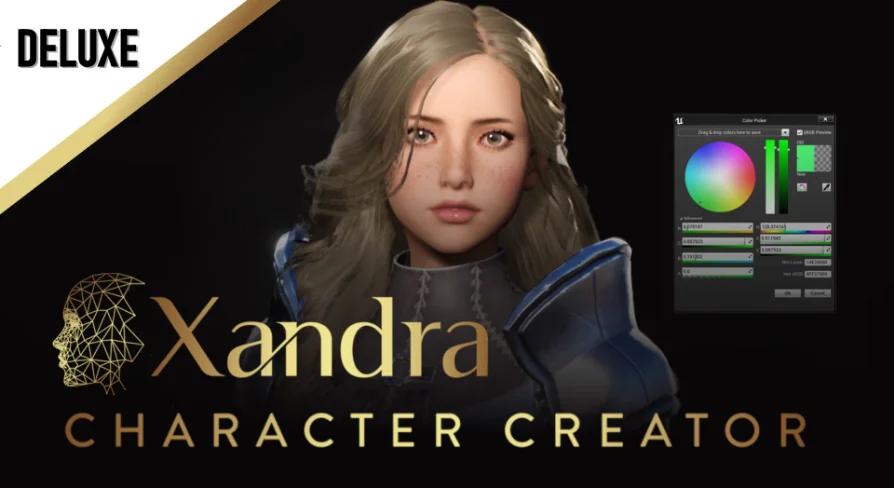
Xandra Character Creator
Implement a runtime character creation system in Unreal Engine using a blend of C++ and Blueprints, featuring ARKit blendshapes and Metahuman compatibility.
Implementing the Xandra Character Creator into an Unreal Engine project begins with a specific installation process. The most stable deployment method is utilizing the.zip file download located in the Additional Files section, rather than standard asset migration. Once installed, the framework operates on a dual-layer architecture built by ELIZEON, who handles the C++ programming, and XANDRA, who manages the 3D character art, UI, and Blueprints. This structural split ensures that advanced foundational functions run on optimized C++ code, while the primary customization interface is exposed entirely through Blueprints. This setup allows developers to integrate a comprehensive character generation system without needing to rewrite complex backend logic, keeping the iteration process accessible within the engine's visual scripting environment.
New users navigating this architecture for the first time are directed to the included Getting Started Guide. This documentation outlines the initial configuration steps required to initialize the C++ and Blueprint dependencies before attempting to generate characters in the viewport.
Runtime Avatar Generation and NPC Deployment
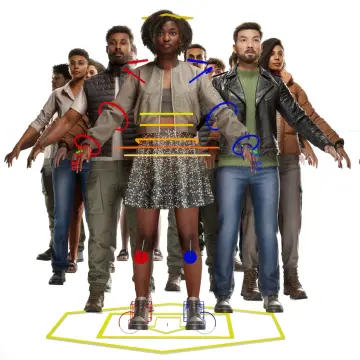
The core functionality of the system revolves around runtime character creation. Developers can implement the intuitive, flexible interface directly into their game, allowing players to manipulate their own unique avatars during an active session. The system captures these player-driven modifications and saves the final appearance data. Beyond assigning this data to the main player controller, developers can utilize these saved appearances within their own custom Blueprints to generate specialized NPCs. This allows a development team to rapidly populate a game world with highly varied, customized characters using a unified generation pipeline.
To demonstrate this runtime capability, the package includes an In-Game character creator demo. This serves as a functional proof-of-concept, illustrating exactly how a player can create and save a character's appearance within a live video game environment. Because this demo is a conceptual framework, adapting it to fit the specific logic, save systems, and UI of an independent game project requires established experience in Blueprint scripting.
Morphology, Cosmetics, and Physical Customization
The customization interface provides extensive control over both the structural morphology and cosmetic detailing of the characters. Structural modifications are driven by a network of face and body blendshapes. These blendshapes allow the runtime interface to actively edit physical proportions, adjusting a character's age, overall weight, and specific body and face shapes. Furthermore, the character rigs contain dedicated bones specifically placed to calculate body physics during movement.
Cosmetic detailing relies on custom materials equipped with modifiable colors and masks. This material setup allows for precise control over skin tones, the application of various makeup styles, and adjustments to brow coloring. The system also supports a wide array of modular physical accessories and attachments. Developers can enable options for piercings, glasses, and fantasy elements like horns. For development teams working on mature games, uncensored body anatomy can be easily added to the base meshes, though this requires a separate addition through the external store pipeline.
Facial Animation, Vtubing, and Controller Integration
Characters generated through this framework are rigged directly to the UE5 Skeleton, ensuring immediate compatibility with standard Unreal Engine animation pipelines. For facial animation, the mesh is equipped with 52 ARKit blendshapes. This specific blendshape configuration allows for high-fidelity face animation and makes the system immediately viable for Vtubing setups using Apple devices. The ARKit and Live-Link integration is pre-configured out of the box. To activate facial capture, developers simply need to access the character Blueprint and choose their broadcasting device from the designated drop-down menu.
Locomotion and overall character control are completely modular. The generated characters can be paired with third-party character controller systems. The framework is explicitly designed to be used alongside advanced movement logic, such as the Advanced Locomotion System (ALS), allowing developers to map their customized avatars to complex traversal mechanics.
Version Branching and Metahuman Compatibility
The asset structure is divided into two distinct versions to handle different content pipelines. Version 4.0 serves as the main character creator release. This primary version utilizes modular character assets to create unique combinations and is fully compatible with the massive library of existing Xandra characters, hairstyles, and outfits. Developers looking to expand their options can continuously integrate modular pieces built for this standard framework.
Version 3.3 is included as an alternative BETA release, specifically engineered for Metahuman compatibility. When utilizing this branch, developers can integrate external Metahuman content. The BETA version is specifically calibrated to work with Metahuman Hair and Clothing Models that fit the "Tall Underweight" body specification. Tutorials are provided to guide developers through the alignment process for these specific Metahuman assets.
Extending the Library with Custom Assets
Beyond the included modular pieces and Metahuman support, the framework allows development teams to import and assign their own entirely custom clothing and hairstyle models. By following the steps outlined in the provided documentation, external 3D models can be adapted to fit the creator's skeletal hierarchy and blendshape structure. Because adjusting weights, checking for clipping, and aligning external meshes to the dynamic proportion system requires technical precision, adding custom 3D models is recommended strictly for experienced users and 3D developers.
 Engine Tools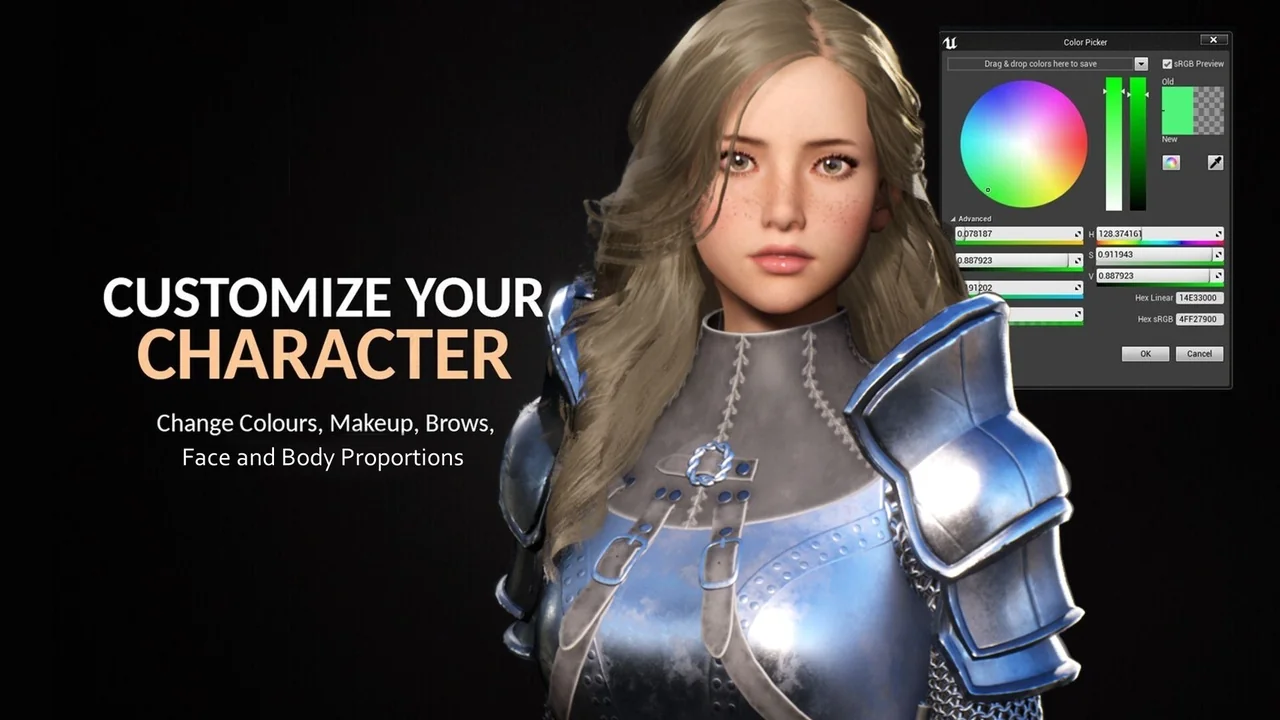
 Engine Tools
 Engine Tools
 Characters