"c68a05d5e51405b3"{"id":"1000114","slug":"unreal-cinematic-mastery-from-beginner-to-cinematic-creator","title":"Unreal Cinematic Mastery –From Beginner to Cinematic Creator","category":"Unreal Engine","engine":"File Content: video + English subtitles","assetVersion":"Video Language: English","engineVersion":"File Content: video + English subtitles","tag":"Unreal Engine","accent":"blue","visual":"mech","summary":"Master real-time filmmaking in Unreal Engine 5.5. Learn to build, light, animate Metahumans, and render complete cinematics from scratch using Sequencer.","platform":"Unreal Engine","publishedAt":"2026-06-09T13:31:58.758Z","updatedAt":"2026-06-09T13:31:58.758Z","sourceNotes":[],"fileContents":[],"compatibility":["Unreal Engine","Video Language: English","File Content: video + English subtitles"],"featuredImage":{"alt":"Unreal Cinematic Mastery –From Beginner to Cinematic Creator","src":"/wp-content/uploads/published/2026/06/4099fecec65e-6484765-a32a-2a5034ad08.webp"},"hasDownloadLink":true,"downloads":1,"terms":[{"taxonomy":"category","slug":"tutoriallibrary-unrealengine","name":"Unreal Engine"}],"galleryImages":[],"accessPanel":{"kind":"video-resource","title":"Access this video resource","eyebrow":"Free Download","message":"Log in or create a free account to start your download.","fileName":"Unreal Cinematic Mastery From Beginner to Cinematic Creator.7z","safetyNote":"Resources are manually reviewed before listing to improve quality and reduce obvious risks.","actionLabel":"Download Free","resourceType":"Video package"},"contentHtml":"\u003ch2\u003eBypassing Fragmented Workflows in Unreal Engine 5.5\u003c/h2\u003e\n\u003cp\u003eLearning real-time filmmaking often involves piecing together disconnected tutorials that skip crucial steps between software installation and the final sequence render.\u003c/p\u003e\n\u003cp\u003eFor complete beginners, filmmakers, and video creators looking to bring storytelling into a real-time environment, establishing a continuous pipeline is essential. By navigating Unreal Engine 5.5 from the initial installation through to the final output, artists can avoid the common frustration of missing link workflows. The process involves a structured, step-by-step introduction made for those with no prior experience in the engine. Across a three-hour and fifty-one-minute workload, this curriculum connects basic engine navigation directly to advanced cinematic production. This ensures that no technical gaps disrupt the creative process, offering a direct path for artists and game developers wanting to master cinematic cutscenes without getting lost in fragmented learning materials.\u003c/p\u003e\n\u003ch2\u003eBuilding Scenarios from Empty Levels\u003c/h2\u003e\n\u003cp\u003eEstablishing the visual mood of a sequence begins with constructing an environment from an entirely empty level and applying foundational lighting techniques.\u003c/p\u003e\n\u003cp\u003eSetting up proper lighting requires a deep understanding of how illumination interacts with characters and environments in a real-time workspace. The focus here is on an efficient lighting and shot creation workflow within the engine, allowing creators to shape the atmosphere of their scenes precisely from the ground up. By starting with a completely blank slate, artists learn the exact placement and configuration of lights needed to achieve professional-level visuals. This foundational knowledge allows content creators to abandon pre-made lighting scenarios and fully control the environmental mood of their projects. Understanding how to properly light an empty level is a critical step for filmmakers transitioning into real-time digital environments.\u003c/p\u003e\n\u003ch2\u003eIntegrating and Animating Metahumans\u003c/h2\u003e\n\u003cp\u003eCharacter-driven cinematics rely heavily on the proper integration and manipulation of highly detailed digital actors within a custom-lit scene.\u003c/p\u003e\n\u003cp\u003eThe workflow dedicates significant focus to the complete Metahuman pipeline, covering the specific steps of importing, setting up, and customizing these models before bringing them to life. Utilizing the Sequencer, developers receive step-by-step guidance on animating these high-fidelity characters directly within the engine workspace. This specific integration allows game developers to craft realistic cinematic cutscenes and gives video creators the tools to manage complex character animations internally. By handling the entire character pipeline within Unreal Engine, artists bypass the need to rely heavily on external rigging software, keeping the storytelling process under one roof. The ability to customize and animate Metahumans seamlessly is a core requirement for modern real-time filmmaking.\u003c/p\u003e\n\u003ch2\u003eDirecting with Cinematic Cameras and Depth of Field\u003c/h2\u003e\n\u003cp\u003eTranslating traditional filmmaking techniques into a virtual space requires precise control over digital camera systems and realistic lens properties.\u003c/p\u003e\n\u003cp\u003eCreating a cinematic camera involves navigating the Sequencer to set up dynamic movements and optical effects tailored to the specific needs of the shot. Video creators can apply depth of field and meticulous camera work to direct the viewer's focus, mimicking the physical properties and limitations of real-world lenses. This level of technical control transforms a static 3D environment into a carefully directed cinematic shot, providing the foundational camera techniques necessary for high-end storytelling. Mastering these camera tools allows directors and artists to frame their customized Metahumans and proper lighting setups with professional visual composition, ensuring the final image mirrors traditional film standards.\u003c/p\u003e\n\u003ch2\u003eThe Uncut Production Process\u003c/h2\u003e\n\u003cp\u003eObserving a real-time, uncut creation process ensures that artists see every technical adjustment and creative decision required to build a cinematic entirely from scratch.\u003c/p\u003e\n\u003cp\u003eFollowing a complete, uninterrupted workflow from the initial setup provides an incredibly transparent look at real-time filmmaking. Because the production process includes no skipped steps, creators can watch every necessary action unfold exactly as it happens in a live project environment. This uncut approach is particularly valuable for Unreal Engine users who are frustrated by resources that gloss over troubleshooting or minor technical adjustments. Seeing the entire process from start to final render demystifies the workflow, proving that professional results are achievable through a logical, step-by-step sequence of actions. It builds confidence for complete beginners who need to see the exact sequence of events required to finalize a scene.\u003c/p\u003e\n\u003ch2\u003eFinalizing Shots in the Movie Render Queue\u003c/h2\u003e\n\u003cp\u003eMoving from the assembled and animated scene to the final output involves rendering the cinematic shot using the engine's dedicated Movie Render Queue.\u003c/p\u003e\n\u003cp\u003eThis final stage solidifies the entire pipeline, outputting the sequence at professional quality for external editing or direct publication. To support this rendering phase and the preceding workflow steps, artists have access to a downloadable Unreal project scene that serves as a direct reference for their own real-time productions. Alongside an Unreal Engine 5.5 Cinematic Beginner's Guide provided in PDF format, these resources offer tangible benchmarks for lighting, camera work, and rendering configurations. The curriculum also outlines next steps and exclusive bonus opportunities to further refine the user's capabilities. The combination of complete project files and a structured rendering workflow ensures that game developers and filmmakers can confidently finalize their cutscenes for production use.\u003c/p\u003e\n\n\u003ch2\u003eExplore Similar Assets\u003c/h2\u003e\n\u003cul\u003e\n\u003cli\u003e\u003ca href=\"https://3dcghub.com/unreal-engine-5-for-beginners-create-your-first-game/\" title=\"Unreal Engine 5 for Beginners - Create your first game\"\u003eUnreal Engine 5 for Beginners - Create your first game\u003c/a\u003e\u003c/li\u003e\n\u003cli\u003e\u003ca href=\"https://3dcghub.com/unreal-engine-5-5-the-ultimate-cinematic-masterclass/\" title=\"Unreal Engine 5.5 - The Ultimate Cinematic Masterclass\"\u003eUnreal Engine 5.5 - The Ultimate Cinematic Masterclass\u003c/a\u003e\u003c/li\u003e\n\u003cli\u003e\u003ca href=\"https://3dcghub.com/the-ultimate-guide-to-unreal-engine-5-for-complete-beginners/\" title=\"The Ultimate Guide to Unreal Engine 5 For Complete Beginners\"\u003eThe Ultimate Guide to Unreal Engine 5 For Complete Beginners\u003c/a\u003e\u003c/li\u003e\n\u003cli\u003e\u003ca href=\"https://3dcghub.com/introduction-to-materials-in-unreal-engine-5/\" title=\"Introduction to Materials in Unreal Engine 5\"\u003eIntroduction to Materials in Unreal Engine 5\u003c/a\u003e\u003c/li\u003e\n\u003cli\u003e\u003ca href=\"https://3dcghub.com/mastering-environment-design-with-unreal-engine-5/\" title=\"Mastering Environment Design with Unreal Engine 5\"\u003eMastering Environment Design with Unreal Engine 5\u003c/a\u003e\u003c/li\u003e\n\u003c/ul\u003e","contentTextLength":6165,"navigation":{"current":1891,"total":3860,"previous":{"id":"1000115","slug":"air-balloons","title":"Air Balloons","category":"Aircraft","platform":"Unreal Engine","updatedAt":"2026-06-09T13:51:38.785Z"},"next":{"id":"1000113","slug":"the-ultimate-guide-to-unreal-engine-5-for-complete-beginners","title":"The Ultimate Guide to Unreal Engine 5 For Complete Beginners","category":"Unreal Engine","platform":"Unreal Engine","updatedAt":"2026-06-08T16:22:45.027Z"}},"relatedResources":[{"id":"1000747","slug":"ultimate-lighting-essentials-in-unreal-engine-5-5","title":"Ultimate Lighting Essentials in Unreal Engine 5.5","category":"Unreal Engine","engine":"File Content: video + English subtitles","assetVersion":"Video Language: English","engineVersion":"File Content: video + English subtitles","tag":"Unreal Engine","accent":"blue","visual":"mech","summary":"A beginner course on Unreal Engine 5.5 lighting covering Lumen, GPU Lightmass, HDRI cubemaps, and weather conditions for cinematic and ArchViz scenes.","platform":"Unreal Engine","publishedAt":"2026-07-27T12:35:56.415Z","updatedAt":"2026-07-27T12:35:56.415Z","sourceNotes":[],"fileContents":[],"compatibility":["Unreal Engine","Video Language: English","File Content: video + English subtitles"],"featuredImage":{"alt":"Ultimate Lighting Essentials in Unreal Engine 5.5","src":"/wp-content/uploads/published/2026/07/3ff763507503-6856293-44f6-3-826542478d.webp"},"hasDownloadLink":true,"downloads":2},{"id":"1000741","slug":"real-time-automotive-rendering-1001","title":"Real-Time Automotive Rendering 1001","category":"Unreal Engine","engine":"File Content: video + English subtitles","assetVersion":"Video Language: English","engineVersion":"File Content: video + English subtitles","tag":"Unreal Engine","accent":"blue","visual":"mech","summary":"A beginner-friendly Unreal Engine course covering automotive cinematic creation: asset prep in Maya, shader setup, exterior and studio lighting, and camera rend","platform":"Unreal Engine","publishedAt":"2026-07-27T11:52:00.768Z","updatedAt":"2026-07-27T11:52:00.768Z","sourceNotes":[],"fileContents":[],"compatibility":["Unreal Engine","Video Language: English","File Content: video + English subtitles"],"featuredImage":{"alt":"Real-Time Automotive Rendering 1001","src":"/wp-content/uploads/published/2026/07/e10d685964d4-rtat1001-0002-porsche-shot-chateu-1-0005-2048x811-da382017e6.webp"},"hasDownloadLink":true,"downloads":1},{"id":"1000187","slug":"unreal-engine-5-cinematics-for-beginners-your-first-scene","title":"Unreal Engine 5: Cinematics for Beginners – Your First Scene","category":"Unreal Engine","engine":"File Content: video + English subtitles","assetVersion":"Video Language: English","engineVersion":"File Content: video + English subtitles","tag":"Unreal Engine","accent":"blue","visual":"mech","summary":"A 6h 14m Unreal Engine 5 course focused on Sequencer, Niagara VFX, cinematography, asset setup, and finishing a first cinematic scene.","platform":"Unreal Engine","publishedAt":"2026-06-22T05:42:46.521Z","updatedAt":"2026-06-22T05:42:46.521Z","sourceNotes":[],"fileContents":[],"compatibility":["Unreal Engine","Video Language: English","File Content: video + English subtitles"],"featuredImage":{"alt":"Unreal Engine 5: Cinematics for Beginners – Your First Scene","src":"/wp-content/uploads/published/2026/06/c963a6e14936-5575526-dc17-16-55cfce9062.webp"},"hasDownloadLink":true,"downloads":1}]}
Unreal Engine
Unreal Cinematic Mastery –From Beginner to Cinematic Creator
Master real-time filmmaking in Unreal Engine 5.5. Learn to build, light, animate Metahumans, and render complete cinematics from scratch using Sequencer.
Category:Unreal EnginePlatform: Unreal EngineVideo Language: EnglishFile Content: video + English subtitlesPublished: Jun 9, 2026
Unreal Engine
Resource overview
Bypassing Fragmented Workflows in Unreal Engine 5.5
Learning real-time filmmaking often involves piecing together disconnected tutorials that skip crucial steps between software installation and the final sequence render.
For complete beginners, filmmakers, and video creators looking to bring storytelling into a real-time environment, establishing a continuous pipeline is essential. By navigating Unreal Engine 5.5 from the initial installation through to the final output, artists can avoid the common frustration of missing link workflows. The process involves a structured, step-by-step introduction made for those with no prior experience in the engine. Across a three-hour and fifty-one-minute workload, this curriculum connects basic engine navigation directly to advanced cinematic production. This ensures that no technical gaps disrupt the creative process, offering a direct path for artists and game developers wanting to master cinematic cutscenes without getting lost in fragmented learning materials.
Building Scenarios from Empty Levels
Establishing the visual mood of a sequence begins with constructing an environment from an entirely empty level and applying foundational lighting techniques.
Setting up proper lighting requires a deep understanding of how illumination interacts with characters and environments in a real-time workspace. The focus here is on an efficient lighting and shot creation workflow within the engine, allowing creators to shape the atmosphere of their scenes precisely from the ground up. By starting with a completely blank slate, artists learn the exact placement and configuration of lights needed to achieve professional-level visuals. This foundational knowledge allows content creators to abandon pre-made lighting scenarios and fully control the environmental mood of their projects. Understanding how to properly light an empty level is a critical step for filmmakers transitioning into real-time digital environments.
Integrating and Animating Metahumans
Character-driven cinematics rely heavily on the proper integration and manipulation of highly detailed digital actors within a custom-lit scene.
The workflow dedicates significant focus to the complete Metahuman pipeline, covering the specific steps of importing, setting up, and customizing these models before bringing them to life. Utilizing the Sequencer, developers receive step-by-step guidance on animating these high-fidelity characters directly within the engine workspace. This specific integration allows game developers to craft realistic cinematic cutscenes and gives video creators the tools to manage complex character animations internally. By handling the entire character pipeline within Unreal Engine, artists bypass the need to rely heavily on external rigging software, keeping the storytelling process under one roof. The ability to customize and animate Metahumans seamlessly is a core requirement for modern real-time filmmaking.
Directing with Cinematic Cameras and Depth of Field
Translating traditional filmmaking techniques into a virtual space requires precise control over digital camera systems and realistic lens properties.
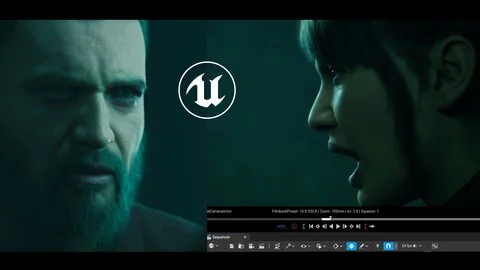
Creating a cinematic camera involves navigating the Sequencer to set up dynamic movements and optical effects tailored to the specific needs of the shot. Video creators can apply depth of field and meticulous camera work to direct the viewer's focus, mimicking the physical properties and limitations of real-world lenses. This level of technical control transforms a static 3D environment into a carefully directed cinematic shot, providing the foundational camera techniques necessary for high-end storytelling. Mastering these camera tools allows directors and artists to frame their customized Metahumans and proper lighting setups with professional visual composition, ensuring the final image mirrors traditional film standards.
The Uncut Production Process
Observing a real-time, uncut creation process ensures that artists see every technical adjustment and creative decision required to build a cinematic entirely from scratch.
Following a complete, uninterrupted workflow from the initial setup provides an incredibly transparent look at real-time filmmaking. Because the production process includes no skipped steps, creators can watch every necessary action unfold exactly as it happens in a live project environment. This uncut approach is particularly valuable for Unreal Engine users who are frustrated by resources that gloss over troubleshooting or minor technical adjustments. Seeing the entire process from start to final render demystifies the workflow, proving that professional results are achievable through a logical, step-by-step sequence of actions. It builds confidence for complete beginners who need to see the exact sequence of events required to finalize a scene.
Finalizing Shots in the Movie Render Queue
Moving from the assembled and animated scene to the final output involves rendering the cinematic shot using the engine's dedicated Movie Render Queue.
This final stage solidifies the entire pipeline, outputting the sequence at professional quality for external editing or direct publication. To support this rendering phase and the preceding workflow steps, artists have access to a downloadable Unreal project scene that serves as a direct reference for their own real-time productions. Alongside an Unreal Engine 5.5 Cinematic Beginner's Guide provided in PDF format, these resources offer tangible benchmarks for lighting, camera work, and rendering configurations. The curriculum also outlines next steps and exclusive bonus opportunities to further refine the user's capabilities. The combination of complete project files and a structured rendering workflow ensures that game developers and filmmakers can confidently finalize their cutscenes for production use.
 Unreal Engine
 Unreal Engine
 Unreal Engine
 Unreal Engine