"7066dd76da796369"{"id":"1000747","slug":"ultimate-lighting-essentials-in-unreal-engine-5-5","title":"Ultimate Lighting Essentials in Unreal Engine 5.5","category":"Unreal Engine","engine":"File Content: video + English subtitles","assetVersion":"Video Language: English","engineVersion":"File Content: video + English subtitles","tag":"Unreal Engine","accent":"blue","visual":"mech","summary":"A beginner course on Unreal Engine 5.5 lighting covering Lumen, GPU Lightmass, HDRI cubemaps, and weather conditions for cinematic and ArchViz scenes.","platform":"Unreal Engine","publishedAt":"2026-07-27T12:35:56.415Z","updatedAt":"2026-07-27T12:35:56.415Z","sourceNotes":[],"fileContents":[],"compatibility":["Unreal Engine","Video Language: English","File Content: video + English subtitles"],"featuredImage":{"alt":"Ultimate Lighting Essentials in Unreal Engine 5.5","src":"/wp-content/uploads/published/2026/07/3ff763507503-6856293-44f6-3-826542478d.webp"},"hasDownloadLink":true,"downloads":2,"terms":[{"taxonomy":"category","slug":"tutoriallibrary-unrealengine","name":"Unreal Engine"}],"galleryImages":[],"accessPanel":{"kind":"video-resource","title":"Download this video resource","eyebrow":"Free Download","message":"Log in or create a free account to start your download.","fileName":"Ultimate Lighting Essentials in Unreal Engine 5.5.7z","safetyNote":"Resources are manually reviewed before listing to improve quality and reduce obvious risks.","actionLabel":"Download Free","resourceType":"Video download"},"contentHtml":"\u003cp\u003eCreating cinematic and realistic lighting inside Unreal Engine 5 presents a specific workflow problem: artists must understand the distinction between dynamic and static systems, know when to rely on real-time global illumination, and determine how to bake lightmaps for performance. Navigating these options without a structured understanding of how different lighting methods evolved in computer graphics often leads to inefficient scene setups. Addressing this requires a grounded look at the available engine tools and how they apply to different visual contexts.\u003c/p\u003e\n\n\u003ch2\u003eBuilding a Foundation in CG Lighting and Lumen\u003c/h2\u003e\n\u003cp\u003eBefore configuring a scene, it helps to understand the history of different lighting methods in CG. Knowing how real-time rendering evolved clarifies why modern engines separate dynamic and static lighting workflows. Dynamic lighting updates continuously during runtime, while static lighting relies on precomputed data to render shadows and bounce light. Recognizing the difference dictates how an artist approaches scene optimization.\u003c/p\u003e\n\n\u003cp\u003eCentral to Unreal Engine 5's lighting pipeline is Global Illumination. Having basic knowledge of what Global Illumination is and how it works is essential for simulating how light bounces across surfaces in a physical space. The engine's Lumen technology provides this real-time Global Illumination. By using Lumen's ray tracing out of the box, creators can achieve complex light interactions without manually placing Reflection Capture probes or baking massive lightmap textures. The workflow begins with the Unreal Engine Environment Light Mixer, a tool configured to get Lumen functioning immediately for scene illumination.\u003c/p\u003e\n\n\u003ch2\u003eApplying Lumen to Different Environments and Weather Conditions\u003c/h2\u003e\n\u003cp\u003eOnce the real-time Global Illumination foundation is set, the workflow moves into configuring specific atmospheres. Creators can apply Lumen to different environments and create different weather conditions. The curriculum covers a range of distinct visual scenarios, ensuring the lighting setup matches the creative direction of the scene. Specifically, the training addresses \u003cem\u003eSunshine\u003c/em\u003e, \u003cem\u003eOvercast\u003c/em\u003e, \u003cem\u003eDystopian\u003c/em\u003e, \u003cem\u003eNight\u003c/em\u003e, and \u003cem\u003eArchViz\u003c/em\u003e environments.\u003c/p\u003e\n\n\u003cp\u003eEach of these scenarios demands different uses of the Environment Light Mixer and sky attributes. For example, an overcast sky diffuses light softly, requiring different exposure and bounce settings compared to a harsh, direct sunlight setup. Night scenes rely heavily on localized light sources and the way Lumen handles minimal light propagation. Dystopian environments often mix moody, directional lighting with heavy atmosphere. By working through these specific conditions, artists learn how to adapt the out-of-the-box Lumen setup to fit moody cinematic requirements or clean architectural visualizations.\u003c/p\u003e\n\n\u003ch2\u003eHDRI Cubemaps and ArchViz Cinematic Quality\u003c/h2\u003e\n\u003cp\u003eFor creators focused on high-fidelity visuals, the course transitions into combining HDRI cubemaps with Lumen. Using an HDRI cubemap with Lumen allows for cinematic-quality image-based lighting. This method wraps the scene in a high-resolution spherical image that drives the ambient light direction, color, and intensity.\u003c/p\u003e\n\n\u003cp\u003eThis technique is particularly relevant for ArchViz lighting, where achieving photorealistic environmental bounce light is critical. The architectural visualization segment focuses on using these cubemaps combined with Lumen's real-time bounce to simulate realistic interiors and exterior light infiltration. For filmmakers and freelancers creating epic cinematics in Unreal Engine 5, this approach bypasses the need for manual lighting placement, relying instead on the HDRI to ground the scene in realistic ambient light.\u003c/p\u003e\n\n\u003ch2\u003eBaking Lighting with the GPU Lightmass Plugin\u003c/h2\u003e\n\u003cp\u003eWhile Lumen handles dynamic real-time lighting, certain game development pipelines require static lighting for performance optimization. Game developers need to understand how to optimize lighting in Unreal Engine 5. This is where the GPU Lightmass Plugin becomes a pivotal tool. The plugin allows artists to bake lighting properly using lightmaps.\u003c/p\u003e\n\n\u003cp\u003eThis workflow computes lighting data ahead of time and stores it in textures called lightmaps, which are then applied to the geometry during runtime. This baked approach removes the real-time calculation cost from the processor, which is vital for optimized game performance. Learning to use the GPU Lightmass Plugin in Unreal Engine 5 ensures that static meshes receive accurate precomputed shadows and bounce light, offering a distinct alternative to real-time Lumen rendering when targeting specific hardware limits.\u003c/p\u003e\n\n\u003ch2\u003eStructuring a Lighting Workflow in Unreal Engine 5.5\u003c/h2\u003e\n\u003cp\u003eThe training provides a direct path through these lighting technologies. Beginning with an introduction to CG lighting, the curriculum progresses into real-time Lumen configuration via the Environment Light Mixer. From there, it covers image-based lighting using HDRI cubemaps for cinematic and ArchViz quality, and concludes with static lighting optimization using the GPU Lightmass Plugin.\u003c/p\u003e\n\n\u003cp\u003eWith a workload of 4 hours and 1 minute, this beginner-level resource is structured for filmmakers transitioning to Unreal Engine's Lumen technology, game developers optimizing scene lighting, and freelancers building cinematic sequences. The progression from dynamic real-time ray tracing to static lightmap baking equips artists with a complete toolset for handling illumination across varying weather conditions and environment types in Unreal Engine 5.5.\u003c/p\u003e\n\n\u003ch2\u003eContinue Browsing Similar Packs\u003c/h2\u003e\n\u003cul\u003e\n\u003cli\u003e\u003ca href=\"https://3dcghub.com/unreal-engine-5-5-the-ultimate-cinematic-masterclass/\" title=\"Unreal Engine 5.5 - The Ultimate Cinematic Masterclass\"\u003eUnreal Engine 5.5 - The Ultimate Cinematic Masterclass\u003c/a\u003e\u003c/li\u003e\n\u003cli\u003e\u003ca href=\"https://3dcghub.com/environment-design-in-unreal-engine-5-5-from-basics-to-pro/\" title=\"Environment Design in Unreal Engine 5.5 – From Basics to Pro\"\u003eEnvironment Design in Unreal Engine 5.5 – From Basics to Pro\u003c/a\u003e\u003c/li\u003e\n\u003cli\u003e\u003ca href=\"https://3dcghub.com/mastering-environment-design-with-unreal-engine-5/\" title=\"Mastering Environment Design with Unreal Engine 5\"\u003eMastering Environment Design with Unreal Engine 5\u003c/a\u003e\u003c/li\u003e\n\u003cli\u003e\u003ca href=\"https://3dcghub.com/unreal-cinematic-mastery-from-beginner-to-cinematic-creator/\" title=\"Unreal Cinematic Mastery –From Beginner to Cinematic Creator\"\u003eUnreal Cinematic Mastery –From Beginner to Cinematic Creator\u003c/a\u003e\u003c/li\u003e\n\u003cli\u003e\u003ca href=\"https://3dcghub.com/ultimate-unreal-engine-5-7-environment-pve-and-pcg-masterclass/\" title=\"Ultimate Unreal Engine 5.7 Environment PVE \u0026amp; PCG Masterclass\"\u003eUltimate Unreal Engine 5.7 Environment PVE \u0026amp; PCG Masterclass\u003c/a\u003e\u003c/li\u003e\n\u003c/ul\u003e","contentTextLength":5835,"navigation":{"current":1417,"total":4016,"previous":{"id":"1000748","slug":"unreal-engine-aaa-spellcasting-system","title":"Unreal Engine AAA Spellcasting System","category":"Unreal Engine","platform":"Unreal Engine","updatedAt":"2026-07-27T13:24:24.308Z"},"next":{"id":"1000746","slug":"product-rendering-in-unreal-engine-5-6-beginner-s-guide","title":"Product Rendering in Unreal Engine 5.6 | Beginner’s Guide","category":"Unreal Engine","platform":"Unreal Engine","updatedAt":"2026-07-27T12:20:50.298Z"}},"relatedResources":[{"id":"1000743","slug":"environment-design-in-unreal-engine-5-5-from-basics-to-pro","title":"Environment Design in Unreal Engine 5.5 – From Basics to Pro","category":"Unreal Engine","engine":"File Content: video + English subtitles","assetVersion":"Video Language: English","engineVersion":"File Content: video + English subtitles","tag":"Unreal Engine","accent":"blue","visual":"city","summary":"Build cinematic real-time 3D environments in Unreal Engine 5.5. Learn landscape sculpting, Megascans integration, lighting, and post-processing techniques.","platform":"Unreal Engine","publishedAt":"2026-07-27T12:02:43.552Z","updatedAt":"2026-07-27T12:02:43.552Z","sourceNotes":[],"fileContents":[],"compatibility":["Unreal Engine","Video Language: English","File Content: video + English subtitles"],"featuredImage":{"alt":"Environment Design in Unreal Engine 5.5 – From Basics to Pro","src":"/wp-content/uploads/published/2026/07/4ee3e4b4ccf2-6668023-deb3-50717e4e41.webp"},"hasDownloadLink":true,"downloads":0},{"id":"1000112","slug":"unreal-engine-5-5-the-ultimate-cinematic-masterclass","title":"Unreal Engine 5.5 - The Ultimate Cinematic Masterclass","category":"Unreal Engine","engine":"Video Language: English","assetVersion":"File Content: video + English subtitles","engineVersion":"Video Language: English","tag":"Unreal Engine","accent":"blue","visual":"mech","summary":"A 12h 8m Unreal Engine 5.5 course covering environments, animation, VFX, Sequencer, and post-production for cinematic work.","platform":"Unreal Engine","publishedAt":"2026-06-08T09:00:23.309Z","updatedAt":"2026-06-08T09:00:23.309Z","sourceNotes":[],"fileContents":[],"compatibility":["Unreal Engine","File Content: video + English subtitles","Video Language: English"],"featuredImage":{"alt":"Unreal Engine 5.5 - The Ultimate Cinematic Masterclass","src":"/wp-content/uploads/published/2026/06/5eeb7042783d-6583581-8949-4-6f216bc9fe.webp"},"hasDownloadLink":true,"downloads":1},{"id":"1000075","slug":"mastering-environment-design-with-unreal-engine-5","title":"Mastering Environment Design with Unreal Engine 5","category":"Unreal Engine","engine":"File Content: video + English subtitles","assetVersion":"Video Language: English","engineVersion":"File Content: video + English subtitles","tag":"Unreal Engine","accent":"blue","visual":"city","summary":"A beginner-focused Unreal Engine 5 course that moves from setup and interface basics into landscapes, lighting, foliage, water, and Liberty Island.","platform":"Unreal Engine","publishedAt":"2026-06-04T11:48:34.690Z","updatedAt":"2026-06-04T11:48:34.690Z","sourceNotes":[],"fileContents":[],"compatibility":["Unreal Engine","Video Language: English","File Content: video + English subtitles"],"featuredImage":{"alt":"Mastering Environment Design with Unreal Engine 5","src":"/wp-content/uploads/published/2026/06/ab718c477394-6356637-409e-2-e37d68d140.webp"},"hasDownloadLink":true,"downloads":4}]}
Unreal Engine
Ultimate Lighting Essentials in Unreal Engine 5.5
A beginner course on Unreal Engine 5.5 lighting covering Lumen, GPU Lightmass, HDRI cubemaps, and weather conditions for cinematic and ArchViz scenes.
Category:Unreal EnginePlatform: Unreal EngineVideo Language: EnglishFile Content: video + English subtitlesPublished: Jul 27, 2026
Unreal Engine
Resource overview
Creating cinematic and realistic lighting inside Unreal Engine 5 presents a specific workflow problem: artists must understand the distinction between dynamic and static systems, know when to rely on real-time global illumination, and determine how to bake lightmaps for performance. Navigating these options without a structured understanding of how different lighting methods evolved in computer graphics often leads to inefficient scene setups. Addressing this requires a grounded look at the available engine tools and how they apply to different visual contexts.
Building a Foundation in CG Lighting and Lumen
Before configuring a scene, it helps to understand the history of different lighting methods in CG. Knowing how real-time rendering evolved clarifies why modern engines separate dynamic and static lighting workflows. Dynamic lighting updates continuously during runtime, while static lighting relies on precomputed data to render shadows and bounce light. Recognizing the difference dictates how an artist approaches scene optimization.
Central to Unreal Engine 5's lighting pipeline is Global Illumination. Having basic knowledge of what Global Illumination is and how it works is essential for simulating how light bounces across surfaces in a physical space. The engine's Lumen technology provides this real-time Global Illumination. By using Lumen's ray tracing out of the box, creators can achieve complex light interactions without manually placing Reflection Capture probes or baking massive lightmap textures. The workflow begins with the Unreal Engine Environment Light Mixer, a tool configured to get Lumen functioning immediately for scene illumination.
Applying Lumen to Different Environments and Weather Conditions
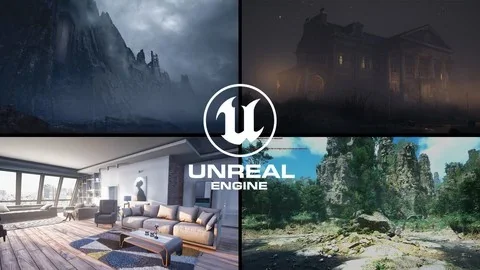
Once the real-time Global Illumination foundation is set, the workflow moves into configuring specific atmospheres. Creators can apply Lumen to different environments and create different weather conditions. The curriculum covers a range of distinct visual scenarios, ensuring the lighting setup matches the creative direction of the scene. Specifically, the training addresses Sunshine, Overcast, Dystopian, Night, and ArchViz environments.
Each of these scenarios demands different uses of the Environment Light Mixer and sky attributes. For example, an overcast sky diffuses light softly, requiring different exposure and bounce settings compared to a harsh, direct sunlight setup. Night scenes rely heavily on localized light sources and the way Lumen handles minimal light propagation. Dystopian environments often mix moody, directional lighting with heavy atmosphere. By working through these specific conditions, artists learn how to adapt the out-of-the-box Lumen setup to fit moody cinematic requirements or clean architectural visualizations.
HDRI Cubemaps and ArchViz Cinematic Quality
For creators focused on high-fidelity visuals, the course transitions into combining HDRI cubemaps with Lumen. Using an HDRI cubemap with Lumen allows for cinematic-quality image-based lighting. This method wraps the scene in a high-resolution spherical image that drives the ambient light direction, color, and intensity.
This technique is particularly relevant for ArchViz lighting, where achieving photorealistic environmental bounce light is critical. The architectural visualization segment focuses on using these cubemaps combined with Lumen's real-time bounce to simulate realistic interiors and exterior light infiltration. For filmmakers and freelancers creating epic cinematics in Unreal Engine 5, this approach bypasses the need for manual lighting placement, relying instead on the HDRI to ground the scene in realistic ambient light.
Baking Lighting with the GPU Lightmass Plugin
While Lumen handles dynamic real-time lighting, certain game development pipelines require static lighting for performance optimization. Game developers need to understand how to optimize lighting in Unreal Engine 5. This is where the GPU Lightmass Plugin becomes a pivotal tool. The plugin allows artists to bake lighting properly using lightmaps.
This workflow computes lighting data ahead of time and stores it in textures called lightmaps, which are then applied to the geometry during runtime. This baked approach removes the real-time calculation cost from the processor, which is vital for optimized game performance. Learning to use the GPU Lightmass Plugin in Unreal Engine 5 ensures that static meshes receive accurate precomputed shadows and bounce light, offering a distinct alternative to real-time Lumen rendering when targeting specific hardware limits.
Structuring a Lighting Workflow in Unreal Engine 5.5
The training provides a direct path through these lighting technologies. Beginning with an introduction to CG lighting, the curriculum progresses into real-time Lumen configuration via the Environment Light Mixer. From there, it covers image-based lighting using HDRI cubemaps for cinematic and ArchViz quality, and concludes with static lighting optimization using the GPU Lightmass Plugin.
With a workload of 4 hours and 1 minute, this beginner-level resource is structured for filmmakers transitioning to Unreal Engine's Lumen technology, game developers optimizing scene lighting, and freelancers building cinematic sequences. The progression from dynamic real-time ray tracing to static lightmap baking equips artists with a complete toolset for handling illumination across varying weather conditions and environment types in Unreal Engine 5.5.
 Unreal Engine
 Unreal Engine
 Unreal Engine
 Unreal Engine