"7066dd76da796369"{"id":"1000743","slug":"environment-design-in-unreal-engine-5-5-from-basics-to-pro","title":"Environment Design in Unreal Engine 5.5 – From Basics to Pro","category":"Unreal Engine","engine":"File Content: video + English subtitles","assetVersion":"Video Language: English","engineVersion":"File Content: video + English subtitles","tag":"Unreal Engine","accent":"blue","visual":"city","summary":"Build cinematic real-time 3D environments in Unreal Engine 5.5. Learn landscape sculpting, Megascans integration, lighting, and post-processing techniques.","platform":"Unreal Engine","publishedAt":"2026-07-27T12:02:43.552Z","updatedAt":"2026-07-27T12:02:43.552Z","sourceNotes":[],"fileContents":[],"compatibility":["Unreal Engine","Video Language: English","File Content: video + English subtitles"],"featuredImage":{"alt":"Environment Design in Unreal Engine 5.5 – From Basics to Pro","src":"/wp-content/uploads/published/2026/07/4ee3e4b4ccf2-6668023-deb3-50717e4e41.webp"},"hasDownloadLink":true,"downloads":0,"terms":[{"taxonomy":"category","slug":"tutoriallibrary-unrealengine","name":"Unreal Engine"}],"galleryImages":[],"accessPanel":{"kind":"video-resource","title":"Download this video resource","eyebrow":"Free Download","message":"Log in or create a free account to start your download.","fileName":"Environment Design in Unreal Engine 5.5 – From Basics to Pro.7z","safetyNote":"Resources are manually reviewed before listing to improve quality and reduce obvious risks.","actionLabel":"Download Free","resourceType":"Video download"},"contentHtml":"\u003cp\u003eReal-time environments serve as the backbone of modern game levels, cinematic showcases, and architectural visualization. When a production requires outdoor vistas or detailed interior scenes, artists rely on a combination of landscape tools, high-resolution scanned assets, and precise lighting to achieve photorealistic results.\u003c/p\u003e\n\n\u003cp\u003e\u003cem\u003eEnvironment Design in Unreal Engine 5.5 – From Basics to Pro\u003c/em\u003e is a training resource that maps directly to this workflow. Instructed by Game Institute, the course teaches how to construct cinematic real-time 3D environments using the latest iteration of Epic Games' engine alongside \u003cem\u003eQuixel Megascans\u003c/em\u003e.\u003c/p\u003e\n\n\u003ch2\u003eBuilding Cinematic 3D Environments in Unreal Engine 5.5\u003c/h2\u003e\n\u003cp\u003eThe training centers on Unreal Engine 5.5, focusing on the specific tools required to produce visually stunning scenes for games or films. Learners work through real-time rendering techniques tailored for environment design and world-building. This includes handling the visual fidelity needed for cinematic showcases while maintaining the optimization required for interactive game levels.\u003c/p\u003e\n\n\u003cp\u003eThe curriculum breaks down the construction of both outdoor and indoor scenes. By working through these different scene types, the course demonstrates how to approach spatial design, asset placement, and rendering pipelines depending on the environmental requirements at hand.\u003c/p\u003e\n\n\u003ch3\u003eLandscape Sculpting and Material Workflows\u003c/h3\u003e\n\u003cp\u003eA major component of the instruction involves terrain creation. The course covers landscape sculpting techniques, allowing artists to generate natural ground formations, hills, and geological features directly within the engine. Following the physical sculpting of the terrain, the curriculum moves into material blending.\u003c/p\u003e\n\n\u003cp\u003eMaterial blending is essential for making natural environments look grounded. Instead of relying on flat, single-surface textures, the training explains how to combine multiple surface materials dynamically across the landscape. Coupled with the integration of \u003cem\u003eQuixel Megascans\u003c/em\u003e and foliage, these techniques allow for the creation of immersive, lifelike game levels.\u003c/p\u003e\n\n\u003ch2\u003eLighting, Foliage, and Post-Processing Effects\u003c/h2\u003e\n\u003cp\u003eBeyond geometry and surface materials, the visual identity of a real-time environment relies heavily on its lighting setup. The course addresses lighting integration as a core method for achieving cinematic results. Proper lighting dictates mood, guides viewer attention, and defines the realism of both indoor and outdoor spaces.\u003c/p\u003e\n\n\u003cp\u003eThe training also incorporates post-processing effects alongside foliage placement. Post-processing allows artists to apply final color grading, exposure adjustments, and visual refinements directly after the initial render pass. When combined with detailed foliage and \u003cem\u003eMegascans\u003c/em\u003e assets, these steps push the scene toward a final, polished cinematic state.\u003c/p\u003e\n\n\u003ch2\u003eRendering Techniques and Portfolio Captures\u003c/h2\u003e\n\u003cp\u003eConstructing the environment is only part of the production pipeline. The final step involves extracting high-quality visuals from the engine. The course dedicates time to capturing high-quality renders and animations. This process ensures that the work put into landscape sculpting, material blending, and lighting translates into a viewable format.\u003c/p\u003e\n\n\u003cp\u003eThese captured renders serve a dual purpose. They can be used as promotional material or cutscenes within a game project, and they function as standalone pieces for a professional portfolio. The curriculum specifically notes that the training is suitable for anyone looking to add a professional-quality real-time environment project to their body of work.\u003c/p\u003e\n\n\u003ch2\u003eCourse Profile and Target Audience\u003c/h2\u003e\n\u003cp\u003ePublished on November 23, 2025, the course is structured as a beginner-level resource. It requires a total workload of 1 hour and 20 minutes, making it a focused, concise entry point into real-time environment creation. The condensed timeframe indicates a streamlined approach to the software, designed to get users working within Unreal Engine 5.5 quickly.\u003c/p\u003e\n\n\u003cp\u003eThe material is tailored for beginners and intermediate learners interested in environment design in Unreal Engine 5. This includes aspiring game developers, level designers, and 3D environment artists who need to understand engine-specific workflows. Indie developers and Unreal Engine enthusiasts focused on cinematic scenes will find the rendering and post-processing segments particularly relevant. Students of game design, VFX, and architectural visualization can also apply these real-time rendering techniques to their respective disciplines.\u003c/p\u003e\n\n\u003ch2\u003eWhere This Training Fits in Production\u003c/h2\u003e\n\u003cp\u003eIn a standard development pipeline, environment creation happens after initial concept art and level design phases. This training slots directly into the production and art-implementation stages. Once an artist understands how to use \u003cem\u003eMegascans\u003c/em\u003e, sculpt landscapes, and blend materials, they can populate levels efficiently and dress scenes according to design documents.\u003c/p\u003e\n\n\u003cp\u003eFor solo indie developers or small teams, knowing how to execute these steps independently reduces reliance on external art teams. The ability to light a scene, apply post-processing, and render out an animation means a single developer can see a level through from an empty default map to a finished cinematic showcase.\u003c/p\u003e\n\n\u003cp\u003eThis resource benefits aspiring developers and environment artists who need a direct, practical introduction to Unreal Engine 5.5. Because it focuses on capturing portfolio-ready renders and navigating the core tools of landscape and lighting, it serves as a practical starting point for users who want to move from absolute basics to creating professional-grade real-time worlds.\u003c/p\u003e\n\n\u003ch2\u003eContinue Browsing Similar Packs\u003c/h2\u003e\n\u003cul\u003e\n\u003cli\u003e\u003ca href=\"https://3dcghub.com/mastering-environment-design-with-unreal-engine-5/\" title=\"Mastering Environment Design with Unreal Engine 5\"\u003eMastering Environment Design with Unreal Engine 5\u003c/a\u003e\u003c/li\u003e\n\u003cli\u003e\u003ca href=\"https://3dcghub.com/animating-in-unreal-engine/\" title=\"Animating in Unreal Engine\"\u003eAnimating in Unreal Engine\u003c/a\u003e\u003c/li\u003e\n\u003cli\u003e\u003ca href=\"https://3dcghub.com/unreal-cinematic-mastery-from-beginner-to-cinematic-creator/\" title=\"Unreal Cinematic Mastery –From Beginner to Cinematic Creator\"\u003eUnreal Cinematic Mastery –From Beginner to Cinematic Creator\u003c/a\u003e\u003c/li\u003e\n\u003cli\u003e\u003ca href=\"https://3dcghub.com/unreal-engine-5-5-the-ultimate-cinematic-masterclass/\" title=\"Unreal Engine 5.5 - The Ultimate Cinematic Masterclass\"\u003eUnreal Engine 5.5 - The Ultimate Cinematic Masterclass\u003c/a\u003e\u003c/li\u003e\n\u003cli\u003e\u003ca href=\"https://3dcghub.com/learn-how-to-create-a-survival-horror-in-unreal-engine/\" title=\"Learn How To Create A Survival Horror In Unreal Engine\"\u003eLearn How To Create A Survival Horror In Unreal Engine\u003c/a\u003e\u003c/li\u003e\n\u003c/ul\u003e","contentTextLength":5910,"navigation":{"current":1421,"total":4016,"previous":{"id":"1000744","slug":"how-to-create-a-movie-in-unreal-engine-5-beginners-edition","title":"How to create a movie in Unreal Engine 5 Beginners Edition","category":"Unreal Engine","platform":"Unreal Engine","updatedAt":"2026-07-27T12:07:40.122Z"},"next":{"id":"1000742","slug":"create-a-first-person-shooter-fps-game-in-unreal-engine-5","title":"Create a First Person Shooter (FPS) Game in Unreal Engine 5","category":"Unreal Engine","platform":"Unreal Engine","updatedAt":"2026-07-27T11:57:43.213Z"}},"relatedResources":[{"id":"1000751","slug":"unreal-engine-5-motion-design","title":"Unreal Engine 5 : Motion Design","category":"Unreal Engine","engine":"File Content: video + English subtitles","assetVersion":"Video Language: English","engineVersion":"File Content: video + English subtitles","tag":"Unreal Engine","accent":"blue","visual":"mech","summary":"A 5.5-hour course covering real-time motion graphics in Unreal Engine 5.4, including cloner tools, splines, typography, and logo animation for beginners.","platform":"Unreal Engine","publishedAt":"2026-07-27T14:03:08.078Z","updatedAt":"2026-07-27T14:03:08.078Z","sourceNotes":[],"fileContents":[],"compatibility":["Unreal Engine","Video Language: English","File Content: video + English subtitles"],"featuredImage":{"alt":"Unreal Engine 5 : Motion Design","src":"/wp-content/uploads/published/2026/07/8686c1689baf-5885848-9034-4-aa0051a79b.webp"},"hasDownloadLink":true,"downloads":2},{"id":"1000075","slug":"mastering-environment-design-with-unreal-engine-5","title":"Mastering Environment Design with Unreal Engine 5","category":"Unreal Engine","engine":"File Content: video + English subtitles","assetVersion":"Video Language: English","engineVersion":"File Content: video + English subtitles","tag":"Unreal Engine","accent":"blue","visual":"city","summary":"A beginner-focused Unreal Engine 5 course that moves from setup and interface basics into landscapes, lighting, foliage, water, and Liberty Island.","platform":"Unreal Engine","publishedAt":"2026-06-04T11:48:34.690Z","updatedAt":"2026-06-04T11:48:34.690Z","sourceNotes":[],"fileContents":[],"compatibility":["Unreal Engine","Video Language: English","File Content: video + English subtitles"],"featuredImage":{"alt":"Mastering Environment Design with Unreal Engine 5","src":"/wp-content/uploads/published/2026/06/ab718c477394-6356637-409e-2-e37d68d140.webp"},"hasDownloadLink":true,"downloads":4},{"id":"1000181","slug":"unreal-engine-5-blender-environment-design-for-beginners","title":"Unreal Engine 5 + Blender Environment Design For Beginners","category":"Unreal Engine","engine":"File Content: video + English subtitles","assetVersion":"Video Language: English","engineVersion":"File Content: video + English subtitles","tag":"Unreal Engine","accent":"blue","visual":"city","summary":"A beginner course focused on creating a factory interior with Blender and Unreal Engine 5, covering modular modeling, materials, lighting, and level assembly.","platform":"Unreal Engine","publishedAt":"2026-06-21T04:53:10.052Z","updatedAt":"2026-10-03T14:08:40.296Z","sourceNotes":[],"fileContents":[],"compatibility":["Blender","Video Language: English","File Content: video + English subtitles"],"featuredImage":{"alt":"Unreal Engine 5 + Blender Environment Design For Beginners","src":"/wp-content/uploads/published/2026/06/629c97a3fbc5-6468489-877c-9382f24713.webp"},"hasDownloadLink":true,"downloads":0}]}
Unreal Engine
Environment Design in Unreal Engine 5.5 – From Basics to Pro
Build cinematic real-time 3D environments in Unreal Engine 5.5. Learn landscape sculpting, Megascans integration, lighting, and post-processing techniques.
Category:Unreal EnginePlatform: Unreal EngineVideo Language: EnglishFile Content: video + English subtitlesPublished: Jul 27, 2026
Unreal Engine
Resource overview
Real-time environments serve as the backbone of modern game levels, cinematic showcases, and architectural visualization. When a production requires outdoor vistas or detailed interior scenes, artists rely on a combination of landscape tools, high-resolution scanned assets, and precise lighting to achieve photorealistic results.
Environment Design in Unreal Engine 5.5 – From Basics to Pro is a training resource that maps directly to this workflow. Instructed by Game Institute, the course teaches how to construct cinematic real-time 3D environments using the latest iteration of Epic Games' engine alongside Quixel Megascans.
Building Cinematic 3D Environments in Unreal Engine 5.5
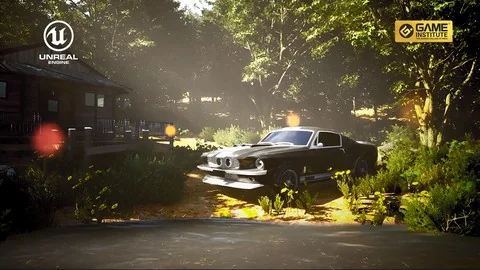
The training centers on Unreal Engine 5.5, focusing on the specific tools required to produce visually stunning scenes for games or films. Learners work through real-time rendering techniques tailored for environment design and world-building. This includes handling the visual fidelity needed for cinematic showcases while maintaining the optimization required for interactive game levels.
The curriculum breaks down the construction of both outdoor and indoor scenes. By working through these different scene types, the course demonstrates how to approach spatial design, asset placement, and rendering pipelines depending on the environmental requirements at hand.
Landscape Sculpting and Material Workflows
A major component of the instruction involves terrain creation. The course covers landscape sculpting techniques, allowing artists to generate natural ground formations, hills, and geological features directly within the engine. Following the physical sculpting of the terrain, the curriculum moves into material blending.
Material blending is essential for making natural environments look grounded. Instead of relying on flat, single-surface textures, the training explains how to combine multiple surface materials dynamically across the landscape. Coupled with the integration of Quixel Megascans and foliage, these techniques allow for the creation of immersive, lifelike game levels.
Lighting, Foliage, and Post-Processing Effects
Beyond geometry and surface materials, the visual identity of a real-time environment relies heavily on its lighting setup. The course addresses lighting integration as a core method for achieving cinematic results. Proper lighting dictates mood, guides viewer attention, and defines the realism of both indoor and outdoor spaces.
The training also incorporates post-processing effects alongside foliage placement. Post-processing allows artists to apply final color grading, exposure adjustments, and visual refinements directly after the initial render pass. When combined with detailed foliage and Megascans assets, these steps push the scene toward a final, polished cinematic state.
Rendering Techniques and Portfolio Captures
Constructing the environment is only part of the production pipeline. The final step involves extracting high-quality visuals from the engine. The course dedicates time to capturing high-quality renders and animations. This process ensures that the work put into landscape sculpting, material blending, and lighting translates into a viewable format.
These captured renders serve a dual purpose. They can be used as promotional material or cutscenes within a game project, and they function as standalone pieces for a professional portfolio. The curriculum specifically notes that the training is suitable for anyone looking to add a professional-quality real-time environment project to their body of work.
Course Profile and Target Audience
Published on November 23, 2025, the course is structured as a beginner-level resource. It requires a total workload of 1 hour and 20 minutes, making it a focused, concise entry point into real-time environment creation. The condensed timeframe indicates a streamlined approach to the software, designed to get users working within Unreal Engine 5.5 quickly.
The material is tailored for beginners and intermediate learners interested in environment design in Unreal Engine 5. This includes aspiring game developers, level designers, and 3D environment artists who need to understand engine-specific workflows. Indie developers and Unreal Engine enthusiasts focused on cinematic scenes will find the rendering and post-processing segments particularly relevant. Students of game design, VFX, and architectural visualization can also apply these real-time rendering techniques to their respective disciplines.
Where This Training Fits in Production
In a standard development pipeline, environment creation happens after initial concept art and level design phases. This training slots directly into the production and art-implementation stages. Once an artist understands how to use Megascans, sculpt landscapes, and blend materials, they can populate levels efficiently and dress scenes according to design documents.
For solo indie developers or small teams, knowing how to execute these steps independently reduces reliance on external art teams. The ability to light a scene, apply post-processing, and render out an animation means a single developer can see a level through from an empty default map to a finished cinematic showcase.
This resource benefits aspiring developers and environment artists who need a direct, practical introduction to Unreal Engine 5.5. Because it focuses on capturing portfolio-ready renders and navigating the core tools of landscape and lighting, it serves as a practical starting point for users who want to move from absolute basics to creating professional-grade real-time worlds.
 Unreal Engine
 Unreal Engine
 Unreal Engine
 Unreal Engine