"6f9bd6df1f44a86f"{"id":"1000751","slug":"unreal-engine-5-motion-design","title":"Unreal Engine 5 : Motion Design","category":"Unreal Engine","engine":"File Content: video + English subtitles","assetVersion":"Video Language: English","engineVersion":"File Content: video + English subtitles","tag":"Unreal Engine","accent":"blue","visual":"mech","summary":"A 5.5-hour course covering real-time motion graphics in Unreal Engine 5.4, including cloner tools, splines, typography, and logo animation for beginners.","platform":"Unreal Engine","indexPolicy":"index","publishedAt":"2026-07-27T14:03:08.078Z","updatedAt":"2026-07-27T14:03:08.078Z","sourceNotes":[],"fileContents":[],"compatibility":["Unreal Engine","Video Language: English","File Content: video + English subtitles"],"featuredImage":{"alt":"Unreal Engine 5 : Motion Design","src":"/wp-content/uploads/published/2026/07/8686c1689baf-5885848-9034-4-aa0051a79b.webp"},"hasDownloadLink":true,"downloads":2,"terms":[{"taxonomy":"category","slug":"tutoriallibrary-unrealengine","name":"Unreal Engine"}],"galleryImages":[],"accessPanel":{"kind":"video-resource","title":"Download this video resource","eyebrow":"Free Download","message":"Log in or create a free account to start your download.","fileName":"Unreal Engine 5.4 Motion Design.7z","safetyNote":"Resources are manually reviewed before listing to improve quality and reduce obvious risks.","actionLabel":"Download Free","resourceType":"Video download"},"contentHtml":"\u003cp\u003e\u003cem\u003eUnreal Engine 5: Motion Design\u003c/em\u003e is a structured instructional course that teaches the creation of real-time motion graphics within Unreal Engine 5. Spanning 5 hours and 28 minutes of material, the curriculum walks users through specific toolsets and animation techniques necessary for building dynamic graphical elements in a real-time environment. The instruction targets all skill levels, specifically aiming to help beginner Unreal Engine users, game developers, and traditional motion graphic designers transition their workflows into Unreal Engine 5.4.\u003c/p\u003e\n\n\u003ch2\u003eConstructing Graphics with the Cloner and Animators\u003c/h2\u003e\n\u003cp\u003eOne of the central pillars of the curriculum is the implementation of Animators and the Cloner system. In a real-time production workflow, these tools function similarly to traditional motion graphics generators found in dedicated 3D animation software. The Cloner allows creators to duplicate and arrange objects in specific patterns or spatial formations, which is a fundamental technique for generating complex abstract visuals or repetitive structural motifs quickly. By pairing the Cloner with Effectors, users can dictate how these duplicated elements behave over time.\u003c/p\u003e\n\n\u003cp\u003eEffectors manipulate the cloned objects by introducing variations in movement, scale, rotation, or visibility. The course dedicates a specific module to the Cloner, ensuring that users understand how to drive these repetitive animations dynamically. This is particularly useful for productions that require animated geometric backgrounds, animated UI elements, or abstract visualizations that need to react in real time rather than through pre-rendered workflows.\u003c/p\u003e\n\n\u003ch2\u003eTypography, Text, and Logo Animation Techniques\u003c/h2\u003e\n\u003cp\u003eText and logo animation forms another major focus of the instruction. The curriculum includes dedicated sections on typography and text animations, demonstrating how to bring static lettering into a moving 3D space. For motion graphic designers moving into Unreal Engine, understanding how to manipulate text in a real-time engine is crucial for creating broadcast graphics, title sequences, and lower thirds.\u003c/p\u003e\n\n\u003cp\u003eTypography animation in Unreal Engine 5 goes beyond simple 2D movement, allowing text to exist fully within a three-dimensional environment. The course covers the specifics of animating these elements, teaching users how to apply dynamic transitions and motion to logos. This provides a direct path for integrating branded content into game cinematics, virtual production sets, or interactive applications where real-time rendering is required.\u003c/p\u003e\n\n\u003ch2\u003eSpline Creation and Turntable Animation\u003c/h2\u003e\n\u003cp\u003eSplines are an essential component for controlled animation paths and shape generation. The course includes a module dedicated to creating and animating splines within Unreal Engine 5. Splines give creators precise control over movement trajectories, allowing objects or cameras to follow complex, curved paths through a scene. They are also frequently used to generate procedural geometry, giving motion designers a way to draw lines and tubes that can be animated over time.\u003c/p\u003e\n\n\u003cp\u003eAccompanying the spline instruction is a module on turntable animation. Turntable animations are a standard method for showcasing 3D models, environments, or graphical assets by rotating them a full 360 degrees. In the context of motion design, this technique can be used to display products, highlight character assets, or present abstract graphical objects in a continuous loop. Learning this within Unreal Engine 5.4 equips developers with a reliable method for generating portfolio renders or real-time presentation loops.\u003c/p\u003e\n\n\u003ch2\u003eIntroduction to Modeling in Unreal Engine 5\u003c/h2\u003e\n\u003cp\u003eBeyond pure animation toolsets, the curriculum also provides an introduction to modeling within Unreal Engine 5. For a motion graphics workflow, having the ability to generate and manipulate basic geometry directly inside the engine reduces the need to bounce between external 3D modeling applications. This section likely covers the foundational modeling tools available in the engine, allowing users to create simple shapes, environments, or props that serve as the base elements for their motion graphics projects. This integration of modeling within the motion design pipeline ensures that users can block out and execute their ideas without leaving the real-time environment.\u003c/p\u003e\n\n\u003ch2\u003eIntegrating Motion Design into Real-Time Workflows\u003c/h2\u003e\n\u003cp\u003eThis course is positioned for users who want to bridge the gap between traditional motion graphics and real-time engine capabilities. For game developers, the skills taught enable the creation of animated menus, in-game holographic effects, and dynamic cutscenes. For traditional motion graphic designers, the curriculum offers a direct translation of familiar concepts—Animators, Cloners, Splines, and typography—into the Unreal Engine 5.4 framework. The workload of 5 hours and 28 minutes is designed to comprehensively walk a beginner through these concepts from an introductory level up to practical application. By combining modeling basics with specific animation techniques like logo reveals, text manipulation, and spline-based movement, the package equips users with the necessary toolkit to build complex real-time motion graphic sequences entirely within Unreal Engine.\u003c/p\u003e\n\n\u003ch2\u003eRelated Resources Worth Checking\u003c/h2\u003e\n\u003cul\u003e\n\u003cli\u003e\u003ca href=\"https://3dcghub.com/learn-how-to-create-a-survival-horror-in-unreal-engine/\" rel=\"noopener noreferrer\"\u003eLearn How To Create A Survival Horror In Unreal Engine\u003c/a\u003e\u003c/li\u003e\n\u003cli\u003e\u003ca href=\"https://3dcghub.com/unreal-engine-5-visual-novel-and-narrative-game-design/\" rel=\"noopener noreferrer\"\u003eUnreal Engine 5 Visual Novel and Narrative Game Design\u003c/a\u003e\u003c/li\u003e\n\u003cli\u003e\u003ca href=\"https://3dcghub.com/unreal-engine-5-c-advanced-action-rpg/\" rel=\"noopener noreferrer\"\u003eUnreal Engine 5 C++: Advanced Action RPG\u003c/a\u003e\u003c/li\u003e\n\u003cli\u003e\u003ca href=\"https://3dcghub.com/the-ultimate-guide-to-unreal-engine-5-for-complete-beginners/\" rel=\"noopener noreferrer\"\u003eThe Ultimate Guide to Unreal Engine 5 For Complete Beginners\u003c/a\u003e\u003c/li\u003e\n\u003cli\u003e\u003ca href=\"https://3dcghub.com/how-to-create-a-movie-in-unreal-engine-5-beginners-edition/\" rel=\"noopener noreferrer\"\u003eHow to create a movie in Unreal Engine 5 Beginners Edition\u003c/a\u003e\u003c/li\u003e\n\u003c/ul\u003e","contentTextLength":5556,"navigation":{"current":1618,"total":4218,"previous":{"id":"1000752","slug":"morbid-motions-animations-and-poses","title":"Morbid Motions | Animations and Poses","category":"Variety","platform":"Unreal Engine","updatedAt":"2026-07-27T14:15:11.213Z"},"next":{"id":"1000750","slug":"unreal-engine-5-scenebuilding-crash-course","title":"Unreal Engine 5 Scenebuilding Crash Course","category":"Unreal Engine","platform":"Unreal Engine","updatedAt":"2026-07-27T13:46:54.467Z"}},"relatedResources":[{"id":"1000181","slug":"unreal-engine-5-blender-environment-design-for-beginners","title":"Unreal Engine 5 + Blender Environment Design For Beginners","category":"Unreal Engine","engine":"File Content: video + English subtitles","assetVersion":"Video Language: English","engineVersion":"File Content: video + English subtitles","tag":"Unreal Engine","accent":"blue","visual":"city","summary":"A beginner course focused on creating a factory interior with Blender and Unreal Engine 5, covering modular modeling, materials, lighting, and level assembly.","platform":"Unreal Engine","indexPolicy":"index","publishedAt":"2026-06-21T04:53:10.052Z","updatedAt":"2026-10-03T14:08:40.296Z","sourceNotes":[],"fileContents":[],"compatibility":["Blender","Video Language: English","File Content: video + English subtitles"],"featuredImage":{"alt":"Unreal Engine 5 + Blender Environment Design For Beginners","src":"/wp-content/uploads/published/2026/06/629c97a3fbc5-6468489-877c-9382f24713.webp"},"hasDownloadLink":true,"downloads":0},{"id":"1000744","slug":"how-to-create-a-movie-in-unreal-engine-5-beginners-edition","title":"How to create a movie in Unreal Engine 5 Beginners Edition","category":"Unreal Engine","engine":"File Content: video + English subtitles","assetVersion":"Video Language: English","engineVersion":"File Content: video + English subtitles","tag":"Unreal Engine","accent":"blue","visual":"mech","summary":"A beginner-level UE5 course on creating CG animation, migrating projects, importing motion capture, and working with MetaHumans.","platform":"Unreal Engine","indexPolicy":"index","publishedAt":"2026-07-27T12:07:40.122Z","updatedAt":"2026-07-27T12:07:40.122Z","sourceNotes":[],"fileContents":[],"compatibility":["Unreal Engine","Video Language: English","File Content: video + English subtitles"],"featuredImage":{"alt":"How to create a movie in Unreal Engine 5 Beginners Edition","src":"/wp-content/uploads/published/2026/07/a207ba37646d-4192342-4b9b-11-973394dbfe.webp"},"hasDownloadLink":true,"downloads":4},{"id":"1001156","slug":"unreal-engine-5-the-complete-beginner-s-course","title":"Unreal Engine 5: The Complete Beginner’s Course","category":"Unreal Engine","engine":"File Content: video + English subtitles","assetVersion":"Video Language: English","engineVersion":"File Content: video + English subtitles","tag":"Unreal Engine","accent":"blue","visual":"mech","summary":"Explore Unreal Engine 5: The Complete Beginner’s Course by David Nixon, covering level design, Blueprints, inputs, UI, audio, and game logic.","platform":"Unreal Engine","indexPolicy":"index","publishedAt":"2026-09-11T00:37:06.865Z","updatedAt":"2026-09-11T00:37:06.865Z","sourceNotes":[],"fileContents":[],"compatibility":["Unreal Engine","Video Language: English","File Content: video + English subtitles"],"featuredImage":{"alt":"Unreal Engine 5: The Complete Beginner’s Course","src":"/wp-content/uploads/published/2026/09/7520d752930b-660600-39b2-5-a470c19787.webp"},"hasDownloadLink":true,"downloads":0}]}
Unreal Engine
Unreal Engine 5 : Motion Design
A 5.5-hour course covering real-time motion graphics in Unreal Engine 5.4, including cloner tools, splines, typography, and logo animation for beginners.
Category:Unreal EnginePlatform: Unreal EngineVideo Language: EnglishFile Content: video + English subtitlesPublished: Jul 27, 2026
Unreal Engine
Resource overview
Unreal Engine 5: Motion Design is a structured instructional course that teaches the creation of real-time motion graphics within Unreal Engine 5. Spanning 5 hours and 28 minutes of material, the curriculum walks users through specific toolsets and animation techniques necessary for building dynamic graphical elements in a real-time environment. The instruction targets all skill levels, specifically aiming to help beginner Unreal Engine users, game developers, and traditional motion graphic designers transition their workflows into Unreal Engine 5.4.
Constructing Graphics with the Cloner and Animators
One of the central pillars of the curriculum is the implementation of Animators and the Cloner system. In a real-time production workflow, these tools function similarly to traditional motion graphics generators found in dedicated 3D animation software. The Cloner allows creators to duplicate and arrange objects in specific patterns or spatial formations, which is a fundamental technique for generating complex abstract visuals or repetitive structural motifs quickly. By pairing the Cloner with Effectors, users can dictate how these duplicated elements behave over time.
Effectors manipulate the cloned objects by introducing variations in movement, scale, rotation, or visibility. The course dedicates a specific module to the Cloner, ensuring that users understand how to drive these repetitive animations dynamically. This is particularly useful for productions that require animated geometric backgrounds, animated UI elements, or abstract visualizations that need to react in real time rather than through pre-rendered workflows.
Typography, Text, and Logo Animation Techniques
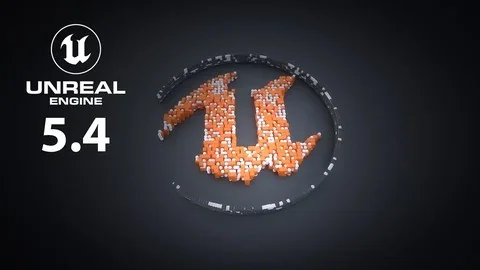
Text and logo animation forms another major focus of the instruction. The curriculum includes dedicated sections on typography and text animations, demonstrating how to bring static lettering into a moving 3D space. For motion graphic designers moving into Unreal Engine, understanding how to manipulate text in a real-time engine is crucial for creating broadcast graphics, title sequences, and lower thirds.
Typography animation in Unreal Engine 5 goes beyond simple 2D movement, allowing text to exist fully within a three-dimensional environment. The course covers the specifics of animating these elements, teaching users how to apply dynamic transitions and motion to logos. This provides a direct path for integrating branded content into game cinematics, virtual production sets, or interactive applications where real-time rendering is required.
Spline Creation and Turntable Animation
Splines are an essential component for controlled animation paths and shape generation. The course includes a module dedicated to creating and animating splines within Unreal Engine 5. Splines give creators precise control over movement trajectories, allowing objects or cameras to follow complex, curved paths through a scene. They are also frequently used to generate procedural geometry, giving motion designers a way to draw lines and tubes that can be animated over time.
Accompanying the spline instruction is a module on turntable animation. Turntable animations are a standard method for showcasing 3D models, environments, or graphical assets by rotating them a full 360 degrees. In the context of motion design, this technique can be used to display products, highlight character assets, or present abstract graphical objects in a continuous loop. Learning this within Unreal Engine 5.4 equips developers with a reliable method for generating portfolio renders or real-time presentation loops.
Introduction to Modeling in Unreal Engine 5
Beyond pure animation toolsets, the curriculum also provides an introduction to modeling within Unreal Engine 5. For a motion graphics workflow, having the ability to generate and manipulate basic geometry directly inside the engine reduces the need to bounce between external 3D modeling applications. This section likely covers the foundational modeling tools available in the engine, allowing users to create simple shapes, environments, or props that serve as the base elements for their motion graphics projects. This integration of modeling within the motion design pipeline ensures that users can block out and execute their ideas without leaving the real-time environment.
Integrating Motion Design into Real-Time Workflows
This course is positioned for users who want to bridge the gap between traditional motion graphics and real-time engine capabilities. For game developers, the skills taught enable the creation of animated menus, in-game holographic effects, and dynamic cutscenes. For traditional motion graphic designers, the curriculum offers a direct translation of familiar concepts—Animators, Cloners, Splines, and typography—into the Unreal Engine 5.4 framework. The workload of 5 hours and 28 minutes is designed to comprehensively walk a beginner through these concepts from an introductory level up to practical application. By combining modeling basics with specific animation techniques like logo reveals, text manipulation, and spline-based movement, the package equips users with the necessary toolkit to build complex real-time motion graphic sequences entirely within Unreal Engine.
 Unreal Engine
 Unreal Engine
 Unreal Engine
 Unreal Engine