"7066dd76da796369"{"id":"1000744","slug":"how-to-create-a-movie-in-unreal-engine-5-beginners-edition","title":"How to create a movie in Unreal Engine 5 Beginners Edition","category":"Unreal Engine","engine":"File Content: video + English subtitles","assetVersion":"Video Language: English","engineVersion":"File Content: video + English subtitles","tag":"Unreal Engine","accent":"blue","visual":"mech","summary":"A beginner-level UE5 course on creating CG animation, migrating projects, importing motion capture, and working with MetaHumans.","platform":"Unreal Engine","publishedAt":"2026-07-27T12:07:40.122Z","updatedAt":"2026-07-27T12:07:40.122Z","sourceNotes":[],"fileContents":[],"compatibility":["Unreal Engine","Video Language: English","File Content: video + English subtitles"],"featuredImage":{"alt":"How to create a movie in Unreal Engine 5 Beginners Edition","src":"/wp-content/uploads/published/2026/07/a207ba37646d-4192342-4b9b-11-973394dbfe.webp"},"hasDownloadLink":true,"downloads":4,"terms":[{"taxonomy":"category","slug":"tutoriallibrary-unrealengine","name":"Unreal Engine"}],"galleryImages":[],"accessPanel":{"kind":"video-resource","title":"Download this video resource","eyebrow":"Free Download","message":"Log in or create a free account to start your download.","fileName":"How to create a movie in Unreal Engine 5 Beginners Edition.7z","safetyNote":"Resources are manually reviewed before listing to improve quality and reduce obvious risks.","actionLabel":"Download Free","resourceType":"Video download"},"contentHtml":"\u003cp\u003eFor anyone standing at the intersection of traditional filmmaking and real-time rendering, jumping into a new engine requires understanding how cameras, motion capture, and character systems interact. A course tailored to beginners offers a direct look at pulling these elements together to make a CG animation.\u003c/p\u003e\n\n\u003ch2\u003eBuilding a Foundation in Unreal Engine 5\u003c/h2\u003e\n\u003cp\u003eThe curriculum begins with the absolute basics. Before touching a Cinematic Sequencer, students learn how to install Unreal Engine 5 on their machines. The early modules focus on an introduction to the engine itself, ensuring that users with no prior experience can navigate the interface and understand the core mechanics of the software.\u003c/p\u003e\n\n\u003cp\u003eFrom navigating the viewport to managing assets, the course establishes a baseline of how to use Unreal Engine 5. This groundwork is strictly aimed at beginners, building up from engine installation to a general introduction before moving into specialized topics like animation.\u003c/p\u003e\n\n\u003ch2\u003eThe Cinematic Sequencer and Camera Work\u003c/h2\u003e\n\u003cp\u003eAt the core of the CG animation training is the Unreal Engine 5 Cinematic Sequencer. The Sequencer is the engine's primary tool for directing scenes, managing cuts, and controlling the flow of a virtual production.\u003c/p\u003e\n\n\u003cp\u003eStudents learn how to add and work with cameras within the Sequencer environment. This process bridges the gap between static 3D scenes and actual cinematography, teaching users how to frame shots and direct the visual narrative of their animation entirely inside the engine.\u003c/p\u003e\n\n\u003ch2\u003eMigrating Projects and Importing Motion Capture\u003c/h2\u003e\n\u003cp\u003eOnce the basics of the Sequencer are established, the course moves into practical scene management. A dedicated section on migrating projects teaches students how to transfer assets and data between different Unreal Engine 5 projects safely and efficiently.\u003c/p\u003e\n\n\u003cp\u003eFollowing project migration, the curriculum shifts to importing motion capture data. This step is vital for animating characters realistically without keyframing every movement by hand. By bringing in external motion capture data, students can drive their character animations using pre-recorded performance data.\u003c/p\u003e\n\n\u003ch2\u003eWorking with MetaHumans Indoors\u003c/h2\u003e\n\u003cp\u003eCharacter animation relies heavily on the digital actors used in the scene. The course includes a specific module on working with MetaHumans indoors. MetaHumans are the engine's high-fidelity digital human system. This section teaches users how to implement these characters and animate them within an enclosed scene setting.\u003c/p\u003e\n\n\u003cp\u003eCombining the imported motion capture data with MetaHuman characters allows students to see how realistic human movements translate into the digital framework. The indoor environment provides a controlled space to test these character interactions and camera angles.\u003c/p\u003e\n\n\u003ch2\u003eTransitioning to the Outdoors: The Cyborg Scene\u003c/h2\u003e\n\u003cp\u003eThe final practical module takes the techniques learned indoors and applies them to a larger outdoor environment. Titled the \u003cem\u003eCyborg\u003c/em\u003e scene, this section pushes the production into an open space. It demonstrates how to manage lighting, scale, and character animation in a less confined setting.\u003c/p\u003e\n\n\u003cp\u003eBuilding an outdoor scene with a cyborg character tests the student's grasp of the Cinematic Sequencer and camera framing. The transition from indoor MetaHumans to an outdoor mechanical character highlights the flexibility of Unreal Engine 5 for varied visual styles and scene types.\u003c/p\u003e\n\n\u003ch2\u003eCourse Structure and Practical Workflow\u003c/h2\u003e\n\u003cp\u003eDelivered by JSFILMZ Entertainment, the course is designed to fit into a tight schedule with a total workload of 2 hours and 34 minutes. Published in late 2022, the material is updated for the official Unreal Engine 5 release. This ensures that beginners are learning on the current engine version rather than early access builds.\u003c/p\u003e\n\n\u003cp\u003eThe workflow taught across the sessions targets real-world production needs. The progression from engine installation to migrating projects, handling motion capture, and managing MetaHumans mirrors the actual steps a virtual production team takes when assembling a short film or previz sequence.\u003c/p\u003e\n\n\u003cp\u003e3D modelers, VFX students, and animation students will find this structure directly applicable to their disciplines. 3D modelers can learn how to see their assets in motion, while VFX and animation students gain exposure to managing character data and camera movements in a real-time engine environment.\u003c/p\u003e\n\n\u003cp\u003eThe course stands as a starting point for movie previz and virtual production students. It covers the essential pipeline of loading characters, applying movement, capturing the scene with virtual cameras, and organizing the data through project migration. Anyone aiming to create a CG animation in Unreal Engine 5 will leave with a connected understanding of how these tools function together.\u003c/p\u003e\n\n\u003ch2\u003eExplore Similar Assets\u003c/h2\u003e\n\u003cul\u003e\n\u003cli\u003e\u003ca href=\"https://3dcghub.com/create-a-first-person-shooter-fps-game-in-unreal-engine-5/\" title=\"Create a First Person Shooter (FPS) Game in Unreal Engine 5\"\u003eCreate a First Person Shooter (FPS) Game in Unreal Engine 5\u003c/a\u003e\u003c/li\u003e\n\u003cli\u003e\u003ca href=\"https://3dcghub.com/unreal-engine-5-for-beginners-create-your-first-game/\" title=\"Unreal Engine 5 for Beginners - Create your first game\"\u003eUnreal Engine 5 for Beginners - Create your first game\u003c/a\u003e\u003c/li\u003e\n\u003cli\u003e\u003ca href=\"https://3dcghub.com/learn-how-to-create-a-survival-horror-in-unreal-engine/\" title=\"Learn How To Create A Survival Horror In Unreal Engine\"\u003eLearn How To Create A Survival Horror In Unreal Engine\u003c/a\u003e\u003c/li\u003e\n\u003cli\u003e\u003ca href=\"https://3dcghub.com/how-to-create-a-weapon-customization-system-in-ue5/\" title=\"How To Create a Weapon Customization System in UE5\"\u003eHow To Create a Weapon Customization System in UE5\u003c/a\u003e\u003c/li\u003e\n\u003cli\u003e\u003ca href=\"https://3dcghub.com/how-to-create-an-online-base-claim-system-with-ue5/\" title=\"How to create an Online Base Claim System with UE5\"\u003eHow to create an Online Base Claim System with UE5\u003c/a\u003e\u003c/li\u003e\n\u003c/ul\u003e","contentTextLength":5032,"navigation":{"current":1420,"total":4016,"previous":{"id":"1000745","slug":"how-to-publish-a-game-on-steam-unreal-engine-5","title":"How to Publish a Game on Steam - Unreal Engine 5","category":"Unreal Engine","platform":"Unreal Engine","updatedAt":"2026-07-27T12:12:54.656Z"},"next":{"id":"1000743","slug":"environment-design-in-unreal-engine-5-5-from-basics-to-pro","title":"Environment Design in Unreal Engine 5.5 – From Basics to Pro","category":"Unreal Engine","platform":"Unreal Engine","updatedAt":"2026-07-27T12:02:43.552Z"}},"relatedResources":[{"id":"1000742","slug":"create-a-first-person-shooter-fps-game-in-unreal-engine-5","title":"Create a First Person Shooter (FPS) Game in Unreal Engine 5","category":"Unreal Engine","engine":"File Content: video + English subtitles","assetVersion":"Video Language: English","engineVersion":"File Content: video + English subtitles","tag":"Unreal Engine","accent":"blue","visual":"mech","summary":"A beginner Unreal Engine 5 course covering FPS character movement, enemy AI, timer systems, abandoned environments, and realistic lighting in 3h 22m.","platform":"Unreal Engine","publishedAt":"2026-07-27T11:57:43.213Z","updatedAt":"2026-07-27T11:57:43.213Z","sourceNotes":[],"fileContents":[],"compatibility":["Unreal Engine","Video Language: English","File Content: video + English subtitles"],"featuredImage":{"alt":"Create a First Person Shooter (FPS) Game in Unreal Engine 5","src":"/wp-content/uploads/published/2026/07/00b4a46b8f07-6649245-5dcd-4-d1bc87e858.webp"},"hasDownloadLink":true,"downloads":2},{"id":"24568","slug":"unreal-engine-5-for-beginners-create-your-first-game","title":"Unreal Engine 5 for Beginners - Create your first game","category":"Unreal Engine","engine":"Video language: English","assetVersion":"Video language: English","engineVersion":"File content: video + supporting files + English subtitles","tag":"Unreal Engine","accent":"blue","visual":"city","summary":"This beginner course walks through Unreal Engine 5 basics, then moves into Blueprints, character animation, UI widgets, and the steps needed to create a real 3D game. It is aimed at beginner game developers who want a practical starting point.","platform":"Unreal Engine","publishedAt":"2026-04-15T13:30:22.000Z","updatedAt":"2026-04-20T06:12:44.000Z","sourceNotes":[],"fileContents":[],"compatibility":["Unreal Engine","Video language: English","File content: video + supporting files + English subtitles"],"featuredImage":{"alt":"Unreal Engine 5 for Beginners - Create your first game","src":"https://3dcghub.com/wp-content/uploads/2026/04/d35b769681b1_5098972_a916_5.webp"},"hasDownloadLink":true,"downloads":0},{"id":"1000910","slug":"unreal-blueprints-create-games-with-visual-scripting-in-unreal-5-6","title":"Unreal Blueprints: Create Games with Visual Scripting in Unreal 5.6","category":"Unreal Engine","engine":"File Content: video + English subtitles","assetVersion":"Video Language: English","engineVersion":"File Content: video + English subtitles","tag":"Unreal Engine","accent":"blue","visual":"mech","summary":"Build three complete games—Marble Run, Crystal Caverns, and Mars Marine—using Unreal 5.6's Blueprint visual scripting. A beginner-friendly course from GameDev.t","platform":"Unreal Engine","publishedAt":"2026-08-06T13:20:33.760Z","updatedAt":"2026-08-06T13:20:33.760Z","sourceNotes":[],"fileContents":[],"compatibility":["Unreal Engine","Video Language: English","File Content: video + English subtitles"],"featuredImage":{"alt":"Unreal Blueprints: Create Games with Visual Scripting in Unreal 5.6","src":"/wp-content/uploads/published/2026/08/8a135189a0df-ragzbmpcjb5j-2f97113de1.webp"},"hasDownloadLink":true,"downloads":3}]}
Unreal Engine
How to create a movie in Unreal Engine 5 Beginners Edition
A beginner-level UE5 course on creating CG animation, migrating projects, importing motion capture, and working with MetaHumans.
Category:Unreal EnginePlatform: Unreal EngineVideo Language: EnglishFile Content: video + English subtitlesPublished: Jul 27, 2026
Unreal Engine
Resource overview
For anyone standing at the intersection of traditional filmmaking and real-time rendering, jumping into a new engine requires understanding how cameras, motion capture, and character systems interact. A course tailored to beginners offers a direct look at pulling these elements together to make a CG animation.
Building a Foundation in Unreal Engine 5
The curriculum begins with the absolute basics. Before touching a Cinematic Sequencer, students learn how to install Unreal Engine 5 on their machines. The early modules focus on an introduction to the engine itself, ensuring that users with no prior experience can navigate the interface and understand the core mechanics of the software.
From navigating the viewport to managing assets, the course establishes a baseline of how to use Unreal Engine 5. This groundwork is strictly aimed at beginners, building up from engine installation to a general introduction before moving into specialized topics like animation.
The Cinematic Sequencer and Camera Work
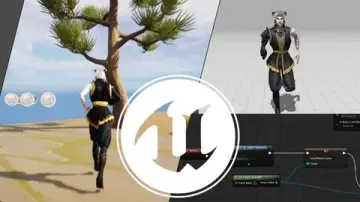
At the core of the CG animation training is the Unreal Engine 5 Cinematic Sequencer. The Sequencer is the engine's primary tool for directing scenes, managing cuts, and controlling the flow of a virtual production.
Students learn how to add and work with cameras within the Sequencer environment. This process bridges the gap between static 3D scenes and actual cinematography, teaching users how to frame shots and direct the visual narrative of their animation entirely inside the engine.
Migrating Projects and Importing Motion Capture
Once the basics of the Sequencer are established, the course moves into practical scene management. A dedicated section on migrating projects teaches students how to transfer assets and data between different Unreal Engine 5 projects safely and efficiently.
Following project migration, the curriculum shifts to importing motion capture data. This step is vital for animating characters realistically without keyframing every movement by hand. By bringing in external motion capture data, students can drive their character animations using pre-recorded performance data.
Working with MetaHumans Indoors
Character animation relies heavily on the digital actors used in the scene. The course includes a specific module on working with MetaHumans indoors. MetaHumans are the engine's high-fidelity digital human system. This section teaches users how to implement these characters and animate them within an enclosed scene setting.
Combining the imported motion capture data with MetaHuman characters allows students to see how realistic human movements translate into the digital framework. The indoor environment provides a controlled space to test these character interactions and camera angles.
Transitioning to the Outdoors: The Cyborg Scene
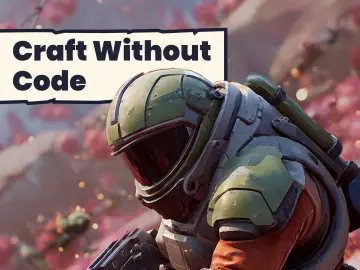
The final practical module takes the techniques learned indoors and applies them to a larger outdoor environment. Titled the Cyborg scene, this section pushes the production into an open space. It demonstrates how to manage lighting, scale, and character animation in a less confined setting.
Building an outdoor scene with a cyborg character tests the student's grasp of the Cinematic Sequencer and camera framing. The transition from indoor MetaHumans to an outdoor mechanical character highlights the flexibility of Unreal Engine 5 for varied visual styles and scene types.
Course Structure and Practical Workflow
Delivered by JSFILMZ Entertainment, the course is designed to fit into a tight schedule with a total workload of 2 hours and 34 minutes. Published in late 2022, the material is updated for the official Unreal Engine 5 release. This ensures that beginners are learning on the current engine version rather than early access builds.
The workflow taught across the sessions targets real-world production needs. The progression from engine installation to migrating projects, handling motion capture, and managing MetaHumans mirrors the actual steps a virtual production team takes when assembling a short film or previz sequence.
3D modelers, VFX students, and animation students will find this structure directly applicable to their disciplines. 3D modelers can learn how to see their assets in motion, while VFX and animation students gain exposure to managing character data and camera movements in a real-time engine environment.
The course stands as a starting point for movie previz and virtual production students. It covers the essential pipeline of loading characters, applying movement, capturing the scene with virtual cameras, and organizing the data through project migration. Anyone aiming to create a CG animation in Unreal Engine 5 will leave with a connected understanding of how these tools function together.
 Unreal Engine
 Unreal Engine
 Unreal Engine
 Unreal Engine