"7066dd76da796369"{"id":"1000750","slug":"unreal-engine-5-scenebuilding-crash-course","title":"Unreal Engine 5 Scenebuilding Crash Course","category":"Unreal Engine","engine":"File Content: video + English subtitles","assetVersion":"Video Language: English","engineVersion":"File Content: video + English subtitles","tag":"Unreal Engine","accent":"blue","visual":"mech","summary":"A 1h 40m beginner course by James Roha covering UE5 visual production fundamentals, finding quality digital assets, and completing an original 3D scene.","platform":"Unreal Engine","publishedAt":"2026-07-27T13:46:54.467Z","updatedAt":"2026-07-27T13:46:54.467Z","sourceNotes":[],"fileContents":[],"compatibility":["Unreal Engine","Video Language: English","File Content: video + English subtitles"],"featuredImage":{"alt":"Unreal Engine 5 Scenebuilding Crash Course","src":"/wp-content/uploads/published/2026/07/819381a7050d-6120223-9d70-2-67b4a400e0.webp"},"hasDownloadLink":true,"downloads":0,"terms":[{"taxonomy":"category","slug":"tutoriallibrary-unrealengine","name":"Unreal Engine"}],"galleryImages":[],"accessPanel":{"kind":"video-resource","title":"Download this video resource","eyebrow":"Free Download","message":"Log in or create a free account to start your download.","fileName":"Unreal Engine 5 Scenebuilding Crash Course.7z","safetyNote":"Resources are manually reviewed before listing to improve quality and reduce obvious risks.","actionLabel":"Download Free","resourceType":"Video download"},"contentHtml":"\u003cp\u003eReal-time scene assembly demands more than just dropping objects into a viewport. It requires an understanding of how lighting, environment composition, and digital asset selection work together in a live rendering engine. The \u003cem\u003eUnreal Engine 5 Scenebuilding Crash Course\u003c/em\u003e addresses this directly, aiming to rapidly accelerate users to a high level of real-time visual production. The instruction bridges the gap between technical engine workflows and creative scene composition, giving users a structured path through the scenebuilding process rather than leaving them to piece together disconnected tutorials.\u003c/p\u003e\n\n\u003ch2\u003eFrom Engine Fundamentals to a Finished 3D Scene in Unreal Engine 5\u003c/h2\u003e\n\u003cp\u003eThe course is structured through a clear progression. It begins with the fundamentals of visual production in Unreal Engine 5, establishing the base knowledge needed to work effectively inside the editor. From there, it moves into asset identification where users learn where to find and how to use high-quality digital assets for creative production. This section connects the practical reality of scenebuilding with the creative goals of the artist, showing how to evaluate and integrate external resources into an original composition.\u003c/p\u003e\n\n\u003cp\u003eThe payoff of this progression is a completed original sample 3D scene. Users do not just follow along with abstract demonstrations. They finish the coursework having built something tangible inside Unreal Engine 5. This emphasis on completing a project from scratch makes the course particularly relevant for users who learn best by moving through an entire production pipeline from start to finish.\u003c/p\u003e\n\n\u003ch3\u003eConnecting Technical Workflow with Creative Production\u003c/h3\u003e\n\u003cp\u003eA central theme of the instruction is the connection between technical and creative production. Real-time engines like Unreal Engine 5 require users to navigate both simultaneously. An environment artist composing a scene must understand light behavior, asset placement, and rendering feedback in real time. A lighting designer moving into real-time technology needs to understand how their creative decisions interact with the engine's technical framework. The course introduces this intersection directly, framing it as a core competency for modern visual production rather than an advanced topic saved for later.\u003c/p\u003e\n\n\u003cp\u003eInstructor James Roha structures the curriculum in sequential parts. The content flow moves from an introductory segment through focused production sections labeled \u003cem\u003ePart 1\u003c/em\u003e, \u003cem\u003ePart 2\u003c/em\u003e, \u003cem\u003ePart 3\u003c/em\u003e, and a final segment titled \u003cem\u003ePart X\u003c/em\u003e. This modular breakdown suggests a step-by-step approach where each section builds on the previous one, keeping the total runtime at a focused 1 hour and 40 minutes.\u003c/p\u003e\n\n\u003ch2\u003eWho the Unreal Engine 5 Scenebuilding Crash Course Serves\u003c/h2\u003e\n\u003cp\u003eThe course targets several distinct profiles within the beginner-to-intermediate range. It is aimed at beginner Unreal Engine users who are curious about the software and want a guided introduction through actual scene creation rather than abstract feature exploration. Beginner environment artists who want to compose scenes from scratch get a workflow that supports original composition from the ground up.\u003c/p\u003e\n\n\u003cp\u003eBeginner-to-intermediate lighting designers are also addressed directly. The material is intended for those who want to leverage real-time technology for their process and production. For lighting professionals, real-time engines represent a shift away from offline rendering workflows, and the course positions itself as a way to understand that shift through practical scenebuilding rather than theoretical instruction.\u003c/p\u003e\n\n\u003cp\u003eIntermediate concept artists form another target group. For artists already working in concept development, the course offers a way to level up their process by introducing Unreal Engine 5 as a tool for real-time visual exploration. Building a scene in a live engine changes how concept work can be iterated and presented, and the course connects that capability to the existing workflow of a working concept artist.\u003c/p\u003e\n\n\u003ch3\u003eCourse Logistics and Scope\u003c/h3\u003e\n\u003cul\u003e\n \u003cli\u003e\u003cstrong\u003eTotal Workload:\u003c/strong\u003e 1 hour and 40 minutes\u003c/li\u003e\n \u003cli\u003e\u003cstrong\u003eLevel:\u003c/strong\u003e Beginner\u003c/li\u003e\n \u003cli\u003e\u003cstrong\u003ePublished:\u003c/strong\u003e August 12, 2024\u003c/li\u003e\n \u003cli\u003e\u003cstrong\u003eProvider:\u003c/strong\u003e James Roha\u003c/li\u003e\n \u003cli\u003e\u003cstrong\u003eCurriculum Structure:\u003c/strong\u003e \u003cem\u003eAbout this Course\u003c/em\u003e, \u003cem\u003ePart 1\u003c/em\u003e, \u003cem\u003ePart 2\u003c/em\u003e, \u003cem\u003ePart 3\u003c/em\u003e, \u003cem\u003ePart X\u003c/em\u003e\u003c/li\u003e\n\u003c/ul\u003e\n\n\u003cp\u003eThe compact runtime reflects the crash-course framing. Rather than an exhaustive tour of every Unreal Engine 5 feature, the material focuses on what is needed to understand visual production fundamentals, find and use quality digital assets, and complete an original scene. The beginner-level designation means prior deep experience with Unreal Engine is not assumed, but the course still stretches into intermediate-relevant territory for lighting designers and concept artists who already have professional context in their fields.\u003c/p\u003e\n\n\u003ch2\u003eBridging Asset Discovery with Original Scene Completion\u003c/h2\u003e\n\u003cp\u003eOne of the more practical elements of the course is its attention to asset identification. Finding high-quality digital assets is a recurring challenge for artists working in real-time production. The course does not just teach users how to use assets once they have them. It addresses the earlier stage of knowing where to look and how to evaluate what is available. This makes the instruction applicable to artists who do not model their own assets but rely on external resources to build their scenes.\u003c/p\u003e\n\n\u003cp\u003eCombined with the goal of completing an original sample 3D scene, this creates a workflow where users move from asset discovery through integration and final composition. The scene they build is original, not a reproduction of an existing reference. This distinction matters for artists evaluating the course as a production exercise rather than a follow-along demonstration. The end result is a scene that the user has composed themselves using the tools and workflow introduced throughout the instruction.\u003c/p\u003e\n\n\u003cp\u003eFor teams evaluating the \u003cem\u003eUnreal Engine 5 Scenebuilding Crash Course\u003c/em\u003e, the strongest takeaway is its combination of scope and outcome. In under two hours, a beginner user moves from engine fundamentals through asset sourcing and into a completed original scene. The connection between technical and creative production is introduced as a working principle, not an abstract concept. Lighting designers, environment artists, and concept artists looking to add real-time scenebuilding to their process get a structured, project-driven path through that transition.\u003c/p\u003e\n\n\u003ch2\u003eContinue Browsing Similar Packs\u003c/h2\u003e\n\u003cul\u003e\n\u003cli\u003e\u003ca href=\"https://3dcghub.com/unreal-engine-5-gameplay-ability-system-gas-crash-course/\" title=\"Unreal Engine 5 Gameplay Ability System (GAS) Crash Course\"\u003eUnreal Engine 5 Gameplay Ability System (GAS) Crash Course\u003c/a\u003e\u003c/li\u003e\n\u003cli\u003e\u003ca href=\"https://3dcghub.com/unreal-engine-5-c-multiplayer-crash-course/\" title=\"Unreal Engine 5 C++ Multiplayer CRASH COURSE\"\u003eUnreal Engine 5 C++ Multiplayer CRASH COURSE\u003c/a\u003e\u003c/li\u003e\n\u003cli\u003e\u003ca href=\"https://3dcghub.com/unreal-engine-5-blueprints-multiplayer-crash-course/\" title=\"Unreal Engine 5 Blueprints Multiplayer CRASH COURSE\"\u003eUnreal Engine 5 Blueprints Multiplayer CRASH COURSE\u003c/a\u003e\u003c/li\u003e\n\u003cli\u003e\u003ca href=\"https://3dcghub.com/unreal-5-niagara-advanced-niagara/\" title=\"Unreal 5 Niagara - Advanced Niagara\"\u003eUnreal 5 Niagara - Advanced Niagara\u003c/a\u003e\u003c/li\u003e\n\u003cli\u003e\u003ca href=\"https://3dcghub.com/unreal-engine-5-blueprint-scripting-101/\" title=\"Unreal Engine 5 - Blueprint Scripting 101\"\u003eUnreal Engine 5 - Blueprint Scripting 101\u003c/a\u003e\u003c/li\u003e\n\u003c/ul\u003e","contentTextLength":6620,"navigation":{"current":1414,"total":4016,"previous":{"id":"1000751","slug":"unreal-engine-5-motion-design","title":"Unreal Engine 5 : Motion Design","category":"Unreal Engine","platform":"Unreal Engine","updatedAt":"2026-07-27T14:03:08.078Z"},"next":{"id":"1000749","slug":"unreal-engine-5-6-build-an-action-rpg-using-lyra-framework","title":"Unreal Engine 5.6 - Build an Action RPG using Lyra Framework","category":"Unreal Engine","platform":"Unreal Engine","updatedAt":"2026-07-27T13:40:29.223Z"}},"relatedResources":[{"id":"1001159","slug":"unreal-engine-5-scenebuilding-crash-course-2","title":"Unreal Engine 5 Scenebuilding Crash Course","category":"Unreal Engine","engine":"File Content: video + English subtitles","assetVersion":"Video Language: English","engineVersion":"File Content: video + English subtitles","tag":"Unreal Engine","accent":"blue","visual":"mech","summary":"Explore the Unreal Engine 5 Scenebuilding Crash Course by James Roha, covering realtime visual production, digital asset use, and 3D scene composition.","platform":"Unreal Engine","publishedAt":"2026-09-11T02:22:26.965Z","updatedAt":"2026-09-11T02:22:26.965Z","sourceNotes":[],"fileContents":[],"compatibility":["Unreal Engine","Video Language: English","File Content: video + English subtitles"],"featuredImage":{"alt":"Unreal Engine 5 Scenebuilding Crash Course","src":"/wp-content/uploads/published/2026/09/819381a7050d-6120223-9d70-2-a08c503cce.webp"},"hasDownloadLink":true,"downloads":0},{"id":"1000696","slug":"unreal-engine-5-gameplay-ability-system-gas-crash-course","title":"Unreal Engine 5 Gameplay Ability System (GAS) Crash Course","category":"Unreal Engine","engine":"File Content: video + English subtitles","assetVersion":"Video Language: English","engineVersion":"File Content: video + English subtitles","tag":"Unreal Engine","accent":"blue","visual":"mech","summary":"An intermediate Unreal Engine 5 course teaching the Gameplay Ability System for multiplayer and single player games, covering attributes, combat, and effects.","platform":"Unreal Engine","publishedAt":"2026-07-23T15:15:12.089Z","updatedAt":"2026-07-23T15:15:12.089Z","sourceNotes":[],"fileContents":[],"compatibility":["Unreal Engine","Video Language: English","File Content: video + English subtitles"],"featuredImage":{"alt":"Unreal Engine 5 Gameplay Ability System (GAS) Crash Course","src":"/wp-content/uploads/published/2026/07/07e55957c115-6844963-5aba-2-e0a165ac1a.webp"},"hasDownloadLink":true,"downloads":0},{"id":"1000215","slug":"unreal-engine-5-c-multiplayer-crash-course","title":"Unreal Engine 5 C++ Multiplayer CRASH COURSE","category":"Unreal Engine","engine":"File Content: video + English subtitles","assetVersion":"Video Language: English","engineVersion":"File Content: video + English subtitles","tag":"Unreal Engine","accent":"blue","visual":"mech","summary":"A comprehensive look at Unreal Engine 5's multiplayer framework, covering core C++ classes, variable replication, remote functions, and seamless level travel.","platform":"Unreal Engine","publishedAt":"2026-06-26T07:32:46.801Z","updatedAt":"2026-06-26T07:32:46.801Z","sourceNotes":[],"fileContents":[],"compatibility":["Unreal Engine","Video Language: English","File Content: video + English subtitles"],"featuredImage":{"alt":"Unreal Engine 5 C++ Multiplayer CRASH COURSE","src":"/wp-content/uploads/published/2026/06/4f54ca9006d2-6693929-e90f-bb04d63291.webp"},"hasDownloadLink":true,"downloads":1}]}
Unreal Engine
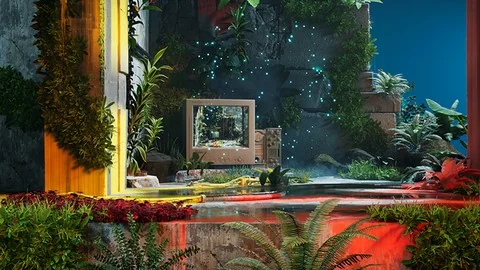
Unreal Engine 5 Scenebuilding Crash Course
A 1h 40m beginner course by James Roha covering UE5 visual production fundamentals, finding quality digital assets, and completing an original 3D scene.
Category:Unreal EnginePlatform: Unreal EngineVideo Language: EnglishFile Content: video + English subtitlesPublished: Jul 27, 2026
Unreal Engine
Resource overview
Real-time scene assembly demands more than just dropping objects into a viewport. It requires an understanding of how lighting, environment composition, and digital asset selection work together in a live rendering engine. The Unreal Engine 5 Scenebuilding Crash Course addresses this directly, aiming to rapidly accelerate users to a high level of real-time visual production. The instruction bridges the gap between technical engine workflows and creative scene composition, giving users a structured path through the scenebuilding process rather than leaving them to piece together disconnected tutorials.
From Engine Fundamentals to a Finished 3D Scene in Unreal Engine 5
The course is structured through a clear progression. It begins with the fundamentals of visual production in Unreal Engine 5, establishing the base knowledge needed to work effectively inside the editor. From there, it moves into asset identification where users learn where to find and how to use high-quality digital assets for creative production. This section connects the practical reality of scenebuilding with the creative goals of the artist, showing how to evaluate and integrate external resources into an original composition.
The payoff of this progression is a completed original sample 3D scene. Users do not just follow along with abstract demonstrations. They finish the coursework having built something tangible inside Unreal Engine 5. This emphasis on completing a project from scratch makes the course particularly relevant for users who learn best by moving through an entire production pipeline from start to finish.
Connecting Technical Workflow with Creative Production
A central theme of the instruction is the connection between technical and creative production. Real-time engines like Unreal Engine 5 require users to navigate both simultaneously. An environment artist composing a scene must understand light behavior, asset placement, and rendering feedback in real time. A lighting designer moving into real-time technology needs to understand how their creative decisions interact with the engine's technical framework. The course introduces this intersection directly, framing it as a core competency for modern visual production rather than an advanced topic saved for later.
Instructor James Roha structures the curriculum in sequential parts. The content flow moves from an introductory segment through focused production sections labeled Part 1, Part 2, Part 3, and a final segment titled Part X. This modular breakdown suggests a step-by-step approach where each section builds on the previous one, keeping the total runtime at a focused 1 hour and 40 minutes.
Who the Unreal Engine 5 Scenebuilding Crash Course Serves
The course targets several distinct profiles within the beginner-to-intermediate range. It is aimed at beginner Unreal Engine users who are curious about the software and want a guided introduction through actual scene creation rather than abstract feature exploration. Beginner environment artists who want to compose scenes from scratch get a workflow that supports original composition from the ground up.
Beginner-to-intermediate lighting designers are also addressed directly. The material is intended for those who want to leverage real-time technology for their process and production. For lighting professionals, real-time engines represent a shift away from offline rendering workflows, and the course positions itself as a way to understand that shift through practical scenebuilding rather than theoretical instruction.
Intermediate concept artists form another target group. For artists already working in concept development, the course offers a way to level up their process by introducing Unreal Engine 5 as a tool for real-time visual exploration. Building a scene in a live engine changes how concept work can be iterated and presented, and the course connects that capability to the existing workflow of a working concept artist.
Course Logistics and Scope
Total Workload: 1 hour and 40 minutes
Level: Beginner
Published: August 12, 2024
Provider: James Roha
Curriculum Structure:About this Course, Part 1, Part 2, Part 3, Part X
The compact runtime reflects the crash-course framing. Rather than an exhaustive tour of every Unreal Engine 5 feature, the material focuses on what is needed to understand visual production fundamentals, find and use quality digital assets, and complete an original scene. The beginner-level designation means prior deep experience with Unreal Engine is not assumed, but the course still stretches into intermediate-relevant territory for lighting designers and concept artists who already have professional context in their fields.
Bridging Asset Discovery with Original Scene Completion
One of the more practical elements of the course is its attention to asset identification. Finding high-quality digital assets is a recurring challenge for artists working in real-time production. The course does not just teach users how to use assets once they have them. It addresses the earlier stage of knowing where to look and how to evaluate what is available. This makes the instruction applicable to artists who do not model their own assets but rely on external resources to build their scenes.
Combined with the goal of completing an original sample 3D scene, this creates a workflow where users move from asset discovery through integration and final composition. The scene they build is original, not a reproduction of an existing reference. This distinction matters for artists evaluating the course as a production exercise rather than a follow-along demonstration. The end result is a scene that the user has composed themselves using the tools and workflow introduced throughout the instruction.
For teams evaluating the Unreal Engine 5 Scenebuilding Crash Course, the strongest takeaway is its combination of scope and outcome. In under two hours, a beginner user moves from engine fundamentals through asset sourcing and into a completed original scene. The connection between technical and creative production is introduced as a working principle, not an abstract concept. Lighting designers, environment artists, and concept artists looking to add real-time scenebuilding to their process get a structured, project-driven path through that transition.
 Unreal Engine
 Unreal Engine
 Unreal Engine
 Unreal Engine