"7066dd76da796369"{"id":"1001159","slug":"unreal-engine-5-scenebuilding-crash-course-2","title":"Unreal Engine 5 Scenebuilding Crash Course","category":"Unreal Engine","engine":"File Content: video + English subtitles","assetVersion":"Video Language: English","engineVersion":"File Content: video + English subtitles","tag":"Unreal Engine","accent":"blue","visual":"mech","summary":"Explore the Unreal Engine 5 Scenebuilding Crash Course by James Roha, covering realtime visual production, digital asset use, and 3D scene composition.","platform":"Unreal Engine","publishedAt":"2026-09-11T02:22:26.965Z","updatedAt":"2026-09-11T02:22:26.965Z","sourceNotes":[],"fileContents":[],"compatibility":["Unreal Engine","Video Language: English","File Content: video + English subtitles"],"featuredImage":{"alt":"Unreal Engine 5 Scenebuilding Crash Course","src":"/wp-content/uploads/published/2026/09/819381a7050d-6120223-9d70-2-a08c503cce.webp"},"hasDownloadLink":true,"downloads":0,"terms":[{"taxonomy":"category","slug":"tutoriallibrary-unrealengine","name":"Unreal Engine"}],"galleryImages":[],"accessPanel":{"kind":"resource","title":"Download this resource","eyebrow":"Free Download","message":"Log in or create a free account to start your download.","fileName":"Unreal Engine 5 Scenebuilding Crash Course.7z","safetyNote":"Resources are manually reviewed before listing to improve quality and reduce obvious risks.","actionLabel":"Download Free","resourceType":"Resource archive"},"contentHtml":"\u003ch2\u003eRealtime Visual Production and Viewport Composition in UE5\u003c/h2\u003e\u003cp\u003eConstructing a 3D environment inside Unreal Engine 5 relies on immediate visual feedback, where layout adjustments, surface placement, and ambient conditions are evaluated directly in the viewport. The Unreal Engine 5 Scenebuilding Crash Course concentrates on this rapid execution layer, focusing on how creators move from an empty project space to an established visual composition without prolonged iteration cycles.\u003c/p\u003e\u003cp\u003eRealtime visual production shifts the traditional assembly pipeline. Rather than separating staging, shading, and visual checks across disconnected stages, modern scenebuilding brings these actions into a shared workspace. Setting up an environment requires an understanding of how individual spatial elements cooperate to define depth, focal orientation, and atmosphere. By targeting visual production fundamentals directly, the course establishes the foundational techniques required to organize, construct, and evaluate three-dimensional spaces within the engine framework.\u003c/p\u003e\u003ch2\u003eSourcing and Integrating High-Quality Digital Assets\u003c/h2\u003e\u003cp\u003ePopulating a digital environment requires more than dropping arbitrary geometry into a level. Creators must develop the ability to identify suitable digital assets, judge their visual fidelity, and integrate them effectively within an active production pipeline. The curriculum addresses where to locate quality external resources and how to evaluate their structural characteristics before bringing them into a scene.\u003c/p\u003e\u003cp\u003eOnce assets are selected, the focus turns to practical deployment. Assets need to be placed with an awareness of scale, alignment, and contextual coherence. Scattershot distribution or improperly proportioned models disrupt visual realism immediately. By teaching methods to assess and handle digital assets systematically, the training emphasizes how high-standard components can be converted into unified scenic backdrops, architectural foundations, or natural terrain groupings without introducing technical conflicts into the project.\u003c/p\u003e\u003ch2\u003eConnecting Technical Constraints to Creative Production\u003c/h2\u003e\u003cp\u003eA primary friction point in real-time engine work is the divide between technical operations and artistic intent. Creative goals—such as establishing mood, rhythm, and clear silhouettes—must function in tandem with engine rules, transform coordinate handling, and performance limits. The course examines this explicit link between technical execution and visual artistry.\u003c/p\u003e\u003cp\u003eUnderstanding this balance helps creators prevent technical missteps that could distort the artistic concept. Knowing how components snap into position, how coordinate spaces behave, and how assets read visually from specific camera perspectives allows artists to work purposefully. When technical management becomes second nature, creative production accelerates, enabling bold compositional decisions and faster scene completion.\u003c/p\u003e\u003ch2\u003eAdapting the Scenebuilding Workflow Across Creative Disciplines\u003c/h2\u003e\u003cp\u003eThe concepts taught throughout the course apply to multiple creative specializations, each approaching real-time scene construction with distinct production goals.\u003c/p\u003e\u003cp\u003eBeginner Unreal Engine users curious about the software gain an accessible entry point. Instead of navigating overwhelming sub-systems, they encounter a clear, visual-first method for building spatial structures inside the engine.\u003c/p\u003e\u003cp\u003eFor environment artists starting from scratch, the workflow provides practical guidelines for composing an entire setting from base zero. It outlines the thought process behind arranging large anchor models, establishing secondary visual detail, and creating believable grounds or architectural zones.\u003c/p\u003e\u003cp\u003eLighting designers operating at beginner-to-intermediate levels can leverage this scenebuilding framework to prepare practical testbeds. Lighting relies entirely on physical surfaces, light blockers, and reflective geometry; having the ability to draft quick, reliable 3D layouts allows lighting artists to test how real-time illumination interacts with varying material planes and complex geometry.\u003c/p\u003e\u003cp\u003eIntermediate concept artists use real-time scene building to accelerate ideation. Constructing a base setting in Unreal Engine 5 delivers immediate perspective accuracy, natural occlusion, and dynamic lighting cues. This 3D staging setup eliminates guess-work before overpainting or final rendering, speeding up visual development pipelines significantly.\u003c/p\u003e\u003ch2\u003eCurriculum Structure and Hands-On Scene Completion\u003c/h2\u003e\u003cp\u003eInstructed by James Roha, the beginner-level course carries a total workload of 1 hour and 40 minutes. Published on August 12, 2024, the instruction is organized into a modular framework structured as follows:\u003c/p\u003e\u003cul\u003e\u003cli\u003eAbout this Course\u003c/li\u003e\u003cli\u003ePart 1\u003c/li\u003e\u003cli\u003ePart 2\u003c/li\u003e\u003cli\u003ePart 3\u003c/li\u003e\u003cli\u003ePart X\u003c/li\u003e\u003c/ul\u003e\u003cp\u003eThe progression moves from initial orientation directly into execution. Across the sequential segments, students work toward a concrete deliverable: constructing and completing an original sample 3D scene inside Unreal Engine 5. Rather than examining theory in isolation, the curriculum drives toward a finished spatial project that validates an artist's ability to locate resources, balance technical needs, and output a resolved real-time environment.\u003c/p\u003e\n\n\u003ch2\u003eExplore Similar Assets\u003c/h2\u003e\n\u003cul\u003e\n\u003cli\u003e\u003ca href=\"https://3dcghub.com/unreal-engine-5-scenebuilding-crash-course/\" title=\"Unreal Engine 5 Scenebuilding Crash Course\"\u003eUnreal Engine 5 Scenebuilding Crash Course\u003c/a\u003e\u003c/li\u003e\n\u003cli\u003e\u003ca href=\"https://3dcghub.com/unreal-engine-5-gameplay-ability-system-gas-crash-course/\" title=\"Unreal Engine 5 Gameplay Ability System (GAS) Crash Course\"\u003eUnreal Engine 5 Gameplay Ability System (GAS) Crash Course\u003c/a\u003e\u003c/li\u003e\n\u003cli\u003e\u003ca href=\"https://3dcghub.com/unreal-engine-5-c-multiplayer-crash-course/\" title=\"Unreal Engine 5 C++ Multiplayer CRASH COURSE\"\u003eUnreal Engine 5 C++ Multiplayer CRASH COURSE\u003c/a\u003e\u003c/li\u003e\n\u003cli\u003e\u003ca href=\"https://3dcghub.com/unreal-engine-5-blueprints-multiplayer-crash-course/\" title=\"Unreal Engine 5 Blueprints Multiplayer CRASH COURSE\"\u003eUnreal Engine 5 Blueprints Multiplayer CRASH COURSE\u003c/a\u003e\u003c/li\u003e\n\u003cli\u003e\u003ca href=\"https://3dcghub.com/unreal-blueprints-create-games-with-visual-scripting-in-unreal-5-6/\" title=\"Unreal Blueprints: Create Games with Visual Scripting in Unreal 5.6\"\u003eUnreal Blueprints: Create Games with Visual Scripting in Unreal 5.6\u003c/a\u003e\u003c/li\u003e\n\u003c/ul\u003e","contentTextLength":5494,"navigation":{"current":982,"total":4016,"previous":{"id":"1001160","slug":"operating-system-simulator-plugin","title":"Operating System Simulator Plugin","category":"Game Mechanics","platform":"Unreal Engine","updatedAt":"2026-09-11T02:34:11.844Z"},"next":{"id":"1001158","slug":"unreal-engine-5-multiplayer-prop-hunt-game-smartpoly","title":"Unreal Engine 5 Multiplayer Prop Hunt Game - SmartPoly","category":"Unreal Engine","platform":"Unreal Engine","updatedAt":"2026-09-11T02:18:19.834Z"}},"relatedResources":[{"id":"1000750","slug":"unreal-engine-5-scenebuilding-crash-course","title":"Unreal Engine 5 Scenebuilding Crash Course","category":"Unreal Engine","engine":"File Content: video + English subtitles","assetVersion":"Video Language: English","engineVersion":"File Content: video + English subtitles","tag":"Unreal Engine","accent":"blue","visual":"mech","summary":"A 1h 40m beginner course by James Roha covering UE5 visual production fundamentals, finding quality digital assets, and completing an original 3D scene.","platform":"Unreal Engine","publishedAt":"2026-07-27T13:46:54.467Z","updatedAt":"2026-07-27T13:46:54.467Z","sourceNotes":[],"fileContents":[],"compatibility":["Unreal Engine","Video Language: English","File Content: video + English subtitles"],"featuredImage":{"alt":"Unreal Engine 5 Scenebuilding Crash Course","src":"/wp-content/uploads/published/2026/07/819381a7050d-6120223-9d70-2-67b4a400e0.webp"},"hasDownloadLink":true,"downloads":0},{"id":"1000696","slug":"unreal-engine-5-gameplay-ability-system-gas-crash-course","title":"Unreal Engine 5 Gameplay Ability System (GAS) Crash Course","category":"Unreal Engine","engine":"File Content: video + English subtitles","assetVersion":"Video Language: English","engineVersion":"File Content: video + English subtitles","tag":"Unreal Engine","accent":"blue","visual":"mech","summary":"An intermediate Unreal Engine 5 course teaching the Gameplay Ability System for multiplayer and single player games, covering attributes, combat, and effects.","platform":"Unreal Engine","publishedAt":"2026-07-23T15:15:12.089Z","updatedAt":"2026-07-23T15:15:12.089Z","sourceNotes":[],"fileContents":[],"compatibility":["Unreal Engine","Video Language: English","File Content: video + English subtitles"],"featuredImage":{"alt":"Unreal Engine 5 Gameplay Ability System (GAS) Crash Course","src":"/wp-content/uploads/published/2026/07/07e55957c115-6844963-5aba-2-e0a165ac1a.webp"},"hasDownloadLink":true,"downloads":0},{"id":"1000215","slug":"unreal-engine-5-c-multiplayer-crash-course","title":"Unreal Engine 5 C++ Multiplayer CRASH COURSE","category":"Unreal Engine","engine":"File Content: video + English subtitles","assetVersion":"Video Language: English","engineVersion":"File Content: video + English subtitles","tag":"Unreal Engine","accent":"blue","visual":"mech","summary":"A comprehensive look at Unreal Engine 5's multiplayer framework, covering core C++ classes, variable replication, remote functions, and seamless level travel.","platform":"Unreal Engine","publishedAt":"2026-06-26T07:32:46.801Z","updatedAt":"2026-06-26T07:32:46.801Z","sourceNotes":[],"fileContents":[],"compatibility":["Unreal Engine","Video Language: English","File Content: video + English subtitles"],"featuredImage":{"alt":"Unreal Engine 5 C++ Multiplayer CRASH COURSE","src":"/wp-content/uploads/published/2026/06/4f54ca9006d2-6693929-e90f-bb04d63291.webp"},"hasDownloadLink":true,"downloads":1}]}
Unreal Engine
Unreal Engine 5 Scenebuilding Crash Course
Explore the Unreal Engine 5 Scenebuilding Crash Course by James Roha, covering realtime visual production, digital asset use, and 3D scene composition.
Category:Unreal EnginePlatform: Unreal EngineVideo Language: EnglishFile Content: video + English subtitlesPublished: Sep 11, 2026
Unreal Engine
Resource overview
Realtime Visual Production and Viewport Composition in UE5
Constructing a 3D environment inside Unreal Engine 5 relies on immediate visual feedback, where layout adjustments, surface placement, and ambient conditions are evaluated directly in the viewport. The Unreal Engine 5 Scenebuilding Crash Course concentrates on this rapid execution layer, focusing on how creators move from an empty project space to an established visual composition without prolonged iteration cycles.
Realtime visual production shifts the traditional assembly pipeline. Rather than separating staging, shading, and visual checks across disconnected stages, modern scenebuilding brings these actions into a shared workspace. Setting up an environment requires an understanding of how individual spatial elements cooperate to define depth, focal orientation, and atmosphere. By targeting visual production fundamentals directly, the course establishes the foundational techniques required to organize, construct, and evaluate three-dimensional spaces within the engine framework.
Sourcing and Integrating High-Quality Digital Assets
Populating a digital environment requires more than dropping arbitrary geometry into a level. Creators must develop the ability to identify suitable digital assets, judge their visual fidelity, and integrate them effectively within an active production pipeline. The curriculum addresses where to locate quality external resources and how to evaluate their structural characteristics before bringing them into a scene.
Once assets are selected, the focus turns to practical deployment. Assets need to be placed with an awareness of scale, alignment, and contextual coherence. Scattershot distribution or improperly proportioned models disrupt visual realism immediately. By teaching methods to assess and handle digital assets systematically, the training emphasizes how high-standard components can be converted into unified scenic backdrops, architectural foundations, or natural terrain groupings without introducing technical conflicts into the project.
Connecting Technical Constraints to Creative Production
A primary friction point in real-time engine work is the divide between technical operations and artistic intent. Creative goals—such as establishing mood, rhythm, and clear silhouettes—must function in tandem with engine rules, transform coordinate handling, and performance limits. The course examines this explicit link between technical execution and visual artistry.
Understanding this balance helps creators prevent technical missteps that could distort the artistic concept. Knowing how components snap into position, how coordinate spaces behave, and how assets read visually from specific camera perspectives allows artists to work purposefully. When technical management becomes second nature, creative production accelerates, enabling bold compositional decisions and faster scene completion.
Adapting the Scenebuilding Workflow Across Creative Disciplines
The concepts taught throughout the course apply to multiple creative specializations, each approaching real-time scene construction with distinct production goals.
Beginner Unreal Engine users curious about the software gain an accessible entry point. Instead of navigating overwhelming sub-systems, they encounter a clear, visual-first method for building spatial structures inside the engine.
For environment artists starting from scratch, the workflow provides practical guidelines for composing an entire setting from base zero. It outlines the thought process behind arranging large anchor models, establishing secondary visual detail, and creating believable grounds or architectural zones.
Lighting designers operating at beginner-to-intermediate levels can leverage this scenebuilding framework to prepare practical testbeds. Lighting relies entirely on physical surfaces, light blockers, and reflective geometry; having the ability to draft quick, reliable 3D layouts allows lighting artists to test how real-time illumination interacts with varying material planes and complex geometry.
Intermediate concept artists use real-time scene building to accelerate ideation. Constructing a base setting in Unreal Engine 5 delivers immediate perspective accuracy, natural occlusion, and dynamic lighting cues. This 3D staging setup eliminates guess-work before overpainting or final rendering, speeding up visual development pipelines significantly.
Curriculum Structure and Hands-On Scene Completion
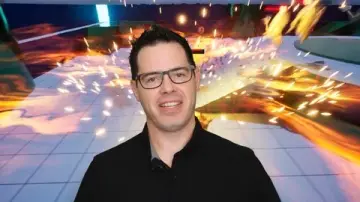
Instructed by James Roha, the beginner-level course carries a total workload of 1 hour and 40 minutes. Published on August 12, 2024, the instruction is organized into a modular framework structured as follows:
About this Course
Part 1
Part 2
Part 3
Part X
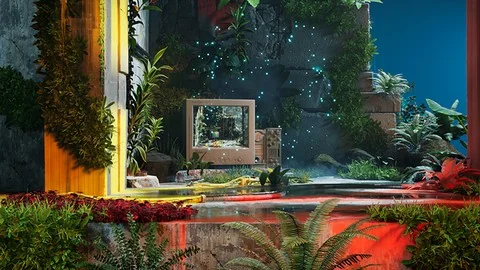
The progression moves from initial orientation directly into execution. Across the sequential segments, students work toward a concrete deliverable: constructing and completing an original sample 3D scene inside Unreal Engine 5. Rather than examining theory in isolation, the curriculum drives toward a finished spatial project that validates an artist's ability to locate resources, balance technical needs, and output a resolved real-time environment.
 Unreal Engine
 Unreal Engine
 Unreal Engine
 Unreal Engine