"7066dd76da796369"{"id":"1001160","slug":"operating-system-simulator-plugin","title":"Operating System Simulator Plugin","category":"Game Mechanics","engine":"5.3","assetVersion":"Asset Version: 3.0.1","engineVersion":"Engine Version: 5.3","tag":"Game Mechanics","accent":"blue","visual":"mech","summary":"Simulate desktop and mobile operating systems with Blueprints, C++, native apps, CCTV feeds, and experimental viewport windows inside Unreal Engine.","platform":"Unreal Engine","publishedAt":"2026-09-11T02:34:11.844Z","updatedAt":"2026-09-11T02:34:11.844Z","sourceNotes":[],"fileContents":[],"compatibility":["Unreal Engine","Asset Version: 3.0.1","Engine Version: 5.3"],"featuredImage":{"alt":"Operating System Simulator Plugin","src":"/wp-content/uploads/published/2026/09/48fe9cde20fd-61677092-f2be-4ddb-b637-8db0cfdb0db7-e8b15e2036.webp"},"hasDownloadLink":true,"downloads":0,"terms":[{"taxonomy":"category","slug":"game-mechanics-tools-and-plugins","name":"Game Mechanics"}],"galleryImages":[{"src":"/wp-content/uploads/published/2026/09/7689845d5cfb-b21399c9-9592-436e-9c40-f7910897e648-bccfc4f24c.webp","alt":"Operating System Simulator Plugin"},{"src":"/wp-content/uploads/published/2026/09/ef0129117130-414f64f5-85c2-44dc-a9cd-8953887c1fc7-2b07c7d92a.webp","alt":"Operating System Simulator Plugin"},{"src":"/wp-content/uploads/published/2026/09/db1d04c63044-d6747ce8-f6bb-46ca-8230-f1c5763ce1f0-0bf7e925d6.webp","alt":"Operating System Simulator Plugin"},{"src":"/wp-content/uploads/published/2026/09/7e614658bc2a-373fdbe5-6a1b-4373-b298-1383a502b901-6803e26703.webp","alt":"Operating System Simulator Plugin"},{"src":"/wp-content/uploads/published/2026/09/d05f45138404-61ffcf51-e26d-4f86-a929-a23dde373171-9ecb6f321b.webp","alt":"Operating System Simulator Plugin"},{"src":"/wp-content/uploads/published/2026/09/94d578f77805-894f3110-cff8-4c3f-a01f-69f8a8f845ec-110b42421a.webp","alt":"Operating System Simulator Plugin"},{"src":"/wp-content/uploads/published/2026/09/d9ca19e72028-45e2b63a-8746-4411-9e48-ca5c5c5677fd-c052b45af4.webp","alt":"Operating System Simulator Plugin"},{"src":"/wp-content/uploads/published/2026/09/960656cfb035-7f80d783-7133-48db-94f1-6363fde82753-f1ef5070e9.webp","alt":"Operating System Simulator Plugin"},{"src":"/wp-content/uploads/published/2026/09/38da544f6910-6304e8f0-9af6-4fa7-92bb-d96f257cd067-abffe2ed70.webp","alt":"Operating System Simulator Plugin"},{"src":"/wp-content/uploads/published/2026/09/713bd18c82ca-8eb3ad9f-7f54-4132-9ffa-57634d698990-82859bfb7b.webp","alt":"Operating System Simulator Plugin"}],"accessPanel":{"kind":"resource","title":"Download this resource","eyebrow":"Free Download","message":"Log in or create a free account to start your download.","fileName":"v3.0.1.7z","safetyNote":"Resources are manually reviewed before listing to improve quality and reduce obvious risks.","actionLabel":"Download Free","resourceType":"Resource archive"},"contentHtml":"\u003ch2\u003eSimulating Modern Devices Across Cyberpunk, Industrial, and Scifi Settings\u003c/h2\u003e\u003cp\u003eModern game environments and training simulations frequently rely on digital terminals to deliver narrative clues, control security infrastructure, or replicate real-world workflows. From industrial control rooms and military command centers to gritty cyberpunk hideouts and everyday contemporary offices, interactive screens provide an immediate sense of immersion. The Operating System Simulator Plugin v3.x addresses this need by providing a full operating system simulation directly inside Unreal Engine, removing the requirement to stitch together disparate UI screens for interactive electronic props.\u003c/p\u003e\u003cp\u003eInstead of relying on static mockups or passive display textures, the framework replicates authentic operating environments across various hardware form factors. Developers can target stationary desktop setups, portable laptops, handheld tablets, and mobile smartphones. The system also supports portable devices that run on battery logic, allowing gameplay mechanics to incorporate power depletion, recharging cycles, or emergency shutdown states. The resulting interfaces operate through UMG, providing native compatibility with standard Web Browser widgets for expanded interface tasks.\u003c/p\u003e\u003ch2\u003eModular Architecture and Custom Commands in Blueprints and C++\u003c/h2\u003e\u003cp\u003eAt the foundation of the simulation lies a modular system structured to allow custom tool development. Rather than locking developers into a closed set of predetermined actions, the plugin exposes an architecture where custom commands, programs, and peripheral behaviors can be built using either visual scripting or native code.\u003c/p\u003e\u003cp\u003eDevelopers working in Blueprints can map interactive logic to user input lines, bind events to software launches, and dictate device responses without modifying engine source code. Teams operating in C++ can extend the baseline systems to establish complex data pipelines, simulated network transactions, or custom script interpreters. This level of extensibility enables projects to model domain-specific procedures, such as custom command-line utilities for academic coursework or bespoke diagnostic tools for narrative puzzles.\u003c/p\u003e\u003cp\u003eBecause the underlying command system accepts user-authored entries, interactive terminals are not limited to fixed decision trees. Players or trainees can type commands manually into a console, test simulated execution responses, and navigate directory structures in real time.\u003c/p\u003e\u003ch2\u003eBuilt-In Application Suite: From File Explorer and Terminal to CCTV Feeds\u003c/h2\u003e\u003cp\u003eOut of the box, the plugin includes a diverse suite of standard desktop software, reducing the setup required to produce a believable digital workspace. Standard utility applications include a functional file explorer for browsing simulated disk drives, an audio and video player for multimedia playback, an email client, a digital store, and a banking interface.\u003c/p\u003e\u003cp\u003eThese included applications serve as functional templates or ready-to-use mechanics for narrative and mechanical progression:\u003c/p\u003e\u003cul\u003e\u003cli\u003e\u003cstrong\u003eTerminal and Code Execution:\u003c/strong\u003e Provides a command prompt interface for scripting, running custom commands, and handling terminal-based navigation.\u003c/li\u003e\u003cli\u003e\u003cstrong\u003eFile Explorer:\u003c/strong\u003e Organizes simulated files and folders, allowing users to uncover documents, inspect multimedia assets, or manipulate files as part of a mission objective.\u003c/li\u003e\u003cli\u003e\u003cstrong\u003eCommunication and Commerce:\u003c/strong\u003e Built-in mail, banking, and store applications facilitate mission delivery, resource buying, and account balance management directly within the UI.\u003c/li\u003e\u003cli\u003e\u003cstrong\u003eSecurity and Camera Monitoring:\u003c/strong\u003e Integrated CCTV functionality turns the simulated OS into a surveillance station, allowing users to monitor camera feeds across a compound or secure facility.\u003c/li\u003e\u003cli\u003e\u003cstrong\u003eDrone Integration:\u003c/strong\u003e Additional support for direct drone control functionality expands the system from passive observation to remote aerial operation.\u003c/li\u003e\u003c/ul\u003e\u003ch2\u003eExperimental Viewport Widgets and the World-Within-a-World Feature\u003c/h2\u003e\u003cp\u003eBeyond traditional 2D application interfaces, the plugin includes an experimental system designed to render playable levels inside a draggable operating system window. This world-within-a-world configuration uses Viewport Widgets to display a live, playable environment inside the active desktop layer.\u003c/p\u003e\u003cp\u003eThis setup allows an operator to control an in-game avatar or scene element through a windowed software display while remaining situated within the parent user interface. A player might operate a remote robotic crawler, view a simulation branch, or test an isolated level block without transitioning across screen-space loading screens. Because Unreal Engine does not natively support nested world logic out of the box, the plugin’s Viewport Widget functionality is categorized strictly as an experimental feature without standard engine-level technical support, offering a specialized sandbox for developers looking to push nested rendering limits.\u003c/p\u003e\u003ch2\u003eEducational Simulation and Diegetic In-Game Objectives\u003c/h2\u003e\u003cp\u003eThe versatility of an operating system simulator spans multiple practical disciplines, ranging from formal education to complex narrative design. In academic and training contexts, the plugin provides a safe, contained environment where students can learn core operating system behaviors, interact with terminal structures, and experiment with software workflows without risking system-level damage to host hardware.\u003c/p\u003e\u003cp\u003eIn commercial game production, the simulator bridges the gap between passive story delivery and active problem solving. A terminal can function as a core gameplay objective where players search a corporate workstation's email records for security passwords, manage account balances through a banking app, or switch between industrial CCTV camera feeds to bypass patrols. Alternatively, the plugin can be deployed as a hidden easter egg, providing players with miniature games, text-based software, or fully interactive computers tucked away within an otherwise conventional environment.\u003c/p\u003e\n\n\u003ch2\u003eMore From The Same Workflow\u003c/h2\u003e\n\u003cul\u003e\n\u003cli\u003e\u003ca href=\"https://3dcghub.com/advanced-hover-vehicle-system/\" title=\"Advanced Hover Vehicle System\"\u003eAdvanced Hover Vehicle System\u003c/a\u003e\u003c/li\u003e\n\u003cli\u003e\u003ca href=\"https://3dcghub.com/smart-shooting-npc-and-player-projectile-target-prediction-and-ballistic-system/\" title=\"Smart Shooting - NPC \u0026amp; Player Projectile Target Prediction \u0026amp; Ballistic System\"\u003eSmart Shooting - NPC \u0026amp; Player Projectile Target Prediction \u0026amp; Ballistic System\u003c/a\u003e\u003c/li\u003e\n\u003cli\u003e\u003ca href=\"https://3dcghub.com/bacon-combo-graph/\" title=\"Bacon Combo Graph\"\u003eBacon Combo Graph\u003c/a\u003e\u003c/li\u003e\n\u003cli\u003e\u003ca href=\"https://3dcghub.com/acf-u-ascent-combat-framework-ultimate-v4-c-complete-action-rpg-creator/\" title=\"(ACF U) Ascent Combat Framework Ultimate V4- C++ Complete Action RPG Creator\"\u003e(ACF U) Ascent Combat Framework Ultimate V4- C++ Complete Action RPG Creator\u003c/a\u003e\u003c/li\u003e\n\u003cli\u003e\u003ca href=\"https://3dcghub.com/ninja-input/\" title=\"Ninja Input\"\u003eNinja Input\u003c/a\u003e\u003c/li\u003e\n\u003c/ul\u003e","contentTextLength":6200,"navigation":{"current":981,"total":4016,"previous":{"id":"1001161","slug":"warehouse-abandoned-factory-district","title":"Warehouse - Abandoned Factory District","category":"Industrial","platform":"Unreal Engine","updatedAt":"2026-09-11T09:39:32.707Z"},"next":{"id":"1001159","slug":"unreal-engine-5-scenebuilding-crash-course-2","title":"Unreal Engine 5 Scenebuilding Crash Course","category":"Unreal Engine","platform":"Unreal Engine","updatedAt":"2026-09-11T02:22:26.965Z"}},"relatedResources":[{"id":"1001903","slug":"omniwalk-planetary-antigravity-magne-boots-hovercraft-traversal-system","title":"OmniWalk: Planetary AntiGravity, Magne-Boots, Hovercraft Traversal System","category":"Game Mechanics","engine":"5.7","assetVersion":"Asset Version: 1.0.0","engineVersion":"Engine Version: 5.7","tag":"Game Mechanics","accent":"blue","visual":"mech","summary":"Explore OmniWalk 0.7.1 for Unreal Engine 5.5+, a C++ locomotion system delivering planetary gravity, magnetic boots, camera stabilization, and setup tooling.","platform":"Unreal Engine","publishedAt":"2026-10-22T11:41:48.786Z","updatedAt":"2026-10-22T11:41:48.786Z","sourceNotes":[],"fileContents":[],"compatibility":["Unreal Engine","Asset Version: 1.0.0","Engine Version: 5.7"],"featuredImage":{"alt":"OmniWalk: Planetary AntiGravity, Magne-Boots, Hovercraft Traversal System","src":"/wp-content/uploads/published/2026/10/3ace24704c09-b4804de5-4f26-4e36-afb4-67b2f0906089-aa87605ead.webp"},"hasDownloadLink":true,"downloads":1},{"id":"1001549","slug":"rts-rpg-unit-template-massai-multiplayer-gameplay-ability-system","title":"RTS/RPG Unit Template - MassAI - Multiplayer - Gameplay Ability System","category":"Game Mechanics","engine":"5.5","assetVersion":"Asset Version: 5.0.1","engineVersion":"Engine Version: 5.5","tag":"Game Mechanics","accent":"blue","visual":"mech","summary":"Explore the RTSUnitTemplate framework for Unreal Engine 5.7+, pairing MassAI, Character classes, GAS attributes, and responsive multiplayer replication.","platform":"Unreal Engine","publishedAt":"2026-10-10T03:11:48.672Z","updatedAt":"2026-10-10T03:11:48.672Z","sourceNotes":[],"fileContents":[],"compatibility":["Unreal Engine","Asset Version: 5.0.1","Engine Version: 5.5"],"featuredImage":{"alt":"RTS/RPG Unit Template - MassAI - Multiplayer - Gameplay Ability System","src":"/wp-content/uploads/published/2026/10/2c9885371932-8a9e3208-607e-4e16-a97e-3d31e7e9c132-917c5503ec.webp"},"hasDownloadLink":true,"downloads":0},{"id":"1001521","slug":"interactive-foliage-and-vegetation-system","title":"Interactive Foliage and Vegetation System","category":"Game Mechanics","engine":"5.4","assetVersion":"Asset Version: 1.0.0","engineVersion":"Engine Version: 5.4","tag":"Game Mechanics","accent":"blue","visual":"mech","summary":"Examine the Interactive Foliage and Vegetation System, exploring its C++ architecture, skeletal mesh physics, shader displacement, and PCG limits.","platform":"Unreal Engine","publishedAt":"2026-10-09T13:33:45.442Z","updatedAt":"2026-10-09T13:33:45.442Z","sourceNotes":[],"fileContents":[],"compatibility":["Unreal Engine","Asset Version: 1.0.0","Engine Version: 5.4"],"featuredImage":{"alt":"Interactive Foliage and Vegetation System","src":"/wp-content/uploads/published/2026/10/bb775a3c739a-57db783a-4718-4b1b-9c19-526bd2dd4808-38a2876edf.webp"},"hasDownloadLink":true,"downloads":0}]}
Game Mechanics
Operating System Simulator Plugin
Simulate desktop and mobile operating systems with Blueprints, C++, native apps, CCTV feeds, and experimental viewport windows inside Unreal Engine.
Simulating Modern Devices Across Cyberpunk, Industrial, and Scifi Settings
Modern game environments and training simulations frequently rely on digital terminals to deliver narrative clues, control security infrastructure, or replicate real-world workflows. From industrial control rooms and military command centers to gritty cyberpunk hideouts and everyday contemporary offices, interactive screens provide an immediate sense of immersion. The Operating System Simulator Plugin v3.x addresses this need by providing a full operating system simulation directly inside Unreal Engine, removing the requirement to stitch together disparate UI screens for interactive electronic props.
Instead of relying on static mockups or passive display textures, the framework replicates authentic operating environments across various hardware form factors. Developers can target stationary desktop setups, portable laptops, handheld tablets, and mobile smartphones. The system also supports portable devices that run on battery logic, allowing gameplay mechanics to incorporate power depletion, recharging cycles, or emergency shutdown states. The resulting interfaces operate through UMG, providing native compatibility with standard Web Browser widgets for expanded interface tasks.
Modular Architecture and Custom Commands in Blueprints and C++
At the foundation of the simulation lies a modular system structured to allow custom tool development. Rather than locking developers into a closed set of predetermined actions, the plugin exposes an architecture where custom commands, programs, and peripheral behaviors can be built using either visual scripting or native code.
Developers working in Blueprints can map interactive logic to user input lines, bind events to software launches, and dictate device responses without modifying engine source code. Teams operating in C++ can extend the baseline systems to establish complex data pipelines, simulated network transactions, or custom script interpreters. This level of extensibility enables projects to model domain-specific procedures, such as custom command-line utilities for academic coursework or bespoke diagnostic tools for narrative puzzles.
Because the underlying command system accepts user-authored entries, interactive terminals are not limited to fixed decision trees. Players or trainees can type commands manually into a console, test simulated execution responses, and navigate directory structures in real time.
Built-In Application Suite: From File Explorer and Terminal to CCTV Feeds
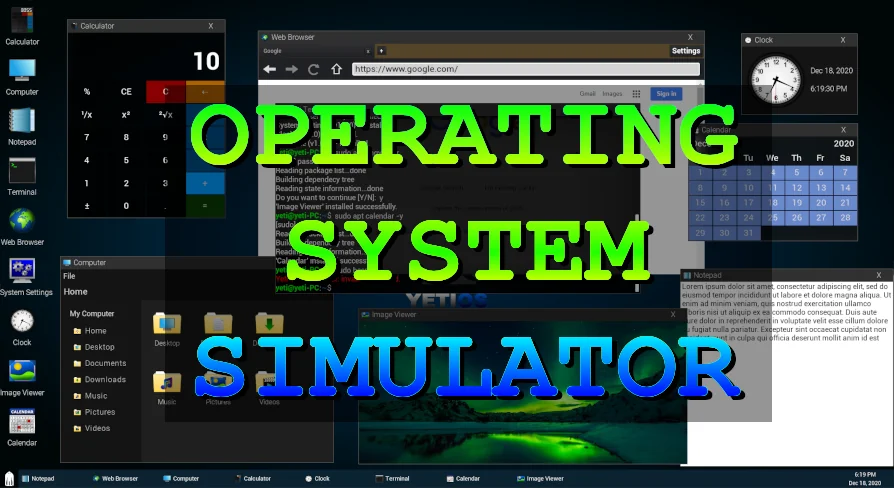
Out of the box, the plugin includes a diverse suite of standard desktop software, reducing the setup required to produce a believable digital workspace. Standard utility applications include a functional file explorer for browsing simulated disk drives, an audio and video player for multimedia playback, an email client, a digital store, and a banking interface.
These included applications serve as functional templates or ready-to-use mechanics for narrative and mechanical progression:
Terminal and Code Execution: Provides a command prompt interface for scripting, running custom commands, and handling terminal-based navigation.
File Explorer: Organizes simulated files and folders, allowing users to uncover documents, inspect multimedia assets, or manipulate files as part of a mission objective.
Communication and Commerce: Built-in mail, banking, and store applications facilitate mission delivery, resource buying, and account balance management directly within the UI.
Security and Camera Monitoring: Integrated CCTV functionality turns the simulated OS into a surveillance station, allowing users to monitor camera feeds across a compound or secure facility.
Drone Integration: Additional support for direct drone control functionality expands the system from passive observation to remote aerial operation.
Experimental Viewport Widgets and the World-Within-a-World Feature
Beyond traditional 2D application interfaces, the plugin includes an experimental system designed to render playable levels inside a draggable operating system window. This world-within-a-world configuration uses Viewport Widgets to display a live, playable environment inside the active desktop layer.
This setup allows an operator to control an in-game avatar or scene element through a windowed software display while remaining situated within the parent user interface. A player might operate a remote robotic crawler, view a simulation branch, or test an isolated level block without transitioning across screen-space loading screens. Because Unreal Engine does not natively support nested world logic out of the box, the plugin’s Viewport Widget functionality is categorized strictly as an experimental feature without standard engine-level technical support, offering a specialized sandbox for developers looking to push nested rendering limits.
Educational Simulation and Diegetic In-Game Objectives
The versatility of an operating system simulator spans multiple practical disciplines, ranging from formal education to complex narrative design. In academic and training contexts, the plugin provides a safe, contained environment where students can learn core operating system behaviors, interact with terminal structures, and experiment with software workflows without risking system-level damage to host hardware.
In commercial game production, the simulator bridges the gap between passive story delivery and active problem solving. A terminal can function as a core gameplay objective where players search a corporate workstation's email records for security passwords, manage account balances through a banking app, or switch between industrial CCTV camera feeds to bypass patrols. Alternatively, the plugin can be deployed as a hidden easter egg, providing players with miniature games, text-based software, or fully interactive computers tucked away within an otherwise conventional environment.
 Game Mechanics
 Game Mechanics
 Game Mechanics
 Game Mechanics