"7066dd76da796369"{"id":"14889","slug":"ninja-input","title":"Ninja Input","category":"Game Mechanics","engine":"5.5 - 5.7","assetVersion":"Engine version: 5.5 - 5.7","engineVersion":"Asset Version:5.6.14","tag":"Game Mechanics","accent":"blue","visual":"character","summary":"Ninja Input provides a modular and extensible framework for managing player input in Unreal Engine. It features deep GAS integration, a reusable handler library, and runtime remapping for professional projects.","platform":"Unreal Engine","publishedAt":"2026-03-11T19:55:22.000Z","updatedAt":"2026-04-19T15:45:39.000Z","sourceNotes":[],"fileContents":[],"compatibility":["Unreal Engine","Engine version: 5.5 - 5.7","Asset Version: 5.6.14"],"featuredImage":{"alt":"Ninja Input","src":"https://3dcghub.com/wp-content/uploads/2026/03/8af37d00-2645-4464-9a1d-441a01d88ea7.webp"},"hasDownloadLink":true,"downloads":1,"terms":[{"taxonomy":"category","slug":"game-mechanics-tools-and-plugins","name":"Game Mechanics"},{"taxonomy":"post_tag","slug":"animation","name":"Animation"},{"taxonomy":"post_tag","slug":"characters","name":"Characters"},{"taxonomy":"post_tag","slug":"game-systems","name":"Game Systems"},{"taxonomy":"post_tag","slug":"plugins","name":"Plugins"},{"taxonomy":"post_tag","slug":"tools","name":"Tools"},{"taxonomy":"post_tag","slug":"unreal-engine-5","name":"Unreal Engine 5"}],"galleryImages":[{"src":"https://3dcghub.com/wp-content/uploads/2026/03/fba65f985e47_03cc8716-9bdb-4d75-a1e4-b555440de07b.webp","alt":"Ninja Input"},{"src":"https://3dcghub.com/wp-content/uploads/2026/03/6236b263c6d9_23d44ddd-6479-4e16-b641-58937c3a6ca2.webp","alt":"Ninja Input"},{"src":"https://3dcghub.com/wp-content/uploads/2026/03/7ca65430c462_c297ec5f-45f4-4850-bc28-0d93d31b0f9a.webp","alt":"Ninja Input"},{"src":"https://3dcghub.com/wp-content/uploads/2026/03/724459c40909_1dcfbf0b-ec38-460c-8f59-ca4ccac8c8b1.webp","alt":"Ninja Input"},{"src":"https://3dcghub.com/wp-content/uploads/2026/03/bc51700e5ae8_a3d49c7f-f6c3-4a6d-82dd-cdf5532fe08f.webp","alt":"Ninja Input"},{"src":"https://3dcghub.com/wp-content/uploads/2026/03/9b7a0cfafdb9_086ac60c-b3a5-4a03-991d-f890d927e24a.webp","alt":"Ninja Input"}],"accessPanel":{"kind":"resource","title":"Access this resource","eyebrow":"Free Download","message":"Log in or create a free account to start your download.","fileName":"Ninja Input 5.5 - 5.7,v5.6.14.7z","safetyNote":"All resources are 100% manually reviewed to eliminate all risks.","actionLabel":"Download Free","resourceType":"Resource archive"},"contentHtml":"\u003ch2\u003eStreamlined Input Management\u003c/h2\u003e\u003cp\u003eNinja Input provides a modular framework built on Unreal Engine’s Enhanced Input System. For nearly three years, this tool has powered production projects and real games. Consequently, developers gain access to a stable, battle-tested system that evolves through continuous updates. Furthermore, the plugin separates orchestration from Character classes to ensure clean and modular code.\u003c/p\u003e\u003cp\u003eUnlike ad-hoc solutions tied directly to a Character or Pawn, this system separates concerns effectively. It provides a dedicated Input Manager and a comprehensive library of reusable handlers. Therefore, you can focus on core gameplay without reinventing the wheel. Moreover, the architecture ensures your input code remains highly extensible for any project type.\u003c/p\u003e\u003ch2\u003eKey Features of Ninja Input\u003c/h2\u003e\u003cp\u003eNinja Input offers a centralized Input Manager that handles the lifecycles of various input contexts. This manager installs and uninstalls contexts while dispatching handlers to the appropriate targets. Consequently, your Character classes remain clean and free from complex input orchestration logic. Specifically, the system includes dozens of ready-made handlers for movement, toggles, and gameplay events.\u003c/p\u003e\u003cp\u003eDevelopers can extend these handlers using either Blueprints or C++. This flexibility supports custom patterns for unique gameplay requirements. Additionally, the library provides ready-to-use input handlers for the Ninja Combat system. This makes it an ideal choice for teams already utilizing the creator's other gameplay frameworks.\u003c/p\u003e\u003ch3\u003eDeep Integration with GAS\u003c/h3\u003e\u003cp\u003eThis plugin is deeply integrated with the Gameplay Ability System (GAS). You can bind inputs directly to ability activations, cancels, and targeting with minimal effort. Therefore, it serves as a perfect companion for GAS-driven projects. It is built to work seamlessly with GAS out of the box, reducing the need for custom glue code. Similarly, it integrates perfectly for teams already using Ninja GAS.\u003c/p\u003e\u003ch3\u003eAdvanced Handling and Buffering\u003c/h3\u003e\u003cp\u003eNinja Input includes a robust input remapping workflow that supports runtime changes. This feature includes ViewModels for UI and persistence through the Enhanced Input system. Consequently, players can have full control over their preferred bindings. Furthermore, the animation-based input buffer ensures that no actions are lost during transitions.\u003c/p\u003e\u003cp\u003eActions are buffered within montage windows or notifies and trigger precisely when they become valid. This ensures a responsive feel for high-action games. Additionally, the system supports user settings like sensitivity and inverted axes. These per-player preferences are tied to a settings object through matching Input Modifiers.\u003c/p\u003e\u003ch2\u003eEditor Integration and Support\u003c/h2\u003e\u003cp\u003eThe creator has included deep editor integration to streamline the development process. You can access Project Settings and contextual asset menus directly inside the Unreal Engine Editor. This setup simplifies the initial configuration and ongoing management of input assets. Moreover, the system has been tested across multiple engine versions to ensure long-term compatibility.\u003c/p\u003e\u003cp\u003eNinja Input is actively maintained with new features and refinements. The developer provides a thorough documentation site covering every important aspect of the plugin. This ensures that teams can implement the system quickly and efficiently. Ultimately, it offers a professional-grade solution for modern game input requirements.\u003c/p\u003e\u003ch2\u003eClosing Notes\u003c/h2\u003e\u003cp\u003eNinja Input stands out as a reliable and modular solution for Unreal Engine developers. By separating input logic from character classes, it promotes a cleaner and more maintainable codebase. Whether you are building a GAS-based project or a standard action game, this tool provides the necessary infrastructure. Its proven track record in production environments makes it a valuable asset for any developer.\u003c/p\u003e\n\n\u003ch2\u003eExplore Similar Assets\u003c/h2\u003e\n\u003cul\u003e\n\u003cli\u003e\u003ca href=\"https://3dcghub.com/extile-plus-ultimate-non-tiling-material-toolkit-for-unreal-engine-environments/\" title=\"EXTILE PLUS -Ultimate Non-Tiling Material Toolkit for Unreal Engine Environments\"\u003eEXTILE PLUS -Ultimate Non-Tiling Material Toolkit for Unreal Engine Environments\u003c/a\u003e\u003c/li\u003e\n\u003cli\u003e\u003ca href=\"https://3dcghub.com/ultimate-template-unrealengine-2d-dialogue-inventory-system-save/\" title=\"ULTIMATE Template UnrealEngine || 2D + Dialogue + Inventory system + Save | |\"\u003eULTIMATE Template UnrealEngine || 2D + Dialogue + Inventory system + Save | |\u003c/a\u003e\u003c/li\u003e\n\u003cli\u003e\u003ca href=\"https://3dcghub.com/zxing-for-unreal/\" title=\"ZXing For Unreal\"\u003eZXing For Unreal\u003c/a\u003e\u003c/li\u003e\n\u003cli\u003e\u003ca href=\"https://3dcghub.com/daz-to-unreal/\" title=\"Daz To Unreal\"\u003eDaz To Unreal\u003c/a\u003e\u003c/li\u003e\n\u003cli\u003e\u003ca href=\"https://3dcghub.com/blueprint-generator-ai-kibibyte-labs-engine-assistant/\" title=\"Blueprint Generator Ai – Kibibyte Labs (Engine Assistant)\"\u003eBlueprint Generator Ai – Kibibyte Labs (Engine Assistant)\u003c/a\u003e\u003c/li\u003e\n\u003c/ul\u003e","contentTextLength":4175,"navigation":{"current":3414,"total":4016,"previous":{"id":"14777","slug":"voxel-plugin-pro-legacy","title":"Voxel Plugin Pro Legacy","category":"Engine Tools","platform":"Unreal Engine","updatedAt":"2026-04-19T15:45:40.000Z"},"next":{"id":"14880","slug":"formation-system-v2","title":"Formation System v2","category":"Game Mechanics","platform":"Unreal Engine","updatedAt":"2026-04-19T15:45:39.000Z"}},"relatedResources":[{"id":"14896","slug":"npc-eyes-sight-system-pro-accurate-npc-vision-with-light-shadow-body-points","title":"NPC Eyes Sight System PRO – Accurate NPC Vision with Light, Shadow, Body Points","category":"Game Mechanics","engine":"5.5 - 5.7","assetVersion":"Engine version: 5.5 - 5.7","engineVersion":"Asset Version:1.35","tag":"Game Mechanics","accent":"blue","visual":"city","summary":"Enhance your game's AI with the NPC Eyes Sight System PRO. This tool provides realistic vision detection based on light, shadows, and specific body points for immersive gameplay.","platform":"Unreal Engine","publishedAt":"2026-03-11T19:59:40.000Z","updatedAt":"2026-04-19T15:45:38.000Z","sourceNotes":[],"fileContents":[],"compatibility":["Unreal Engine","Engine version: 5.5 - 5.7","Asset Version: 1.35"],"featuredImage":{"alt":"NPC Eyes Sight System PRO – Accurate NPC Vision with Light, Shadow, Body Points","src":"https://3dcghub.com/wp-content/uploads/2026/03/4c9b5e8f-e7c4-4881-9f39-32d39055487e.webp"},"hasDownloadLink":true,"downloads":1},{"id":"14880","slug":"formation-system-v2","title":"Formation System v2","category":"Game Mechanics","engine":"5.3","assetVersion":"Engine version: 5.3","engineVersion":"Asset Version:2.0","tag":"Game Mechanics","accent":"blue","visual":"audio","summary":"Organize your AI characters with Formation System v2. This Unreal Engine tool supports multiplayer, RTS-style movements, and customizable formation spreads.","platform":"Unreal Engine","publishedAt":"2026-03-11T19:56:18.000Z","updatedAt":"2026-04-19T15:45:39.000Z","sourceNotes":[],"fileContents":[],"compatibility":["Unreal Engine","Engine version: 5.3","Asset Version: 2.0"],"featuredImage":{"alt":"Formation System v2","src":"https://3dcghub.com/wp-content/uploads/2026/03/154c81e9-0147-495e-8723-a32ce680f854.webp"},"hasDownloadLink":true,"downloads":0},{"id":"14866","slug":"engore-procedural-dismemberment","title":"EnGore: Procedural Dismemberment","category":"Game Mechanics","engine":"4.27,5.0 - 5.3","assetVersion":"Engine version: 4.27,5.0 - 5.3","engineVersion":"4.27","tag":"Game Mechanics","accent":"blue","visual":"mech","summary":"EnGore: Procedural Dismemberment is a high-performance C++ plugin designed for dynamic skeletal mesh destruction. It eliminates the need for baked meshes while offering highly customizable gore and blood effects.","platform":"Unreal Engine","publishedAt":"2026-03-11T19:54:46.000Z","updatedAt":"2026-04-19T15:45:39.000Z","sourceNotes":[],"fileContents":[],"compatibility":["Unreal Engine","Engine version: 4.27,5.0 - 5.3"],"featuredImage":{"alt":"EnGore: Procedural Dismemberment","src":"https://3dcghub.com/wp-content/uploads/2026/03/3524900f-fc0b-4c67-9fa4-be82c2e8451b.webp"},"hasDownloadLink":true,"downloads":1}]}
Game Mechanics
Ninja Input
Ninja Input provides a modular and extensible framework for managing player input in Unreal Engine. It features deep GAS integration, a reusable handler library, and runtime remapping for professional projects.
Ninja Input provides a modular framework built on Unreal Engine’s Enhanced Input System. For nearly three years, this tool has powered production projects and real games. Consequently, developers gain access to a stable, battle-tested system that evolves through continuous updates. Furthermore, the plugin separates orchestration from Character classes to ensure clean and modular code.
Unlike ad-hoc solutions tied directly to a Character or Pawn, this system separates concerns effectively. It provides a dedicated Input Manager and a comprehensive library of reusable handlers. Therefore, you can focus on core gameplay without reinventing the wheel. Moreover, the architecture ensures your input code remains highly extensible for any project type.
Key Features of Ninja Input
Ninja Input offers a centralized Input Manager that handles the lifecycles of various input contexts. This manager installs and uninstalls contexts while dispatching handlers to the appropriate targets. Consequently, your Character classes remain clean and free from complex input orchestration logic. Specifically, the system includes dozens of ready-made handlers for movement, toggles, and gameplay events.
Developers can extend these handlers using either Blueprints or C++. This flexibility supports custom patterns for unique gameplay requirements. Additionally, the library provides ready-to-use input handlers for the Ninja Combat system. This makes it an ideal choice for teams already utilizing the creator's other gameplay frameworks.
Deep Integration with GAS
This plugin is deeply integrated with the Gameplay Ability System (GAS). You can bind inputs directly to ability activations, cancels, and targeting with minimal effort. Therefore, it serves as a perfect companion for GAS-driven projects. It is built to work seamlessly with GAS out of the box, reducing the need for custom glue code. Similarly, it integrates perfectly for teams already using Ninja GAS.
Advanced Handling and Buffering
Ninja Input includes a robust input remapping workflow that supports runtime changes. This feature includes ViewModels for UI and persistence through the Enhanced Input system. Consequently, players can have full control over their preferred bindings. Furthermore, the animation-based input buffer ensures that no actions are lost during transitions.
Actions are buffered within montage windows or notifies and trigger precisely when they become valid. This ensures a responsive feel for high-action games. Additionally, the system supports user settings like sensitivity and inverted axes. These per-player preferences are tied to a settings object through matching Input Modifiers.
Editor Integration and Support
The creator has included deep editor integration to streamline the development process. You can access Project Settings and contextual asset menus directly inside the Unreal Engine Editor. This setup simplifies the initial configuration and ongoing management of input assets. Moreover, the system has been tested across multiple engine versions to ensure long-term compatibility.
Ninja Input is actively maintained with new features and refinements. The developer provides a thorough documentation site covering every important aspect of the plugin. This ensures that teams can implement the system quickly and efficiently. Ultimately, it offers a professional-grade solution for modern game input requirements.
Closing Notes
Ninja Input stands out as a reliable and modular solution for Unreal Engine developers. By separating input logic from character classes, it promotes a cleaner and more maintainable codebase. Whether you are building a GAS-based project or a standard action game, this tool provides the necessary infrastructure. Its proven track record in production environments makes it a valuable asset for any developer.
 Game Mechanics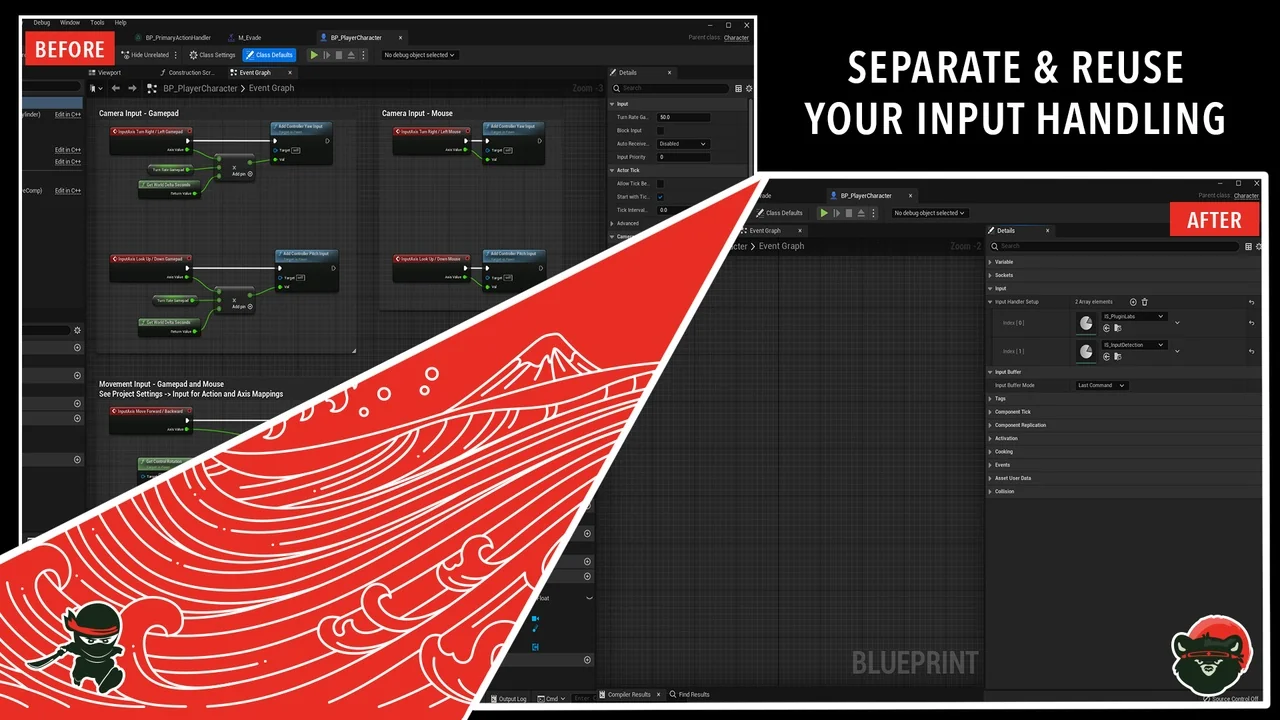
 Game Mechanics
 Game Mechanics
 Game Mechanics