"c14ff6bd758dadb1"{"id":"1000564","slug":"bacon-combo-graph","title":"Bacon Combo Graph","category":"Game Mechanics","engine":"5.6","assetVersion":"Asset Version: 1.1.3","engineVersion":"Engine Version: 5.6","tag":"Game Mechanics","accent":"blue","visual":"mech","summary":"Unreal Engine 5.4+ plugin for building animation-driven combat systems with a graph-based combo editor, native GAS support, hitboxes, and multiplayer.","platform":"Unreal Engine","publishedAt":"2026-07-16T05:12:09.313Z","updatedAt":"2026-07-16T05:12:09.313Z","sourceNotes":[],"fileContents":[],"compatibility":["Unreal Engine","Asset Version: 1.1.3","Engine Version: 5.6"],"featuredImage":{"alt":"Bacon Combo Graph","src":"/wp-content/uploads/published/2026/07/9646d4d546ed-2c516278-31f8-44fe-9b3a-405f33305fde-22655ed477.webp"},"hasDownloadLink":true,"downloads":0,"terms":[{"taxonomy":"category","slug":"game-mechanics-tools-and-plugins","name":"Game Mechanics"}],"galleryImages":[{"src":"/wp-content/uploads/published/2026/07/0b8d38cc1074-84d0f440-ef42-42a7-a163-d5c107c92ae6-d141f8a905.webp","alt":"Bacon Combo Graph"},{"src":"/wp-content/uploads/published/2026/07/9aa9c062bbe4-656c8fdc-a948-46ca-970f-afc4696fce40-db8594c19e.webp","alt":"Bacon Combo Graph"},{"src":"/wp-content/uploads/published/2026/07/c1a1e5a3c996-55ebd28d-5c7b-4ca0-975c-9aac8f1c08da-828cba95ee.webp","alt":"Bacon Combo Graph"},{"src":"/wp-content/uploads/published/2026/07/147eac9b1776-57a6da40-bc34-4698-b2f9-c655e855dff1-937051be17.webp","alt":"Bacon Combo Graph"}],"accessPanel":{"kind":"resource","title":"Download this resource","eyebrow":"Free Download","message":"Log in or create a free account to start your download.","fileName":"5.6,v1.1.3.7z","safetyNote":"Resources are manually reviewed before listing to improve quality and reduce obvious risks.","actionLabel":"Download Free","resourceType":"Resource archive"},"contentHtml":"\u003cp\u003eMelee combat in games like Souls-likes, beat 'em ups, and hack-and-slash titles lives or dies by how cleanly animation connects to gameplay logic. Attack windows need precise timing, hitboxes must sync with montage frames, and combo branches have to respond to player input without forcing a programmer to hand-wire every transition. Bacon Combo Graph is an Unreal Engine plugin built specifically for that intersection — a graph-based combo system that handles animation callbacks, hit detection, and input routing inside a single visual editor.\u003c/p\u003e \u003ch2\u003eWhere Bacon Combo Graph fits in production\u003c/h2\u003e \u003cp\u003eThe plugin targets Unreal 5.4 and onward. Lower engine versions can be made to function, but the developer notes that doing so requires manual fixes and comes with functional limitations. This makes the tool straightforward for teams already on UE5.4 or above, while projects still on earlier builds should expect to invest time into porting. The plugin has been featured on 80 Level and has received positive community feedback across coverage articles and discussion threads.\u003c/p\u003e \u003cp\u003eStructurally, the plugin depends on two engine-side components: StructUtils, which is a standard engine plugin, and Gameplay Ability System, which is also an engine plugin but listed as optional. GAS integration is native, meaning the combo graph communicates directly with Gameplay Abilities rather than requiring a custom bridge. This matters for projects already using GAS for ability management — the combo system slots into that architecture without a rewrite — and the optional flag means the plugin can still function in projects that have not adopted GAS.\u003c/p\u003e \u003ch2\u003eDesigning combo sequences in a graph-based editor\u003c/h2\u003e \u003cp\u003eBacon Combo Graph replaces the approach of hand-authoring DataAssets to define attack sequences. Instead, work happens inside a custom editor tool where combo chains are laid out as graph nodes. Each node can represent a step in a sequence, and the node set is fully extendable: developers can create custom nodes to match specific game logic rather than bending the system's defaults. The graph handles combo windows, allowing timing gaps between attacks where a follow-up input is still valid. This approach to combo design speeds up iteration since adjustments to a sequence — adding a branch, shifting a window — are visual operations rather than code changes or DataAsset rewrites.\u003c/p\u003e \u003cp\u003eBeyond simple button-mashing chains, the graph supports layered input. Charge attacks and single-click attacks are both handled, and the system is built on Unreal's Enhanced Input System. For a combat designer, this means input modifiers can be tied directly to combo branches: a held button can route into a heavy attack node, a quick tap can chain into a lighter follow-up, and the graph manages which branch executes based on the input received. This is particularly valuable for action games where movement and attack intent need to feed into the same decision tree without manual input polling in Blueprint or C++.\u003c/p\u003e \u003ch3\u003eAnimation and Montage integration with GAS\u003c/h3\u003e \u003cp\u003eThe system is animation-driven at its core. Communication between the Animation system — specifically Montages — and Gameplay Abilities flows through the plugin rather than requiring external linkage. This means the combo graph can listen for montage events, trigger ability activations at precise animation frames, and route hit-relevant data back through GAS. For combat systems where the relationship between what is shown on screen and what is mechanically active must be exact — frame windows for cancels, specific start-up moments, recovery cancellation points — this tight integration reduces the gap between authored animation and authored gameplay.\u003c/p\u003e \u003ch2\u003eHitbox system and pre-made collision shapes\u003c/h2\u003e \u003cp\u003eA combat graph is only useful if it can actually register hits. Bacon Combo Graph includes a hitbox system that provides pre-made collision shapes: box, sphere, capsule, and ring. These shapes can be assigned to attacks within the graph, allowing designers to define volumetric hit areas per attack or per combo step. Rather than building collision logic from scratch or relying on piecemeal Blueprint implementations per weapon, the pre-made shapes give a consistent foundation. Whether a wide ring attack needs a large arc or a thrust needs a narrow capsule, the shape set covers common melee scenarios without requiring custom collision code for each new attack type.\u003c/p\u003e \u003ch2\u003eMultiplayer, player, and AI support\u003c/h2\u003e \u003cp\u003eThe plugin is multiplayer-ready, which is a significant functional concern for any combat system where client-side prediction, server authority, and replication of hit detection all play a role. Rather than leaving networking as an afterthought, Bacon Combo Graph is built to support networked gameplay alongside its combo and hitbox systems. The same graph that defines a player's combo chain can also drive AI behavior — the system supports AI alongside player characters — which means NPC combatants can use the same combat logic as player-controlled characters without a separate path. This unification reduces maintenance: a change to a combo sequence applies across players and AI, and the logic lives in one place.\u003c/p\u003e \u003cp\u003eFor genres where enemy variety and player movesets are both core to the experience — Souls-likes with varied enemy movesets, beat 'em ups where multiple enemy types share attack families, hack-and-slash titles with NPC combatants — this design removes redundant work and keeps the combat implementation consistent across character types.\u003c/p\u003e \u003ch2\u003eWhat the demo covers and what it does not\u003c/h2\u003e \u003cp\u003eThe plugin ships with a demo, but the developer is explicit about what that demo is and is not. It is an out-of-the-box demonstration of the plugin's systems, not a ready-to-deploy game. Buyers will need to integrate the plugin with their own game systems — the demo does not plug into an existing project seamlessly without that integration step. Once integrated, the developer describes creating new combat content as fast and intuitive.\u003c/p\u003e \u003cp\u003eAnimations are not included with the plugin. The demo itself uses \u0026#8220;RamsterZ Free Anims Volume 1\u0026#8221; for its animation set. Developers using Bacon Combo Graph will need to supply their own animation assets or obtain packs that suit their project's visual style. The plugin's value lies in the combat logic layer — the graph, the hitbox routing, the input handling, the GAS communication — not in animation content.\u003c/p\u003e \u003ch2\u003eActive development and scope expectations\u003c/h2\u003e \u003cp\u003eBacon Combo Graph is under active development, with more updates planned. The developer maintains a Discord server for bug reports and feedback, and video documentation is available including a plugin trailer, a plugin overview video, and tutorial videos. Text-based tutorials and a changelog are also provided alongside documentation.\u003c/p\u003e \u003cp\u003eRequests for features outside the current scope are placed into a backlog for future improvements rather than being immediately addressed. The developer advises reading the Features section carefully before adopting the plugin to confirm it aligns with a project's needs. This is a practical stance: the plugin is a toolset with a defined feature boundary, and extending it beyond that boundary relies on future updates rather than custom requests.\u003c/p\u003e \u003ch2\u003eWho benefits from this tool\u003c/h2\u003e \u003cp\u003eStudios and solo developers working on melee-focused, combo-driven Unreal Engine projects — particularly those in the Souls-like, beat 'em up, and hack-and-slash spaces — are the clearest fit. Teams already using GAS gain the most from native integration, since the combo graph speaks directly to the ability system. Projects targeting multiplayer melee combat benefit from a system built with networked gameplay in mind from the start. Solo developers or small teams without a dedicated combat programmer can use the visual editor to prototype and implement complex combo logic without touching raw code or wrestling with DataAssets.\u003c/p\u003e \u003cp\u003eThe tradeoff is straightforward: the plugin requires Unreal 5.4 or higher, depends on StructUtils, and ships with a demo rather than a full integration. Once those requirements are met and the integration work is done, Bacon Combo Graph provides a graph-based workflow that compresses the time between designing a combo and seeing it function in-engine — with hitboxes, input handling, and multiplayer behavior built into the same system that drives the animation playback.\u003c/p\u003e\n\n\u003ch2\u003eExplore Similar Assets\u003c/h2\u003e\n\u003cul\u003e\n\u003cli\u003e\u003ca href=\"https://3dcghub.com/combo-graph/\" title=\"Combo Graph\"\u003eCombo Graph\u003c/a\u003e\u003c/li\u003e\n\u003cli\u003e\u003ca href=\"https://3dcghub.com/formation-system-v2/\" title=\"Formation System v2\"\u003eFormation System v2\u003c/a\u003e\u003c/li\u003e\n\u003cli\u003e\u003ca href=\"https://3dcghub.com/acf-u-ascent-combat-framework-ultimate-v4-c-complete-action-rpg-creator/\" title=\"(ACF U) Ascent Combat Framework Ultimate V4- C++ Complete Action RPG Creator\"\u003e(ACF U) Ascent Combat Framework Ultimate V4- C++ Complete Action RPG Creator\u003c/a\u003e\u003c/li\u003e\n\u003cli\u003e\u003ca href=\"https://3dcghub.com/ninja-input/\" title=\"Ninja Input\"\u003eNinja Input\u003c/a\u003e\u003c/li\u003e\n\u003cli\u003e\u003ca href=\"https://3dcghub.com/npc-eyes-sight-system-pro-accurate-npc-vision-with-light-shadow-body-points/\" title=\"NPC Eyes Sight System PRO – Accurate NPC Vision with Light, Shadow, Body Points\"\u003eNPC Eyes Sight System PRO – Accurate NPC Vision with Light, Shadow, Body Points\u003c/a\u003e\u003c/li\u003e\n\u003c/ul\u003e","contentTextLength":8593,"navigation":{"current":1299,"total":3719,"previous":{"id":"1000566","slug":"ble-utilities-v2","title":"BLE Utilities V2","category":"Engine Tools","platform":"Unreal Engine","updatedAt":"2026-07-16T05:28:31.784Z"},"next":{"id":"1000563","slug":"assassin-spell-vfx-pack","title":"Assassin Spell VFX Pack","category":"Spells \u0026 Combat","platform":"Unreal Engine","updatedAt":"2026-07-16T05:04:58.240Z"}},"relatedResources":[{"id":"13825","slug":"combo-graph","title":"Combo Graph","category":"Engine Tools","engine":"5.1 - 5.8","assetVersion":"Asset Version:1.4.0 - 1.6.1","engineVersion":"Engine version: 5.1 - 5.8","tag":"Engine Tools","accent":"blue","visual":"luts","summary":"Streamline your combat design with Combo Graph, a GAS-based Unreal Engine plugin. Use its node-based editor to create complex melee strings with multiplayer support and rapid prototyping tools.","platform":"Unreal Engine","publishedAt":"2026-03-11T10:10:59.000Z","updatedAt":"2026-08-24T05:32:39.634Z","sourceNotes":[],"fileContents":[],"compatibility":["Unreal Engine","Asset Version:1.4.0 - 1.6.1","Engine version: 5.1 - 5.8"],"featuredImage":{"alt":"Combo Graph","src":"https://3dcghub.com/wp-content/uploads/2026/03/11f09f07-e4bd-4cc8-9924-40b122bd6f3a.webp"},"hasDownloadLink":true,"downloads":2},{"id":"1001549","slug":"rts-rpg-unit-template-massai-multiplayer-gameplay-ability-system","title":"RTS/RPG Unit Template - MassAI - Multiplayer - Gameplay Ability System","category":"Game Mechanics","engine":"5.5","assetVersion":"Asset Version: 5.0.1","engineVersion":"Engine Version: 5.5","tag":"Game Mechanics","accent":"blue","visual":"mech","summary":"Explore the RTSUnitTemplate framework for Unreal Engine 5.7+, pairing MassAI, Character classes, GAS attributes, and responsive multiplayer replication.","platform":"Unreal Engine","publishedAt":"2026-10-10T03:11:48.672Z","updatedAt":"2026-10-10T03:11:48.672Z","sourceNotes":[],"fileContents":[],"compatibility":["Unreal Engine","Asset Version: 5.0.1","Engine Version: 5.5"],"featuredImage":{"alt":"RTS/RPG Unit Template - MassAI - Multiplayer - Gameplay Ability System","src":"/wp-content/uploads/published/2026/10/2c9885371932-8a9e3208-607e-4e16-a97e-3d31e7e9c132-917c5503ec.webp"},"hasDownloadLink":true,"downloads":0},{"id":"14880","slug":"formation-system-v2","title":"Formation System v2","category":"Game Mechanics","engine":"5.3","assetVersion":"Engine version: 5.3","engineVersion":"Asset Version:2.0","tag":"Game Mechanics","accent":"blue","visual":"audio","summary":"Organize your AI characters with Formation System v2. This Unreal Engine tool supports multiplayer, RTS-style movements, and customizable formation spreads.","platform":"Unreal Engine","publishedAt":"2026-03-11T19:56:18.000Z","updatedAt":"2026-04-19T15:45:39.000Z","sourceNotes":[],"fileContents":[],"compatibility":["Unreal Engine","Engine version: 5.3","Asset Version: 2.0"],"featuredImage":{"alt":"Formation System v2","src":"https://3dcghub.com/wp-content/uploads/2026/03/154c81e9-0147-495e-8723-a32ce680f854.webp"},"hasDownloadLink":true,"downloads":0}]}
Game Mechanics
Bacon Combo Graph
Unreal Engine 5.4+ plugin for building animation-driven combat systems with a graph-based combo editor, native GAS support, hitboxes, and multiplayer.
Melee combat in games like Souls-likes, beat 'em ups, and hack-and-slash titles lives or dies by how cleanly animation connects to gameplay logic. Attack windows need precise timing, hitboxes must sync with montage frames, and combo branches have to respond to player input without forcing a programmer to hand-wire every transition. Bacon Combo Graph is an Unreal Engine plugin built specifically for that intersection — a graph-based combo system that handles animation callbacks, hit detection, and input routing inside a single visual editor.
Where Bacon Combo Graph fits in production
The plugin targets Unreal 5.4 and onward. Lower engine versions can be made to function, but the developer notes that doing so requires manual fixes and comes with functional limitations. This makes the tool straightforward for teams already on UE5.4 or above, while projects still on earlier builds should expect to invest time into porting. The plugin has been featured on 80 Level and has received positive community feedback across coverage articles and discussion threads.
Structurally, the plugin depends on two engine-side components: StructUtils, which is a standard engine plugin, and Gameplay Ability System, which is also an engine plugin but listed as optional. GAS integration is native, meaning the combo graph communicates directly with Gameplay Abilities rather than requiring a custom bridge. This matters for projects already using GAS for ability management — the combo system slots into that architecture without a rewrite — and the optional flag means the plugin can still function in projects that have not adopted GAS.
Designing combo sequences in a graph-based editor
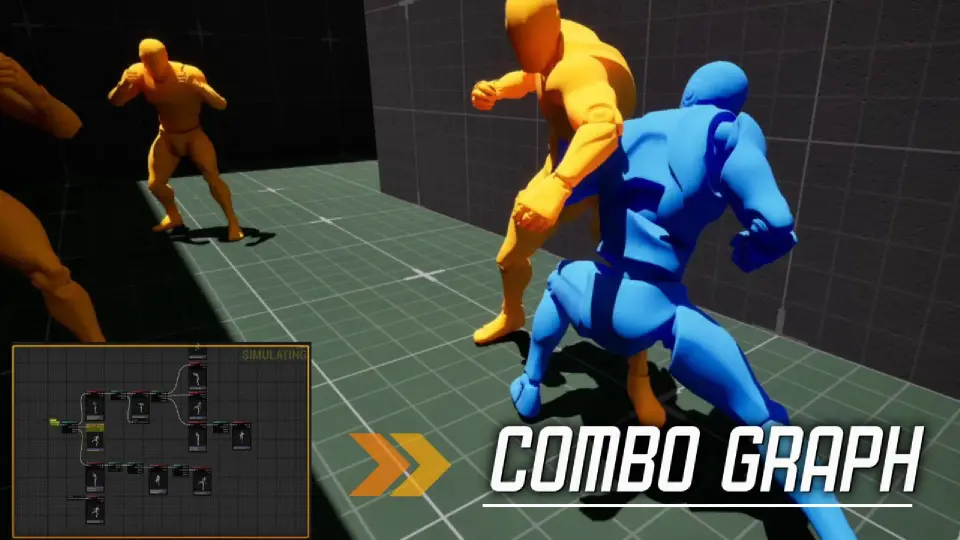
Bacon Combo Graph replaces the approach of hand-authoring DataAssets to define attack sequences. Instead, work happens inside a custom editor tool where combo chains are laid out as graph nodes. Each node can represent a step in a sequence, and the node set is fully extendable: developers can create custom nodes to match specific game logic rather than bending the system's defaults. The graph handles combo windows, allowing timing gaps between attacks where a follow-up input is still valid. This approach to combo design speeds up iteration since adjustments to a sequence — adding a branch, shifting a window — are visual operations rather than code changes or DataAsset rewrites.
Beyond simple button-mashing chains, the graph supports layered input. Charge attacks and single-click attacks are both handled, and the system is built on Unreal's Enhanced Input System. For a combat designer, this means input modifiers can be tied directly to combo branches: a held button can route into a heavy attack node, a quick tap can chain into a lighter follow-up, and the graph manages which branch executes based on the input received. This is particularly valuable for action games where movement and attack intent need to feed into the same decision tree without manual input polling in Blueprint or C++.
Animation and Montage integration with GAS
The system is animation-driven at its core. Communication between the Animation system — specifically Montages — and Gameplay Abilities flows through the plugin rather than requiring external linkage. This means the combo graph can listen for montage events, trigger ability activations at precise animation frames, and route hit-relevant data back through GAS. For combat systems where the relationship between what is shown on screen and what is mechanically active must be exact — frame windows for cancels, specific start-up moments, recovery cancellation points — this tight integration reduces the gap between authored animation and authored gameplay.
Hitbox system and pre-made collision shapes
A combat graph is only useful if it can actually register hits. Bacon Combo Graph includes a hitbox system that provides pre-made collision shapes: box, sphere, capsule, and ring. These shapes can be assigned to attacks within the graph, allowing designers to define volumetric hit areas per attack or per combo step. Rather than building collision logic from scratch or relying on piecemeal Blueprint implementations per weapon, the pre-made shapes give a consistent foundation. Whether a wide ring attack needs a large arc or a thrust needs a narrow capsule, the shape set covers common melee scenarios without requiring custom collision code for each new attack type.
Multiplayer, player, and AI support
The plugin is multiplayer-ready, which is a significant functional concern for any combat system where client-side prediction, server authority, and replication of hit detection all play a role. Rather than leaving networking as an afterthought, Bacon Combo Graph is built to support networked gameplay alongside its combo and hitbox systems. The same graph that defines a player's combo chain can also drive AI behavior — the system supports AI alongside player characters — which means NPC combatants can use the same combat logic as player-controlled characters without a separate path. This unification reduces maintenance: a change to a combo sequence applies across players and AI, and the logic lives in one place.
For genres where enemy variety and player movesets are both core to the experience — Souls-likes with varied enemy movesets, beat 'em ups where multiple enemy types share attack families, hack-and-slash titles with NPC combatants — this design removes redundant work and keeps the combat implementation consistent across character types.
What the demo covers and what it does not
The plugin ships with a demo, but the developer is explicit about what that demo is and is not. It is an out-of-the-box demonstration of the plugin's systems, not a ready-to-deploy game. Buyers will need to integrate the plugin with their own game systems — the demo does not plug into an existing project seamlessly without that integration step. Once integrated, the developer describes creating new combat content as fast and intuitive.
Animations are not included with the plugin. The demo itself uses “RamsterZ Free Anims Volume 1” for its animation set. Developers using Bacon Combo Graph will need to supply their own animation assets or obtain packs that suit their project's visual style. The plugin's value lies in the combat logic layer — the graph, the hitbox routing, the input handling, the GAS communication — not in animation content.
Active development and scope expectations
Bacon Combo Graph is under active development, with more updates planned. The developer maintains a Discord server for bug reports and feedback, and video documentation is available including a plugin trailer, a plugin overview video, and tutorial videos. Text-based tutorials and a changelog are also provided alongside documentation.
Requests for features outside the current scope are placed into a backlog for future improvements rather than being immediately addressed. The developer advises reading the Features section carefully before adopting the plugin to confirm it aligns with a project's needs. This is a practical stance: the plugin is a toolset with a defined feature boundary, and extending it beyond that boundary relies on future updates rather than custom requests.
Who benefits from this tool
Studios and solo developers working on melee-focused, combo-driven Unreal Engine projects — particularly those in the Souls-like, beat 'em up, and hack-and-slash spaces — are the clearest fit. Teams already using GAS gain the most from native integration, since the combo graph speaks directly to the ability system. Projects targeting multiplayer melee combat benefit from a system built with networked gameplay in mind from the start. Solo developers or small teams without a dedicated combat programmer can use the visual editor to prototype and implement complex combo logic without touching raw code or wrestling with DataAssets.
The tradeoff is straightforward: the plugin requires Unreal 5.4 or higher, depends on StructUtils, and ships with a demo rather than a full integration. Once those requirements are met and the integration work is done, Bacon Combo Graph provides a graph-based workflow that compresses the time between designing a combo and seeing it function in-engine — with hitboxes, input handling, and multiplayer behavior built into the same system that drives the animation playback.
 Game Mechanics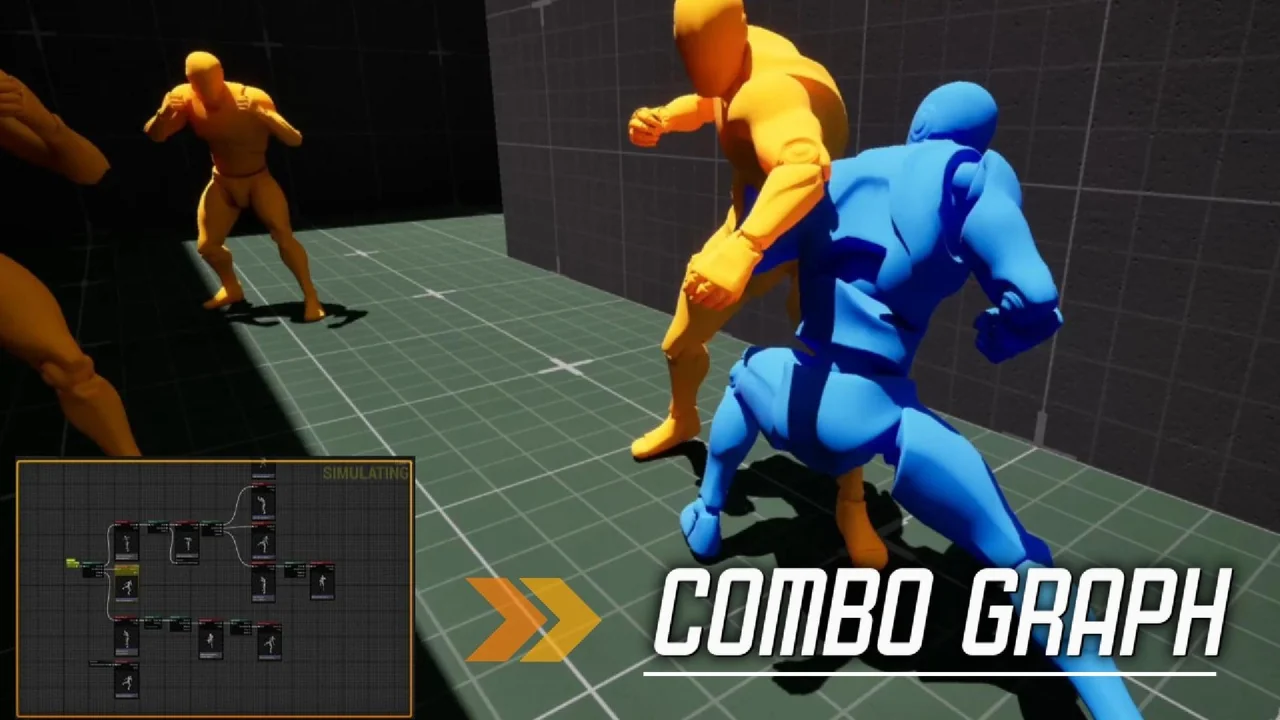
 Engine Tools
 Game Mechanics
 Game Mechanics