"0341a2901a4ae9aa"{"id":"13825","slug":"combo-graph","title":"Combo Graph","category":"Engine Tools","engine":"5.1 - 5.8","assetVersion":"Asset Version:1.4.0 - 1.6.1","engineVersion":"Engine version: 5.1 - 5.8","tag":"Engine Tools","accent":"blue","visual":"luts","summary":"Streamline your combat design with Combo Graph, a GAS-based Unreal Engine plugin. Use its node-based editor to create complex melee strings with multiplayer support and rapid prototyping tools.","platform":"Unreal Engine","publishedAt":"2026-03-11T10:10:59.000Z","updatedAt":"2026-08-24T05:32:39.634Z","sourceNotes":[],"fileContents":[],"compatibility":["Unreal Engine","Asset Version:1.4.0 - 1.6.1","Engine version: 5.1 - 5.8"],"featuredImage":{"alt":"Combo Graph","src":"https://3dcghub.com/wp-content/uploads/2026/03/11f09f07-e4bd-4cc8-9924-40b122bd6f3a.webp"},"hasDownloadLink":true,"downloads":2,"terms":[{"taxonomy":"category","slug":"engine-tools-tools-and-plugins","name":"Engine Tools"},{"taxonomy":"post_tag","slug":"animation","name":"Animation"},{"taxonomy":"post_tag","slug":"characters","name":"Characters"},{"taxonomy":"post_tag","slug":"game-systems","name":"Game Systems"},{"taxonomy":"post_tag","slug":"plugins","name":"Plugins"},{"taxonomy":"post_tag","slug":"tools","name":"Tools"},{"taxonomy":"post_tag","slug":"unreal-engine-5","name":"Unreal Engine 5"}],"galleryImages":[{"src":"https://3dcghub.com/wp-content/uploads/2026/03/cfa4e8c41f1c_c2358d98-2149-4aa9-b8ea-8f77a5e1482d.webp","alt":"Combo Graph"},{"src":"https://3dcghub.com/wp-content/uploads/2026/03/dab7d29af54b_fdf2f11c-f2b1-4521-b763-41875ff7a621.webp","alt":"Combo Graph"},{"src":"https://3dcghub.com/wp-content/uploads/2026/03/d7194cd7f7a2_8940ad1a-8b62-44e4-a72a-97f94bff9df9.webp","alt":"Combo Graph"},{"src":"https://3dcghub.com/wp-content/uploads/2026/03/272d2fbc7afa_67bafbc3-1f9e-476b-b367-a1b080e67d32.webp","alt":"Combo Graph"},{"src":"https://3dcghub.com/wp-content/uploads/2026/03/3ed6f9ebb932_c26ac5cf-c1cf-4ddd-9f16-7d9e5b781701.webp","alt":"Combo Graph"},{"src":"https://3dcghub.com/wp-content/uploads/2026/03/c389b6187624_b4614e8c-877b-45d7-90bc-eaf8ddefdcbd.webp","alt":"Combo Graph"},{"src":"https://3dcghub.com/wp-content/uploads/2026/03/085af7eb0e25_6959586c-525c-4971-b216-f5d1769c6361.webp","alt":"Combo Graph"},{"src":"https://3dcghub.com/wp-content/uploads/2026/03/42623d0a02fd_e558e0c7-6571-42a6-af05-2aa2376746f7.webp","alt":"Combo Graph"},{"src":"https://3dcghub.com/wp-content/uploads/2026/03/39dd51a4a883_bd0cb684-b258-4fdc-b48f-06580294886b.webp","alt":"Combo Graph"},{"src":"https://3dcghub.com/wp-content/uploads/2026/03/82b09528bab0_6de0a08f-f771-4b24-a94c-9153b8e48931.webp","alt":"Combo Graph"},{"src":"https://3dcghub.com/wp-content/uploads/2026/03/249da4610bd7_e6573d58-2886-4611-bbcd-e5dd41fb8d91.webp","alt":"Combo Graph"},{"src":"https://3dcghub.com/wp-content/uploads/2026/03/28ece32ac42f_f9e75070-dfba-45ca-ae5a-c6f03a7438ca.webp","alt":"Combo Graph"},{"src":"https://3dcghub.com/wp-content/uploads/2026/03/6184c6a33987_cc4401ad-df3f-4109-b086-21308494abb3.webp","alt":"Combo Graph"},{"src":"https://3dcghub.com/wp-content/uploads/2026/03/02da63b9a789_1cfed1e7-1964-448b-81ab-171fdbe21524.webp","alt":"Combo Graph"},{"src":"https://3dcghub.com/wp-content/uploads/2026/03/ca04421db306_793b7b08-5cef-41b4-a218-5c93b5f5e0e4.webp","alt":"Combo Graph"},{"src":"https://3dcghub.com/wp-content/uploads/2026/03/ee056b157ef8_810144e7-d105-416a-954a-702f90d3cdc9.webp","alt":"Combo Graph"}],"accessPanel":{"kind":"resource","title":"Download this resource","eyebrow":"Free Download","message":"Log in or create a free account to start your download.","fileName":"Combo Graph.7z","safetyNote":"Resources are manually reviewed before listing to improve quality and reduce obvious risks.","actionLabel":"Download Free","resourceType":"Resource archive"},"contentHtml":"\u003ch2\u003eEfficient Combat Design with Combo Graph\u003c/h2\u003e\n\u003cp\u003eCombo Graph is an Unreal Engine plugin based on the Gameplay Ability System (GAS) that empowers developers to focus on combat design. By using a custom graph and node-based editor, the creator provides a fast and flexible experience for building melee systems. The main goal of this tool is to significantly reduce iteration times during the prototyping phase.\u003c/p\u003e\n\u003cp\u003eThis resource is built to be approachable for all developers. Although it uses GAS and Enhanced Input at its core, you do not need deep GAS knowledge to integrate it. Consequently, you can run assets via Ability Tasks or Gameplay Tasks within Character Blueprints and Behavior Trees.\u003c/p\u003e\n\n\u003ch2\u003eA Specialized Node-Based Editor\u003c/h2\u003e\n\u003cp\u003eThe plugin features a dedicated editor where you can create and manage assets directly in the Content Browser. Similar to Behavior Trees, this node-based interface allows you to build complex combo strings effortlessly. You can add various nodes to define transitions using specific Input Actions.\u003c/p\u003e\n\u003cp\u003eThe developer provides two primary node types: Montage-based and Sequence-based. Furthermore, you can create custom nodes through Blueprints to implement unique logic. Each node allows for the configuration of Gameplay Effects, damage delivery, and Gameplay Cues for visual and sound effects.\u003c/p\u003e\n\n\u003ch2\u003eMultiplayer Support and Replication\u003c/h2\u003e\n\u003cp\u003eReplication was a core focus during the development of Combo Graph. Because it is built on GAS, the plugin offers local prediction and replication out of the box when using Animation Montages. This ensures a smooth experience for multiplayer melee combat.\u003c/p\u003e\n\u003cp\u003eHowever, there is a technical distinction regarding animation types. While the plugin supports Animation Sequences for rapid prototyping, these do not replicate as reliably as Animation Montages. Therefore, the developer recommends converting sequences to montages before finalizing a networked project.\u003c/p\u003e\n\n\u003ch2\u003eAdvanced Workflow Features\u003c/h2\u003e\n\u003cp\u003eSetting up combat often requires numerous Animation Notify States (ANS). To solve this, the plugin includes an \"Auto Setup\" feature. This tool automatically configures Notify States like collision windows without requiring you to edit every individual animation asset.\u003c/p\u003e\n\u003cp\u003eIn addition, the plugin includes a built-in collision component for basic hit detection using traces. While it is not a replacement for complex combat frameworks, it provides an easy way to handle hits. It also integrates seamlessly with third-party systems by sending gameplay events and target data payloads.\u003c/p\u003e\n\n\u003ch2\u003eAI Integration and Compatibility\u003c/h2\u003e\n\u003cp\u003eCombo Graph is fully compatible with AI workflows through its included Behavior Tree Task. This C++ implementation allows developers to trigger complex combos from within an AI's logic. Moreover, the system includes helpers to simulate inputs for non-player characters.\u003c/p\u003e\n\u003cp\u003eIn practice, Combo Graph provides the underlying framework needed to build a robust melee system. It is designed for Windows and supports Unreal Engine versions 4.26, 4.27, and 5.0 Early Access. By focusing on a node-based workflow, it simplifies the transition from a simple prototype to a finished combat system.\u003c/p\u003e\n\n\u003ch2\u003eRelated Resources Worth Checking\u003c/h2\u003e\n\u003cul\u003e\n\u003cli\u003e\u003ca href=\"https://3dcghub.com/extile-plus-ultimate-non-tiling-material-toolkit-for-unreal-engine-environments/\" title=\"EXTILE PLUS -Ultimate Non-Tiling Material Toolkit for Unreal Engine Environments\"\u003eEXTILE PLUS -Ultimate Non-Tiling Material Toolkit for Unreal Engine Environments\u003c/a\u003e\u003c/li\u003e\n\u003cli\u003e\u003ca href=\"https://3dcghub.com/ultimate-template-unrealengine-2d-dialogue-inventory-system-save/\" title=\"ULTIMATE Template UnrealEngine || 2D + Dialogue + Inventory system + Save | |\"\u003eULTIMATE Template UnrealEngine || 2D + Dialogue + Inventory system + Save | |\u003c/a\u003e\u003c/li\u003e\n\u003cli\u003e\u003ca href=\"https://3dcghub.com/blueprint-generator-ai-kibibyte-labs-engine-assistant/\" title=\"Blueprint Generator Ai – Kibibyte Labs (Engine Assistant)\"\u003eBlueprint Generator Ai – Kibibyte Labs (Engine Assistant)\u003c/a\u003e\u003c/li\u003e\n\u003cli\u003e\u003ca href=\"https://3dcghub.com/sci-fi-environment-engine-room/\" title=\"Sci-fi Environment Engine Room\"\u003eSci-fi Environment Engine Room\u003c/a\u003e\u003c/li\u003e\n\u003cli\u003e\u003ca href=\"https://3dcghub.com/cinematographer-pro-a-cinematic-photorealistic-camera-system/\" title=\"Cinematographer PRO – A Cinematic Photorealistic Camera System\"\u003eCinematographer PRO – A Cinematic Photorealistic Camera System\u003c/a\u003e\u003c/li\u003e\n\u003c/ul\u003e","contentTextLength":3509,"navigation":{"current":1115,"total":4017,"previous":{"id":"13614","slug":"compiler-booster","title":"Compiler Booster","category":"Automations","platform":"Unreal Engine","updatedAt":"2026-08-25T07:36:59.621Z"},"next":{"id":"1001033","slug":"game-main-menu-3d-ui-gamepad-common-ui-ultimate","title":"Game Main Menu - 3D UI - Gamepad - Common UI - Ultimate","category":"UI Kits / HUDs","platform":"Unreal Engine","updatedAt":"2026-08-23T14:19:59.018Z"}},"relatedResources":[{"id":"14282","slug":"narrative-tales-node-based-quests-and-dialogue","title":"Narrative Tales - Node Based Quests and Dialogue","category":"Engine Tools","engine":"5.4 - 5.5","assetVersion":"Engine version: 5.4 - 5.5","engineVersion":"Asset Version:3.5 - 3.6","tag":"Engine Tools","accent":"blue","visual":"animation","summary":"Narrative Tales - Node Based Quests and Dialogue provides a professional, node-based solution for building complex story systems and cinematic interactions in Unreal Engine.","platform":"Unreal Engine","publishedAt":"2026-03-11T17:18:03.000Z","updatedAt":"2026-04-19T15:45:49.000Z","sourceNotes":[],"fileContents":[],"compatibility":["Unreal Engine","Engine version: 5.4 - 5.5","Asset Version: 3.5 - 3.6"],"featuredImage":{"alt":"Narrative Tales - Node Based Quests and Dialogue","src":"https://3dcghub.com/wp-content/uploads/2026/03/4704c395-9d69-4f9e-bb63-fc67d2198758.webp"},"hasDownloadLink":true,"downloads":2},{"id":"13938","slug":"easy-pose","title":"Easy Pose","category":"Engine Tools","engine":"5.1 - 5.8","assetVersion":"Asset Version: 2.0.3","engineVersion":"Engine version: 5.1 - 5.8","tag":"Engine Tools","accent":"blue","visual":"audio","summary":"Easy Pose is a powerful tool designed to simplify animation retargeting through a one-click interface. It supports diverse bone structures and skeletal models, ensuring flawless results with minimal effort.","platform":"Unreal Engine","publishedAt":"2026-03-11T10:42:49.000Z","updatedAt":"2026-09-29T08:45:23.408Z","sourceNotes":[],"fileContents":[],"compatibility":["Unreal Engine","Asset Version: 2.0.3","Engine version: 5.1 - 5.8"],"featuredImage":{"alt":"Easy Pose","src":"https://3dcghub.com/wp-content/uploads/2026/03/5e2069bb-f3d3-4af9-8231-ad7018eafae3.webp"},"hasDownloadLink":true,"downloads":0},{"id":"13566","slug":"hierarchical-task-network-planning-ai","title":"Hierarchical Task Network Planning AI","category":"Artificial Intelligence","engine":"5.1 - 5.4","assetVersion":"Engine version: 5.1 - 5.4","engineVersion":"4.24","tag":"Artificial Intelli","accent":"blue","visual":"mech","summary":"Empower your characters with the Hierarchical Task Network Planning AI plugin. This tool features a visual graph editor and predictive logic to create sophisticated, tactical AI behaviors.","platform":"Unreal Engine","publishedAt":"2026-03-11T03:45:14.000Z","updatedAt":"2026-04-19T15:46:26.000Z","sourceNotes":[],"fileContents":[],"compatibility":["Unreal Engine","Engine version: 5.1 - 5.4"],"featuredImage":{"alt":"Hierarchical Task Network Planning AI","src":"https://3dcghub.com/wp-content/uploads/2026/03/a61cd7ac-52d7-428a-a6ac-280c9d5d8bfb.webp"},"hasDownloadLink":true,"downloads":0}]}
Engine Tools
Combo Graph
Streamline your combat design with Combo Graph, a GAS-based Unreal Engine plugin. Use its node-based editor to create complex melee strings with multiplayer support and rapid prototyping tools.
Category:Unreal Engine,Engine ToolsPlatform: Unreal EngineAsset Version: 1.4.0 - 1.6.1Engine version: 5.1 - 5.8Published: Mar 11, 2026Updated: Aug 24, 2026
Engine Tools
Resource overview
Efficient Combat Design with Combo Graph
Combo Graph is an Unreal Engine plugin based on the Gameplay Ability System (GAS) that empowers developers to focus on combat design. By using a custom graph and node-based editor, the creator provides a fast and flexible experience for building melee systems. The main goal of this tool is to significantly reduce iteration times during the prototyping phase.
This resource is built to be approachable for all developers. Although it uses GAS and Enhanced Input at its core, you do not need deep GAS knowledge to integrate it. Consequently, you can run assets via Ability Tasks or Gameplay Tasks within Character Blueprints and Behavior Trees.
A Specialized Node-Based Editor
The plugin features a dedicated editor where you can create and manage assets directly in the Content Browser. Similar to Behavior Trees, this node-based interface allows you to build complex combo strings effortlessly. You can add various nodes to define transitions using specific Input Actions.
The developer provides two primary node types: Montage-based and Sequence-based. Furthermore, you can create custom nodes through Blueprints to implement unique logic. Each node allows for the configuration of Gameplay Effects, damage delivery, and Gameplay Cues for visual and sound effects.
Multiplayer Support and Replication
Replication was a core focus during the development of Combo Graph. Because it is built on GAS, the plugin offers local prediction and replication out of the box when using Animation Montages. This ensures a smooth experience for multiplayer melee combat.
However, there is a technical distinction regarding animation types. While the plugin supports Animation Sequences for rapid prototyping, these do not replicate as reliably as Animation Montages. Therefore, the developer recommends converting sequences to montages before finalizing a networked project.
Advanced Workflow Features
Setting up combat often requires numerous Animation Notify States (ANS). To solve this, the plugin includes an "Auto Setup" feature. This tool automatically configures Notify States like collision windows without requiring you to edit every individual animation asset.
In addition, the plugin includes a built-in collision component for basic hit detection using traces. While it is not a replacement for complex combat frameworks, it provides an easy way to handle hits. It also integrates seamlessly with third-party systems by sending gameplay events and target data payloads.
AI Integration and Compatibility
Combo Graph is fully compatible with AI workflows through its included Behavior Tree Task. This C++ implementation allows developers to trigger complex combos from within an AI's logic. Moreover, the system includes helpers to simulate inputs for non-player characters.
In practice, Combo Graph provides the underlying framework needed to build a robust melee system. It is designed for Windows and supports Unreal Engine versions 4.26, 4.27, and 5.0 Early Access. By focusing on a node-based workflow, it simplifies the transition from a simple prototype to a finished combat system.
 Engine Tools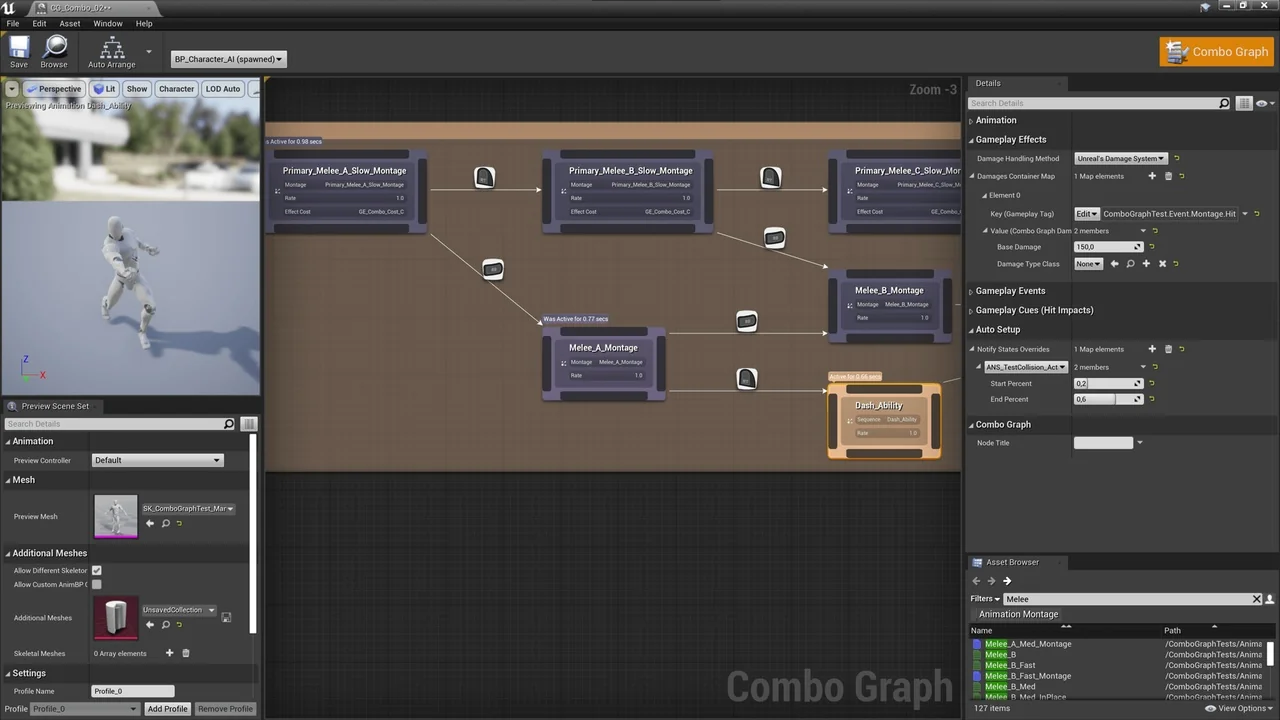
 Engine Tools
 Engine Tools
 Artificial Intelli