"0341a2901a4ae9aa"{"id":"13614","slug":"compiler-booster","title":"Compiler Booster","category":"Automations","engine":"1.1 - 1.2","assetVersion":"Engine version: 4.26 - 5.8","engineVersion":"Asset Version:1.1 - 1.2","tag":"Automations","accent":"blue","visual":"character","summary":"Compiler Booster is a powerful editor plugin designed to significantly reduce shader and light compile times by optimizing CPU priority within Unreal Engine.","platform":"Unreal Engine","publishedAt":"2026-03-11T09:15:50.000Z","updatedAt":"2026-08-25T07:36:59.621Z","sourceNotes":[],"fileContents":[],"compatibility":["Unreal Engine","Engine version: 4.26 - 5.8","Asset Version:1.1 - 1.2"],"featuredImage":{"alt":"Compiler Booster","src":"https://3dcghub.com/wp-content/uploads/2026/03/2cad4408-cc39-4d74-bc73-4ca5ee7e6d98.webp"},"hasDownloadLink":true,"downloads":1,"terms":[{"taxonomy":"category","slug":"automations-tools-and-plugins","name":"Automations"},{"taxonomy":"post_tag","slug":"environment","name":"Environment"},{"taxonomy":"post_tag","slug":"game-systems","name":"Game Systems"},{"taxonomy":"post_tag","slug":"materials","name":"Materials"},{"taxonomy":"post_tag","slug":"plugins","name":"Plugins"},{"taxonomy":"post_tag","slug":"tools","name":"Tools"},{"taxonomy":"post_tag","slug":"unreal-engine-5","name":"Unreal Engine 5"}],"galleryImages":[{"src":"https://3dcghub.com/wp-content/uploads/2026/03/c22a81272592_2353d846-4256-4dff-8c13-15f3531b8d4c.webp","alt":"Compiler Booster"},{"src":"https://3dcghub.com/wp-content/uploads/2026/03/191c4d939805_3de24c27-2355-481d-858a-ca595882f799.webp","alt":"Compiler Booster"},{"src":"https://3dcghub.com/wp-content/uploads/2026/03/d07a898834b0_a3f0bd85-2241-4265-84d1-e2b50364c5a6.webp","alt":"Compiler Booster"}],"accessPanel":{"kind":"resource","title":"Download this resource","eyebrow":"Free Download","message":"Log in or create a free account to start your download.","fileName":"Compiler Booster.7z","safetyNote":"Resources are manually reviewed before listing to improve quality and reduce obvious risks.","actionLabel":"Download Free","resourceType":"Resource archive"},"contentHtml":"\u003ch2\u003eStreamline Your Development with Compiler Booster\u003c/h2\u003e\n\u003cp\u003eCompiler Booster is a high-performance asset designed to streamline your development workflow by reducing long wait times. Many developers lose hours to shader and light compiling during a project. This tool addresses that bottleneck by adjusting how your system handles these intensive tasks. Specifically, it sets the compilers' CPU priority higher than the default Windows settings.\u003c/p\u003e\n\n\u003cp\u003eFor that reason, your hardware focuses its power on the most demanding background processes. This shift allows you to transform your daily routine into more productive work sessions. Moreover, the asset functions as a dedicated editor plugin. Therefore, the editor must be fully launched for the optimization to take effect.\u003c/p\u003e\n\n\u003ch2\u003eQuantifiable Performance Gains\u003c/h2\u003e\n\u003cp\u003eThe primary benefit of using Compiler Booster is the significant reduction in processing time. According to testing data, users can achieve up to 72% faster shader compile times. Furthermore, light build times can see improvements of up to 43%. These benchmarks demonstrate how effectively the tool reallocates system resources.\u003c/p\u003e\n\n\u003cp\u003eThe creator tested these performance gains on an Intel Core i5-6500 @3.20 GHz. While these specific figures are impressive, the tool is compatible with both Intel and AMD CPUs. However, results for landscape compilation may vary. This variation occurs because landscape tasks often involve multiple concurrent processes.\u003c/p\u003e\n\n\u003ch2\u003eCompatibility and Technical Details\u003c/h2\u003e\n\u003cp\u003eThis asset is built for modern development environments. It currently works with UE4 and UE5 on Windows systems only. It is important to note that the tool is not compatible with task distribution systems like Unreal Swarm. If your workflow relies on external task distribution, this plugin may not be suitable for your setup.\u003c/p\u003e\n\n\u003cp\u003eAlso, the developer has included helpful resources for further optimization. If you are looking to speed up editor launch times, the official documentation provides a handy workaround. This ensures that every aspect of your project interaction is as fast as possible.\u003c/p\u003e\n\n\u003ch2\u003eBest Practices for Peak Efficiency\u003c/h2\u003e\n\u003cp\u003eTo get the best results from Compiler Booster, certain operational steps should be followed. First, you should always save your work before boosting. This is because changing CPU priority impacts engine performance and system stability. Consequently, securing your data is a vital safety measure.\u003c/p\u003e\n\n\u003cp\u003eSecond, you should close other resource-intensive programs during the compilation process. Applications like web browsers can consume significant CPU cycles. By closing these programs, you provide the compiler with more headroom to operate. Notably, these simple steps ensure you get the maximum benefit from the increased priority levels.\u003c/p\u003e\n\n\u003ch2\u003eClosing Notes\u003c/h2\u003e\n\u003cp\u003eCompiler Booster offers a practical solution for developers tired of waiting for slow builds. By optimizing CPU priority, it delivers substantial time savings for both shaders and lighting. Whether you are working on a small scene or a complex environment, this tool helps you maintain your creative momentum. Transform your workflow today by focusing more on design and less on waiting.\u003c/p\u003e\n\n\u003ch2\u003eExplore Similar Assets\u003c/h2\u003e\n\u003cul\u003e\n\u003cli\u003e\u003ca href=\"https://3dcghub.com/extile-plus-ultimate-non-tiling-material-toolkit-for-unreal-engine-environments/\" title=\"EXTILE PLUS -Ultimate Non-Tiling Material Toolkit for Unreal Engine Environments\"\u003eEXTILE PLUS -Ultimate Non-Tiling Material Toolkit for Unreal Engine Environments\u003c/a\u003e\u003c/li\u003e\n\u003cli\u003e\u003ca href=\"https://3dcghub.com/ultimate-template-unrealengine-2d-dialogue-inventory-system-save/\" title=\"ULTIMATE Template UnrealEngine || 2D + Dialogue + Inventory system + Save | |\"\u003eULTIMATE Template UnrealEngine || 2D + Dialogue + Inventory system + Save | |\u003c/a\u003e\u003c/li\u003e\n\u003cli\u003e\u003ca href=\"https://3dcghub.com/sci-fi-environment-engine-room/\" title=\"Sci-fi Environment Engine Room\"\u003eSci-fi Environment Engine Room\u003c/a\u003e\u003c/li\u003e\n\u003cli\u003e\u003ca href=\"https://3dcghub.com/runtime-ai-chatbot-integrator-tts/\" title=\"Runtime AI Chatbot Integrator (+TTS)\"\u003eRuntime AI Chatbot Integrator (+TTS)\u003c/a\u003e\u003c/li\u003e\n\u003cli\u003e\u003ca href=\"https://3dcghub.com/mixamo-animation-retargeting-2/\" title=\"Mixamo Animation Retargeting 2\"\u003eMixamo Animation Retargeting 2\u003c/a\u003e\u003c/li\u003e\n\u003c/ul\u003e","contentTextLength":3461,"navigation":{"current":1114,"total":4017,"previous":{"id":"15252","slug":"dungeon-architect","title":"Dungeon Architect","category":"Procedural Systems","platform":"Unreal Engine","updatedAt":"2026-08-25T10:55:56.623Z"},"next":{"id":"13825","slug":"combo-graph","title":"Combo Graph","category":"Engine Tools","platform":"Unreal Engine","updatedAt":"2026-08-24T05:32:39.634Z"}},"relatedResources":[{"id":"13806","slug":"clouds-lighting-system","title":"Clouds Lighting System","category":"Engine Tools","engine":"4.26 - 5.8","assetVersion":"Asset Version: 0.3.3.1","engineVersion":"Engine version: 4.26 - 5.8","tag":"Engine Tools","accent":"blue","visual":"animation","summary":"The Clouds Lighting System is a specialized tool designed to add realistic illumination to 2D clouds, volumetric clouds, and various particle systems like smoke and fog.","platform":"Unreal Engine","publishedAt":"2026-03-11T10:07:32.000Z","updatedAt":"2026-09-29T08:34:46.190Z","sourceNotes":[],"fileContents":[],"compatibility":["Unreal Engine","Asset Version: 0.3.3.1","Engine version: 4.26 - 5.8"],"featuredImage":{"alt":"Clouds Lighting System","src":"https://3dcghub.com/wp-content/uploads/2026/03/5915be78-e14d-4e90-8a8e-9eff04991bc6.webp"},"hasDownloadLink":true,"downloads":1},{"id":"1000789","slug":"advanced-texture-tool","title":"Advanced Texture Tool","category":"Automations","engine":"4.27,5.0+","assetVersion":"","engineVersion":"Engine Version: 4.27,5.0+","tag":"Automations","accent":"blue","visual":"luts","summary":"An Unreal Engine editor utility widget for resizing, generating, and editing textures directly in-engine, with channel packing, filters, and bulk operations.","platform":"Unreal Engine","publishedAt":"2026-07-30T12:34:19.535Z","updatedAt":"2026-07-30T12:34:19.535Z","sourceNotes":[],"fileContents":[],"compatibility":["Unreal Engine","Engine Version: 4.27,5.0+"],"featuredImage":{"alt":"Advanced Texture Tool","src":"/wp-content/uploads/published/2026/07/34b581fe962a-5c91cb5f-8425-4f3b-b5eb-18069223b399-b0f8c895b3.webp"},"hasDownloadLink":true,"downloads":0},{"id":"27256","slug":"ultimate-engine-copilot-formerly-ultimate-blueprint-generator","title":"Ultimate Engine CoPilot (formerly Ultimate Blueprint Generator)","category":"Automations","engine":"0.3.5 - 1.3.5","assetVersion":"Engine version: 5.4 - 5.7","engineVersion":"Asset Version:0.3.5 - 1.3.5","tag":"Automations","accent":"blue","visual":"city","summary":"Ultimate Engine CoPilot keeps Blueprint setup, VFX work, UI creation, and other editor tasks inside Unreal Engine. It responds to natural language, supports voice input, and can run multiple AI agents while you work.","platform":"Unreal Engine","publishedAt":"2026-04-23T06:55:26.000Z","updatedAt":"2026-07-05T09:41:32.225Z","sourceNotes":[],"fileContents":[],"compatibility":["Unreal Engine","Engine version: 5.4 - 5.7","Asset Version:0.3.5 - 1.3.5"],"featuredImage":{"alt":"Ultimate Engine CoPilot (formerly Ultimate Blueprint Generator)","src":"https://3dcghub.com/wp-content/uploads/2026/04/fd75d459aa77_025b3508-1406-4cd3-96bf-9537f34d3d5f.webp"},"hasDownloadLink":true,"downloads":20}]}
Automations
Compiler Booster
Compiler Booster is a powerful editor plugin designed to significantly reduce shader and light compile times by optimizing CPU priority within Unreal Engine.
Category:Unreal Engine,AutomationsPlatform: Unreal EngineEngine version: 4.26 - 5.8Asset Version: 1.1 - 1.2Published: Mar 11, 2026Updated: Aug 25, 2026
Automations
Resource overview
Streamline Your Development with Compiler Booster
Compiler Booster is a high-performance asset designed to streamline your development workflow by reducing long wait times. Many developers lose hours to shader and light compiling during a project. This tool addresses that bottleneck by adjusting how your system handles these intensive tasks. Specifically, it sets the compilers' CPU priority higher than the default Windows settings.
For that reason, your hardware focuses its power on the most demanding background processes. This shift allows you to transform your daily routine into more productive work sessions. Moreover, the asset functions as a dedicated editor plugin. Therefore, the editor must be fully launched for the optimization to take effect.
Quantifiable Performance Gains
The primary benefit of using Compiler Booster is the significant reduction in processing time. According to testing data, users can achieve up to 72% faster shader compile times. Furthermore, light build times can see improvements of up to 43%. These benchmarks demonstrate how effectively the tool reallocates system resources.
The creator tested these performance gains on an Intel Core i5-6500 @3.20 GHz. While these specific figures are impressive, the tool is compatible with both Intel and AMD CPUs. However, results for landscape compilation may vary. This variation occurs because landscape tasks often involve multiple concurrent processes.
Compatibility and Technical Details
This asset is built for modern development environments. It currently works with UE4 and UE5 on Windows systems only. It is important to note that the tool is not compatible with task distribution systems like Unreal Swarm. If your workflow relies on external task distribution, this plugin may not be suitable for your setup.
Also, the developer has included helpful resources for further optimization. If you are looking to speed up editor launch times, the official documentation provides a handy workaround. This ensures that every aspect of your project interaction is as fast as possible.
Best Practices for Peak Efficiency
To get the best results from Compiler Booster, certain operational steps should be followed. First, you should always save your work before boosting. This is because changing CPU priority impacts engine performance and system stability. Consequently, securing your data is a vital safety measure.
Second, you should close other resource-intensive programs during the compilation process. Applications like web browsers can consume significant CPU cycles. By closing these programs, you provide the compiler with more headroom to operate. Notably, these simple steps ensure you get the maximum benefit from the increased priority levels.
Closing Notes
Compiler Booster offers a practical solution for developers tired of waiting for slow builds. By optimizing CPU priority, it delivers substantial time savings for both shaders and lighting. Whether you are working on a small scene or a complex environment, this tool helps you maintain your creative momentum. Transform your workflow today by focusing more on design and less on waiting.
 Automations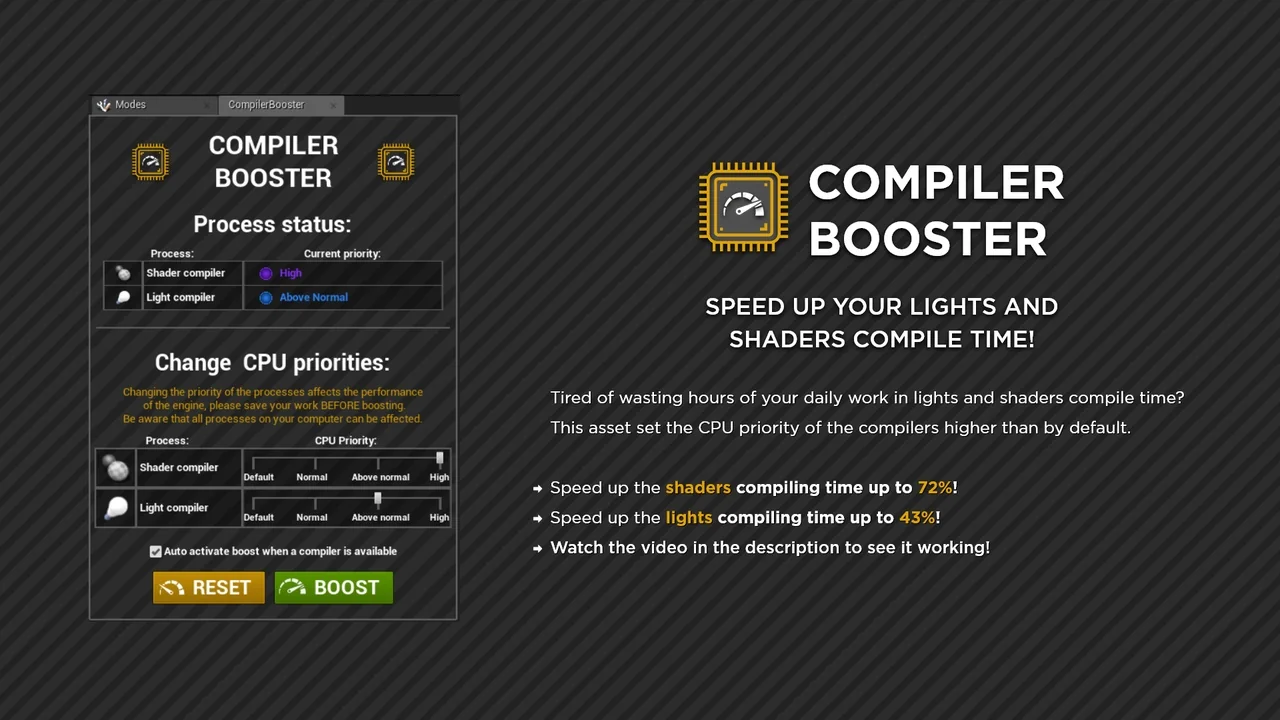
 Engine Tools
 Automations
 Automations