"ddd0e3fb95b0aec2"{"id":"1001033","slug":"game-main-menu-3d-ui-gamepad-common-ui-ultimate","title":"Game Main Menu - 3D UI - Gamepad - Common UI - Ultimate","category":"UI Kits / HUDs","engine":"5.3+","assetVersion":"","engineVersion":"Engine Version: 5.3+","tag":"UI Kits / HUDs","accent":"blue","visual":"mech","summary":"A Common UI 3D main menu with automatic gamepad detection, seamless keyboard/mouse switching, and rebinding for control, audio, and graphics in a 3D space.","platform":"Unreal Engine","publishedAt":"2026-08-23T14:19:59.018Z","updatedAt":"2026-08-23T14:19:59.018Z","sourceNotes":[],"fileContents":[],"compatibility":["Unreal Engine","Engine Version: 5.3+"],"featuredImage":{"alt":"Game Main Menu - 3D UI - Gamepad - Common UI - Ultimate","src":"/wp-content/uploads/published/2026/08/c00e2cb2b7c6-2e8d92a6-f31b-4fa9-b200-d9833f2dea7a-00688ddcf9.webp"},"hasDownloadLink":true,"downloads":1,"terms":[{"taxonomy":"category","slug":"ui-kits-huds","name":"UI Kits / HUDs"}],"galleryImages":[{"src":"/wp-content/uploads/published/2026/08/c36459bdd5a8-e2fd335e-61e0-421a-9d88-2df8edcfc89a-711414b08a.webp","alt":"Game Main Menu - 3D UI - Gamepad - Common UI - Ultimate"},{"src":"/wp-content/uploads/published/2026/08/b18b1cad0dcd-e6c2f96f-5bcc-40a0-a495-2598af59480c-9a16916b95.webp","alt":"Game Main Menu - 3D UI - Gamepad - Common UI - Ultimate"},{"src":"/wp-content/uploads/published/2026/08/97b45880e308-5ff95f68-dc3f-49c3-8a4c-e8c8e00167fb-db9dd2bfba.webp","alt":"Game Main Menu - 3D UI - Gamepad - Common UI - Ultimate"},{"src":"/wp-content/uploads/published/2026/08/b67a0aac6138-976d0fb5-ba5b-4e0f-b252-808a61044a24-d7526aa9ca.webp","alt":"Game Main Menu - 3D UI - Gamepad - Common UI - Ultimate"},{"src":"/wp-content/uploads/published/2026/08/bb44dda6650d-5eb13400-f66e-45c6-8ce4-9334e8703ffb-7a096ede93.webp","alt":"Game Main Menu - 3D UI - Gamepad - Common UI - Ultimate"},{"src":"/wp-content/uploads/published/2026/08/9986bd9ec5c0-028379de-9854-48dc-bf16-ba6c329d97d5-c19afe3010.webp","alt":"Game Main Menu - 3D UI - Gamepad - Common UI - Ultimate"},{"src":"/wp-content/uploads/published/2026/08/2fe52ee575c2-3a7395ed-6f16-4867-985b-8acffe076db6-5a0f45b68b.webp","alt":"Game Main Menu - 3D UI - Gamepad - Common UI - Ultimate"},{"src":"/wp-content/uploads/published/2026/08/040feb4dc25a-1eb09998-579e-41e8-b0fb-2f991ffff6b2-f47447ee59.webp","alt":"Game Main Menu - 3D UI - Gamepad - Common UI - Ultimate"},{"src":"/wp-content/uploads/published/2026/08/f2b3c0596065-01615599-7bab-4b5a-b5a4-188a5847eda8-0a802f4847.webp","alt":"Game Main Menu - 3D UI - Gamepad - Common UI - Ultimate"},{"src":"/wp-content/uploads/published/2026/08/baaabc1de920-ac6a7dcf-97f5-4adc-a9d7-e873b35f2ee0-b8ce6e7b88.webp","alt":"Game Main Menu - 3D UI - Gamepad - Common UI - Ultimate"}],"accessPanel":{"kind":"resource","title":"Download this resource","eyebrow":"Free Download","message":"Log in or create a free account to start your download.","fileName":"Content.7z","safetyNote":"Resources are manually reviewed before listing to improve quality and reduce obvious risks.","actionLabel":"Download Free","resourceType":"Resource archive"},"contentHtml":"\u003ch2\u003eA Main Menu That Treats the First Screen as Part of the Game\u003c/h2\u003e\n\u003cp\u003eThe Game Main Menu - 3D UI - Gamepad - Common UI - Ultimate is a ready-to-use menu system shaped by Unreal's Common UI framework. It is designed to move past a flat, static settings screen and instead drop the player into a visually crafted 3D space the moment the game loads. The description frames it directly: “Don't just start the game, embark on an adventure from the very first menu.”\u003c/p\u003e\n\u003cp\u003eThat positioning is more than flavor text. The menu is built with navigation and look in mind, aiming to be a modern, feature-packed starting point for any project that needs more than a default UI. Because it runs on Common UI, it sits comfortably inside the Unreal interface workflow, where widgets, activation, and focus management are handled consistently across devices.\u003c/p\u003e\n\u003ch2\u003eAutomatic Gamepad Detection and Seamless Input Switching\u003c/h2\u003e\n\u003cp\u003eOne of the standout behaviors is how input is handled. The menu automatically detects when a gamepad is being used, and players can switch between keyboard/mouse and gamepad while navigating without an explicit mode toggle. This is a practical detail for any game with multiple input options, especially those played on a TV or with a controller plugged in.\u003c/p\u003e\n\u003cp\u003eThe seamless switching means the menu reads the active input source on the fly. If a player moves the mouse and then picks up a controller, the UI responds accordingly, which keeps the experience fluid. For players on PC, this removes the need to go into a settings submenu just to change input profiles.\u003c/p\u003e\n\u003ch2\u003eRebinding Options for Control, Audio, and Graphics\u003c/h2\u003e\n\u003cp\u003eThe menu isn't just a hub for starting a game. It comes with extensive rebinding options that cover control, audio, and graphics. That means players can tailor their experience directly from the menu, adjusting key bindings, sound levels, and visual quality settings without leaving the 3D shell.\u003c/p\u003e\n\u003cp\u003eFrom a development standpoint, this is a significant time-saver. Instead of building separate settings systems and wiring them into the UI, the package provides a unified interface where all three areas are presented together. The rebinding logic is already in place, so a production team can focus on the actual game instead of re-implementing common settings screens.\u003c/p\u003e\n\u003ch2\u003eCustomization Through Data Tables\u003c/h2\u003e\n\u003cp\u003eThe visual and structural customization of the menu is handled through data tables, which gives developers a way to adjust the interface without digging into blueprint logic. “Customize every aspect of the interface with data tables” suggests that labels, colors, mappings, or even layout hints can be tweaked from a central data source, rather than on a widget-by-widget basis.\u003c/p\u003e\n\u003cp\u003eUsing data tables also makes it easier to localize or re-theme the menu. Since the data is separated from the widget hierarchy, an artist or designer can update text or visual parameters without disturbing the layout logic. For a project that expects to iterate on its UI, this is a flexible approach.\u003c/p\u003e\n\u003ch2\u003eWhere This Menu Fits in a Production Workflow\u003c/h2\u003e\n\u003cp\u003eThe Game Main Menu is a drop-in solution for any Unreal project that wants to ship with a polished, game-ready front end. Its integration is described as seamless and requiring only a few clicks, which points to a package that is set up to be placed into an existing project and connected to the game's main flow.\u003c/p\u003e\n\u003cp\u003eBecause it includes settings for control, audio, and graphics, it essentially replaces the first layer of a typical game's front end. That means production teams can check a box on the pre-production list: a high-quality menu that supports both keyboard/mouse and complete gamepad navigation. The 3D space around the menu also gives a specific mood to the game's opening moments, turning a functional screen into something closer to an interactive intro.\u003c/p\u003e\n\u003cp\u003eThe broader tag set for the resource — Customizable, GUI, Settings, Menu, User, Blueprint, Interface — reinforces its role as a building block. It is not a placeholder or a throwaway demo; it is a substantial piece of UI infrastructure that a team can adapt to its own visual identity.\u003c/p\u003e\n\u003cp\u003eWhere it fits best is in a project already aligned with Unreal's Common UI system, particularly one that targets players on both PC and console-style settings. The automatic gamepad detection and the ability to switch inputs seamlessly make it a solid foundation for cross-platform launches.\u003c/p\u003e\n\u003cp\u003eThe menu is also a fit for developers who want to extend rather than reinvent. Because the base is built in Blueprint, developers can open it up and modify logic, widgets, and data tables to match their own game’s flow. The data table layer means that even without touching Blueprint, a lot of visible interface changes are achievable.\u003c/p\u003e\n\u003ch2\u003eA Menu Designed to Be an Experience\u003c/h2\u003e\n\u003cp\u003eThe underlying idea of the package is that the menu is not an interruption but the first piece of the player experience. “This isn't just a menu, it's an experience” is a bold claim, but the feature set backs it up: a 3D visual space, automatic input switching, and full rebinding options come together to create a front end that feels intentionally designed rather than cobbled together.\u003c/p\u003e\n\u003cp\u003eFor developers, the practical takeaway is that this package is set up to handle the entire front-end layer of a game: navigation, settings, and visual presentation. It removes the need to write a login flow, a settings manager, and a 3D scene for the menu from scratch. Instead, it gives a project a cohesive starting point that can be customized to match the game’s own art style and mechanical requirements.\u003c/p\u003e\n\n\u003ch2\u003eRelated Resources Worth Checking\u003c/h2\u003e\n\u003cul\u003e\n\u003cli\u003e\u003ca href=\"https://3dcghub.com/fortuna-ultimate-menu-system/\" title=\"Fortuna Ultimate Menu System\"\u003eFortuna Ultimate Menu System\u003c/a\u003e\u003c/li\u003e\n\u003cli\u003e\u003ca href=\"https://3dcghub.com/game-main-menu-3d-ui-3d-immerse-ui/\" title=\"Game Main Menu - 3D UI - 3D Immerse UI\"\u003eGame Main Menu - 3D UI - 3D Immerse UI\u003c/a\u003e\u003c/li\u003e\n\u003cli\u003e\u003ca href=\"https://3dcghub.com/easy-game-ui-ultimate/\" title=\"Easy Game UI Ultimate\"\u003eEasy Game UI Ultimate\u003c/a\u003e\u003c/li\u003e\n\u003cli\u003e\u003ca href=\"https://3dcghub.com/hyper-menu-and-gamepad-system-v4-commonui/\" title=\"Hyper Menu and Gamepad System v4 [CommonUI]\"\u003eHyper Menu and Gamepad System v4 [CommonUI]\u003c/a\u003e\u003c/li\u003e\n\u003cli\u003e\u003ca href=\"https://3dcghub.com/gui-simple-round-2/\" title=\"GUI - Simple Round\"\u003eGUI - Simple Round\u003c/a\u003e\u003c/li\u003e\n\u003c/ul\u003e","contentTextLength":5730,"navigation":{"current":593,"total":3511,"previous":{"id":"13825","slug":"combo-graph","title":"Combo Graph","category":"Engine Tools","platform":"Unreal Engine","updatedAt":"2026-08-24T05:32:39.634Z"},"next":{"id":"1001032","slug":"action-adventure-movement-system","title":"Action-Adventure Movement System","category":"Gameplay Features","platform":"Unreal Engine","updatedAt":"2026-08-23T13:56:31.671Z"}},"relatedResources":[{"id":"1001510","slug":"dark-gui-ui-main-menu-pro-kit-complete-solution-psd-sources","title":"Dark GUI / UI / Main Menu Pro KIT - complete solution + psd sources","category":"UI Kits / HUDs","engine":"5.0+","assetVersion":"","engineVersion":"Engine Version: 5.0+","tag":"UI Kits / HUDs","accent":"blue","visual":"luts","summary":"A comprehensive dark UI kit featuring 148 widgets, 1,912 PNG files, adjustable Full HD and 4K layouts, and editable PSD and AI source files.","platform":"Unreal Engine","publishedAt":"2026-10-09T13:10:46.166Z","updatedAt":"2026-10-09T13:10:46.166Z","sourceNotes":[],"fileContents":[],"compatibility":["Unreal Engine","Engine Version: 5.0+"],"featuredImage":{"alt":"Dark GUI / UI / Main Menu Pro KIT - complete solution + psd sources","src":"/wp-content/uploads/published/2026/10/c5ad73455c8b-4d85652b-d0b5-4724-9c6c-1ce24dd1672c-e7c62e20b2.webp"},"hasDownloadLink":true,"downloads":0},{"id":"1000990","slug":"fortuna-ultimate-menu-system","title":"Fortuna Ultimate Menu System","category":"UI Kits / HUDs","engine":"5.0+","assetVersion":"","engineVersion":"Engine Version: 5.0+","tag":"UI Kits / HUDs","accent":"blue","visual":"mech","summary":"A complete modular menu system with a ready-to-use main menu, settings suite, save/load audio and keybinds, credits via Data Table, confirmation popups, and reu","platform":"Unreal Engine","publishedAt":"2026-08-18T06:42:18.738Z","updatedAt":"2026-08-18T06:42:18.738Z","sourceNotes":[],"fileContents":[],"compatibility":["Unreal Engine","Engine Version: 5.0+"],"featuredImage":{"alt":"Fortuna Ultimate Menu System","src":"/wp-content/uploads/published/2026/08/02d76a441ee6-e6cec5e1-df66-41c0-af9c-fe7a60a63d8f-ea56872eb0.webp"},"hasDownloadLink":true,"downloads":0},{"id":"1000613","slug":"game-main-menu-3d-ui-3d-immerse-ui","title":"Game Main Menu - 3D UI - 3D Immerse UI","category":"UI Kits / HUDs","engine":"5.3+","assetVersion":"","engineVersion":"Engine Version: 5.3+","tag":"UI Kits / HUDs","accent":"blue","visual":"mech","summary":"A modular 3D main menu Blueprint for Unreal Engine featuring seamless integration, extensive graphics and audio rebinding, and data table customization.","platform":"Unreal Engine","publishedAt":"2026-07-20T20:37:06.164Z","updatedAt":"2026-07-20T20:37:06.164Z","sourceNotes":[],"fileContents":[],"compatibility":["Unreal Engine","Engine Version: 5.3+"],"featuredImage":{"alt":"Game Main Menu - 3D UI - 3D Immerse UI","src":"/wp-content/uploads/published/2026/07/4871fb276d02-c64b3ec4-4e4b-461f-b299-0b2a3faf7537-5d32013994.webp"},"hasDownloadLink":true,"downloads":0}]}
UI Kits / HUDs
Game Main Menu - 3D UI - Gamepad - Common UI - Ultimate
A Common UI 3D main menu with automatic gamepad detection, seamless keyboard/mouse switching, and rebinding for control, audio, and graphics in a 3D space.
A Main Menu That Treats the First Screen as Part of the Game
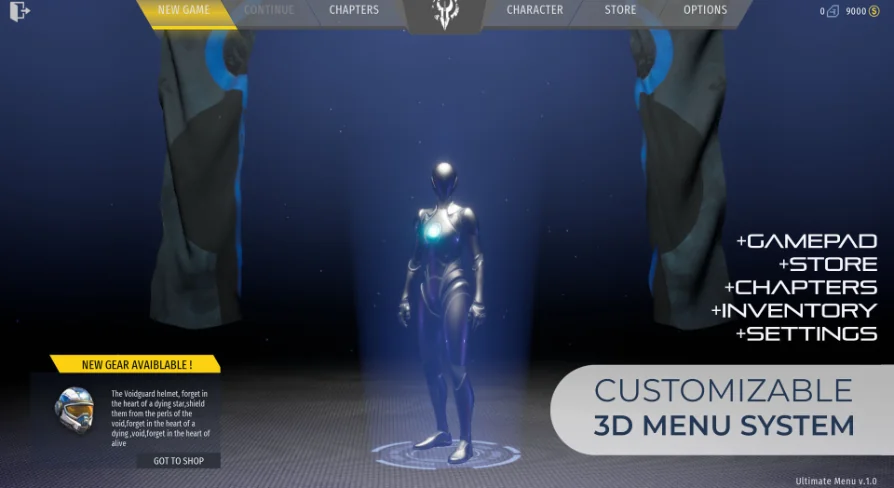
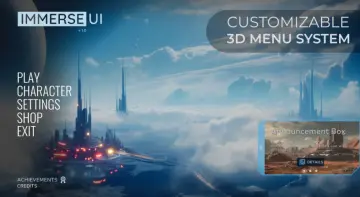
The Game Main Menu - 3D UI - Gamepad - Common UI - Ultimate is a ready-to-use menu system shaped by Unreal's Common UI framework. It is designed to move past a flat, static settings screen and instead drop the player into a visually crafted 3D space the moment the game loads. The description frames it directly: “Don't just start the game, embark on an adventure from the very first menu.”
That positioning is more than flavor text. The menu is built with navigation and look in mind, aiming to be a modern, feature-packed starting point for any project that needs more than a default UI. Because it runs on Common UI, it sits comfortably inside the Unreal interface workflow, where widgets, activation, and focus management are handled consistently across devices.
Automatic Gamepad Detection and Seamless Input Switching
One of the standout behaviors is how input is handled. The menu automatically detects when a gamepad is being used, and players can switch between keyboard/mouse and gamepad while navigating without an explicit mode toggle. This is a practical detail for any game with multiple input options, especially those played on a TV or with a controller plugged in.
The seamless switching means the menu reads the active input source on the fly. If a player moves the mouse and then picks up a controller, the UI responds accordingly, which keeps the experience fluid. For players on PC, this removes the need to go into a settings submenu just to change input profiles.
Rebinding Options for Control, Audio, and Graphics
The menu isn't just a hub for starting a game. It comes with extensive rebinding options that cover control, audio, and graphics. That means players can tailor their experience directly from the menu, adjusting key bindings, sound levels, and visual quality settings without leaving the 3D shell.
From a development standpoint, this is a significant time-saver. Instead of building separate settings systems and wiring them into the UI, the package provides a unified interface where all three areas are presented together. The rebinding logic is already in place, so a production team can focus on the actual game instead of re-implementing common settings screens.
Customization Through Data Tables
The visual and structural customization of the menu is handled through data tables, which gives developers a way to adjust the interface without digging into blueprint logic. “Customize every aspect of the interface with data tables” suggests that labels, colors, mappings, or even layout hints can be tweaked from a central data source, rather than on a widget-by-widget basis.
Using data tables also makes it easier to localize or re-theme the menu. Since the data is separated from the widget hierarchy, an artist or designer can update text or visual parameters without disturbing the layout logic. For a project that expects to iterate on its UI, this is a flexible approach.
Where This Menu Fits in a Production Workflow
The Game Main Menu is a drop-in solution for any Unreal project that wants to ship with a polished, game-ready front end. Its integration is described as seamless and requiring only a few clicks, which points to a package that is set up to be placed into an existing project and connected to the game's main flow.
Because it includes settings for control, audio, and graphics, it essentially replaces the first layer of a typical game's front end. That means production teams can check a box on the pre-production list: a high-quality menu that supports both keyboard/mouse and complete gamepad navigation. The 3D space around the menu also gives a specific mood to the game's opening moments, turning a functional screen into something closer to an interactive intro.
The broader tag set for the resource — Customizable, GUI, Settings, Menu, User, Blueprint, Interface — reinforces its role as a building block. It is not a placeholder or a throwaway demo; it is a substantial piece of UI infrastructure that a team can adapt to its own visual identity.
Where it fits best is in a project already aligned with Unreal's Common UI system, particularly one that targets players on both PC and console-style settings. The automatic gamepad detection and the ability to switch inputs seamlessly make it a solid foundation for cross-platform launches.
The menu is also a fit for developers who want to extend rather than reinvent. Because the base is built in Blueprint, developers can open it up and modify logic, widgets, and data tables to match their own game’s flow. The data table layer means that even without touching Blueprint, a lot of visible interface changes are achievable.
A Menu Designed to Be an Experience
The underlying idea of the package is that the menu is not an interruption but the first piece of the player experience. “This isn't just a menu, it's an experience” is a bold claim, but the feature set backs it up: a 3D visual space, automatic input switching, and full rebinding options come together to create a front end that feels intentionally designed rather than cobbled together.
For developers, the practical takeaway is that this package is set up to handle the entire front-end layer of a game: navigation, settings, and visual presentation. It removes the need to write a login flow, a settings manager, and a 3D scene for the menu from scratch. Instead, it gives a project a cohesive starting point that can be customized to match the game’s own art style and mechanical requirements.
 UI Kits / HUDs
 UI Kits / HUDs
 UI Kits / HUDs
 UI Kits / HUDs