"fa182e0cd0a6ea73"{"id":"1000613","slug":"game-main-menu-3d-ui-3d-immerse-ui","title":"Game Main Menu - 3D UI - 3D Immerse UI","category":"UI Kits / HUDs","engine":"5.3+","assetVersion":"","engineVersion":"Engine Version: 5.3+","tag":"UI Kits / HUDs","accent":"blue","visual":"mech","summary":"A modular 3D main menu Blueprint for Unreal Engine featuring seamless integration, extensive graphics and audio rebinding, and data table customization.","platform":"Unreal Engine","publishedAt":"2026-07-20T20:37:06.164Z","updatedAt":"2026-07-20T20:37:06.164Z","sourceNotes":[],"fileContents":[],"compatibility":["Unreal Engine","Engine Version: 5.3+"],"featuredImage":{"alt":"Game Main Menu - 3D UI - 3D Immerse UI","src":"/wp-content/uploads/published/2026/07/4871fb276d02-c64b3ec4-4e4b-461f-b299-0b2a3faf7537-5d32013994.webp"},"hasDownloadLink":true,"downloads":0,"terms":[{"taxonomy":"category","slug":"ui-kits-huds","name":"UI Kits / HUDs"}],"galleryImages":[{"src":"/wp-content/uploads/published/2026/07/98084eb854a7-a4a2aa39-8324-4f6c-a990-8ce610893ec8-74333045e6.webp","alt":"Game Main Menu - 3D UI - 3D Immerse UI"},{"src":"/wp-content/uploads/published/2026/07/dd1e56cd60e7-5f21e845-ba5a-4d32-8504-61e318e8f013-6f7aaa906f.webp","alt":"Game Main Menu - 3D UI - 3D Immerse UI"},{"src":"/wp-content/uploads/published/2026/07/ce360cd5ee46-ee7fb324-210a-4348-be2c-10d21f92606b-4c12aba604.webp","alt":"Game Main Menu - 3D UI - 3D Immerse UI"},{"src":"/wp-content/uploads/published/2026/07/e6e5fb2e815a-ee589e86-f91d-4586-9b04-450749c6e1bb-cb6e553e63.webp","alt":"Game Main Menu - 3D UI - 3D Immerse UI"},{"src":"/wp-content/uploads/published/2026/07/a51508995995-ba6b116f-41b2-44e7-8157-3e07cce15ac4-fabc4781cb.webp","alt":"Game Main Menu - 3D UI - 3D Immerse UI"},{"src":"/wp-content/uploads/published/2026/07/258152c64884-bf3f2e75-b956-4ad2-a93c-9d3a424d3b1c-cb5f02cb01.webp","alt":"Game Main Menu - 3D UI - 3D Immerse UI"},{"src":"/wp-content/uploads/published/2026/07/6ebb2d0f1ba4-84c54c7f-9b16-48b8-a323-f467ad52b743-14e853d48a.webp","alt":"Game Main Menu - 3D UI - 3D Immerse UI"},{"src":"/wp-content/uploads/published/2026/07/b9894af85a81-5abdb859-5b32-4fd8-a3ac-8c280713be9f-a67223e22f.webp","alt":"Game Main Menu - 3D UI - 3D Immerse UI"},{"src":"/wp-content/uploads/published/2026/07/f4076d5bae33-cc87a6df-80fd-4264-9a33-2fd326f894d4-f168e8e5f8.webp","alt":"Game Main Menu - 3D UI - 3D Immerse UI"}],"accessPanel":{"kind":"resource","title":"Download this resource","eyebrow":"Free Download","message":"Log in or create a free account to start your download.","fileName":"Content.7z","safetyNote":"Resources are manually reviewed before listing to improve quality and reduce obvious risks.","actionLabel":"Download Free","resourceType":"Resource archive"},"contentHtml":"\u003cp\u003eGetting a project running often means wrestling with front-end interfaces before the actual gameplay loop can be tested. \u003cstrong\u003eGame Main Menu - 3D UI - 3D Immerse UI\u003c/strong\u003e Approaches this setup phase by providing a modular Blueprint menu system intended for seamless integration with a few clicks. The asset functions as a complete user interface framework built directly within Unreal Engine's 3D space, prioritizing a modern look alongside effortless navigation for the end player.\u003c/p\u003e \u003ch2\u003eImplementing the 3D Immerse UI Blueprint\u003c/h2\u003e \u003cp\u003eThe core architecture of this package is built on a modular Blueprint foundation. Instead of relying solely on flat 2D textures, the menu utilizes the 3D environment, allowing the interface and its elements to exist naturally within the game's physical rendering space. This gives the visual presentation a more immersive depth.\u003c/p\u003e \u003cp\u003eFrom a production standpoint, the developer can drop the menu into an existing project without a lengthy configuration process. The focus is on reducing the friction of initial setup, so teams can establish a functional starting point for their game or project quickly. Because the system is modular, individual components of the interface can be managed independently rather than navigating a single, monolithic user interface file.\u003c/p\u003e \u003ch2\u003ePlayer Controls and Settings Configuration\u003c/h2\u003e \u003cp\u003eA significant portion of the package is dedicated to player customization. Once integrated, the menu provides extensive control, audio, and graphic rebinding options. This ensures that players can tailor their experience to their specific hardware and playstyle preferences.\u003c/p\u003e \u003cp\u003eThe settings environment includes drop-down menus necessary for navigating different graphic and audio options. An initial bug involving overlapping drop-down menus within the settings was identified and resolved in version 1.0.1, stabilizing the interaction model for end users and allowing them to make exact adjustments to their personal configuration without interruption.\u003c/p\u003e \u003ch2\u003eVisual Customization Through Data Tables\u003c/h2\u003e \u003cp\u003eBeyond the default 3D presentation, the asset allows for extensive modification of the interface specifically through data tables. This implementation choice means that altering the visual style or available options does not necessarily require navigating complex Blueprint node graphs.\u003c/p\u003e \u003cp\u003eDevelopers can customize every aspect of the interface by modifying table entries. This data-driven approach allows teams to define new settings values, swap out visual elements, or restructure the presentation of the menu directly through spreadsheet-style row and column management, keeping the structural data distinct from the operational logic.\u003c/p\u003e \u003ch2\u003ePausing and User Interface Interactions\u003c/h2\u003e \u003cp\u003eThe package is tagged and structured to cover both the initial game launch and the in-game pause environment. This means the interface is equipped to handle user navigation during a suspended play state, providing consistent user experiences across both the start menu and the pause menu.\u003c/p\u003e \u003cp\u003eThe inclusion of pause functionality ensures that the modular Blueprint system serves as an ongoing interface tool rather than a one-time launch screen. The same design language, graphical rebinding options, and data table customization techniques apply to the pause state, maintaining uniform presentation for the player.\u003c/p\u003e \u003ch2\u003eVersion Maintenance and Support\u003c/h2\u003e \u003cp\u003eThe asset is actively maintained to ensure production readiness. The resolution of overlapping drop-down menus in the 1.0.1 update demonstrates ongoing revisions to the interface logic. The creator remains available for questions and technical support regarding the asset, providing a direct line of communication for developers implementing the Blueprint into their workflows.\u003c/p\u003e \u003cp\u003eUltimately, this main menu system is best suited for developers seeking a data-driven, highly customizable interface solution that operates within Unreal Engine's 3D space. Projects that require detailed player control over graphics and audio settings, as well as a cohesive pause menu environment, will benefit most from its modular Blueprint architecture.\u003c/p\u003e\n\n\u003ch2\u003eContinue Browsing Similar Packs\u003c/h2\u003e\n\u003cul\u003e\n\u003cli\u003e\u003ca href=\"https://3dcghub.com/hyper-menu-and-gamepad-system-v4-commonui/\" title=\"Hyper Menu and Gamepad System v4 [CommonUI]\"\u003eHyper Menu and Gamepad System v4 [CommonUI]\u003c/a\u003e\u003c/li\u003e\n\u003cli\u003e\u003ca href=\"https://3dcghub.com/gui-simple-round-2/\" title=\"GUI - Simple Round\"\u003eGUI - Simple Round\u003c/a\u003e\u003c/li\u003e\n\u003cli\u003e\u003ca href=\"https://3dcghub.com/easy-game-ui-ultimate/\" title=\"Easy Game UI Ultimate\"\u003eEasy Game UI Ultimate\u003c/a\u003e\u003c/li\u003e\n\u003cli\u003e\u003ca href=\"https://3dcghub.com/ascent-ui-tools-gamepad-navigation-ui-framework/\" title=\"Ascent UI Tools - Gamepad Navigation \u0026amp; UI Framework\"\u003eAscent UI Tools - Gamepad Navigation \u0026amp; UI Framework\u003c/a\u003e\u003c/li\u003e\n\u003cli\u003e\u003ca href=\"https://3dcghub.com/gui-yellow-kid-2/\" title=\"GUI - Yellow Kid\"\u003eGUI - Yellow Kid\u003c/a\u003e\u003c/li\u003e\n\u003c/ul\u003e","contentTextLength":4258,"navigation":{"current":1321,"total":3789,"previous":{"id":"1000614","slug":"generic-combat-system-advanced-gas-based-multiplayer-combat-framework","title":"Generic Combat System - Advanced GAS based Multiplayer combat framework.","category":"Game Mechanics","platform":"Unreal Engine","updatedAt":"2026-07-20T20:41:12.096Z"},"next":{"id":"1000612","slug":"g2-wulin-swordman-01","title":"G2: Wulin Swordman 01","category":"Humans","platform":"Unreal Engine","updatedAt":"2026-07-20T20:27:46.766Z"}},"relatedResources":[{"id":"1001614","slug":"menu-system-pro-by-moonville","title":"Menu System Pro by Moonville","category":"UI Kits / HUDs","engine":"5.4+","assetVersion":"","engineVersion":"Engine Version: 5.4+","tag":"UI Kits / HUDs","accent":"blue","visual":"mech","summary":"Menu System Pro by Moonville provides Common UI support, Enhanced Input rebinding, modular settings, and multiplayer server menus in Unreal Engine.","platform":"Unreal Engine","publishedAt":"2026-10-11T01:43:28.810Z","updatedAt":"2026-10-11T01:43:28.810Z","sourceNotes":[],"fileContents":[],"compatibility":["Unreal Engine","Engine Version: 5.4+"],"featuredImage":{"alt":"Menu System Pro by Moonville","src":"/wp-content/uploads/published/2026/10/01bc0f1e2ce3-606b5d6f-2eb9-4b02-a3c3-d6c337be04bc-f5eaea47b3.webp"},"hasDownloadLink":true,"downloads":1},{"id":"1001510","slug":"dark-gui-ui-main-menu-pro-kit-complete-solution-psd-sources","title":"Dark GUI / UI / Main Menu Pro KIT - complete solution + psd sources","category":"UI Kits / HUDs","engine":"5.0+","assetVersion":"","engineVersion":"Engine Version: 5.0+","tag":"UI Kits / HUDs","accent":"blue","visual":"luts","summary":"A comprehensive dark UI kit featuring 148 widgets, 1,912 PNG files, adjustable Full HD and 4K layouts, and editable PSD and AI source files.","platform":"Unreal Engine","publishedAt":"2026-10-09T13:10:46.166Z","updatedAt":"2026-10-09T13:10:46.166Z","sourceNotes":[],"fileContents":[],"compatibility":["Unreal Engine","Engine Version: 5.0+"],"featuredImage":{"alt":"Dark GUI / UI / Main Menu Pro KIT - complete solution + psd sources","src":"/wp-content/uploads/published/2026/10/c5ad73455c8b-4d85652b-d0b5-4724-9c6c-1ce24dd1672c-e7c62e20b2.webp"},"hasDownloadLink":true,"downloads":0},{"id":"1001033","slug":"game-main-menu-3d-ui-gamepad-common-ui-ultimate","title":"Game Main Menu - 3D UI - Gamepad - Common UI - Ultimate","category":"UI Kits / HUDs","engine":"5.3+","assetVersion":"","engineVersion":"Engine Version: 5.3+","tag":"UI Kits / HUDs","accent":"blue","visual":"mech","summary":"A Common UI 3D main menu with automatic gamepad detection, seamless keyboard/mouse switching, and rebinding for control, audio, and graphics in a 3D space.","platform":"Unreal Engine","publishedAt":"2026-08-23T14:19:59.018Z","updatedAt":"2026-08-23T14:19:59.018Z","sourceNotes":[],"fileContents":[],"compatibility":["Unreal Engine","Engine Version: 5.3+"],"featuredImage":{"alt":"Game Main Menu - 3D UI - Gamepad - Common UI - Ultimate","src":"/wp-content/uploads/published/2026/08/c00e2cb2b7c6-2e8d92a6-f31b-4fa9-b200-d9833f2dea7a-00688ddcf9.webp"},"hasDownloadLink":true,"downloads":2}]}
UI Kits / HUDs
Game Main Menu - 3D UI - 3D Immerse UI
A modular 3D main menu Blueprint for Unreal Engine featuring seamless integration, extensive graphics and audio rebinding, and data table customization.
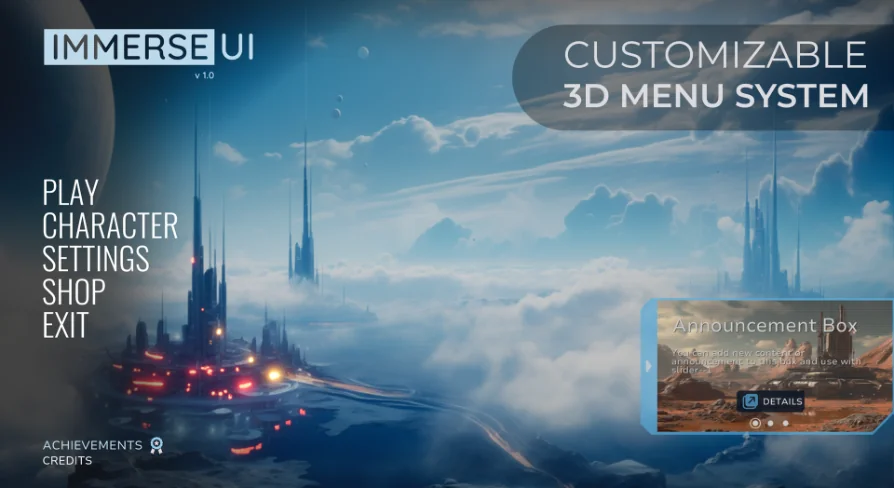
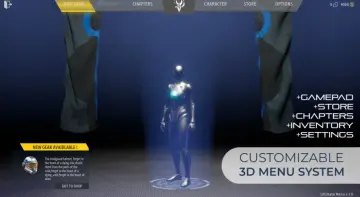
Getting a project running often means wrestling with front-end interfaces before the actual gameplay loop can be tested. Game Main Menu - 3D UI - 3D Immerse UI Approaches this setup phase by providing a modular Blueprint menu system intended for seamless integration with a few clicks. The asset functions as a complete user interface framework built directly within Unreal Engine's 3D space, prioritizing a modern look alongside effortless navigation for the end player.
Implementing the 3D Immerse UI Blueprint
The core architecture of this package is built on a modular Blueprint foundation. Instead of relying solely on flat 2D textures, the menu utilizes the 3D environment, allowing the interface and its elements to exist naturally within the game's physical rendering space. This gives the visual presentation a more immersive depth.
From a production standpoint, the developer can drop the menu into an existing project without a lengthy configuration process. The focus is on reducing the friction of initial setup, so teams can establish a functional starting point for their game or project quickly. Because the system is modular, individual components of the interface can be managed independently rather than navigating a single, monolithic user interface file.
Player Controls and Settings Configuration
A significant portion of the package is dedicated to player customization. Once integrated, the menu provides extensive control, audio, and graphic rebinding options. This ensures that players can tailor their experience to their specific hardware and playstyle preferences.
The settings environment includes drop-down menus necessary for navigating different graphic and audio options. An initial bug involving overlapping drop-down menus within the settings was identified and resolved in version 1.0.1, stabilizing the interaction model for end users and allowing them to make exact adjustments to their personal configuration without interruption.
Visual Customization Through Data Tables
Beyond the default 3D presentation, the asset allows for extensive modification of the interface specifically through data tables. This implementation choice means that altering the visual style or available options does not necessarily require navigating complex Blueprint node graphs.
Developers can customize every aspect of the interface by modifying table entries. This data-driven approach allows teams to define new settings values, swap out visual elements, or restructure the presentation of the menu directly through spreadsheet-style row and column management, keeping the structural data distinct from the operational logic.
Pausing and User Interface Interactions
The package is tagged and structured to cover both the initial game launch and the in-game pause environment. This means the interface is equipped to handle user navigation during a suspended play state, providing consistent user experiences across both the start menu and the pause menu.
The inclusion of pause functionality ensures that the modular Blueprint system serves as an ongoing interface tool rather than a one-time launch screen. The same design language, graphical rebinding options, and data table customization techniques apply to the pause state, maintaining uniform presentation for the player.
Version Maintenance and Support
The asset is actively maintained to ensure production readiness. The resolution of overlapping drop-down menus in the 1.0.1 update demonstrates ongoing revisions to the interface logic. The creator remains available for questions and technical support regarding the asset, providing a direct line of communication for developers implementing the Blueprint into their workflows.
Ultimately, this main menu system is best suited for developers seeking a data-driven, highly customizable interface solution that operates within Unreal Engine's 3D space. Projects that require detailed player control over graphics and audio settings, as well as a cohesive pause menu environment, will benefit most from its modular Blueprint architecture.
 UI Kits / HUDs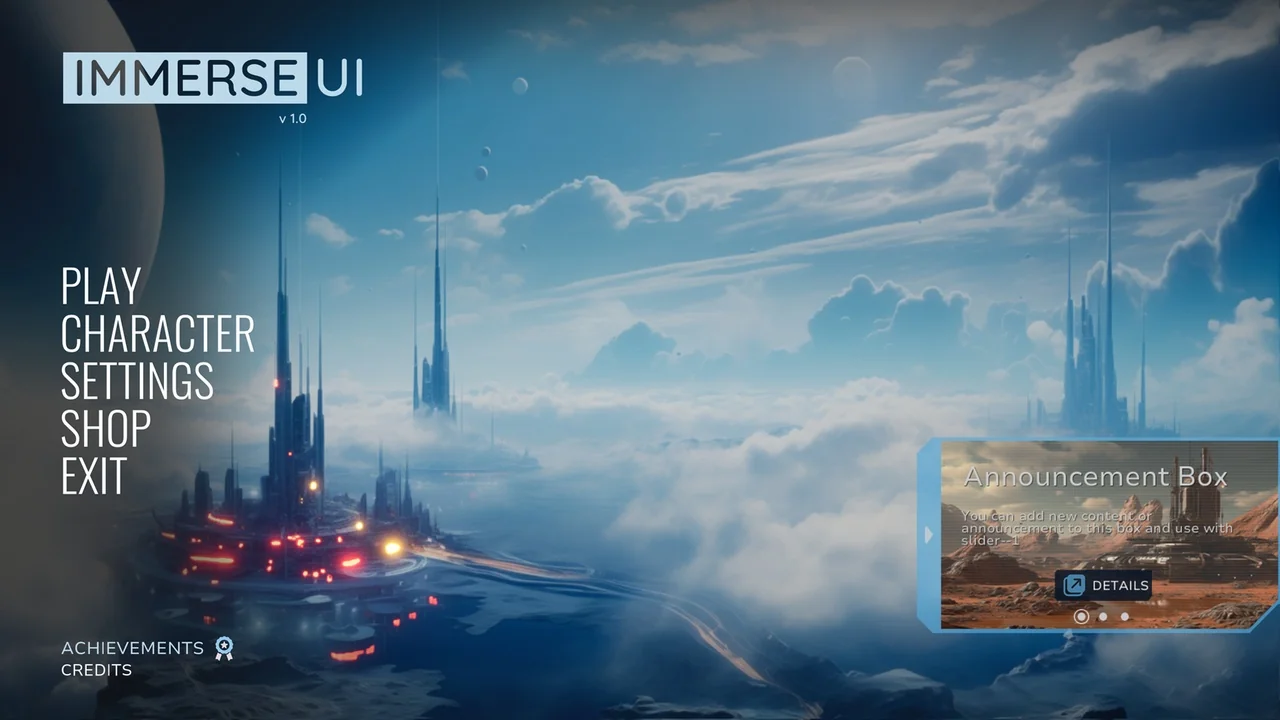
 UI Kits / HUDs
 UI Kits / HUDs
 UI Kits / HUDs