"6f9bd6df1f44a86f"{"id":"15453","slug":"easy-game-ui-ultimate","title":"Easy Game UI Ultimate","category":"UI Kits / HUDs","engine":"5.3+","assetVersion":"Engine version: 5.3+","engineVersion":"5.3","tag":"UI Kits / HUDs","accent":"blue","visual":"mech","summary":"Easy Game UI Ultimate provides a comprehensive toolkit for developers to implement professional user interfaces. It features advanced save systems, a procedural credits tool, and a robust HUD builder.","platform":"Unreal Engine","indexPolicy":"index","publishedAt":"2026-03-12T09:03:10.000Z","updatedAt":"2026-04-19T15:44:46.000Z","sourceNotes":[],"fileContents":[],"compatibility":["Unreal Engine","Engine version: 5.3+"],"featuredImage":{"alt":"Easy Game UI Ultimate","src":"https://3dcghub.com/wp-content/uploads/2026/03/f4fb3aaf-1633-47f4-aad4-504acc3e744c.webp"},"hasDownloadLink":true,"downloads":4,"terms":[{"taxonomy":"category","slug":"ui-kits-huds","name":"UI Kits / HUDs"},{"taxonomy":"post_tag","slug":"characters","name":"Characters"},{"taxonomy":"post_tag","slug":"game-systems","name":"Game Systems"},{"taxonomy":"post_tag","slug":"plugins","name":"Plugins"},{"taxonomy":"post_tag","slug":"tools","name":"Tools"},{"taxonomy":"post_tag","slug":"ui","name":"UI"},{"taxonomy":"post_tag","slug":"weapons","name":"Weapons"}],"galleryImages":[{"src":"https://3dcghub.com/wp-content/uploads/2026/03/a3381c4b6b9a_a9327be4-f547-4ea5-9b3c-6d7587aa50fc.webp","alt":"Easy Game UI Ultimate"},{"src":"https://3dcghub.com/wp-content/uploads/2026/03/a08513514eea_e0b7773f-7fd6-432c-ab99-2e73e45c96f3.webp","alt":"Easy Game UI Ultimate"},{"src":"https://3dcghub.com/wp-content/uploads/2026/03/b283ad45f33b_e20a7474-5892-4f2f-871a-c703c8029994.webp","alt":"Easy Game UI Ultimate"},{"src":"https://3dcghub.com/wp-content/uploads/2026/03/bda387cc48ea_e6d3d20d-8860-41ac-a05a-1c5388f7b91f.webp","alt":"Easy Game UI Ultimate"},{"src":"https://3dcghub.com/wp-content/uploads/2026/03/78f2ebd68901_d85af8b0-cf93-41d1-b657-6d9c38525ef5.webp","alt":"Easy Game UI Ultimate"},{"src":"https://3dcghub.com/wp-content/uploads/2026/03/c9acd7cf847c_d9c0f251-51bc-431a-ac9a-370e322f8b0c.webp","alt":"Easy Game UI Ultimate"},{"src":"https://3dcghub.com/wp-content/uploads/2026/03/fddbed38ea35_7d642e19-81e5-416c-8c9d-59773f14f4cb.webp","alt":"Easy Game UI Ultimate"},{"src":"https://3dcghub.com/wp-content/uploads/2026/03/f4ea87ccd434_12906c6a-8384-4e67-9d9e-770ba354987e.webp","alt":"Easy Game UI Ultimate"},{"src":"https://3dcghub.com/wp-content/uploads/2026/03/4fd0b7861e68_461c590a-35c3-4f5a-903a-88f13903fccb.webp","alt":"Easy Game UI Ultimate"},{"src":"https://3dcghub.com/wp-content/uploads/2026/03/39c7d22f2f72_b2568fcd-a4e2-4d2d-970e-4289da5ca8e3.webp","alt":"Easy Game UI Ultimate"},{"src":"https://3dcghub.com/wp-content/uploads/2026/03/c4ffa70201a4_e70fee2c-42af-4dcf-a6c9-56e11335b976.webp","alt":"Easy Game UI Ultimate"},{"src":"https://3dcghub.com/wp-content/uploads/2026/03/ab6e1cb11969_ec687b6f-81dc-47c3-aa25-f0eb4a7d69c9.webp","alt":"Easy Game UI Ultimate"},{"src":"https://3dcghub.com/wp-content/uploads/2026/03/6eaff4c5822e_2ac0a204-1556-40c9-88c1-1e037a66af0e.webp","alt":"Easy Game UI Ultimate"},{"src":"https://3dcghub.com/wp-content/uploads/2026/03/f6a7bcfd47e7_e382210d-ce4d-494a-85fa-385e7fb56038.webp","alt":"Easy Game UI Ultimate"},{"src":"https://3dcghub.com/wp-content/uploads/2026/03/53eb0eb2ca5a_cb093167-4d57-47a3-9ac2-b4f82963b337.webp","alt":"Easy Game UI Ultimate"},{"src":"https://3dcghub.com/wp-content/uploads/2026/03/94087e4bb28b_28937e65-0ea5-4af4-acc2-37f56124ff64.webp","alt":"Easy Game UI Ultimate"}],"accessPanel":{"kind":"resource","title":"Access this resource","eyebrow":"Free Download","message":"Log in or create a free account to start your download.","fileName":"Content.7z","safetyNote":"All resources are 100% manually reviewed to eliminate all risks.","actionLabel":"Download Free","resourceType":"Resource archive"},"contentHtml":"\u003ch2\u003eComprehensive UI Framework for Modern Games\u003c/h2\u003e\n\u003cp\u003eEasy Game UI Ultimate is a quick and simple way to add a complete UI Framework to your game. This asset provides all the essential components for a professional interface in one package. It includes a main menu, pause menu, and an extensive options menu. Additionally, the creator has integrated unique features like a game benchmarking tool and a procedural credits system.\u003c/p\u003e\n\n\u003ch2\u003eHigh-Quality Options and Benchmarking\u003c/h2\u003e\n\u003cp\u003eThe options menu offers in-depth video and graphics settings. It supports external upscaling technologies such as DLSS, FSR, and XeSS. Moreover, the system includes an extensive key rebinding tool for both gamepads and keyboards. Developers can use the built-in JSON plugin to save custom settings effortlessly. Therefore, players can enjoy a highly tailored technical experience.\u003c/p\u003e\n\n\u003ch2\u003ePowerful HUD Building Toolkit\u003c/h2\u003e\n\u003cp\u003eEasy Game UI Ultimate features a sophisticated HUD Building Toolkit. This tool uses a system of contexts and modules that adapt to the current gameplay state. Consequently, managing complex HUDs becomes an effortless task for developers. The pack includes 11 advanced built-in modules to get you started. These modules cover common elements like health bars, weapon displays, and quest alerts.\u003c/p\u003e\n\n\u003ch2\u003eAdvanced Save Systems and Photo Mode\u003c/h2\u003e\n\u003cp\u003eThe save game system is both advanced and automatic. It handles thumbnails, dates, play time, and versioning without manual input. Furthermore, the framework supports four distinct save types: Auto, Manual, Quick, and Checkpoint saves. For players who enjoy capturing moments, the pack includes a complete photo mode. This feature offers a free camera perspective and a dedicated gallery UI to view captured screenshots.\u003c/p\u003e\n\n\u003ch2\u003eInteraction and Input Systems\u003c/h2\u003e\n\u003cp\u003eHandling player interactions is simple with the versatile interaction system. It supports various input types, including tap, hold, and mash interactions. Additionally, the dynamic input prompts system automatically detects device changes. It includes dedicated icons for keyboard, mouse, and three types of gamepads. Because the UI is built with modular widgets, every element is easy to reuse and customize.\u003c/p\u003e\n\n\u003ch2\u003eStreamlined Integration and Localization\u003c/h2\u003e\n\u003cp\u003eEasy Game UI Ultimate is designed for easy integration in just a few steps. It does not require specific character implementation to function. The asset also supports full localization and includes a French translation out of the box. Moreover, the 1.1 update brings significant improvements to the HUD toolkit and general system stability. This makes it a reliable choice for developers seeking a robust UI solution.\u003c/p\u003e\n\n\u003ch2\u003eMore From The Same Workflow\u003c/h2\u003e\n\u003cul\u003e\n\u003cli\u003e\u003ca href=\"https://3dcghub.com/cyberpunk-rpg-ui/\" rel=\"noopener noreferrer\"\u003eCyberpunk RPG UI\u003c/a\u003e\u003c/li\u003e\n\u003cli\u003e\u003ca href=\"https://3dcghub.com/clean-flat-gui-elements/\" rel=\"noopener noreferrer\"\u003eClean Flat GUI Elements\u003c/a\u003e\u003c/li\u003e\n\u003cli\u003e\u003ca href=\"https://3dcghub.com/uiws-unified-interactive-water-system/\" rel=\"noopener noreferrer\"\u003eUIWS – Unified Interactive Water System\u003c/a\u003e\u003c/li\u003e\n\u003cli\u003e\u003ca href=\"https://3dcghub.com/uipf-unified-interactive-physical-foliage/\" rel=\"noopener noreferrer\"\u003eUIPF – Unified Interactive Physical Foliage\u003c/a\u003e\u003c/li\u003e\n\u003cli\u003e\u003ca href=\"https://3dcghub.com/quick-merge-skeletal-mesh/\" rel=\"noopener noreferrer\"\u003eQuick Merge Skeletal Mesh\u003c/a\u003e\u003c/li\u003e\n\u003c/ul\u003e","contentTextLength":2831,"navigation":{"current":3651,"total":4218,"previous":{"id":"15459","slug":"delayed-healthbar-system","title":"Delayed Healthbar System","category":"Widgets \u0026 Controls","platform":"Unreal Engine","updatedAt":"2026-04-19T15:44:46.000Z"},"next":{"id":"15554","slug":"dragon-flame-fx","title":"Dragon Flame FX","category":"Fire \u0026 Explosions","platform":"Unreal Engine","updatedAt":"2026-04-19T15:44:45.000Z"}},"relatedResources":[{"id":"15434","slug":"cyberpunk-rpg-ui","title":"Cyberpunk RPG UI","category":"UI Kits / HUDs","engine":"4.26+,5.0+","assetVersion":"Engine version: 4.26+,5.0+","engineVersion":"4.27","tag":"UI Kits / HUDs","accent":"blue","visual":"audio","summary":"Enhance your game's aesthetic with the Cyberpunk RPG UI. This high-resolution skin is designed specifically for action RPGs and supports up to 4k displays with a neon-inspired look.","platform":"Unreal Engine","indexPolicy":"index","publishedAt":"2026-03-12T09:01:43.000Z","updatedAt":"2026-04-19T15:44:47.000Z","sourceNotes":[],"fileContents":[],"compatibility":["Unreal Engine","Engine version: 4.26+,5.0+"],"featuredImage":{"alt":"Cyberpunk RPG UI","src":"https://3dcghub.com/wp-content/uploads/2026/03/936e28e9-d1f6-4ece-8636-eee4d4b14e97.webp"},"hasDownloadLink":true,"downloads":0},{"id":"1001033","slug":"game-main-menu-3d-ui-gamepad-common-ui-ultimate","title":"Game Main Menu - 3D UI - Gamepad - Common UI - Ultimate","category":"UI Kits / HUDs","engine":"5.3+","assetVersion":"","engineVersion":"Engine Version: 5.3+","tag":"UI Kits / HUDs","accent":"blue","visual":"mech","summary":"A Common UI 3D main menu with automatic gamepad detection, seamless keyboard/mouse switching, and rebinding for control, audio, and graphics in a 3D space.","platform":"Unreal Engine","indexPolicy":"index","publishedAt":"2026-08-23T14:19:59.018Z","updatedAt":"2026-08-23T14:19:59.018Z","sourceNotes":[],"fileContents":[],"compatibility":["Unreal Engine","Engine Version: 5.3+"],"featuredImage":{"alt":"Game Main Menu - 3D UI - Gamepad - Common UI - Ultimate","src":"/wp-content/uploads/published/2026/08/c00e2cb2b7c6-2e8d92a6-f31b-4fa9-b200-d9833f2dea7a-00688ddcf9.webp"},"hasDownloadLink":true,"downloads":2},{"id":"1000990","slug":"fortuna-ultimate-menu-system","title":"Fortuna Ultimate Menu System","category":"UI Kits / HUDs","engine":"5.0+","assetVersion":"","engineVersion":"Engine Version: 5.0+","tag":"UI Kits / HUDs","accent":"blue","visual":"mech","summary":"A complete modular menu system with a ready-to-use main menu, settings suite, save/load audio and keybinds, credits via Data Table, confirmation popups, and reu","platform":"Unreal Engine","indexPolicy":"index","publishedAt":"2026-08-18T06:42:18.738Z","updatedAt":"2026-08-18T06:42:18.738Z","sourceNotes":[],"fileContents":[],"compatibility":["Unreal Engine","Engine Version: 5.0+"],"featuredImage":{"alt":"Fortuna Ultimate Menu System","src":"/wp-content/uploads/published/2026/08/02d76a441ee6-e6cec5e1-df66-41c0-af9c-fe7a60a63d8f-ea56872eb0.webp"},"hasDownloadLink":true,"downloads":0}]}
UI Kits / HUDs
Easy Game UI Ultimate
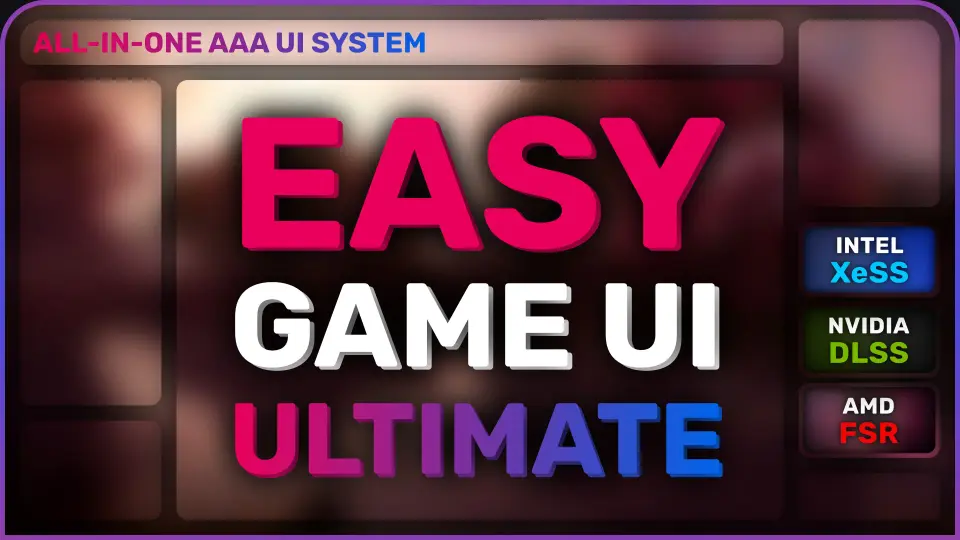
Easy Game UI Ultimate provides a comprehensive toolkit for developers to implement professional user interfaces. It features advanced save systems, a procedural credits tool, and a robust HUD builder.
Easy Game UI Ultimate is a quick and simple way to add a complete UI Framework to your game. This asset provides all the essential components for a professional interface in one package. It includes a main menu, pause menu, and an extensive options menu. Additionally, the creator has integrated unique features like a game benchmarking tool and a procedural credits system.
High-Quality Options and Benchmarking
The options menu offers in-depth video and graphics settings. It supports external upscaling technologies such as DLSS, FSR, and XeSS. Moreover, the system includes an extensive key rebinding tool for both gamepads and keyboards. Developers can use the built-in JSON plugin to save custom settings effortlessly. Therefore, players can enjoy a highly tailored technical experience.
Powerful HUD Building Toolkit
Easy Game UI Ultimate features a sophisticated HUD Building Toolkit. This tool uses a system of contexts and modules that adapt to the current gameplay state. Consequently, managing complex HUDs becomes an effortless task for developers. The pack includes 11 advanced built-in modules to get you started. These modules cover common elements like health bars, weapon displays, and quest alerts.
Advanced Save Systems and Photo Mode
The save game system is both advanced and automatic. It handles thumbnails, dates, play time, and versioning without manual input. Furthermore, the framework supports four distinct save types: Auto, Manual, Quick, and Checkpoint saves. For players who enjoy capturing moments, the pack includes a complete photo mode. This feature offers a free camera perspective and a dedicated gallery UI to view captured screenshots.
Interaction and Input Systems
Handling player interactions is simple with the versatile interaction system. It supports various input types, including tap, hold, and mash interactions. Additionally, the dynamic input prompts system automatically detects device changes. It includes dedicated icons for keyboard, mouse, and three types of gamepads. Because the UI is built with modular widgets, every element is easy to reuse and customize.
Streamlined Integration and Localization
Easy Game UI Ultimate is designed for easy integration in just a few steps. It does not require specific character implementation to function. The asset also supports full localization and includes a French translation out of the box. Moreover, the 1.1 update brings significant improvements to the HUD toolkit and general system stability. This makes it a reliable choice for developers seeking a robust UI solution.
 UI Kits / HUDs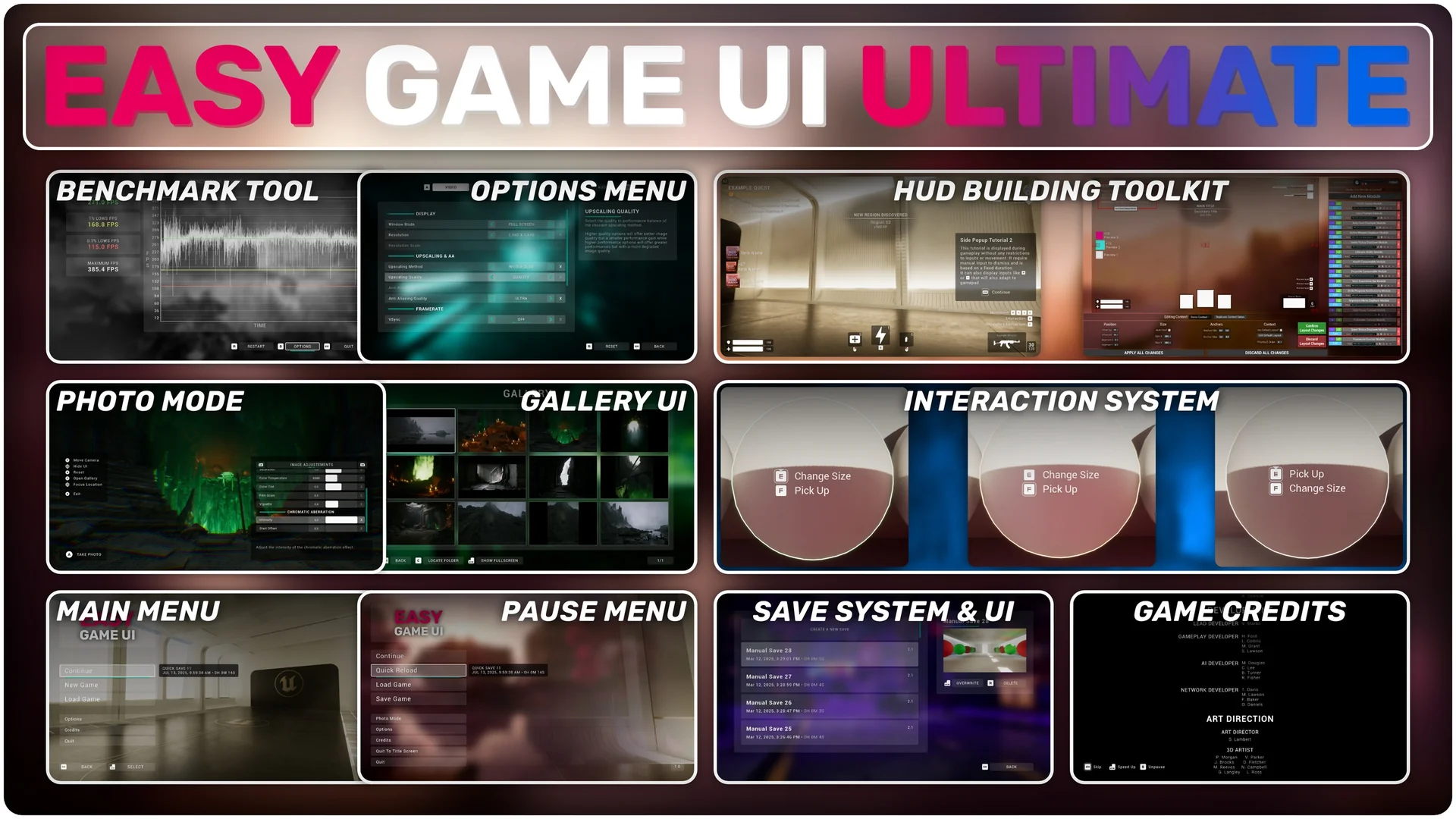
 UI Kits / HUDs
 UI Kits / HUDs
 UI Kits / HUDs