"0341a2901a4ae9aa"{"id":"15459","slug":"delayed-healthbar-system","title":"Delayed Healthbar System","category":"Widgets \u0026 Controls","engine":"5.0+","assetVersion":"Engine version: 5.0+","engineVersion":"5.0","tag":"Widgets \u0026 Controls","accent":"blue","visual":"audio","summary":"Enhance your game's user interface with the Delayed Healthbar System. This asset provides a ready-to-use solution for animated health bars, damage blips, and screen-space indicators.","platform":"Unreal Engine","publishedAt":"2026-03-12T09:07:20.000Z","updatedAt":"2026-04-19T15:44:46.000Z","sourceNotes":[],"fileContents":[],"compatibility":["Unreal Engine","Engine version: 5.0+"],"featuredImage":{"alt":"Delayed Healthbar System","src":"https://3dcghub.com/wp-content/uploads/2026/03/072782e5-1fcd-4671-915e-3f517fc8aea5.webp"},"hasDownloadLink":true,"downloads":0,"terms":[{"taxonomy":"category","slug":"widgets-and-controls","name":"Widgets \u0026 Controls"},{"taxonomy":"post_tag","slug":"animation","name":"Animation"},{"taxonomy":"post_tag","slug":"blueprint","name":"Blueprint"},{"taxonomy":"post_tag","slug":"characters","name":"Characters"},{"taxonomy":"post_tag","slug":"game-systems","name":"Game Systems"},{"taxonomy":"post_tag","slug":"ui","name":"UI"},{"taxonomy":"post_tag","slug":"vfx","name":"VFX"}],"galleryImages":[{"src":"https://3dcghub.com/wp-content/uploads/2026/03/0b816e73b967_890d7394-f0f3-4744-b9fa-dc94f8cecd44.webp","alt":"Delayed Healthbar System"},{"src":"https://3dcghub.com/wp-content/uploads/2026/03/c77b6e496dc6_2610edf7-8f18-47be-a34b-27dd2a9ed252.webp","alt":"Delayed Healthbar System"},{"src":"https://3dcghub.com/wp-content/uploads/2026/03/c3c058e52b35_3799be13-e0a0-4293-90d8-299eda8e0cae.webp","alt":"Delayed Healthbar System"}],"accessPanel":{"kind":"resource","title":"Access this resource","eyebrow":"Free Download","message":"Log in or create a free account to start your download.","fileName":"Content.7z","safetyNote":"All resources are 100% manually reviewed to eliminate all risks.","actionLabel":"Download Free","resourceType":"Resource archive"},"contentHtml":"\u003ch2\u003eProfessional UI with the Delayed Healthbar System\u003c/h2\u003e\n\u003cp\u003eThe \u003cstrong\u003eDelayed Healthbar System\u003c/strong\u003e offers a streamlined way to implement professional damage effects in your game projects. This asset is designed for creators who want to add visual weight to health changes through a delayed catching-up mechanic. Furthermore, it provides a flexible foundation that works for both new and existing projects. Developers can hit the ground running by using the included example widget as a base for their own designs.\u003c/p\u003e\n\n\u003ch2\u003eSeamless Integration and Customization\u003c/h2\u003e\n\u003cp\u003eIntegrating this system into your workflow is quick and efficient. You can use the example healthbar widget to build upon and customize for your specific needs. Alternatively, you can reparent an existing widget to gain access to the delayed functionality. Consequently, this flexibility ensures that the asset fits into various development pipelines without requiring a total UI overhaul.\u003c/p\u003e\n\n\u003ch2\u003eKey Features and Example Implementation\u003c/h2\u003e\n\u003cp\u003eThe asset comes with a ready-to-use example that demonstrates its full capabilities. This implementation includes several helpful features for game developers:\u003c/p\u003e\n\u003cul\u003e\n \u003cli\u003e\u003cstrong\u003eDamage and Healing Volumes:\u003c/strong\u003e Includes volumes that apply random damage or restore health gradually over time.\u003c/li\u003e\n \u003cli\u003e\u003cstrong\u003eVersatile Display Options:\u003c/strong\u003e Features both screen-space per-character healthbars and a dedicated player HUD healthbar.\u003c/li\u003e\n \u003cli\u003e\u003cstrong\u003eAutomatic Visibility:\u003c/strong\u003e Healthbars can automatically hide when full after a short delay to keep the screen uncluttered.\u003c/li\u003e\n \u003cli\u003e\u003cstrong\u003eAdvanced Animations:\u003c/strong\u003e Includes damage blip animations and animated text for the last damage dealt.\u003c/li\u003e\n\u003c/ul\u003e\n\u003cp\u003eThe core of the \u003cstrong\u003eDelayed Healthbar System\u003c/strong\u003e is the animated bar itself. This bar slowly catches up to the actual health value after damage is taken. Therefore, players receive clear and satisfying visual feedback during combat or environmental hazards.\u003c/p\u003e\n\n\u003ch2\u003eClear Documentation and Readable Code\u003c/h2\u003e\n\u003cp\u003eTo help you get started, the developer has provided a dedicated integration guide. This documentation includes a full API reference for the delayed healthbar widget. Additionally, all Blueprint code is thoroughly commented. Because the code is written for readability, it is easy to understand and modify. However, the system is robust enough to work immediately with the provided setup instructions.\u003c/p\u003e\n\n\u003ch2\u003eClosing Notes\u003c/h2\u003e\n\u003cp\u003eThe \u003cstrong\u003eDelayed Healthbar System\u003c/strong\u003e is a practical tool for any developer looking to polish their game's interface. It combines ease of use with professional-grade animations and logic. By using this system, you can provide players with a more dynamic and responsive health tracking experience.\u003c/p\u003e\n\n\u003ch2\u003eExplore Similar Assets\u003c/h2\u003e\n\u003cul\u003e\n\u003cli\u003e\u003ca href=\"https://3dcghub.com/modular-gameplay-blueprint-systems/\" title=\"Modular Gameplay Blueprint Systems\"\u003eModular Gameplay Blueprint Systems\u003c/a\u003e\u003c/li\u003e\n\u003cli\u003e\u003ca href=\"https://3dcghub.com/easy-game-ui-ultimate/\" title=\"Easy Game UI Ultimate\"\u003eEasy Game UI Ultimate\u003c/a\u003e\u003c/li\u003e\n\u003cli\u003e\u003ca href=\"https://3dcghub.com/npc-optimizator-automatic-optimize-npc-for-you-game/\" title=\"NPC Optimizator – automatic optimize NPC for you game\"\u003eNPC Optimizator – automatic optimize NPC for you game\u003c/a\u003e\u003c/li\u003e\n\u003cli\u003e\u003ca href=\"https://3dcghub.com/narrative-pro-2-complete-game-framework/\" title=\"Narrative Pro 2 – Complete Game Framework\"\u003eNarrative Pro 2 – Complete Game Framework\u003c/a\u003e\u003c/li\u003e\n\u003cli\u003e\u003ca href=\"https://3dcghub.com/survival-game-kit-v2/\" title=\"Survival Game Kit V2\"\u003eSurvival Game Kit V2\u003c/a\u003e\u003c/li\u003e\n\u003c/ul\u003e","contentTextLength":2788,"navigation":{"current":3449,"total":4017,"previous":{"id":"15467","slug":"extended-progress-bar","title":"Extended Progress Bar","category":"Widgets \u0026 Controls","platform":"Unreal Engine","updatedAt":"2026-04-19T15:44:46.000Z"},"next":{"id":"15453","slug":"easy-game-ui-ultimate","title":"Easy Game UI Ultimate","category":"UI Kits / HUDs","platform":"Unreal Engine","updatedAt":"2026-04-19T15:44:46.000Z"}},"relatedResources":[{"id":"15480","slug":"hqui-progress-bars","title":"HQUI: Progress Bars","category":"Widgets \u0026 Controls","engine":"4.26+,5.0+","assetVersion":"Engine version: 4.26+,5.0+","engineVersion":"4.19","tag":"Widgets \u0026 Controls","accent":"blue","visual":"animation","summary":"HQUI: Progress Bars offers a robust set of highly customizable UMG components for developers. This pack features advanced settings, gradients, and automated interpolation to elevate your game's user interface.","platform":"Unreal Engine","publishedAt":"2026-03-12T09:09:48.000Z","updatedAt":"2026-04-19T15:44:46.000Z","sourceNotes":[],"fileContents":[],"compatibility":["Unreal Engine","Engine version: 4.26+,5.0+"],"featuredImage":{"alt":"HQUI: Progress Bars","src":"https://3dcghub.com/wp-content/uploads/2026/03/327a22db-0f44-410f-93b6-73bd636562cb.webp"},"hasDownloadLink":true,"downloads":2},{"id":"14050","slug":"hand-tracking-plugin","title":"Hand Tracking Plugin","category":"Engine Tools","engine":"5.1,5.3","assetVersion":"Engine version: 5.1,5.3","engineVersion":"5.3","tag":"Engine Tools","accent":"blue","visual":"mech","summary":"The Hand Tracking Plugin provides a comprehensive suite of tools for Meta Quest developers, including advanced grabbing mechanics, gesture recognition, and customizable locomotion systems.","platform":"Unreal Engine","publishedAt":"2026-03-11T13:27:35.000Z","updatedAt":"2026-04-19T15:45:54.000Z","sourceNotes":[],"fileContents":[],"compatibility":["Unreal Engine","Engine version: 5.1,5.3"],"featuredImage":{"alt":"Hand Tracking Plugin","src":"https://3dcghub.com/wp-content/uploads/2026/03/2c3458bb-1d4c-4254-8eb0-2605709a94c6.webp"},"hasDownloadLink":true,"downloads":0},{"id":"16636","slug":"realistic-blood-vfx-niagara-blood-effects-blood-vfx-blood-blood-vfx","title":"Realistic Blood VFX (Niagara Blood Effects, Blood VFX, Blood, Blood VFX)","category":"Spells \u0026 Combat","engine":"5.2+","assetVersion":"Engine version: 5.2+","engineVersion":"5.0","tag":"Spells \u0026 Combat","accent":"blue","visual":"luts","summary":"Enhance your project with Realistic Blood VFX, a comprehensive Niagara-based system featuring dynamic splatters, arterial bleeding, and PBR-compatible decals for high-fidelity results.","platform":"Unreal Engine","publishedAt":"2026-03-12T17:37:05.000Z","updatedAt":"2026-04-19T15:43:44.000Z","sourceNotes":[],"fileContents":[],"compatibility":["Unreal Engine","Engine version: 5.2+"],"featuredImage":{"alt":"Realistic Blood VFX (Niagara Blood Effects, Blood VFX, Blood, Blood VFX)","src":"https://3dcghub.com/wp-content/uploads/2026/03/436dc969-0b81-4830-9180-0a4919a2a247.webp"},"hasDownloadLink":true,"downloads":14}]}
Widgets & Controls
Delayed Healthbar System
Enhance your game's user interface with the Delayed Healthbar System. This asset provides a ready-to-use solution for animated health bars, damage blips, and screen-space indicators.
The Delayed Healthbar System offers a streamlined way to implement professional damage effects in your game projects. This asset is designed for creators who want to add visual weight to health changes through a delayed catching-up mechanic. Furthermore, it provides a flexible foundation that works for both new and existing projects. Developers can hit the ground running by using the included example widget as a base for their own designs.
Seamless Integration and Customization
Integrating this system into your workflow is quick and efficient. You can use the example healthbar widget to build upon and customize for your specific needs. Alternatively, you can reparent an existing widget to gain access to the delayed functionality. Consequently, this flexibility ensures that the asset fits into various development pipelines without requiring a total UI overhaul.
Key Features and Example Implementation
The asset comes with a ready-to-use example that demonstrates its full capabilities. This implementation includes several helpful features for game developers:
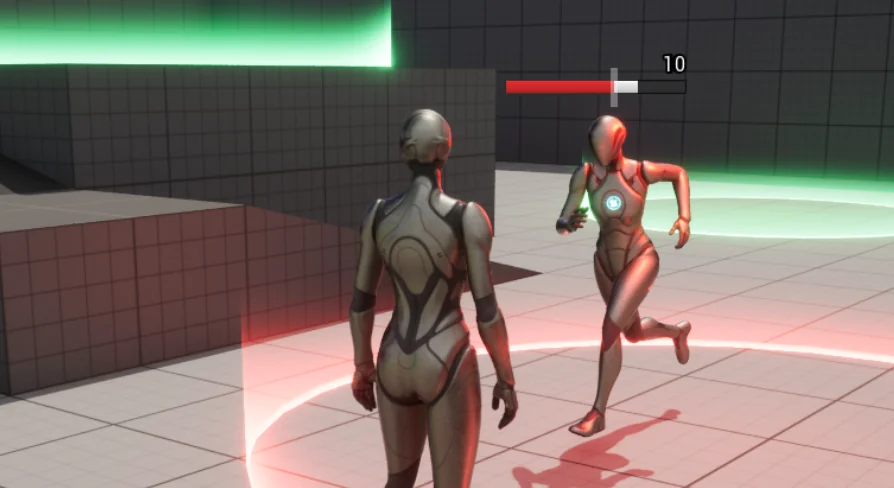
Damage and Healing Volumes: Includes volumes that apply random damage or restore health gradually over time.
Versatile Display Options: Features both screen-space per-character healthbars and a dedicated player HUD healthbar.
Automatic Visibility: Healthbars can automatically hide when full after a short delay to keep the screen uncluttered.
Advanced Animations: Includes damage blip animations and animated text for the last damage dealt.
The core of the Delayed Healthbar System is the animated bar itself. This bar slowly catches up to the actual health value after damage is taken. Therefore, players receive clear and satisfying visual feedback during combat or environmental hazards.
Clear Documentation and Readable Code
To help you get started, the developer has provided a dedicated integration guide. This documentation includes a full API reference for the delayed healthbar widget. Additionally, all Blueprint code is thoroughly commented. Because the code is written for readability, it is easy to understand and modify. However, the system is robust enough to work immediately with the provided setup instructions.
Closing Notes
The Delayed Healthbar System is a practical tool for any developer looking to polish their game's interface. It combines ease of use with professional-grade animations and logic. By using this system, you can provide players with a more dynamic and responsive health tracking experience.
 Widgets & Controls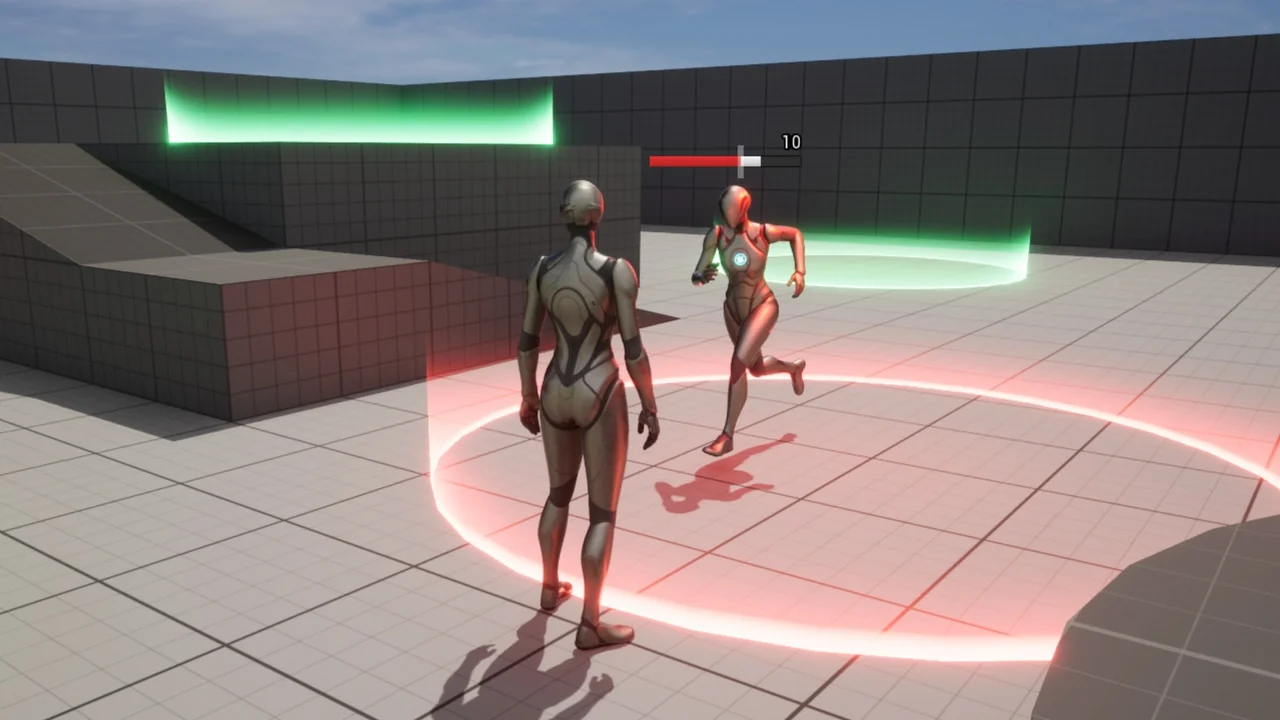
 Widgets & Controls
 Engine Tools
 Spells & Combat