"0341a2901a4ae9aa"{"id":"15467","slug":"extended-progress-bar","title":"Extended Progress Bar","category":"Widgets \u0026 Controls","engine":"4.26+,5.0+","assetVersion":"Engine version: 4.26+,5.0+","engineVersion":"4.24","tag":"Widgets \u0026 Controls","accent":"blue","visual":"character","summary":"Enhance your game's user interface with the Extended Progress Bar. This plugin simplifies the process of creating animated bars for health, mana, and stamina with deep customization options.","platform":"Unreal Engine","publishedAt":"2026-03-12T09:07:55.000Z","updatedAt":"2026-04-19T15:44:46.000Z","sourceNotes":[],"fileContents":[],"compatibility":["Unreal Engine","Engine version: 4.26+,5.0+"],"featuredImage":{"alt":"Extended Progress Bar","src":"https://3dcghub.com/wp-content/uploads/2026/03/2ae124bc-cc48-4d29-ba9a-8d3040b25849.webp"},"hasDownloadLink":true,"downloads":1,"terms":[{"taxonomy":"category","slug":"widgets-and-controls","name":"Widgets \u0026 Controls"},{"taxonomy":"post_tag","slug":"blueprint","name":"Blueprint"},{"taxonomy":"post_tag","slug":"environment","name":"Environment"},{"taxonomy":"post_tag","slug":"plugins","name":"Plugins"},{"taxonomy":"post_tag","slug":"progress-bar-plugin","name":"Progress Bar Plugin"},{"taxonomy":"post_tag","slug":"ui","name":"UI"},{"taxonomy":"post_tag","slug":"unreal-engine-5","name":"Unreal Engine 5"}],"galleryImages":[{"src":"https://3dcghub.com/wp-content/uploads/2026/03/eb77fcd3af8d_37ca9629-cd63-4ab1-a113-7806a5e1225f.webp","alt":"Extended Progress Bar"},{"src":"https://3dcghub.com/wp-content/uploads/2026/03/0d2cab23a3e4_051009ce-2f97-48a1-a37e-9b324f933a6f.webp","alt":"Extended Progress Bar"},{"src":"https://3dcghub.com/wp-content/uploads/2026/03/89e2132c105c_d4f482b4-2b58-46ff-a0f6-718ab99ffa29.webp","alt":"Extended Progress Bar"},{"src":"https://3dcghub.com/wp-content/uploads/2026/03/60f73522dd88_3be29fae-f55a-4ecf-92db-f61130508c64.webp","alt":"Extended Progress Bar"},{"src":"https://3dcghub.com/wp-content/uploads/2026/03/55f0e1c42f61_ad544c49-4ace-417d-8fcc-088952229608.webp","alt":"Extended Progress Bar"}],"accessPanel":{"kind":"resource","title":"Access this resource","eyebrow":"Free Download","message":"Log in or create a free account to start your download.","fileName":"Content.7z","safetyNote":"All resources are 100% manually reviewed to eliminate all risks.","actionLabel":"Download Free","resourceType":"Resource archive"},"contentHtml":"\u003ch2\u003eDynamic UI with the Extended Progress Bar\u003c/h2\u003e\n\u003cp\u003eThe Extended Progress Bar is a versatile plugin designed for developers who need a reliable way to display game stats. Whether you are tracking health, mana, or stamina, this tool provides a streamlined solution. Furthermore, it allows you to adapt every visual element to fit your specific project needs.\u003c/p\u003e\n\n\u003ch2\u003eUser-Friendly Integration\u003c/h2\u003e\n\u003cp\u003eGetting started with the Extended Progress Bar is remarkably simple and beginner-friendly. First, you just drag and drop the widget into your UMG layout. After that, you can customize the appearance through various settings. Consequently, it works just like the vanilla progress bar by using standard SetPercent() and GetPercent() Blueprint functions.\u003c/p\u003e\n\n\u003ch2\u003eDeep Customization Options\u003c/h2\u003e\n\u003cp\u003eCustomization is a core strength of this plugin. For instance, you can choose between linear and circular shapes, or even combine both. Additionally, the developer has included parameters for width and length to help you adjust the overall dimensions. You can also add segments to divide the bar into multiple distinct parts.\u003c/p\u003e\n\n\u003ch3\u003eAdvanced Visual Features\u003c/h3\u003e\n\u003cp\u003eVisual quality is enhanced through several advanced features. The tool supports transparency and opacity masks for complex UI designs. Moreover, you can fully customize colors and apply gradients for a more professional look. To ensure a polished finish, the plugin includes smoothness and anti-aliasing parameters.\u003c/p\u003e\n\n\u003ch3\u003eResponsive Animations\u003c/h3\u003e\n\u003cp\u003eOne of the most helpful features is the automatic animation system. When a value changes, such as when a character takes damage, the bar animates smoothly. However, you still maintain full control over how it reacts to these value updates. This ensures that the feedback for healing or damage feels responsive to the player.\u003c/p\u003e\n\n\u003ch2\u003eLearning and Support\u003c/h2\u003e\n\u003cp\u003eTo help you understand the workflow, the plugin includes an example level. This level showcases a variety of different progress bars in action. Therefore, you can easily reference these examples if you need inspiration or technical guidance. This tool was previously known as the \"Circular Animated Bar\" before receiving a significant feature update.\u003c/p\u003e\n\n\u003ch2\u003eBest Fit\u003c/h2\u003e\n\u003cp\u003eFor teams considering it, the Extended Progress Bar provides an efficient way to handle dynamic UI elements. With its blend of ease of use and deep customization, it is a valuable resource for any game developer. It simplifies the creation of animated, segmented, and shaped bars while maintaining high visual standards.\u003c/p\u003e\n\n\u003ch2\u003eMore From The Same Workflow\u003c/h2\u003e\n\u003cul\u003e\n\u003cli\u003e\u003ca href=\"https://3dcghub.com/runtime-files-downloader/\" title=\"Runtime Files Downloader\"\u003eRuntime Files Downloader\u003c/a\u003e\u003c/li\u003e\n\u003cli\u003e\u003ca href=\"https://3dcghub.com/mission-objectives/\" title=\"Mission \u0026amp;amp; Objectives\"\u003eMission \u0026amp; Objectives\u003c/a\u003e\u003c/li\u003e\n\u003cli\u003e\u003ca href=\"https://3dcghub.com/android-native-goodies/\" title=\"Android Native Goodies\"\u003eAndroid Native Goodies\u003c/a\u003e\u003c/li\u003e\n\u003cli\u003e\u003ca href=\"https://3dcghub.com/psd2umg/\" title=\"PSD2UMG\"\u003ePSD2UMG\u003c/a\u003e\u003c/li\u003e\n\u003cli\u003e\u003ca href=\"https://3dcghub.com/rodinbridge-unreal-engine-add-on/\" title=\"RodinBridge – Unreal Engine Add-on\"\u003eRodinBridge – Unreal Engine Add-on\u003c/a\u003e\u003c/li\u003e\n\u003c/ul\u003e","contentTextLength":2646,"navigation":{"current":3448,"total":4017,"previous":{"id":"15480","slug":"hqui-progress-bars","title":"HQUI: Progress Bars","category":"Widgets \u0026 Controls","platform":"Unreal Engine","updatedAt":"2026-04-19T15:44:46.000Z"},"next":{"id":"15459","slug":"delayed-healthbar-system","title":"Delayed Healthbar System","category":"Widgets \u0026 Controls","platform":"Unreal Engine","updatedAt":"2026-04-19T15:44:46.000Z"}},"relatedResources":[{"id":"15480","slug":"hqui-progress-bars","title":"HQUI: Progress Bars","category":"Widgets \u0026 Controls","engine":"4.26+,5.0+","assetVersion":"Engine version: 4.26+,5.0+","engineVersion":"4.19","tag":"Widgets \u0026 Controls","accent":"blue","visual":"animation","summary":"HQUI: Progress Bars offers a robust set of highly customizable UMG components for developers. This pack features advanced settings, gradients, and automated interpolation to elevate your game's user interface.","platform":"Unreal Engine","publishedAt":"2026-03-12T09:09:48.000Z","updatedAt":"2026-04-19T15:44:46.000Z","sourceNotes":[],"fileContents":[],"compatibility":["Unreal Engine","Engine version: 4.26+,5.0+"],"featuredImage":{"alt":"HQUI: Progress Bars","src":"https://3dcghub.com/wp-content/uploads/2026/03/327a22db-0f44-410f-93b6-73bd636562cb.webp"},"hasDownloadLink":true,"downloads":2},{"id":"15521","slug":"ultimate-menu-system","title":"Ultimate Menu System","category":"Widgets \u0026 Controls","engine":"4.27,5.0+","assetVersion":"Engine version: 4.27,5.0+","engineVersion":"4.26","tag":"Widgets \u0026 Controls","accent":"blue","visual":"animation","summary":"Ultimate Menu System provides a modular and dynamic framework for creating professional game interfaces. It supports multiple input methods and includes pre-built systems for settings and multiplayer hosting.","platform":"Unreal Engine","publishedAt":"2026-03-12T09:12:56.000Z","updatedAt":"2026-04-19T15:44:45.000Z","sourceNotes":[],"fileContents":[],"compatibility":["Unreal Engine","Engine version: 4.27,5.0+"],"featuredImage":{"alt":"Ultimate Menu System","src":"https://3dcghub.com/wp-content/uploads/2026/03/f49ca1b4-975f-44a0-a17f-9f3cca8ab40c.webp"},"hasDownloadLink":true,"downloads":1},{"id":"15496","slug":"rd-lighting-kit","title":"RD: Lighting Kit","category":"Widgets \u0026 Controls","engine":"5.0+","assetVersion":"Engine version: 5.0+","engineVersion":"5.0","tag":"Widgets \u0026 Controls","accent":"blue","visual":"character","summary":"Transform your renders with RD: Lighting Kit, a comprehensive tool for creating photorealistic studio environments in Unreal Engine. It features over 50 handcrafted presets and unique backdrops for professional results.","platform":"Unreal Engine","publishedAt":"2026-03-12T09:11:29.000Z","updatedAt":"2026-04-19T15:44:45.000Z","sourceNotes":[],"fileContents":[],"compatibility":["Unreal Engine","Engine version: 5.0+"],"featuredImage":{"alt":"RD: Lighting Kit","src":"https://3dcghub.com/wp-content/uploads/2026/03/56a37b57-480a-454b-a6d3-4243c4f68a88.webp"},"hasDownloadLink":true,"downloads":0}]}
Widgets & Controls
Extended Progress Bar
Enhance your game's user interface with the Extended Progress Bar. This plugin simplifies the process of creating animated bars for health, mana, and stamina with deep customization options.
The Extended Progress Bar is a versatile plugin designed for developers who need a reliable way to display game stats. Whether you are tracking health, mana, or stamina, this tool provides a streamlined solution. Furthermore, it allows you to adapt every visual element to fit your specific project needs.
User-Friendly Integration
Getting started with the Extended Progress Bar is remarkably simple and beginner-friendly. First, you just drag and drop the widget into your UMG layout. After that, you can customize the appearance through various settings. Consequently, it works just like the vanilla progress bar by using standard SetPercent() and GetPercent() Blueprint functions.
Deep Customization Options
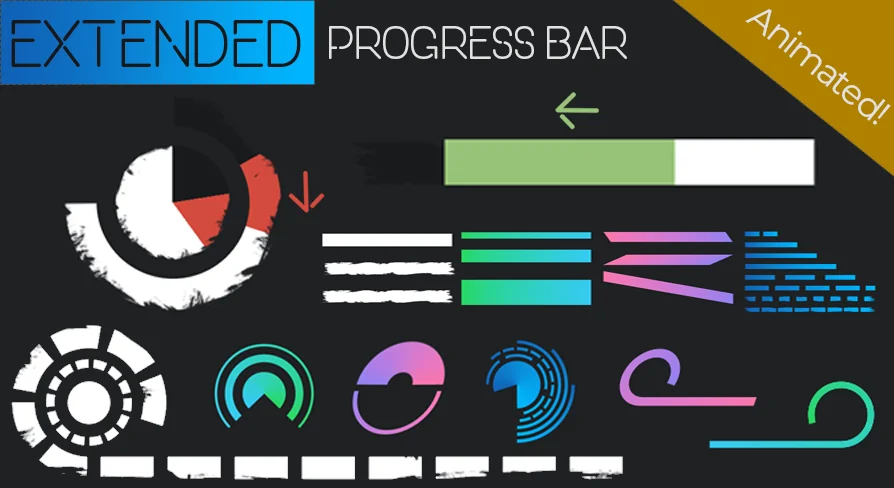
Customization is a core strength of this plugin. For instance, you can choose between linear and circular shapes, or even combine both. Additionally, the developer has included parameters for width and length to help you adjust the overall dimensions. You can also add segments to divide the bar into multiple distinct parts.
Advanced Visual Features
Visual quality is enhanced through several advanced features. The tool supports transparency and opacity masks for complex UI designs. Moreover, you can fully customize colors and apply gradients for a more professional look. To ensure a polished finish, the plugin includes smoothness and anti-aliasing parameters.
Responsive Animations
One of the most helpful features is the automatic animation system. When a value changes, such as when a character takes damage, the bar animates smoothly. However, you still maintain full control over how it reacts to these value updates. This ensures that the feedback for healing or damage feels responsive to the player.
Learning and Support
To help you understand the workflow, the plugin includes an example level. This level showcases a variety of different progress bars in action. Therefore, you can easily reference these examples if you need inspiration or technical guidance. This tool was previously known as the "Circular Animated Bar" before receiving a significant feature update.
Best Fit
For teams considering it, the Extended Progress Bar provides an efficient way to handle dynamic UI elements. With its blend of ease of use and deep customization, it is a valuable resource for any game developer. It simplifies the creation of animated, segmented, and shaped bars while maintaining high visual standards.
 Widgets & Controls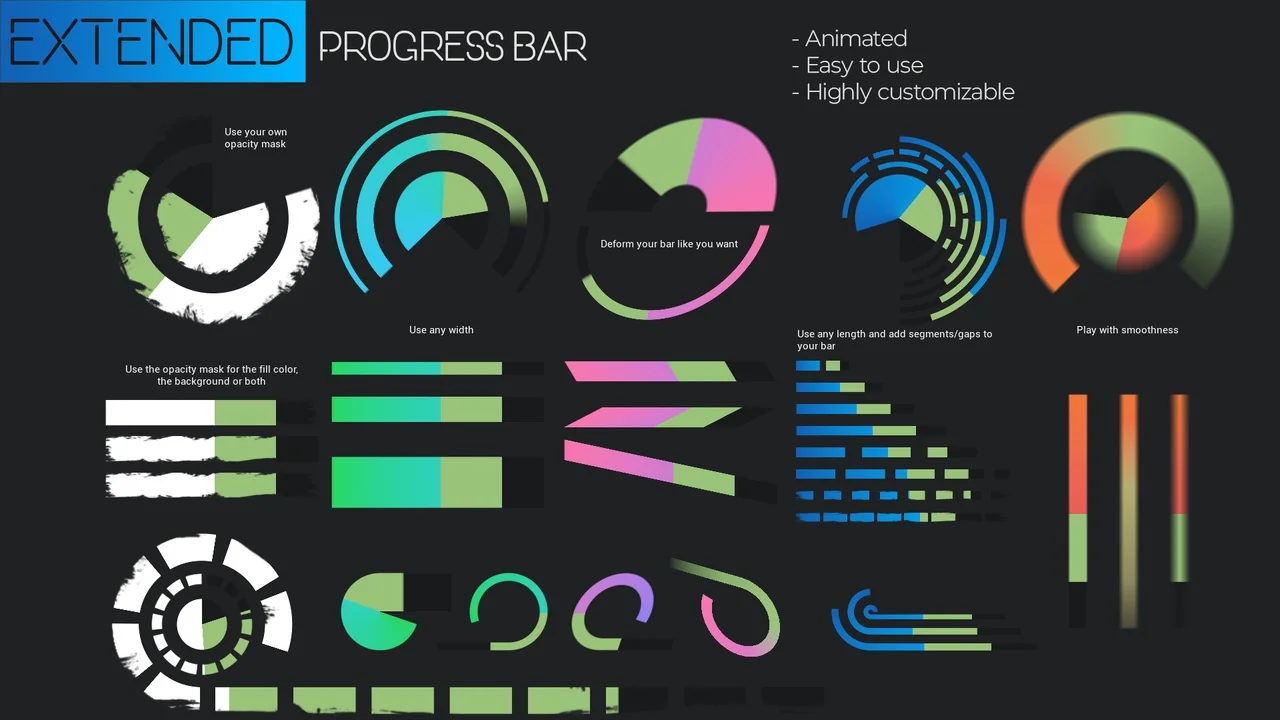
 Widgets & Controls
 Widgets & Controls
 Widgets & Controls