"0341a2901a4ae9aa"{"id":"13629","slug":"psd2umg","title":"PSD2UMG","category":"Automations","engine":"4.23 - 5.4","assetVersion":"Engine version: 4.23 - 5.4","engineVersion":"4.19","tag":"Automations","accent":"blue","visual":"city","summary":"PSD2UMG streamlines the user interface workflow by converting Photoshop layers directly into functional Unreal Engine 4 Widget Blueprints with automatic anchor assignment.","platform":"Unreal Engine","publishedAt":"2026-03-11T09:20:40.000Z","updatedAt":"2026-04-19T15:46:25.000Z","sourceNotes":[],"fileContents":[],"compatibility":["Unreal Engine","Engine version: 4.23 - 5.4"],"featuredImage":{"alt":"PSD2UMG","src":"https://3dcghub.com/wp-content/uploads/2026/03/a572f1ef-e7c6-41df-a134-588fe95e8b25.webp"},"hasDownloadLink":true,"downloads":0,"terms":[{"taxonomy":"category","slug":"automations-tools-and-plugins","name":"Automations"},{"taxonomy":"post_tag","slug":"blueprint","name":"Blueprint"},{"taxonomy":"post_tag","slug":"plugins","name":"Plugins"},{"taxonomy":"post_tag","slug":"psd2umg","name":"Psd2umg"},{"taxonomy":"post_tag","slug":"tools","name":"Tools"},{"taxonomy":"post_tag","slug":"ui","name":"UI"},{"taxonomy":"post_tag","slug":"unreal-engine-5","name":"Unreal Engine 5"}],"galleryImages":[{"src":"https://3dcghub.com/wp-content/uploads/2026/03/5edba5a02a56_500a0136-0215-429f-a686-0e8075a41988.webp","alt":"PSD2UMG"},{"src":"https://3dcghub.com/wp-content/uploads/2026/03/e1e6b794ccbb_b9bf2b66-52f0-480f-99bb-c6e015327f94.webp","alt":"PSD2UMG"},{"src":"https://3dcghub.com/wp-content/uploads/2026/03/dee5eadd51c3_5468d9d9-1af8-44ef-8a5c-8f4242e2287d.webp","alt":"PSD2UMG"}],"accessPanel":{"kind":"free-resource","title":"Access this resource","eyebrow":"Free Download","message":"Log in or create a free account to start your download.","fileName":"PSD2UMG 4.23-5.4.7z","safetyNote":"All resources are 100% manually reviewed to eliminate all risks.","actionLabel":"Download Free","resourceType":"Resource archive"},"contentHtml":"\u003ch2\u003eStreamlining UI Design with PSD2UMG\u003c/h2\u003e\n\u003cp\u003ePSD2UMG is a specialized plugin designed for Unreal Engine 4 that bridges the gap between graphic design and engine implementation. This tool allows developers to import PSD files directly into the engine environment. Consequently, it transforms layers from a standard Photoshop document into functional Widget Blueprints.\u003c/p\u003e\n\u003cp\u003eThe primary goal of the plugin is to reduce the manual effort required to recreate complex user interfaces. By automating the conversion process, the creator ensures that the transition from design software to the game engine is as efficient as possible. Therefore, UI designers can spend more time on aesthetics and less on manual asset placement.\u003c/p\u003e\n\n\u003ch2\u003eAutomated Layer Conversion\u003c/h2\u003e\n\u003cp\u003ePSD2UMG functions by identifying individual layers within a PSD file and assigning them to specific object types in a Widget Blueprint. This conversion process supports several essential UI components. Specifically, the plugin can generate the following objects:\u003c/p\u003e\n\u003cul\u003e\n \u003cli\u003eImages for visual backgrounds and icons.\u003c/li\u003e\n \u003cli\u003eInteractive Buttons for menu navigation.\u003c/li\u003e\n \u003cli\u003eProgress Bars for health or loading indicators.\u003c/li\u003e\n \u003cli\u003eCanvas Panels to maintain layout structure.\u003c/li\u003e\n \u003cli\u003eText elements for labels and information.\u003c/li\u003e\n\u003c/ul\u003e\n\u003cp\u003eIt is important to note that while text layers are converted, the plugin currently does not support the transfer of specific text attributes like size or color. However, the core text object is still created within the Widget Blueprint for further refinement.\u003c/p\u003e\n\n\u003ch2\u003eEfficient Layout and Anchor Management\u003c/h2\u003e\n\u003cp\u003eOne of the most time-consuming aspects of UI development is setting up responsive layouts. PSD2UMG addresses this by assigning anchors automatically during the import process. This feature ensures that the converted objects maintain their intended positions within the Widget Blueprint structure.\u003c/p\u003e\n\u003cp\u003eOn top of that, the plugin provides robust support for iterative design through its re-import functionality. If the visual style of the interface needs to change, the developer can simply update the original PSD file. By re-importing the file, the appearance of the existing Widget Blueprints can be updated quickly. This workflow prevents the need to rebuild UI elements from scratch every time a design tweak occurs.\u003c/p\u003e\n\n\u003ch2\u003eA Proven Resource for Developers\u003c/h2\u003e\n\u003cp\u003eThis plugin has a recognized history within the developer community. It was notably featured as part of the Monthly Unreal Engine Sponsored Content in July 2020. This recognition highlights its utility for those working specifically within the Unreal Engine 4 ecosystem.\u003c/p\u003e\n\u003cp\u003eFor teams considering it, PSD2UMG offers a practical solution for developers looking to accelerate their UI production pipeline. By automating the conversion of PSD layers into Widget Blueprints and handling anchor assignments, it simplifies the most tedious parts of interface creation. Consequently, it remains a valuable tool for maintaining design consistency and efficiency in game development.\u003c/p\u003e\n\n\u003ch2\u003eRelated Resources Worth Checking\u003c/h2\u003e\n\u003cul\u003e\n\u003cli\u003e\u003ca href=\"https://3dcghub.com/extile-plus-ultimate-non-tiling-material-toolkit-for-unreal-engine-environments/\" title=\"EXTILE PLUS -Ultimate Non-Tiling Material Toolkit for Unreal Engine Environments\"\u003eEXTILE PLUS -Ultimate Non-Tiling Material Toolkit for Unreal Engine Environments\u003c/a\u003e\u003c/li\u003e\n\u003cli\u003e\u003ca href=\"https://3dcghub.com/ultimate-template-unrealengine-2d-dialogue-inventory-system-save/\" title=\"ULTIMATE Template UnrealEngine || 2D + Dialogue + Inventory system + Save | |\"\u003eULTIMATE Template UnrealEngine || 2D + Dialogue + Inventory system + Save | |\u003c/a\u003e\u003c/li\u003e\n\u003cli\u003e\u003ca href=\"https://3dcghub.com/sci-fi-environment-engine-room/\" title=\"Sci-fi Environment Engine Room\"\u003eSci-fi Environment Engine Room\u003c/a\u003e\u003c/li\u003e\n\u003cli\u003e\u003ca href=\"https://3dcghub.com/pivot-tool/\" title=\"Pivot Tool\"\u003ePivot Tool\u003c/a\u003e\u003c/li\u003e\n\u003cli\u003e\u003ca href=\"https://3dcghub.com/compiler-booster/\" title=\"Compiler Booster\"\u003eCompiler Booster\u003c/a\u003e\u003c/li\u003e\n\u003c/ul\u003e","contentTextLength":3215,"navigation":{"current":3352,"total":4017,"previous":{"id":"13643","slug":"3d-gaussians-plugin","title":"3D Gaussians Plugin","category":"Engine Tools","platform":"Unreal Engine","updatedAt":"2026-04-19T15:46:25.000Z"},"next":{"id":"13623","slug":"pivot-tool","title":"Pivot Tool","category":"Automations","platform":"Unreal Engine","updatedAt":"2026-04-19T15:46:25.000Z"}},"relatedResources":[{"id":"13834","slug":"darker-nodes","title":"Darker Nodes","category":"Engine Tools","engine":"4.26 - 5.8","assetVersion":"Asset Version:2.6 - 3.6","engineVersion":"Engine version: 4.26 - 5.8","tag":"Engine Tools","accent":"blue","visual":"city","summary":"Enhance your development environment with Darker Nodes, a comprehensive theme for the Unreal Editor. This tool optimizes interface brightness and simplifies complex layouts to improve your daily workflow.","platform":"Unreal Engine","publishedAt":"2026-03-11T10:16:04.000Z","updatedAt":"2026-08-27T11:17:12.825Z","sourceNotes":[],"fileContents":[],"compatibility":["Unreal Engine","Asset Version:2.6 - 3.6","Engine version: 4.26 - 5.8"],"featuredImage":{"alt":"Darker Nodes","src":"https://3dcghub.com/wp-content/uploads/2026/03/18fa5af4-6fba-42db-9e00-28fe14d01c2b.webp"},"hasDownloadLink":true,"downloads":2},{"id":"27256","slug":"ultimate-engine-copilot-formerly-ultimate-blueprint-generator","title":"Ultimate Engine CoPilot (formerly Ultimate Blueprint Generator)","category":"Automations","engine":"0.3.5 - 1.3.5","assetVersion":"Engine version: 5.4 - 5.7","engineVersion":"Asset Version:0.3.5 - 1.3.5","tag":"Automations","accent":"blue","visual":"city","summary":"Ultimate Engine CoPilot keeps Blueprint setup, VFX work, UI creation, and other editor tasks inside Unreal Engine. It responds to natural language, supports voice input, and can run multiple AI agents while you work.","platform":"Unreal Engine","publishedAt":"2026-04-23T06:55:26.000Z","updatedAt":"2026-07-05T09:41:32.225Z","sourceNotes":[],"fileContents":[],"compatibility":["Unreal Engine","Engine version: 5.4 - 5.7","Asset Version:0.3.5 - 1.3.5"],"featuredImage":{"alt":"Ultimate Engine CoPilot (formerly Ultimate Blueprint Generator)","src":"https://3dcghub.com/wp-content/uploads/2026/04/fd75d459aa77_025b3508-1406-4cd3-96bf-9537f34d3d5f.webp"},"hasDownloadLink":true,"downloads":20},{"id":"13614","slug":"compiler-booster","title":"Compiler Booster","category":"Automations","engine":"1.1 - 1.2","assetVersion":"Engine version: 4.26 - 5.8","engineVersion":"Asset Version:1.1 - 1.2","tag":"Automations","accent":"blue","visual":"character","summary":"Compiler Booster is a powerful editor plugin designed to significantly reduce shader and light compile times by optimizing CPU priority within Unreal Engine.","platform":"Unreal Engine","publishedAt":"2026-03-11T09:15:50.000Z","updatedAt":"2026-08-25T07:36:59.621Z","sourceNotes":[],"fileContents":[],"compatibility":["Unreal Engine","Engine version: 4.26 - 5.8","Asset Version:1.1 - 1.2"],"featuredImage":{"alt":"Compiler Booster","src":"https://3dcghub.com/wp-content/uploads/2026/03/2cad4408-cc39-4d74-bc73-4ca5ee7e6d98.webp"},"hasDownloadLink":true,"downloads":1}]}
Automations
PSD2UMG
PSD2UMG streamlines the user interface workflow by converting Photoshop layers directly into functional Unreal Engine 4 Widget Blueprints with automatic anchor assignment.
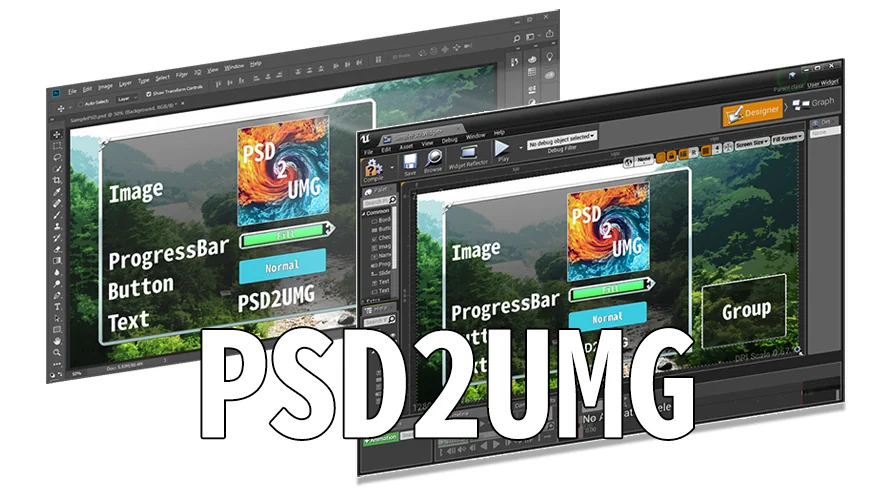
PSD2UMG is a specialized plugin designed for Unreal Engine 4 that bridges the gap between graphic design and engine implementation. This tool allows developers to import PSD files directly into the engine environment. Consequently, it transforms layers from a standard Photoshop document into functional Widget Blueprints.
The primary goal of the plugin is to reduce the manual effort required to recreate complex user interfaces. By automating the conversion process, the creator ensures that the transition from design software to the game engine is as efficient as possible. Therefore, UI designers can spend more time on aesthetics and less on manual asset placement.
Automated Layer Conversion
PSD2UMG functions by identifying individual layers within a PSD file and assigning them to specific object types in a Widget Blueprint. This conversion process supports several essential UI components. Specifically, the plugin can generate the following objects:
Images for visual backgrounds and icons.
Interactive Buttons for menu navigation.
Progress Bars for health or loading indicators.
Canvas Panels to maintain layout structure.
Text elements for labels and information.
It is important to note that while text layers are converted, the plugin currently does not support the transfer of specific text attributes like size or color. However, the core text object is still created within the Widget Blueprint for further refinement.
Efficient Layout and Anchor Management
One of the most time-consuming aspects of UI development is setting up responsive layouts. PSD2UMG addresses this by assigning anchors automatically during the import process. This feature ensures that the converted objects maintain their intended positions within the Widget Blueprint structure.
On top of that, the plugin provides robust support for iterative design through its re-import functionality. If the visual style of the interface needs to change, the developer can simply update the original PSD file. By re-importing the file, the appearance of the existing Widget Blueprints can be updated quickly. This workflow prevents the need to rebuild UI elements from scratch every time a design tweak occurs.
A Proven Resource for Developers
This plugin has a recognized history within the developer community. It was notably featured as part of the Monthly Unreal Engine Sponsored Content in July 2020. This recognition highlights its utility for those working specifically within the Unreal Engine 4 ecosystem.
For teams considering it, PSD2UMG offers a practical solution for developers looking to accelerate their UI production pipeline. By automating the conversion of PSD layers into Widget Blueprints and handling anchor assignments, it simplifies the most tedious parts of interface creation. Consequently, it remains a valuable tool for maintaining design consistency and efficiency in game development.
 Automations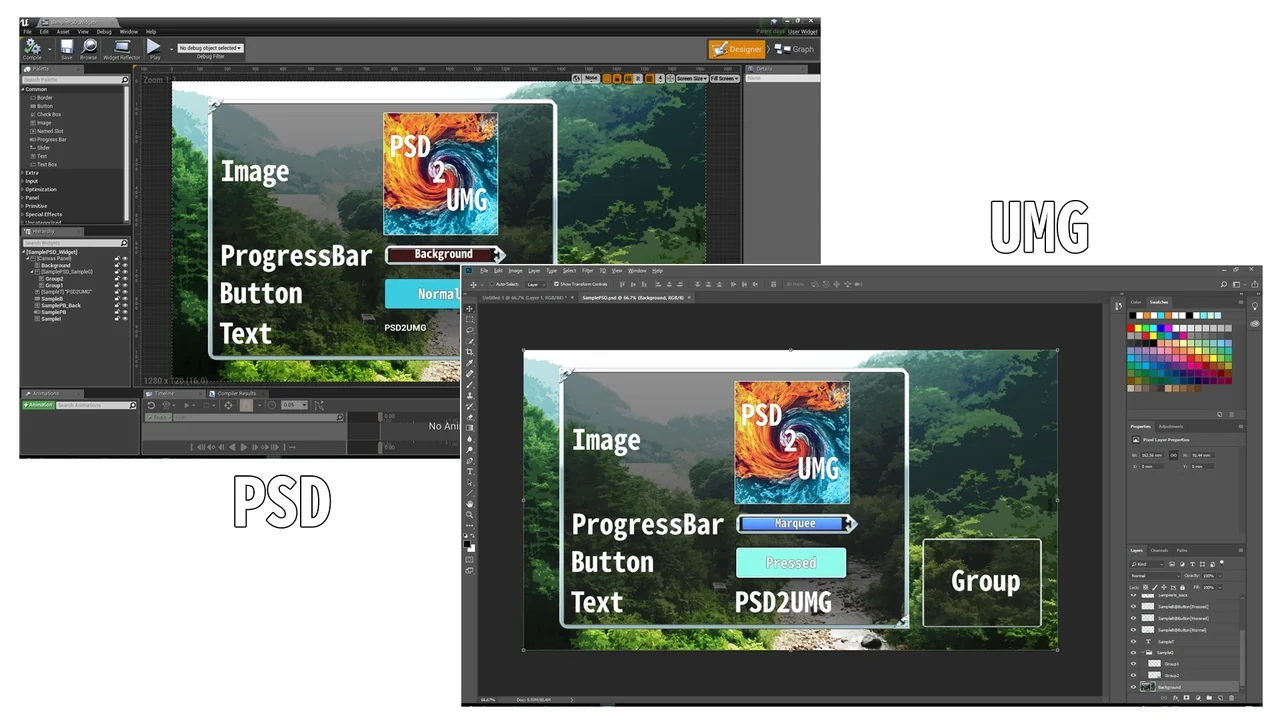
 Engine Tools
 Automations
 Automations