"7066dd76da796369"{"id":"13623","slug":"pivot-tool","title":"Pivot Tool","category":"Automations","engine":"4.26 - 5.3","assetVersion":"Engine version: 4.26 - 5.3","engineVersion":"4.12","tag":"Automations","accent":"blue","visual":"luts","summary":"The Pivot Tool provides a seamless way to adjust and bake actor pivots directly within Unreal Engine. This utility eliminates the need for external 3D modeling software when tweaking asset positions.","platform":"Unreal Engine","publishedAt":"2026-03-11T09:18:28.000Z","updatedAt":"2026-04-19T15:46:25.000Z","sourceNotes":[],"fileContents":[],"compatibility":["Unreal Engine","Engine version: 4.26 - 5.3"],"featuredImage":{"alt":"Pivot Tool","src":"https://3dcghub.com/wp-content/uploads/2026/03/14813ab7-c580-4147-9876-1f3850b86715.webp"},"hasDownloadLink":true,"downloads":0,"terms":[{"taxonomy":"category","slug":"automations-tools-and-plugins","name":"Automations"},{"taxonomy":"post_tag","slug":"editor-extensions","name":"Editor Extensions"},{"taxonomy":"post_tag","slug":"pivot-editor","name":"Pivot Editor"},{"taxonomy":"post_tag","slug":"pivot-presets","name":"Pivot Presets"},{"taxonomy":"post_tag","slug":"tools","name":"Tools"},{"taxonomy":"post_tag","slug":"unreal-editor-tool","name":"Unreal Editor Tool"},{"taxonomy":"post_tag","slug":"unreal-engine-5","name":"Unreal Engine 5"}],"galleryImages":[{"src":"https://3dcghub.com/wp-content/uploads/2026/03/147644a06a99_e7c9c6c5-0732-4825-83bb-4d02f1a1935a.webp","alt":"Pivot Tool"},{"src":"https://3dcghub.com/wp-content/uploads/2026/03/c3f3da27ee6e_970b395c-9a3b-4b7e-8568-30b771a24033.webp","alt":"Pivot Tool"},{"src":"https://3dcghub.com/wp-content/uploads/2026/03/8db59f5e940a_5ef08bec-77b9-4701-aec2-859697ceb1cb.webp","alt":"Pivot Tool"},{"src":"https://3dcghub.com/wp-content/uploads/2026/03/59543b19af74_2b8129e6-aa5e-4003-b182-6ca0714001c5.webp","alt":"Pivot Tool"},{"src":"https://3dcghub.com/wp-content/uploads/2026/03/23e7209c2a48_f7b1908c-4010-4c3c-b91d-7ac1891e1e33.webp","alt":"Pivot Tool"},{"src":"https://3dcghub.com/wp-content/uploads/2026/03/f22c06763d9f_408e7baa-a8e1-4581-96ba-2e2b55e6caca.webp","alt":"Pivot Tool"}],"accessPanel":{"kind":"free-resource","title":"Access this resource","eyebrow":"Free Download","message":"Log in or create a free account to start your download.","fileName":"Pivot Tool 4.26-5.3.7z","safetyNote":"All resources are 100% manually reviewed to eliminate all risks.","actionLabel":"Download Free","resourceType":"Resource archive"},"contentHtml":"\u003ch2\u003eEfficient Pivot Management in Unreal Engine\u003c/h2\u003e\n\u003cp\u003ePivot Tool is a dedicated pivot editor designed specifically for Unreal Engine users. It simplifies the process of modifying actor pivots by offering both manual and automatic adjustment options. Consequently, developers can maintain a faster workflow without leaving the Unreal environment. By focusing on internal editor efficiency, the tool addresses common alignment challenges directly.\u003c/p\u003e\n\n\u003cp\u003eThe tool provides a robust set of options for asset organization. With the Pivot Tool, users gain precise control over their project's actors. The developer has included 27 different pivot presets that allow for rapid, automatic alignment of objects. Furthermore, manual adjustments are available for those who require specific or unique placements for their assets.\u003c/p\u003e\n\n\u003ch2\u003eBake Changes Directly to Static Meshes\u003c/h2\u003e\n\u003cp\u003eOne of the most significant advantages of this tool is the ability to bake pivot changes into a static mesh. This process happens entirely inside the Unreal Editor. Therefore, there is no need to open external 3D modeling software just for pivot position tweaking. This integrated approach saves time and reduces the complexity of the asset pipeline.\u003c/p\u003e\n\n\u003cp\u003eIn addition to baking offsets, the tool includes a freeze rotation feature. This allows users to manage actor orientations more effectively within the scene. Moreover, these features ensure that pivot adjustments are permanent and consistent across different instances of the mesh. As a result, the tool serves as a comprehensive solution for meshing and alignment tasks.\u003c/p\u003e\n\n\u003ch2\u003eOptimized Workflow for Developers\u003c/h2\u003e\n\u003cp\u003eBy using the Pivot Tool, creators can significantly reduce the time spent on repetitive asset preparation. The workflow is designed to be intuitive, allowing for quick transitions between different alignment needs. Whether you are working on simple actors or complex static meshes, the tool provides the necessary utility to keep your project organized.\u003c/p\u003e\n\n\u003cp\u003eThe clearest takeaway is that the Pivot Tool offers a specialized set of features for Unreal Engine developers looking to optimize their asset management. The combination of 27 presets, manual control, and in-editor baking makes it a valuable resource. By removing the dependency on external software for pivot tweaks, it enhances the native capabilities of the Unreal Editor.\u003c/p\u003e\n\n\u003ch2\u003eContinue Browsing Similar Packs\u003c/h2\u003e\n\u003cul\u003e\n\u003cli\u003e\u003ca href=\"https://3dcghub.com/root-motion-fix-tool-mocap-animations-root-motion-cleaner-and-fixer/\" title=\"Root Motion Fix Tool | Mocap animations root motion cleaner and fixer\"\u003eRoot Motion Fix Tool | Mocap animations root motion cleaner and fixer\u003c/a\u003e\u003c/li\u003e\n\u003cli\u003e\u003ca href=\"https://3dcghub.com/scanlabz-trees-_-honeylocust-tree/\" title=\"Scanlabz Trees _ Honeylocust Tree\"\u003eScanlabz Trees _ Honeylocust Tree\u003c/a\u003e\u003c/li\u003e\n\u003cli\u003e\u003ca href=\"https://3dcghub.com/ultimate-template-unrealengine-2d-dialogue-inventory-system-save/\" title=\"ULTIMATE Template UnrealEngine || 2D + Dialogue + Inventory system + Save | |\"\u003eULTIMATE Template UnrealEngine || 2D + Dialogue + Inventory system + Save | |\u003c/a\u003e\u003c/li\u003e\n\u003cli\u003e\u003ca href=\"https://3dcghub.com/compiler-booster/\" title=\"Compiler Booster\"\u003eCompiler Booster\u003c/a\u003e\u003c/li\u003e\n\u003cli\u003e\u003ca href=\"https://3dcghub.com/mixamo-animation-retargeting-2/\" title=\"Mixamo Animation Retargeting 2\"\u003eMixamo Animation Retargeting 2\u003c/a\u003e\u003c/li\u003e\n\u003c/ul\u003e","contentTextLength":2623,"navigation":{"current":3352,"total":4016,"previous":{"id":"13629","slug":"psd2umg","title":"PSD2UMG","category":"Automations","platform":"Unreal Engine","updatedAt":"2026-04-19T15:46:25.000Z"},"next":{"id":"13689","slug":"asset-downgrader","title":"Asset Downgrader","category":"Engine Tools","platform":"Unreal Engine","updatedAt":"2026-04-19T15:46:24.000Z"}},"relatedResources":[{"id":"13614","slug":"compiler-booster","title":"Compiler Booster","category":"Automations","engine":"1.1 - 1.2","assetVersion":"Engine version: 4.26 - 5.8","engineVersion":"Asset Version:1.1 - 1.2","tag":"Automations","accent":"blue","visual":"character","summary":"Compiler Booster is a powerful editor plugin designed to significantly reduce shader and light compile times by optimizing CPU priority within Unreal Engine.","platform":"Unreal Engine","publishedAt":"2026-03-11T09:15:50.000Z","updatedAt":"2026-08-25T07:36:59.621Z","sourceNotes":[],"fileContents":[],"compatibility":["Unreal Engine","Engine version: 4.26 - 5.8","Asset Version:1.1 - 1.2"],"featuredImage":{"alt":"Compiler Booster","src":"https://3dcghub.com/wp-content/uploads/2026/03/2cad4408-cc39-4d74-bc73-4ca5ee7e6d98.webp"},"hasDownloadLink":true,"downloads":1},{"id":"13629","slug":"psd2umg","title":"PSD2UMG","category":"Automations","engine":"4.23 - 5.4","assetVersion":"Engine version: 4.23 - 5.4","engineVersion":"4.19","tag":"Automations","accent":"blue","visual":"city","summary":"PSD2UMG streamlines the user interface workflow by converting Photoshop layers directly into functional Unreal Engine 4 Widget Blueprints with automatic anchor assignment.","platform":"Unreal Engine","publishedAt":"2026-03-11T09:20:40.000Z","updatedAt":"2026-04-19T15:46:25.000Z","sourceNotes":[],"fileContents":[],"compatibility":["Unreal Engine","Engine version: 4.23 - 5.4"],"featuredImage":{"alt":"PSD2UMG","src":"https://3dcghub.com/wp-content/uploads/2026/03/a572f1ef-e7c6-41df-a134-588fe95e8b25.webp"},"hasDownloadLink":true,"downloads":0},{"id":"1001944","slug":"ai-grid-path-finder","title":"AI Grid Path Finder","category":"Automations","engine":"4.27","assetVersion":"Asset Version: 1.0","engineVersion":"Engine Version: 4.27","tag":"Automations","accent":"blue","visual":"mech","summary":"AI Grid Path Finder provides real-time grid generation, tag-based obstacle tagging, and queue-managed pathfinding across Unreal Engine versions.","platform":"Unreal Engine","publishedAt":"2026-10-24T11:18:53.337Z","updatedAt":"2026-10-24T11:18:53.337Z","sourceNotes":[],"fileContents":[],"compatibility":["Unreal Engine","Asset Version: 1.0","Engine Version: 4.27"],"featuredImage":{"alt":"AI Grid Path Finder","src":"/wp-content/uploads/published/2026/10/433cd661bb25-4fd9ce71-f1fa-4eb3-8893-cdb3731ed9ea-23f0b1174b.webp"},"hasDownloadLink":true,"downloads":1}]}
Automations
Pivot Tool
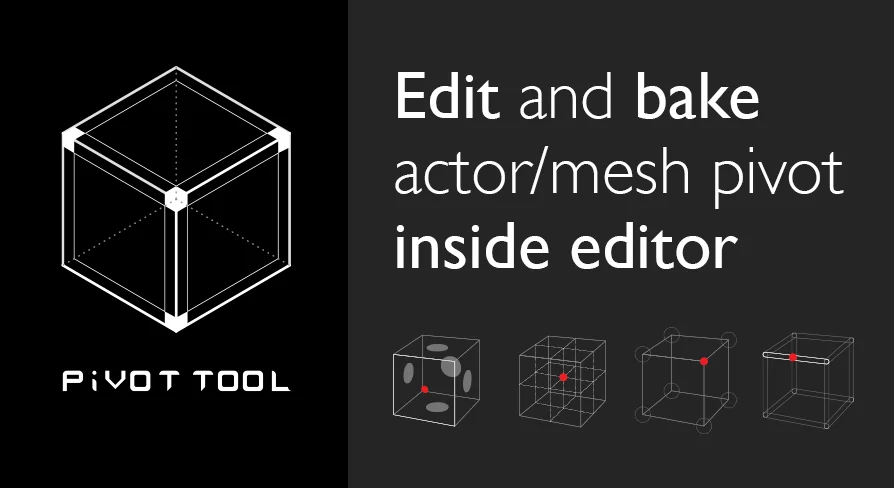
The Pivot Tool provides a seamless way to adjust and bake actor pivots directly within Unreal Engine. This utility eliminates the need for external 3D modeling software when tweaking asset positions.
Pivot Tool is a dedicated pivot editor designed specifically for Unreal Engine users. It simplifies the process of modifying actor pivots by offering both manual and automatic adjustment options. Consequently, developers can maintain a faster workflow without leaving the Unreal environment. By focusing on internal editor efficiency, the tool addresses common alignment challenges directly.
The tool provides a robust set of options for asset organization. With the Pivot Tool, users gain precise control over their project's actors. The developer has included 27 different pivot presets that allow for rapid, automatic alignment of objects. Furthermore, manual adjustments are available for those who require specific or unique placements for their assets.
Bake Changes Directly to Static Meshes
One of the most significant advantages of this tool is the ability to bake pivot changes into a static mesh. This process happens entirely inside the Unreal Editor. Therefore, there is no need to open external 3D modeling software just for pivot position tweaking. This integrated approach saves time and reduces the complexity of the asset pipeline.
In addition to baking offsets, the tool includes a freeze rotation feature. This allows users to manage actor orientations more effectively within the scene. Moreover, these features ensure that pivot adjustments are permanent and consistent across different instances of the mesh. As a result, the tool serves as a comprehensive solution for meshing and alignment tasks.
Optimized Workflow for Developers
By using the Pivot Tool, creators can significantly reduce the time spent on repetitive asset preparation. The workflow is designed to be intuitive, allowing for quick transitions between different alignment needs. Whether you are working on simple actors or complex static meshes, the tool provides the necessary utility to keep your project organized.
The clearest takeaway is that the Pivot Tool offers a specialized set of features for Unreal Engine developers looking to optimize their asset management. The combination of 27 presets, manual control, and in-editor baking makes it a valuable resource. By removing the dependency on external software for pivot tweaks, it enhances the native capabilities of the Unreal Editor.
 Automations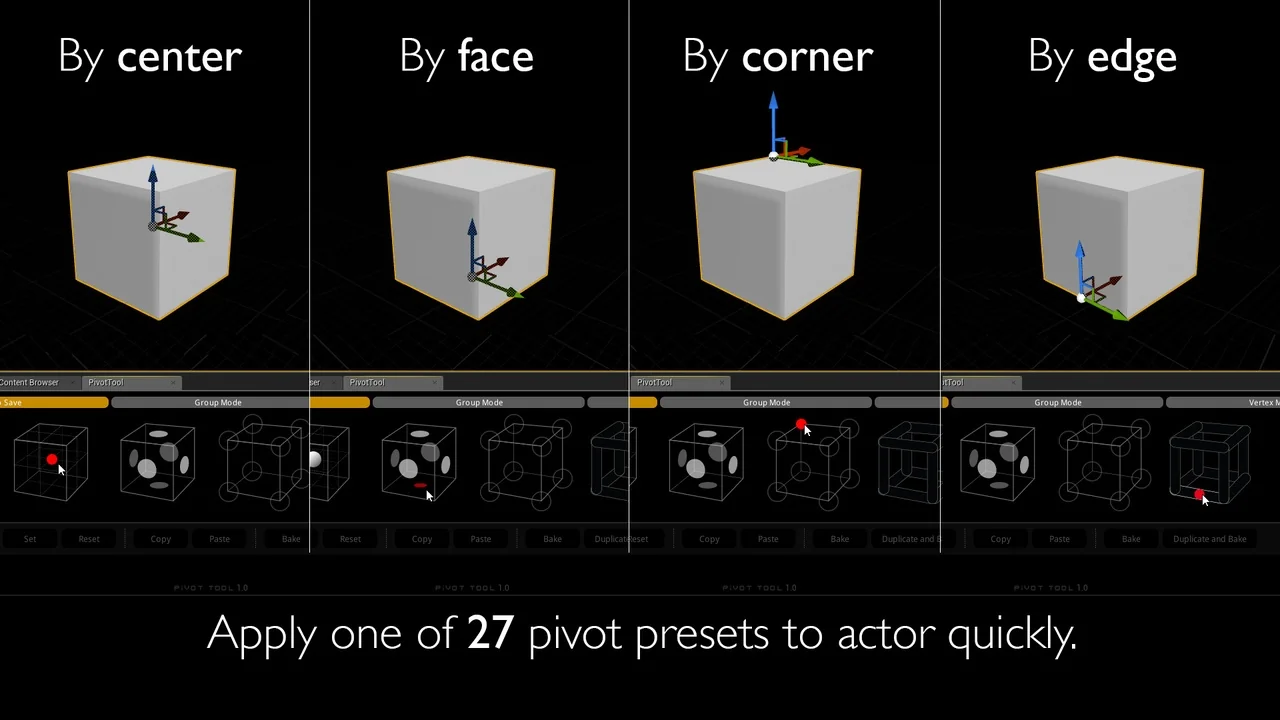
 Automations
 Automations
 Automations