"7aa4acc705f0d80b"{"id":"1001944","slug":"ai-grid-path-finder","title":"AI Grid Path Finder","category":"Automations","engine":"4.27","assetVersion":"Asset Version: 1.0","engineVersion":"Engine Version: 4.27","tag":"Automations","accent":"blue","visual":"mech","summary":"AI Grid Path Finder provides real-time grid generation, tag-based obstacle tagging, and queue-managed pathfinding across Unreal Engine versions.","platform":"Unreal Engine","publishedAt":"2026-10-24T11:18:53.337Z","updatedAt":"2026-10-24T11:18:53.337Z","sourceNotes":[],"fileContents":[],"compatibility":["Unreal Engine","Asset Version: 1.0","Engine Version: 4.27"],"featuredImage":{"alt":"AI Grid Path Finder","src":"/wp-content/uploads/published/2026/10/433cd661bb25-4fd9ce71-f1fa-4eb3-8893-cdb3731ed9ea-23f0b1174b.webp"},"hasDownloadLink":true,"downloads":1,"terms":[{"taxonomy":"category","slug":"automations-tools-and-plugins","name":"Automations"}],"galleryImages":[{"src":"/wp-content/uploads/published/2026/10/24a411765182-e2d3dcc4-b87a-4760-bf40-4c60038f37c3-ef989c389e.webp","alt":"AI Grid Path Finder"},{"src":"/wp-content/uploads/published/2026/10/637873c05cfb-74fba5a1-aecd-483f-b377-0f6db76e2ea7-ed0bacbf55.webp","alt":"AI Grid Path Finder"}],"accessPanel":{"kind":"resource","title":"Download this resource","eyebrow":"Free Download","message":"Log in or create a free account to start your download.","fileName":"AI Grid Path Finder.7z","safetyNote":"Resources are manually reviewed before listing to improve quality and reduce obvious risks.","actionLabel":"Download Free","resourceType":"Resource archive"},"contentHtml":"\u003cp\u003eTraversing environments that change during gameplay requires navigation systems capable of recalculating paths without dragging down frame rates. AI Grid Path Finder establishes a customized real-time path grid generator built to handle moving bots, display navigational hint trails directly to players, and process movement queries inside shifting environments. Operating via a low-overhead grid model, the plugin supplies a pathfinding workflow designed to function either completely at runtime or through pre-generated data compiled directly within the editor.\u003c/p\u003e \u003ch2\u003eConfiguring Grid Density and Step Height in AI Grid Path Finder\u003c/h2\u003e\n\u003cp\u003eEstablishing traversable space begins with two primary geometric variables: grid density and the lifting step height. Grid density dictates the spatial resolution of the navigation matrix across the level floor, setting how granularly agents evaluate position candidates. Lifting step height defines the maximum vertical elevation a bot can step up or cross over between neighboring nodes. By isolating traversal logic to these two properties, configuring terrain accessibility avoids the complex voxelization passes common in heavier navigation workflows.\u003c/p\u003e \u003cp\u003eThe system adapts cleanly to dynamically generated levels where environment geometry instantiates on demand. When scenes shift, the path grid can be invoked to generate instantly off game events. For levels that feature static layouts or predefined segments, the grid can be computed directly within the engine editor and saved into shipping builds. Storing the computed grid eliminates runtime recalculation entirely, freeing the CPU from handling spatial scans when a map first loads.\u003c/p\u003e \u003ch2\u003eTag-Based Surface Masking and Dynamic Regeneration\u003c/h2\u003e\n\u003cp\u003eDefining which objects obstruct movement or allow passage relies on an actor and component tagging system. Instead of rebuilding navigation colliders, users assign specific tags to objects of any shape or scale. AI Grid Path Finder treats tagged objects as absolute movement blockers, shaping the passable corridor around whatever geometric volume the tag represents.\u003c/p\u003e \u003cp\u003eThe same logic operates in reverse for designated movement areas. Meshes or volumes carrying the assigned area tag mark explicit zones where movement is permitted. Because the calculation looks only for the specified tags rather than rigid collision classes, level design teams can use structural meshes, dynamic props, or custom trigger volumes to shape walkable zones. If gameplay conditions change—such as a security door closing or a bridge lowering—swapping the object tag and triggering a grid regeneration instantly updates the navigation matrix to match the new state of the level.\u003c/p\u003e \u003ch2\u003eMulti-Grid Architecture for Varied Bot Dimensions\u003c/h2\u003e\n\u003cp\u003eUniform navigation meshes struggle when an environment hosts autonomous agents of vastly differing physical footprints. An opening that permits a compact industrial inspection drone might completely block a heavy cargo bot, while vertical obstacles manageable by tall units prove impassable to low-profile rovers. AI Grid Path Finder solves this by allowing multiple independent path grids to coexist within the same world.\u003c/p\u003e \u003cp\u003eEach distinct grid holds its own discrete sizing constraints and maximum traversal heights. A compact scout robot can query a high-density grid capable of resolving tight crevices and short step heights, while a larger combatant queries an alternate grid with expanded boundary tolerances. Both grids evaluate concurrently without corrupting each other's traversal data, providing accurate spatial routing tailored to each agent category.\u003c/p\u003e \u003ch2\u003eQueue Manager and Search Iteration Limits\u003c/h2\u003e\n\u003cp\u003eHigh agent counts querying complex routes simultaneously can quickly saturate CPU time. AI Grid Path Finder contains a dedicated queue manager that schedules incoming path requests. The queue manager incorporates automated speed optimization to pace execution, preventing simultaneous queries from generating frame spikes or stalling the main game thread.\u003c/p\u003e \u003cp\u003eDevelopers retain direct control over search performance through adjustable speed and accuracy parameters. By tuning how aggressively the algorithm evaluates neighboring nodes, projects can prioritize lightning-fast heuristic paths for background entities or strict mathematical precision for critical agents. For additional safety, the search iteration ceiling can be capped at a maximum count. If an agent requests an impossible route or gets caught calculating across massive distances, the search terminates cleanly once it hits the iteration boundary rather than consuming ongoing compute cycles.\u003c/p\u003e \u003ch2\u003ePath Optimization and Visual Debugging Routines\u003c/h2\u003e\n\u003cp\u003eRaw node paths derived from spatial grids naturally contain jagged waypoint sequences as agents step between adjacent cells. To create clean locomotion, the plugin includes a dedicated path optimization function. This optimization process simplifies raw path points, reducing the total point count by approximately a factor of two. Stripping out redundant collinear waypoints produces cleaner movement vectors for bot controllers and smoother visual splines when projecting guiding visual hints to the player.\u003c/p\u003e \u003cp\u003eTroubleshooting path networks relies on visual debugging routines built directly into the toolset. Developers can draw individual grid chunks in the viewport to monitor how the generator subdivides the scene, checking whether complex geometry properly registers as blocked or open. The system also supports real-time path drawing, rendering the exact node progression and optimized paths directly inside the viewport during testing.\u003c/p\u003e \u003ch2\u003eIntegration, C++ Foundation, and Engine Support\u003c/h2\u003e\n\u003cp\u003eWhile AI Grid Path Finder is written entirely in C++ for maximum processing efficiency, its implementation is exposed so it can be incorporated across standard Blueprints or native C++ projects alike. Because it minimizes background calculations, the pathfinding pipeline runs practically without affecting FPS, outperforming standard heavy pathfinding implementations across high-density scenarios.\u003c/p\u003e \u003cp\u003eThe plugin package provides preconfigured sample maps showcasing functional queue setups, dynamic regeneration, and step configurations. Ready for integration across modern project tracks, example environments and compatibility extend across Unreal Engine versions 4.25, 4.26, 4.27, 5.0, 5.1, and 5.4. For projects centering on procedural levels, robotics simulations, or high-density industrial environments, the grid generator establishes a fast, predictable alternative to traditional navigation meshes.\u003c/p\u003e\n\n\u003ch2\u003eMore From The Same Workflow\u003c/h2\u003e\n\u003cul\u003e\n\u003cli\u003e\u003ca href=\"https://3dcghub.com/dynamic-ai-system/\" title=\"Dynamic AI System\"\u003eDynamic AI System\u003c/a\u003e\u003c/li\u003e\n\u003cli\u003e\u003ca href=\"https://3dcghub.com/ultimate-engine-copilot-formerly-ultimate-blueprint-generator/\" title=\"Ultimate Engine CoPilot (formerly Ultimate Blueprint Generator)\"\u003eUltimate Engine CoPilot (formerly Ultimate Blueprint Generator)\u003c/a\u003e\u003c/li\u003e\n\u003cli\u003e\u003ca href=\"https://3dcghub.com/c-generator/\" title=\"C++ Generator\"\u003eC++ Generator\u003c/a\u003e\u003c/li\u003e\n\u003cli\u003e\u003ca href=\"https://3dcghub.com/open-world-ai-multiplayer-spawn-system/\" title=\"Open World AI Multiplayer Spawn System\"\u003eOpen World AI Multiplayer Spawn System\u003c/a\u003e\u003c/li\u003e\n\u003cli\u003e\u003ca href=\"https://3dcghub.com/open-world-ai-spawn-system/\" title=\"Open World AI Spawn System\"\u003eOpen World AI Spawn System\u003c/a\u003e\u003c/li\u003e\n\u003c/ul\u003e","contentTextLength":6729,"navigation":{"current":46,"total":3925,"previous":{"id":"1001945","slug":"ambient-video-game-music-science-fiction-4","title":"Ambient Video Game Music - Science Fiction 4","category":"Music","platform":"Unreal Engine","updatedAt":"2026-10-24T11:19:29.462Z"},"next":{"id":"1001943","slug":"african-weapon-pack","title":"African Weapon Pack","category":"Weapons \u0026 Combat","platform":"Unreal Engine","updatedAt":"2026-10-24T11:18:02.991Z"}},"relatedResources":[{"id":"13862","slug":"dynamic-ai-system","title":"Dynamic AI System","category":"Engine Tools","engine":"4.26 - 5.8","assetVersion":"Asset Version: 1.0","engineVersion":"Engine version: 4.26 - 5.8","tag":"Engine Tools","accent":"blue","visual":"city","summary":"Enhance your game with the Dynamic AI System, a scalable solution for managing complex NPC behaviors and movement paths. This tool allows characters to react to world changes and perform specific actions effortlessly.","platform":"Unreal Engine","publishedAt":"2026-03-11T10:28:11.000Z","updatedAt":"2026-08-27T11:07:36.100Z","sourceNotes":[],"fileContents":[],"compatibility":["Unreal Engine","Asset Version: 1.0","Engine version: 4.26 - 5.8"],"featuredImage":{"alt":"Dynamic AI System","src":"https://3dcghub.com/wp-content/uploads/2026/03/2aac77c2-7e98-497e-8922-45b7233bb3c1.webp"},"hasDownloadLink":true,"downloads":2},{"id":"27256","slug":"ultimate-engine-copilot-formerly-ultimate-blueprint-generator","title":"Ultimate Engine CoPilot (formerly Ultimate Blueprint Generator)","category":"Automations","engine":"0.3.5 - 1.3.5","assetVersion":"Engine version: 5.4 - 5.7","engineVersion":"Asset Version:0.3.5 - 1.3.5","tag":"Automations","accent":"blue","visual":"city","summary":"Ultimate Engine CoPilot keeps Blueprint setup, VFX work, UI creation, and other editor tasks inside Unreal Engine. It responds to natural language, supports voice input, and can run multiple AI agents while you work.","platform":"Unreal Engine","publishedAt":"2026-04-23T06:55:26.000Z","updatedAt":"2026-07-05T09:41:32.225Z","sourceNotes":[],"fileContents":[],"compatibility":["Unreal Engine","Engine version: 5.4 - 5.7","Asset Version:0.3.5 - 1.3.5"],"featuredImage":{"alt":"Ultimate Engine CoPilot (formerly Ultimate Blueprint Generator)","src":"https://3dcghub.com/wp-content/uploads/2026/04/fd75d459aa77_025b3508-1406-4cd3-96bf-9537f34d3d5f.webp"},"hasDownloadLink":true,"downloads":20},{"id":"1000569","slug":"c-generator","title":"C++ Generator","category":"Automations","engine":"5.3 - 5.7","assetVersion":"Asset Version: 1.2","engineVersion":"Engine Version: 5.3 - 5.7","tag":"Automations","accent":"blue","visual":"mech","summary":"Unreal Engine plugin generating C++ code snippets dynamically without AI. Includes UMacros, AActor, BP Node translator, and a C++ toolbox for 5.3–5.8.","platform":"Unreal Engine","publishedAt":"2026-07-16T21:35:58.214Z","updatedAt":"2026-07-16T21:35:58.214Z","sourceNotes":[],"fileContents":[],"compatibility":["Unreal Engine","Asset Version: 1.2","Engine Version: 5.3 - 5.7"],"featuredImage":{"alt":"C++ Generator","src":"/wp-content/uploads/published/2026/07/6871f3419d44-c2bbc23a-6642-424c-a432-59797b06b343-b01832c8fb.webp"},"hasDownloadLink":true,"downloads":2}]}
Automations
AI Grid Path Finder
AI Grid Path Finder provides real-time grid generation, tag-based obstacle tagging, and queue-managed pathfinding across Unreal Engine versions.
Traversing environments that change during gameplay requires navigation systems capable of recalculating paths without dragging down frame rates. AI Grid Path Finder establishes a customized real-time path grid generator built to handle moving bots, display navigational hint trails directly to players, and process movement queries inside shifting environments. Operating via a low-overhead grid model, the plugin supplies a pathfinding workflow designed to function either completely at runtime or through pre-generated data compiled directly within the editor.
Configuring Grid Density and Step Height in AI Grid Path Finder
Establishing traversable space begins with two primary geometric variables: grid density and the lifting step height. Grid density dictates the spatial resolution of the navigation matrix across the level floor, setting how granularly agents evaluate position candidates. Lifting step height defines the maximum vertical elevation a bot can step up or cross over between neighboring nodes. By isolating traversal logic to these two properties, configuring terrain accessibility avoids the complex voxelization passes common in heavier navigation workflows.
The system adapts cleanly to dynamically generated levels where environment geometry instantiates on demand. When scenes shift, the path grid can be invoked to generate instantly off game events. For levels that feature static layouts or predefined segments, the grid can be computed directly within the engine editor and saved into shipping builds. Storing the computed grid eliminates runtime recalculation entirely, freeing the CPU from handling spatial scans when a map first loads.
Tag-Based Surface Masking and Dynamic Regeneration
Defining which objects obstruct movement or allow passage relies on an actor and component tagging system. Instead of rebuilding navigation colliders, users assign specific tags to objects of any shape or scale. AI Grid Path Finder treats tagged objects as absolute movement blockers, shaping the passable corridor around whatever geometric volume the tag represents.
The same logic operates in reverse for designated movement areas. Meshes or volumes carrying the assigned area tag mark explicit zones where movement is permitted. Because the calculation looks only for the specified tags rather than rigid collision classes, level design teams can use structural meshes, dynamic props, or custom trigger volumes to shape walkable zones. If gameplay conditions change—such as a security door closing or a bridge lowering—swapping the object tag and triggering a grid regeneration instantly updates the navigation matrix to match the new state of the level.
Multi-Grid Architecture for Varied Bot Dimensions
Uniform navigation meshes struggle when an environment hosts autonomous agents of vastly differing physical footprints. An opening that permits a compact industrial inspection drone might completely block a heavy cargo bot, while vertical obstacles manageable by tall units prove impassable to low-profile rovers. AI Grid Path Finder solves this by allowing multiple independent path grids to coexist within the same world.
Each distinct grid holds its own discrete sizing constraints and maximum traversal heights. A compact scout robot can query a high-density grid capable of resolving tight crevices and short step heights, while a larger combatant queries an alternate grid with expanded boundary tolerances. Both grids evaluate concurrently without corrupting each other's traversal data, providing accurate spatial routing tailored to each agent category.
Queue Manager and Search Iteration Limits
High agent counts querying complex routes simultaneously can quickly saturate CPU time. AI Grid Path Finder contains a dedicated queue manager that schedules incoming path requests. The queue manager incorporates automated speed optimization to pace execution, preventing simultaneous queries from generating frame spikes or stalling the main game thread.
Developers retain direct control over search performance through adjustable speed and accuracy parameters. By tuning how aggressively the algorithm evaluates neighboring nodes, projects can prioritize lightning-fast heuristic paths for background entities or strict mathematical precision for critical agents. For additional safety, the search iteration ceiling can be capped at a maximum count. If an agent requests an impossible route or gets caught calculating across massive distances, the search terminates cleanly once it hits the iteration boundary rather than consuming ongoing compute cycles.
Path Optimization and Visual Debugging Routines
Raw node paths derived from spatial grids naturally contain jagged waypoint sequences as agents step between adjacent cells. To create clean locomotion, the plugin includes a dedicated path optimization function. This optimization process simplifies raw path points, reducing the total point count by approximately a factor of two. Stripping out redundant collinear waypoints produces cleaner movement vectors for bot controllers and smoother visual splines when projecting guiding visual hints to the player.
Troubleshooting path networks relies on visual debugging routines built directly into the toolset. Developers can draw individual grid chunks in the viewport to monitor how the generator subdivides the scene, checking whether complex geometry properly registers as blocked or open. The system also supports real-time path drawing, rendering the exact node progression and optimized paths directly inside the viewport during testing.
Integration, C++ Foundation, and Engine Support
While AI Grid Path Finder is written entirely in C++ for maximum processing efficiency, its implementation is exposed so it can be incorporated across standard Blueprints or native C++ projects alike. Because it minimizes background calculations, the pathfinding pipeline runs practically without affecting FPS, outperforming standard heavy pathfinding implementations across high-density scenarios.
The plugin package provides preconfigured sample maps showcasing functional queue setups, dynamic regeneration, and step configurations. Ready for integration across modern project tracks, example environments and compatibility extend across Unreal Engine versions 4.25, 4.26, 4.27, 5.0, 5.1, and 5.4. For projects centering on procedural levels, robotics simulations, or high-density industrial environments, the grid generator establishes a fast, predictable alternative to traditional navigation meshes.
 Automations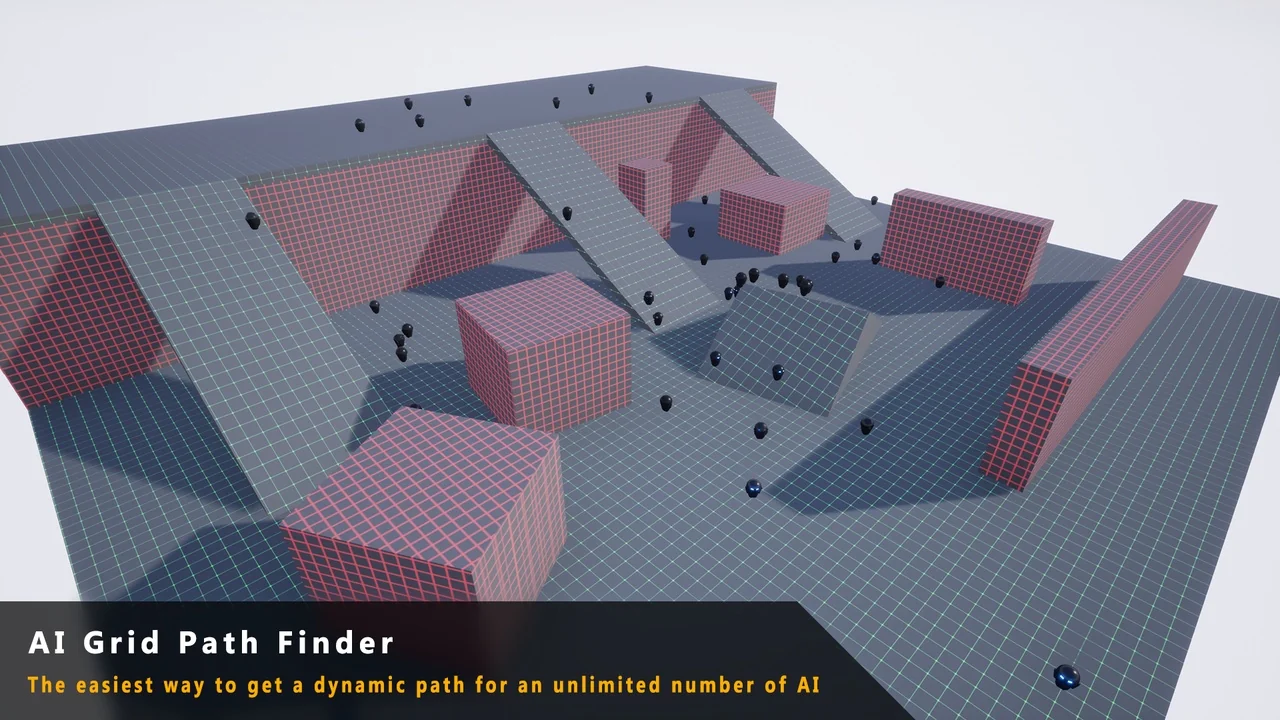
 Engine Tools
 Automations
 Automations