"fa182e0cd0a6ea73"{"id":"1000569","slug":"c-generator","title":"C++ Generator","category":"Automations","engine":"5.3 - 5.7","assetVersion":"Asset Version: 1.2","engineVersion":"Engine Version: 5.3 - 5.7","tag":"Automations","accent":"blue","visual":"mech","summary":"Unreal Engine plugin generating C++ code snippets dynamically without AI. Includes UMacros, AActor, BP Node translator, and a C++ toolbox for 5.3–5.8.","platform":"Unreal Engine","publishedAt":"2026-07-16T21:35:58.214Z","updatedAt":"2026-07-16T21:35:58.214Z","sourceNotes":[],"fileContents":[],"compatibility":["Unreal Engine","Asset Version: 1.2","Engine Version: 5.3 - 5.7"],"featuredImage":{"alt":"C++ Generator","src":"/wp-content/uploads/published/2026/07/6871f3419d44-c2bbc23a-6642-424c-a432-59797b06b343-b01832c8fb.webp"},"hasDownloadLink":true,"downloads":2,"terms":[{"taxonomy":"category","slug":"automations-tools-and-plugins","name":"Automations"}],"galleryImages":[{"src":"/wp-content/uploads/published/2026/07/fcaaaf8457bd-935494d7-f4a2-48e8-b6aa-2ea055222787-b3ba0cbf2a.webp","alt":"C++ Generator"},{"src":"/wp-content/uploads/published/2026/07/a1c256a6606d-422603eb-50c9-4776-a795-07450c1fc642-fbb7dacdd7.webp","alt":"C++ Generator"},{"src":"/wp-content/uploads/published/2026/07/b34a28384dbf-7f524800-eb4a-48d9-860d-ad0b40a186c7-8186e67374.webp","alt":"C++ Generator"},{"src":"/wp-content/uploads/published/2026/07/312be09a6863-dd6a4153-aed3-4cd3-aede-b795259267f4-2d8e372547.webp","alt":"C++ Generator"}],"accessPanel":{"kind":"resource","title":"Download this resource","eyebrow":"Free Download","message":"Log in or create a free account to start your download.","fileName":"C Generator.7z","safetyNote":"Resources are manually reviewed before listing to improve quality and reduce obvious risks.","actionLabel":"Download Free","resourceType":"Resource archive"},"contentHtml":"\u003cp\u003eTyping out boilerplate C++ in Unreal Engine can slow a team to a crawl, especially when the same variable declarations, include directives, and actor hierarchies pile up across dozens of classes. The \u003cstrong\u003eC++ Generator\u003c/strong\u003e Plugin steps in as a toolbox that produces those structures dynamically from developer input, bypassing any reliance on AI or large language models.\u003c/p\u003e \u003ch2\u003eGenerating Snippets Dynamically Without AI\u003c/h2\u003e \u003cp\u003eAt its core, the plugin reads developer input and produces ready-to-paste C++ code snippets. That approach keeps the output deterministic and traceable—there is no black-box model guessing at syntax or inventing function signatures. The creator explicitly notes that the system offers precision and control without relying on AI or LLMs, which makes the generated code predictable enough for production pipelines where consistency matters.\u003c/p\u003e \u003cp\u003eBecause the generation happens locally inside the editor, teams stay within their existing Unreal workflow. There is no external service to ping or third-party model to query. The package then offers code that fits the surrounding project conventions because the developer drives every parameter the generator uses.\u003c/p\u003e \u003ch2\u003eBP Node Translator: Bridge Between Visual Scripting and C++\u003c/h2\u003e \u003cp\u003eUpdate 1.2 introduced a Blueprint Node translator that addresses a recurring pain point for developers moving between visual scripting and native code. A database of over 130 widely used Blueprint nodes lets developers look up the node they need and retrieve the corresponding C++ equivalent with a single click.\u003c/p\u003e \u003cp\u003eThis feature matters most for teams transitioning gameplay logic from Blueprints to C++ for performance reasons. Visual scripters can search for a familiar node, see exactly how its C++ counterpart is structured, and gradually build familiarity with the native API without leaving the editor to dig through engine headers manually.\u003c/p\u003e \u003ch2\u003eUMacros Generator for Variable and Function Workflow\u003c/h2\u003e \u003ch3\u003eEssential Variables and Collections\u003c/h3\u003e\n\u003cp\u003eThe UMacros Generator targets one of the most repetitive parts of C++ development in Unreal Engine: declaring and configuring variables. Developers can generate essential types such as Bool, Int, and Transform, along with Arrays and Sets. Default values can be set directly during generation, which removes a round-trip through the header file after the fact.\u003c/p\u003e \u003ch3\u003eExposed Flags and Custom Node Creation\u003c/h3\u003e\n\u003cp\u003eBeyond variable creation, the UMacros Generator handles advanced flags and specifiers. C++ variables and functions can be exposed to the editor while their behavior is customized through specifier options. Developers can also generate custom functions with multiple inputs and outputs, mirroring the multi-pin node behavior that Blueprints already support. That capability narrows the gap between what a Blueprint author can prototype visually and what a C++ developer can scaffold in code.\u003c/p\u003e \u003ch2\u003eAActor Generator and Actor Hierarchies\u003c/h2\u003e \u003cp\u003eBuilding actor hierarchies in C++ is notoriously fiddly—incorrect parent-child relationships or missing component registrations can break compilation. The AActor Generator is built to create and manage these hierarchies while keeping compilation error-free.\u003c/p\u003e \u003cp\u003eThe drag-and-drop management interface allows developers to modify actor hierarchies visually within the editor rather than editing class definitions by hand. Custom C++ components can be integrated into generated actors seamlessly, which means a team's existing component library slots directly into new actor classes without manual wiring. The generator also produces full class code automatically, completing the heavy lifting at a pace comparable to spawning a new Blueprint class.\u003c/p\u003e \u003ch2\u003eThe All-In-One C++ Toolbox\u003c/h2\u003e \u003cp\u003eRounding out the plugin is a general-purpose C++ Toolbox that groups several smaller utilities into a single panel.\u003c/p\u003e \u003cul\u003e\n\u003cli\u003e\u003cstrong\u003eFind Includes and Delegates:\u003c/strong\u003e Developers can search the engine for the correct include directives and delegate signatures, avoiding the trial-and-error of guessing header paths.\u003c/li\u003e\n\u003cli\u003e\u003cstrong\u003eInstant Logging and Debugging:\u003c/strong\u003e Log statements and debug shapes can be generated in two clicks, accelerating the iteration loop when tracking down runtime issues.\u003c/li\u003e\n\u003cli\u003e\u003cstrong\u003eRetrieve Asset Paths:\u003c/strong\u003e Non-C++ assets can be loaded into code with ease, bridging the workflow between content creators placing assets in the editor and programmers referencing them in native classes.\u003c/li\u003e\n\u003cli\u003e\u003cstrong\u003eGenerate Structs and Enums:\u003c/strong\u003e Custom data structures and enumerations can be scaffolded quickly, reducing friction when defining gameplay data containers.\u003c/li\u003e\n\u003c/ul\u003e \u003cp\u003eThese utilities are stitched into a single workflow panel, letting developers move between searching for includes, generating a struct, and emitting a log line without switching tools or editor tabs.\u003c/p\u003e \u003ch2\u003eEngine Compatibility and Pipeline Fit\u003c/h2\u003e \u003cp\u003eThe plugin supports Unreal Engine versions 5.3 through 5.8, covering teams staying on the earlier 5.3 release as well as those tracking the latest previews up to 5.8. That breadth makes the tool viable for studios mid-production on a pinned engine version and those actively upgrading.\u003c/p\u003e \u003cp\u003eFor teams evaluating the plugin, the strongest practical takeaway is the shift from hand-writing repetitive C++ scaffolding to generating it deterministically inside the editor. With the Blueprint Node translator covering over 130 common nodes, the UMacros and AActor generators producing full classes and variable structures, and the toolbox handling includes, delegates, logging, and asset paths, the plugin consolidates a wide stretch of the C++ development cycle into a single editor-integrated workflow.\u003c/p\u003e\n\n\u003ch2\u003eMore From The Same Workflow\u003c/h2\u003e\n\u003cul\u003e\n\u003cli\u003e\u003ca href=\"https://3dcghub.com/ultimate-engine-copilot-formerly-ultimate-blueprint-generator/\" title=\"Ultimate Engine CoPilot (formerly Ultimate Blueprint Generator)\"\u003eUltimate Engine CoPilot (formerly Ultimate Blueprint Generator)\u003c/a\u003e\u003c/li\u003e\n\u003cli\u003e\u003ca href=\"https://3dcghub.com/framecapture-screen-capture-and-video-recorder/\" title=\"FrameCapture - Screen Capture and Video Recorder\"\u003eFrameCapture - Screen Capture and Video Recorder\u003c/a\u003e\u003c/li\u003e\n\u003cli\u003e\u003ca href=\"https://3dcghub.com/compiler-booster/\" title=\"Compiler Booster\"\u003eCompiler Booster\u003c/a\u003e\u003c/li\u003e\n\u003cli\u003e\u003ca href=\"https://3dcghub.com/blueprint-generator-ai-kibibyte-labs-engine-assistant/\" title=\"AI Engine Assistant - Kibibyte Labs (Blueprint Generator \u0026amp; More!)\"\u003eAI Engine Assistant - Kibibyte Labs (Blueprint Generator \u0026amp; More!)\u003c/a\u003e\u003c/li\u003e\n\u003cli\u003e\u003ca href=\"https://3dcghub.com/pivot-tool/\" title=\"Pivot Tool\"\u003ePivot Tool\u003c/a\u003e\u003c/li\u003e\n\u003c/ul\u003e","contentTextLength":5735,"navigation":{"current":1367,"total":3789,"previous":{"id":"1000570","slug":"christmas-assets-volume-1","title":"Christmas Assets Volume 1","category":"Tools, Objects \u0026 Decor","platform":"Unreal Engine","updatedAt":"2026-07-16T21:44:55.238Z"},"next":{"id":"11947","slug":"bodycam-fps-kit","title":"BODYCAM FPS KIT","category":"Shooter","platform":"Unreal Engine","updatedAt":"2026-07-16T21:33:18.672Z"}},"relatedResources":[{"id":"27256","slug":"ultimate-engine-copilot-formerly-ultimate-blueprint-generator","title":"Ultimate Engine CoPilot (formerly Ultimate Blueprint Generator)","category":"Automations","engine":"0.3.5 - 1.3.5","assetVersion":"Engine version: 5.4 - 5.7","engineVersion":"Asset Version:0.3.5 - 1.3.5","tag":"Automations","accent":"blue","visual":"city","summary":"Ultimate Engine CoPilot keeps Blueprint setup, VFX work, UI creation, and other editor tasks inside Unreal Engine. It responds to natural language, supports voice input, and can run multiple AI agents while you work.","platform":"Unreal Engine","publishedAt":"2026-04-23T06:55:26.000Z","updatedAt":"2026-07-05T09:41:32.225Z","sourceNotes":[],"fileContents":[],"compatibility":["Unreal Engine","Engine version: 5.4 - 5.7","Asset Version:0.3.5 - 1.3.5"],"featuredImage":{"alt":"Ultimate Engine CoPilot (formerly Ultimate Blueprint Generator)","src":"https://3dcghub.com/wp-content/uploads/2026/04/fd75d459aa77_025b3508-1406-4cd3-96bf-9537f34d3d5f.webp"},"hasDownloadLink":true,"downloads":20},{"id":"1000162","slug":"framecapture-screen-capture-and-video-recorder","title":"FrameCapture - Screen Capture and Video Recorder","category":"Automations","engine":"5.3","assetVersion":"Asset Version: 3.0","engineVersion":"Engine Version: 5.3","tag":"Automations","accent":"blue","visual":"mech","summary":"A C++ screen capture and recording library for grabbing viewport snapshots, recording gameplay, capturing UI, and turning screens into textures.","platform":"Unreal Engine","publishedAt":"2026-06-18T22:53:44.835Z","updatedAt":"2026-06-18T22:53:44.835Z","sourceNotes":[],"fileContents":[],"compatibility":["Unreal Engine","Asset Version: 3.0","Engine Version: 5.3"],"featuredImage":{"alt":"FrameCapture - Screen Capture and Video Recorder","src":"/wp-content/uploads/published/2026/06/2fa777136d75-e1e38ea1-f891-4786-8913-954857c7d5c2-26b0213550.webp"},"hasDownloadLink":true,"downloads":0},{"id":"13614","slug":"compiler-booster","title":"Compiler Booster","category":"Automations","engine":"1.1 - 1.2","assetVersion":"Engine version: 4.26 - 5.8","engineVersion":"Asset Version:1.1 - 1.2","tag":"Automations","accent":"blue","visual":"character","summary":"Compiler Booster is a powerful editor plugin designed to significantly reduce shader and light compile times by optimizing CPU priority within Unreal Engine.","platform":"Unreal Engine","publishedAt":"2026-03-11T09:15:50.000Z","updatedAt":"2026-08-25T07:36:59.621Z","sourceNotes":[],"fileContents":[],"compatibility":["Unreal Engine","Engine version: 4.26 - 5.8","Asset Version:1.1 - 1.2"],"featuredImage":{"alt":"Compiler Booster","src":"https://3dcghub.com/wp-content/uploads/2026/03/2cad4408-cc39-4d74-bc73-4ca5ee7e6d98.webp"},"hasDownloadLink":true,"downloads":1}]}
Automations
C++ Generator
Unreal Engine plugin generating C++ code snippets dynamically without AI. Includes UMacros, AActor, BP Node translator, and a C++ toolbox for 5.3–5.8.
Typing out boilerplate C++ in Unreal Engine can slow a team to a crawl, especially when the same variable declarations, include directives, and actor hierarchies pile up across dozens of classes. The C++ Generator Plugin steps in as a toolbox that produces those structures dynamically from developer input, bypassing any reliance on AI or large language models.
Generating Snippets Dynamically Without AI
At its core, the plugin reads developer input and produces ready-to-paste C++ code snippets. That approach keeps the output deterministic and traceable—there is no black-box model guessing at syntax or inventing function signatures. The creator explicitly notes that the system offers precision and control without relying on AI or LLMs, which makes the generated code predictable enough for production pipelines where consistency matters.
Because the generation happens locally inside the editor, teams stay within their existing Unreal workflow. There is no external service to ping or third-party model to query. The package then offers code that fits the surrounding project conventions because the developer drives every parameter the generator uses.
BP Node Translator: Bridge Between Visual Scripting and C++
Update 1.2 introduced a Blueprint Node translator that addresses a recurring pain point for developers moving between visual scripting and native code. A database of over 130 widely used Blueprint nodes lets developers look up the node they need and retrieve the corresponding C++ equivalent with a single click.
This feature matters most for teams transitioning gameplay logic from Blueprints to C++ for performance reasons. Visual scripters can search for a familiar node, see exactly how its C++ counterpart is structured, and gradually build familiarity with the native API without leaving the editor to dig through engine headers manually.
UMacros Generator for Variable and Function Workflow
Essential Variables and Collections
The UMacros Generator targets one of the most repetitive parts of C++ development in Unreal Engine: declaring and configuring variables. Developers can generate essential types such as Bool, Int, and Transform, along with Arrays and Sets. Default values can be set directly during generation, which removes a round-trip through the header file after the fact.
Exposed Flags and Custom Node Creation
Beyond variable creation, the UMacros Generator handles advanced flags and specifiers. C++ variables and functions can be exposed to the editor while their behavior is customized through specifier options. Developers can also generate custom functions with multiple inputs and outputs, mirroring the multi-pin node behavior that Blueprints already support. That capability narrows the gap between what a Blueprint author can prototype visually and what a C++ developer can scaffold in code.
AActor Generator and Actor Hierarchies
Building actor hierarchies in C++ is notoriously fiddly—incorrect parent-child relationships or missing component registrations can break compilation. The AActor Generator is built to create and manage these hierarchies while keeping compilation error-free.
The drag-and-drop management interface allows developers to modify actor hierarchies visually within the editor rather than editing class definitions by hand. Custom C++ components can be integrated into generated actors seamlessly, which means a team's existing component library slots directly into new actor classes without manual wiring. The generator also produces full class code automatically, completing the heavy lifting at a pace comparable to spawning a new Blueprint class.
The All-In-One C++ Toolbox
Rounding out the plugin is a general-purpose C++ Toolbox that groups several smaller utilities into a single panel.
Find Includes and Delegates: Developers can search the engine for the correct include directives and delegate signatures, avoiding the trial-and-error of guessing header paths.
Instant Logging and Debugging: Log statements and debug shapes can be generated in two clicks, accelerating the iteration loop when tracking down runtime issues.
Retrieve Asset Paths: Non-C++ assets can be loaded into code with ease, bridging the workflow between content creators placing assets in the editor and programmers referencing them in native classes.
Generate Structs and Enums: Custom data structures and enumerations can be scaffolded quickly, reducing friction when defining gameplay data containers.
These utilities are stitched into a single workflow panel, letting developers move between searching for includes, generating a struct, and emitting a log line without switching tools or editor tabs.
Engine Compatibility and Pipeline Fit
The plugin supports Unreal Engine versions 5.3 through 5.8, covering teams staying on the earlier 5.3 release as well as those tracking the latest previews up to 5.8. That breadth makes the tool viable for studios mid-production on a pinned engine version and those actively upgrading.
For teams evaluating the plugin, the strongest practical takeaway is the shift from hand-writing repetitive C++ scaffolding to generating it deterministically inside the editor. With the Blueprint Node translator covering over 130 common nodes, the UMacros and AActor generators producing full classes and variable structures, and the toolbox handling includes, delegates, logging, and asset paths, the plugin consolidates a wide stretch of the C++ development cycle into a single editor-integrated workflow.
 Automations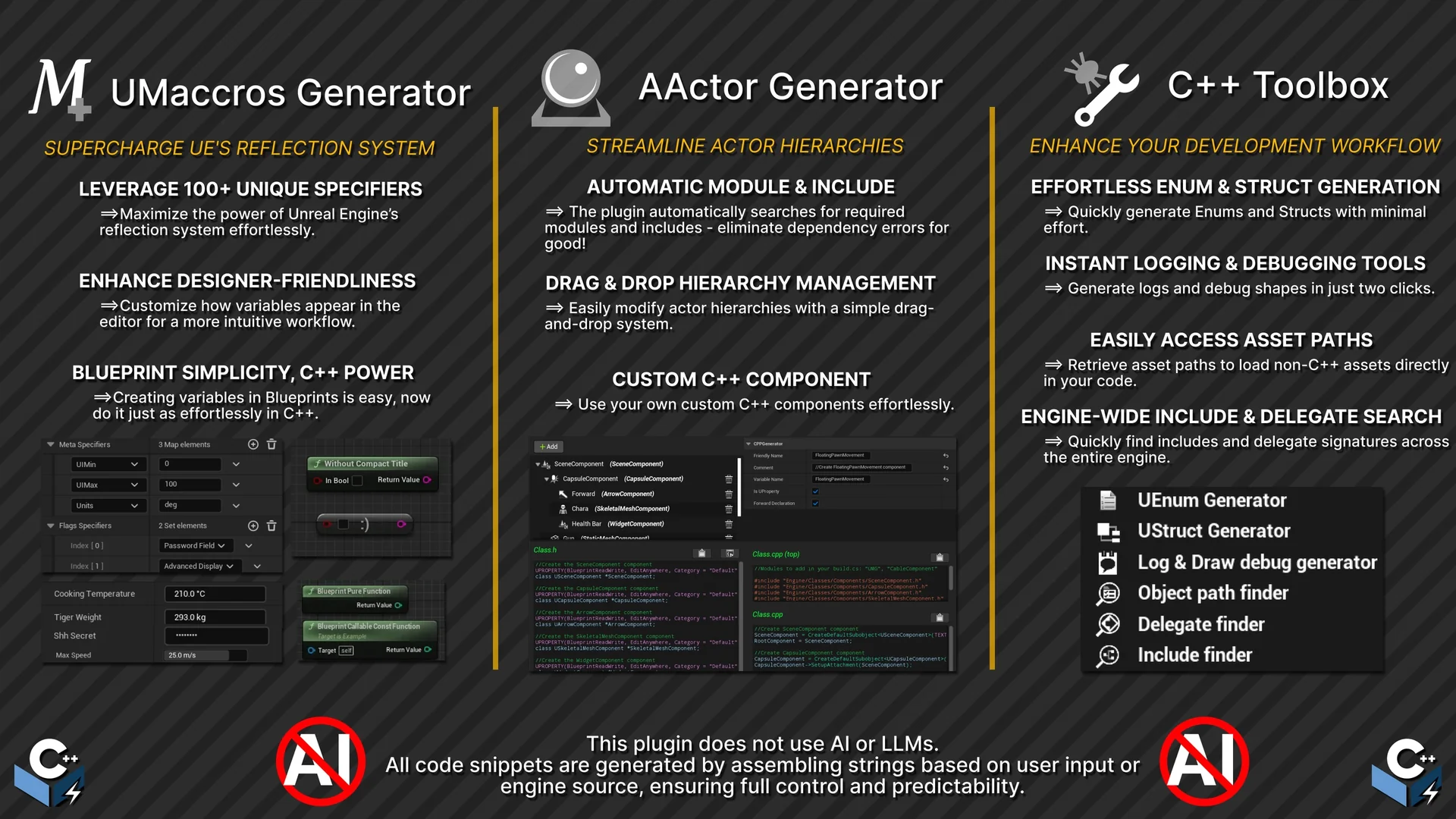
 Automations
 Automations
 Automations