"0341a2901a4ae9aa"{"id":"15480","slug":"hqui-progress-bars","title":"HQUI: Progress Bars","category":"Widgets \u0026 Controls","engine":"4.26+,5.0+","assetVersion":"Engine version: 4.26+,5.0+","engineVersion":"4.19","tag":"Widgets \u0026 Controls","accent":"blue","visual":"animation","summary":"HQUI: Progress Bars offers a robust set of highly customizable UMG components for developers. This pack features advanced settings, gradients, and automated interpolation to elevate your game's user interface.","platform":"Unreal Engine","publishedAt":"2026-03-12T09:09:48.000Z","updatedAt":"2026-04-19T15:44:46.000Z","sourceNotes":[],"fileContents":[],"compatibility":["Unreal Engine","Engine version: 4.26+,5.0+"],"featuredImage":{"alt":"HQUI: Progress Bars","src":"https://3dcghub.com/wp-content/uploads/2026/03/327a22db-0f44-410f-93b6-73bd636562cb.webp"},"hasDownloadLink":true,"downloads":2,"terms":[{"taxonomy":"category","slug":"widgets-and-controls","name":"Widgets \u0026 Controls"},{"taxonomy":"post_tag","slug":"blueprint","name":"Blueprint"},{"taxonomy":"post_tag","slug":"tools","name":"Tools"},{"taxonomy":"post_tag","slug":"ui","name":"UI"},{"taxonomy":"post_tag","slug":"umg-progress-bars","name":"UMG Progress Bars"},{"taxonomy":"post_tag","slug":"unreal-engine-5","name":"Unreal Engine 5"},{"taxonomy":"post_tag","slug":"vfx","name":"VFX"}],"galleryImages":[{"src":"https://3dcghub.com/wp-content/uploads/2026/03/2059fa5ad738_f74ca418-5ef7-4ea7-9a81-af6d75f39c9b.webp","alt":"HQUI: Progress Bars"},{"src":"https://3dcghub.com/wp-content/uploads/2026/03/0d9772520fad_3f0c5a59-1b26-4c46-b51f-61e7378022f4.webp","alt":"HQUI: Progress Bars"},{"src":"https://3dcghub.com/wp-content/uploads/2026/03/aac0ddce1b57_beabc9d1-de86-4719-8236-7adb4c0a49c7.webp","alt":"HQUI: Progress Bars"},{"src":"https://3dcghub.com/wp-content/uploads/2026/03/a5d640e81c5a_59b154c0-c4f9-40b2-a60f-70f21c0eeba7.webp","alt":"HQUI: Progress Bars"},{"src":"https://3dcghub.com/wp-content/uploads/2026/03/6c0b5b60a120_78f191d6-4b49-44aa-87a6-b406d80687c7.webp","alt":"HQUI: Progress Bars"},{"src":"https://3dcghub.com/wp-content/uploads/2026/03/2f658b9c4ba4_0e107d74-eeef-4e80-a2ef-e016b7079b4f.webp","alt":"HQUI: Progress Bars"},{"src":"https://3dcghub.com/wp-content/uploads/2026/03/b0307f78b93f_606406a0-ed04-43df-b5ac-76e65a60cfdd.webp","alt":"HQUI: Progress Bars"},{"src":"https://3dcghub.com/wp-content/uploads/2026/03/38fb7f3ba13c_047d2716-addf-4c93-8988-4ad3182869dd.webp","alt":"HQUI: Progress Bars"},{"src":"https://3dcghub.com/wp-content/uploads/2026/03/b3e7db2838d5_ac421f54-dea9-4838-a9c5-9135348fa9e0.webp","alt":"HQUI: Progress Bars"},{"src":"https://3dcghub.com/wp-content/uploads/2026/03/011582537f07_28f297bc-59a0-4f29-89c9-173e43aea095.webp","alt":"HQUI: Progress Bars"}],"accessPanel":{"kind":"resource","title":"Access this resource","eyebrow":"Free Download","message":"Log in or create a free account to start your download.","fileName":"HQUI_ProgressBars.7z","safetyNote":"All resources are 100% manually reviewed to eliminate all risks.","actionLabel":"Download Free","resourceType":"Resource archive"},"contentHtml":"\u003ch2\u003eAdvanced UI Customization with HQUI: Progress Bars\u003c/h2\u003e\n\u003cp\u003eHQUI: Progress Bars is a highly customizable pack of UMG Progress Bars designed for professional game interfaces. This tool offers significantly more setting details than standard UMG options. Consequently, it serves as an ideal solution for creating high-quality Progress Bars. Developers can easily adapt these elements to fit their specific UI and HUD designs. Moreover, the technical preparation involved ensures a smooth integration process for various project types.\u003c/p\u003e\n\n\u003ch2\u003eEnhanced Visual Features and Design\u003c/h2\u003e\n\u003cp\u003eThe developer built this pack with a focus on visual depth. Therefore, it provides a level of detail that surpasses default engine components. The progress bars include useful additions such as gradients. In addition, a detailed effects section allows for deeper visual polish. These features ensure that your interface looks modern and professional. Furthermore, the flexibility of the settings allows for a wide range of aesthetic styles, from minimalist menus to complex wargame interfaces.\u003c/p\u003e\n\n\u003ch2\u003eTechnical Functionality and Blueprints\u003c/h2\u003e\n\u003cp\u003eHQUI: Progress Bars supports both static and temporally interpolated execution. This flexibility allows for smoother visual transitions during gameplay. Additionally, the pack includes a dedicated manager function. This function enables context-sensitive execution of the most relevant settings via Blueprints. As a result, developers can manage their UI logic more efficiently. The tool is specifically designed to bridge the gap between basic functionality and high-end design requirements.\u003c/p\u003e\n\n\u003ch2\u003eAutomated Command Queuing\u003c/h2\u003e\n\u003cp\u003eOne of the standout features involves how the system handles updates. All Percent commands executed through an Interpolated Progress bar are automatically queued. Consequently, they execute one after the other without manual intervention. This technical preparation ensures a seamless user experience during rapid data changes. Moreover, the system handles these transitions automatically to maintain visual consistency. Therefore, developers do not need to worry about overlapping commands breaking the UI flow.\u003c/p\u003e\n\n\u003ch2\u003eFinal Take\u003c/h2\u003e\n\u003cp\u003eTaken together, HQUI: Progress Bars provides a comprehensive toolkit for professional UI development. It offers superior customization options compared to standard UMG bars. By utilizing gradients, effects, and automated interpolation, you can create a superior HUD. This pack is a valuable resource for any developer looking to refine their game's interface. Whether you are building a main menu or a complex in-game display, these tools provide the necessary depth for high-quality results.\u003c/p\u003e\n\n\u003ch2\u003eRelated Resources Worth Checking\u003c/h2\u003e\n\u003cul\u003e\n\u003cli\u003e\u003ca href=\"https://3dcghub.com/extended-progress-bar/\" title=\"Extended Progress Bar\"\u003eExtended Progress Bar\u003c/a\u003e\u003c/li\u003e\n\u003cli\u003e\u003ca href=\"https://3dcghub.com/psd2umg/\" title=\"PSD2UMG\"\u003ePSD2UMG\u003c/a\u003e\u003c/li\u003e\n\u003cli\u003e\u003ca href=\"https://3dcghub.com/rodinbridge-unreal-engine-add-on/\" title=\"RodinBridge – Unreal Engine Add-on\"\u003eRodinBridge – Unreal Engine Add-on\u003c/a\u003e\u003c/li\u003e\n\u003cli\u003e\u003ca href=\"https://3dcghub.com/extile-plus-ultimate-non-tiling-material-toolkit-for-unreal-engine-environments/\" title=\"EXTILE PLUS -Ultimate Non-Tiling Material Toolkit for Unreal Engine Environments\"\u003eEXTILE PLUS -Ultimate Non-Tiling Material Toolkit for Unreal Engine Environments\u003c/a\u003e\u003c/li\u003e\n\u003cli\u003e\u003ca href=\"https://3dcghub.com/ultimate-template-unrealengine-2d-dialogue-inventory-system-save/\" title=\"ULTIMATE Template UnrealEngine || 2D + Dialogue + Inventory system + Save | |\"\u003eULTIMATE Template UnrealEngine || 2D + Dialogue + Inventory system + Save | |\u003c/a\u003e\u003c/li\u003e\n\u003c/ul\u003e","contentTextLength":2919,"navigation":{"current":3447,"total":4017,"previous":{"id":"15384","slug":"250-sci-fi-flat-icons","title":"250 Sci-fi Flat Icons","category":"Icons","platform":"Unreal Engine","updatedAt":"2026-04-19T15:44:47.000Z"},"next":{"id":"15467","slug":"extended-progress-bar","title":"Extended Progress Bar","category":"Widgets \u0026 Controls","platform":"Unreal Engine","updatedAt":"2026-04-19T15:44:46.000Z"}},"relatedResources":[{"id":"15467","slug":"extended-progress-bar","title":"Extended Progress Bar","category":"Widgets \u0026 Controls","engine":"4.26+,5.0+","assetVersion":"Engine version: 4.26+,5.0+","engineVersion":"4.24","tag":"Widgets \u0026 Controls","accent":"blue","visual":"character","summary":"Enhance your game's user interface with the Extended Progress Bar. This plugin simplifies the process of creating animated bars for health, mana, and stamina with deep customization options.","platform":"Unreal Engine","publishedAt":"2026-03-12T09:07:55.000Z","updatedAt":"2026-04-19T15:44:46.000Z","sourceNotes":[],"fileContents":[],"compatibility":["Unreal Engine","Engine version: 4.26+,5.0+"],"featuredImage":{"alt":"Extended Progress Bar","src":"https://3dcghub.com/wp-content/uploads/2026/03/2ae124bc-cc48-4d29-ba9a-8d3040b25849.webp"},"hasDownloadLink":true,"downloads":1},{"id":"15459","slug":"delayed-healthbar-system","title":"Delayed Healthbar System","category":"Widgets \u0026 Controls","engine":"5.0+","assetVersion":"Engine version: 5.0+","engineVersion":"5.0","tag":"Widgets \u0026 Controls","accent":"blue","visual":"audio","summary":"Enhance your game's user interface with the Delayed Healthbar System. This asset provides a ready-to-use solution for animated health bars, damage blips, and screen-space indicators.","platform":"Unreal Engine","publishedAt":"2026-03-12T09:07:20.000Z","updatedAt":"2026-04-19T15:44:46.000Z","sourceNotes":[],"fileContents":[],"compatibility":["Unreal Engine","Engine version: 5.0+"],"featuredImage":{"alt":"Delayed Healthbar System","src":"https://3dcghub.com/wp-content/uploads/2026/03/072782e5-1fcd-4671-915e-3f517fc8aea5.webp"},"hasDownloadLink":true,"downloads":0},{"id":"15496","slug":"rd-lighting-kit","title":"RD: Lighting Kit","category":"Widgets \u0026 Controls","engine":"5.0+","assetVersion":"Engine version: 5.0+","engineVersion":"5.0","tag":"Widgets \u0026 Controls","accent":"blue","visual":"character","summary":"Transform your renders with RD: Lighting Kit, a comprehensive tool for creating photorealistic studio environments in Unreal Engine. It features over 50 handcrafted presets and unique backdrops for professional results.","platform":"Unreal Engine","publishedAt":"2026-03-12T09:11:29.000Z","updatedAt":"2026-04-19T15:44:45.000Z","sourceNotes":[],"fileContents":[],"compatibility":["Unreal Engine","Engine version: 5.0+"],"featuredImage":{"alt":"RD: Lighting Kit","src":"https://3dcghub.com/wp-content/uploads/2026/03/56a37b57-480a-454b-a6d3-4243c4f68a88.webp"},"hasDownloadLink":true,"downloads":0}]}
Widgets & Controls
HQUI: Progress Bars
HQUI: Progress Bars offers a robust set of highly customizable UMG components for developers. This pack features advanced settings, gradients, and automated interpolation to elevate your game's user interface.
Advanced UI Customization with HQUI: Progress Bars
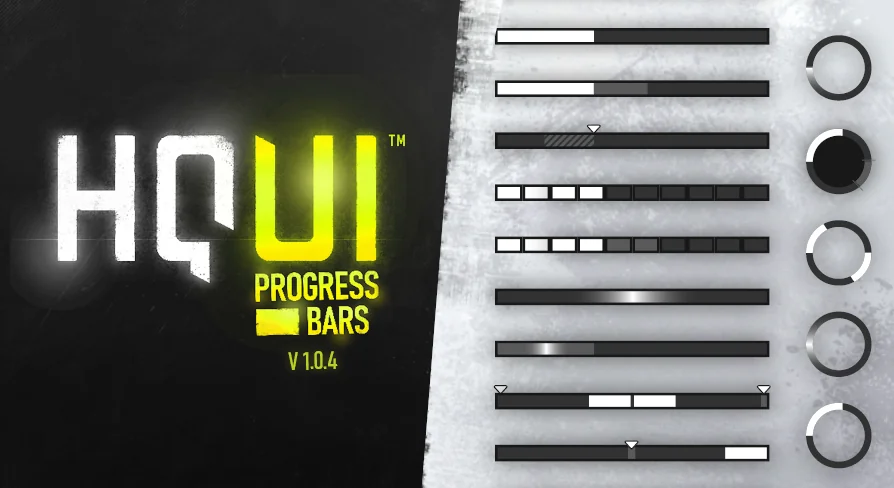
HQUI: Progress Bars is a highly customizable pack of UMG Progress Bars designed for professional game interfaces. This tool offers significantly more setting details than standard UMG options. Consequently, it serves as an ideal solution for creating high-quality Progress Bars. Developers can easily adapt these elements to fit their specific UI and HUD designs. Moreover, the technical preparation involved ensures a smooth integration process for various project types.
Enhanced Visual Features and Design
The developer built this pack with a focus on visual depth. Therefore, it provides a level of detail that surpasses default engine components. The progress bars include useful additions such as gradients. In addition, a detailed effects section allows for deeper visual polish. These features ensure that your interface looks modern and professional. Furthermore, the flexibility of the settings allows for a wide range of aesthetic styles, from minimalist menus to complex wargame interfaces.
Technical Functionality and Blueprints
HQUI: Progress Bars supports both static and temporally interpolated execution. This flexibility allows for smoother visual transitions during gameplay. Additionally, the pack includes a dedicated manager function. This function enables context-sensitive execution of the most relevant settings via Blueprints. As a result, developers can manage their UI logic more efficiently. The tool is specifically designed to bridge the gap between basic functionality and high-end design requirements.
Automated Command Queuing
One of the standout features involves how the system handles updates. All Percent commands executed through an Interpolated Progress bar are automatically queued. Consequently, they execute one after the other without manual intervention. This technical preparation ensures a seamless user experience during rapid data changes. Moreover, the system handles these transitions automatically to maintain visual consistency. Therefore, developers do not need to worry about overlapping commands breaking the UI flow.
Final Take
Taken together, HQUI: Progress Bars provides a comprehensive toolkit for professional UI development. It offers superior customization options compared to standard UMG bars. By utilizing gradients, effects, and automated interpolation, you can create a superior HUD. This pack is a valuable resource for any developer looking to refine their game's interface. Whether you are building a main menu or a complex in-game display, these tools provide the necessary depth for high-quality results.
 Widgets & Controls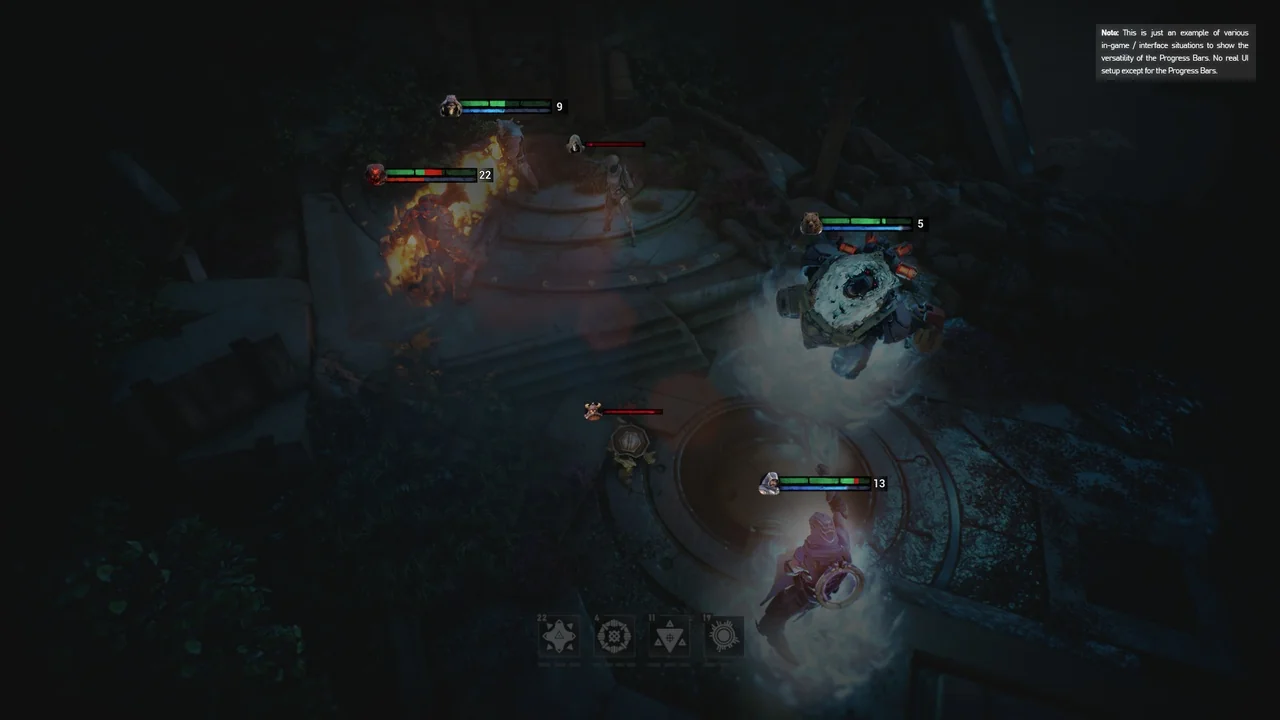
 Widgets & Controls
 Widgets & Controls
 Widgets & Controls