"1a0e4ac4dc71d030"{"id":"1000191","slug":"gui-yellow-kid-2","title":"GUI - Yellow Kid","category":"UI Kits / HUDs","engine":"4.26+,5.0+","assetVersion":"","engineVersion":"Engine Version: 4.26+,5.0+","tag":"UI Kits / HUDs","accent":"blue","visual":"mech","summary":"GUI - Yellow Kid is a cute fantasy-style interface pack with 1920x1080 graphics, 400+ PNG sources, 72 button icons, and 72 pictogram icons.","platform":"Unreal Engine","publishedAt":"2026-06-22T16:35:55.071Z","updatedAt":"2026-06-22T16:35:55.071Z","sourceNotes":[],"fileContents":[],"compatibility":["Unreal Engine","Engine Version: 4.26+,5.0+"],"featuredImage":{"alt":"GUI - Yellow Kid","src":"/wp-content/uploads/published/2026/06/e3cc25c19c62-7619401d-2a3e-44a1-8f08-111901af2992-46a75e35eb.webp"},"hasDownloadLink":true,"downloads":0,"terms":[{"taxonomy":"category","slug":"ui-kits-huds","name":"UI Kits / HUDs"}],"galleryImages":[{"src":"/wp-content/uploads/published/2026/06/718da4ed3abf-8066840d-d3b5-4b6c-82e2-d73f0c567c22-535e57fcf6.webp","alt":"GUI - Yellow Kid"},{"src":"/wp-content/uploads/published/2026/06/556c3735bd42-e21e2525-8082-4417-9e24-e06ab68c001b-ea16e7d8db.webp","alt":"GUI - Yellow Kid"},{"src":"/wp-content/uploads/published/2026/06/3fcf58257a07-9950ab56-45cd-4927-8fa6-8a61c79e71a8-d6a49cd241.webp","alt":"GUI - Yellow Kid"}],"accessPanel":{"kind":"resource","title":"Download this resource","eyebrow":"Free Download","message":"Log in or create a free account to start your download.","fileName":"Content.7z","safetyNote":"Resources are manually reviewed before listing to improve quality and reduce obvious risks.","actionLabel":"Download Free","resourceType":"Resource archive"},"contentHtml":"\u003cp\u003eProjects with a cute fantasy tone, mobile-friendly menus, or casual roleplay presentation often need interface art that reads quickly and keeps a strong visual identity. GUI - Yellow Kid sits in that space. It is a GUI package anchored in bright yellow styling, cartoon-friendly presentation, and a game UI direction that fits tags such as videogame, fantasy, mobile, roleplay, HUD, RPG, casual, simple, user interface, and interface.\u003c/p\u003e\n\u003cp\u003eThe package is presented as a graphic resource rather than a coded system. Its graphics are prepared at 1920x1080 resolution, all asset elements are included as PNG files, and coding and animation are not included. That makes the pack especially relevant for teams or individual creators who want ready-made visual interface parts and plan to handle implementation on their own.\u003c/p\u003e \u003ch2\u003eWhere GUI - Yellow Kid fits best\u003c/h2\u003e\n\u003cp\u003eThe strongest use case for this set is a game project that wants a soft, approachable interface rather than a hard sci-fi or realistic one. The combination of cute, yellow, cartoon, fantasy, and casual tags points toward menus, HUD elements, and icon-driven screens that need to feel friendly at a glance. This can suit roleplay-oriented layouts, mobile game screens, and simple menu systems where clarity matters as much as personality.\u003c/p\u003e\n\u003cp\u003eYellow is an important part of the package identity, not just a minor accent. In practice, that gives GUI - Yellow Kid a clear visual lane for creators who want an interface theme that feels warm and energetic. For projects already leaning into bright fantasy or playful RPG presentation, a cohesive yellow-centered UI can help menus, buttons, and symbols feel connected instead of assembled from unrelated parts.\u003c/p\u003e\n\u003cp\u003eThe pack also makes sense in situations where the interface art needs to be separated cleanly from the rest of production. Since coding and animation are not part of the package, GUI - Yellow Kid is best viewed as a visual component library for teams that already know how they want screens to behave but need the artwork to support that behavior.\u003c/p\u003e \u003ch2\u003eYellow Kid graphics at 1920x1080\u003c/h2\u003e\n\u003cp\u003eThe graphics are prepared at 1920x1080 resolution. That single detail matters across multiple kinds of interface work because it establishes the scale of the package. Full-screen menu composition, panel arrangement, and HUD mockups all benefit from assets developed around a defined resolution target. It gives artists and UI implementers a predictable starting point when they place interface elements into game scenes, menu layouts, or prototype screens.\u003c/p\u003e\n\u003cp\u003eEvery element is included as PNG. This is one of the most concrete practical strengths of the pack. PNG delivery keeps the artwork easy to preview, sort, and place into a UI workflow. Instead of relying on a single flattened composition, the package includes asset elements in a format that can be handled one piece at a time. That is useful when a creator wants to build their own layouts, swap icons, or test different button arrangements while keeping a consistent visual language.\u003c/p\u003e\n\u003cp\u003eThe note about coding and animation not being included also helps define expectations clearly. GUI - Yellow Kid supplies the art side of the interface. If a project needs animated transitions, hover effects, scripted HUD behavior, or menu logic, those parts must be created separately. For some users, that separation is exactly the advantage: the visual resources are there, while the technical setup remains open to the project’s own workflow.\u003c/p\u003e \u003ch2\u003eWhat 400+ PNG sources bring to the interface\u003c/h2\u003e\n\u003cp\u003eThe asset list includes more than 400 sources as PNG. That number suggests breadth within the pack, and the format choice reinforces that this is meant to be worked with as a library of individual parts. A large count of PNG sources is most useful when an interface needs repeated variation without leaving the overall style behind. Menu screens, inventory panels, status displays, selection prompts, and icon-supported buttons all benefit from having a deeper pool of pieces rather than only a few headline graphics.\u003c/p\u003e\n\u003cp\u003eFor creators, the practical value of a large source count is flexibility inside a fixed art direction. A cute fantasy interface often needs many small decisions: which icon fits a button, which panel element feels right for a submenu, how to keep screens visually consistent while still distinguishing one function from another. More source files mean more room to assemble those screens with consistency.\u003c/p\u003e\n\u003cp\u003eBecause all elements are supplied as PNG files, the package leans toward direct use and rearrangement. That can help when laying out multiple UI scenes that need to feel related, such as a title menu, settings panel, reward popup, and in-game HUD. The pack does not promise system behavior, but it does offer a substantial visual pool from which that behavior can be dressed.\u003c/p\u003e \u003ch2\u003e72 button icons and 72 pictogram icons\u003c/h2\u003e\n\u003cp\u003eOne of the clearest parts of GUI - Yellow Kid is its icon structure. The package includes 72 button icons in blue, gray, red, and yellow. That color range gives the set a practical layer of variation without changing the overall UI family. In interface work, color often helps separate actions, states, or categories. Having the same icon group presented across several colors can support a cleaner visual hierarchy while preserving recognition.\u003c/p\u003e\n\u003cp\u003eThe 72 pictogram icons are supplied at 64x64, 128x128, 256x256, and 512x512. Multiple sizes make these pictograms easier to adapt across different parts of a game interface. Smaller icon use can suit compact HUD placements or dense menu rows, while larger versions are more suitable for feature tiles, highlighted actions, or selection screens where the symbol needs to carry more visual weight.\u003c/p\u003e\n\u003cp\u003eThat range also helps keep the same symbol set consistent across different UI moments. Instead of treating tiny HUD icons and larger menu graphics as separate design problems, a project can pull from the same pictogram family in several dimensions. For a simple or casual interface, that kind of consistency can do a lot of work.\u003c/p\u003e \u003ch2\u003ePSD editable vector layer and the AI pictogram file\u003c/h2\u003e\n\u003cp\u003eBeyond the PNG assets, GUI - Yellow Kid includes 23 PSD editable vector layer files and 1 pictogram icons AI file. These are the files that make the pack more than a drop-in graphic bundle. They point to a workflow where creators may want to adjust visual details, refine compositions, or adapt icon material inside familiar design software.\u003c/p\u003e\n\u003cp\u003eThe PSD editable vector layer files are particularly relevant for anyone who expects to make changes rather than only place finished images. Editable layered material can help when adjusting arrangement, revising visual emphasis, or tailoring elements to match the structure of a specific game screen. The package does not claim unlimited customization, but editable layered files naturally offer a more flexible path than flat exports alone.\u003c/p\u003e\n\u003cp\u003eThe inclusion of a pictogram icons AI file gives the icon side of the pack its own editable source. For a UI set where symbols are central, that matters. Teams that want to work directly with icon artwork, keep it clean at different output sizes, or make selective changes to the pictogram collection have a source file specifically tied to that part of the package.\u003c/p\u003e \u003ch2\u003eWho benefits most from GUI - Yellow Kid\u003c/h2\u003e\n\u003cp\u003eGUI - Yellow Kid is most useful for creators building cute, fantasy-leaning, cartoon-friendly game interfaces that need a ready visual base rather than a programmed UI framework. Its strongest audience is likely anyone assembling mobile-style menus, casual RPG screens, roleplay HUD elements, or simple game interfaces that depend on icon clarity and a unified bright theme.\u003c/p\u003e\n\u003cp\u003eThe package gives that audience a substantial PNG library, a defined 1920x1080 graphic target, four-color button icon variations, pictogram icons in four sizes, editable PSD material, and an AI pictogram file. Anyone comfortable handling their own coding and animation can get the most from it, because the visual parts are here while implementation remains open.\u003c/p\u003e\n\n\u003ch2\u003eRelated Resources Worth Checking\u003c/h2\u003e\n\u003cul\u003e\n\u003cli\u003e\u003ca href=\"https://3dcghub.com/gui-simple-round-2/\" title=\"GUI - Simple Round\"\u003eGUI - Simple Round\u003c/a\u003e\u003c/li\u003e\n\u003cli\u003e\u003ca href=\"https://3dcghub.com/gui-mono-round-2/\" title=\"GUI - Mono Round\"\u003eGUI - Mono Round\u003c/a\u003e\u003c/li\u003e\n\u003cli\u003e\u003ca href=\"https://3dcghub.com/virtual-joystick-minimalist-pack/\" title=\"Virtual Joystick Minimalist Pack\"\u003eVirtual Joystick Minimalist Pack\u003c/a\u003e\u003c/li\u003e\n\u003cli\u003e\u003ca href=\"https://3dcghub.com/cyberpunk-rpg-ui/\" title=\"Cyberpunk RPG UI\"\u003eCyberpunk RPG UI\u003c/a\u003e\u003c/li\u003e\n\u003cli\u003e\u003ca href=\"https://3dcghub.com/hyper-menu-and-gamepad-system-v4-commonui/\" title=\"Hyper Menu and Gamepad System v4 [CommonUI]\"\u003eHyper Menu and Gamepad System v4 [CommonUI]\u003c/a\u003e\u003c/li\u003e\n\u003c/ul\u003e","contentTextLength":8169,"navigation":{"current":1111,"total":3200,"previous":{"id":"1000192","slug":"hud-and-gui-medieval-art-bundle","title":"HUD and GUI Medieval Art Bundle","category":"Tools, Objects \u0026 Decor","platform":"Unreal Engine","updatedAt":"2026-06-22T17:21:47.836Z"},"next":{"id":"1000190","slug":"gui-simple-round-2","title":"GUI - Simple Round","category":"UI Kits / HUDs","platform":"Unreal Engine","updatedAt":"2026-06-22T16:07:55.150Z"}},"relatedResources":[{"id":"1000190","slug":"gui-simple-round-2","title":"GUI - Simple Round","category":"UI Kits / HUDs","engine":"4.26+,5.0+","assetVersion":"","engineVersion":"Engine Version: 4.26+,5.0+","tag":"UI Kits / HUDs","accent":"blue","visual":"mech","summary":"GUI - Simple Round is a UI graphics pack with 1280x800 artwork, 467 PNG sources, 288 button icons, and 13 PSD files for menu and HUD production.","platform":"Unreal Engine","publishedAt":"2026-06-22T16:07:55.150Z","updatedAt":"2026-06-22T16:07:55.150Z","sourceNotes":[],"fileContents":[],"compatibility":["Unreal Engine","Engine Version: 4.26+,5.0+"],"featuredImage":{"alt":"GUI - Simple Round","src":"/wp-content/uploads/published/2026/06/ee6bec8b27c7-27292e13-678b-4e0d-9dac-0be0580c5e54-0c44dcf7b5.webp"},"hasDownloadLink":true,"downloads":0},{"id":"1000189","slug":"gui-mono-round-2","title":"GUI - Mono Round","category":"UI Kits / HUDs","engine":"4.26+,5.0+","assetVersion":"","engineVersion":"Engine Version: 4.26+,5.0+","tag":"UI Kits / HUDs","accent":"blue","visual":"mech","summary":"GUI - Mono Round delivers 1920x1080 interface graphics with 281+ PNG sources, 182 button icons, 28 PSD scenes, and editable UI parts for mobile-style HUD work.","platform":"Unreal Engine","publishedAt":"2026-06-22T15:39:25.216Z","updatedAt":"2026-06-22T15:39:25.216Z","sourceNotes":[],"fileContents":[],"compatibility":["Unreal Engine","Engine Version: 4.26+,5.0+"],"featuredImage":{"alt":"GUI - Mono Round","src":"/wp-content/uploads/published/2026/06/e1d93156b9a0-7aa27969-39db-4e8a-a680-62a704002f91-3c0ec24dca.webp"},"hasDownloadLink":true,"downloads":0},{"id":"1000870","slug":"pro-hud-navigation-tools-only","title":"Pro HUD: Navigation Tools Only","category":"UI Kits / HUDs","engine":"4.27,5.0+","assetVersion":"","engineVersion":"Engine Version: 4.27,5.0+","tag":"UI Kits / HUDs","accent":"blue","visual":"mech","summary":"Pro HUD: Navigation Tools Only provides easy-to-use HUD elements for navigation. Presets, a style guide, and runtime HUD nodes help guide players to objectives.","platform":"Unreal Engine","publishedAt":"2026-08-05T07:01:27.966Z","updatedAt":"2026-08-05T07:01:27.966Z","sourceNotes":[],"fileContents":[],"compatibility":["Unreal Engine","Engine Version: 4.27,5.0+"],"featuredImage":{"alt":"Pro HUD: Navigation Tools Only","src":"/wp-content/uploads/published/2026/08/fcc104e40615-be7b0a56-e52b-4af2-a9b4-3701ffaab3c5-7117c706ba.webp"},"hasDownloadLink":true,"downloads":0}]}
UI Kits / HUDs
GUI - Yellow Kid
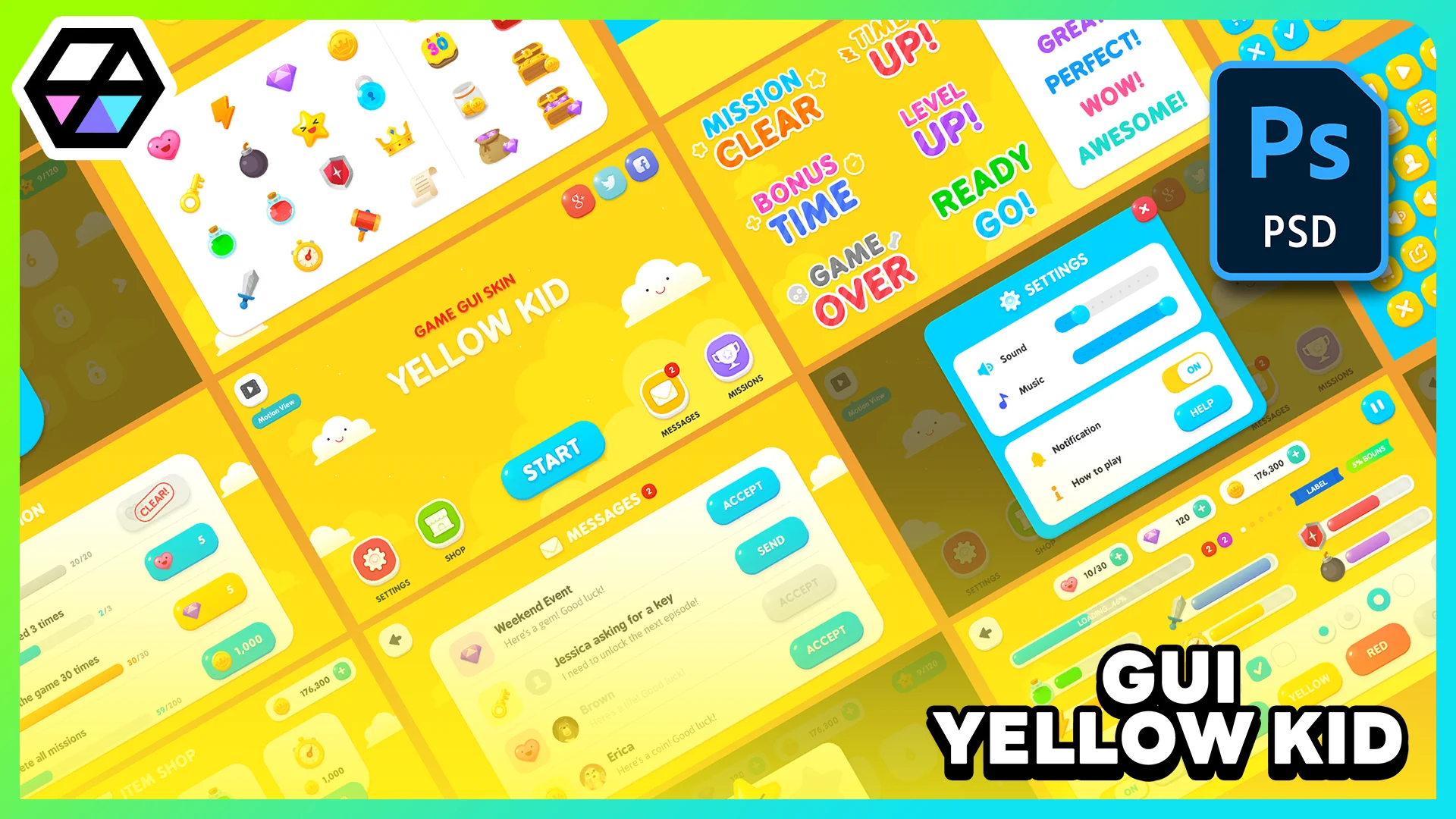
GUI - Yellow Kid is a cute fantasy-style interface pack with 1920x1080 graphics, 400+ PNG sources, 72 button icons, and 72 pictogram icons.
Projects with a cute fantasy tone, mobile-friendly menus, or casual roleplay presentation often need interface art that reads quickly and keeps a strong visual identity. GUI - Yellow Kid sits in that space. It is a GUI package anchored in bright yellow styling, cartoon-friendly presentation, and a game UI direction that fits tags such as videogame, fantasy, mobile, roleplay, HUD, RPG, casual, simple, user interface, and interface.
The package is presented as a graphic resource rather than a coded system. Its graphics are prepared at 1920x1080 resolution, all asset elements are included as PNG files, and coding and animation are not included. That makes the pack especially relevant for teams or individual creators who want ready-made visual interface parts and plan to handle implementation on their own.
Where GUI - Yellow Kid fits best
The strongest use case for this set is a game project that wants a soft, approachable interface rather than a hard sci-fi or realistic one. The combination of cute, yellow, cartoon, fantasy, and casual tags points toward menus, HUD elements, and icon-driven screens that need to feel friendly at a glance. This can suit roleplay-oriented layouts, mobile game screens, and simple menu systems where clarity matters as much as personality.
Yellow is an important part of the package identity, not just a minor accent. In practice, that gives GUI - Yellow Kid a clear visual lane for creators who want an interface theme that feels warm and energetic. For projects already leaning into bright fantasy or playful RPG presentation, a cohesive yellow-centered UI can help menus, buttons, and symbols feel connected instead of assembled from unrelated parts.
The pack also makes sense in situations where the interface art needs to be separated cleanly from the rest of production. Since coding and animation are not part of the package, GUI - Yellow Kid is best viewed as a visual component library for teams that already know how they want screens to behave but need the artwork to support that behavior.
Yellow Kid graphics at 1920x1080
The graphics are prepared at 1920x1080 resolution. That single detail matters across multiple kinds of interface work because it establishes the scale of the package. Full-screen menu composition, panel arrangement, and HUD mockups all benefit from assets developed around a defined resolution target. It gives artists and UI implementers a predictable starting point when they place interface elements into game scenes, menu layouts, or prototype screens.
Every element is included as PNG. This is one of the most concrete practical strengths of the pack. PNG delivery keeps the artwork easy to preview, sort, and place into a UI workflow. Instead of relying on a single flattened composition, the package includes asset elements in a format that can be handled one piece at a time. That is useful when a creator wants to build their own layouts, swap icons, or test different button arrangements while keeping a consistent visual language.
The note about coding and animation not being included also helps define expectations clearly. GUI - Yellow Kid supplies the art side of the interface. If a project needs animated transitions, hover effects, scripted HUD behavior, or menu logic, those parts must be created separately. For some users, that separation is exactly the advantage: the visual resources are there, while the technical setup remains open to the project’s own workflow.
What 400+ PNG sources bring to the interface
The asset list includes more than 400 sources as PNG. That number suggests breadth within the pack, and the format choice reinforces that this is meant to be worked with as a library of individual parts. A large count of PNG sources is most useful when an interface needs repeated variation without leaving the overall style behind. Menu screens, inventory panels, status displays, selection prompts, and icon-supported buttons all benefit from having a deeper pool of pieces rather than only a few headline graphics.
For creators, the practical value of a large source count is flexibility inside a fixed art direction. A cute fantasy interface often needs many small decisions: which icon fits a button, which panel element feels right for a submenu, how to keep screens visually consistent while still distinguishing one function from another. More source files mean more room to assemble those screens with consistency.
Because all elements are supplied as PNG files, the package leans toward direct use and rearrangement. That can help when laying out multiple UI scenes that need to feel related, such as a title menu, settings panel, reward popup, and in-game HUD. The pack does not promise system behavior, but it does offer a substantial visual pool from which that behavior can be dressed.
72 button icons and 72 pictogram icons
One of the clearest parts of GUI - Yellow Kid is its icon structure. The package includes 72 button icons in blue, gray, red, and yellow. That color range gives the set a practical layer of variation without changing the overall UI family. In interface work, color often helps separate actions, states, or categories. Having the same icon group presented across several colors can support a cleaner visual hierarchy while preserving recognition.
The 72 pictogram icons are supplied at 64x64, 128x128, 256x256, and 512x512. Multiple sizes make these pictograms easier to adapt across different parts of a game interface. Smaller icon use can suit compact HUD placements or dense menu rows, while larger versions are more suitable for feature tiles, highlighted actions, or selection screens where the symbol needs to carry more visual weight.
That range also helps keep the same symbol set consistent across different UI moments. Instead of treating tiny HUD icons and larger menu graphics as separate design problems, a project can pull from the same pictogram family in several dimensions. For a simple or casual interface, that kind of consistency can do a lot of work.
PSD editable vector layer and the AI pictogram file
Beyond the PNG assets, GUI - Yellow Kid includes 23 PSD editable vector layer files and 1 pictogram icons AI file. These are the files that make the pack more than a drop-in graphic bundle. They point to a workflow where creators may want to adjust visual details, refine compositions, or adapt icon material inside familiar design software.
The PSD editable vector layer files are particularly relevant for anyone who expects to make changes rather than only place finished images. Editable layered material can help when adjusting arrangement, revising visual emphasis, or tailoring elements to match the structure of a specific game screen. The package does not claim unlimited customization, but editable layered files naturally offer a more flexible path than flat exports alone.
The inclusion of a pictogram icons AI file gives the icon side of the pack its own editable source. For a UI set where symbols are central, that matters. Teams that want to work directly with icon artwork, keep it clean at different output sizes, or make selective changes to the pictogram collection have a source file specifically tied to that part of the package.
Who benefits most from GUI - Yellow Kid
GUI - Yellow Kid is most useful for creators building cute, fantasy-leaning, cartoon-friendly game interfaces that need a ready visual base rather than a programmed UI framework. Its strongest audience is likely anyone assembling mobile-style menus, casual RPG screens, roleplay HUD elements, or simple game interfaces that depend on icon clarity and a unified bright theme.
The package gives that audience a substantial PNG library, a defined 1920x1080 graphic target, four-color button icon variations, pictogram icons in four sizes, editable PSD material, and an AI pictogram file. Anyone comfortable handling their own coding and animation can get the most from it, because the visual parts are here while implementation remains open.
 UI Kits / HUDs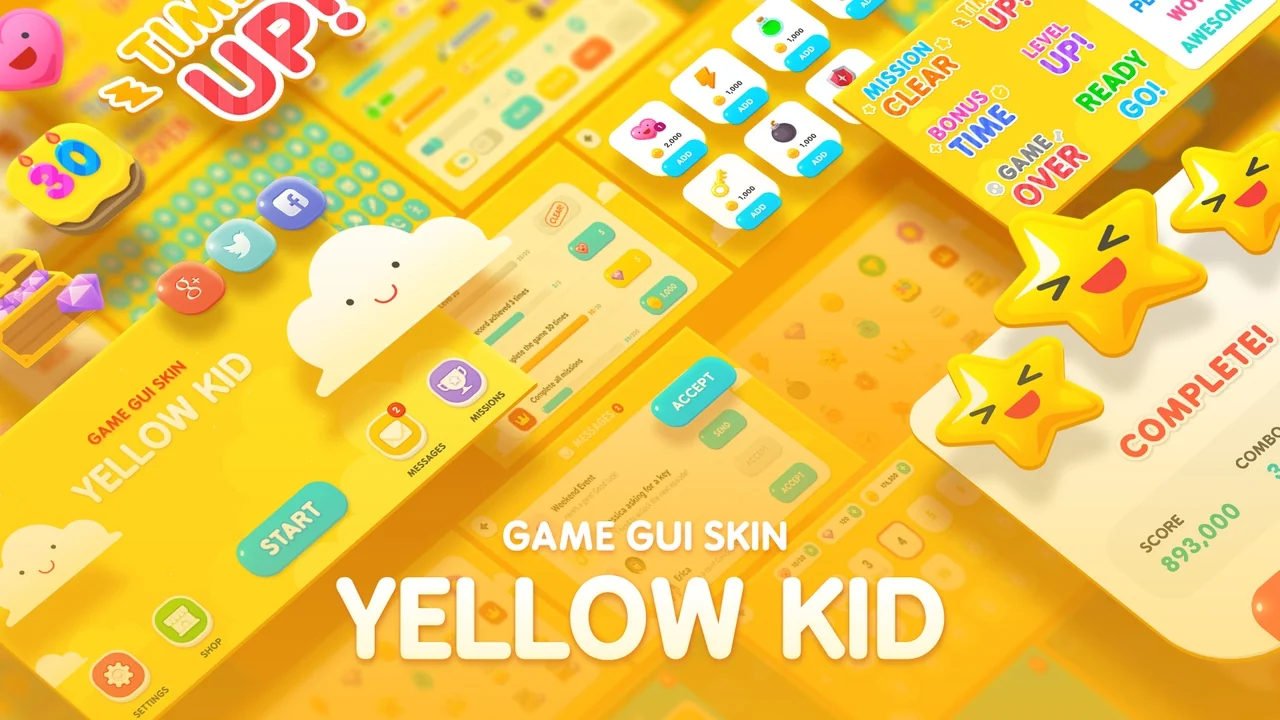
 UI Kits / HUDs
 UI Kits / HUDs
 UI Kits / HUDs