"6f9bd6df1f44a86f"{"id":"1000870","slug":"pro-hud-navigation-tools-only","title":"Pro HUD: Navigation Tools Only","category":"UI Kits / HUDs","engine":"4.27,5.0+","assetVersion":"","engineVersion":"Engine Version: 4.27,5.0+","tag":"UI Kits / HUDs","accent":"blue","visual":"mech","summary":"Pro HUD: Navigation Tools Only provides easy-to-use HUD elements for navigation. Presets, a style guide, and runtime HUD nodes help guide players to objectives.","platform":"Unreal Engine","indexPolicy":"index","publishedAt":"2026-08-05T07:01:27.966Z","updatedAt":"2026-08-05T07:01:27.966Z","sourceNotes":[],"fileContents":[],"compatibility":["Unreal Engine","Engine Version: 4.27,5.0+"],"featuredImage":{"alt":"Pro HUD: Navigation Tools Only","src":"/wp-content/uploads/published/2026/08/fcc104e40615-be7b0a56-e52b-4af2-a9b4-3701ffaab3c5-7117c706ba.webp"},"hasDownloadLink":true,"downloads":0,"terms":[{"taxonomy":"category","slug":"ui-kits-huds","name":"UI Kits / HUDs"}],"galleryImages":[{"src":"/wp-content/uploads/published/2026/08/e10776ceb8c4-e218c488-57cb-485d-9259-f1970ed89aef-900b492226.webp","alt":"Pro HUD: Navigation Tools Only"},{"src":"/wp-content/uploads/published/2026/08/2c16fe3afef7-42d32e1e-e9cd-48c5-8c6f-5f3fd2d82407-c2a4ee1ef4.webp","alt":"Pro HUD: Navigation Tools Only"},{"src":"/wp-content/uploads/published/2026/08/520f981a6b40-c00486d2-77d6-414d-b2fa-a14a74a2904c-c7c7a0b401.webp","alt":"Pro HUD: Navigation Tools Only"},{"src":"/wp-content/uploads/published/2026/08/18ff222d2645-de0aa610-6816-4c07-a291-4925d59f1c9a-cd5550400e.webp","alt":"Pro HUD: Navigation Tools Only"},{"src":"/wp-content/uploads/published/2026/08/25d94ea0368e-31b14cf6-5425-44c5-a917-3d75dd5df6ee-5408a40ade.webp","alt":"Pro HUD: Navigation Tools Only"},{"src":"/wp-content/uploads/published/2026/08/3a5538085ce4-2effae82-fef0-4d46-b9a7-59e2aae3fac2-1c6e2d29cf.webp","alt":"Pro HUD: Navigation Tools Only"},{"src":"/wp-content/uploads/published/2026/08/ed33a7e706db-17283510-788f-4864-85f1-8ffc4dac96c5-7920d9c38f.webp","alt":"Pro HUD: Navigation Tools Only"}],"accessPanel":{"kind":"resource","title":"Download this resource","eyebrow":"Free Download","message":"Log in or create a free account to start your download.","fileName":"Content.7z","safetyNote":"Resources are manually reviewed before listing to improve quality and reduce obvious risks.","actionLabel":"Download Free","resourceType":"Resource archive"},"contentHtml":"\u003cp\u003ePlayers don't always know where to go. A waypoint can sit ahead, but the actual route may be hidden behind terrain, buildings, or dense lighting. The moments when a player character has to find a place are exactly when the Heads-Up Display (HUD) must take over and offer clear direction. \u003cem\u003ePro HUD: Navigation Tools Only\u003c/em\u003e is made for those situations.\u003c/p\u003e\n\n\u003cp\u003eThe pack focuses on 1 important part of the interface: navigation. Its goal is to communicate gameplay information to the player through visual guidance, so the player can move forward without needing to stop and read a manual.\u003c/p\u003e\n\n\u003ch2\u003eA Bridge Between the Game and the Player\u003c/h2\u003e\n\n\u003cp\u003eIn any game, the HUD is the primary channel between the game and its players. It translates internal state into visual information. When that information is about navigation, the HUD needs to be especially direct. A marker that is hard to read or a compass that lags behind can break the flow of play.\u003c/p\u003e\n\n\u003cp\u003eThis pack approaches that communication as a bridge. Navigation elements are meant to be easy for the player to interpret while still being flexible for the developer to tune. Because the pack is structured through easy-to-use tools, it places the burden of clarity on the HUD design rather than on the player's patience.\u003c/p\u003e\n\n\u003ch2\u003ePresets and a Style Guide for Faster User Interface (UI) Development\u003c/h2\u003e\n\n\u003cp\u003eStarting a HUD from scratch is time-consuming. There are dozens of decisions to make: what the marker looks like, how it changes when off-screen, how far it is from the edge of the screen. The pack's numerous preset options remove that initial blank page. They give a design team a ready-made starting point that fits a navigation-focused HUD.\u003c/p\u003e\n\n\u003cp\u003eBecause the presets are numerous, a developer can select a look that matches the game's tone without having to design every element from 0. The presets can be dropped into the scene and then adjusted as needed. This makes the pack especially useful for prototyping and for project teams that want to iterate on the feel of the navigation system.\u003c/p\u003e\n\n\u003ch3\u003eKeeping the Interface Consistent with a Style Guide Option\u003c/h3\u003e\n\n\u003cp\u003ePresets alone are not enough to keep a HUD cohesive across all screens. That is why the pack also includes a style guide option. The style guide establishes a consistent visual language for all navigation elements. When indicators, markers, and compass features follow the same rules, the player's eye learns where to look.\u003c/p\u003e\n\n\u003cp\u003eThe style guide option serves as a reference for the whole UI team. It keeps the navigation tools aligned with each other and with the broader design of the game. This is particularly important in projects where different Levels or gameplay modes might otherwise end up with mismatched interface elements.\u003c/p\u003e\n\n\u003ch2\u003eRuntime Adjustments Through HUD Nodes\u003c/h2\u003e\n\n\u003cp\u003eAnother layer of flexibility comes from the \u003ccode\u003eHUD Nodes\u003c/code\u003e. These nodes expose setting options that can be changed at runtime, rather than only in the Editor. That means a developer or designer can adjust how the navigation tools behave while the game is actually running.\u003c/p\u003e\n\n\u003cp\u003eRuntime control opens up practical possibilities. A compass sensitivity setting can be changed on the fly. A marker's visibility threshold can be modified for a specific segment of a mission. Because the \u003ccode\u003eHUD Nodes\u003c/code\u003e give direct access to these settings, the team can fine-tune the navigation experience without rebuilding the UI between tests.\u003c/p\u003e\n\n\u003ch2\u003eWhere the Pack Fits in a Production\u003c/h2\u003e\n\n\u003cp\u003eThe most common scenario for this HUD pack is when a player character has to find a specific place. It may be the goal of a quest, the location of a resource, or the entry to a building. The pack communicates that information in a navigational way, using visual cues to point the player in the right direction.\u003c/p\u003e\n\n\u003cp\u003eThat makes the pack relevant to a range of projects, from open-world adventures to wargames and mission-based shooters. Any game where spatial orientation matters can benefit from a dedicated set of navigation tools. The pack's design language, which centers on indicators, markers, and compass-based guidance, supports players as they move through large or complex spaces.\u003c/p\u003e\n\n\u003cp\u003eFor teams adopting the pack, there are also supporting materials. A preview video shows the HUD in action, a demo build provides a playable reference, tutorials walk through the setup process, and documentation explains the technical details. These resources shorten the learning curve and allow the pack to be integrated into the production pipeline quickly.\u003c/p\u003e\n\n\u003ch2\u003eA Practical Starting Point for Navigation-Heavy Games\u003c/h2\u003e\n\n\u003cp\u003ePutting all the pieces together, \u003cem\u003ePro HUD: Navigation Tools Only\u003c/em\u003e builds a strong foundation for gameplay navigation. The combination of numerous presets, a style guide option, and runtime \u003ccode\u003eHUD Node\u003c/code\u003e settings covers both the visual and the interactive side of a navigation HUD.\u003c/p\u003e\n\n\u003cp\u003eTeams that adopt the pack can start with a preset, keep the interface consistent with the style guide, and tune the behavior through \u003ccode\u003eHUD Nodes\u003c/code\u003e. That workflow is simple enough for a small group and flexible enough for a larger production.\u003c/p\u003e\n\n\u003cp\u003eThe pack's focus is intentionally narrow: it is about navigation tools. That focus is what makes it useful. Instead of becoming a sprawling UI kit, it puts its effort into 1 of the most important parts of the player experience. When a player always knows which way to go, the game feels smoother, and the interface has done its job.\u003c/p\u003e\n\n\u003ch2\u003eRelated Resources Worth Checking\u003c/h2\u003e\n\u003cul\u003e\n\u003cli\u003e\u003ca href=\"https://3dcghub.com/gui-simple-round-2/\" rel=\"noopener noreferrer\"\u003eGUI - Simple Round\u003c/a\u003e\u003c/li\u003e\n\u003cli\u003e\u003ca href=\"https://3dcghub.com/gui-mono-round-2/\" rel=\"noopener noreferrer\"\u003eGUI - Mono Round\u003c/a\u003e\u003c/li\u003e\n\u003cli\u003e\u003ca href=\"https://3dcghub.com/easy-game-ui-ultimate/\" rel=\"noopener noreferrer\"\u003eEasy Game UI Ultimate\u003c/a\u003e\u003c/li\u003e\n\u003cli\u003e\u003ca href=\"https://3dcghub.com/virtual-joystick-minimalist-pack/\" rel=\"noopener noreferrer\"\u003eVirtual Joystick Minimalist Pack\u003c/a\u003e\u003c/li\u003e\n\u003cli\u003e\u003ca href=\"https://3dcghub.com/gui-yellow-kid-2/\" rel=\"noopener noreferrer\"\u003eGUI - Yellow Kid\u003c/a\u003e\u003c/li\u003e\n\u003c/ul\u003e","contentTextLength":5460,"navigation":{"current":1494,"total":4218,"previous":{"id":"1000871","slug":"progressiveui-loading-styles","title":"ProgressiveUI - Loading styles","category":"Gameplay Features","platform":"Unreal Engine","updatedAt":"2026-08-05T07:04:59.906Z"},"next":{"id":"1000869","slug":"powerful-fighter-pack-can-be-used-with-my-sword-pack","title":"Powerful Fighter Pack(Can be used with my Sword Pack)","category":"Combat","platform":"Unreal Engine","updatedAt":"2026-08-05T06:58:01.030Z"}},"relatedResources":[{"id":"1002155","slug":"pro-hud-pack-horror-skin","title":"Pro HUD Pack: Horror Skin","category":"UI Kits / HUDs","engine":"4.24+,5.0+","assetVersion":"","engineVersion":"Engine Version: 4.24+,5.0+","tag":"UI Kits / HUDs","accent":"blue","visual":"mech","summary":"Pro HUD Pack: Horror Skin provides navigational compass tools, minimaps, task alerts, and runtime HUD nodes tailored for horror and wargame interfaces.","platform":"Unreal Engine","indexPolicy":"index","publishedAt":"2026-10-29T09:59:23.096Z","updatedAt":"2026-10-29T09:59:23.096Z","sourceNotes":[],"fileContents":[],"compatibility":["Unreal Engine","Engine Version: 4.24+,5.0+"],"featuredImage":{"alt":"Pro HUD Pack: Horror Skin","src":"/wp-content/uploads/published/2026/10/2a99ef34b46b-984148b6-ffe2-475d-ba56-5890c73bd792-62e4a00883.webp"},"hasDownloadLink":true,"downloads":0},{"id":"15453","slug":"easy-game-ui-ultimate","title":"Easy Game UI Ultimate","category":"UI Kits / HUDs","engine":"5.3+","assetVersion":"Engine version: 5.3+","engineVersion":"5.3","tag":"UI Kits / HUDs","accent":"blue","visual":"mech","summary":"Easy Game UI Ultimate provides a comprehensive toolkit for developers to implement professional user interfaces. It features advanced save systems, a procedural credits tool, and a robust HUD builder.","platform":"Unreal Engine","indexPolicy":"index","publishedAt":"2026-03-12T09:03:10.000Z","updatedAt":"2026-04-19T15:44:46.000Z","sourceNotes":[],"fileContents":[],"compatibility":["Unreal Engine","Engine version: 5.3+"],"featuredImage":{"alt":"Easy Game UI Ultimate","src":"https://3dcghub.com/wp-content/uploads/2026/03/f4fb3aaf-1633-47f4-aad4-504acc3e744c.webp"},"hasDownloadLink":true,"downloads":4},{"id":"1001858","slug":"advanced-hud-style-12","title":"Advanced HUD-Style 12","category":"UI Kits / HUDs","engine":"4.26+,5.0+","assetVersion":"","engineVersion":"Engine Version: 4.26+,5.0+","tag":"UI Kits / HUDs","accent":"blue","visual":"mech","summary":"An Action RPG interface system featuring level streaming across four maps, persistent settings, minimap pointers, and enhanced input updates.","platform":"Unreal Engine","indexPolicy":"index","publishedAt":"2026-10-22T10:52:37.375Z","updatedAt":"2026-10-22T10:52:37.375Z","sourceNotes":[],"fileContents":[],"compatibility":["Unreal Engine","Engine Version: 4.26+,5.0+"],"featuredImage":{"alt":"Advanced HUD-Style 12","src":"/wp-content/uploads/published/2026/10/6a724464fb23-fe0f8c74-09d6-42a7-acb0-add7cb7a8849-e91320c35a.webp"},"hasDownloadLink":true,"downloads":0}]}
UI Kits / HUDs
Pro HUD: Navigation Tools Only
Pro HUD: Navigation Tools Only provides easy-to-use HUD elements for navigation. Presets, a style guide, and runtime HUD nodes help guide players to objectives.
Players don't always know where to go. A waypoint can sit ahead, but the actual route may be hidden behind terrain, buildings, or dense lighting. The moments when a player character has to find a place are exactly when the Heads-Up Display (HUD) must take over and offer clear direction. Pro HUD: Navigation Tools Only is made for those situations.
The pack focuses on 1 important part of the interface: navigation. Its goal is to communicate gameplay information to the player through visual guidance, so the player can move forward without needing to stop and read a manual.
A Bridge Between the Game and the Player
In any game, the HUD is the primary channel between the game and its players. It translates internal state into visual information. When that information is about navigation, the HUD needs to be especially direct. A marker that is hard to read or a compass that lags behind can break the flow of play.
This pack approaches that communication as a bridge. Navigation elements are meant to be easy for the player to interpret while still being flexible for the developer to tune. Because the pack is structured through easy-to-use tools, it places the burden of clarity on the HUD design rather than on the player's patience.
Presets and a Style Guide for Faster User Interface (UI) Development
Starting a HUD from scratch is time-consuming. There are dozens of decisions to make: what the marker looks like, how it changes when off-screen, how far it is from the edge of the screen. The pack's numerous preset options remove that initial blank page. They give a design team a ready-made starting point that fits a navigation-focused HUD.
Because the presets are numerous, a developer can select a look that matches the game's tone without having to design every element from 0. The presets can be dropped into the scene and then adjusted as needed. This makes the pack especially useful for prototyping and for project teams that want to iterate on the feel of the navigation system.
Keeping the Interface Consistent with a Style Guide Option
Presets alone are not enough to keep a HUD cohesive across all screens. That is why the pack also includes a style guide option. The style guide establishes a consistent visual language for all navigation elements. When indicators, markers, and compass features follow the same rules, the player's eye learns where to look.
The style guide option serves as a reference for the whole UI team. It keeps the navigation tools aligned with each other and with the broader design of the game. This is particularly important in projects where different Levels or gameplay modes might otherwise end up with mismatched interface elements.
Runtime Adjustments Through HUD Nodes
Another layer of flexibility comes from the HUD Nodes. These nodes expose setting options that can be changed at runtime, rather than only in the Editor. That means a developer or designer can adjust how the navigation tools behave while the game is actually running.
Runtime control opens up practical possibilities. A compass sensitivity setting can be changed on the fly. A marker's visibility threshold can be modified for a specific segment of a mission. Because the HUD Nodes give direct access to these settings, the team can fine-tune the navigation experience without rebuilding the UI between tests.
Where the Pack Fits in a Production
The most common scenario for this HUD pack is when a player character has to find a specific place. It may be the goal of a quest, the location of a resource, or the entry to a building. The pack communicates that information in a navigational way, using visual cues to point the player in the right direction.
That makes the pack relevant to a range of projects, from open-world adventures to wargames and mission-based shooters. Any game where spatial orientation matters can benefit from a dedicated set of navigation tools. The pack's design language, which centers on indicators, markers, and compass-based guidance, supports players as they move through large or complex spaces.
For teams adopting the pack, there are also supporting materials. A preview video shows the HUD in action, a demo build provides a playable reference, tutorials walk through the setup process, and documentation explains the technical details. These resources shorten the learning curve and allow the pack to be integrated into the production pipeline quickly.
A Practical Starting Point for Navigation-Heavy Games
Putting all the pieces together, Pro HUD: Navigation Tools Only builds a strong foundation for gameplay navigation. The combination of numerous presets, a style guide option, and runtime HUD Node settings covers both the visual and the interactive side of a navigation HUD.
Teams that adopt the pack can start with a preset, keep the interface consistent with the style guide, and tune the behavior through HUD Nodes. That workflow is simple enough for a small group and flexible enough for a larger production.
The pack's focus is intentionally narrow: it is about navigation tools. That focus is what makes it useful. Instead of becoming a sprawling UI kit, it puts its effort into 1 of the most important parts of the player experience. When a player always knows which way to go, the game feels smoother, and the interface has done its job.
 UI Kits / HUDs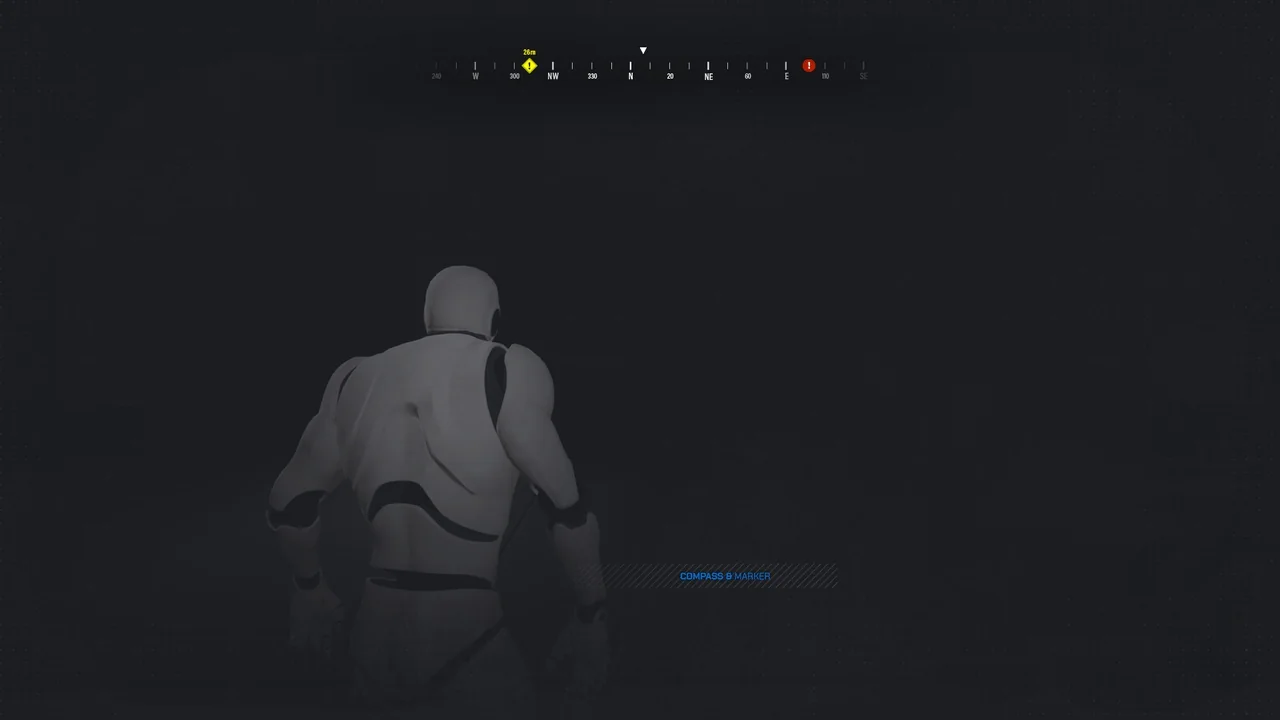
 UI Kits / HUDs
 UI Kits / HUDs
 UI Kits / HUDs