"6f9bd6df1f44a86f"{"id":"1000871","slug":"progressiveui-loading-styles","title":"ProgressiveUI - Loading styles","category":"Gameplay Features","engine":"4.27,5.0+","assetVersion":"","engineVersion":"Engine Version: 4.27,5.0+","tag":"Gameplay Features","accent":"blue","visual":"mech","summary":"ProgressiveUI - Loading styles brings templates for level loading systems, changeable loading styles, in-screen game info, and Blueprint/Interface integration.","platform":"Unreal Engine","indexPolicy":"index","publishedAt":"2026-08-05T07:04:59.906Z","updatedAt":"2026-08-05T07:04:59.906Z","sourceNotes":[],"fileContents":[],"compatibility":["Unreal Engine","Engine Version: 4.27,5.0+"],"featuredImage":{"alt":"ProgressiveUI - Loading styles","src":"/wp-content/uploads/published/2026/08/3e8bb03f67bb-768f32a7-4583-49ef-b28e-7ab129bcea59-04fc12bc93.webp"},"hasDownloadLink":true,"downloads":0,"terms":[{"taxonomy":"category","slug":"gameplay-features","name":"Gameplay Features"}],"galleryImages":[{"src":"/wp-content/uploads/published/2026/08/0f6ca7c72457-871dfd94-8312-46d4-b35f-87c692166230-3cbc224f6f.webp","alt":"ProgressiveUI - Loading styles"},{"src":"/wp-content/uploads/published/2026/08/3f03cbeea572-71f20452-086a-466e-b5df-531dd08c6526-a0513f03ae.webp","alt":"ProgressiveUI - Loading styles"},{"src":"/wp-content/uploads/published/2026/08/672064133094-ef9a4597-fb34-4040-a137-dd3548f4872e-cd7dfd52b5.webp","alt":"ProgressiveUI - Loading styles"},{"src":"/wp-content/uploads/published/2026/08/effec96d46ff-c9db0832-7f5a-4155-ad80-3b8346e01372-c149511125.webp","alt":"ProgressiveUI - Loading styles"},{"src":"/wp-content/uploads/published/2026/08/e513fd14887d-15888529-fdf1-4af5-840a-c27219f3e5e1-cdd249c00c.webp","alt":"ProgressiveUI - Loading styles"},{"src":"/wp-content/uploads/published/2026/08/bbc04da41136-aef024fd-e6aa-4b46-84d8-259e6248ad1f-249d77dd0d.webp","alt":"ProgressiveUI - Loading styles"},{"src":"/wp-content/uploads/published/2026/08/f8e0efef0d3c-1a8d7fcd-91fb-4b27-9d85-fe9b6a8d38a5-a72d9adf57.webp","alt":"ProgressiveUI - Loading styles"}],"accessPanel":{"kind":"resource","title":"Download this resource","eyebrow":"Free Download","message":"Log in or create a free account to start your download.","fileName":"Content.7z","safetyNote":"Resources are manually reviewed before listing to improve quality and reduce obvious risks.","actionLabel":"Download Free","resourceType":"Resource archive"},"contentHtml":"\u003cp\u003eA loading screen is the 1st thing players see during a Level transition. \u003cem\u003eProgressiveUI - Loading styles\u003c/em\u003e approaches that moment as something a project can shape. The asset is a set of loading templates built to be implemented directly into an existing Level loading system. The templates let the team change the loading style and use the same screen to display information about the game, which turns the wait into a functional part of the experience.\u003c/p\u003e\n\n\u003ch2\u003eLevel Loading Meets a Set of Swap-Ready Templates\u003c/h2\u003e\n\n\u003cp\u003eThe core idea is simple: a Level transition needs something on screen while the next map is being prepared. The templates in this asset are intended for that exact spot. They are built for the Level loading system, meaning they plug into the moment when the game moves from 1 area to another. Because the templates are ready-made, they remove the need to start a loading screen from a blank canvas. The implementation path is also described as easy, which suggests that a user can take the existing Level loading flow and fit the templates into it without major refactoring.\u003c/p\u003e\n\n\u003cp\u003eFor a developer, this is useful because loading screens are often treated as a last-minute addition. With these templates, the visual layer of the load can be put in place early, then refined as the game's style develops. The templates do not replace the Level loading system itself; they sit on top of it and present the loading state to the player.\u003c/p\u003e\n\n\u003ch2\u003eChanging Loading Styles Without Rebuilding the Loading Screen\u003c/h2\u003e\n\n\u003cp\u003eThe asset's name points to loading styles, and the ability to change them easily is a central part of what it offers. That is a practical feature for any game that wants to avoid a 1-size-fits-all loading experience. The same project can use different styles for different moments in the game, and those styles can be swapped without touching the underlying loading logic. Because the styles are templates, only the presentation changes; the process that loads the Level stays the same.\u003c/p\u003e\n\n\u003cp\u003eIn practice, this means a team can match the progress screen to the tone of the Level being loaded. A quick, minimal style might be enough for a fast respawn, while a richer style with more on-screen content can accompany a long transition between major areas. The ability to switch styles easily also allows for iteration during production. If 1 style does not feel right, another can take its place without delaying other work.\u003c/p\u003e\n\n\u003ch2\u003eMaking Room for Information About the Game\u003c/h2\u003e\n\n\u003cp\u003eA loading screen does more than show progress. The asset is designed to display information about the game, so the loading phase can carry context, reminders, or anything else the project wants to put in front of the player. The description also includes “and more,” which leaves room for content beyond simple text. That makes the asset suitable for teams that want a flexible communication layer between Levels.\u003c/p\u003e\n\n\u003cp\u003eFor a player, this is a better experience than staring at a static bar. For a game team, it is an opportunity to reinforce the game’s narrative or give practical information at a natural break. What exactly is displayed is up to the integrator; the template provides the slot.\u003c/p\u003e\n\n\u003ch2\u003eWiring It Through Blueprint and Interface\u003c/h2\u003e\n\n\u003cp\u003eThe asset’s tags include \u003cem\u003eBlueprint\u003c/em\u003e and \u003cem\u003eInterface\u003c/em\u003e, which means the loading styles are delivered in a form that fits an engine’s visual-scripting and User Interface (UI) workflow. That is important for users who want to make changes without digging into low-level code. The \u003ccode\u003eBlueprint\u003c/code\u003e side handles the behavior, such as switching styles and responding to loading events. The \u003ccode\u003eInterface\u003c/code\u003e side handles the layout, so the information about the game appears in a structured way on screen.\u003c/p\u003e\n\n\u003cp\u003eBecause both are part of the package, the templates can be treated as a normal part of the game’s UI rather than as a separate element. A developer can open the relevant \u003ccode\u003eBlueprint\u003c/code\u003e, adjust the interface, and see how the loading screen behaves without leaving familiar tools.\u003c/p\u003e\n\n\u003ch2\u003eA Demo and a Support Channel Are Part of the Offering\u003c/h2\u003e\n\n\u003cp\u003eThe asset comes with a demonstration video, which is helpful for a loading-screen resource because motion and timing are hard to communicate in still images. The demo shows the loading styles in action, giving a developer a sense of how the screen behaves during an actual transition. There is also a support channel on Discord for users who need help during implementation. For a tool that sits inside the Level loading flow, having a place to ask questions is valuable.\u003c/p\u003e\n\n\u003ch2\u003eWhere \u003cem\u003eProgressiveUI\u003c/em\u003e Fits in a Production Workflow\u003c/h2\u003e\n\n\u003cp\u003eThe \u003cem\u003eProgressiveUI\u003c/em\u003e name points to User Interface (UI) work, and this asset specifically covers the loading-screen part of that category. The templates are positioned for teams that already have a Level loading system and want to upgrade what players see during that time. The asset does not force a particular look; instead, it provides a set of styles that can be swapped and modified. It also does not force a particular kind of game information; the user decides what to show.\u003c/p\u003e\n\n\u003cp\u003eThat makes it a practical fit for a range of projects. A production that needs a quick loading screen can drop in a template and move on. A larger team can take the same template, reshape it, and make it match an established art direction. Either way, the asset shortens the distance between having a loading gap and having a loading screen that feels intentional.\u003c/p\u003e\n\n\u003cp\u003eFor a team evaluating loading-screen options, the concrete takeaway is that this asset focuses on the part of the game loop where players are most likely to disengage. Having a set of ready-made templates that slot into the Level loading system, switch styles easily, and display game information gives the project a way to keep that moment engaging. That is the real value of \u003cem\u003eProgressiveUI - Loading styles\u003c/em\u003e: it makes the wait feel like part of the game rather than an interruption.\u003c/p\u003e\n\n\u003ch2\u003eContinue Browsing Similar Packs\u003c/h2\u003e\n\u003cul\u003e\n\u003cli\u003e\u003ca href=\"https://3dcghub.com/freeflow-combat/\" rel=\"noopener noreferrer\"\u003eFreeflow Combat\u003c/a\u003e\u003c/li\u003e\n\u003cli\u003e\u003ca href=\"https://3dcghub.com/2048-puzzle-game-template/\" rel=\"noopener noreferrer\"\u003e2048 Puzzle Game Template\u003c/a\u003e\u003c/li\u003e\n\u003cli\u003e\u003ca href=\"https://3dcghub.com/hudcallouttitles01/\" rel=\"noopener noreferrer\"\u003eHUDCallOutTitles01\u003c/a\u003e\u003c/li\u003e\n\u003cli\u003e\u003ca href=\"https://3dcghub.com/instant-photo-camera/\" rel=\"noopener noreferrer\"\u003eInstant Photo Camera\u003c/a\u003e\u003c/li\u003e\n\u003cli\u003e\u003ca href=\"https://3dcghub.com/dot-matrix-shader-pack/\" rel=\"noopener noreferrer\"\u003eDot Matrix Shader Pack\u003c/a\u003e\u003c/li\u003e\n\u003c/ul\u003e","contentTextLength":5978,"navigation":{"current":1493,"total":4218,"previous":{"id":"1000872","slug":"reactive-banners-and-flags-2-0","title":"Reactive Banners and Flags 2.0","category":"Outdoors","platform":"Unreal Engine","updatedAt":"2026-08-05T07:09:49.228Z"},"next":{"id":"1000870","slug":"pro-hud-navigation-tools-only","title":"Pro HUD: Navigation Tools Only","category":"UI Kits / HUDs","platform":"Unreal Engine","updatedAt":"2026-08-05T07:01:27.966Z"}},"relatedResources":[{"id":"15092","slug":"tile-based-minimap","title":"Tile Based Minimap","category":"Gameplay Features","engine":"5.3 - 5.5","assetVersion":"Asset Version: 1.2.2 - 2.1.1","engineVersion":"Engine Version: 5.3 - 5.5","tag":"Gameplay Features","accent":"blue","visual":"mech","summary":"The Tile Based Minimap system provides a robust solution for creating tiled in-game maps using pre-rendered level images. It features GPS-style routing, multi-grid support, and full Blueprint extensibility.","platform":"Unreal Engine","indexPolicy":"noindex","publishedAt":"2026-03-12T07:51:23.000Z","updatedAt":"2026-10-08T12:57:55.645Z","sourceNotes":[],"fileContents":[],"compatibility":["Unreal Engine","Asset Version: 1.2.2 - 2.1.1","Engine Version: 5.3 - 5.5"],"featuredImage":{"alt":"Tile Based Minimap","src":"https://3dcghub.com/wp-content/uploads/2026/03/768cc7d5-0ca5-439b-b02a-f4807a2c39bd.webp"},"hasDownloadLink":true,"downloads":5},{"id":"10858","slug":"freeflow-combat","title":"Freeflow Combat","category":"Gameplay Features","engine":"4.27,5.0+","assetVersion":"Engine version: 4.27,5.0+","engineVersion":"4.27","tag":"Gameplay Features","accent":"blue","visual":"city","summary":"Freeflow Combat offers a comprehensive modular framework for creating fluid, superhero-style combat. It features smart targeting, coordinated group AI, and cinematic finishers to streamline game development.","platform":"Unreal Engine","indexPolicy":"index","publishedAt":"2026-03-03T16:25:04.000Z","updatedAt":"2026-04-19T15:49:55.000Z","sourceNotes":[],"fileContents":[],"compatibility":["Unreal Engine","Engine version: 4.27,5.0+"],"featuredImage":{"alt":"Freeflow Combat","src":"https://3dcghub.com/wp-content/uploads/2026/03/796e8d94-436a-4186-83b5-a3597b87b3ab.webp"},"hasDownloadLink":true,"downloads":2},{"id":"1002179","slug":"rpg-compass-ui-system","title":"RPG Compass UI System","category":"Gameplay Features","engine":"4.27+,5.0+","assetVersion":"","engineVersion":"Engine Version: 4.27+,5.0+","tag":"Gameplay Features","accent":"blue","visual":"mech","summary":"Explore the RPG Compass UI System, featuring dynamic UI widgets, customizable markable actors, visual effects, network replication, and gamepad support.","platform":"Unreal Engine","indexPolicy":"index","publishedAt":"2026-10-29T14:21:05.247Z","updatedAt":"2026-10-29T14:21:05.247Z","sourceNotes":[],"fileContents":[],"compatibility":["Unreal Engine","Engine Version: 4.27+,5.0+"],"featuredImage":{"alt":"RPG Compass UI System","src":"/wp-content/uploads/published/2026/10/e1afbde60845-f96f2024-2708-4500-b02b-68163a93b251-64844439a4.webp"},"hasDownloadLink":true,"downloads":0}]}
Gameplay Features
ProgressiveUI - Loading styles
ProgressiveUI - Loading styles brings templates for level loading systems, changeable loading styles, in-screen game info, and Blueprint/Interface integration.
A loading screen is the 1st thing players see during a Level transition. ProgressiveUI - Loading styles approaches that moment as something a project can shape. The asset is a set of loading templates built to be implemented directly into an existing Level loading system. The templates let the team change the loading style and use the same screen to display information about the game, which turns the wait into a functional part of the experience.
Level Loading Meets a Set of Swap-Ready Templates
The core idea is simple: a Level transition needs something on screen while the next map is being prepared. The templates in this asset are intended for that exact spot. They are built for the Level loading system, meaning they plug into the moment when the game moves from 1 area to another. Because the templates are ready-made, they remove the need to start a loading screen from a blank canvas. The implementation path is also described as easy, which suggests that a user can take the existing Level loading flow and fit the templates into it without major refactoring.
For a developer, this is useful because loading screens are often treated as a last-minute addition. With these templates, the visual layer of the load can be put in place early, then refined as the game's style develops. The templates do not replace the Level loading system itself; they sit on top of it and present the loading state to the player.
Changing Loading Styles Without Rebuilding the Loading Screen
The asset's name points to loading styles, and the ability to change them easily is a central part of what it offers. That is a practical feature for any game that wants to avoid a 1-size-fits-all loading experience. The same project can use different styles for different moments in the game, and those styles can be swapped without touching the underlying loading logic. Because the styles are templates, only the presentation changes; the process that loads the Level stays the same.
In practice, this means a team can match the progress screen to the tone of the Level being loaded. A quick, minimal style might be enough for a fast respawn, while a richer style with more on-screen content can accompany a long transition between major areas. The ability to switch styles easily also allows for iteration during production. If 1 style does not feel right, another can take its place without delaying other work.
Making Room for Information About the Game
A loading screen does more than show progress. The asset is designed to display information about the game, so the loading phase can carry context, reminders, or anything else the project wants to put in front of the player. The description also includes “and more,” which leaves room for content beyond simple text. That makes the asset suitable for teams that want a flexible communication layer between Levels.
For a player, this is a better experience than staring at a static bar. For a game team, it is an opportunity to reinforce the game’s narrative or give practical information at a natural break. What exactly is displayed is up to the integrator; the template provides the slot.
Wiring It Through Blueprint and Interface
The asset’s tags include Blueprint and Interface, which means the loading styles are delivered in a form that fits an engine’s visual-scripting and User Interface (UI) workflow. That is important for users who want to make changes without digging into low-level code. The Blueprint side handles the behavior, such as switching styles and responding to loading events. The Interface side handles the layout, so the information about the game appears in a structured way on screen.
Because both are part of the package, the templates can be treated as a normal part of the game’s UI rather than as a separate element. A developer can open the relevant Blueprint, adjust the interface, and see how the loading screen behaves without leaving familiar tools.
A Demo and a Support Channel Are Part of the Offering
The asset comes with a demonstration video, which is helpful for a loading-screen resource because motion and timing are hard to communicate in still images. The demo shows the loading styles in action, giving a developer a sense of how the screen behaves during an actual transition. There is also a support channel on Discord for users who need help during implementation. For a tool that sits inside the Level loading flow, having a place to ask questions is valuable.
Where ProgressiveUI Fits in a Production Workflow
The ProgressiveUI name points to User Interface (UI) work, and this asset specifically covers the loading-screen part of that category. The templates are positioned for teams that already have a Level loading system and want to upgrade what players see during that time. The asset does not force a particular look; instead, it provides a set of styles that can be swapped and modified. It also does not force a particular kind of game information; the user decides what to show.
That makes it a practical fit for a range of projects. A production that needs a quick loading screen can drop in a template and move on. A larger team can take the same template, reshape it, and make it match an established art direction. Either way, the asset shortens the distance between having a loading gap and having a loading screen that feels intentional.
For a team evaluating loading-screen options, the concrete takeaway is that this asset focuses on the part of the game loop where players are most likely to disengage. Having a set of ready-made templates that slot into the Level loading system, switch styles easily, and display game information gives the project a way to keep that moment engaging. That is the real value of ProgressiveUI - Loading styles: it makes the wait feel like part of the game rather than an interruption.
 Gameplay Features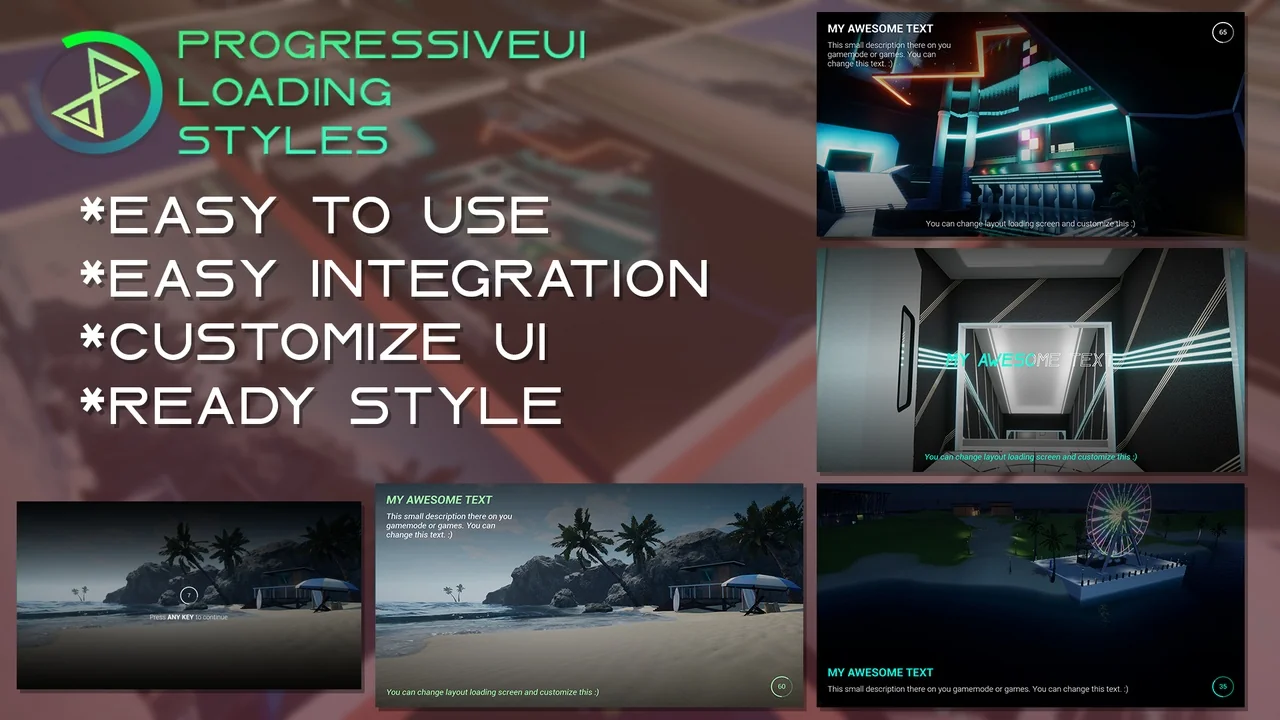
 Gameplay Features
 Gameplay Features
 Gameplay Features