"6f9bd6df1f44a86f"{"id":"1000872","slug":"reactive-banners-and-flags-2-0","title":"Reactive Banners and Flags 2.0","category":"Outdoors","engine":"5.1+","assetVersion":"","engineVersion":"Engine Version: 5.1+","tag":"Outdoors","accent":"blue","visual":"mech","summary":"Reactive Banners and Flags 2.0 brings Chaos Cloth physics, new banner types, and weatherable materials to a wind-reactive flag and banner system for Unreal Engi","platform":"Unreal Engine","indexPolicy":"index","publishedAt":"2026-08-05T07:09:49.228Z","updatedAt":"2026-08-05T07:09:49.228Z","sourceNotes":[],"fileContents":[],"compatibility":["Unreal Engine","Engine Version: 5.1+"],"featuredImage":{"alt":"Reactive Banners and Flags 2.0","src":"/wp-content/uploads/published/2026/08/28a01b6772ea-e3704b04-44b8-4bb1-a991-c23a303893b4-0b6b7ff14b.webp"},"hasDownloadLink":true,"downloads":1,"terms":[{"taxonomy":"category","slug":"outdoors","name":"Outdoors"}],"galleryImages":[{"src":"/wp-content/uploads/published/2026/08/715e38bdd7fc-d9baaf28-1bf0-46c9-a0a2-0fe3dbbe5c8e-c355e6febd.webp","alt":"Reactive Banners and Flags 2.0"},{"src":"/wp-content/uploads/published/2026/08/b786325d2af0-45f710bf-ae7d-4197-b326-bba0b0623b9a-656bd271cc.webp","alt":"Reactive Banners and Flags 2.0"},{"src":"/wp-content/uploads/published/2026/08/2497b2e8fff8-8fc2ec73-1e00-4ae8-9e8b-bd0442462cea-a11ad43b54.webp","alt":"Reactive Banners and Flags 2.0"},{"src":"/wp-content/uploads/published/2026/08/38b3a5ed1829-358bdceb-2f7b-4ba2-b19e-759af2936918-e5f3cba2f2.webp","alt":"Reactive Banners and Flags 2.0"},{"src":"/wp-content/uploads/published/2026/08/56e902ccda48-430c6451-5363-4e7d-b0e4-f258721b640c-27e8da461b.webp","alt":"Reactive Banners and Flags 2.0"},{"src":"/wp-content/uploads/published/2026/08/cc173baf6f56-af0f25bb-1278-4516-aaa9-f1768735e1e8-e99c2c332a.webp","alt":"Reactive Banners and Flags 2.0"},{"src":"/wp-content/uploads/published/2026/08/dcc674b8f9d7-fb70603f-b046-4d03-999b-7e206f95ee11-2a43533078.webp","alt":"Reactive Banners and Flags 2.0"},{"src":"/wp-content/uploads/published/2026/08/de864af9d012-12f4bf45-cae7-4f15-99cd-ec00245f782b-c344c635b7.webp","alt":"Reactive Banners and Flags 2.0"},{"src":"/wp-content/uploads/published/2026/08/449cc91c1654-2806a9aa-d3c2-4550-84d3-28a84829e95b-351181e16a.webp","alt":"Reactive Banners and Flags 2.0"},{"src":"/wp-content/uploads/published/2026/08/7dac31747f68-960e15f9-fa1c-483f-8076-bf99bf4e5bf7-206738e52f.webp","alt":"Reactive Banners and Flags 2.0"}],"accessPanel":{"kind":"resource","title":"Download this resource","eyebrow":"Free Download","message":"Log in or create a free account to start your download.","fileName":"Content.7z","safetyNote":"Resources are manually reviewed before listing to improve quality and reduce obvious risks.","actionLabel":"Download Free","resourceType":"Resource archive"},"contentHtml":"\u003cp\u003e\u003cem\u003eReactive Banners and Flags V2.0\u003c/em\u003e is a collection of cloth banners and flags built for Unreal Engine 5 (UE5). The whole set reacts to Unreal's \u003ccode\u003eWind Directional Source\u003c/code\u003e, so instead of playing a pre-baked animation, each flag and banner responds in real time to wind. That makes it a practical fit for scenes where wind is an active part of the atmosphere—city streets, castle courtyards, beachfronts, or event spaces.\u003c/p\u003e\n\n\u003ch2\u003eWind-Reactive Fabric for UE5 Scenes\u003c/h2\u003e\n\n\u003cp\u003eThe package is designed to cover both modern and medieval/fantasy settings. Rather than being tied to 1 visual style, the banners and flags keep a neutral enough look that they can be mixed into environments as varied as a convention hall, a streetlight-lined plaza, a palace wall, or a seaside promenade. The wind reaction itself comes from UE5's native \u003ccode\u003eWind Directional Source\u003c/code\u003e, so all the cloth movement is driven by the engine's own wind system. That keeps the setup straightforward in Sequencer or in a normal Level.\u003c/p\u003e\n\n\u003ch2\u003ePole Types and Mounting Options in the Collection\u003c/h2\u003e\n\n\u003cp\u003eThere are more than 15 distinct mounting configurations in the set. Specifically, the package includes a banner mast like the ones seen in front of a convention hall, 3 light poles with double banners, 4 flag banners similar to what you would see at the beach, 4 standard flagpoles with differing flag designs, 3 wall-mounted flag poles, a ground frame banner, 5 vertical banners with stands, and 7 wall banners that sit flush with the wall. With that many options, it is possible to populate a whole environment without repeating the same pole-and-banner combination.\u003c/p\u003e\n\n\u003cul\u003e\n \u003cli\u003eBanner mast for large entries and plazas\u003c/li\u003e\n \u003cli\u003eLight poles with double banners for street and path lighting\u003c/li\u003e\n \u003cli\u003eBeach-style flag banners and standard flagpoles\u003c/li\u003e\n \u003cli\u003eWall-mounted flag poles and flush wall banners\u003c/li\u003e\n \u003cli\u003eGround frame banner and vertical banners with stands\u003c/li\u003e\n\u003c/ul\u003e\n\n\u003ch2\u003eV2.0: Chaos Cloth, New Flags, and Weathering Materials\u003c/h2\u003e\n\n\u003cp\u003eV2.0 reworks the simulation core by moving to Chaos Cloth. That change affects the way every flag and banner deforms under wind, and it brings the asset in line with Unreal Engine 5's current physics pipeline. The update also adds 8 new items: 2 golf flags, 2 hand flags, 1 indoor flag, and 3 string banners. These cover smaller-scale wind reactions, from a flag on a putting green to a hand-held flag that moves as a character walks, as well as lightweight string banners stretched across an indoor space.\u003c/p\u003e\n\n\u003cp\u003eAnother practical addition in V2.0 is a set of Material-based wear effects. Dirt, damage, and wetness can be layered onto the fabric through new Materials. Rather than swapping to a completely different texture for a weathered flag, you can blend in grime or make a banner appear rain-soaked. This is especially useful for medieval or post-apocalyptic scenes where banners are not pristine.\u003c/p\u003e\n\n\u003ch2\u003eCustomizing Textures with Templates and the \u003ccode\u003eHelp_Document\u003c/code\u003e\u003c/h2\u003e\n\n\u003cp\u003eEach banner and flag comes with a texture template, so you can create your own customized patterns without starting from a blank canvas. The package includes a thorough manual that explains, in detail, how to alter the textures to suit your project. The documentation lives inside the \u003ccode\u003eHelp_Document\u003c/code\u003e folder, which you can open by right-clicking and choosing \u003ccode\u003eShow in Explorer\u003c/code\u003e from the context menu. The manual is complemented by video tutorials: 1 covers customization directly, another walks through animating cloth in Sequencer, and a 3rd explains how to convert a Skeletal Mesh into a Static Mesh. Those last 2 are particularly useful when you want a flag to animate beyond the normal wind response or when you need to optimize by baking the cloth simulation into a Static Mesh. The texture set itself uses public domain images from \u003cem\u003ePixabay\u003c/em\u003e, which keeps the source imagery consistent with a permissive license.\u003c/p\u003e\n\n\u003ch2\u003eNumbers That Matter: Vertices, Materials, and Texture Sizes\u003c/h2\u003e\n\n\u003cp\u003eThe collection is structured through 89 Materials, all deriving from a Master Material with Material Instances used for variation. There are 92 Textures in total, with resolutions that span 56x56, 1024x1024, 2622x963, and 2048x2048. The Meshes themselves sit between 685 and 9648 vertices, so lighter pieces work well for distant fill while denser meshes hold up in close shots. The intended and tested platform is PC.\u003c/p\u003e\n\n\u003cp\u003eBecause V2.0 is only available for Unreal Engine 5, it is worth paying attention to engine upgrades. The developer's recommendation is to update \u003cem\u003eReactive Banners and Flags\u003c/em\u003e every time you move the project to a newer UE version; otherwise, you may run into problems with the cloth simulation. The update process goes through the Epic Games Launcher: open the \u003ccode\u003eLibrary\u003c/code\u003e tab, scroll to the \u003ccode\u003eVault\u003c/code\u003e section, search for \u003cem\u003eReactive Banners and Flags\u003c/em\u003e, click \u003ccode\u003eAdd To Project\u003c/code\u003e, select the new project version, and confirm with \u003ccode\u003eYes\u003c/code\u003e when asked to overwrite files.\u003c/p\u003e\n\n\u003ch2\u003eStaying in Sync with Unreal Engine Upgrades\u003c/h2\u003e\n\n\u003cp\u003eFor Level Designers who need wind-reactive fabric across both fantasy and modern environments, this version covers the basics and then some. The Chaos Cloth update keeps the simulation aligned with Unreal Engine 5, the new golf flags, hand flags, and string banners fill in gaps from the original release, and the Material system provides a quick way to show wear. Creators who already use the pack will want to update alongside their UE5 upgrades to avoid broken cloth behavior, and those new to the set can rely on the included templates and manual to adapt any banner to their project's look.\u003c/p\u003e\n\n\u003ch2\u003eMore From The Same Workflow\u003c/h2\u003e\n\u003cul\u003e\n\u003cli\u003e\u003ca href=\"https://3dcghub.com/playground-equipment-vol-2-playground-equipment-swings-slides-climbing-3d/\" rel=\"noopener noreferrer\"\u003ePlayground Equipment VOL.2 ( Playground Equipment Swings Slides Climbing 3D )\u003c/a\u003e\u003c/li\u003e\n\u003cli\u003e\u003ca href=\"https://3dcghub.com/48-hdri-alien-places/\" rel=\"noopener noreferrer\"\u003e48 HDRI Alien Places\u003c/a\u003e\u003c/li\u003e\n\u003cli\u003e\u003ca href=\"https://3dcghub.com/68-hdri-space-nebula-8k/\" rel=\"noopener noreferrer\"\u003e68 HDRI Space Nebula - 8k\u003c/a\u003e\u003c/li\u003e\n\u003cli\u003e\u003ca href=\"https://3dcghub.com/flag-props-package-250-flags/\" rel=\"noopener noreferrer\"\u003eFlag Props Package / 250+ Flags\u003c/a\u003e\u003c/li\u003e\n\u003cli\u003e\u003ca href=\"https://3dcghub.com/advanced-flock-system-multithreaded-fish-ai-and-reactive-school-behavior/\" rel=\"noopener noreferrer\"\u003eAdvanced Flock System – Multithreaded Fish AI and Reactive School Behavior\u003c/a\u003e\u003c/li\u003e\n\u003c/ul\u003e","contentTextLength":5690,"navigation":{"current":1492,"total":4218,"previous":{"id":"1000873","slug":"realistic-lace-material-pack-4k-v3","title":"Realistic Lace Material Pack 4K - V3","category":"Fabric \u0026 Clothing","platform":"Unreal Engine","updatedAt":"2026-08-05T15:01:25.198Z"},"next":{"id":"1000871","slug":"progressiveui-loading-styles","title":"ProgressiveUI - Loading styles","category":"Gameplay Features","platform":"Unreal Engine","updatedAt":"2026-08-05T07:04:59.906Z"}},"relatedResources":[{"id":"1001833","slug":"signage-vol-10-wooden-signs-nanite-and-low-poly","title":"Signage VOL.10 - Wooden Signs (Nanite and Low Poly)","category":"Outdoors","engine":"5.6+","assetVersion":"","engineVersion":"Engine Version: 5.6+","tag":"Outdoors","accent":"blue","visual":"mech","summary":"Explore Signage VOL.10 - Wooden Signs with 67 Nanite and low-poly meshes, 4K channel-packed textures, master material controls, and Unreal Engine Lumen support.","platform":"Unreal Engine","indexPolicy":"index","publishedAt":"2026-10-21T08:25:11.650Z","updatedAt":"2026-10-21T08:25:11.650Z","sourceNotes":[],"fileContents":[],"compatibility":["Unreal Engine","Engine Version: 5.6+"],"featuredImage":{"alt":"Signage VOL.10 - Wooden Signs (Nanite and Low Poly)","src":"/wp-content/uploads/published/2026/10/7b220292c669-7cd19d1b-d58a-4f5a-9832-7a31760e81ee-c144408677.webp"},"hasDownloadLink":true,"downloads":0},{"id":"1000018","slug":"playground-equipment-vol-2-playground-equipment-swings-slides-climbing-3d","title":"Playground Equipment VOL.2 ( Playground Equipment Swings Slides Climbing 3D )","category":"Outdoors","engine":"4.26+,5.0+","assetVersion":"","engineVersion":"4.26+,5.0+","tag":"Outdoors","accent":"blue","visual":"mech","summary":"A playground environment pack for Unreal Engine with assets, maps, and materials, created for realistic AAA-quality visuals and compatible with ULAT.","platform":"Unreal Engine","indexPolicy":"index","publishedAt":"2026-05-20T08:50:10.492Z","updatedAt":"2026-05-20T08:50:10.492Z","sourceNotes":[],"fileContents":[],"compatibility":["Unreal Engine","Engine version: 4.26+,5.0+"],"featuredImage":{"alt":"Playground Equipment VOL.2 ( Playground Equipment Swings Slides Climbing 3D )","src":"/wp-content/uploads/published/2026/05/bbb70ea57298-5c8e6c84-761a-4eee-a1ff-339d95523e5f-d78f946197.webp"},"hasDownloadLink":true,"downloads":0},{"id":"1000780","slug":"48-hdri-alien-places","title":"48 HDRI Alien Places","category":"Outdoors","engine":"5.1+","assetVersion":"","engineVersion":"Engine Version: 5.1+","tag":"Outdoors","accent":"blue","visual":"mech","summary":"48 8K 32-bit HDR textures and 7 example levels for building alien sci-fi backgrounds in UE5 using the free HDRIBackdrop plugin.","platform":"Unreal Engine","indexPolicy":"index","publishedAt":"2026-07-29T15:59:08.453Z","updatedAt":"2026-07-29T15:59:08.453Z","sourceNotes":[],"fileContents":[],"compatibility":["Unreal Engine","Engine Version: 5.1+"],"featuredImage":{"alt":"48 HDRI Alien Places","src":"/wp-content/uploads/published/2026/07/b7befb483820-e8e40fc8-6d4c-4da5-860d-66e5fcee4c9b-ff18b80cdc.webp"},"hasDownloadLink":true,"downloads":1}]}
Outdoors
Reactive Banners and Flags 2.0
Reactive Banners and Flags 2.0 brings Chaos Cloth physics, new banner types, and weatherable materials to a wind-reactive flag and banner system for Unreal Engi
Category:Unreal Engine,OutdoorsPlatform: Unreal EngineEngine Version: 5.1+Published: Aug 5, 2026
Outdoors
Resource overview
Reactive Banners and Flags V2.0 is a collection of cloth banners and flags built for Unreal Engine 5 (UE5). The whole set reacts to Unreal's Wind Directional Source, so instead of playing a pre-baked animation, each flag and banner responds in real time to wind. That makes it a practical fit for scenes where wind is an active part of the atmosphere—city streets, castle courtyards, beachfronts, or event spaces.
Wind-Reactive Fabric for UE5 Scenes
The package is designed to cover both modern and medieval/fantasy settings. Rather than being tied to 1 visual style, the banners and flags keep a neutral enough look that they can be mixed into environments as varied as a convention hall, a streetlight-lined plaza, a palace wall, or a seaside promenade. The wind reaction itself comes from UE5's native Wind Directional Source, so all the cloth movement is driven by the engine's own wind system. That keeps the setup straightforward in Sequencer or in a normal Level.
Pole Types and Mounting Options in the Collection
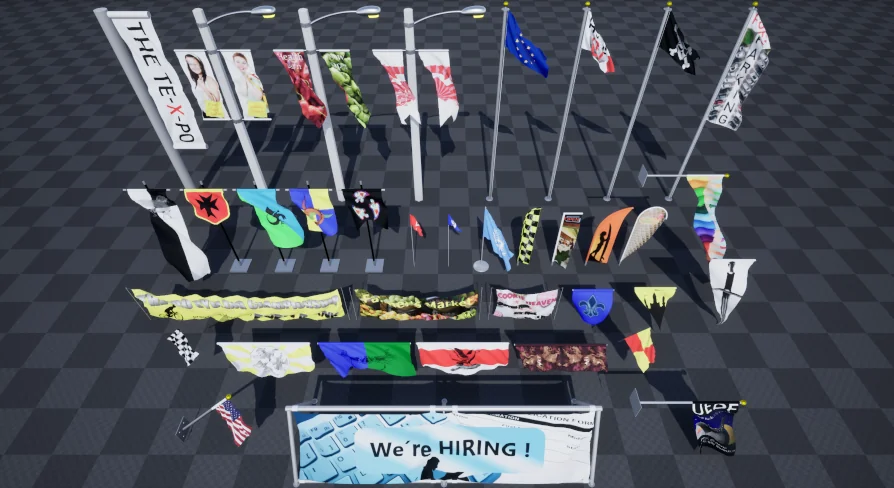
There are more than 15 distinct mounting configurations in the set. Specifically, the package includes a banner mast like the ones seen in front of a convention hall, 3 light poles with double banners, 4 flag banners similar to what you would see at the beach, 4 standard flagpoles with differing flag designs, 3 wall-mounted flag poles, a ground frame banner, 5 vertical banners with stands, and 7 wall banners that sit flush with the wall. With that many options, it is possible to populate a whole environment without repeating the same pole-and-banner combination.
Banner mast for large entries and plazas
Light poles with double banners for street and path lighting
Beach-style flag banners and standard flagpoles
Wall-mounted flag poles and flush wall banners
Ground frame banner and vertical banners with stands
V2.0: Chaos Cloth, New Flags, and Weathering Materials
V2.0 reworks the simulation core by moving to Chaos Cloth. That change affects the way every flag and banner deforms under wind, and it brings the asset in line with Unreal Engine 5's current physics pipeline. The update also adds 8 new items: 2 golf flags, 2 hand flags, 1 indoor flag, and 3 string banners. These cover smaller-scale wind reactions, from a flag on a putting green to a hand-held flag that moves as a character walks, as well as lightweight string banners stretched across an indoor space.
Another practical addition in V2.0 is a set of Material-based wear effects. Dirt, damage, and wetness can be layered onto the fabric through new Materials. Rather than swapping to a completely different texture for a weathered flag, you can blend in grime or make a banner appear rain-soaked. This is especially useful for medieval or post-apocalyptic scenes where banners are not pristine.
Customizing Textures with Templates and the Help_Document
Each banner and flag comes with a texture template, so you can create your own customized patterns without starting from a blank canvas. The package includes a thorough manual that explains, in detail, how to alter the textures to suit your project. The documentation lives inside the Help_Document folder, which you can open by right-clicking and choosing Show in Explorer from the context menu. The manual is complemented by video tutorials: 1 covers customization directly, another walks through animating cloth in Sequencer, and a 3rd explains how to convert a Skeletal Mesh into a Static Mesh. Those last 2 are particularly useful when you want a flag to animate beyond the normal wind response or when you need to optimize by baking the cloth simulation into a Static Mesh. The texture set itself uses public domain images from Pixabay, which keeps the source imagery consistent with a permissive license.
Numbers That Matter: Vertices, Materials, and Texture Sizes
The collection is structured through 89 Materials, all deriving from a Master Material with Material Instances used for variation. There are 92 Textures in total, with resolutions that span 56x56, 1024x1024, 2622x963, and 2048x2048. The Meshes themselves sit between 685 and 9648 vertices, so lighter pieces work well for distant fill while denser meshes hold up in close shots. The intended and tested platform is PC.
Because V2.0 is only available for Unreal Engine 5, it is worth paying attention to engine upgrades. The developer's recommendation is to update Reactive Banners and Flags every time you move the project to a newer UE version; otherwise, you may run into problems with the cloth simulation. The update process goes through the Epic Games Launcher: open the Library tab, scroll to the Vault section, search for Reactive Banners and Flags, click Add To Project, select the new project version, and confirm with Yes when asked to overwrite files.
Staying in Sync with Unreal Engine Upgrades
For Level Designers who need wind-reactive fabric across both fantasy and modern environments, this version covers the basics and then some. The Chaos Cloth update keeps the simulation aligned with Unreal Engine 5, the new golf flags, hand flags, and string banners fill in gaps from the original release, and the Material system provides a quick way to show wear. Creators who already use the pack will want to update alongside their UE5 upgrades to avoid broken cloth behavior, and those new to the set can rely on the included templates and manual to adapt any banner to their project's look.
 Outdoors
 Outdoors
 Outdoors
 Outdoors