"efaa631e936fd3ee"{"id":"1002179","slug":"rpg-compass-ui-system","title":"RPG Compass UI System","category":"Gameplay Features","engine":"4.27+,5.0+","assetVersion":"","engineVersion":"Engine Version: 4.27+,5.0+","tag":"Gameplay Features","accent":"blue","visual":"mech","summary":"Explore the RPG Compass UI System, featuring dynamic UI widgets, customizable markable actors, visual effects, network replication, and gamepad support.","platform":"Unreal Engine","publishedAt":"2026-10-29T14:21:05.247Z","updatedAt":"2026-10-29T14:21:05.247Z","sourceNotes":[],"fileContents":[],"compatibility":["Unreal Engine","Engine Version: 4.27+,5.0+"],"featuredImage":{"alt":"RPG Compass UI System","src":"/wp-content/uploads/published/2026/10/e1afbde60845-f96f2024-2708-4500-b02b-68163a93b251-64844439a4.webp"},"hasDownloadLink":true,"downloads":0,"terms":[{"taxonomy":"category","slug":"gameplay-features","name":"Gameplay Features"}],"galleryImages":[{"src":"/wp-content/uploads/published/2026/10/376114b21649-fc393697-3e96-49ec-ba68-34cb54c3d47d-77d9c916e3.webp","alt":"RPG Compass UI System"},{"src":"/wp-content/uploads/published/2026/10/7cf2bb75ad73-b8572deb-02a4-4e9f-b1f0-4efaa50f0b89-3d24d06969.webp","alt":"RPG Compass UI System"},{"src":"/wp-content/uploads/published/2026/10/1bcf1a0cf8c5-8ecb4240-35af-45a6-8a5e-d1b28b50d35e-d0b7d38ee4.webp","alt":"RPG Compass UI System"},{"src":"/wp-content/uploads/published/2026/10/a47929448125-c2847668-1322-4a65-ab2e-03a34fe51e6c-154ee88617.webp","alt":"RPG Compass UI System"},{"src":"/wp-content/uploads/published/2026/10/875dc36c1f71-f771f272-71f2-4db4-843e-a69756c090c7-8eec2a5442.webp","alt":"RPG Compass UI System"}],"accessPanel":{"kind":"resource","title":"Download this resource","eyebrow":"Free Download","message":"Log in or create a free account to start your download.","fileName":"RPG Compass UI System.7z","safetyNote":"Resources are manually reviewed before listing to improve quality and reduce obvious risks.","actionLabel":"Download Free","resourceType":"Resource archive"},"contentHtml":"\u003ch2\u003eNavigating Sprawling Environments in RPGs, Shooters, and Adventure Games\u003c/h2\u003e\n\u003cp\u003eVast terrain in open-world role-playing titles, dense corridors in first-person shooters, and multi-tiered chambers in puzzle adventures require intuitive spatial orientation. When players explore battle royale maps, third-person action games, or narrative adventure games (AVG), keeping track of points of interest without constantly pausing to consult a full-screen map is essential to maintaining game flow. The RPG Compass UI System addresses this navigational demand by providing an interactive directional header that communicates orientation and marked destinations directly on the user interface.\u003c/p\u003e\n\u003cp\u003eRather than leaving orientation to static icons or cumbersome overlays, the system provides dynamic compass UI widgets that respond smoothly to character orientation and camera movement. In fast-paced competitive environments like battle royales, where callouts and directional awareness dictate survival, smooth horizontal tracking ensures players can align with squad targets instantly. In slower, observation-heavy adventure and puzzle games, the same directional display allows players to register puzzle mechanisms, landmarks, and quest nodes without breaking visual immersion.\u003c/p\u003e \u003ch2\u003eDynamic Compass UI Widgets and On-Screen Waypoint Tracking\u003c/h2\u003e\n\u003cp\u003eThe core interface relies on dynamic compass UI widgets that translate world-space actor positions into readable markers along a clean navigational bar. Players can set marks for interactive objects directly in the world, triggering custom markers on the user interface that indicate where to go. Once an objective has been reached or an objective is completed, players are able to remove the marks that have been set, keeping the compass widget uncluttered.\u003c/p\u003e\n\u003cp\u003eTo complement the screen-space interface, the system integrates visual effects that project into the game space. These visual effects assist players in quickly locating and returning to marked points, creating an immediate line of sight even across complex geometry or long distances. By pairing the HUD-level widget representation with world-level visual effects, the package ensures that targets remain visible both through directional bearings and direct environmental cues.\u003c/p\u003e \u003ch2\u003eConfiguring Example Markable Actors and Debugging Tools\u003c/h2\u003e\n\u003cp\u003eTo simplify implementation, the package includes an example markable object designed to show how world-space actors communicate with the compass interface. This actor serves as an interactive testing baseline that developers can use to study marker placement logic or immediately adapt into specific quest items, resource nodes, and map waypoints.\u003c/p\u003e\n\u003cp\u003eThe example markable object comes pre-configured with several exposed variables for rapid modification:\u003c/p\u003e\n\u003cul\u003e \u003cli\u003e\u003cstrong\u003eCustom Mesh:\u003c/strong\u003e Allows developers to swap in project-specific meshes without rebuilding the underlying marker logic.\u003c/li\u003e \u003cli\u003e\u003cstrong\u003eCollision Radius:\u003c/strong\u003e Adjusts the interactive boundary around the object, defining how close a character must be to initiate tracking or interaction.\u003c/li\u003e \u003cli\u003e\u003cstrong\u003eShow Collision for Debugging:\u003c/strong\u003e An internal visual toggle that exposes the actor collision bounds directly in the viewport for troubleshooting interaction triggers and placement issues.\u003c/li\u003e\n\u003c/ul\u003e\n\u003cp\u003eThese customizable parameters turn the example actor into a practical sandbox. Designers can place multiple instances throughout a test level, modify their interactive footprints, toggle collision visibility to confirm player clearance, and observe how multiple simultaneous markers register on the compass UI.\u003c/p\u003e \u003ch2\u003eFirst-Person Interaction and Blueprint Architecture\u003c/h2\u003e\n\u003cp\u003eTo facilitate out-of-the-box evaluation, the system incorporates an example markable first-person character blueprint class. This character is configured to move throughout the scene, interact with markable objects, place new marks, and clear existing waypoints in real time. Because the character class demonstrates the exact communication pipeline between character input, actor interaction, and widget updates, it functions as a working template for integrating the system into custom player controllers.\u003c/p\u003e\n\u003cp\u003eAll core mechanics across the compass and markable actors are created entirely using Blueprints. Every graph is thoroughly commented and arranged logically, eliminating guesswork when tracing data flow from the player viewport to the UI canvas. This organization is paired with quick setup routines that minimize the overhead of binding new actors to the compass, alongside tested compatibility with the Advanced Interaction System framework.\u003c/p\u003e \u003ch2\u003eNetwork Replication and Controller Integration\u003c/h2\u003e\n\u003cp\u003eModern action games, tactical shooters, and cooperative RPGs depend on reliable multiplayer architecture. The RPG Compass UI System features built-in network replication, ensuring that marker states, actor updates, and positional tracking remain synchronized across server-authoritative and client sessions. Whether teammates are coordinating targets across a battle royale field or embarking on shared role-playing quests, the underlying networking ensures marker actions reflect correctly across connected clients.\u003c/p\u003e\n\u003cp\u003eThe system also includes full controller and gamepad support out of the box. Menu navigation, marker placement actions, and clearing routines map cleanly to gamepad inputs, ensuring parity across keyboard, mouse, and console controller setups. Developers targeting multiplatform distribution can implement the compass interface without rebuilding input handlers for varied controller profiles.\u003c/p\u003e \u003ch2\u003ePractical Application Across Project Genres\u003c/h2\u003e\n\u003cp\u003eBecause the RPG Compass UI System handles both UI tracking and world-space actor marking through an open Blueprint structure, its toolset fits a broad range of production scopes:\u003c/p\u003e\n\u003cul\u003e \u003cli\u003e\u003cstrong\u003eRole-Playing and Action-Adventure Games:\u003c/strong\u003e Tracking quest givers, hidden treasure chests, and custom map pins without obscuring the main camera view.\u003c/li\u003e \u003cli\u003e\u003cstrong\u003eFirst-Person and Third-Person Shooters:\u003c/strong\u003e Marking tactical choke points, hostile positions, and weapon drops during active firefights.\u003c/li\u003e \u003cli\u003e\u003cstrong\u003eBattle Royale Titles:\u003c/strong\u003e Facilitating rapid team pings, safe zone orientation, and dynamic landing markers across large-scale maps.\u003c/li\u003e \u003cli\u003e\u003cstrong\u003ePuzzle and Exploration Games:\u003c/strong\u003e Directing player attention toward interactable levers, lore items, and environmental puzzle components using clean directional indicators and visual cues.\u003c/li\u003e\n\u003c/ul\u003e\n\u003cp\u003eProjects requiring a transparent, network-ready compass interface can deploy the provided templates to prototype core navigation early, relying on the clean Blueprint architecture and customizable markable actors to scale cleanly into full production.\u003c/p\u003e\n\n\u003ch2\u003eMore From The Same Workflow\u003c/h2\u003e\n\u003cul\u003e\n\u003cli\u003e\u003ca href=\"https://3dcghub.com/gui-with-multiplayer/\" title=\"GUI with Multiplayer\"\u003eGUI with Multiplayer\u003c/a\u003e\u003c/li\u003e\n\u003cli\u003e\u003ca href=\"https://3dcghub.com/simple-screen-damage-indicator/\" title=\"Simple Screen Damage Indicator\"\u003eSimple Screen Damage Indicator\u003c/a\u003e\u003c/li\u003e\n\u003cli\u003e\u003ca href=\"https://3dcghub.com/experience-system/\" title=\"Experience System\"\u003eExperience System\u003c/a\u003e\u003c/li\u003e\n\u003cli\u003e\u003ca href=\"https://3dcghub.com/advanced-framework-vr-mobile-desktop/\" title=\"Advanced Framework - VR, Mobile \u0026amp; Desktop\"\u003eAdvanced Framework - VR, Mobile \u0026amp; Desktop\u003c/a\u003e\u003c/li\u003e\n\u003cli\u003e\u003ca href=\"https://3dcghub.com/hudcallouttitles01/\" title=\"HUDCallOutTitles01\"\u003eHUDCallOutTitles01\u003c/a\u003e\u003c/li\u003e\n\u003c/ul\u003e","contentTextLength":6713,"navigation":{"current":106,"total":4209,"previous":{"id":"1002180","slug":"rpg-fantasy-crystals-kit","title":"RPG Fantasy Crystals KIT","category":"Tools, Objects \u0026 Decor","platform":"Unreal Engine","updatedAt":"2026-10-29T14:22:11.011Z"},"next":{"id":"1002178","slug":"royal-crab-king-sebastian-rock-land-creature-red-crustacean-monster-18","title":"Royal Crab - King Sebastian - Rock Land Creature - Red Crustacean Monster- #18","category":"Animals","platform":"Unreal Engine","updatedAt":"2026-10-29T14:19:55.812Z"}},"relatedResources":[{"id":"1001686","slug":"gui-with-multiplayer","title":"GUI with Multiplayer","category":"Gameplay Features","engine":"5.0+","assetVersion":"","engineVersion":"Engine Version: 5.0+","tag":"Gameplay Features","accent":"blue","visual":"mech","summary":"Explore GUI with Multiplayer, a Blueprint menu, pause, and lobby interface designed without vehicle bloat and compatible with Complete RPG setups.","platform":"Unreal Engine","publishedAt":"2026-10-14T09:01:31.452Z","updatedAt":"2026-10-14T09:01:31.452Z","sourceNotes":[],"fileContents":[],"compatibility":["Unreal Engine","Engine Version: 5.0+"],"featuredImage":{"alt":"GUI with Multiplayer","src":"/wp-content/uploads/published/2026/10/adad783b7992-00a57126-ac3e-4e43-9e2f-f9b4e649e3b9-c27c2242f7.webp"},"hasDownloadLink":true,"downloads":0},{"id":"1000775","slug":"simple-screen-damage-indicator","title":"Simple Screen Damage Indicator","category":"Gameplay Features","engine":"5.4+","assetVersion":"","engineVersion":"Engine Version: 5.4+","tag":"Gameplay Features","accent":"blue","visual":"mech","summary":"A 100% Blueprint visual feedback system displaying a blood splatter overlay on hazard damage. Built for single-player prototyping with local multiplayer UI rend","platform":"Unreal Engine","publishedAt":"2026-07-28T18:07:04.744Z","updatedAt":"2026-07-28T18:07:04.744Z","sourceNotes":[],"fileContents":[],"compatibility":["Unreal Engine","Engine Version: 5.4+"],"featuredImage":{"alt":"Simple Screen Damage Indicator","src":"/wp-content/uploads/published/2026/07/5369eff53b58-641db878-ef1c-4892-ab16-112ae9023f3c-f070c8732a.webp"},"hasDownloadLink":true,"downloads":2},{"id":"1000366","slug":"experience-system","title":"Experience System","category":"Gameplay Features","engine":"5.1+","assetVersion":"","engineVersion":"Engine Version: 5.1+","tag":"Gameplay Features","accent":"blue","visual":"mech","summary":"A comprehensive blueprint-based progression framework featuring multiple experience types, modular UI widgets, multiplayer replication, and level-blocking logic","platform":"Unreal Engine","publishedAt":"2026-07-06T08:20:00.610Z","updatedAt":"2026-07-06T08:20:00.610Z","sourceNotes":[],"fileContents":[],"compatibility":["Unreal Engine","Engine Version: 5.1+"],"featuredImage":{"alt":"Experience System","src":"/wp-content/uploads/published/2026/07/01a001477a74-92820b13-b6a6-432c-9c52-604b6a0cbd07-102ab4be2a.webp"},"hasDownloadLink":true,"downloads":0}]}
Gameplay Features
RPG Compass UI System
Explore the RPG Compass UI System, featuring dynamic UI widgets, customizable markable actors, visual effects, network replication, and gamepad support.
Navigating Sprawling Environments in RPGs, Shooters, and Adventure Games
Vast terrain in open-world role-playing titles, dense corridors in first-person shooters, and multi-tiered chambers in puzzle adventures require intuitive spatial orientation. When players explore battle royale maps, third-person action games, or narrative adventure games (AVG), keeping track of points of interest without constantly pausing to consult a full-screen map is essential to maintaining game flow. The RPG Compass UI System addresses this navigational demand by providing an interactive directional header that communicates orientation and marked destinations directly on the user interface.
Rather than leaving orientation to static icons or cumbersome overlays, the system provides dynamic compass UI widgets that respond smoothly to character orientation and camera movement. In fast-paced competitive environments like battle royales, where callouts and directional awareness dictate survival, smooth horizontal tracking ensures players can align with squad targets instantly. In slower, observation-heavy adventure and puzzle games, the same directional display allows players to register puzzle mechanisms, landmarks, and quest nodes without breaking visual immersion.
Dynamic Compass UI Widgets and On-Screen Waypoint Tracking
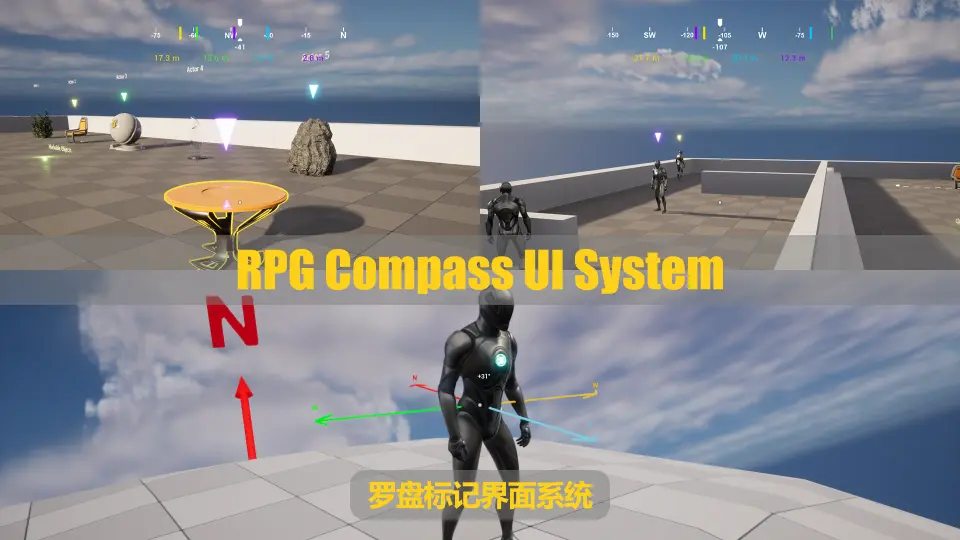
The core interface relies on dynamic compass UI widgets that translate world-space actor positions into readable markers along a clean navigational bar. Players can set marks for interactive objects directly in the world, triggering custom markers on the user interface that indicate where to go. Once an objective has been reached or an objective is completed, players are able to remove the marks that have been set, keeping the compass widget uncluttered.
To complement the screen-space interface, the system integrates visual effects that project into the game space. These visual effects assist players in quickly locating and returning to marked points, creating an immediate line of sight even across complex geometry or long distances. By pairing the HUD-level widget representation with world-level visual effects, the package ensures that targets remain visible both through directional bearings and direct environmental cues.
Configuring Example Markable Actors and Debugging Tools
To simplify implementation, the package includes an example markable object designed to show how world-space actors communicate with the compass interface. This actor serves as an interactive testing baseline that developers can use to study marker placement logic or immediately adapt into specific quest items, resource nodes, and map waypoints.
The example markable object comes pre-configured with several exposed variables for rapid modification:
Custom Mesh: Allows developers to swap in project-specific meshes without rebuilding the underlying marker logic.
Collision Radius: Adjusts the interactive boundary around the object, defining how close a character must be to initiate tracking or interaction.
Show Collision for Debugging: An internal visual toggle that exposes the actor collision bounds directly in the viewport for troubleshooting interaction triggers and placement issues.
These customizable parameters turn the example actor into a practical sandbox. Designers can place multiple instances throughout a test level, modify their interactive footprints, toggle collision visibility to confirm player clearance, and observe how multiple simultaneous markers register on the compass UI.
First-Person Interaction and Blueprint Architecture
To facilitate out-of-the-box evaluation, the system incorporates an example markable first-person character blueprint class. This character is configured to move throughout the scene, interact with markable objects, place new marks, and clear existing waypoints in real time. Because the character class demonstrates the exact communication pipeline between character input, actor interaction, and widget updates, it functions as a working template for integrating the system into custom player controllers.
All core mechanics across the compass and markable actors are created entirely using Blueprints. Every graph is thoroughly commented and arranged logically, eliminating guesswork when tracing data flow from the player viewport to the UI canvas. This organization is paired with quick setup routines that minimize the overhead of binding new actors to the compass, alongside tested compatibility with the Advanced Interaction System framework.
Network Replication and Controller Integration
Modern action games, tactical shooters, and cooperative RPGs depend on reliable multiplayer architecture. The RPG Compass UI System features built-in network replication, ensuring that marker states, actor updates, and positional tracking remain synchronized across server-authoritative and client sessions. Whether teammates are coordinating targets across a battle royale field or embarking on shared role-playing quests, the underlying networking ensures marker actions reflect correctly across connected clients.
The system also includes full controller and gamepad support out of the box. Menu navigation, marker placement actions, and clearing routines map cleanly to gamepad inputs, ensuring parity across keyboard, mouse, and console controller setups. Developers targeting multiplatform distribution can implement the compass interface without rebuilding input handlers for varied controller profiles.
Practical Application Across Project Genres
Because the RPG Compass UI System handles both UI tracking and world-space actor marking through an open Blueprint structure, its toolset fits a broad range of production scopes:
Role-Playing and Action-Adventure Games: Tracking quest givers, hidden treasure chests, and custom map pins without obscuring the main camera view.
First-Person and Third-Person Shooters: Marking tactical choke points, hostile positions, and weapon drops during active firefights.
Battle Royale Titles: Facilitating rapid team pings, safe zone orientation, and dynamic landing markers across large-scale maps.
Puzzle and Exploration Games: Directing player attention toward interactable levers, lore items, and environmental puzzle components using clean directional indicators and visual cues.
Projects requiring a transparent, network-ready compass interface can deploy the provided templates to prototype core navigation early, relying on the clean Blueprint architecture and customizable markable actors to scale cleanly into full production.
 Gameplay Features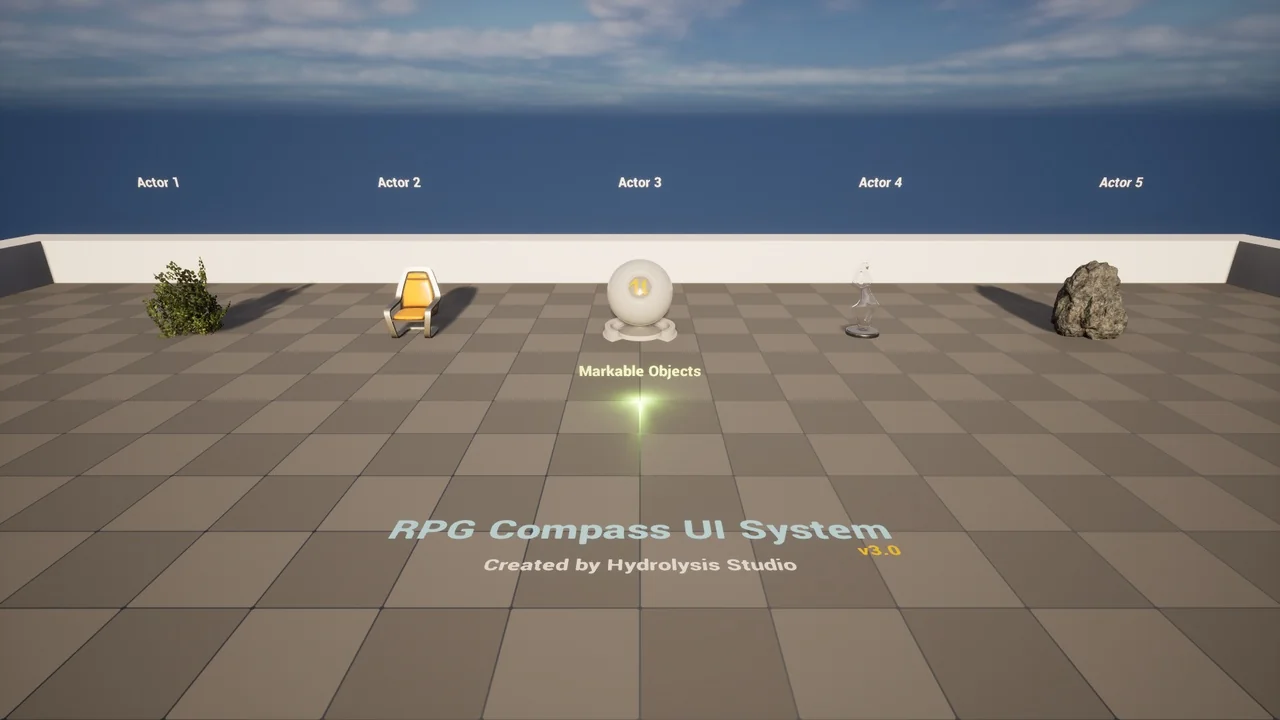
 Gameplay Features
 Gameplay Features
 Gameplay Features