"1c2c8b66743036b4"{"id":"1001686","slug":"gui-with-multiplayer","title":"GUI with Multiplayer","category":"Gameplay Features","engine":"5.0+","assetVersion":"","engineVersion":"Engine Version: 5.0+","tag":"Gameplay Features","accent":"blue","visual":"mech","summary":"Explore GUI with Multiplayer, a Blueprint menu, pause, and lobby interface designed without vehicle bloat and compatible with Complete RPG setups.","platform":"Unreal Engine","publishedAt":"2026-10-14T09:01:31.452Z","updatedAt":"2026-10-14T09:01:31.452Z","sourceNotes":[],"fileContents":[],"compatibility":["Unreal Engine","Engine Version: 5.0+"],"featuredImage":{"alt":"GUI with Multiplayer","src":"/wp-content/uploads/published/2026/10/adad783b7992-00a57126-ac3e-4e43-9e2f-f9b4e649e3b9-c27c2242f7.webp"},"hasDownloadLink":true,"downloads":0,"terms":[{"taxonomy":"category","slug":"gameplay-features","name":"Gameplay Features"}],"galleryImages":[{"src":"/wp-content/uploads/published/2026/10/65393518b51a-8437aaac-0032-4bea-8289-9cef4e944b6b-c863a1d9a2.webp","alt":"GUI with Multiplayer"},{"src":"/wp-content/uploads/published/2026/10/660f3eae6107-2f9c6292-d5cf-4b13-b4a4-a57c8d8f4e79-2a2f0df23f.webp","alt":"GUI with Multiplayer"},{"src":"/wp-content/uploads/published/2026/10/ccd0abce9985-7c10f5c2-98b4-424d-93b0-89983b176792-831126963f.webp","alt":"GUI with Multiplayer"},{"src":"/wp-content/uploads/published/2026/10/ed91ddb6e8db-36e7e923-2263-429c-b797-e8e658ed67ac-d76f0e41a9.webp","alt":"GUI with Multiplayer"},{"src":"/wp-content/uploads/published/2026/10/d1736450df59-ea3317db-27da-494d-be64-1cf21d8f0016-2576d907bd.webp","alt":"GUI with Multiplayer"}],"accessPanel":{"kind":"resource","title":"Download this resource","eyebrow":"Free Download","message":"Log in or create a free account to start your download.","fileName":"GUI with Multiplayer.7z","safetyNote":"Resources are manually reviewed before listing to improve quality and reduce obvious risks.","actionLabel":"Download Free","resourceType":"Resource archive"},"contentHtml":"\u003cp\u003eNetworked games face a recurring challenge early in production: setting up a clean, functional front-end interface before the match even begins. Connecting clients, handling game pauses during a session, and orchestrating lobby selections often get entangled with heavy game mechanics. Projects needing structured multiplayer menus benefit from isolating the interface layer completely from heavy gameplay assets, allowing teams to establish session flow, state management, and user interaction cleanly.\u003c/p\u003e \u003ch2\u003eStructuring Front-End Flow with Blueprint Menus and Lobbies\u003c/h2\u003e\n\u003cp\u003eInterface logic in networked environments has to carry more responsibility than a standard single-player screen. A multiplayer menu system must coordinate game entry, handle transitions, accommodate lobby states, and give players reliable control through pause states while remaining synced with the underlying session structure.\u003c/p\u003e \u003cp\u003eBuilt directly around Blueprints, the interface mechanics here center on standardizing essential game menus. The package targets three major interaction points that define a player's path through a networked title:\u003c/p\u003e\n\u003cul\u003e\n\u003cli\u003e\u003cstrong\u003eMain and Navigation Menus:\u003c/strong\u003e The baseline graphical interface for launching into game options, organizing user preferences, and initiating matchmaking or host sequences.\u003c/li\u003e\n\u003cli\u003e\u003cstrong\u003eLobby Architecture:\u003c/strong\u003e Designated staging interfaces where players gather, configure their presence, and prepare for the session before entering actual level gameplay.\u003c/li\u003e\n\u003cli\u003e\u003cstrong\u003ePause Menus:\u003c/strong\u003e In-session interface layers designed to allow users to access critical system or session adjustments mid-game without breaking the underlying multiplayer communication flow.\u003c/li\u003e\n\u003c/ul\u003e \u003cp\u003eBy centering these elements in visual scripting, the framework keeps interaction routes open for adjustment. Blueprint visual logic allows developers to trace event dispatches, UI button clicks, and state switches without digging through hardcoded dependencies. This structure ensures that screen states—from launching the client to sitting in a multiplayer lobby or pausing mid-match—follow predictable execution paths.\u003c/p\u003e \u003ch2\u003eFocusing on UI Without Tanks or Planes\u003c/h2\u003e\n\u003cp\u003eA frequent complication when using larger asset kits is the unwanted baggage they bring along. Complete project packages often bundle complex physics models, flight instruments, vehicular logic, and weapon systems alongside their interface code. For a team that simply requires a working interface, stripping out extraneous tanks, aircraft physics, and vehicle controllers is time-consuming and prone to broken references.\u003c/p\u003e \u003cp\u003eThis package takes a deliberate step away from heavy simulation assets. The system contains menu elements only, explicitly excluding vehicles such as tanks or planes. While originated from the broader Complete Shooter: Bundle, the interface has been decoupled so it can function independently as a pure GUI solution.\u003c/p\u003e \u003cp\u003eThis separation prevents project bloat. When vehicle meshes, heavy physics rigs, and specialized vehicle code are removed, project memory overhead remains light, migration into clean project repositories becomes straightforward, and developers do not have to untangle vehicular Blueprint code just to alter a button event or change a menu canvas. This gives a dedicated user interface layer that does not dictate what kind of gameplay entities must exist behind it.\u003c/p\u003e \u003ch2\u003eSetup Workflows and Modifying GUI with Multiplayer\u003c/h2\u003e\n\u003cp\u003eAdapting an existing interface template into a customized title requires a transparent setup path. Interface assets that rely on complex, obscure hierarchy trees often slow down designers who just want to modify layouts, button configurations, or font assignments.\u003c/p\u003e \u003cp\u003eThe package provides designated setup and overview guidance to assist in unpacking and modifying the project structure. These guides detail the layout of the Blueprint assets and explain how the various menu stages interface with one another. Following the established setup workflow allows creators to:\u003c/p\u003e\n\u003cul\u003e\n\u003cli\u003eInspect the overview layout to see how widgets, anchors, and canvas panels are mapped.\u003c/li\u003e\n\u003cli\u003eModify existing interface widgets to match proprietary branding, color palettes, and stylistic needs.\u003c/li\u003e\n\u003cli\u003eHook custom session calls into the established lobby and pause buttons without disrupting the base visual scripts.\u003c/li\u003e\n\u003cli\u003eAddress any project-specific structural adjustments with support backed by an active user community of over 3,500 developers.\u003c/li\u003e\n\u003c/ul\u003e \u003cp\u003eOngoing user feedback and developer revisions mean that inaccuracies within the project structure are actively refined. When adapting pre-built menu Blueprints, having access to an established modification roadmap reduces the trial-and-error often required to locate which event graph drives a specific lobby prompt or menu transition.\u003c/p\u003e \u003ch2\u003eIntegration Context Across Complete Shooter and Complete RPG Frameworks\u003c/h2\u003e\n\u003cp\u003eWhile the interface trace roots back to the Complete Shooter: Bundle, its functional reach extends beyond military or action-focused titles. The package also features established compatibility with Complete RPG projects, highlighting the adaptability of its underlying user interface nodes.\u003c/p\u003e \u003cp\u003eLobby and pause structures do not inherently care whether an underlying game tracks ammunition and frag counts or character levels, inventory tabs, and spell stats. What matters at the interface layer is reliable state communication: identifying who has joined, displaying ready status, enabling smooth transitions between menu screens, and allowing users to pause cleanly without de-syncing client visuals. Because the GUI logic is not chained to specific weapon or tank behaviors, developers working within Complete RPG structures can integrate these menus into character-driven setups just as easily as shooter creators can drop them into tactical skirmishes.\u003c/p\u003e \u003cp\u003eThis cross-framework compatibility makes the toolkit adaptable for titles crossing genre lines. A cooperative role-playing game requiring party gathering in a pre-game staging area can employ the lobby framework without inheriting irrelevant ballistics code. Similarly, a fast-paced arena game can leverage the pause menu logic without pulling in massive single-player RPG inventories.\u003c/p\u003e \u003ch2\u003eIdeal Project Fits and Practical Application\u003c/h2\u003e\n\u003cp\u003eImplementing an interface layer from scratch often pulls technical designers away from primary gameplay mechanics. Building input-safe widgets, configuring lobby visual states, and wiring up pause menus requires meticulous attention to UI hierarchy and network dispatching.\u003c/p\u003e \u003cp\u003eThis package is best suited for independent developers, small teams, and rapid prototypers who need an immediate, functioning front-end structure for their networked projects. Creators seeking a standalone menu system—free from bulky vehicle mechanics, flight models, or unnecessary simulation assets—can leverage the Blueprint foundation to stand up lobbies and menus quickly, whether their production aligns with a Complete Shooter framework or a Complete RPG architecture.\u003c/p\u003e\n\n\u003ch2\u003eExplore Similar Assets\u003c/h2\u003e\n\u003cul\u003e\n\u003cli\u003e\u003ca href=\"https://3dcghub.com/advanced-fuel-system-multiplayer-vehicle-addon/\" title=\"Advanced Fuel System: Multiplayer Vehicle Addon\"\u003eAdvanced Fuel System: Multiplayer Vehicle Addon\u003c/a\u003e\u003c/li\u003e\n\u003cli\u003e\u003ca href=\"https://3dcghub.com/simple-screen-damage-indicator/\" title=\"Simple Screen Damage Indicator\"\u003eSimple Screen Damage Indicator\u003c/a\u003e\u003c/li\u003e\n\u003cli\u003e\u003ca href=\"https://3dcghub.com/experience-system/\" title=\"Experience System\"\u003eExperience System\u003c/a\u003e\u003c/li\u003e\n\u003cli\u003e\u003ca href=\"https://3dcghub.com/advanced-framework-vr-mobile-desktop/\" title=\"Advanced Framework - VR, Mobile \u0026amp; Desktop\"\u003eAdvanced Framework - VR, Mobile \u0026amp; Desktop\u003c/a\u003e\u003c/li\u003e\n\u003cli\u003e\u003ca href=\"https://3dcghub.com/multiplayer-object-throwing-system/\" title=\"Multiplayer Object Throwing System\"\u003eMultiplayer Object Throwing System\u003c/a\u003e\u003c/li\u003e\n\u003c/ul\u003e","contentTextLength":7088,"navigation":{"current":29,"total":3651,"previous":{"id":"1001687","slug":"horror-forest","title":"Horror Forest","category":"Abandoned","platform":"Unreal Engine","updatedAt":"2026-10-14T09:04:25.805Z"},"next":{"id":"1001685","slug":"grand-bazaar-bundle","title":"Grand Bazaar - Bundle","category":"Historical","platform":"Unreal Engine","updatedAt":"2026-10-14T08:58:43.230Z"}},"relatedResources":[{"id":"10502","slug":"advanced-fuel-system-multiplayer-vehicle-addon","title":"Advanced Fuel System: Multiplayer Vehicle Addon","category":"Gameplay Features","engine":"5.5+","assetVersion":"Engine version: 5.5+","engineVersion":"5.1","tag":"Gameplay Features","accent":"blue","visual":"animation","summary":"Enhance your Unreal Engine projects with a realistic fuel management system designed for Chaos Vehicles. This addon features full multiplayer replication, advanced interaction animations, and customizable consumption settings.","platform":"Unreal Engine","publishedAt":"2026-03-03T15:31:41.000Z","updatedAt":"2026-04-19T15:50:00.000Z","sourceNotes":[],"fileContents":[],"compatibility":["Unreal Engine","Engine version: 5.5+"],"featuredImage":{"alt":"Advanced Fuel System: Multiplayer Vehicle Addon","src":"https://3dcghub.com/wp-content/uploads/2026/03/df670bf4-6884-496e-b6e4-b3a5a2f37e31.webp"},"hasDownloadLink":true,"downloads":1},{"id":"1000775","slug":"simple-screen-damage-indicator","title":"Simple Screen Damage Indicator","category":"Gameplay Features","engine":"5.4+","assetVersion":"","engineVersion":"Engine Version: 5.4+","tag":"Gameplay Features","accent":"blue","visual":"mech","summary":"A 100% Blueprint visual feedback system displaying a blood splatter overlay on hazard damage. Built for single-player prototyping with local multiplayer UI rend","platform":"Unreal Engine","publishedAt":"2026-07-28T18:07:04.744Z","updatedAt":"2026-07-28T18:07:04.744Z","sourceNotes":[],"fileContents":[],"compatibility":["Unreal Engine","Engine Version: 5.4+"],"featuredImage":{"alt":"Simple Screen Damage Indicator","src":"/wp-content/uploads/published/2026/07/5369eff53b58-641db878-ef1c-4892-ab16-112ae9023f3c-f070c8732a.webp"},"hasDownloadLink":true,"downloads":1},{"id":"1000366","slug":"experience-system","title":"Experience System","category":"Gameplay Features","engine":"5.1+","assetVersion":"","engineVersion":"Engine Version: 5.1+","tag":"Gameplay Features","accent":"blue","visual":"mech","summary":"A comprehensive blueprint-based progression framework featuring multiple experience types, modular UI widgets, multiplayer replication, and level-blocking logic","platform":"Unreal Engine","publishedAt":"2026-07-06T08:20:00.610Z","updatedAt":"2026-07-06T08:20:00.610Z","sourceNotes":[],"fileContents":[],"compatibility":["Unreal Engine","Engine Version: 5.1+"],"featuredImage":{"alt":"Experience System","src":"/wp-content/uploads/published/2026/07/01a001477a74-92820b13-b6a6-432c-9c52-604b6a0cbd07-102ab4be2a.webp"},"hasDownloadLink":true,"downloads":0}]}
Gameplay Features
GUI with Multiplayer
Explore GUI with Multiplayer, a Blueprint menu, pause, and lobby interface designed without vehicle bloat and compatible with Complete RPG setups.
Networked games face a recurring challenge early in production: setting up a clean, functional front-end interface before the match even begins. Connecting clients, handling game pauses during a session, and orchestrating lobby selections often get entangled with heavy game mechanics. Projects needing structured multiplayer menus benefit from isolating the interface layer completely from heavy gameplay assets, allowing teams to establish session flow, state management, and user interaction cleanly.
Structuring Front-End Flow with Blueprint Menus and Lobbies
Interface logic in networked environments has to carry more responsibility than a standard single-player screen. A multiplayer menu system must coordinate game entry, handle transitions, accommodate lobby states, and give players reliable control through pause states while remaining synced with the underlying session structure.
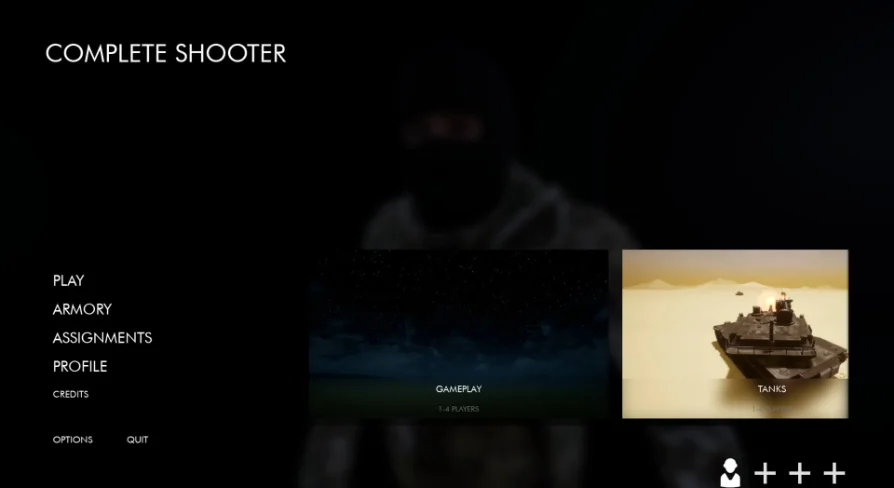
Built directly around Blueprints, the interface mechanics here center on standardizing essential game menus. The package targets three major interaction points that define a player's path through a networked title:
Main and Navigation Menus: The baseline graphical interface for launching into game options, organizing user preferences, and initiating matchmaking or host sequences.
Lobby Architecture: Designated staging interfaces where players gather, configure their presence, and prepare for the session before entering actual level gameplay.
Pause Menus: In-session interface layers designed to allow users to access critical system or session adjustments mid-game without breaking the underlying multiplayer communication flow.
By centering these elements in visual scripting, the framework keeps interaction routes open for adjustment. Blueprint visual logic allows developers to trace event dispatches, UI button clicks, and state switches without digging through hardcoded dependencies. This structure ensures that screen states—from launching the client to sitting in a multiplayer lobby or pausing mid-match—follow predictable execution paths.
Focusing on UI Without Tanks or Planes
A frequent complication when using larger asset kits is the unwanted baggage they bring along. Complete project packages often bundle complex physics models, flight instruments, vehicular logic, and weapon systems alongside their interface code. For a team that simply requires a working interface, stripping out extraneous tanks, aircraft physics, and vehicle controllers is time-consuming and prone to broken references.
This package takes a deliberate step away from heavy simulation assets. The system contains menu elements only, explicitly excluding vehicles such as tanks or planes. While originated from the broader Complete Shooter: Bundle, the interface has been decoupled so it can function independently as a pure GUI solution.
This separation prevents project bloat. When vehicle meshes, heavy physics rigs, and specialized vehicle code are removed, project memory overhead remains light, migration into clean project repositories becomes straightforward, and developers do not have to untangle vehicular Blueprint code just to alter a button event or change a menu canvas. This gives a dedicated user interface layer that does not dictate what kind of gameplay entities must exist behind it.
Setup Workflows and Modifying GUI with Multiplayer
Adapting an existing interface template into a customized title requires a transparent setup path. Interface assets that rely on complex, obscure hierarchy trees often slow down designers who just want to modify layouts, button configurations, or font assignments.
The package provides designated setup and overview guidance to assist in unpacking and modifying the project structure. These guides detail the layout of the Blueprint assets and explain how the various menu stages interface with one another. Following the established setup workflow allows creators to:
Inspect the overview layout to see how widgets, anchors, and canvas panels are mapped.
Modify existing interface widgets to match proprietary branding, color palettes, and stylistic needs.
Hook custom session calls into the established lobby and pause buttons without disrupting the base visual scripts.
Address any project-specific structural adjustments with support backed by an active user community of over 3,500 developers.
Ongoing user feedback and developer revisions mean that inaccuracies within the project structure are actively refined. When adapting pre-built menu Blueprints, having access to an established modification roadmap reduces the trial-and-error often required to locate which event graph drives a specific lobby prompt or menu transition.
Integration Context Across Complete Shooter and Complete RPG Frameworks
While the interface trace roots back to the Complete Shooter: Bundle, its functional reach extends beyond military or action-focused titles. The package also features established compatibility with Complete RPG projects, highlighting the adaptability of its underlying user interface nodes.
Lobby and pause structures do not inherently care whether an underlying game tracks ammunition and frag counts or character levels, inventory tabs, and spell stats. What matters at the interface layer is reliable state communication: identifying who has joined, displaying ready status, enabling smooth transitions between menu screens, and allowing users to pause cleanly without de-syncing client visuals. Because the GUI logic is not chained to specific weapon or tank behaviors, developers working within Complete RPG structures can integrate these menus into character-driven setups just as easily as shooter creators can drop them into tactical skirmishes.
This cross-framework compatibility makes the toolkit adaptable for titles crossing genre lines. A cooperative role-playing game requiring party gathering in a pre-game staging area can employ the lobby framework without inheriting irrelevant ballistics code. Similarly, a fast-paced arena game can leverage the pause menu logic without pulling in massive single-player RPG inventories.
Ideal Project Fits and Practical Application
Implementing an interface layer from scratch often pulls technical designers away from primary gameplay mechanics. Building input-safe widgets, configuring lobby visual states, and wiring up pause menus requires meticulous attention to UI hierarchy and network dispatching.
This package is best suited for independent developers, small teams, and rapid prototypers who need an immediate, functioning front-end structure for their networked projects. Creators seeking a standalone menu system—free from bulky vehicle mechanics, flight models, or unnecessary simulation assets—can leverage the Blueprint foundation to stand up lobbies and menus quickly, whether their production aligns with a Complete Shooter framework or a Complete RPG architecture.
 Gameplay Features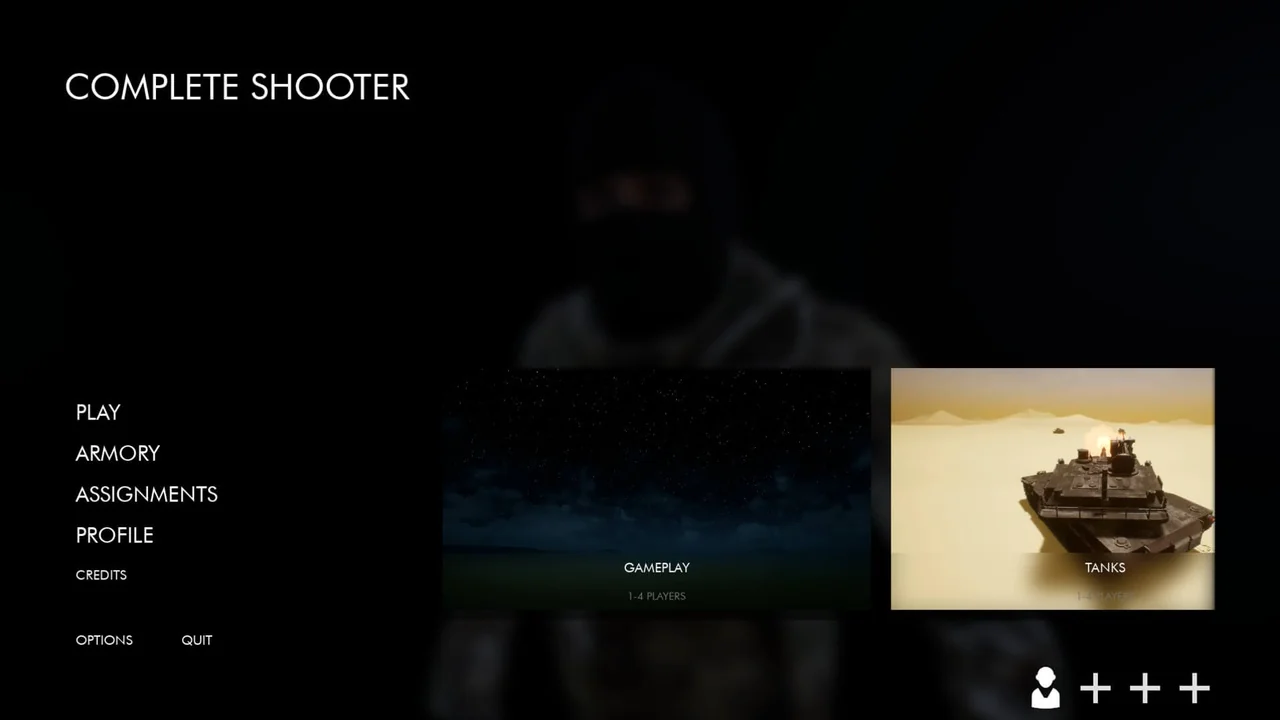
 Gameplay Features
 Gameplay Features
 Gameplay Features