"7066dd76da796369"{"id":"1000775","slug":"simple-screen-damage-indicator","title":"Simple Screen Damage Indicator","category":"Gameplay Features","engine":"5.4+","assetVersion":"","engineVersion":"Engine Version: 5.4+","tag":"Gameplay Features","accent":"blue","visual":"mech","summary":"A 100% Blueprint visual feedback system displaying a blood splatter overlay on hazard damage. Built for single-player prototyping with local multiplayer UI rend","platform":"Unreal Engine","publishedAt":"2026-07-28T18:07:04.744Z","updatedAt":"2026-07-28T18:07:04.744Z","sourceNotes":[],"fileContents":[],"compatibility":["Unreal Engine","Engine Version: 5.4+"],"featuredImage":{"alt":"Simple Screen Damage Indicator","src":"/wp-content/uploads/published/2026/07/5369eff53b58-641db878-ef1c-4892-ab16-112ae9023f3c-f070c8732a.webp"},"hasDownloadLink":true,"downloads":2,"terms":[{"taxonomy":"category","slug":"gameplay-features","name":"Gameplay Features"}],"galleryImages":[{"src":"/wp-content/uploads/published/2026/07/9233e25b2135-39276504-4c6e-421e-b99a-3a7b32a16797-057fdc056d.webp","alt":"Simple Screen Damage Indicator"},{"src":"/wp-content/uploads/published/2026/07/96592551545b-dd2a78d6-feac-44ee-aab4-5c3820f8c9e5-218e397f0d.webp","alt":"Simple Screen Damage Indicator"},{"src":"/wp-content/uploads/published/2026/07/6b0d863927bc-f8a0e85b-1375-445d-9764-b2df273a169b-49858d290c.webp","alt":"Simple Screen Damage Indicator"},{"src":"/wp-content/uploads/published/2026/07/7656ddcf0fc4-6ab9ddc3-f6c4-4d7c-93bb-ec963eab8898-058ec749b9.webp","alt":"Simple Screen Damage Indicator"}],"accessPanel":{"kind":"resource","title":"Download this resource","eyebrow":"Free Download","message":"Log in or create a free account to start your download.","fileName":"Content.7z","safetyNote":"Resources are manually reviewed before listing to improve quality and reduce obvious risks.","actionLabel":"Download Free","resourceType":"Resource archive"},"contentHtml":"\u003cp\u003eGetting instant visual feedback to a player when their character takes damage often requires fiddling with UI timelines, material alpha channels, and collision logic. \u003cem\u003eSimple Screen Damage Indicator\u003c/em\u003e handles this specific workflow by providing a plug-and-play visual feedback system built entirely in Unreal Engine Blueprints.\u003c/p\u003e\n\n\u003ch2\u003eCore Blood Splatter Overlay and Widget Fade\u003c/h2\u003e\n\u003cp\u003eAt the center of this system is a high-quality blood splatter texture labeled \u003ccode\u003eT_BloodOverlay\u003c/code\u003e. When the player takes damage from an environmental hazard, this texture automatically renders as a screen overlay. The visual response is designed to be immediate, ensuring the player recognizes the threat without needing to check a health bar.\u003c/p\u003e\n\n\u003cp\u003eManaging the visual persistence of this effect is handled natively within the Widget Blueprint (\u003ccode\u003eWBP_DamageIndicator\u003c/code\u003e). Instead of relying on external timing scripts, the widget runs a smooth, one-second fade-out animation. Developers can adjust the animation speed and alpha intensity directly inside the timeline, making it easy to tune how long the blood splatter lingers on screen and how opaque it appears at peak visibility.\u003c/p\u003e\n\n\u003ch2\u003eHazard Interaction and Message Tracking\u003c/h2\u003e\n\u003cp\u003eTo demonstrate the damage logic in action, the package includes a spinning obstacle Blueprint named \u003ccode\u003eBp_obstacle\u003c/code\u003e. This Actor Blueprint applies damage to the player upon physical contact. It acts as both a functional hazard for combat environments and a clear reference point for developers looking to see how damage events are triggered and communicated to the UI.\u003c/p\u003e\n\n\u003cp\u003eBeyond the texture overlay, the system features visual on-screen message tracking whenever the damage logic is activated. This tracking provides an additional layer of feedback, confirming that the interaction has registered. The combination of the spinning obstacle, the message tracking, and the screen overlay creates a complete feedback loop that can be dropped directly into a project to test combat stakes.\u003c/p\u003e\n\n\u003ch2\u003eProject Inclusions and \u003ccode\u003eDemo_map\u003c/code\u003e Setup\u003c/h2\u003e\n\u003cp\u003eThe resource is structured to be easy to implement in any project, specifically targeting developers who want to avoid C++ entirely. The package contains a lean set of assets focused on the damage feedback workflow:\u003c/p\u003e\n\n\u003cul\u003e\n \u003cli\u003e\u003cstrong\u003e1 Actor Blueprint (\u003ccode\u003eBp_obstacle\u003c/code\u003e)\u003c/strong\u003e: For applying contact damage.\u003c/li\u003e\n \u003cli\u003e\u003cstrong\u003e1 Widget Blueprint (\u003ccode\u003eWBP_DamageIndicator\u003c/code\u003e)\u003c/strong\u003e: For handling the screen overlay and native fade-out timeline.\u003c/li\u003e\n \u003cli\u003e\u003cstrong\u003e1 Blood Splatter Texture (\u003ccode\u003eT_BloodOverlay\u003c/code\u003e)\u003c/strong\u003e: Preset and ready to use.\u003c/li\u003e\n \u003cli\u003e\u003cstrong\u003eDemo Map folder (\u003ccode\u003eDemo_map\u003c/code\u003e)\u003c/strong\u003e: Complete with hazard setup.\u003c/li\u003e\n\u003c/ul\u003e\n\n\u003cp\u003eThe \u003ccode\u003eDemo_map\u003c/code\u003e is preconfigured with the hazard setup, allowing developers to immediately interact with the spinning obstacle and observe the UI behavior. This provides a working sandbox to understand how the widget triggers before migrating the components into a main game build.\u003c/p\u003e\n\n\u003ch2\u003eLocal UI Rendering in Multiplayer Environments\u003c/h2\u003e\n\u003cp\u003eWhile the system is explicitly built for single-player projects and does not include a multiplayer feature set out of the box, the UI architecture accounts for networked environments. The damage indicator renders locally on the damaged player's screen. This localized rendering ensures that one player taking damage from a hazard does not interfere with the UI of other players in the same session.\u003c/p\u003e\n\n\u003cp\u003eThe flexibility of the system makes it suitable for small combat environments and rapid prototyping. Because the fade timing and alpha intensity are highly customizable within the Widget timeline, developers can quickly tweak the visual intensity to match the pacing of their specific action-based game.\u003c/p\u003e\n\n\u003ch2\u003ePrototyping Combat Feedback Without C++\u003c/h2\u003e\n\u003cp\u003e\u003cem\u003eSimple Screen Damage Indicator\u003c/em\u003e fits naturally into the early stages of action game development. For creators building an immersive combat environment, the ability to drop in a spinning obstacle, trigger an immediate blood splatter overlay, and track the damage state visually accelerates the process of testing how combat encounters feel.\u003c/p\u003e\n\n\u003cp\u003eThe system is ideal for developers seeking a modular, 100% Blueprint solution to player damage feedback. It strips away the need for complex C++ coding while retaining the flexibility needed to adjust the visual response to fit a game's specific tone and pace.\u003c/p\u003e\n\n\u003ch2\u003eContinue Browsing Similar Packs\u003c/h2\u003e\n\u003cul\u003e\n\u003cli\u003e\u003ca href=\"https://3dcghub.com/universal-mp-indicator/\" title=\"Universal MP Indicator\"\u003eUniversal MP Indicator\u003c/a\u003e\u003c/li\u003e\n\u003cli\u003e\u003ca href=\"https://3dcghub.com/hologram-vfx-with-niagara-2/\" title=\"HOLOGRAM VFX With Niagara 2\"\u003eHOLOGRAM VFX With Niagara 2\u003c/a\u003e\u003c/li\u003e\n\u003cli\u003e\u003ca href=\"https://3dcghub.com/experience-system/\" title=\"Experience System\"\u003eExperience System\u003c/a\u003e\u003c/li\u003e\n\u003cli\u003e\u003ca href=\"https://3dcghub.com/advanced-framework-vr-mobile-desktop/\" title=\"Advanced Framework - VR, Mobile \u0026amp; Desktop\"\u003eAdvanced Framework - VR, Mobile \u0026amp; Desktop\u003c/a\u003e\u003c/li\u003e\n\u003cli\u003e\u003ca href=\"https://3dcghub.com/dot-matrix-shader-pack/\" title=\"Dot Matrix Shader Pack\"\u003eDot Matrix Shader Pack\u003c/a\u003e\u003c/li\u003e\n\u003c/ul\u003e","contentTextLength":4352,"navigation":{"current":1388,"total":4016,"previous":{"id":"1000776","slug":"slime-vfx-2","title":"Slime VFX","category":"Variety","platform":"Unreal Engine","updatedAt":"2026-07-28T18:10:15.879Z"},"next":{"id":"1000774","slug":"robot-3","title":"Robot 3","category":"Mechanical \u0026 Robots","platform":"Unreal Engine","updatedAt":"2026-07-28T18:00:55.715Z"}},"relatedResources":[{"id":"15167","slug":"universal-mp-indicator","title":"Universal MP Indicator","category":"Network \u0026 Multiplayer","engine":"4.27 - 5.8","assetVersion":"Asset Version:1.0 - 1.4","engineVersion":"Engine version: 4.27 - 5.8","tag":"Network","accent":"blue","visual":"character","summary":"The Universal MP Indicator is a high-performance C++ plugin designed for tracking targets in 2D screen space. It offers versatile on-screen and off-screen modes with deep customization for any game project.","platform":"Unreal Engine","publishedAt":"2026-03-12T08:08:42.000Z","updatedAt":"2026-09-30T04:40:38.530Z","sourceNotes":[],"fileContents":[],"compatibility":["Unreal Engine","Asset Version:1.0 - 1.4","Engine version: 4.27 - 5.8"],"featuredImage":{"alt":"Universal MP Indicator","src":"https://3dcghub.com/wp-content/uploads/2026/03/425f1a5c-f01e-46ad-8217-6e746d0a12fd.webp"},"hasDownloadLink":true,"downloads":0},{"id":"1001747","slug":"multiverse","title":"Multiverse","category":"Gameplay Features","engine":"5.2+","assetVersion":"","engineVersion":"Engine Version: 5.2+","tag":"Gameplay Features","accent":"blue","visual":"mech","summary":"Create seamless multiplayer parallel universes with no loading screens or plugins using this replicated Blueprint system and internal space manager.","platform":"Unreal Engine","publishedAt":"2026-10-20T02:52:36.558Z","updatedAt":"2026-10-20T02:52:36.558Z","sourceNotes":[],"fileContents":[],"compatibility":["Unreal Engine","Engine Version: 5.2+"],"featuredImage":{"alt":"Multiverse","src":"/wp-content/uploads/published/2026/10/7f60f7c5b780-c6c39f3d-8522-4880-90d0-f3e14e975bc5-2e804d5047.webp"},"hasDownloadLink":true,"downloads":0},{"id":"1000980","slug":"basic-locomotion-system-replicated","title":"Basic Locomotion System (REPLICATED)","category":"Gameplay Features","engine":"5.0+","assetVersion":"","engineVersion":"Engine Version: 5.0+","tag":"Gameplay Features","accent":"blue","visual":"animation","summary":"A ground-up locomotion system for the UE5 Skeleton using Lyra animations, built as a simple third-person template with MetaHuman integration and multiplayer inv","platform":"Unreal Engine","publishedAt":"2026-08-18T05:57:51.717Z","updatedAt":"2026-08-18T05:57:51.717Z","sourceNotes":[],"fileContents":[],"compatibility":["Unreal Engine","Engine Version: 5.0+"],"featuredImage":{"alt":"Basic Locomotion System (REPLICATED)","src":"/wp-content/uploads/published/2026/08/497370037da8-24315aeb-c8a9-4077-aa37-d1119fdcf17d-0970e54182.webp"},"hasDownloadLink":true,"downloads":4}]}
Gameplay Features
Simple Screen Damage Indicator
A 100% Blueprint visual feedback system displaying a blood splatter overlay on hazard damage. Built for single-player prototyping with local multiplayer UI rend
Getting instant visual feedback to a player when their character takes damage often requires fiddling with UI timelines, material alpha channels, and collision logic. Simple Screen Damage Indicator handles this specific workflow by providing a plug-and-play visual feedback system built entirely in Unreal Engine Blueprints.
Core Blood Splatter Overlay and Widget Fade
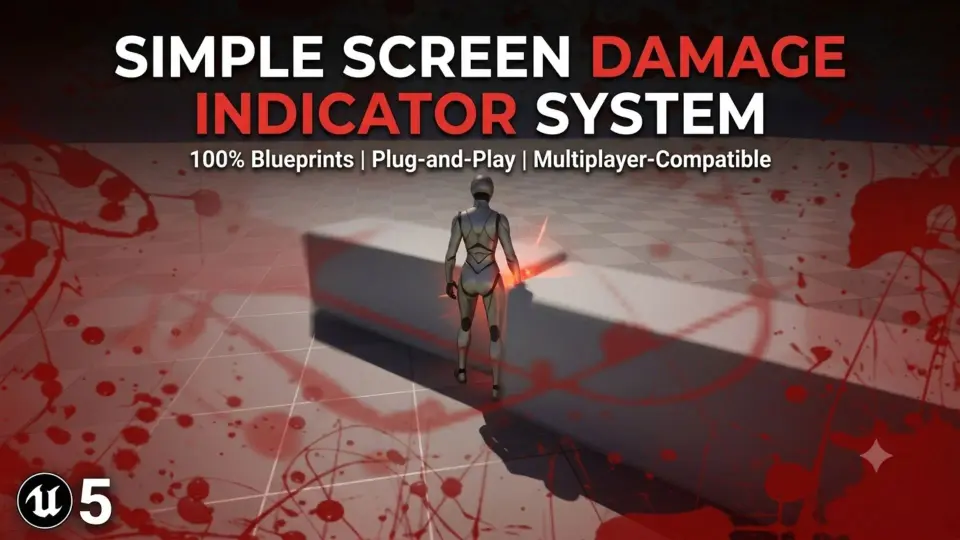
At the center of this system is a high-quality blood splatter texture labeled T_BloodOverlay. When the player takes damage from an environmental hazard, this texture automatically renders as a screen overlay. The visual response is designed to be immediate, ensuring the player recognizes the threat without needing to check a health bar.
Managing the visual persistence of this effect is handled natively within the Widget Blueprint (WBP_DamageIndicator). Instead of relying on external timing scripts, the widget runs a smooth, one-second fade-out animation. Developers can adjust the animation speed and alpha intensity directly inside the timeline, making it easy to tune how long the blood splatter lingers on screen and how opaque it appears at peak visibility.
Hazard Interaction and Message Tracking
To demonstrate the damage logic in action, the package includes a spinning obstacle Blueprint named Bp_obstacle. This Actor Blueprint applies damage to the player upon physical contact. It acts as both a functional hazard for combat environments and a clear reference point for developers looking to see how damage events are triggered and communicated to the UI.
Beyond the texture overlay, the system features visual on-screen message tracking whenever the damage logic is activated. This tracking provides an additional layer of feedback, confirming that the interaction has registered. The combination of the spinning obstacle, the message tracking, and the screen overlay creates a complete feedback loop that can be dropped directly into a project to test combat stakes.
Project Inclusions and Demo_map Setup
The resource is structured to be easy to implement in any project, specifically targeting developers who want to avoid C++ entirely. The package contains a lean set of assets focused on the damage feedback workflow:
1 Actor Blueprint (Bp_obstacle): For applying contact damage.
1 Widget Blueprint (WBP_DamageIndicator): For handling the screen overlay and native fade-out timeline.
1 Blood Splatter Texture (T_BloodOverlay): Preset and ready to use.
Demo Map folder (Demo_map): Complete with hazard setup.
The Demo_map is preconfigured with the hazard setup, allowing developers to immediately interact with the spinning obstacle and observe the UI behavior. This provides a working sandbox to understand how the widget triggers before migrating the components into a main game build.
Local UI Rendering in Multiplayer Environments
While the system is explicitly built for single-player projects and does not include a multiplayer feature set out of the box, the UI architecture accounts for networked environments. The damage indicator renders locally on the damaged player's screen. This localized rendering ensures that one player taking damage from a hazard does not interfere with the UI of other players in the same session.
The flexibility of the system makes it suitable for small combat environments and rapid prototyping. Because the fade timing and alpha intensity are highly customizable within the Widget timeline, developers can quickly tweak the visual intensity to match the pacing of their specific action-based game.
Prototyping Combat Feedback Without C++
Simple Screen Damage Indicator fits naturally into the early stages of action game development. For creators building an immersive combat environment, the ability to drop in a spinning obstacle, trigger an immediate blood splatter overlay, and track the damage state visually accelerates the process of testing how combat encounters feel.
The system is ideal for developers seeking a modular, 100% Blueprint solution to player damage feedback. It strips away the need for complex C++ coding while retaining the flexibility needed to adjust the visual response to fit a game's specific tone and pace.
 Gameplay Features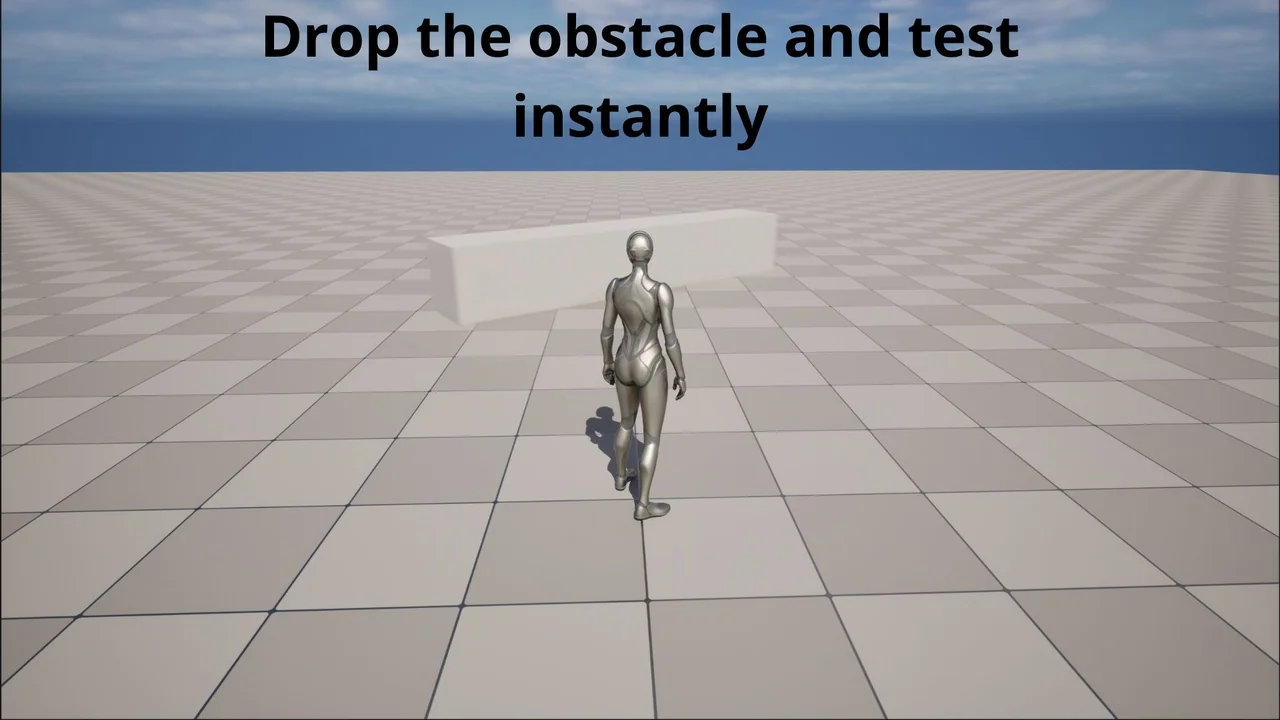
 Network
 Gameplay Features
 Gameplay Features