"7977b3847c3127c7"{"id":"1000366","slug":"experience-system","title":"Experience System","category":"Gameplay Features","engine":"5.1+","assetVersion":"","engineVersion":"Engine Version: 5.1+","tag":"Gameplay Features","accent":"blue","visual":"mech","summary":"A comprehensive blueprint-based progression framework featuring multiple experience types, modular UI widgets, multiplayer replication, and level-blocking logic","platform":"Unreal Engine","publishedAt":"2026-07-06T08:20:00.610Z","updatedAt":"2026-07-06T08:20:00.610Z","sourceNotes":[],"fileContents":[],"compatibility":["Unreal Engine","Engine Version: 5.1+"],"featuredImage":{"alt":"Experience System","src":"/wp-content/uploads/published/2026/07/01a001477a74-92820b13-b6a6-432c-9c52-604b6a0cbd07-102ab4be2a.webp"},"hasDownloadLink":true,"downloads":0,"terms":[{"taxonomy":"category","slug":"gameplay-features","name":"Gameplay Features"}],"galleryImages":[{"src":"/wp-content/uploads/published/2026/07/8ec944d05bfc-52a4be46-6456-4cb6-814b-e1c11939b545-b70347a613.webp","alt":"Experience System"},{"src":"/wp-content/uploads/published/2026/07/49f75468286f-cf320742-5903-4d58-9069-49439c5d38d6-d1fe6f983d.webp","alt":"Experience System"},{"src":"/wp-content/uploads/published/2026/07/c52e52f66c4b-41c6d934-2e33-4589-ada4-00ffb566a104-20fb529319.webp","alt":"Experience System"},{"src":"/wp-content/uploads/published/2026/07/34036f31c3bf-f4ff314f-a864-4c2f-bab1-469f4929652c-fa45f75cbe.webp","alt":"Experience System"},{"src":"/wp-content/uploads/published/2026/07/cbf0369c7845-c26e5755-c95b-4807-8999-cd1e8aecfcac-484567de99.webp","alt":"Experience System"},{"src":"/wp-content/uploads/published/2026/07/85d7c2d6cf24-2fcb94cc-8144-44ad-8ac8-54bf8be3f486-f7e8302d57.webp","alt":"Experience System"},{"src":"/wp-content/uploads/published/2026/07/b103343bc924-8c994f59-a429-4185-996f-32dcb53260ee-1aedd0340a.webp","alt":"Experience System"},{"src":"/wp-content/uploads/published/2026/07/cdb8ed460135-09fbd070-c66f-458c-b4d2-7e179dee5b3f-fc5135e7f3.webp","alt":"Experience System"},{"src":"/wp-content/uploads/published/2026/07/f63839f067a0-a8cd6f3b-2d36-45d8-a13f-a7f180fcb467-bfcbf02151.webp","alt":"Experience System"},{"src":"/wp-content/uploads/published/2026/07/eaee90691ded-eda43278-284c-4b0e-acff-c27fb2236cfd-e405227951.webp","alt":"Experience System"}],"accessPanel":{"kind":"resource","title":"Download this resource","eyebrow":"Free Download","message":"Log in or create a free account to start your download.","fileName":"Content.7z","safetyNote":"Resources are manually reviewed before listing to improve quality and reduce obvious risks.","actionLabel":"Download Free","resourceType":"Resource archive"},"contentHtml":"\u003ch2\u003eInitializing the Player Controller Component\u003c/h2\u003e\n\u003cp\u003eIntegrating the Experience System starts at the core of the player's input and logic chain. Developers implement the framework by attaching a single specialized component directly to their existing player controller. From this central node, the setup phase involves defining custom experience parameters and weaving the system's native AddExperience events into the game's existing mechanics.\u003c/p\u003e\n\u003cp\u003eBecause the logic relies on a centralized component, updating the player's progression state becomes a modular process. The framework utilizes event dispatchers to broadcast updates across the project. Developers can bind custom events to these dispatchers, ensuring that other game systems receive immediate notifications whenever a player's experience points fluctuate or their overall level changes. This event-driven architecture prevents the need for constant variable polling during gameplay.\u003c/p\u003e\n\u003ch2\u003eManaging Multiple Experience Types and Multipliers\u003c/h2\u003e\n\u003cp\u003eOnce the core component is established, developers can configure the system to track multiple distinct experience pools simultaneously. The blueprint framework supports rewarding players with single or multiple experience types during a single event trigger.\u003c/p\u003e\n\u003cp\u003eTo manage the pacing of progression, a built-in multiplier system allows for rapid adjustments to incoming experience gains. Developers can dynamically boost or reduce the amount of experience rewarded based on active buffs, environmental factors, or specific gameplay states. If pacing requires a hard stop, experience gains can be entirely locked and unlocked on demand.\u003c/p\u003e\n\u003cp\u003eThe Experience System also accommodates negative progression. Logic is included to subtract experience points from the player, which can trigger a complete de-leveling event. This functionality supports mechanics shaped by penalties, curses, or shifting character alignments.\u003c/p\u003e\n\u003cp\u003eFor more complex game designs, developers can establish hidden experience types. These tracking pools operate entirely in the background and remain invisible to the player. By tracking hidden progression, developers can power specialized mechanics like guaranteed loot drops, the unlocking of secret skills, or behind-the-scenes narrative milestones based on accumulated actions.\u003c/p\u003e\n\u003ch2\u003eReplicated Multiplayer and Shared Gains\u003c/h2\u003e\n\u003cp\u003eThe entire progression framework is fully replicated, ensuring that experience data remains synchronized across server and client connections in multiplayer projects. To demonstrate the system's capacity for competitive environments, a dedicated PVP experience example is included within the project files.\u003c/p\u003e\n\u003cp\u003eCooperative gameplay is also supported through a specialized, healer-friendly experience-sharing setup. This logic provides a structured way to distribute experience points among multiple players in a multiplayer session, ensuring that support roles or assisting characters receive appropriate progression credit even if they are not dealing direct damage to targets.\u003c/p\u003e\n\u003ch2\u003eDisplaying Progression with Responsive UI Widgets\u003c/h2\u003e\n\u003cp\u003eTranslating numerical progression into visual feedback is handled through a suite of included UI elements. The asset provides a traditional edge hugger experience bar alongside a compact micro HUD, which can be repositioned to various locations across the screen based on the project's layout requirements. For an alternative visual style, a radial experience bar is also included. Both the standard and radial bars are made for easy integration and can be nested into any custom widgets the developer creates.\u003c/p\u003e\n\u003cp\u003ePlayers can interact directly with a dedicated experience window that catalogs all the visible experience types they need to monitor. By clicking on a specific experience category within this window, the active HUD updates dynamically. The standard display swaps out to show the newly selected experience type instead of the default tracker.\u003c/p\u003e\n\u003cp\u003eChanges to experience and overall level can be broadcast directly on the player's screen. The visibility of these on-screen updates is modular; developers can choose exactly what information shows and what remains hidden for each individual experience type.\u003c/p\u003e\n\u003ch2\u003eLevel Changes, Niagara Effects, and Audio Feedback\u003c/h2\u003e\n\u003cp\u003eWhen a player crosses a leveling threshold, the system triggers specific visual and auditory feedback. The blueprint package includes both a large display and a small display format for broadcasting level changes on the user interface.\u003c/p\u003e\n\u003cp\u003eThese interface updates are paired with a vibrant fireworks Niagara System that features a floating plus sign. The particle effects are accompanied by distinct Level Up and Level Down audio cues. To differentiate various progression paths, developers can assign entirely different sounds and Niagara systems to each individual experience type. This ensures that leveling up a crafting skill feels and sounds distinct from leveling up combat or magic abilities.\u003c/p\u003e\n\u003ch2\u003eRestricting Map Areas with Level Blocked Logic\u003c/h2\u003e\n\u003cp\u003eBeyond interface updates and numerical tracking, the Experience System integrates directly into environment navigation. A level-blocked areas system is provided, allowing developers to restrict physical access to specific parts of the game map.\u003c/p\u003e\n\u003cp\u003eThese environmental restrictions evaluate the player's current level within a designated experience type. If the player has not met the required threshold, the area remains inaccessible, tying physical world exploration directly to the progression component.\u003c/p\u003e\n\u003ch2\u003ePersistent Data Saving and Documentation Framework\u003c/h2\u003e\n\u003cp\u003eMaintaining player progression across sessions requires robust data handling. The framework automatically saves and loads all experience and leveling data between gameplay sessions and map transitions, removing the need to build custom save-state logic for progression tracking.\u003c/p\u003e\n\u003cp\u003eAll underlying blueprints are thoroughly commented to ensure readability during customization and iteration. Alongside the commented node graphs, extensive documentation guides developers through every facet of the system's logic. A complete demo world containing all the assets, UI widgets, and functional examples is included to serve as a practical, hands-on reference for implementing the system's capabilities.\u003c/p\u003e\n\n\u003ch2\u003eMore From The Same Workflow\u003c/h2\u003e\n\u003cul\u003e\n\u003cli\u003e\u003ca href=\"https://3dcghub.com/gaming-health-widget/\" title=\"Gaming Health Widget\"\u003eGaming Health Widget\u003c/a\u003e\u003c/li\u003e\n\u003cli\u003e\u003ca href=\"https://3dcghub.com/advanced-framework-vr-mobile-desktop/\" title=\"Advanced Framework - VR, Mobile \u0026amp; Desktop\"\u003eAdvanced Framework - VR, Mobile \u0026amp; Desktop\u003c/a\u003e\u003c/li\u003e\n\u003cli\u003e\u003ca href=\"https://3dcghub.com/multiplayer-xp-system/\" title=\"Multiplayer XP System\"\u003eMultiplayer XP System\u003c/a\u003e\u003c/li\u003e\n\u003cli\u003e\u003ca href=\"https://3dcghub.com/advanced-fade-objects-pro-object-fading-with-tags-colors-and-multiplayer/\" title=\"Advanced Fade Objects PRO – Object Fading with Tags, Colors and Multiplayer\"\u003eAdvanced Fade Objects PRO – Object Fading with Tags, Colors and Multiplayer\u003c/a\u003e\u003c/li\u003e\n\u003cli\u003e\u003ca href=\"https://3dcghub.com/leveling-system-x/\" title=\"Leveling System X\"\u003eLeveling System X\u003c/a\u003e\u003c/li\u003e\n\u003c/ul\u003e","contentTextLength":6407,"navigation":{"current":1284,"total":3510,"previous":{"id":"1000367","slug":"first-person-baseball-bat","title":"First Person baseball bat","category":"Combat","platform":"Unreal Engine","updatedAt":"2026-07-06T08:25:58.586Z"},"next":{"id":"1000365","slug":"drone","title":"Drone","category":"Characters \u0026 Creatures","platform":"Unreal Engine","updatedAt":"2026-07-06T08:11:05.295Z"}},"relatedResources":[{"id":"10870","slug":"gaming-health-widget","title":"Gaming Health Widget","category":"Gameplay Features","engine":"5.6+","assetVersion":"Engine version: 5.6+","engineVersion":"4.24","tag":"Gameplay Features","accent":"blue","visual":"mech","summary":"Enhance your project's user interface with this versatile Gaming Health Widget. It features customizable health, mana, and shield components alongside a flexible experience system.","platform":"Unreal Engine","publishedAt":"2026-03-03T16:25:16.000Z","updatedAt":"2026-04-19T15:49:55.000Z","sourceNotes":[],"fileContents":[],"compatibility":["Unreal Engine","Engine version: 5.6+"],"featuredImage":{"alt":"Gaming Health Widget","src":"https://3dcghub.com/wp-content/uploads/2026/03/2c18a22e-1205-4b81-8dde-2e2c752274c7.webp"},"hasDownloadLink":true,"downloads":0},{"id":"28394","slug":"advanced-framework-vr-mobile-desktop","title":"Advanced Framework - VR, Mobile \u0026 Desktop","category":"Gameplay Features","engine":"5.0+","assetVersion":"Engine version: 5.0+","engineVersion":"","tag":"Gameplay Features","accent":"blue","visual":"luts","summary":"Advanced Framework is a production-ready foundation for VR, desktop, and mobile applications. It combines first-person control setups, interaction systems, multiplayer replication, navigation modes, and adaptable UI tools in one package.","platform":"Unreal Engine","publishedAt":"2026-05-12T09:33:53.000Z","updatedAt":"2026-05-12T09:33:54.000Z","sourceNotes":[],"fileContents":[],"compatibility":["Unreal Engine","Engine version: 5.0+"],"featuredImage":{"alt":"Advanced Framework - VR, Mobile \u0026 Desktop","src":"https://3dcghub.com/wp-content/uploads/2026/05/98ecd66b1773_1af6d69e-fbe1-435d-abdf-cc772ef3b31f.webp"},"hasDownloadLink":true,"downloads":0},{"id":"1000775","slug":"simple-screen-damage-indicator","title":"Simple Screen Damage Indicator","category":"Gameplay Features","engine":"5.4+","assetVersion":"","engineVersion":"Engine Version: 5.4+","tag":"Gameplay Features","accent":"blue","visual":"mech","summary":"A 100% Blueprint visual feedback system displaying a blood splatter overlay on hazard damage. Built for single-player prototyping with local multiplayer UI rend","platform":"Unreal Engine","publishedAt":"2026-07-28T18:07:04.744Z","updatedAt":"2026-07-28T18:07:04.744Z","sourceNotes":[],"fileContents":[],"compatibility":["Unreal Engine","Engine Version: 5.4+"],"featuredImage":{"alt":"Simple Screen Damage Indicator","src":"/wp-content/uploads/published/2026/07/5369eff53b58-641db878-ef1c-4892-ab16-112ae9023f3c-f070c8732a.webp"},"hasDownloadLink":true,"downloads":1}]}
Gameplay Features
Experience System
A comprehensive blueprint-based progression framework featuring multiple experience types, modular UI widgets, multiplayer replication, and level-blocking logic
Integrating the Experience System starts at the core of the player's input and logic chain. Developers implement the framework by attaching a single specialized component directly to their existing player controller. From this central node, the setup phase involves defining custom experience parameters and weaving the system's native AddExperience events into the game's existing mechanics.
Because the logic relies on a centralized component, updating the player's progression state becomes a modular process. The framework utilizes event dispatchers to broadcast updates across the project. Developers can bind custom events to these dispatchers, ensuring that other game systems receive immediate notifications whenever a player's experience points fluctuate or their overall level changes. This event-driven architecture prevents the need for constant variable polling during gameplay.
Managing Multiple Experience Types and Multipliers
Once the core component is established, developers can configure the system to track multiple distinct experience pools simultaneously. The blueprint framework supports rewarding players with single or multiple experience types during a single event trigger.
To manage the pacing of progression, a built-in multiplier system allows for rapid adjustments to incoming experience gains. Developers can dynamically boost or reduce the amount of experience rewarded based on active buffs, environmental factors, or specific gameplay states. If pacing requires a hard stop, experience gains can be entirely locked and unlocked on demand.
The Experience System also accommodates negative progression. Logic is included to subtract experience points from the player, which can trigger a complete de-leveling event. This functionality supports mechanics shaped by penalties, curses, or shifting character alignments.
For more complex game designs, developers can establish hidden experience types. These tracking pools operate entirely in the background and remain invisible to the player. By tracking hidden progression, developers can power specialized mechanics like guaranteed loot drops, the unlocking of secret skills, or behind-the-scenes narrative milestones based on accumulated actions.
Replicated Multiplayer and Shared Gains
The entire progression framework is fully replicated, ensuring that experience data remains synchronized across server and client connections in multiplayer projects. To demonstrate the system's capacity for competitive environments, a dedicated PVP experience example is included within the project files.
Cooperative gameplay is also supported through a specialized, healer-friendly experience-sharing setup. This logic provides a structured way to distribute experience points among multiple players in a multiplayer session, ensuring that support roles or assisting characters receive appropriate progression credit even if they are not dealing direct damage to targets.
Displaying Progression with Responsive UI Widgets
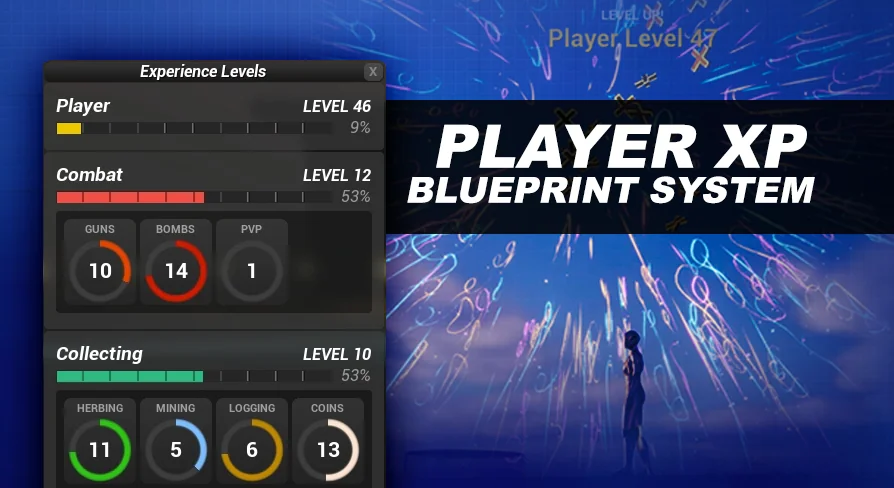
Translating numerical progression into visual feedback is handled through a suite of included UI elements. The asset provides a traditional edge hugger experience bar alongside a compact micro HUD, which can be repositioned to various locations across the screen based on the project's layout requirements. For an alternative visual style, a radial experience bar is also included. Both the standard and radial bars are made for easy integration and can be nested into any custom widgets the developer creates.
Players can interact directly with a dedicated experience window that catalogs all the visible experience types they need to monitor. By clicking on a specific experience category within this window, the active HUD updates dynamically. The standard display swaps out to show the newly selected experience type instead of the default tracker.
Changes to experience and overall level can be broadcast directly on the player's screen. The visibility of these on-screen updates is modular; developers can choose exactly what information shows and what remains hidden for each individual experience type.
Level Changes, Niagara Effects, and Audio Feedback
When a player crosses a leveling threshold, the system triggers specific visual and auditory feedback. The blueprint package includes both a large display and a small display format for broadcasting level changes on the user interface.
These interface updates are paired with a vibrant fireworks Niagara System that features a floating plus sign. The particle effects are accompanied by distinct Level Up and Level Down audio cues. To differentiate various progression paths, developers can assign entirely different sounds and Niagara systems to each individual experience type. This ensures that leveling up a crafting skill feels and sounds distinct from leveling up combat or magic abilities.
Restricting Map Areas with Level Blocked Logic
Beyond interface updates and numerical tracking, the Experience System integrates directly into environment navigation. A level-blocked areas system is provided, allowing developers to restrict physical access to specific parts of the game map.
These environmental restrictions evaluate the player's current level within a designated experience type. If the player has not met the required threshold, the area remains inaccessible, tying physical world exploration directly to the progression component.
Persistent Data Saving and Documentation Framework
Maintaining player progression across sessions requires robust data handling. The framework automatically saves and loads all experience and leveling data between gameplay sessions and map transitions, removing the need to build custom save-state logic for progression tracking.
All underlying blueprints are thoroughly commented to ensure readability during customization and iteration. Alongside the commented node graphs, extensive documentation guides developers through every facet of the system's logic. A complete demo world containing all the assets, UI widgets, and functional examples is included to serve as a practical, hands-on reference for implementing the system's capabilities.
 Gameplay Features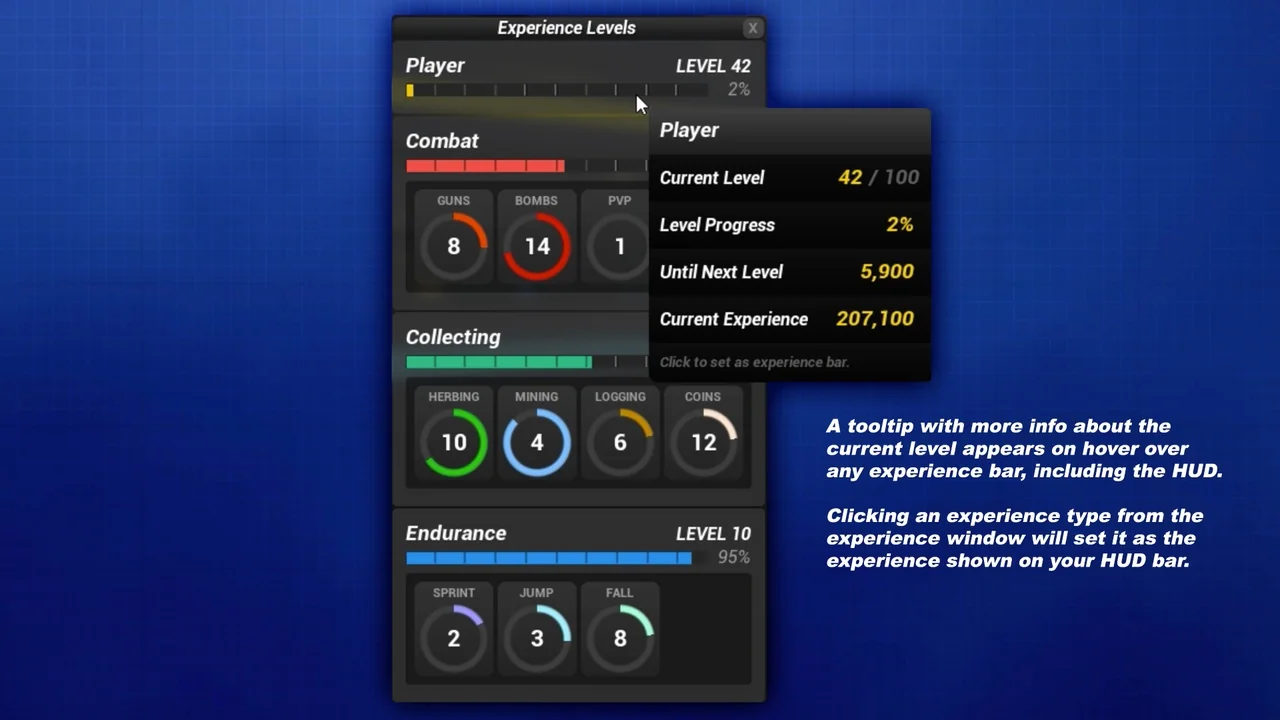
 Gameplay Features
 Gameplay Features
 Gameplay Features