"ddd0e3fb95b0aec2"{"id":"1000367","slug":"first-person-baseball-bat","title":"First Person baseball bat","category":"Combat","engine":"4.26+,5.0+","assetVersion":"","engineVersion":"Engine Version: 4.26+,5.0+","tag":"Combat","accent":"blue","visual":"mech","summary":"A collection of 43 hand-keyed first-person melee animations built on the Unreal Engine 4 and 5 Epic Skeleton, featuring integrated head-bone camera shakes.","platform":"Unreal Engine","publishedAt":"2026-07-06T08:25:58.586Z","updatedAt":"2026-07-06T08:25:58.586Z","sourceNotes":[],"fileContents":[],"compatibility":["Unreal Engine","Engine Version: 4.26+,5.0+"],"featuredImage":{"alt":"First Person baseball bat","src":"/wp-content/uploads/published/2026/07/d769b372cc69-9e224cf6-bbe6-4a10-9f99-27edb1009e43-ffdfdd3742.webp"},"hasDownloadLink":true,"downloads":1,"terms":[{"taxonomy":"category","slug":"combat","name":"Combat"}],"galleryImages":[{"src":"/wp-content/uploads/published/2026/07/cc03a418c655-a25adb74-f41e-41a5-9253-c807932597c2-46b068f3f7.webp","alt":"First Person baseball bat"},{"src":"/wp-content/uploads/published/2026/07/f04f71e38168-d839ec85-c39c-4f83-b04e-9b7ef0d37a21-582f2c7070.webp","alt":"First Person baseball bat"},{"src":"/wp-content/uploads/published/2026/07/3c32a8d90263-0af6aef9-d4b3-42c5-98a1-6693b7fe5333-12dcc37727.webp","alt":"First Person baseball bat"},{"src":"/wp-content/uploads/published/2026/07/fa16727ff4e5-092b6d82-e29e-4c14-a67d-53db0c065127-69faa02cc9.webp","alt":"First Person baseball bat"},{"src":"/wp-content/uploads/published/2026/07/2d200e18df01-6dc28544-620c-4a58-b7fe-efcd776e6020-692cee6c1e.webp","alt":"First Person baseball bat"},{"src":"/wp-content/uploads/published/2026/07/a77fdfd5119d-639af94e-1447-4b79-a333-b5f063668d74-d185ff3a59.webp","alt":"First Person baseball bat"},{"src":"/wp-content/uploads/published/2026/07/1c667fa26a42-9143d2e1-94cd-4ca6-b92a-dc2035415088-e70817d4ad.webp","alt":"First Person baseball bat"},{"src":"/wp-content/uploads/published/2026/07/00656bc4f208-7895bc2c-6cd0-4493-8f12-a8efe8fd8690-30276a8a4b.webp","alt":"First Person baseball bat"},{"src":"/wp-content/uploads/published/2026/07/52f3aa4f4808-14026680-c2fd-4b56-9235-e1a6116548ce-2e977eb5d2.webp","alt":"First Person baseball bat"}],"accessPanel":{"kind":"resource","title":"Download this resource","eyebrow":"Free Download","message":"Log in or create a free account to start your download.","fileName":"Content.7z","safetyNote":"Resources are manually reviewed before listing to improve quality and reduce obvious risks.","actionLabel":"Download Free","resourceType":"Resource archive"},"contentHtml":"\u003ch2\u003eInitializing the First-Person Epic Skeleton Rig\u003c/h2\u003e\n\u003cp\u003eImplementing a melee system requires a reliable animation foundation, and this package provides 43 distinct animations specifically authored for first-person combat. The core setup process begins with the skeleton hierarchy. Every movement in this collection is hand-keyed rather than motion-captured, ensuring deliberate, readable weapon arcs and strike timings that are essential for responsive melee mechanics. Because the data is built directly onto the standard Unreal Engine 4 and Unreal Engine 5 Epic Skeletons, developers can bypass complex retargeting workflows when using standard mannequins.\u003c/p\u003e\n\u003cp\u003eBringing these animations into an existing project involves standard skeleton assignment. When importing the animation data into an Unreal Engine environment, the engine will automatically recognize the bone structure of the UE4 or UE5 mannequin. This allows the 43 hand-keyed sequences to be immediately assigned to character animation blueprints. The hand-keyed approach guarantees that the spatial positioning of the arms remains consistent across the viewport, providing a stable foundation for survival and shooter projects where melee combat is a primary gameplay loop.\u003c/p\u003e\n\u003ch2\u003eConfiguring Camera Attachment and Head Bone Mechanics\u003c/h2\u003e\n\u003cp\u003eThe most critical aspect of setting up a first-person perspective is how the camera reacts to the character's physical actions. In this animation set, the head bone of the Epic Skeleton contains baked animation data for every single asset in the package. To utilize this data, developers must attach their camera component directly to the character's head bone within the blueprint viewport.\u003c/p\u003e\n\u003cp\u003eOnce the camera is parented to the head bone, it inherits all of the rotational and translational movement authored into the animation. This specific setup eliminates the need to script procedural camera recoil or build complex camera shake blueprints for melee impacts. The camera will automatically shake and jolt in sync with each hit, swing, and physical reaction, creating immediate visual feedback for the player. Despite being attached to the head bone, the system remains flexible. Developers can place and offset the camera wherever they wish relative to the bone, allowing for precise adjustments to the field of view or the exact first-person angle desired for the specific game design.\u003c/p\u003e\n\u003ch2\u003eSocketing the Baseball Bat Mesh\u003c/h2\u003e\n\u003cp\u003eIntegrating the actual weapon into the character's hands relies on standard Unreal Engine socketing workflows. The package includes a baseball bat model, but this asset is provided purely as a spatial reference for scaling and alignment. While it is possible to use this exact low-quality reference model in a project if desired, the intended implementation path involves replacing it with a production-ready weapon mesh.\u003c/p\u003e\n\u003cp\u003eTo set up the weapon correctly, developers need to target the character's right hand. The animations are designed to work seamlessly when a static or skeletal mesh is attached directly to the right hand bone or to a designated \u003ccode\u003eWeapon_rSocket\u003c/code\u003e. By positioning a custom model in the exact same orientation and location as the included reference bat, developers ensure that the hands grip the weapon naturally during all 43 animations. This socketing approach allows the underlying hand-keyed animations to drive the movement perfectly, whether the final game uses a modified bat, a crafted survival tool, or a completely different cylindrical melee weapon.\u003c/p\u003e\n\u003ch2\u003eRestricting the Viewport to First-Person Perspectives\u003c/h2\u003e\n\u003cp\u003eIntegrating these animations requires strict adherence to their intended camera perspective. These animations are absolutely not made for third-person cameras. First-person animations are typically authored by contorting the character's spine, shoulders, and arms to push the weapon into the camera's specific viewing frustum. While this creates a highly immersive and impactful view from the perspective of the player's eyes, the body mechanics will look heavily distorted, broken, or unnatural if viewed from an external, over-the-shoulder, or traditional third-person vantage point.\u003c/p\u003e\n\u003cp\u003eBecause the set is built exclusively for first-person shooters and survival games, developers must ensure their character blueprints hide the mesh from external views or use a split-mesh approach where the first-person arms are rendered only for the local player. The heavy reliance on head-bone animation for camera shakes further reinforces this limitation, as a third-person camera would not benefit from the baked-in impact feedback. Maintaining a strict first-person implementation ensures the hand-keyed combat animations deliver the exact visual weight and melee timing they were designed to provide.\u003c/p\u003e\n\n\u003ch2\u003eMore From The Same Workflow\u003c/h2\u003e\n\u003cul\u003e\n\u003cli\u003e\u003ca href=\"https://3dcghub.com/ak-rifle-character-animation-pack-first-third-person/\" title=\"AK Rifle Character Animation Pack First \u0026amp; Third Person\"\u003eAK Rifle Character Animation Pack First \u0026amp; Third Person\u003c/a\u003e\u003c/li\u003e\n\u003cli\u003e\u003ca href=\"https://3dcghub.com/fps-animations-pistol-tactical-shield/\" title=\"FPS ANIMATIONS PISTOL (TACTICAL SHIELD)\"\u003eFPS ANIMATIONS PISTOL (TACTICAL SHIELD)\u003c/a\u003e\u003c/li\u003e\n\u003cli\u003e\u003ca href=\"https://3dcghub.com/first-person-knife/\" title=\"First Person Knife\"\u003eFirst Person Knife\u003c/a\u003e\u003c/li\u003e\n\u003cli\u003e\u003ca href=\"https://3dcghub.com/fps-sniper-rifle-03-animations/\" title=\"FPS Sniper Rifle 03 (Animations)\"\u003eFPS Sniper Rifle 03 (Animations)\u003c/a\u003e\u003c/li\u003e\n\u003cli\u003e\u003ca href=\"https://3dcghub.com/fps-automatic-rifle-02-animations/\" title=\"FPS Automatic Rifle 02 (Animations)\"\u003eFPS Automatic Rifle 02 (Animations)\u003c/a\u003e\u003c/li\u003e\n\u003c/ul\u003e","contentTextLength":4942,"navigation":{"current":1284,"total":3511,"previous":{"id":"1000368","slug":"fps-pistol-and-knife-animations","title":"FPS Pistol And Knife Animations","category":"Combat","platform":"Unreal Engine","updatedAt":"2026-07-06T08:29:39.574Z"},"next":{"id":"1000366","slug":"experience-system","title":"Experience System","category":"Gameplay Features","platform":"Unreal Engine","updatedAt":"2026-07-06T08:20:00.610Z"}},"relatedResources":[{"id":"5533","slug":"ak-rifle-character-animation-pack-first-third-person","title":"AK Rifle Character Animation Pack First \u0026 Third Person","category":"Combat","engine":"4.26+,5.0+","assetVersion":"Engine version: 4.26+,5.0+","engineVersion":"4.26","tag":"Combat","accent":"blue","visual":"animation","summary":"Boost your game's realism with this AK Rifle Animation Pack. Includes high-quality first and third-person animations for reloads, movement, and weapon handling.","platform":"Unreal Engine","publishedAt":"2026-02-17T15:52:49.000Z","updatedAt":"2026-04-19T15:56:55.000Z","sourceNotes":[],"fileContents":[],"compatibility":["Unreal Engine","Engine version: 4.26+,5.0+"],"featuredImage":{"alt":"AK Rifle Character Animation Pack First \u0026 Third Person","src":"https://3dcghub.com/wp-content/uploads/2026/02/b0f0cd33-26f8-4877-9906-392e4539fe3b.webp"},"hasDownloadLink":true,"downloads":4},{"id":"5646","slug":"first-person-knife","title":"First Person Knife","category":"Combat","engine":"4.27,5.0+","assetVersion":"Engine version: 4.27,5.0+","engineVersion":"4.27","tag":"Combat","accent":"blue","visual":"animation","summary":"Elevate your FPS game with 49 professional hand-keyed knife animations. Features include Unreal Epic Skeleton support and realistic camera shakes for combat.","platform":"Unreal Engine","publishedAt":"2026-02-17T16:20:50.000Z","updatedAt":"2026-04-19T15:56:43.000Z","sourceNotes":[],"fileContents":[],"compatibility":["Unreal Engine","Engine version: 4.27,5.0+"],"featuredImage":{"alt":"First Person Knife","src":"https://3dcghub.com/wp-content/uploads/2026/02/0dc7edad-9c67-48fd-bd9a-f4c5427d044c.webp"},"hasDownloadLink":true,"downloads":3},{"id":"5655","slug":"fps-animations-pistol-tactical-shield","title":"FPS ANIMATIONS PISTOL (TACTICAL SHIELD)","category":"Combat","engine":"4.26+,5.0+","assetVersion":"Engine version: 4.26+,5.0+","engineVersion":"4.18","tag":"Combat","accent":"blue","visual":"animation","summary":"Enhance your first-person shooter with this professional FPS pistol and tactical shield animation pack. Includes modular hands, skins, and smooth combat moves.","platform":"Unreal Engine","publishedAt":"2026-02-17T16:23:27.000Z","updatedAt":"2026-04-19T15:56:42.000Z","sourceNotes":[],"fileContents":[],"compatibility":["Unreal Engine","Engine version: 4.26+,5.0+"],"featuredImage":{"alt":"FPS ANIMATIONS PISTOL (TACTICAL SHIELD)","src":"https://3dcghub.com/wp-content/uploads/2026/02/75b98ca5-5519-4d3c-ae9c-aea4df78f586.webp"},"hasDownloadLink":true,"downloads":1}]}
Combat
First Person baseball bat
A collection of 43 hand-keyed first-person melee animations built on the Unreal Engine 4 and 5 Epic Skeleton, featuring integrated head-bone camera shakes.
Implementing a melee system requires a reliable animation foundation, and this package provides 43 distinct animations specifically authored for first-person combat. The core setup process begins with the skeleton hierarchy. Every movement in this collection is hand-keyed rather than motion-captured, ensuring deliberate, readable weapon arcs and strike timings that are essential for responsive melee mechanics. Because the data is built directly onto the standard Unreal Engine 4 and Unreal Engine 5 Epic Skeletons, developers can bypass complex retargeting workflows when using standard mannequins.
Bringing these animations into an existing project involves standard skeleton assignment. When importing the animation data into an Unreal Engine environment, the engine will automatically recognize the bone structure of the UE4 or UE5 mannequin. This allows the 43 hand-keyed sequences to be immediately assigned to character animation blueprints. The hand-keyed approach guarantees that the spatial positioning of the arms remains consistent across the viewport, providing a stable foundation for survival and shooter projects where melee combat is a primary gameplay loop.
Configuring Camera Attachment and Head Bone Mechanics
The most critical aspect of setting up a first-person perspective is how the camera reacts to the character's physical actions. In this animation set, the head bone of the Epic Skeleton contains baked animation data for every single asset in the package. To utilize this data, developers must attach their camera component directly to the character's head bone within the blueprint viewport.
Once the camera is parented to the head bone, it inherits all of the rotational and translational movement authored into the animation. This specific setup eliminates the need to script procedural camera recoil or build complex camera shake blueprints for melee impacts. The camera will automatically shake and jolt in sync with each hit, swing, and physical reaction, creating immediate visual feedback for the player. Despite being attached to the head bone, the system remains flexible. Developers can place and offset the camera wherever they wish relative to the bone, allowing for precise adjustments to the field of view or the exact first-person angle desired for the specific game design.
Socketing the Baseball Bat Mesh
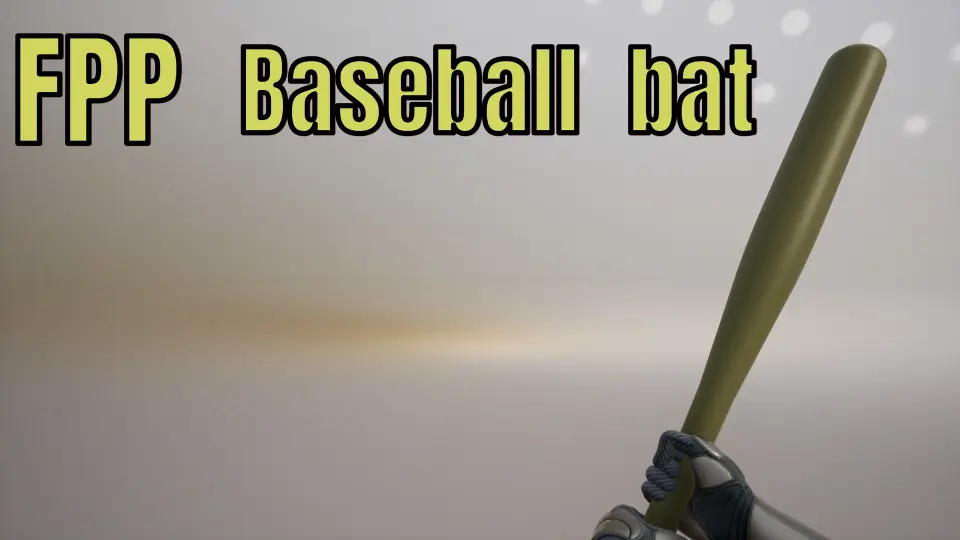
Integrating the actual weapon into the character's hands relies on standard Unreal Engine socketing workflows. The package includes a baseball bat model, but this asset is provided purely as a spatial reference for scaling and alignment. While it is possible to use this exact low-quality reference model in a project if desired, the intended implementation path involves replacing it with a production-ready weapon mesh.
To set up the weapon correctly, developers need to target the character's right hand. The animations are designed to work seamlessly when a static or skeletal mesh is attached directly to the right hand bone or to a designated Weapon_rSocket. By positioning a custom model in the exact same orientation and location as the included reference bat, developers ensure that the hands grip the weapon naturally during all 43 animations. This socketing approach allows the underlying hand-keyed animations to drive the movement perfectly, whether the final game uses a modified bat, a crafted survival tool, or a completely different cylindrical melee weapon.
Restricting the Viewport to First-Person Perspectives
Integrating these animations requires strict adherence to their intended camera perspective. These animations are absolutely not made for third-person cameras. First-person animations are typically authored by contorting the character's spine, shoulders, and arms to push the weapon into the camera's specific viewing frustum. While this creates a highly immersive and impactful view from the perspective of the player's eyes, the body mechanics will look heavily distorted, broken, or unnatural if viewed from an external, over-the-shoulder, or traditional third-person vantage point.
Because the set is built exclusively for first-person shooters and survival games, developers must ensure their character blueprints hide the mesh from external views or use a split-mesh approach where the first-person arms are rendered only for the local player. The heavy reliance on head-bone animation for camera shakes further reinforces this limitation, as a third-person camera would not benefit from the baked-in impact feedback. Maintaining a strict first-person implementation ensures the hand-keyed combat animations deliver the exact visual weight and melee timing they were designed to provide.
 Combat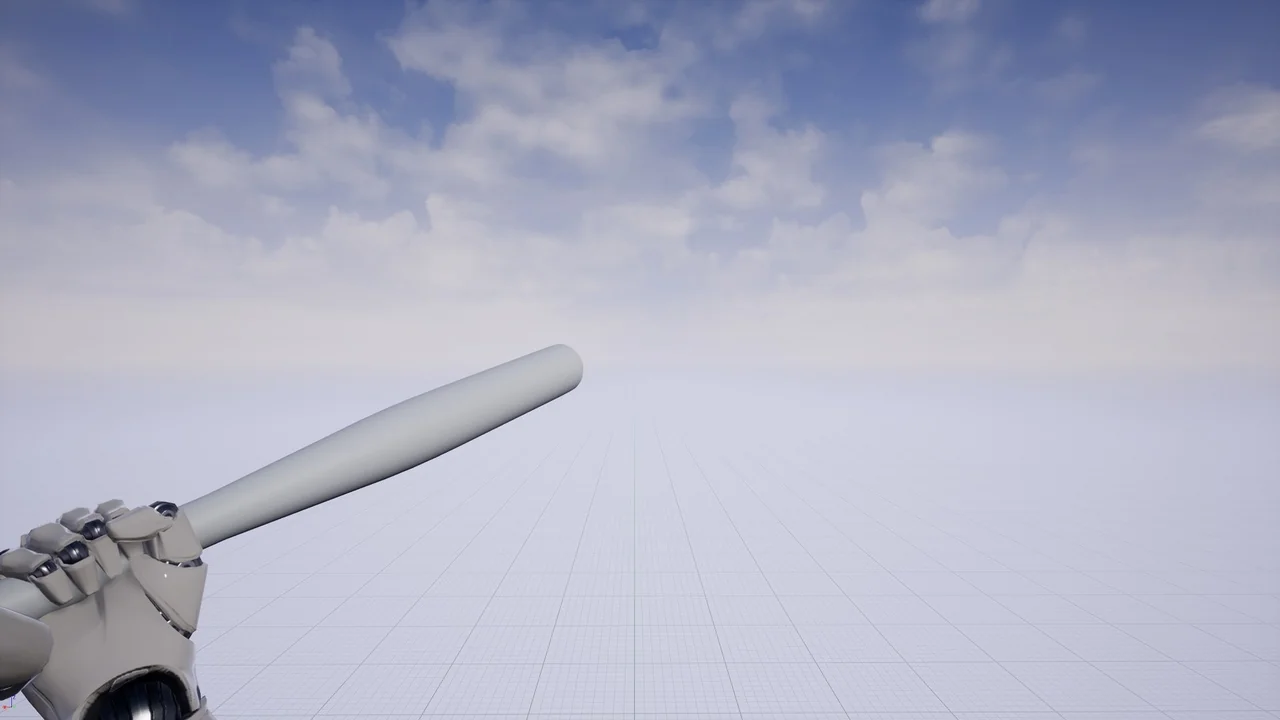
 Combat
 Combat
 Combat