"0341a2901a4ae9aa"{"id":"11024","slug":"multiplayer-xp-system","title":"Multiplayer XP System","category":"Gameplay Features","engine":"4.26+,5.0+","assetVersion":"Engine version: 4.26+,5.0+","engineVersion":"4.18","tag":"Gameplay Features","accent":"blue","visual":"luts","summary":"A streamlined Blueprint-based system for managing experience points and leveling in single-player or multiplayer projects.","platform":"Unreal Engine","publishedAt":"2026-03-03T16:43:29.000Z","updatedAt":"2026-04-19T15:49:52.000Z","sourceNotes":[],"fileContents":[],"compatibility":["Unreal Engine","Engine version: 4.26+,5.0+"],"featuredImage":{"alt":"Multiplayer XP System","src":"https://3dcghub.com/wp-content/uploads/2026/03/8c714f2d-8796-4591-a01d-e06608c50194.webp"},"hasDownloadLink":true,"downloads":0,"terms":[{"taxonomy":"category","slug":"gameplay-features","name":"Gameplay Features"},{"taxonomy":"post_tag","slug":"experience-point-blueprint","name":"Experience Point Blueprint"},{"taxonomy":"post_tag","slug":"game-leveling-system","name":"Game Leveling System"},{"taxonomy":"post_tag","slug":"multiplayer-experience","name":"Multiplayer Experience"},{"taxonomy":"post_tag","slug":"multiplayer-xp-system","name":"Multiplayer XP System"},{"taxonomy":"post_tag","slug":"unreal-engine-xp","name":"Unreal Engine XP"}],"galleryImages":[{"src":"https://3dcghub.com/wp-content/uploads/2026/03/8327ba567f9d_18a523c1-3231-4f75-8669-1b48a81d0c05.webp","alt":"Multiplayer XP System"},{"src":"https://3dcghub.com/wp-content/uploads/2026/03/694faa4d8e69_263f562f-b323-42f5-b6a1-e59af460d30b.webp","alt":"Multiplayer XP System"},{"src":"https://3dcghub.com/wp-content/uploads/2026/03/0f4af18179d7_d91409b4-ce2e-4187-a4bf-65bbd9a2b633.webp","alt":"Multiplayer XP System"}],"accessPanel":{"kind":"resource","title":"Access this resource","eyebrow":"Free Download","message":"Log in or create a free account to start your download.","fileName":"Content.7z","safetyNote":"All resources are 100% manually reviewed to eliminate all risks.","actionLabel":"Download Free","resourceType":"Resource archive"},"contentHtml":"\u003ch2\u003eStreamlined Experience Management\u003c/h2\u003e\n\u003cp\u003eThe Multiplayer XP System offers a straightforward way to handle player progression in your game. Moreover, this system is designed for quick integration using Blueprints. It provides a realistic approach to leveling mechanics for various project types. Therefore, developers can focus on gameplay instead of complex coding. The creator focused on making the system accessible for all skill levels.\u003c/p\u003e\n\n\u003ch2\u003eSimple Implementation Workflow\u003c/h2\u003e\n\u003cp\u003eInitially, setting up the system requires only a few steps. You can start by adding the XP component to your actor. This modular approach ensures the logic remains organized. Next, you must create the XP main widget to handle the visual data. This widget displays the player's current progress on the screen.\u003c/p\u003e\n\n\u003cp\u003eAfter creating the widget, you must reference it to the XP component. This connection allows the two parts to communicate effectively. Finally, you call the \"Init\" function to start the system. This function initializes the data and prepares the logic for use. Consequently, the Multiplayer XP System becomes active within the game world immediately.\u003c/p\u003e\n\n\u003ch2\u003eManaging Experience Points\u003c/h2\u003e\n\u003cp\u003eAdding experience to a character is a very simple process. The developer included a dedicated \"Add XP\" function for this purpose. You can call this function whenever a player completes a task or defeats an enemy. Furthermore, you have the freedom to choose your desired amount of experience for each action. This flexibility allows for precise control over the leveling speed.\u003c/p\u003e\n\n\u003cp\u003eThe Multiplayer XP System is built to be versatile. It works perfectly for single-player adventures where only one user earns points. However, it is also fully compatible with multiplayer environments. This makes it a great choice for online games that require synchronized progression. The system handles the logic across different network setups efficiently.\u003c/p\u003e\n\n\u003ch2\u003eFlexible Integration Options\u003c/h2\u003e\n\u003cp\u003eBecause the system uses a component-based design, it is highly adaptable. You can attach the XP component to any actor that needs to track progress. Specifically, this includes player characters, vehicles, or even interactive objects. The use of a main widget also ensures that the user interface is easy to manage. However, the system remains lightweight to maintain game performance.\u003c/p\u003e\n\n\u003cp\u003eIf you need guidance during the setup, the developer provides a tutorial. This video demonstrates exactly how to setup and use the system. It also covers how to change specific settings to fit your needs. Additionally, support is available through a dedicated community server. This ensures that help is accessible if you encounter any implementation questions.\u003c/p\u003e\n\n\u003ch2\u003eFinal Take\u003c/h2\u003e\n\u003cp\u003eThe clearest takeaway is that the Multiplayer XP System is an efficient tool for any developer. It simplifies the process of adding experience and leveling to a project. By using the included functions and components, you can create a functional progression system quickly. Whether you are building an online world or a solo journey, this system provides the necessary foundation for character growth.\u003c/p\u003e\n\n\u003ch2\u003eExplore Similar Assets\u003c/h2\u003e\n\u003cul\u003e\n\u003cli\u003e\u003ca href=\"https://3dcghub.com/leveling-system-x/\" title=\"Leveling System X\"\u003eLeveling System X\u003c/a\u003e\u003c/li\u003e\n\u003cli\u003e\u003ca href=\"https://3dcghub.com/interactive-water-ocean-and-swim-systems/\" title=\"Interactive Water, Ocean and Swim Systems\"\u003eInteractive Water, Ocean and Swim Systems\u003c/a\u003e\u003c/li\u003e\n\u003cli\u003e\u003ca href=\"https://3dcghub.com/gathering-resources-advanced-system/\" title=\"Gathering Resources – Advanced System\"\u003eGathering Resources – Advanced System\u003c/a\u003e\u003c/li\u003e\n\u003cli\u003e\u003ca href=\"https://3dcghub.com/enhanced-locomotion-system-replication/\" title=\"Enhanced Locomotion System (Replication)\"\u003eEnhanced Locomotion System (Replication)\u003c/a\u003e\u003c/li\u003e\n\u003cli\u003e\u003ca href=\"https://3dcghub.com/complete-horse-riding-system-rideable-mount/\" title=\"Complete Horse Riding System: Rideable Mount\"\u003eComplete Horse Riding System: Rideable Mount\u003c/a\u003e\u003c/li\u003e\n\u003c/ul\u003e","contentTextLength":3319,"navigation":{"current":3183,"total":4017,"previous":{"id":"10931","slug":"hudcallouttitles01","title":"HUDCallOutTitles01","category":"Gameplay Features","platform":"Unreal Engine","updatedAt":"2026-04-19T15:49:53.000Z"},"next":{"id":"11018","slug":"modular-gameplay-blueprint-systems","title":"Modular Gameplay Blueprint Systems","category":"Gameplay Features","platform":"Unreal Engine","updatedAt":"2026-04-19T15:49:52.000Z"}},"relatedResources":[{"id":"1001938","slug":"advanced-multiplayer-lobby-system-v2","title":"Advanced Multiplayer Lobby System V2","category":"Gameplay Features","engine":"4.26+,5.0+","assetVersion":"","engineVersion":"Engine Version: 4.26+,5.0+","tag":"Gameplay Features","accent":"blue","visual":"mech","summary":"Explore Advanced Multiplayer Lobby System V2, featuring customizable player pods, Steam Subsystem integration, replicated chat, and modular Actor Components.","platform":"Unreal Engine","publishedAt":"2026-10-24T11:14:17.405Z","updatedAt":"2026-10-24T11:14:17.405Z","sourceNotes":[],"fileContents":[],"compatibility":["Unreal Engine","Engine Version: 4.26+,5.0+"],"featuredImage":{"alt":"Advanced Multiplayer Lobby System V2","src":"/wp-content/uploads/published/2026/10/bb90ebda1d38-fcf74666-81cc-481a-8f29-e136d71e0b58-08afe87973.webp"},"hasDownloadLink":true,"downloads":0},{"id":"1000854","slug":"multiplayer-traps-pack","title":"Multiplayer Traps Pack","category":"Gameplay Features","engine":"4.26+,5.0+","assetVersion":"","engineVersion":"Engine Version: 4.26+,5.0+","tag":"Gameplay Features","accent":"blue","visual":"mech","summary":"Blueprint multiplayer traps: spike plates, spinning saws, flamethrowers, swinging maces. Animation-free, no event tick, per-trap settings, mesh-swappable.","platform":"Unreal Engine","publishedAt":"2026-08-04T16:58:03.710Z","updatedAt":"2026-08-04T16:58:03.710Z","sourceNotes":[],"fileContents":[],"compatibility":["Unreal Engine","Engine Version: 4.26+,5.0+"],"featuredImage":{"alt":"Multiplayer Traps Pack","src":"/wp-content/uploads/published/2026/08/baa4c8cf0c46-aa3aeac9-d975-4dac-a312-19c77e90c7e5-c3127b0699.webp"},"hasDownloadLink":true,"downloads":3},{"id":"1000922","slug":"open-world-ai-multiplayer-spawn-system","title":"Open World AI Multiplayer Spawn System","category":"Gameplay Features","engine":"4.26+,5.0+","assetVersion":"","engineVersion":"Engine Version: 4.26+,5.0+","tag":"Gameplay Features","accent":"blue","visual":"mech","summary":"A server-side Blueprint spawn system for open-world multiplayer games, with roaming, stationary, and path AI, friendly or zombie variants.","platform":"Unreal Engine","publishedAt":"2026-08-08T05:05:40.195Z","updatedAt":"2026-08-08T05:05:40.195Z","sourceNotes":[],"fileContents":[],"compatibility":["Unreal Engine","Engine Version: 4.26+,5.0+"],"featuredImage":{"alt":"Open World AI Multiplayer Spawn System","src":"/wp-content/uploads/published/2026/08/c4917032d21c-cb7e3ead-ba0b-445c-8608-4fe8a4722c7e-d50d7d81fc.webp"},"hasDownloadLink":true,"downloads":2}]}
Gameplay Features
Multiplayer XP System
A streamlined Blueprint-based system for managing experience points and leveling in single-player or multiplayer projects.
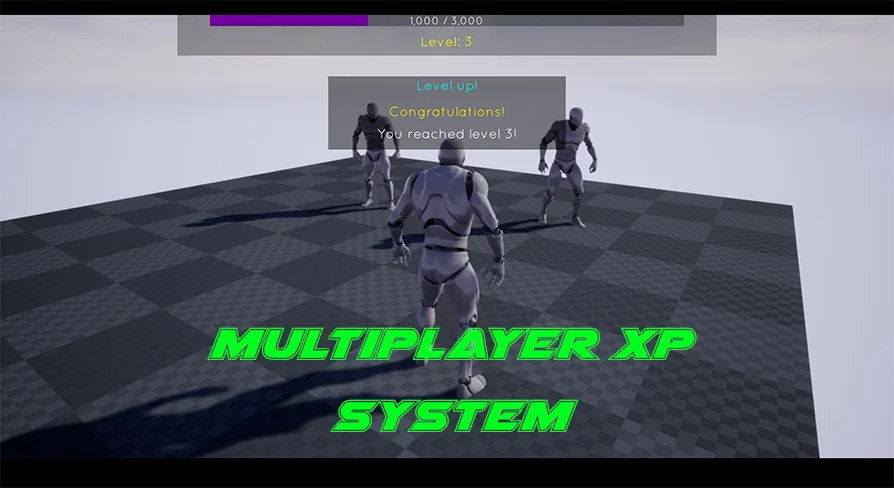
The Multiplayer XP System offers a straightforward way to handle player progression in your game. Moreover, this system is designed for quick integration using Blueprints. It provides a realistic approach to leveling mechanics for various project types. Therefore, developers can focus on gameplay instead of complex coding. The creator focused on making the system accessible for all skill levels.
Simple Implementation Workflow
Initially, setting up the system requires only a few steps. You can start by adding the XP component to your actor. This modular approach ensures the logic remains organized. Next, you must create the XP main widget to handle the visual data. This widget displays the player's current progress on the screen.
After creating the widget, you must reference it to the XP component. This connection allows the two parts to communicate effectively. Finally, you call the "Init" function to start the system. This function initializes the data and prepares the logic for use. Consequently, the Multiplayer XP System becomes active within the game world immediately.
Managing Experience Points
Adding experience to a character is a very simple process. The developer included a dedicated "Add XP" function for this purpose. You can call this function whenever a player completes a task or defeats an enemy. Furthermore, you have the freedom to choose your desired amount of experience for each action. This flexibility allows for precise control over the leveling speed.
The Multiplayer XP System is built to be versatile. It works perfectly for single-player adventures where only one user earns points. However, it is also fully compatible with multiplayer environments. This makes it a great choice for online games that require synchronized progression. The system handles the logic across different network setups efficiently.
Flexible Integration Options
Because the system uses a component-based design, it is highly adaptable. You can attach the XP component to any actor that needs to track progress. Specifically, this includes player characters, vehicles, or even interactive objects. The use of a main widget also ensures that the user interface is easy to manage. However, the system remains lightweight to maintain game performance.
If you need guidance during the setup, the developer provides a tutorial. This video demonstrates exactly how to setup and use the system. It also covers how to change specific settings to fit your needs. Additionally, support is available through a dedicated community server. This ensures that help is accessible if you encounter any implementation questions.
Final Take
The clearest takeaway is that the Multiplayer XP System is an efficient tool for any developer. It simplifies the process of adding experience and leveling to a project. By using the included functions and components, you can create a functional progression system quickly. Whether you are building an online world or a solo journey, this system provides the necessary foundation for character growth.
 Gameplay Features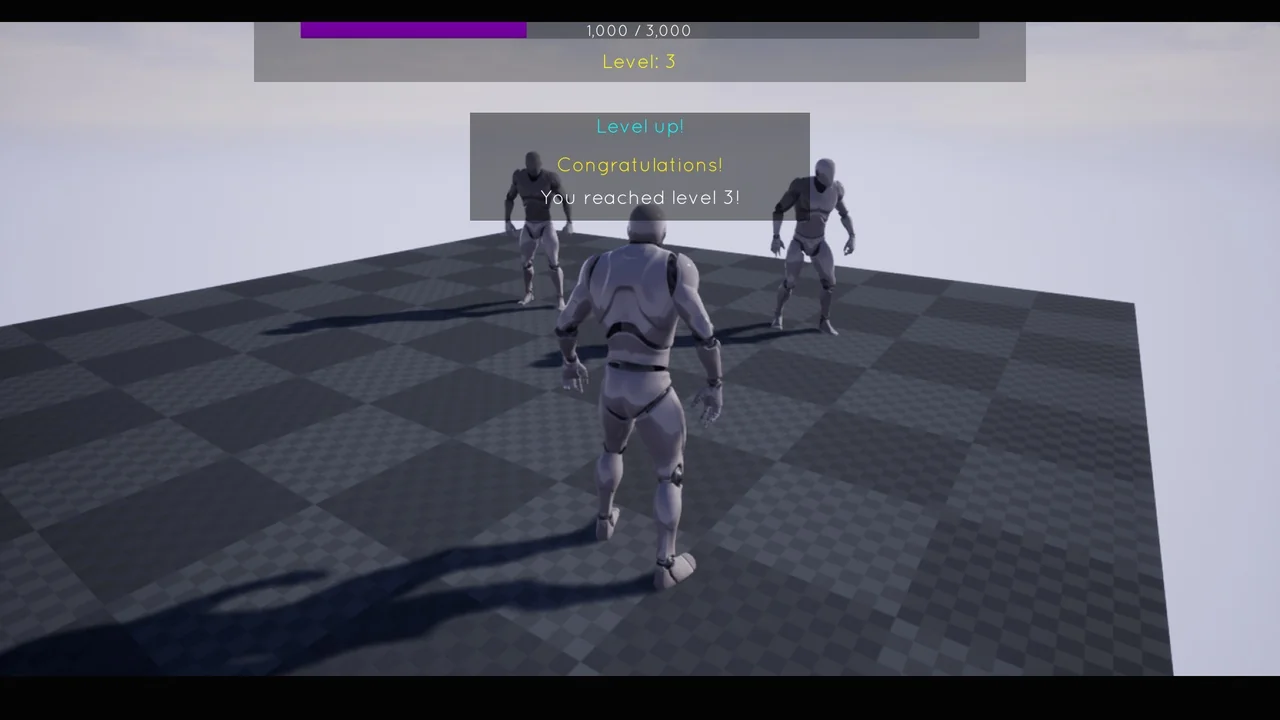
 Gameplay Features
 Gameplay Features
 Gameplay Features