"7aa4acc705f0d80b"{"id":"1001938","slug":"advanced-multiplayer-lobby-system-v2","title":"Advanced Multiplayer Lobby System V2","category":"Gameplay Features","engine":"4.26+,5.0+","assetVersion":"","engineVersion":"Engine Version: 4.26+,5.0+","tag":"Gameplay Features","accent":"blue","visual":"mech","summary":"Explore Advanced Multiplayer Lobby System V2, featuring customizable player pods, Steam Subsystem integration, replicated chat, and modular Actor Components.","platform":"Unreal Engine","publishedAt":"2026-10-24T11:14:17.405Z","updatedAt":"2026-10-24T11:14:17.405Z","sourceNotes":[],"fileContents":[],"compatibility":["Unreal Engine","Engine Version: 4.26+,5.0+"],"featuredImage":{"alt":"Advanced Multiplayer Lobby System V2","src":"/wp-content/uploads/published/2026/10/bb90ebda1d38-fcf74666-81cc-481a-8f29-e136d71e0b58-08afe87973.webp"},"hasDownloadLink":true,"downloads":0,"terms":[{"taxonomy":"category","slug":"gameplay-features","name":"Gameplay Features"}],"galleryImages":[{"src":"/wp-content/uploads/published/2026/10/55828e25e1fc-26528118-6e20-4e12-a7dd-947a67b41497-e0b84842b9.webp","alt":"Advanced Multiplayer Lobby System V2"},{"src":"/wp-content/uploads/published/2026/10/18c34a9a0371-06ca657c-718c-4fa5-a68d-d86206448181-98f9d52654.webp","alt":"Advanced Multiplayer Lobby System V2"},{"src":"/wp-content/uploads/published/2026/10/fd2f057df932-f1f654bd-bdd7-42e0-915b-6645ac5c4231-3fd1601b9e.webp","alt":"Advanced Multiplayer Lobby System V2"},{"src":"/wp-content/uploads/published/2026/10/ab6bdcf1521e-842b89f2-df9a-44d9-b56a-2caa283932b9-364cc7768a.webp","alt":"Advanced Multiplayer Lobby System V2"},{"src":"/wp-content/uploads/published/2026/10/3bd3be2ae8a3-38f86010-9dda-4fc2-ae8a-e5ba7e40008d-23aab6e815.webp","alt":"Advanced Multiplayer Lobby System V2"},{"src":"/wp-content/uploads/published/2026/10/3dd5e453f828-ad8828ec-154d-4a76-88ae-93bddc0116b6-4cfe89783a.webp","alt":"Advanced Multiplayer Lobby System V2"}],"accessPanel":{"kind":"resource","title":"Download this resource","eyebrow":"Free Download","message":"Log in or create a free account to start your download.","fileName":"Content.7z","safetyNote":"Resources are manually reviewed before listing to improve quality and reduce obvious risks.","actionLabel":"Download Free","resourceType":"Resource archive"},"contentHtml":"\u003cp\u003eStaging players before a match requires coordinated networking, visual presence, and clear session state management. Advanced Multiplayer Lobby System V2 handles this setup by organizing player representation into physical pods while controlling session logic through an Actor Component equipped with modular functions. Built with fully commented Blueprints, the package provides a structured foundation for hosting, viewing, and preparing characters for online play.\u003c/p\u003e \u003ch2\u003eActor Component Architecture and Modular Functions\u003c/h2\u003e\n\u003cp\u003eAt the center of the system is an Actor Component that coordinates network logic independently of specific character meshes or bespoke scene actors. Because the logic resides in a component rather than being hardcoded into a monolithic game mode or level blueprint, developers can attach the lobby behavior to their existing project structures without rebuilding foundational assets.\u003c/p\u003e \u003cp\u003eThe code is divided into modular functions that can be adjusted or replaced to suit individual project requirements. Each function handles distinct slices of lobby management, such as state tracking, pod assignments, and menu triggers. The logic relies on network replication to keep all connected clients synchronized with the server. Because the internal Blueprint graphs are thoroughly commented, navigating the event flow, inspecting variable pass-throughs, and customizing specific node networks can be handled without deciphering undocumented connections.\u003c/p\u003e \u003ch2\u003eCustomizable Player Pods: Main Pod and Side Pods\u003c/h2\u003e\n\u003cp\u003eVisual staging in the system uses a spatial pod arrangement rather than static text lists. The environment is configured around a customizable number of player pods, giving developers direct control over how many participants can be displayed on screen simultaneously.\u003c/p\u003e \u003cp\u003eThe system distinguishes between two distinct pod types:\u003c/p\u003e\n\u003cul\u003e \u003cli\u003e\u003cstrong\u003eMain Pod:\u003c/strong\u003e Dedicated entirely to the local player's character, positioning the user at the visual center of their own staging screen.\u003c/li\u003e \u003cli\u003e\u003cstrong\u003eSide Pods:\u003c/strong\u003e Configured to populate dynamically as other players join the session, showing incoming party members in assigned slots around the host space.\u003c/li\u003e\n\u003c/ul\u003e \u003cp\u003eThis division separates local visual preferences from remote participant handling. As players connect or leave, the modular functions update the side pods accordingly. The spatial separation of the main character from incoming peers ensures that local customization, inspection, and menu focus remain distinct from the surrounding lobby roster.\u003c/p\u003e \u003ch2\u003eReplicated Chat, Ready Checks, and Player Overview\u003c/h2\u003e\n\u003cp\u003eBeyond visual staging, the package includes critical session management tools that regulate party interaction before launching gameplay. Communication is handled by an integrated chat system that allows participants to exchange messages in real time across the replicated session.\u003c/p\u003e \u003cp\u003eCoordination hinges on a built-in player readiness mechanic. Through the \"waiting for players ready\" sequence, the host and connected users can confirm match readiness, preventing premature session launches until participants flag that they are prepared. Alongside readiness checks, a player overview system gives users visibility into who is currently present in the lobby, providing a centralized interface to view member states and match information.\u003c/p\u003e \u003ch2\u003eLobby Customization and Menu Framework\u003c/h2\u003e\n\u003cp\u003ePlayer personalization is handled directly within the staging area via an integrated customization system. Characters positioned on the main pod can be altered prior to starting a match, allowing players to tweak their appearance or loadout settings while remaining inside the interactive lobby space.\u003c/p\u003e \u003cp\u003eThe interface suite also provides ready-to-use menu screens, including dedicated Options and Credits sections. The Options menu offers immediate hooks for standard game configuration toggles, while the Credits menu provides a clean template for attribution. Because the interface elements interface directly with the underlying Actor Component, layout adjustments can be made without breaking the underlying replication events.\u003c/p\u003e \u003ch2\u003eSteam Subsystem Integration and Survival Framework Fit\u003c/h2\u003e\n\u003cp\u003eOnline connectivity in Advanced Multiplayer Lobby System V2 is based on Steam Subsystem integration. This enables session creation, lobby searching, invites, and network discovery using Steam's multiplayer infrastructure. Developers targeting platform-specific matchmaking can utilize these native calls directly out of the box.\u003c/p\u003e \u003cp\u003eWhile the lobby functions as a standalone, beginner-friendly asset, it is also fully integrated into the Ultimate Multiplayer Survival Pack (UMSP), also designated as the Ultimate Multiplayer Survival Engine (UMSE). Projects built on top of this survival framework utilize this exact lobby setup for handling server entry and player staging, demonstrating the system's capacity to scale into complex, production-ready survival game pipelines.\u003c/p\u003e\n\n\u003ch2\u003eRelated Resources Worth Checking\u003c/h2\u003e\n\u003cul\u003e\n\u003cli\u003e\u003ca href=\"https://3dcghub.com/gui-with-multiplayer/\" title=\"GUI with Multiplayer\"\u003eGUI with Multiplayer\u003c/a\u003e\u003c/li\u003e\n\u003cli\u003e\u003ca href=\"https://3dcghub.com/player-farming-system/\" title=\"Player Farming System\"\u003ePlayer Farming System\u003c/a\u003e\u003c/li\u003e\n\u003cli\u003e\u003ca href=\"https://3dcghub.com/chat-groups-guilds/\" title=\"Chat Groups Guilds\"\u003eChat Groups Guilds\u003c/a\u003e\u003c/li\u003e\n\u003cli\u003e\u003ca href=\"https://3dcghub.com/multiplayer-traps-pack/\" title=\"Multiplayer Traps Pack\"\u003eMultiplayer Traps Pack\u003c/a\u003e\u003c/li\u003e\n\u003cli\u003e\u003ca href=\"https://3dcghub.com/open-world-ai-multiplayer-spawn-system/\" title=\"Open World AI Multiplayer Spawn System\"\u003eOpen World AI Multiplayer Spawn System\u003c/a\u003e\u003c/li\u003e\n\u003c/ul\u003e","contentTextLength":5009,"navigation":{"current":52,"total":3925,"previous":{"id":"1001939","slug":"advanced-platformer","title":"Advanced Platformer","category":"Platformer","platform":"Unreal Engine","updatedAt":"2026-10-24T11:15:01.946Z"},"next":{"id":"1001937","slug":"advanced-magic-fx-06","title":"Advanced Magic FX 06","category":"Spells \u0026 Combat","platform":"Unreal Engine","updatedAt":"2026-10-24T11:13:37.611Z"}},"relatedResources":[{"id":"1001686","slug":"gui-with-multiplayer","title":"GUI with Multiplayer","category":"Gameplay Features","engine":"5.0+","assetVersion":"","engineVersion":"Engine Version: 5.0+","tag":"Gameplay Features","accent":"blue","visual":"mech","summary":"Explore GUI with Multiplayer, a Blueprint menu, pause, and lobby interface designed without vehicle bloat and compatible with Complete RPG setups.","platform":"Unreal Engine","publishedAt":"2026-10-14T09:01:31.452Z","updatedAt":"2026-10-14T09:01:31.452Z","sourceNotes":[],"fileContents":[],"compatibility":["Unreal Engine","Engine Version: 5.0+"],"featuredImage":{"alt":"GUI with Multiplayer","src":"/wp-content/uploads/published/2026/10/adad783b7992-00a57126-ac3e-4e43-9e2f-f9b4e649e3b9-c27c2242f7.webp"},"hasDownloadLink":true,"downloads":0},{"id":"1000865","slug":"player-farming-system","title":"Player Farming System","category":"Gameplay Features","engine":"5.3+","assetVersion":"","engineVersion":"Engine Version: 5.3+","tag":"Gameplay Features","accent":"blue","visual":"mech","summary":"Multiplayer farming Blueprint with plant stats, growth stages, sickness, socket placement, 7 plants, 3 tools, 3 planters, Survival Game Kit V2.","platform":"Unreal Engine","publishedAt":"2026-08-05T06:42:26.659Z","updatedAt":"2026-08-05T06:42:26.659Z","sourceNotes":[],"fileContents":[],"compatibility":["Unreal Engine","Engine Version: 5.3+"],"featuredImage":{"alt":"Player Farming System","src":"/wp-content/uploads/published/2026/08/41a79560e065-b4125912-9555-45fb-b37f-36aeb529a75e-d4ec89e558.webp"},"hasDownloadLink":true,"downloads":2},{"id":"1000802","slug":"chat-groups-guilds","title":"Chat Groups Guilds","category":"Gameplay Features","engine":"5.3+","assetVersion":"","engineVersion":"Engine Version: 5.3+","tag":"Gameplay Features","accent":"blue","visual":"mech","summary":"A multiplayer social system with text chat, groups, guilds, name plates, roles, permissions, and save support. Compatible with Survival Game Kit V2.","platform":"Unreal Engine","publishedAt":"2026-07-30T23:12:29.822Z","updatedAt":"2026-07-30T23:12:29.822Z","sourceNotes":[],"fileContents":[],"compatibility":["Unreal Engine","Engine Version: 5.3+"],"featuredImage":{"alt":"Chat Groups Guilds","src":"/wp-content/uploads/published/2026/07/74351ee7d0d4-643617b8-bdc9-43a2-ad0b-2c6c3e6e44e2-5a20d9f744.webp"},"hasDownloadLink":true,"downloads":0}]}
Gameplay Features
Advanced Multiplayer Lobby System V2
Explore Advanced Multiplayer Lobby System V2, featuring customizable player pods, Steam Subsystem integration, replicated chat, and modular Actor Components.
Staging players before a match requires coordinated networking, visual presence, and clear session state management. Advanced Multiplayer Lobby System V2 handles this setup by organizing player representation into physical pods while controlling session logic through an Actor Component equipped with modular functions. Built with fully commented Blueprints, the package provides a structured foundation for hosting, viewing, and preparing characters for online play.
Actor Component Architecture and Modular Functions
At the center of the system is an Actor Component that coordinates network logic independently of specific character meshes or bespoke scene actors. Because the logic resides in a component rather than being hardcoded into a monolithic game mode or level blueprint, developers can attach the lobby behavior to their existing project structures without rebuilding foundational assets.
The code is divided into modular functions that can be adjusted or replaced to suit individual project requirements. Each function handles distinct slices of lobby management, such as state tracking, pod assignments, and menu triggers. The logic relies on network replication to keep all connected clients synchronized with the server. Because the internal Blueprint graphs are thoroughly commented, navigating the event flow, inspecting variable pass-throughs, and customizing specific node networks can be handled without deciphering undocumented connections.
Customizable Player Pods: Main Pod and Side Pods
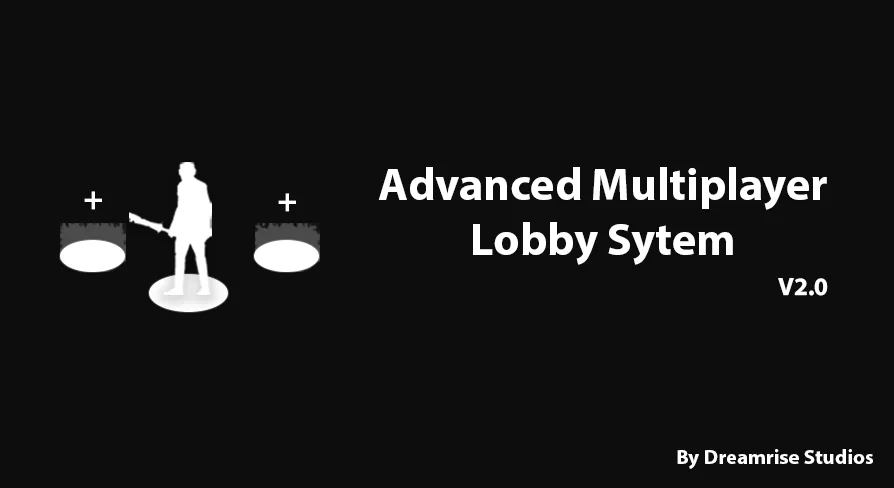
Visual staging in the system uses a spatial pod arrangement rather than static text lists. The environment is configured around a customizable number of player pods, giving developers direct control over how many participants can be displayed on screen simultaneously.
The system distinguishes between two distinct pod types:
Main Pod: Dedicated entirely to the local player's character, positioning the user at the visual center of their own staging screen.
Side Pods: Configured to populate dynamically as other players join the session, showing incoming party members in assigned slots around the host space.
This division separates local visual preferences from remote participant handling. As players connect or leave, the modular functions update the side pods accordingly. The spatial separation of the main character from incoming peers ensures that local customization, inspection, and menu focus remain distinct from the surrounding lobby roster.
Replicated Chat, Ready Checks, and Player Overview
Beyond visual staging, the package includes critical session management tools that regulate party interaction before launching gameplay. Communication is handled by an integrated chat system that allows participants to exchange messages in real time across the replicated session.
Coordination hinges on a built-in player readiness mechanic. Through the "waiting for players ready" sequence, the host and connected users can confirm match readiness, preventing premature session launches until participants flag that they are prepared. Alongside readiness checks, a player overview system gives users visibility into who is currently present in the lobby, providing a centralized interface to view member states and match information.
Lobby Customization and Menu Framework
Player personalization is handled directly within the staging area via an integrated customization system. Characters positioned on the main pod can be altered prior to starting a match, allowing players to tweak their appearance or loadout settings while remaining inside the interactive lobby space.
The interface suite also provides ready-to-use menu screens, including dedicated Options and Credits sections. The Options menu offers immediate hooks for standard game configuration toggles, while the Credits menu provides a clean template for attribution. Because the interface elements interface directly with the underlying Actor Component, layout adjustments can be made without breaking the underlying replication events.
Steam Subsystem Integration and Survival Framework Fit
Online connectivity in Advanced Multiplayer Lobby System V2 is based on Steam Subsystem integration. This enables session creation, lobby searching, invites, and network discovery using Steam's multiplayer infrastructure. Developers targeting platform-specific matchmaking can utilize these native calls directly out of the box.
While the lobby functions as a standalone, beginner-friendly asset, it is also fully integrated into the Ultimate Multiplayer Survival Pack (UMSP), also designated as the Ultimate Multiplayer Survival Engine (UMSE). Projects built on top of this survival framework utilize this exact lobby setup for handling server entry and player staging, demonstrating the system's capacity to scale into complex, production-ready survival game pipelines.
 Gameplay Features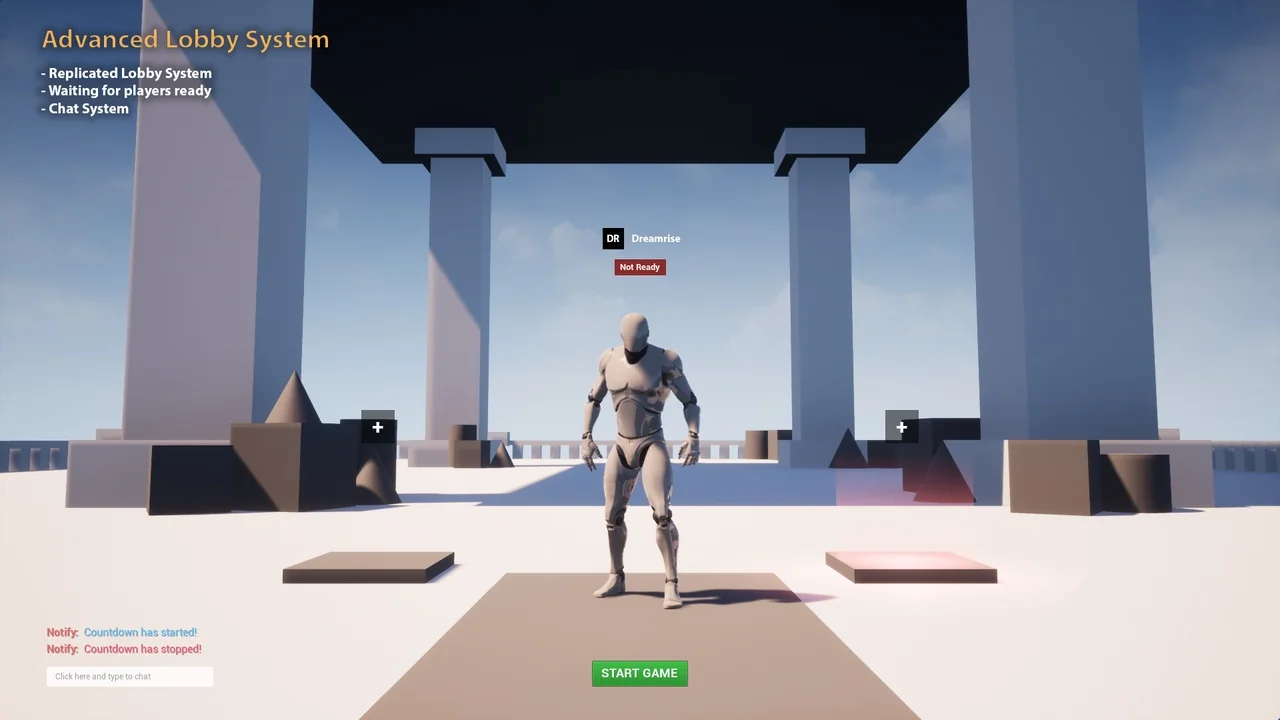
 Gameplay Features
 Gameplay Features
 Gameplay Features