"6f9bd6df1f44a86f"{"id":"1000802","slug":"chat-groups-guilds","title":"Chat Groups Guilds","category":"Gameplay Features","engine":"5.3+","assetVersion":"","engineVersion":"Engine Version: 5.3+","tag":"Gameplay Features","accent":"blue","visual":"mech","summary":"A multiplayer social system with text chat, groups, guilds, name plates, roles, permissions, and save support. Compatible with Survival Game Kit V2.","platform":"Unreal Engine","indexPolicy":"index","publishedAt":"2026-07-30T23:12:29.822Z","updatedAt":"2026-07-30T23:12:29.822Z","sourceNotes":[],"fileContents":[],"compatibility":["Unreal Engine","Engine Version: 5.3+"],"featuredImage":{"alt":"Chat Groups Guilds","src":"/wp-content/uploads/published/2026/07/74351ee7d0d4-643617b8-bdc9-43a2-ad0b-2c6c3e6e44e2-5a20d9f744.webp"},"hasDownloadLink":true,"downloads":0,"terms":[{"taxonomy":"category","slug":"gameplay-features","name":"Gameplay Features"}],"galleryImages":[{"src":"/wp-content/uploads/published/2026/07/3011f8c5d647-e28a2877-e15c-4c73-863b-0e8e4d5b2033-9e6ab955c2.webp","alt":"Chat Groups Guilds"},{"src":"/wp-content/uploads/published/2026/07/b525ecf2d4a7-3aa741e0-7cae-4e9b-afad-91ec228aa1e9-80ceb06e7e.webp","alt":"Chat Groups Guilds"},{"src":"/wp-content/uploads/published/2026/07/5fddeee5cf78-a1a950a1-6633-4426-a791-584c3fcd66e6-10ea0a97cf.webp","alt":"Chat Groups Guilds"},{"src":"/wp-content/uploads/published/2026/07/a318ea882d6f-4774679e-0c7a-40fa-87e3-75f7b0f99606-c1f6d4b766.webp","alt":"Chat Groups Guilds"},{"src":"/wp-content/uploads/published/2026/07/ac0a50b0e21b-bf041a0d-613b-4eeb-85c2-bea339bf366f-36b7d2038b.webp","alt":"Chat Groups Guilds"},{"src":"/wp-content/uploads/published/2026/07/cf2a1a5f7649-39d0698a-dd86-4bc6-82f9-81f92f811526-a856ed8ccb.webp","alt":"Chat Groups Guilds"},{"src":"/wp-content/uploads/published/2026/07/474de7cc4ede-86bbd6c2-658a-4946-9044-36d989eb5f73-f44d6f0647.webp","alt":"Chat Groups Guilds"},{"src":"/wp-content/uploads/published/2026/07/25245a9ea4fc-01b45c92-49bb-463f-809b-ecf6840db273-a387a206a4.webp","alt":"Chat Groups Guilds"},{"src":"/wp-content/uploads/published/2026/07/44a25ee1010a-a6308e7d-c537-4592-81ac-5b3b801317ba-788a7f62e9.webp","alt":"Chat Groups Guilds"},{"src":"/wp-content/uploads/published/2026/07/6864c9e7e689-27b3c636-8b40-4dd6-80fc-e5b7ffd15d3d-a9d7c0468b.webp","alt":"Chat Groups Guilds"}],"accessPanel":{"kind":"resource","title":"Download this resource","eyebrow":"Free Download","message":"Log in or create a free account to start your download.","fileName":"ChatGroupsGuilds.7z","safetyNote":"Resources are manually reviewed before listing to improve quality and reduce obvious risks.","actionLabel":"Download Free","resourceType":"Resource archive"},"contentHtml":"\u003cp\u003eBuilding a multiplayer game requires communication tools that go beyond simple global messaging. Teams need private channels, leadership hierarchies, and the ability to organize players into persistent factions. Setting up these systems from scratch involves complex networking logic for replication, invite handling, and role management.\u003c/p\u003e\n\n\u003cp\u003e\u003cem\u003eChat Groups Guilds\u003c/em\u003e is a complete social system designed to be dropped into an Unreal Engine project to handle these exact requirements. It functions as a Blueprint- and UMG-based (Unreal Motion Graphics) solution, bringing text chat, player groups, and full guild mechanics into a unified interface. The package is explicitly compatible with \u003cem\u003eSurvival Game Kit V2\u003c/em\u003e, making it a direct fit for creators already working within that framework.\u003c/p\u003e\n\n\u003ch2\u003eText Chat and Message Types in Multiplayer\u003c/h2\u003e\n\u003cp\u003eThe communication core relies on a multiplayer-supported text chat system that categorizes messages by delivery scope. Players can use \u003ccode\u003eWhisper\u003c/code\u003e for direct private messaging, \u003ccode\u003eSay\u003c/code\u003e for localized communication, and \u003ccode\u003eYell\u003c/code\u003e for wider area shouts. Global messaging is available for server-wide announcements.\u003c/p\u003e\n\n\u003cp\u003eGroup- and guild-level chat also integrates directly with the social framework. Players can send messages specifically to their Group or Guild, ensuring that faction-specific conversations remain isolated from public channels. To manage communication overflow, the system includes social settings that allow players to mute message sounds entirely.\u003c/p\u003e\n\n\u003ch2\u003eGroups and Guild Mechanics with Role Permissions\u003c/h2\u003e\n\u003cp\u003eBeyond basic messaging, the asset allows players to form temporary Groups and persistent Guilds. Group management includes options to \u003cstrong\u003ePromote\u003c/strong\u003e, \u003cstrong\u003eKick\u003c/strong\u003e, and \u003cstrong\u003eInvite\u003c/strong\u003e players, giving squad leaders basic organizational tools for team gameplay.\u003c/p\u003e\n\n\u003cp\u003eGuilds operate with a deeper administrative structure. Guild leaders can \u003cstrong\u003eRename\u003c/strong\u003e or \u003cstrong\u003eDelete\u003c/strong\u003e their guild, and set a \u003cstrong\u003eStarting Role\u003c/strong\u003e for new members. The system allows for the creation, removal, and renaming of specific Guild Roles. Each role can be assigned fine control over permissions, letting guild leaders dictate exactly who can manage the guild, invite others, or access specific guild functions.\u003c/p\u003e\n\n\u003ch3\u003eGuild Settings and Custom Nameplates\u003c/h3\u003e\n\u003cp\u003eIdentity is handled through customizable nameplates. The system allows nameplates to be added to any Actor in the game world, providing a way to display player names, titles, or roles dynamically. Players also have access to personal social settings, including the option to replace their displayed player name or block incoming invites entirely.\u003c/p\u003e\n\n\u003ch2\u003eSaving Social Data and Chat Commands\u003c/h2\u003e\n\u003cp\u003eRetention of social data is handled by an integrated Save System. This system records the state of Guilds and Groups, ensuring that factions persist across play sessions. It also saves individual player Social Settings, as well as Chat Layout and Chat Settings preferences. This prevents players from having to reconfigure their chat windows or guild structures every time they log in.\u003c/p\u003e\n\n\u003cp\u003eTo speed up interaction, the package includes a \u003ccode\u003eChat Commands\u003c/code\u003e system. Players can type commands directly into the chat box to \u003ccode\u003eQuit\u003c/code\u003e the game or \u003ccode\u003eBlock\u003c/code\u003e and \u003ccode\u003eUnblock\u003c/code\u003e other players. The command framework is built to be easily expandable, allowing developers to script new commands as needed.\u003c/p\u003e\n\n\u003ch2\u003eAdding the System to a Project Workflow\u003c/h2\u003e\n\u003cp\u003eIntegration is centered around ease of use. The package includes an \u003cstrong\u003eAll Players UI\u003c/strong\u003e panel, providing a clean and accessible interface for managing social interactions. The UI is built with customizable widgets, allowing developers to reskin the interface to match their specific art style.\u003c/p\u003e\n\n\u003cp\u003eThe underlying Blueprints are fully commented and documented, guiding developers through the implementation process. Because the system handles networking complexity internally—managing replicated data across zones and areas—it serves as a functional networking layer for communication.\u003c/p\u003e\n\n\u003cp\u003eFor developers working on multiplayer or online survival projects, particularly those using \u003cem\u003eSurvival Game Kit V2\u003c/em\u003e, this system fills the communication and organization gap. The included patch notes, showcase video, and documentation provide a starting point for implementation, mapping out how chat, groups, and guilds interact within the existing game framework.\u003c/p\u003e\n\n\u003ch2\u003eExplore Similar Assets\u003c/h2\u003e\n\u003cul\u003e\n\u003cli\u003e\u003ca href=\"https://3dcghub.com/fire-chat-pro-groups-pms-proximity-and-world-chat-with-adjustable-range/\" rel=\"noopener noreferrer\"\u003eFire Chat PRO – Groups, PMs, Proximity and World Chat with adjustable range\u003c/a\u003e\u003c/li\u003e\n\u003cli\u003e\u003ca href=\"https://3dcghub.com/mgt-multiplayer-gravity-template/\" rel=\"noopener noreferrer\"\u003eMGT Multiplayer Gravity Template\u003c/a\u003e\u003c/li\u003e\n\u003cli\u003e\u003ca href=\"https://3dcghub.com/multiplayer-object-throwing-system/\" rel=\"noopener noreferrer\"\u003eMultiplayer Object Throwing System\u003c/a\u003e\u003c/li\u003e\n\u003cli\u003e\u003ca href=\"https://3dcghub.com/time-system/\" rel=\"noopener noreferrer\"\u003eTime System\u003c/a\u003e\u003c/li\u003e\n\u003cli\u003e\u003ca href=\"https://3dcghub.com/replicated-interaction-kit-vol-1-switch-valve-chain-etc/\" rel=\"noopener noreferrer\"\u003eReplicated Interaction Kit Vol 1 (Switch, Valve, Chain etc.)\u003c/a\u003e\u003c/li\u003e\n\u003c/ul\u003e","contentTextLength":4468,"navigation":{"current":1562,"total":4218,"previous":{"id":"1000803","slug":"close-combat-swordsman","title":"Close Combat: Swordsman","category":"Gameplay Features","platform":"Unreal Engine","updatedAt":"2026-07-30T23:17:13.049Z"},"next":{"id":"1000801","slug":"cgr-pcc-pack","title":"CGr PCC Pack","category":"Guns","platform":"Unreal Engine","updatedAt":"2026-07-30T23:06:31.513Z"}},"relatedResources":[{"id":"15005","slug":"fire-chat-pro-groups-pms-proximity-and-world-chat-with-adjustable-range","title":"Fire Chat PRO – Groups, PMs, Proximity and World Chat with adjustable range","category":"Gameplay Features","engine":"5.3 - 5.7","assetVersion":"Engine version: 5.3 - 5.7","engineVersion":"Asset Version:1.0 - 1.3","tag":"Gameplay Features","accent":"blue","visual":"animation","summary":"Enhance your multiplayer project with Fire Chat PRO. This system offers unlimited channels, private messaging, and adjustable proximity chat for Unreal Engine developers.","platform":"Unreal Engine","indexPolicy":"index","publishedAt":"2026-03-12T07:22:05.000Z","updatedAt":"2026-04-19T15:45:37.000Z","sourceNotes":[],"fileContents":[],"compatibility":["Unreal Engine","Engine version: 5.3 - 5.7","Asset Version: 1.0 - 1.3"],"featuredImage":{"alt":"Fire Chat PRO – Groups, PMs, Proximity and World Chat with adjustable range","src":"https://3dcghub.com/wp-content/uploads/2026/03/8f314fa1-b51f-4e57-aeb3-ffbe08760427.webp"},"hasDownloadLink":true,"downloads":0},{"id":"1001938","slug":"advanced-multiplayer-lobby-system-v2","title":"Advanced Multiplayer Lobby System V2","category":"Gameplay Features","engine":"4.26+,5.0+","assetVersion":"","engineVersion":"Engine Version: 4.26+,5.0+","tag":"Gameplay Features","accent":"blue","visual":"mech","summary":"Explore Advanced Multiplayer Lobby System V2, featuring customizable player pods, Steam Subsystem integration, replicated chat, and modular Actor Components.","platform":"Unreal Engine","indexPolicy":"index","publishedAt":"2026-10-24T11:14:17.405Z","updatedAt":"2026-10-24T11:14:17.405Z","sourceNotes":[],"fileContents":[],"compatibility":["Unreal Engine","Engine Version: 4.26+,5.0+"],"featuredImage":{"alt":"Advanced Multiplayer Lobby System V2","src":"/wp-content/uploads/published/2026/10/bb90ebda1d38-fcf74666-81cc-481a-8f29-e136d71e0b58-08afe87973.webp"},"hasDownloadLink":true,"downloads":0},{"id":"1001711","slug":"ultimate-horse-system-horse-horse-riding-horse-system-mount-rideable-horse","title":"Ultimate Horse System (Horse, Horse Riding, Horse System, Mount, Rideable Horse)","category":"Gameplay Features","engine":"5.1+","assetVersion":"","engineVersion":"Engine Version: 5.1+","tag":"Gameplay Features","accent":"blue","visual":"mech","summary":"Explore the Ultimate Horse System for Unreal Engine, featuring full network replication, modular saddles, Foot IK, water interaction, and custom rider support.","platform":"Unreal Engine","indexPolicy":"index","publishedAt":"2026-10-14T17:15:39.983Z","updatedAt":"2026-10-14T17:15:39.983Z","sourceNotes":[],"fileContents":[],"compatibility":["Unreal Engine","Engine Version: 5.1+"],"featuredImage":{"alt":"Ultimate Horse System (Horse, Horse Riding, Horse System, Mount, Rideable Horse)","src":"/wp-content/uploads/published/2026/10/6dc76c7660f2-d252bb16-9c4e-4df7-8a68-0bb86ab4c882-eca349b4ab.webp"},"hasDownloadLink":true,"downloads":2}]}
Gameplay Features
Chat Groups Guilds
A multiplayer social system with text chat, groups, guilds, name plates, roles, permissions, and save support. Compatible with Survival Game Kit V2.
Building a multiplayer game requires communication tools that go beyond simple global messaging. Teams need private channels, leadership hierarchies, and the ability to organize players into persistent factions. Setting up these systems from scratch involves complex networking logic for replication, invite handling, and role management.
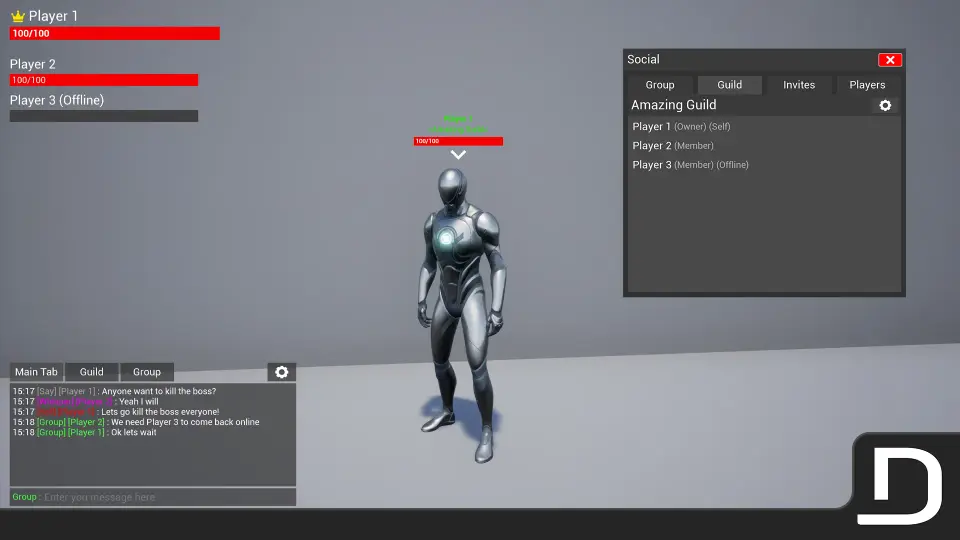
Chat Groups Guilds is a complete social system designed to be dropped into an Unreal Engine project to handle these exact requirements. It functions as a Blueprint- and UMG-based (Unreal Motion Graphics) solution, bringing text chat, player groups, and full guild mechanics into a unified interface. The package is explicitly compatible with Survival Game Kit V2, making it a direct fit for creators already working within that framework.
Text Chat and Message Types in Multiplayer
The communication core relies on a multiplayer-supported text chat system that categorizes messages by delivery scope. Players can use Whisper for direct private messaging, Say for localized communication, and Yell for wider area shouts. Global messaging is available for server-wide announcements.
Group- and guild-level chat also integrates directly with the social framework. Players can send messages specifically to their Group or Guild, ensuring that faction-specific conversations remain isolated from public channels. To manage communication overflow, the system includes social settings that allow players to mute message sounds entirely.
Groups and Guild Mechanics with Role Permissions
Beyond basic messaging, the asset allows players to form temporary Groups and persistent Guilds. Group management includes options to Promote, Kick, and Invite players, giving squad leaders basic organizational tools for team gameplay.
Guilds operate with a deeper administrative structure. Guild leaders can Rename or Delete their guild, and set a Starting Role for new members. The system allows for the creation, removal, and renaming of specific Guild Roles. Each role can be assigned fine control over permissions, letting guild leaders dictate exactly who can manage the guild, invite others, or access specific guild functions.
Guild Settings and Custom Nameplates
Identity is handled through customizable nameplates. The system allows nameplates to be added to any Actor in the game world, providing a way to display player names, titles, or roles dynamically. Players also have access to personal social settings, including the option to replace their displayed player name or block incoming invites entirely.
Saving Social Data and Chat Commands
Retention of social data is handled by an integrated Save System. This system records the state of Guilds and Groups, ensuring that factions persist across play sessions. It also saves individual player Social Settings, as well as Chat Layout and Chat Settings preferences. This prevents players from having to reconfigure their chat windows or guild structures every time they log in.
To speed up interaction, the package includes a Chat Commands system. Players can type commands directly into the chat box to Quit the game or Block and Unblock other players. The command framework is built to be easily expandable, allowing developers to script new commands as needed.
Adding the System to a Project Workflow
Integration is centered around ease of use. The package includes an All Players UI panel, providing a clean and accessible interface for managing social interactions. The UI is built with customizable widgets, allowing developers to reskin the interface to match their specific art style.
The underlying Blueprints are fully commented and documented, guiding developers through the implementation process. Because the system handles networking complexity internally—managing replicated data across zones and areas—it serves as a functional networking layer for communication.
For developers working on multiplayer or online survival projects, particularly those using Survival Game Kit V2, this system fills the communication and organization gap. The included patch notes, showcase video, and documentation provide a starting point for implementation, mapping out how chat, groups, and guilds interact within the existing game framework.
 Gameplay Features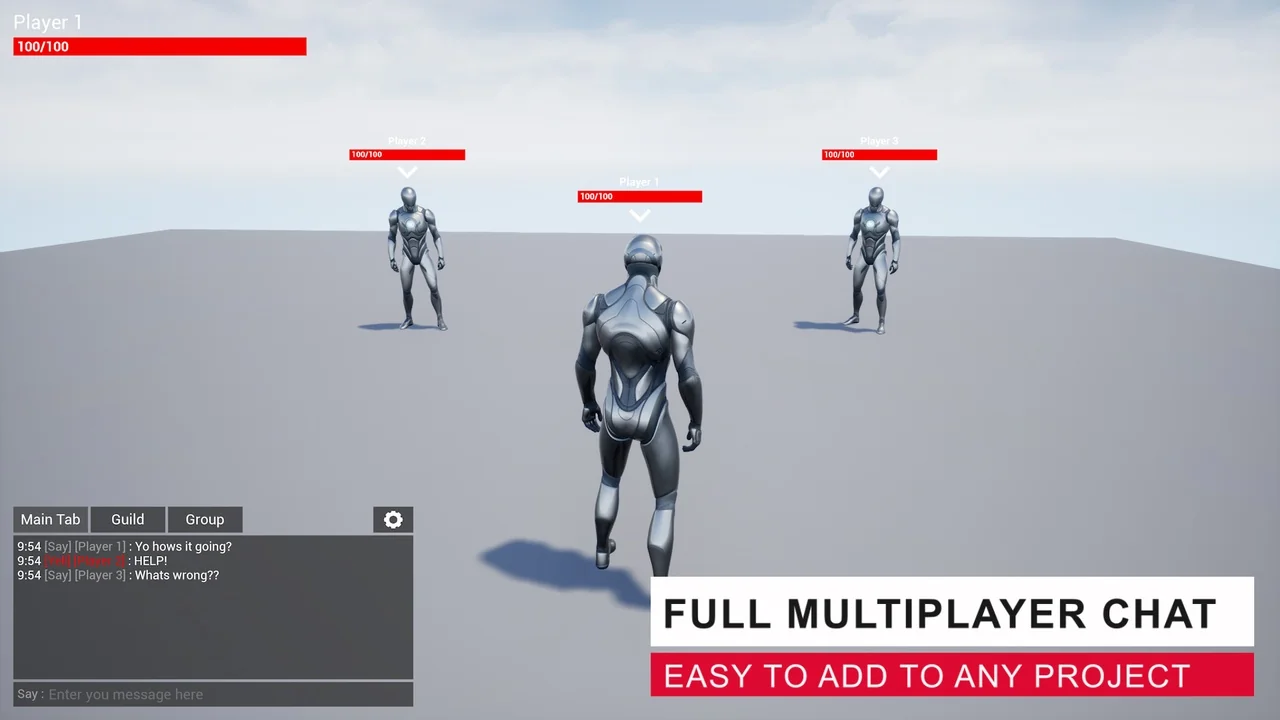
 Gameplay Features
 Gameplay Features
 Gameplay Features