"c68a05d5e51405b3"{"id":"1000698","slug":"time-system","title":"Time System","category":"Gameplay Features","engine":"5.1+","assetVersion":"","engineVersion":"Engine Version: 5.1+","tag":"Gameplay Features","accent":"blue","visual":"mech","summary":"A blueprint-based time management system for Unreal Engine featuring day/night cycles, multiplayer replication, save/load persistence, and sample Niagara spawne","platform":"Unreal Engine","publishedAt":"2026-07-23T17:19:44.409Z","updatedAt":"2026-07-23T17:19:44.409Z","sourceNotes":[],"fileContents":[],"compatibility":["Unreal Engine","Engine Version: 5.1+"],"featuredImage":{"alt":"Time System","src":"/wp-content/uploads/published/2026/07/8217e9535d8a-4749283a-6af3-4d3b-8a67-2347e754444e-73bc9235d6.webp"},"hasDownloadLink":true,"downloads":0,"terms":[{"taxonomy":"category","slug":"gameplay-features","name":"Gameplay Features"}],"galleryImages":[{"src":"/wp-content/uploads/published/2026/07/0f10e77360dd-64f2996f-fedc-4192-9ea7-260aeebeab5e-7b4641dab0.webp","alt":"Time System"},{"src":"/wp-content/uploads/published/2026/07/4b4446c4b692-47c5f3b2-8a7d-4eb0-970e-ab0e22830bbb-f59e095f7e.webp","alt":"Time System"},{"src":"/wp-content/uploads/published/2026/07/bbbac8fd260f-396e35a9-42de-4495-ae50-00cc4962ff31-2008268003.webp","alt":"Time System"},{"src":"/wp-content/uploads/published/2026/07/05ebb4969d4b-a1b9506d-dea7-4aef-8026-aef33e421e09-553ebee387.webp","alt":"Time System"},{"src":"/wp-content/uploads/published/2026/07/338c1770d85a-8fca5b69-d54f-4752-8893-749c40b4dd6a-1b55c4b0b5.webp","alt":"Time System"},{"src":"/wp-content/uploads/published/2026/07/a967b49cb51f-fcbafa89-eb0f-48f8-ba5a-c2e6a2e367ef-d436c33e7c.webp","alt":"Time System"},{"src":"/wp-content/uploads/published/2026/07/d1e3a036d20b-ab1e6c27-1fb4-45ec-b45d-451663eacd75-e43cab3740.webp","alt":"Time System"},{"src":"/wp-content/uploads/published/2026/07/3ef32c04c780-6999d1ae-9f42-4066-a028-2b8fdb29c46d-50546fe2a8.webp","alt":"Time System"},{"src":"/wp-content/uploads/published/2026/07/431d12a291b5-a0730f4f-ecd4-4305-8697-8f248259238d-1621e0bd7b.webp","alt":"Time System"},{"src":"/wp-content/uploads/published/2026/07/3a06b066495f-dcfa3c14-6815-41a7-9d2a-f9fbd4ce14f0-1bbd9bc673.webp","alt":"Time System"}],"accessPanel":{"kind":"resource","title":"Download this resource","eyebrow":"Free Download","message":"Log in or create a free account to start your download.","fileName":"Content.7z","safetyNote":"Resources are manually reviewed before listing to improve quality and reduce obvious risks.","actionLabel":"Download Free","resourceType":"Resource archive"},"contentHtml":"\u003cp\u003eSetting up time logic in an Unreal Engine project often means wiring together clocks, lighting, and save systems from scratch. Time System approaches this by providing a central Blueprint that tracks and manages time, then exposing its functions and event dispatchers so other actors can respond. The included demo world demonstrates how these pieces connect, giving developers a working reference for the full setup process.\u003c/p\u003e\n\n\n\u003ch2\u003eCore Time Blueprint and Custom Timeline Setup\u003c/h2\u003e\n\u003cp\u003eAt the center of the package is the main Blueprint, responsible for tracking and managing time in the world. Developers can choose between syncing to real-life time or building a custom timeline. The custom timeline mode lets you define a starting point and then control playback by speeding up, slowing down, or pausing time. Instant jumps forward and backward through time are also supported, which is useful for testing or for gameplay mechanics that skip ahead.\u003c/p\u003e\n\n\u003cp\u003eThe main Blueprint is populated with functions and event dispatchers intended for custom time-driven logic. Rather than locking interaction behind a closed system, it exposes points where you can hook in your own Blueprints. The examples bundled with the asset show exactly how to use and interact with this main Blueprint, making the integration path clearer.\u003c/p\u003e\n\n\u003ch3\u003eSave, Load, and Cross-Level Persistence\u003c/h3\u003e\n\u003cp\u003eTime System includes an optional, automatic save and load system. When enabled, custom time can persist between play sessions and across different levels. This means a player can leave a session, return later, and find the world's clock in the state they left it in. The system handles this automatically rather than requiring manual save calls for the time variable itself.\u003c/p\u003e\n\n\n\u003ch2\u003eDay/Night Sky Rotation and Lighting Effects\u003c/h2\u003e\n\u003cp\u003eThe Sky Rotator component rotates two directional lights in the sky to produce a realistic day-and-night cycle. This pairs the time value directly with lighting orientation, so the sun and moon positions shift as the clock advances. The system is also noted as compatible with updating Ultra Dynamic Sky, extending its usefulness for projects that already rely on that asset for sky and weather rendering.\u003c/p\u003e\n\n\n\u003cp\u003eBeyond lighting direction, the package includes several time-driven lighting and audio components:\u003c/p\u003e\n\u003cul\u003e\n\u003cli\u003e\u003cstrong\u003eOn/Off Light Switch:\u003c/strong\u003e Toggles lights based on the current time.\u003c/li\u003e\n\u003cli\u003e\u003cstrong\u003eLight Color Fader:\u003c/strong\u003e Drives color transitions on lights according to the time of day.\u003c/li\u003e\n\u003cli\u003e\u003cstrong\u003eAmbient Sound Switch:\u003c/strong\u003e Swaps ambient audio based on time conditions.\u003c/li\u003e\n\u003cli\u003e\u003cstrong\u003eCustom Blueprint On/Off Switch:\u003c/strong\u003e A generic solution for toggling any Blueprint on or off using time as the trigger.\u003c/li\u003e\n\u003c/ul\u003e\n\n\u003cp\u003eThese components cover the most common environmental reactions to time progression without requiring custom event wiring for each one.\u003c/p\u003e\n\n\u003ch2\u003eSpawners, Clocks, and Interactive Time Objects\u003c/h2\u003e\n\u003cp\u003eTime System includes several Blueprints that demonstrate time-driven interaction in concrete ways. The bed Blueprint detects when a player overlaps it and jumps the clock ahead to the next specific point in time, displaying a sleep UI overlay during the transition. This provides a built-in template for rest or fast-forward mechanics commonly seen in open-world games.\u003c/p\u003e\n\n\n\u003cp\u003eThe Time of Day spawner can spawn custom Blueprints and Niagara systems at defined points in the cycle. Three Niagara systems are included: fireflies, colorflies, and butterflies. These serve as ready-made examples of environmental particle effects that appear or disappear based on the current time.\u003c/p\u003e\n\n\n\u003cp\u003eFor displaying time to the player, the asset provides customizable digital and analog clock examples, along with a small watch example. A Time HUD Blueprint shows the current time on screen through a UI element. These display options can be dropped into a project and adjusted without building the clock face or HUD logic from scratch.\u003c/p\u003e\n\n\u003ch3\u003eThe Time Machine and Actor Rotation\u003c/h3\u003e\n\u003cp\u003eA component called the Time Machine rotates actors in the level at a set rate determined by the current speed multiplier. This means any actor placed under its influence will rotate faster or slower as the time scale changes. It offers a visual or gameplay element tied directly to the time system's core multiplier.\u003c/p\u003e\n\n\n\u003ch2\u003eMultiplayer Replication and Demo World\u003c/h2\u003e\n\u003cp\u003eEverything in Time System is already replicated for multiplayer. The time value, day/night state, and time-driven events are synchronized across the network, so all connected clients see the same clock and environmental behavior. For single-player projects, this replication layer is invisible, but for multiplayer titles it removes the need to build custom time synchronization.\u003c/p\u003e\n\n\n\u003cp\u003eThe demo world shows how all the included systems work together. It acts as a playable sandbox where developers can observe the Sky Rotator, spawners, clocks, switches, and HUD operating simultaneously. The demo world is also available as a downloadable Windows build, allowing you to try the system before integrating it into a project.\u003c/p\u003e\n\n\u003ch2\u003eDocumentation, Tutorials, and Version 2 Notes\u003c/h2\u003e\n\u003cp\u003eThe Blueprints in the package are clean and commented throughout, which makes reading and modifying the logic straightforward. The documentation is described as extensive and easy to follow, covering setup and usage for all included features. Step-by-step setup guides and tutorial videos are available, and the documentation can be viewed without any verification or login.\u003c/p\u003e\n\n\u003cp\u003eVersion 2 of Time System is now available. Developers upgrading from version 1 are advised to review the documentation, as significant changes have been made between versions. This ensures existing projects migrate correctly to the updated framework.\u003c/p\u003e\n\n\u003ch2\u003eWho Benefits from Time System\u003c/h2\u003e\n\u003cp\u003eThis asset is suited for developers building open-world games, simulation projects, or any Unreal Engine experience where time progression drives lighting, audio, spawning, and gameplay logic. Projects that need a synchronized day/night cycle in multiplayer, persistent save states across levels, or ready-made environmental reactions to time will find the included components directly applicable. The combination of a central Time Blueprint, event dispatchers, and example Blueprints means teams can start with a working time framework and extend it with custom logic rather than building the foundation themselves.\u003c/p\u003e\n\n\u003ch2\u003eContinue Browsing Similar Packs\u003c/h2\u003e\n\u003cul\u003e\n\u003cli\u003e\u003ca href=\"https://3dcghub.com/data-array-visualizers/\" title=\"Data Array Visualizers\"\u003eData Array Visualizers\u003c/a\u003e\u003c/li\u003e\n\u003cli\u003e\u003ca href=\"https://3dcghub.com/teleportation-and-portal/\" title=\"Teleportation and Portal\"\u003eTeleportation and Portal\u003c/a\u003e\u003c/li\u003e\n\u003cli\u003e\u003ca href=\"https://3dcghub.com/interactive-water-ocean-and-swim-systems/\" title=\"Interactive Water, Ocean and Swim Systems\"\u003eInteractive Water, Ocean and Swim Systems\u003c/a\u003e\u003c/li\u003e\n\u003cli\u003e\u003ca href=\"https://3dcghub.com/powerline-generator/\" title=\"Powerline Generator\"\u003ePowerline Generator\u003c/a\u003e\u003c/li\u003e\n\u003cli\u003e\u003ca href=\"https://3dcghub.com/vr-input-recorder/\" title=\"VR Input Recorder\"\u003eVR Input Recorder\u003c/a\u003e\u003c/li\u003e\n\u003c/ul\u003e","contentTextLength":6370,"navigation":{"current":1305,"total":3860,"previous":{"id":"1000699","slug":"toolshed-combo-prop-pack-vol-1-6","title":"Toolshed - COMBO Prop Pack (VOL 1-6)","category":"Hardware","platform":"Unreal Engine","updatedAt":"2026-07-23T23:53:28.594Z"},"next":{"id":"1000341","slug":"smart-shooting-npc-and-player-projectile-target-prediction-and-ballistic-system","title":"Smart Shooting - NPC \u0026 Player Projectile Target Prediction \u0026 Ballistic System","category":"Game Mechanics","platform":"Unreal Engine","updatedAt":"2026-07-23T16:54:01.327Z"}},"relatedResources":[{"id":"1001419","slug":"3d-dynamicdatacubechart-01","title":"3D DynamicDataCubeChart 01","category":"Gameplay Features","engine":"5.2+","assetVersion":"","engineVersion":"Engine Version: 5.2+","tag":"Gameplay Features","accent":"blue","visual":"mech","summary":"Configure 3D DynamicDataCubeChart 01 for real-time data visualization in virtual studios using Substrate shaders, Text3D, and dynamic cube arrays.","platform":"Unreal Engine","publishedAt":"2026-10-06T14:59:05.834Z","updatedAt":"2026-10-06T14:59:05.834Z","sourceNotes":[],"fileContents":[],"compatibility":["Unreal Engine","Engine Version: 5.2+"],"featuredImage":{"alt":"3D DynamicDataCubeChart 01","src":"/wp-content/uploads/published/2026/10/c0627c29c04e-fcf13a10-2b56-4f0d-9542-15991e2ba98b-5890c4ca73.webp"},"hasDownloadLink":true,"downloads":0},{"id":"1001035","slug":"hyper-time-manager-system-v4","title":"Hyper Time Manager System v4","category":"Gameplay Features","engine":"5.7+","assetVersion":"Asset Version: v4","engineVersion":"Engine Version: 5.7+","tag":"Gameplay Features","accent":"blue","visual":"mech","summary":"Hyper Time Manager System v4 centralizes in-game time in the GameState, syncing NPC schedules, day-night cycles, and world events with Blueprint, multiplayer-re","platform":"Unreal Engine","publishedAt":"2026-08-25T11:24:46.098Z","updatedAt":"2026-08-25T11:24:46.098Z","sourceNotes":[],"fileContents":[],"compatibility":["Unreal Engine","Asset Version: v4","Engine Version: 5.7+"],"featuredImage":{"alt":"Hyper Time Manager System v4","src":"/wp-content/uploads/published/2026/08/0c6d2b9b85f3-d2a03156-4b13-4068-b29a-47eca06cd2d2-7cea1ff9c1.webp"},"hasDownloadLink":true,"downloads":2},{"id":"10708","slug":"data-array-visualizers","title":"Data Array Visualizers","category":"Gameplay Features","engine":"5.1+","assetVersion":"Engine version: 5.1+","engineVersion":"5.0","tag":"Gameplay Features","accent":"blue","visual":"city","summary":"Enhance your project's visual quality with 12 high-quality Niagara VFX designed to visualize data arrays in real-time. This game-ready pack is easy to customize and requires no advanced blueprinting knowledge.","platform":"Unreal Engine","publishedAt":"2026-03-03T16:01:56.000Z","updatedAt":"2026-04-19T15:49:57.000Z","sourceNotes":[],"fileContents":[],"compatibility":["Unreal Engine","Engine version: 5.1+"],"featuredImage":{"alt":"Data Array Visualizers","src":"https://3dcghub.com/wp-content/uploads/2026/03/eab0b72c-cf2f-4a85-bee0-0981c6073e80.webp"},"hasDownloadLink":true,"downloads":0}]}
Gameplay Features
Time System
A blueprint-based time management system for Unreal Engine featuring day/night cycles, multiplayer replication, save/load persistence, and sample Niagara spawne
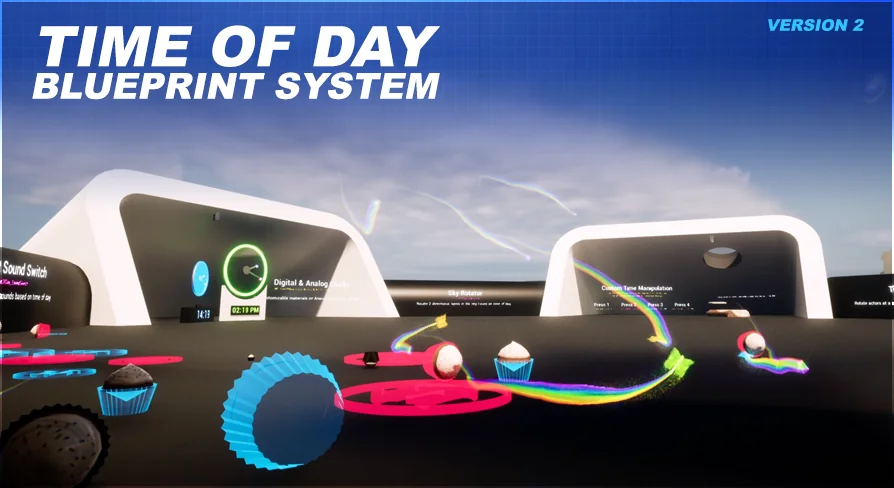
Setting up time logic in an Unreal Engine project often means wiring together clocks, lighting, and save systems from scratch. Time System approaches this by providing a central Blueprint that tracks and manages time, then exposing its functions and event dispatchers so other actors can respond. The included demo world demonstrates how these pieces connect, giving developers a working reference for the full setup process.
Core Time Blueprint and Custom Timeline Setup
At the center of the package is the main Blueprint, responsible for tracking and managing time in the world. Developers can choose between syncing to real-life time or building a custom timeline. The custom timeline mode lets you define a starting point and then control playback by speeding up, slowing down, or pausing time. Instant jumps forward and backward through time are also supported, which is useful for testing or for gameplay mechanics that skip ahead.
The main Blueprint is populated with functions and event dispatchers intended for custom time-driven logic. Rather than locking interaction behind a closed system, it exposes points where you can hook in your own Blueprints. The examples bundled with the asset show exactly how to use and interact with this main Blueprint, making the integration path clearer.
Save, Load, and Cross-Level Persistence
Time System includes an optional, automatic save and load system. When enabled, custom time can persist between play sessions and across different levels. This means a player can leave a session, return later, and find the world's clock in the state they left it in. The system handles this automatically rather than requiring manual save calls for the time variable itself.
Day/Night Sky Rotation and Lighting Effects
The Sky Rotator component rotates two directional lights in the sky to produce a realistic day-and-night cycle. This pairs the time value directly with lighting orientation, so the sun and moon positions shift as the clock advances. The system is also noted as compatible with updating Ultra Dynamic Sky, extending its usefulness for projects that already rely on that asset for sky and weather rendering.
Beyond lighting direction, the package includes several time-driven lighting and audio components:
On/Off Light Switch: Toggles lights based on the current time.
Light Color Fader: Drives color transitions on lights according to the time of day.
Ambient Sound Switch: Swaps ambient audio based on time conditions.
Custom Blueprint On/Off Switch: A generic solution for toggling any Blueprint on or off using time as the trigger.
These components cover the most common environmental reactions to time progression without requiring custom event wiring for each one.
Spawners, Clocks, and Interactive Time Objects
Time System includes several Blueprints that demonstrate time-driven interaction in concrete ways. The bed Blueprint detects when a player overlaps it and jumps the clock ahead to the next specific point in time, displaying a sleep UI overlay during the transition. This provides a built-in template for rest or fast-forward mechanics commonly seen in open-world games.
The Time of Day spawner can spawn custom Blueprints and Niagara systems at defined points in the cycle. Three Niagara systems are included: fireflies, colorflies, and butterflies. These serve as ready-made examples of environmental particle effects that appear or disappear based on the current time.
For displaying time to the player, the asset provides customizable digital and analog clock examples, along with a small watch example. A Time HUD Blueprint shows the current time on screen through a UI element. These display options can be dropped into a project and adjusted without building the clock face or HUD logic from scratch.
The Time Machine and Actor Rotation
A component called the Time Machine rotates actors in the level at a set rate determined by the current speed multiplier. This means any actor placed under its influence will rotate faster or slower as the time scale changes. It offers a visual or gameplay element tied directly to the time system's core multiplier.
Multiplayer Replication and Demo World
Everything in Time System is already replicated for multiplayer. The time value, day/night state, and time-driven events are synchronized across the network, so all connected clients see the same clock and environmental behavior. For single-player projects, this replication layer is invisible, but for multiplayer titles it removes the need to build custom time synchronization.
The demo world shows how all the included systems work together. It acts as a playable sandbox where developers can observe the Sky Rotator, spawners, clocks, switches, and HUD operating simultaneously. The demo world is also available as a downloadable Windows build, allowing you to try the system before integrating it into a project.
Documentation, Tutorials, and Version 2 Notes
The Blueprints in the package are clean and commented throughout, which makes reading and modifying the logic straightforward. The documentation is described as extensive and easy to follow, covering setup and usage for all included features. Step-by-step setup guides and tutorial videos are available, and the documentation can be viewed without any verification or login.
Version 2 of Time System is now available. Developers upgrading from version 1 are advised to review the documentation, as significant changes have been made between versions. This ensures existing projects migrate correctly to the updated framework.
Who Benefits from Time System
This asset is suited for developers building open-world games, simulation projects, or any Unreal Engine experience where time progression drives lighting, audio, spawning, and gameplay logic. Projects that need a synchronized day/night cycle in multiplayer, persistent save states across levels, or ready-made environmental reactions to time will find the included components directly applicable. The combination of a central Time Blueprint, event dispatchers, and example Blueprints means teams can start with a working time framework and extend it with custom logic rather than building the foundation themselves.
 Gameplay Features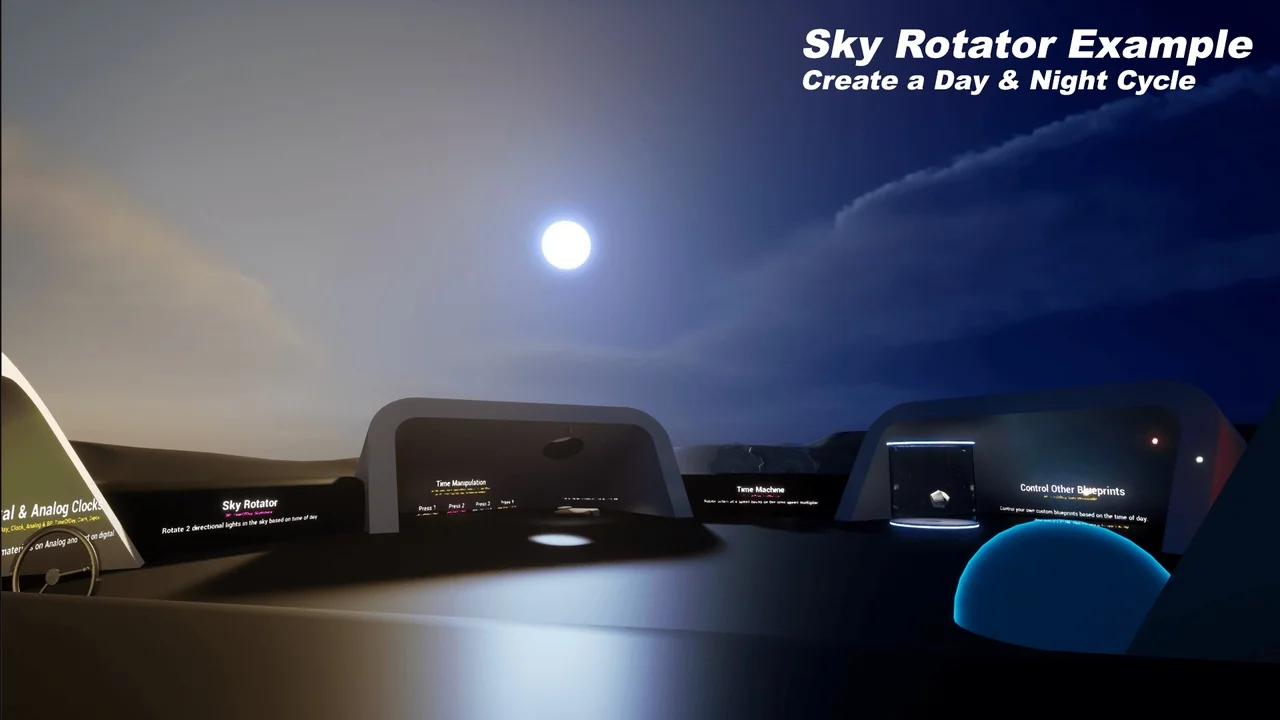
 Gameplay Features
 Gameplay Features
 Gameplay Features