"7e6fc58c410f2894"{"id":"1000437","slug":"powerline-generator","title":"Powerline Generator","category":"Gameplay Features","engine":"5.1+","assetVersion":"","engineVersion":"Engine Version: 5.1+","tag":"Gameplay Features","accent":"blue","visual":"mech","summary":"Unreal Engine 5 blueprint tool for generating powerline networks with spline controls, dynamic pole materials, cable physics, wind effects, and electric box bra","platform":"Unreal Engine","publishedAt":"2026-07-10T22:27:14.786Z","updatedAt":"2026-07-10T22:27:14.786Z","sourceNotes":[],"fileContents":[],"compatibility":["Unreal Engine","Engine Version: 5.1+"],"featuredImage":{"alt":"Powerline Generator","src":"/wp-content/uploads/published/2026/07/e62e48e2d844-a38d6222-1e25-420d-ac8a-30e5a3852fed-e38e3054db.webp"},"hasDownloadLink":true,"downloads":0,"terms":[{"taxonomy":"category","slug":"gameplay-features","name":"Gameplay Features"}],"galleryImages":[{"src":"/wp-content/uploads/published/2026/07/834cf13a74c3-d131fec4-46c3-4aa8-a475-2b2ddd7eaca3-1137a896a3.webp","alt":"Powerline Generator"},{"src":"/wp-content/uploads/published/2026/07/b7d3a78ce5f2-fa261684-f569-40ed-baa0-77fbeea7867b-984e5caa8d.webp","alt":"Powerline Generator"},{"src":"/wp-content/uploads/published/2026/07/1e2243081c20-6b104c60-cf15-439f-8966-7675741ea6b5-89fb890ec6.webp","alt":"Powerline Generator"},{"src":"/wp-content/uploads/published/2026/07/691f35db4615-53e408a4-bd2b-426f-9ab6-fbd34e8d3aef-96df7e7f73.webp","alt":"Powerline Generator"},{"src":"/wp-content/uploads/published/2026/07/244a41c35cc2-8d93d22b-afc9-4bfd-b1db-e4bd440de42b-baa210a1db.webp","alt":"Powerline Generator"},{"src":"/wp-content/uploads/published/2026/07/6a59f4878a5e-4cfa8cf6-f083-4df1-9d09-7fb99ddfa9fc-468b0405b3.webp","alt":"Powerline Generator"},{"src":"/wp-content/uploads/published/2026/07/1b54c5c09198-c711b968-73e2-4e81-bef6-fab9b15aee34-4de63a4412.webp","alt":"Powerline Generator"},{"src":"/wp-content/uploads/published/2026/07/ae192965ccfc-8e071f1f-2a2c-4ad9-8c5e-c64e7e59beb4-f8e87383a2.webp","alt":"Powerline Generator"},{"src":"/wp-content/uploads/published/2026/07/50f0996b3528-5bd6ad61-f51c-44a7-913f-3e2194478f4d-7556858a2a.webp","alt":"Powerline Generator"},{"src":"/wp-content/uploads/published/2026/07/299e99a59be3-0fe50cc8-c464-45bc-9e4b-6ed107ce9c3f-2cc95a0790.webp","alt":"Powerline Generator"}],"accessPanel":{"kind":"resource","title":"Download this resource","eyebrow":"Free Download","message":"Log in or create a free account to start your download.","fileName":"Content.7z","safetyNote":"Resources are manually reviewed before listing to improve quality and reduce obvious risks.","actionLabel":"Download Free","resourceType":"Resource archive"},"contentHtml":"\u003cp\u003eStringing powerlines across an open world map by hand quickly turns into an exercise in frustration. Each pole needs precise placement, every cable requires careful tension tuning, and branching connections between different power runs rarely stay tidy. Powerline Generator addresses this directly as an Unreal Engine 5 blueprint tool, letting developers shape electrical networks through a spline interface rather than manual vertex pushing.\u003c/p\u003e \u003cp\u003eThe blueprint is aimed at projects that need believable electrical infrastructure without the labor of building it piece by piece. You drag the blueprint into a level, use the built-in spline components to trace the route, and the tool handles the generation of the poles and cables along that path. This drag-and-drop setup is the core of the workflow, turning what would normally be a tedious environment dressing task into a single editable line.\u003c/p\u003e \u003ch2\u003eShaping Networks with Spline and Pole Controls\u003c/h2\u003e \u003cp\u003eBecause the generation runs through a spline system, any adjustments to the powerline route happen directly in the viewport. Moving a spline point shifts the connected poles and re-runs the cable layout. The tool provides a variety of pole types to choose from, and you can mix and match different varieties within the same network rather than being locked to a single mesh style across a whole scene.\u003c/p\u003e \u003cp\u003eIf a project demands custom assets, the blueprint supports mesh integration. Developers can slot in their own pole and electric box meshes, keeping the generator useful even when a game or film has a distinct art direction that the default meshes cannot serve. This scalability ensures the tool adapts to different visual styles rather than forcing a uniform look.\u003c/p\u003e \u003cp\u003eVisual customization extends to the materials themselves. Pole colors can be adjusted using Dynamic Material Instances. This makes it possible to create distinct visual effects for the infrastructure, differentiating weathered utility poles from newer installations, or simply matching a specific regional power standard color scheme across a sprawling map.\u003c/p\u003e \u003ch2\u003eSimulating Cable Physics and Environmental Shake\u003c/h2\u003e \u003cp\u003eStatic cables often look artificial when stretched between poles. The generator approaches this with cable physics settings that simulate realistic behavior. Gravity and length variations are exposed as parameters, allowing the cables to sag and settle along their spans in a way that mimics real-world tension distribution.\u003c/p\u003e \u003cp\u003eThe physics system also accounts for specific environmental contexts. It includes settings for underwater poles, letting cables behave differently when running through submerged sections of a network. Alongside this, there are options for managing disconnected cables, adding loose or broken segments that interact with the scene rather than having every line sit perfectly intact.\u003c/p\u003e \u003cp\u003eFor dynamic scenes, wind and shake effects bring further motion. The generation simulates environmental forces, making the poles shake and the cables sway as if caught in a gust, useful for cinematic shots or gameplay sequences set during storms.\u003c/p\u003e \u003ch2\u003eBranching Electric Boxes and Inter Powerline Linking\u003c/h2\u003e \u003cp\u003eReal power grids do not run in straight lines indefinitely. They split at junction boxes and cross over to other branches. The tool models this complexity with electric box branching, connecting poles to branching points that route power into different directions. This creates more complex powerline network topologies than a single linear run.\u003c/p\u003e \u003cp\u003eFor expansive environments, the generator supports inter powerline branching. Multiple separate powerlines can be linked together, bridging what would otherwise be isolated segments into a single connected electrical system.\u003c/p\u003e \u003cp\u003eRecent updates fixed a bug in version 5.4.2, and the asset includes feature showcases and comprehensive documentation. For developers laying out rural roads, urban backdrops, industrial sites, or flood-prone environments, the generator fits where believable overhead power infrastructure is required. Animators and filmmakers will find the wind, shake, and cable physics parameters useful for sequences where ambient motion sells the realism of the environment.\u003c/p\u003e\n\n\u003ch2\u003eMore From The Same Workflow\u003c/h2\u003e\n\u003cul\u003e\n\u003cli\u003e\u003ca href=\"https://3dcghub.com/teleportation-and-portal/\" title=\"Teleportation and Portal\"\u003eTeleportation and Portal\u003c/a\u003e\u003c/li\u003e\n\u003cli\u003e\u003ca href=\"https://3dcghub.com/interactive-water-ocean-and-swim-systems/\" title=\"Interactive Water, Ocean and Swim Systems\"\u003eInteractive Water, Ocean and Swim Systems\u003c/a\u003e\u003c/li\u003e\n\u003cli\u003e\u003ca href=\"https://3dcghub.com/customizable-bodycam-component/\" title=\"Customizable Bodycam Component\"\u003eCustomizable Bodycam Component\u003c/a\u003e\u003c/li\u003e\n\u003cli\u003e\u003ca href=\"https://3dcghub.com/universal-shooting-game-template-and-framework/\" title=\"Universal Shooting Game Template and Framework\"\u003eUniversal Shooting Game Template and Framework\u003c/a\u003e\u003c/li\u003e\n\u003cli\u003e\u003ca href=\"https://3dcghub.com/experience-system/\" title=\"Experience System\"\u003eExperience System\u003c/a\u003e\u003c/li\u003e\n\u003c/ul\u003e","contentTextLength":4344,"navigation":{"current":1320,"total":3618,"previous":{"id":"1000438","slug":"roll-and-dash-animation","title":"Roll and Dash Animation","category":"Locomotion / Gaits","platform":"Unreal Engine","updatedAt":"2026-07-10T22:31:05.674Z"},"next":{"id":"1000436","slug":"physics-platformer-toolkit","title":"Physics Platformer Toolkit","category":"Physics","platform":"Unreal Engine","updatedAt":"2026-07-10T22:22:57.642Z"}},"relatedResources":[{"id":"1001307","slug":"ultimate-spell-system","title":"Ultimate Spell System","category":"Gameplay Features","engine":"5.1+","assetVersion":"","engineVersion":"Engine Version: 5.1+","tag":"Gameplay Features","accent":"blue","visual":"mech","summary":"Explore the Ultimate Spell System, an advanced magic framework featuring Niagara integration, multiplayer support, mana, shields, and spellbook mechanics.","platform":"Unreal Engine","publishedAt":"2026-10-02T06:21:12.194Z","updatedAt":"2026-10-02T06:21:12.194Z","sourceNotes":[],"fileContents":[],"compatibility":["Unreal Engine","Engine Version: 5.1+"],"featuredImage":{"alt":"Ultimate Spell System","src":"/wp-content/uploads/published/2026/10/b765acfa374d-8db4a436-8f55-46de-a8d5-84bd16177dcd-b3cdaaff6f.webp"},"hasDownloadLink":true,"downloads":0},{"id":"1000698","slug":"time-system","title":"Time System","category":"Gameplay Features","engine":"5.1+","assetVersion":"","engineVersion":"Engine Version: 5.1+","tag":"Gameplay Features","accent":"blue","visual":"mech","summary":"A blueprint-based time management system for Unreal Engine featuring day/night cycles, multiplayer replication, save/load persistence, and sample Niagara spawne","platform":"Unreal Engine","publishedAt":"2026-07-23T17:19:44.409Z","updatedAt":"2026-07-23T17:19:44.409Z","sourceNotes":[],"fileContents":[],"compatibility":["Unreal Engine","Engine Version: 5.1+"],"featuredImage":{"alt":"Time System","src":"/wp-content/uploads/published/2026/07/8217e9535d8a-4749283a-6af3-4d3b-8a67-2347e754444e-73bc9235d6.webp"},"hasDownloadLink":true,"downloads":0},{"id":"27841","slug":"teleportation-and-portal","title":"Teleportation and Portal","category":"Gameplay Features","engine":"5.0+","assetVersion":"Engine version: 5.0+","engineVersion":"4.22","tag":"Gameplay Features","accent":"blue","visual":"mech","summary":"Teleportation and Portal centers on one clear job: moving characters through portals without manual friction. Its strongest practical angle is online multiplayer, with a replicated, customizable, and automatic setup backed by Blueprint, Niagara, particles,...","platform":"Unreal Engine","publishedAt":"2026-04-29T10:56:20.000Z","updatedAt":"2026-04-29T10:56:21.000Z","sourceNotes":[],"fileContents":[],"compatibility":["Unreal Engine","Engine version: 5.0+"],"featuredImage":{"alt":"Teleportation and Portal","src":"https://3dcghub.com/wp-content/uploads/2026/04/b75b5cbdd2e1_e4771e4d-77b5-48e2-8b4f-31654a1f53e7.webp"},"hasDownloadLink":true,"downloads":0}]}
Gameplay Features
Powerline Generator
Unreal Engine 5 blueprint tool for generating powerline networks with spline controls, dynamic pole materials, cable physics, wind effects, and electric box bra
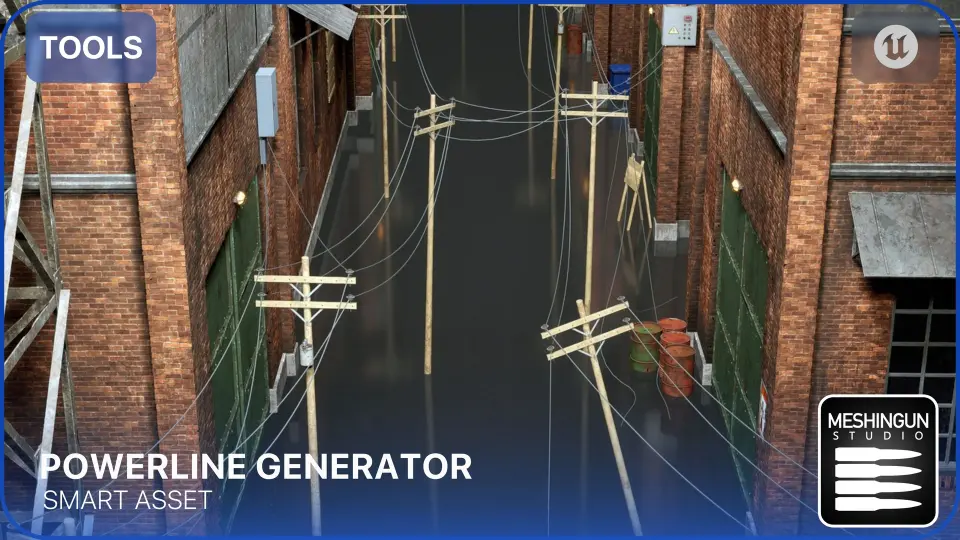
Stringing powerlines across an open world map by hand quickly turns into an exercise in frustration. Each pole needs precise placement, every cable requires careful tension tuning, and branching connections between different power runs rarely stay tidy. Powerline Generator addresses this directly as an Unreal Engine 5 blueprint tool, letting developers shape electrical networks through a spline interface rather than manual vertex pushing.
The blueprint is aimed at projects that need believable electrical infrastructure without the labor of building it piece by piece. You drag the blueprint into a level, use the built-in spline components to trace the route, and the tool handles the generation of the poles and cables along that path. This drag-and-drop setup is the core of the workflow, turning what would normally be a tedious environment dressing task into a single editable line.
Shaping Networks with Spline and Pole Controls
Because the generation runs through a spline system, any adjustments to the powerline route happen directly in the viewport. Moving a spline point shifts the connected poles and re-runs the cable layout. The tool provides a variety of pole types to choose from, and you can mix and match different varieties within the same network rather than being locked to a single mesh style across a whole scene.
If a project demands custom assets, the blueprint supports mesh integration. Developers can slot in their own pole and electric box meshes, keeping the generator useful even when a game or film has a distinct art direction that the default meshes cannot serve. This scalability ensures the tool adapts to different visual styles rather than forcing a uniform look.
Visual customization extends to the materials themselves. Pole colors can be adjusted using Dynamic Material Instances. This makes it possible to create distinct visual effects for the infrastructure, differentiating weathered utility poles from newer installations, or simply matching a specific regional power standard color scheme across a sprawling map.
Simulating Cable Physics and Environmental Shake
Static cables often look artificial when stretched between poles. The generator approaches this with cable physics settings that simulate realistic behavior. Gravity and length variations are exposed as parameters, allowing the cables to sag and settle along their spans in a way that mimics real-world tension distribution.
The physics system also accounts for specific environmental contexts. It includes settings for underwater poles, letting cables behave differently when running through submerged sections of a network. Alongside this, there are options for managing disconnected cables, adding loose or broken segments that interact with the scene rather than having every line sit perfectly intact.
For dynamic scenes, wind and shake effects bring further motion. The generation simulates environmental forces, making the poles shake and the cables sway as if caught in a gust, useful for cinematic shots or gameplay sequences set during storms.
Branching Electric Boxes and Inter Powerline Linking
Real power grids do not run in straight lines indefinitely. They split at junction boxes and cross over to other branches. The tool models this complexity with electric box branching, connecting poles to branching points that route power into different directions. This creates more complex powerline network topologies than a single linear run.
For expansive environments, the generator supports inter powerline branching. Multiple separate powerlines can be linked together, bridging what would otherwise be isolated segments into a single connected electrical system.
Recent updates fixed a bug in version 5.4.2, and the asset includes feature showcases and comprehensive documentation. For developers laying out rural roads, urban backdrops, industrial sites, or flood-prone environments, the generator fits where believable overhead power infrastructure is required. Animators and filmmakers will find the wind, shake, and cable physics parameters useful for sequences where ambient motion sells the realism of the environment.
 Gameplay Features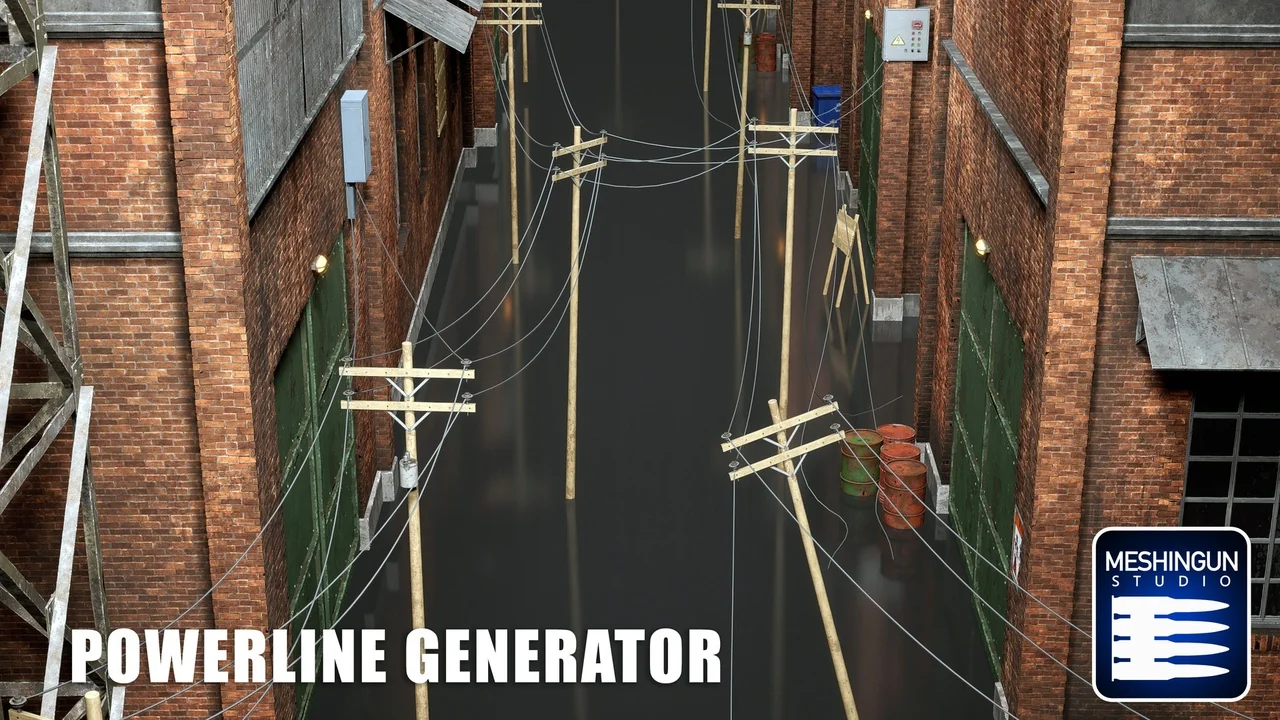
 Gameplay Features
 Gameplay Features
 Gameplay Features