"7e6fc58c410f2894"{"id":"1000436","slug":"physics-platformer-toolkit","title":"Physics Platformer Toolkit","category":"Physics","engine":"5.5+","assetVersion":"","engineVersion":"Engine Version: 5.5+","tag":"Physics","accent":"blue","visual":"mech","summary":"UE5 Blueprint toolkit for physics-based platformers with 3rd Person and Side Scroller characters, 25+ dynamic physics assets, weapons, and equipment. Requires S","platform":"Unreal Engine","publishedAt":"2026-07-10T22:22:57.642Z","updatedAt":"2026-07-10T22:22:57.642Z","sourceNotes":[],"fileContents":[],"compatibility":["Unreal Engine","Engine Version: 5.5+"],"featuredImage":{"alt":"Physics Platformer Toolkit","src":"https://media.fab.com/image_previews/gallery_images/e05f5263-1142-4b4a-8b70-37161e10367d/3f35392f-150e-4cf5-addb-f0273578dd33.png"},"hasDownloadLink":true,"downloads":0,"terms":[{"taxonomy":"category","slug":"physics","name":"Physics"}],"galleryImages":[{"src":"/wp-content/uploads/published/2026/07/c898fdd776b4-74226a6c-1f54-4872-b6b8-dc0bcd368dd6-c29f04bd7c.webp","alt":"Physics Platformer Toolkit"},{"src":"/wp-content/uploads/published/2026/07/699beee4f623-24c70dd8-ea52-41f6-bb13-26e8455a11b1-d6144261cc.webp","alt":"Physics Platformer Toolkit"},{"src":"/wp-content/uploads/published/2026/07/bb2ce0095884-bc5ef9da-0173-4bd1-a64b-cb7c8cd79ce8-21945e1d06.webp","alt":"Physics Platformer Toolkit"}],"accessPanel":{"kind":"resource","title":"Download this resource","eyebrow":"Free Download","message":"Log in or create a free account to start your download.","fileName":"PhysicsPlatformerToolkit.7z","safetyNote":"Resources are manually reviewed before listing to improve quality and reduce obvious risks.","actionLabel":"Download Free","resourceType":"Resource archive"},"contentHtml":"\u003cp\u003eSetting up a physics-driven platformer in Unreal Engine 5 usually means wrestling with capsule simulation, state transitions, and ability orchestration from scratch. The Physics Platformer Toolkit handles that heavy lifting entirely in Blueprints. It provides fully implemented 3rd Person and Side Scroller characters shaped by a physics-simulated capsule, along with a suite of weapons, equipment, and interactive objects. The implementation relies on UE5's default State Tree plugin for state machine logic, and recent versions route ability execution through a dedicated Gameplay Ability System to keep character components modular and customizable.\u003c/p\u003e \u003ch2\u003eCharacter Variants and Movement Setup\u003c/h2\u003e \u003cp\u003eDifferent platformer concepts demand different character architectures. The toolkit includes four distinct character variants to accommodate varied production needs: a 3rd Person Kinematic Character based on the default character, a 3rd Person Physics Character also based on the default character, a 3rd Person Physics Character built from the Pawn class, and a Side Scroller Physics Character likewise based on Pawn.\u003c/p\u003e \u003cp\u003eThe Pawn-based characters are constructed from the bottom up, giving developers direct control over physics simulation behavior without relying on default character movement overrides. The state machine governing these characters is built using the new UE5 default State Tree plugin. As of version 1.2.0, the State Tree is decoupled from the character and components entirely. Everything routes through the Gameplay Ability System, and transitions are reimplemented using events instead of tick operations for performance optimization.\u003c/p\u003e \u003cp\u003eCore movement dynamics include Walk/Run, Jump, and Air Control. For the 3rd Person Physics Character, movement behavior is encapsulated within a single movement component, simplifying code maintenance. Controller support and all relevant movement events are implemented, and input actions are explicitly defined for all inputs.\u003c/p\u003e \u003ch2\u003eAbility System and Aiming Customization\u003c/h2\u003e \u003cp\u003eVersion 1.2.0 introduced a Gameplay Ability System intended for orchestration and seamless integration with custom characters. A single interface sits between abilities and the ability system, allowing developers to add new abilities without diving deep into core character logic.\u003c/p\u003e \u003cp\u003eAiming logic is decoupled from movement and handled in a separate component. This separation makes customizing how a character tracks targets or calculates aim vectors significantly easier, as changes to the aiming component do not require rewriting movement code.\u003c/p\u003e \u003cp\u003eAbilities currently implemented in the toolkit include Stomp and Grab Objects. The Grab functionality is merged with the Physics Gun; both use a single component behind the scenes. The grapple hook, however, operates strictly in simulated mode and is fundamentally incompatible with the kinematic character mode.\u003c/p\u003e \u003ch3\u003eWeapons and Equipment Integration\u003c/h3\u003e \u003cp\u003eWeapons and equipment are optional modules that can be included or excluded at compile time. The toolkit emits debug messages when required components are missing, making troubleshooting straightforward during integration.\u003c/p\u003e \u003cp\u003eThe weapon set includes:\u003c/p\u003e\n\u003cul\u003e\u003cli\u003ePunch (with added animation and sphere trace)\u003c/li\u003e\u003cli\u003eRocket Launcher\u003c/li\u003e\u003cli\u003eGrenade Launcher\u003c/li\u003e\u003cli\u003eBalloon Gun\u003c/li\u003e\u003cli\u003eBubble Gun\u003c/li\u003e\u003c/ul\u003e \u003cp\u003eEquipment covers the Jetpack, Grapple Hook, and Physics Gun. All weapons and most equipment have been ported to the Default 3rd Person Character, with an example character setup on a separate map.\u003c/p\u003e \u003ch2\u003eBuilding Environments with 25+ Dynamic Physics Assets\u003c/h2\u003e\n\u003cp\u003eThe toolkit ships with over 25 self-contained physics assets. Each can be used independently, and many support per-instance configuration in the editor to create visual and behavioral variation without duplicating Blueprints.\u003c/p\u003e \u003cp\u003eCore environmental assets include variable length chains, fixed length ropes, pull levers, push buttons, light bulbs, and hanging lamps. Level designers can place five types of hanging platforms and four types of forcefields—directional, radial, damping, and antigravity. Additional interactive elements include blowing fans, hinged doors, and rope bridges.\u003c/p\u003e \u003cp\u003eFor traversal puzzles and dynamic encounters, the pack provides physics surfaces with bounce and friction properties, helium balloons, soap bubbles, launch pads, spring pads, spring boards, and seesaws. Physics-driven mechanisms such as a simple cart, battering ram, crankshaft (flywheel), simple propeller, and punching bag allow for mechanical interactions driven entirely by Chaos physics simulation.\u003c/p\u003e \u003ch2\u003eState Machine Refinements and Modularity Updates\u003c/h2\u003e\n\u003cp\u003eThe codebase underwent significant cleanup between versions 1.1 and 1.2.1. Actor functions were simplified, and the Grab and Physics Gun systems were merged to reduce component overhead. The Side Scroller character was reimplemented using the same components as the other characters, unifying the architecture across both perspectives.\u003c/p\u003e \u003cp\u003eA dedicated Player Controller and Game Mode were implemented to increase modularization. This allows developers to subclass and override game rules and input handling without modifying the core character blueprints.\u003c/p\u003e \u003cp\u003eCamera behavior for the physics-based 3rd Person Character saw fixes and simplifications for horizontal and vertical shifts. Character in-air facing was corrected for instances where the character spawns with a different orientation.\u003c/p\u003e \u003ch2\u003eCompatibility, Limitations, and Known Issues\u003c/h2\u003e\n\u003cp\u003eThe Physics Platformer Toolkit requires the State Tree UE5 plugin. It is compatible with Unreal Engine 5.5 through 5.7, with explicit support added for UE 5.6 and UE 5.7 in version 1.2.1. The implementation is strictly Blueprint-based, with no C++ code included.\u003c/p\u003e \u003cp\u003eThe pack is focused on physics simulation. The included meshes, materials, and effects exist solely to showcase the physics assets and are not the primary deliverable. Because physics simulation is inherently unpredictable, some specific scenarios may require custom adjustments to achieve reliable results.\u003c/p\u003e \u003cp\u003eThe toolkit has not been tested in VR or multiplayer environments.\u003c/p\u003e \u003cp\u003eTwo known engine-level issues currently affect the toolkit:\u003c/p\u003e\n\u003cul\u003e\u003cli\u003eThe grapple hook visual representation does not update correctly when latching onto a geometry collection. The grapple function itself works, but Blueprints cannot currently retrieve the location of a specific part of a geometry collection.\u003c/li\u003e\u003cli\u003eIn a physics field, physics constraints break if one of the attached components goes to sleep. This appears to be an engine bug. The workaround involves applying a Physical Material that prevents sleep to components affected by the field.\u003c/li\u003e\u003c/ul\u003e \u003ch2\u003eProduction Readiness and Practical Takeaway\u003c/h2\u003e\n\u003cp\u003eFor developers prototyping or building a full physics-based platformer, this toolkit provides a modular foundation. The decoupled aiming component, event-driven state transitions, and compile-time weapon inclusion give teams clear hooks for customization. The reliance on the Gameplay Ability System for orchestration means new mechanics can be slotted into existing characters through a single interface. While the pack requires manual tweaking for edge-case physics scenarios and lacks VR or multiplayer validation, its Blueprint-only architecture makes it accessible for developers who need to inspect, modify, and extend character logic without compiling C++ code.\u003c/p\u003e\n\n\u003ch2\u003eExplore Similar Assets\u003c/h2\u003e\n\u003cul\u003e\n\u003cli\u003e\u003ca href=\"https://3dcghub.com/ultimate-template-unrealengine-2d-dialogue-inventory-system-save/\" title=\"ULTIMATE Template UnrealEngine || 2D + Dialogue + Inventory system + Save | |\"\u003eULTIMATE Template UnrealEngine || 2D + Dialogue + Inventory system + Save | |\u003c/a\u003e\u003c/li\u003e\n\u003cli\u003e\u003ca href=\"https://3dcghub.com/corgi-engine-2d-2-5d-platformer/\" title=\"Corgi Engine - 2D + 2.5D Platformer\"\u003eCorgi Engine - 2D + 2.5D Platformer\u003c/a\u003e\u003c/li\u003e\n\u003cli\u003e\u003ca href=\"https://3dcghub.com/make-a-2d-action-platformer-in-unreal-engine-5/\" title=\"Make a 2D Action Platformer in Unreal Engine 5\"\u003eMake a 2D Action Platformer in Unreal Engine 5\u003c/a\u003e\u003c/li\u003e\n\u003cli\u003e\u003ca href=\"https://3dcghub.com/hurricane-vr-physics-interaction-toolkit/\" title=\"Hurricane VR - Physics Interaction Toolkit\"\u003eHurricane VR - Physics Interaction Toolkit\u003c/a\u003e\u003c/li\u003e\n\u003cli\u003e\u003ca href=\"https://3dcghub.com/silantro-flight-simulator-toolkit/\" title=\"Silantro Flight Simulator Toolkit\"\u003eSilantro Flight Simulator Toolkit\u003c/a\u003e\u003c/li\u003e\n\u003c/ul\u003e","contentTextLength":7527,"navigation":{"current":1321,"total":3618,"previous":{"id":"1000437","slug":"powerline-generator","title":"Powerline Generator","category":"Gameplay Features","platform":"Unreal Engine","updatedAt":"2026-07-10T22:27:14.786Z"},"next":{"id":"1000435","slug":"natural-wonders-mojave","title":"Natural Wonders - Mojave","category":"Mountain","platform":"Unreal Engine","updatedAt":"2026-07-10T22:18:48.473Z"}},"relatedResources":[{"id":"11729","slug":"ultimate-template-unrealengine-2d-dialogue-inventory-system-save","title":"ULTIMATE Template UnrealEngine || 2D + Dialogue + Inventory system + Save | |","category":"Platformer","engine":"5.5+","assetVersion":"Engine version: 5.5+","engineVersion":"5.5","tag":"Platformer","accent":"blue","visual":"city","summary":"The ULTIMATE Template for Unreal Engine is a comprehensive toolkit designed to jumpstart 2D and 2.5D game development. It features integrated animation, dialogue, and inventory systems to streamline your workflow.","platform":"Unreal Engine","publishedAt":"2026-03-05T18:26:37.000Z","updatedAt":"2026-04-19T15:48:07.000Z","sourceNotes":[],"fileContents":[],"compatibility":["Unreal Engine","Engine version: 5.5+"],"featuredImage":{"alt":"ULTIMATE Template UnrealEngine || 2D + Dialogue + Inventory system + Save | |","src":"https://3dcghub.com/wp-content/uploads/2026/03/78f3e1b6-7c25-4143-87c5-c625191631ff.webp"},"hasDownloadLink":true,"downloads":0},{"id":"22125","slug":"corgi-engine-2d-2-5d-platformer","title":"Corgi Engine - 2D + 2.5D Platformer","category":"Systems","engine":"Original Unity version: 2019.4.3","assetVersion":"Original Unity version: 2019.4.3","engineVersion":"Asset Version:9.3","tag":"Systems","accent":"cyan","visual":"city","summary":"The Corgi Engine provides a highly optimized, non-physics-based character controller for Unity, designed for precision movement and rapid production across desktop and mobile platforms.","platform":"Unity","publishedAt":"2026-03-31T15:18:24.000Z","updatedAt":"2026-04-19T15:42:09.000Z","sourceNotes":[],"fileContents":[],"compatibility":["Unity","Original Unity version: 2019.4.3","Asset Version: 9.3"],"featuredImage":{"alt":"Corgi Engine - 2D + 2.5D Platformer","src":"https://3dcghub.com/wp-content/uploads/2026/03/dad0f74f95bb_c89bd6b3-82eb-47d9-a558-71b04d369909_1280x720_stretch.webp"},"hasDownloadLink":true,"downloads":1},{"id":"24581","slug":"make-a-2d-action-platformer-in-unreal-engine-5","title":"Make a 2D Action Platformer in Unreal Engine 5","category":"Unreal Engine","engine":"Video language: English","assetVersion":"Video language: English","engineVersion":"File content: video + supporting files + English subtitles","tag":"Unreal Engine","accent":"blue","visual":"audio","summary":"A side-scrolling action game in Unreal Engine 5 needs responsive movement, readable enemy behavior, and levels that support fast platforming. This training walks through that workflow with Paper 2D, from basics and Blueprints to combat, AI, UI, and level cr...","platform":"Unreal Engine","publishedAt":"2026-04-15T13:51:52.000Z","updatedAt":"2026-04-20T06:12:43.000Z","sourceNotes":[],"fileContents":[],"compatibility":["Unreal Engine","Video language: English","File content: video + supporting files + English subtitles"],"featuredImage":{"alt":"Make a 2D Action Platformer in Unreal Engine 5","src":"https://3dcghub.com/wp-content/uploads/2026/04/269b76c038ae_5706222_3889.webp"},"hasDownloadLink":true,"downloads":1}]}
Physics
Physics Platformer Toolkit
UE5 Blueprint toolkit for physics-based platformers with 3rd Person and Side Scroller characters, 25+ dynamic physics assets, weapons, and equipment. Requires S
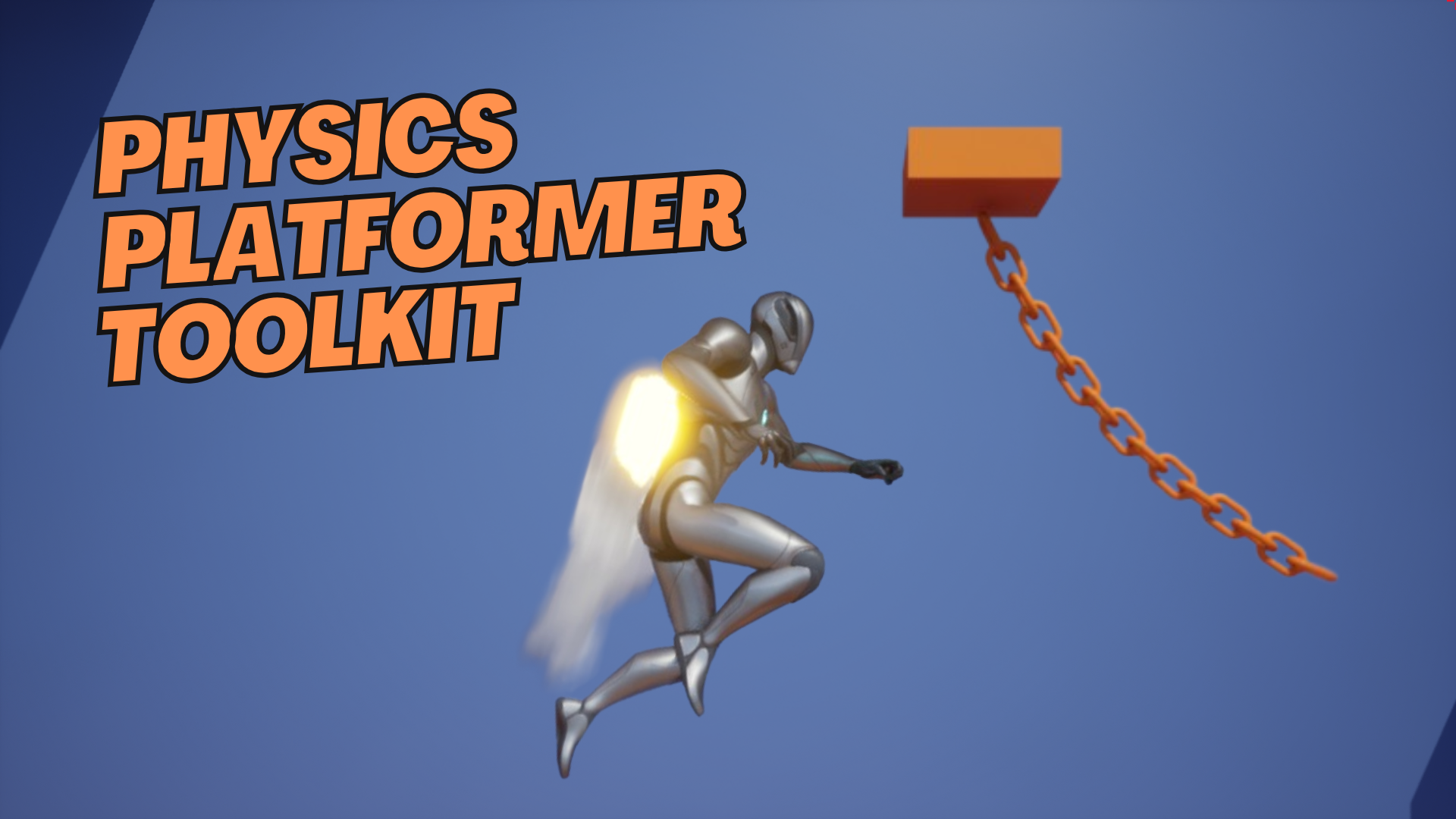
Setting up a physics-driven platformer in Unreal Engine 5 usually means wrestling with capsule simulation, state transitions, and ability orchestration from scratch. The Physics Platformer Toolkit handles that heavy lifting entirely in Blueprints. It provides fully implemented 3rd Person and Side Scroller characters shaped by a physics-simulated capsule, along with a suite of weapons, equipment, and interactive objects. The implementation relies on UE5's default State Tree plugin for state machine logic, and recent versions route ability execution through a dedicated Gameplay Ability System to keep character components modular and customizable.
Character Variants and Movement Setup
Different platformer concepts demand different character architectures. The toolkit includes four distinct character variants to accommodate varied production needs: a 3rd Person Kinematic Character based on the default character, a 3rd Person Physics Character also based on the default character, a 3rd Person Physics Character built from the Pawn class, and a Side Scroller Physics Character likewise based on Pawn.
The Pawn-based characters are constructed from the bottom up, giving developers direct control over physics simulation behavior without relying on default character movement overrides. The state machine governing these characters is built using the new UE5 default State Tree plugin. As of version 1.2.0, the State Tree is decoupled from the character and components entirely. Everything routes through the Gameplay Ability System, and transitions are reimplemented using events instead of tick operations for performance optimization.
Core movement dynamics include Walk/Run, Jump, and Air Control. For the 3rd Person Physics Character, movement behavior is encapsulated within a single movement component, simplifying code maintenance. Controller support and all relevant movement events are implemented, and input actions are explicitly defined for all inputs.
Ability System and Aiming Customization
Version 1.2.0 introduced a Gameplay Ability System intended for orchestration and seamless integration with custom characters. A single interface sits between abilities and the ability system, allowing developers to add new abilities without diving deep into core character logic.
Aiming logic is decoupled from movement and handled in a separate component. This separation makes customizing how a character tracks targets or calculates aim vectors significantly easier, as changes to the aiming component do not require rewriting movement code.
Abilities currently implemented in the toolkit include Stomp and Grab Objects. The Grab functionality is merged with the Physics Gun; both use a single component behind the scenes. The grapple hook, however, operates strictly in simulated mode and is fundamentally incompatible with the kinematic character mode.
Weapons and Equipment Integration
Weapons and equipment are optional modules that can be included or excluded at compile time. The toolkit emits debug messages when required components are missing, making troubleshooting straightforward during integration.
The weapon set includes:
Punch (with added animation and sphere trace)
Rocket Launcher
Grenade Launcher
Balloon Gun
Bubble Gun
Equipment covers the Jetpack, Grapple Hook, and Physics Gun. All weapons and most equipment have been ported to the Default 3rd Person Character, with an example character setup on a separate map.
Building Environments with 25+ Dynamic Physics Assets
The toolkit ships with over 25 self-contained physics assets. Each can be used independently, and many support per-instance configuration in the editor to create visual and behavioral variation without duplicating Blueprints.
Core environmental assets include variable length chains, fixed length ropes, pull levers, push buttons, light bulbs, and hanging lamps. Level designers can place five types of hanging platforms and four types of forcefields—directional, radial, damping, and antigravity. Additional interactive elements include blowing fans, hinged doors, and rope bridges.
For traversal puzzles and dynamic encounters, the pack provides physics surfaces with bounce and friction properties, helium balloons, soap bubbles, launch pads, spring pads, spring boards, and seesaws. Physics-driven mechanisms such as a simple cart, battering ram, crankshaft (flywheel), simple propeller, and punching bag allow for mechanical interactions driven entirely by Chaos physics simulation.
State Machine Refinements and Modularity Updates
The codebase underwent significant cleanup between versions 1.1 and 1.2.1. Actor functions were simplified, and the Grab and Physics Gun systems were merged to reduce component overhead. The Side Scroller character was reimplemented using the same components as the other characters, unifying the architecture across both perspectives.
A dedicated Player Controller and Game Mode were implemented to increase modularization. This allows developers to subclass and override game rules and input handling without modifying the core character blueprints.
Camera behavior for the physics-based 3rd Person Character saw fixes and simplifications for horizontal and vertical shifts. Character in-air facing was corrected for instances where the character spawns with a different orientation.
Compatibility, Limitations, and Known Issues
The Physics Platformer Toolkit requires the State Tree UE5 plugin. It is compatible with Unreal Engine 5.5 through 5.7, with explicit support added for UE 5.6 and UE 5.7 in version 1.2.1. The implementation is strictly Blueprint-based, with no C++ code included.
The pack is focused on physics simulation. The included meshes, materials, and effects exist solely to showcase the physics assets and are not the primary deliverable. Because physics simulation is inherently unpredictable, some specific scenarios may require custom adjustments to achieve reliable results.
The toolkit has not been tested in VR or multiplayer environments.
Two known engine-level issues currently affect the toolkit:
The grapple hook visual representation does not update correctly when latching onto a geometry collection. The grapple function itself works, but Blueprints cannot currently retrieve the location of a specific part of a geometry collection.
In a physics field, physics constraints break if one of the attached components goes to sleep. This appears to be an engine bug. The workaround involves applying a Physical Material that prevents sleep to components affected by the field.
Production Readiness and Practical Takeaway
For developers prototyping or building a full physics-based platformer, this toolkit provides a modular foundation. The decoupled aiming component, event-driven state transitions, and compile-time weapon inclusion give teams clear hooks for customization. The reliance on the Gameplay Ability System for orchestration means new mechanics can be slotted into existing characters through a single interface. While the pack requires manual tweaking for edge-case physics scenarios and lacks VR or multiplayer validation, its Blueprint-only architecture makes it accessible for developers who need to inspect, modify, and extend character logic without compiling C++ code.
 Physics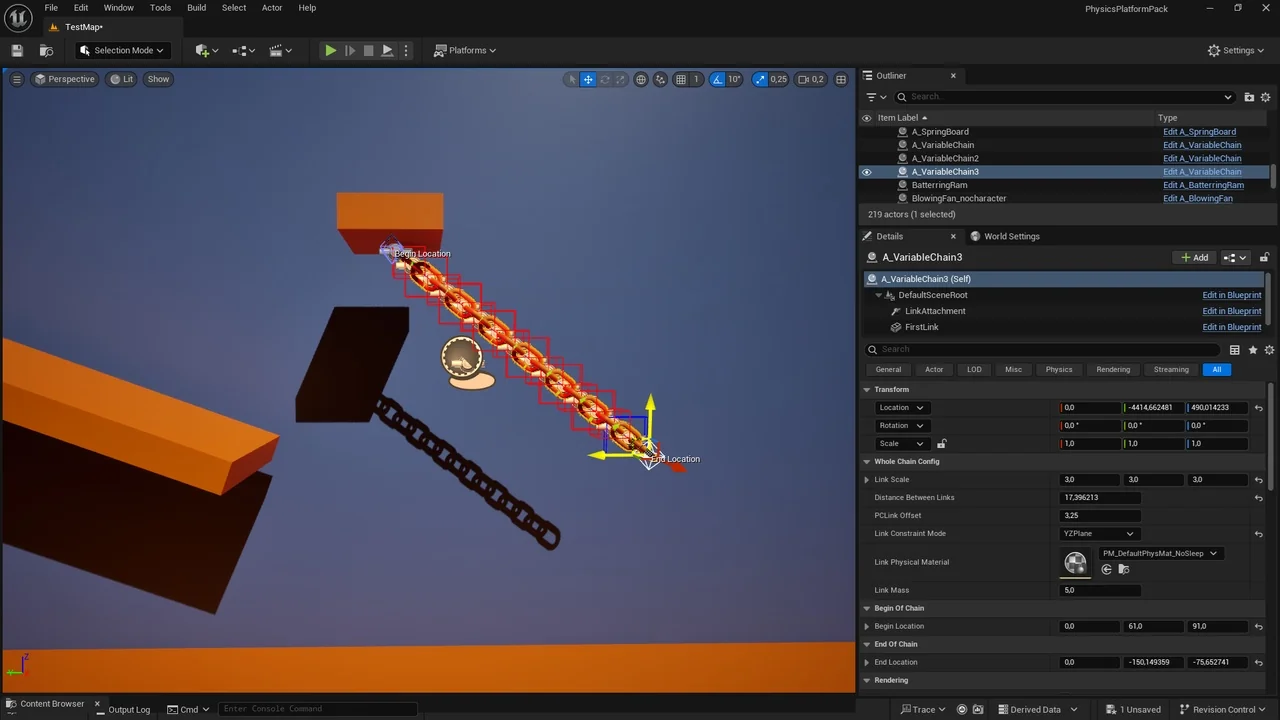
 Platformer
 Systems
 Unreal Engine