"26aaab8a5d5ed4fc"{"id":"22125","slug":"corgi-engine-2d-2-5d-platformer","title":"Corgi Engine - 2D + 2.5D Platformer","category":"Systems","engine":"Original Unity version: 2019.4.3","assetVersion":"Original Unity version: 2019.4.3","engineVersion":"Asset Version:9.3","tag":"Systems","accent":"cyan","visual":"city","summary":"The Corgi Engine provides a highly optimized, non-physics-based character controller for Unity, designed for precision movement and rapid production across desktop and mobile platforms.","platform":"Unity","publishedAt":"2026-03-31T15:18:24.000Z","updatedAt":"2026-04-19T15:42:09.000Z","sourceNotes":[],"fileContents":[],"compatibility":["Unity","Original Unity version: 2019.4.3","Asset Version: 9.3"],"featuredImage":{"alt":"Corgi Engine - 2D + 2.5D Platformer","src":"https://3dcghub.com/wp-content/uploads/2026/03/dad0f74f95bb_c89bd6b3-82eb-47d9-a558-71b04d369909_1280x720_stretch.webp"},"hasDownloadLink":true,"downloads":1,"terms":[{"taxonomy":"category","slug":"systems","name":"Systems"},{"taxonomy":"post_tag","slug":"characters","name":"Characters"},{"taxonomy":"post_tag","slug":"unity","name":"Unity"},{"taxonomy":"post_tag","slug":"weapons","name":"Weapons"}],"galleryImages":[{"src":"https://3dcghub.com/wp-content/uploads/2026/03/d3cde146018c_b190b9f8-5b36-425c-aca2-de5212f8c17b_scaled.webp","alt":"Corgi Engine - 2D + 2.5D Platformer"},{"src":"https://3dcghub.com/wp-content/uploads/2026/03/830269a35501_3d34d296-5b80-4265-8f1c-fac0aa021ef0_scaled.webp","alt":"Corgi Engine - 2D + 2.5D Platformer"},{"src":"https://3dcghub.com/wp-content/uploads/2026/03/b644defe91ad_fef8a112-1762-4c9a-998a-db8a9f98482e_scaled.webp","alt":"Corgi Engine - 2D + 2.5D Platformer"},{"src":"https://3dcghub.com/wp-content/uploads/2026/03/94eebfd686eb_559d9891-62b7-4a0b-a159-4f0bade91371_scaled.webp","alt":"Corgi Engine - 2D + 2.5D Platformer"},{"src":"https://3dcghub.com/wp-content/uploads/2026/03/3fdca41d62b7_f99596e3-bb39-4ff2-9541-f601dc9eb865_scaled.webp","alt":"Corgi Engine - 2D + 2.5D Platformer"},{"src":"https://3dcghub.com/wp-content/uploads/2026/03/29e63cce0b1f_1ee4e8f2-a5b1-40bf-89b4-22e3ad733ecf_scaled.webp","alt":"Corgi Engine - 2D + 2.5D Platformer"},{"src":"https://3dcghub.com/wp-content/uploads/2026/03/6f39042d2563_1fc046d7-1d82-4996-85e8-9def563c0ce3_scaled.webp","alt":"Corgi Engine - 2D + 2.5D Platformer"},{"src":"https://3dcghub.com/wp-content/uploads/2026/03/c6016176ca3c_09617c04-236d-4141-8fd7-038420ab7afb_scaled.webp","alt":"Corgi Engine - 2D + 2.5D Platformer"},{"src":"https://3dcghub.com/wp-content/uploads/2026/03/bda08dab1445_f767c983-28dd-4ca5-bd76-3223e3af1ec6_scaled.webp","alt":"Corgi Engine - 2D + 2.5D Platformer"},{"src":"https://3dcghub.com/wp-content/uploads/2026/03/291b9c6e2623_52402d62-b00e-4cd8-b4db-fe4053801b2d_scaled.webp","alt":"Corgi Engine - 2D + 2.5D Platformer"}],"accessPanel":{"kind":"resource","title":"Access this resource","eyebrow":"Free Download","message":"Log in or create a free account to start your download.","fileName":"Corgi Engine - 2D 25D Platformer v9.3 (23 Dec 2024).7z","safetyNote":"All resources are 100% manually reviewed to eliminate all risks.","actionLabel":"Download Free","resourceType":"Resource archive"},"contentHtml":"\u003ch2\u003eA Non-Physics Approach to Precision Movement\u003c/h2\u003e\n\u003cp\u003eThe core of the Corgi Engine is a dedicated 2D character controller that bypasses standard physics-based controls in favor of a tighter, more responsive feel. This architecture is specifically designed to handle the high-precision requirements of 2D and 2.5D platformers, where predictable movement and frame-perfect responsiveness are critical. Built for Unity 6, the system is optimized to run across various hardware environments, including desktop, mobile, and web-based platforms like HTML5.\u003c/p\u003e\n\n\u003cp\u003eBecause the controller is not reliant on the default physics engine for its primary movement, it avoids common issues such as jitter on slopes or unpredictable friction. Instead, it utilizes a system that handles collision detection, slope normal adjustments, and surface feedbacks internally. This allows developers to tweak speed data and gravity settings directly through the inspector to create specific movement profiles, whether for a slow-paced puzzle platformer or a high-velocity run-and-gun title.\u003c/p\u003e\n\n\u003ch2\u003eExtensive Player Ability and Interaction Systems\u003c/h2\u003e\n\u003cp\u003eThe engine is built around a modular ability system that covers a wide spectrum of traditional and modern platformer mechanics. Standard traversal options include walking, running, crouching, and looking up or down, but the system extends significantly into specialized movement. For verticality, the engine supports ladders, ledge hanging, ledge pulling, and dangling. It also includes complex jump mechanics, such as wall jumps in the style of Super Mario Run, double jumps, and the ability to configure an infinite number of additional jumps.\u003c/p\u003e\n\n\u003cp\u003eBeyond basic movement, the engine includes built-in support for advanced traversal tools and environmental interactions. This includes jetpacks, ziplines, and diving mechanics for swimming sections. The controller also handles character state changes such as dashing (both horizontal and vertical), rolling along slopes, and taking fall damage. For games requiring physical interaction with the environment, the engine provides dedicated logic for pushing and pulling objects, as well as carrying and throwing items.\u003c/p\u003e\n\n\u003ch2\u003eCombat Mechanics and the Kills Manager\u003c/h2\u003e\n\u003cp\u003eFor action-oriented projects, the Corgi Engine features a robust weaponry system. This includes support for melee attacks, hitscan weapons, and projectile-based firearms. Developers can implement burst fire, combo systems, and charge-up weapons to add depth to combat encounters. To assist with gameplay on different input devices, an auto-aim system is included, alongside flight and time control mechanics.\u003c/p\u003e\n\n\u003cp\u003eThe v8.6 update introduced the Kills Manager, a tool designed to streamline level progression and event triggering. This manager allows developers to trigger specific game events once a certain number of enemies—or all enemies in a designated area—have been defeated. This integrates with the broader damage system, which handles various damage types, armor calculations, resistances, and specialized states like getting stunned or being crushed by moving geometry.\u003c/p\u003e\n\n\u003ch2\u003eProduction-Ready Content and Visual Assets\u003c/h2\u003e\n\u003cp\u003eThe package is not merely a collection of scripts but a full production environment. It includes over 50 handcrafted demo levels that showcase different genres and configurations of the engine. These levels serve as both functional templates and educational resources for understanding how to structure complex 2D environments. To facilitate rapid prototyping and final production, the asset includes more than 300 visual assets that are ready for use in commercial projects, rather than being simple placeholder graphics.\u003c/p\u003e\n\n\u003cp\u003eThe technical foundation is supported by over 200 optimized scripts and a library of production-ready prefabs. This includes a character swapping system, which allows players to cycle through different heroes within a single scene. The engine also ensures that data persists between scenes, making it easier to manage player progress and state across a multi-level campaign.\u003c/p\u003e\n\n\u003ch2\u003eIntegrated Game Feel and Polish Tools\u003c/h2\u003e\n\u003cp\u003eTo address the nuances of game feel, the engine has MMFeedbacks built-in. This native integration allows for the rapid addition of surface feedbacks and visual cues without requiring external tools. These feedbacks can be triggered by nearly any action, from landing a jump to taking damage, helping to ground the character in the world and provide immediate response to player input.\u003c/p\u003e\n\n\u003cp\u003eThe engine is designed to be accessible to various skill levels. For those new to the environment, it provides video tutorials and extensive documentation, while seasoned developers can leverage the extensions repository to further customize the controller’s behavior. The flexibility of the inspector-based tweaking system means that the feel of the game can be altered significantly without necessarily rewriting the core movement logic, making it a versatile choice for studios targeting diverse platformer sub-genres.\u003c/p\u003e\n\n\u003ch2\u003eExplore Similar Assets\u003c/h2\u003e\n\u003cul\u003e\n\u003cli\u003e\u003ca href=\"https://3dcghub.com/classic-city-builder-kit/\" title=\"Classic City Builder Kit\"\u003eClassic City Builder Kit\u003c/a\u003e\u003c/li\u003e\n\u003cli\u003e\u003ca href=\"https://3dcghub.com/ccg-kit/\" title=\"CCG Kit\"\u003eCCG Kit\u003c/a\u003e\u003c/li\u003e\n\u003cli\u003e\u003ca href=\"https://3dcghub.com/arpg-project/\" title=\"ARPG Project\"\u003eARPG Project\u003c/a\u003e\u003c/li\u003e\n\u003cli\u003e\u003ca href=\"https://3dcghub.com/airplane-race-creator/\" title=\"Airplane Race Creator\"\u003eAirplane Race Creator\u003c/a\u003e\u003c/li\u003e\n\u003cli\u003e\u003ca href=\"https://3dcghub.com/advanced-horror-fps-kit-for-mobile-and-pc-first-person-shooter-horror/\" title=\"Advanced Horror FPS Kit for Mobile and PC – First Person Shooter Horror\"\u003eAdvanced Horror FPS Kit for Mobile and PC – First Person Shooter Horror\u003c/a\u003e\u003c/li\u003e\n\u003c/ul\u003e","contentTextLength":5160,"navigation":{"current":3184,"total":3400,"previous":{"id":"22138","slug":"drag-racing-framework","title":"Drag Racing Framework","category":"Systems","platform":"Unity","updatedAt":"2026-04-19T15:42:09.000Z"},"next":{"id":"22112","slug":"classic-city-builder-kit","title":"Classic City Builder Kit","category":"Systems","platform":"Unity","updatedAt":"2026-04-19T15:42:09.000Z"}},"relatedResources":[{"id":"22209","slug":"game-kit-controller-shooter-melee-adventure-fps-tps-creator-3d-2-5d","title":"Game Kit Controller - Shooter Melee Adventure FPS TPS Creator 3D + 2.5D","category":"Systems","engine":"Original Unity version: 2019.4.41","assetVersion":"Original Unity version: 2019.4.41","engineVersion":"Asset Version:3.77d","tag":"Systems","accent":"cyan","visual":"city","summary":"Game Kit Controller (GKC) serves as a comprehensive engine solution for Unity, supporting first-person, third-person, and 2.5D perspectives. It integrates physics-based movement, vehicle systems, and advanced traversal mechanics to streamline the production...","platform":"Unity","publishedAt":"2026-04-06T07:18:54.000Z","updatedAt":"2026-04-19T15:42:08.000Z","sourceNotes":[],"fileContents":[],"compatibility":["Unity","Original Unity version: 2019.4.41","Asset Version: 3.77d"],"featuredImage":{"alt":"Game Kit Controller - Shooter Melee Adventure FPS TPS Creator 3D + 2.5D","src":"https://3dcghub.com/wp-content/uploads/2026/04/49a50c819664_8e113599-70ad-43a6-a6f7-00660a017816_1280x720_stretch.webp"},"hasDownloadLink":true,"downloads":1},{"id":"24535","slug":"the-complete-guide-to-unity-2d-platformer-development","title":"The Complete Guide to Unity 2D : Platformer Development","category":"Unity","engine":"Video language: English","assetVersion":"Video language: English","engineVersion":"File content: video + supporting files + English subtitles","tag":"Unity","accent":"cyan","visual":"city","summary":"This course follows the process of making a 2D platformer in Unity, starting with C# and Unity basics and moving into character work, level creation, gameplay systems, and polish. It also extends into co-op play, gamepad support, and an optional mobile vers...","platform":"Unity","publishedAt":"2026-04-15T09:46:03.000Z","updatedAt":"2026-04-20T06:12:46.000Z","sourceNotes":[],"fileContents":[],"compatibility":["Unity","Video language: English","File content: video + supporting files + English subtitles"],"featuredImage":{"alt":"The Complete Guide to Unity 2D : Platformer Development","src":"https://3dcghub.com/wp-content/uploads/2026/04/33eb152dfd65_5927092_552c.webp"},"hasDownloadLink":true,"downloads":1},{"id":"22041","slug":"2d-action-rpg-engine-mythril2d","title":"2D Action RPG Engine: Mythril2D","category":"Systems","engine":"Original Unity version: 6000.3.10","assetVersion":"Asset Version:1.4.1 - 3.2","engineVersion":"Original Unity version: 6000.3.10","tag":"Systems","accent":"cyan","visual":"animation","summary":"Mythril2D is a versatile engine for Unity designed to facilitate the creation of 2D Action RPGs through a modular, no-code workflow.","platform":"Unity","publishedAt":"2026-03-28T06:03:41.000Z","updatedAt":"2026-07-29T16:30:08.036Z","sourceNotes":[],"fileContents":[],"compatibility":["Unity","Asset Version:1.4.1 - 3.2","Original Unity version: 6000.3.10"],"featuredImage":{"alt":"2D Action RPG Engine: Mythril2D","src":"https://3dcghub.com/wp-content/uploads/2026/03/d149e469edde_5392e957-e417-4b9e-9efa-ca53c8fa3275_1280x720_stretch.webp"},"hasDownloadLink":true,"downloads":2}]}
Systems
Corgi Engine - 2D + 2.5D Platformer
The Corgi Engine provides a highly optimized, non-physics-based character controller for Unity, designed for precision movement and rapid production across desktop and mobile platforms.
The core of the Corgi Engine is a dedicated 2D character controller that bypasses standard physics-based controls in favor of a tighter, more responsive feel. This architecture is specifically designed to handle the high-precision requirements of 2D and 2.5D platformers, where predictable movement and frame-perfect responsiveness are critical. Built for Unity 6, the system is optimized to run across various hardware environments, including desktop, mobile, and web-based platforms like HTML5.
Because the controller is not reliant on the default physics engine for its primary movement, it avoids common issues such as jitter on slopes or unpredictable friction. Instead, it utilizes a system that handles collision detection, slope normal adjustments, and surface feedbacks internally. This allows developers to tweak speed data and gravity settings directly through the inspector to create specific movement profiles, whether for a slow-paced puzzle platformer or a high-velocity run-and-gun title.
Extensive Player Ability and Interaction Systems
The engine is built around a modular ability system that covers a wide spectrum of traditional and modern platformer mechanics. Standard traversal options include walking, running, crouching, and looking up or down, but the system extends significantly into specialized movement. For verticality, the engine supports ladders, ledge hanging, ledge pulling, and dangling. It also includes complex jump mechanics, such as wall jumps in the style of Super Mario Run, double jumps, and the ability to configure an infinite number of additional jumps.
Beyond basic movement, the engine includes built-in support for advanced traversal tools and environmental interactions. This includes jetpacks, ziplines, and diving mechanics for swimming sections. The controller also handles character state changes such as dashing (both horizontal and vertical), rolling along slopes, and taking fall damage. For games requiring physical interaction with the environment, the engine provides dedicated logic for pushing and pulling objects, as well as carrying and throwing items.
Combat Mechanics and the Kills Manager
For action-oriented projects, the Corgi Engine features a robust weaponry system. This includes support for melee attacks, hitscan weapons, and projectile-based firearms. Developers can implement burst fire, combo systems, and charge-up weapons to add depth to combat encounters. To assist with gameplay on different input devices, an auto-aim system is included, alongside flight and time control mechanics.
The v8.6 update introduced the Kills Manager, a tool designed to streamline level progression and event triggering. This manager allows developers to trigger specific game events once a certain number of enemies—or all enemies in a designated area—have been defeated. This integrates with the broader damage system, which handles various damage types, armor calculations, resistances, and specialized states like getting stunned or being crushed by moving geometry.
Production-Ready Content and Visual Assets
The package is not merely a collection of scripts but a full production environment. It includes over 50 handcrafted demo levels that showcase different genres and configurations of the engine. These levels serve as both functional templates and educational resources for understanding how to structure complex 2D environments. To facilitate rapid prototyping and final production, the asset includes more than 300 visual assets that are ready for use in commercial projects, rather than being simple placeholder graphics.
The technical foundation is supported by over 200 optimized scripts and a library of production-ready prefabs. This includes a character swapping system, which allows players to cycle through different heroes within a single scene. The engine also ensures that data persists between scenes, making it easier to manage player progress and state across a multi-level campaign.
Integrated Game Feel and Polish Tools
To address the nuances of game feel, the engine has MMFeedbacks built-in. This native integration allows for the rapid addition of surface feedbacks and visual cues without requiring external tools. These feedbacks can be triggered by nearly any action, from landing a jump to taking damage, helping to ground the character in the world and provide immediate response to player input.
The engine is designed to be accessible to various skill levels. For those new to the environment, it provides video tutorials and extensive documentation, while seasoned developers can leverage the extensions repository to further customize the controller’s behavior. The flexibility of the inspector-based tweaking system means that the feel of the game can be altered significantly without necessarily rewriting the core movement logic, making it a versatile choice for studios targeting diverse platformer sub-genres.
 Systems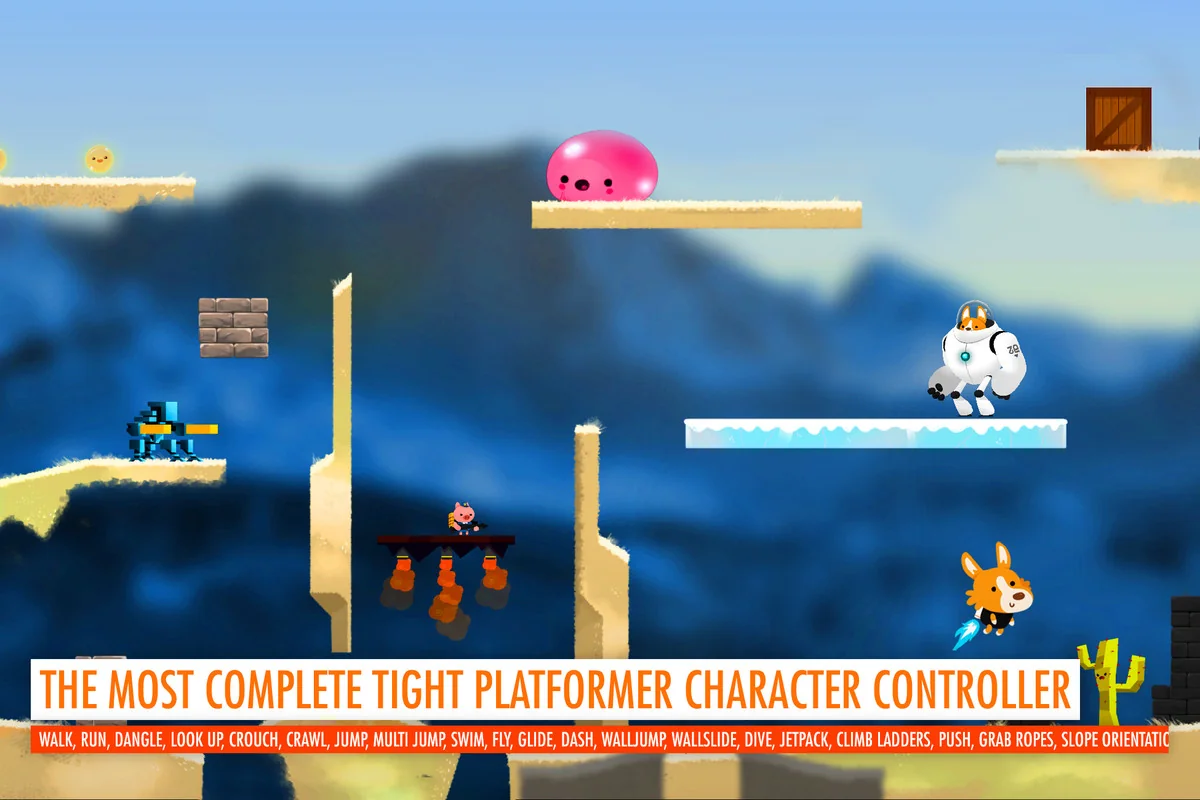
 Systems
 Unity
Unity Systems