"7b46a695175d8694"{"id":"23495","slug":"silantro-flight-simulator-toolkit","title":"Silantro Flight Simulator Toolkit","category":"Physics","engine":"Original Unity version: 2019.3.0","assetVersion":"Original Unity version: 2019.3.0","engineVersion":"Asset Version:3.5.15","tag":"Physics","accent":"cyan","visual":"city","summary":"Silantro Flight Simulator Toolkit is a Unity package for setting up and simulating fixed-wing aircraft with detailed aerodynamics, engine models, cockpit instruments, and input support. It also includes sample scenes that show manual, mobile, stabilized, an...","platform":"Unity","publishedAt":"2026-04-09T17:42:33.000Z","updatedAt":"2026-04-19T15:35:23.000Z","sourceNotes":[],"fileContents":[],"compatibility":["Unity","Original Unity version: 2019.3.0","Asset Version: 3.5.15"],"featuredImage":{"alt":"Silantro Flight Simulator Toolkit","src":"https://3dcghub.com/wp-content/uploads/2026/04/40950f9dc369_c00f37d3-2929-4ee4-a088-72108b308b42_1280x720_stretch.webp"},"hasDownloadLink":true,"downloads":1,"terms":[{"taxonomy":"category","slug":"physics-tools-unity-2","name":"Physics"},{"taxonomy":"post_tag","slug":"game-systems","name":"Game Systems"},{"taxonomy":"post_tag","slug":"unity","name":"Unity"},{"taxonomy":"post_tag","slug":"vehicles","name":"Vehicles"}],"galleryImages":[{"src":"https://3dcghub.com/wp-content/uploads/2026/04/7c6f0a2e4279_92b7639d-f2b8-47fe-b10f-6ffdc83c8883_scaled.webp","alt":"Silantro Flight Simulator Toolkit"},{"src":"https://3dcghub.com/wp-content/uploads/2026/04/32826f816c96_618cb23a-1e39-4e6c-b209-caf28b4c2545_scaled.webp","alt":"Silantro Flight Simulator Toolkit"},{"src":"https://3dcghub.com/wp-content/uploads/2026/04/a3cc25f42e1e_4d430bda-53b7-44ac-bd0f-be6037e5aa9c_scaled.webp","alt":"Silantro Flight Simulator Toolkit"},{"src":"https://3dcghub.com/wp-content/uploads/2026/04/319a2b3757ba_b442fa8d-15d6-4ee3-a742-0afea6356ea0_scaled.webp","alt":"Silantro Flight Simulator Toolkit"},{"src":"https://3dcghub.com/wp-content/uploads/2026/04/b48bd9ecc75f_707c38f5-9b50-4689-a62a-6940b9a6f9e1_scaled.webp","alt":"Silantro Flight Simulator Toolkit"},{"src":"https://3dcghub.com/wp-content/uploads/2026/04/0d3ce5e20daa_8c4405d9-50cf-4b9b-b8a4-82bd5b7a0053_scaled.webp","alt":"Silantro Flight Simulator Toolkit"},{"src":"https://3dcghub.com/wp-content/uploads/2026/04/14d38e217e94_2d4402a9-6486-4bc0-986d-59aea07f1ab9_scaled.webp","alt":"Silantro Flight Simulator Toolkit"},{"src":"https://3dcghub.com/wp-content/uploads/2026/04/c3773890b4d5_f2ff277e-cc7b-4092-928e-b3f51f9e45d8_scaled.webp","alt":"Silantro Flight Simulator Toolkit"}],"accessPanel":{"kind":"resource","title":"Access this resource","eyebrow":"Free Download","message":"Log in or create a free account to start your download.","fileName":"Silantro Flight Simulator Toolkit v3.5.15.7z","safetyNote":"All resources are 100% manually reviewed to eliminate all risks.","actionLabel":"Download Free","resourceType":"Resource archive"},"contentHtml":"\u003ch2\u003eFlight scenes that need aircraft behavior, not just a model\u003c/h2\u003e\n\u003cp\u003eJet runways, propeller aircraft, gliders, and cockpit-driven flight scenes all need more than a mesh and a movement script. Silantro Flight Simulator Toolkit is a Unity toolkit for setting up, modelling, and simulating fixed-wing aircraft with the systems needed to make those scenes behave like aircraft instead of props.\u003c/p\u003e\n\u003cp\u003eIt can be used for subsonic or supersonic jets, propeller-powered aeroplanes, and unpowered or powered gliders. The package also supports Android and iOS devices, which makes it relevant for projects that need the same flight logic across desktop and mobile targets.\u003c/p\u003e \u003ch2\u003eAerodynamics built around aircraft forces and airfoils\u003c/h2\u003e\n\u003cp\u003eThe core of the toolkit is its detailed aerodynamic system. All forces on the aircraft are calculated based on standard aerodynamic principles and formulas, so the aircraft behavior is not limited to a simple scripted approximation. Airfoil data can be imported directly from javafoil in either txt or afl file format, which gives the aerofoil setup a practical connection to existing airfoil data.\u003c/p\u003e\n\u003cp\u003eControl surface handling is broad enough to cover common aircraft behaviors. The aerofoil system includes implementations for ailerons, rudders, elevators, spoilers, flaps, slats, and elevons. That matters when a project needs different lift, drag, and control responses across separate aircraft parts instead of a single generic wing setup.\u003c/p\u003e\n\u003cp\u003eAn update also added advanced modelling with full subdivision configuration for each aerofoil, including a Spitfire wing example. That makes the wing setup more granular where the aircraft shape or control behavior needs finer adjustment.\u003c/p\u003e \u003ch2\u003eEngines, cockpit systems, and input paths\u003c/h2\u003e\n\u003cp\u003eSilantro Flight Simulator Toolkit does not stop at aerodynamics. It includes realistic engines with full thermodynamic analysis, covering turboprop, piston, turboshaft, electric, turbojet, liftfan, and turbofan engine types. Thrust vectoring and a variable exhaust nozzle are also available for the engines, which gives the propulsion side more room for aircraft-specific behavior.\u003c/p\u003e\n\u003cp\u003eInput is handled through a central system with support for standard Unity input, Unity's new Input System, custom VR controls, and mobile controls. Full VR support is included as well, along with control testing. For hardware input, the toolkit supports Logitech, Thrustmaster, and other joysticks compatible with Unity.\u003c/p\u003e\n\u003cp\u003eCockpit setup is covered through a full array of instruments, including joysticks, yokes, analogue dials, and digital displays. Custom editors for all scripts and components are included to make the setup process easier to manage inside Unity.\u003c/p\u003e \u003ch3\u003eSystems that let the aircraft feel complete\u003c/h3\u003e\n\u003cul\u003e \u003cli\u003eRealistic engine models with thermodynamic analysis\u003c/li\u003e \u003cli\u003eAircraft control surfaces for a wide range of wing and tail behaviors\u003c/li\u003e \u003cli\u003eVR, mobile, standard Unity input, and new Input System support\u003c/li\u003e \u003cli\u003eJoystick support for common flight hardware\u003c/li\u003e \u003cli\u003eCockpit instruments for piloted aircraft scenes\u003c/li\u003e \u003cli\u003eWeapon options including miniguns, unguided drop bombs, unguided rockets, and active or semi-active homing missiles with proportional navigation\u003c/li\u003e\n\u003c/ul\u003e \u003ch2\u003eSample scenes that show different ways the toolkit can be staged\u003c/h2\u003e\n\u003cp\u003eThe included scenes show how the system can be configured for different flight setups and control styles. There are seven scenes demonstrating different configurations and behavior:\u003c/p\u003e\n\u003cul\u003e \u003cli\u003eAugmented (Stability Augmentation) Controls\u003c/li\u003e \u003cli\u003eManual Controls\u003c/li\u003e \u003cli\u003eMobile Controls\u003c/li\u003e \u003cli\u003eEnter-Exit Mode\u003c/li\u003e \u003cli\u003ePerformance Flighter with CAS Controls\u003c/li\u003e \u003cli\u003eHot Start\u003c/li\u003e \u003cli\u003eWeapons Loadout\u003c/li\u003e\n\u003c/ul\u003e\n\u003cp\u003eThat range makes the package useful when a project needs more than one kind of aircraft interaction. A flight game, simulator prototype, or training-style scene can use different control and loadout states without changing the underlying aircraft framework each time.\u003c/p\u003e \u003ch2\u003eWhere it fits in a Unity workflow\u003c/h2\u003e\n\u003cp\u003eIn production, this toolkit fits best where the aircraft itself is a major part of the scene. It gives a project a ready place to start when the work involves fixed-wing flight, cockpit control, input mapping, engine response, and weapon integration. The full C# source code also means the systems can be inspected and adapted inside the project rather than treated as a black box.\u003c/p\u003e\n\u003cp\u003eThe package comes as a unitypackage, with an original Unity version of 2019.3.0, a latest version of 3.5.15, and a latest release date of Dec 04, 2022. It was first published on Sep 11, 2018. The file size is 117.0 MB and the asset count is 514.\u003c/p\u003e\n\u003cp\u003eFor projects that need fixed-wing aircraft with detailed flight behavior, cockpit instruments, and multiple control paths, Silantro Flight Simulator Toolkit is positioned as a practical starting point rather than a thin placeholder. It is most useful when the aircraft needs to be simulated, not merely animated.\u003c/p\u003e\n\n\u003ch2\u003eMore From The Same Workflow\u003c/h2\u003e\n\u003cul\u003e\n\u003cli\u003e\u003ca href=\"https://3dcghub.com/opencv-for-unity/\" title=\"OpenCV for Unity\"\u003eOpenCV for Unity\u003c/a\u003e\u003c/li\u003e\n\u003cli\u003e\u003ca href=\"https://3dcghub.com/exporter-for-unreal-to-for-unity-2026/\" title=\"Exporter for Unreal to/for Unity 2026\"\u003eExporter for Unreal to/for Unity 2026\u003c/a\u003e\u003c/li\u003e\n\u003cli\u003e\u003ca href=\"https://3dcghub.com/dialogue-system-for-unity/\" title=\"Dialogue System for Unity\"\u003eDialogue System for Unity\u003c/a\u003e\u003c/li\u003e\n\u003cli\u003e\u003ca href=\"https://3dcghub.com/ambient-sounds-interactive-soundscapes-for-unity-6/\" title=\"Ambient Sounds – Interactive Soundscapes for Unity 6\"\u003eAmbient Sounds – Interactive Soundscapes for Unity 6\u003c/a\u003e\u003c/li\u003e\n\u003cli\u003e\u003ca href=\"https://3dcghub.com/pegasus-flythroughs-for-unity-6/\" title=\"Pegasus – Flythroughs for Unity 6\"\u003ePegasus – Flythroughs for Unity 6\u003c/a\u003e\u003c/li\u003e\n\u003c/ul\u003e","contentTextLength":5016,"navigation":{"current":3403,"total":3481,"previous":{"id":"23504","slug":"toolkit-for-unity-physics-2026","title":"Toolkit for Unity Physics 2026","category":"Physics","platform":"Unity","updatedAt":"2026-04-19T15:35:23.000Z"},"next":{"id":"23484","slug":"realistic-mesh-deformation","title":"Realistic Mesh Deformation","category":"Physics","platform":"Unity","updatedAt":"2026-04-19T15:35:23.000Z"}},"relatedResources":[{"id":"23475","slug":"projectile-toolkit-3","title":"Projectile Toolkit 3","category":"Physics","engine":"Original Unity version: 6000.0.34","assetVersion":"Original Unity version: 6000.0.34","engineVersion":"Asset Version:3.0","tag":"Physics","accent":"cyan","visual":"city","summary":"Projectile Toolkit 3 brings projectile launch, trajectory prediction, and projectile aerodynamics into one Unity physics package. Version 3.1 adds an Aero Projectile Launcher template, frame-rate-independent predictor animation, and updated docs.","platform":"Unity","publishedAt":"2026-04-09T17:33:49.000Z","updatedAt":"2026-04-19T15:35:25.000Z","sourceNotes":[],"fileContents":[],"compatibility":["Unity","Original Unity version: 6000.0.34","Asset Version: 3.0"],"featuredImage":{"alt":"Projectile Toolkit 3","src":"https://3dcghub.com/wp-content/uploads/2026/04/88bf7dfb5ab0_c3c433be-3749-4a04-8dc9-4b94e8fa7d29_1280x720_stretch.webp"},"hasDownloadLink":true,"downloads":0},{"id":"23454","slug":"nwh-vehicle-physics-2","title":"NWH Vehicle Physics 2","category":"Physics","engine":"Original Unity version: 2022.3.20","assetVersion":"Original Unity version: 2022.3.20","engineVersion":"Asset Version:13.5","tag":"Physics","accent":"cyan","visual":"animation","summary":"NWH Vehicle Physics 2 focuses on getting drivable vehicles into Unity quickly, then keeps them editable through modular parts and runtime control. It adds surface detection, vehicle switching, multiplayer support, and the full C# source code.","platform":"Unity","publishedAt":"2026-04-09T17:29:13.000Z","updatedAt":"2026-04-19T15:35:25.000Z","sourceNotes":[],"fileContents":[],"compatibility":["Unity","Original Unity version: 2022.3.20","Asset Version: 13.5"],"featuredImage":{"alt":"NWH Vehicle Physics 2","src":"https://3dcghub.com/wp-content/uploads/2026/04/aca45ab345c2_70f6980b-2041-4da8-91b4-d1e95b31d6c1_1280x720_stretch.webp"},"hasDownloadLink":true,"downloads":2},{"id":"23430","slug":"hurricane-vr-physics-interaction-toolkit","title":"Hurricane VR - Physics Interaction Toolkit","category":"Physics","engine":"Original Unity version: 2019.4.1","assetVersion":"Original Unity version: 2019.4.1","engineVersion":"Asset Version:2.9.1","tag":"Physics","accent":"cyan","visual":"audio","summary":"HurricaneVR is a Unity VR interaction framework centered on physics hands, responsive grabbing, and object collisions. It also covers player movement, sockets, weapons, and sample interactables for projects that need a physical VR loop.","platform":"Unity","publishedAt":"2026-04-09T17:22:04.000Z","updatedAt":"2026-04-19T15:35:26.000Z","sourceNotes":[],"fileContents":[],"compatibility":["Unity","Original Unity version: 2019.4.1","Asset Version: 2.9.1"],"featuredImage":{"alt":"Hurricane VR - Physics Interaction Toolkit","src":"https://3dcghub.com/wp-content/uploads/2026/04/de5223ff03b1_b9dd83aa-837c-4855-a440-d6a6902ebe16_1280x720_stretch.webp"},"hasDownloadLink":true,"downloads":0}]}
Physics
Silantro Flight Simulator Toolkit
Silantro Flight Simulator Toolkit is a Unity package for setting up and simulating fixed-wing aircraft with detailed aerodynamics, engine models, cockpit instruments, and input support. It also includes sample scenes that show manual, mobile, stabilized, an...
Flight scenes that need aircraft behavior, not just a model
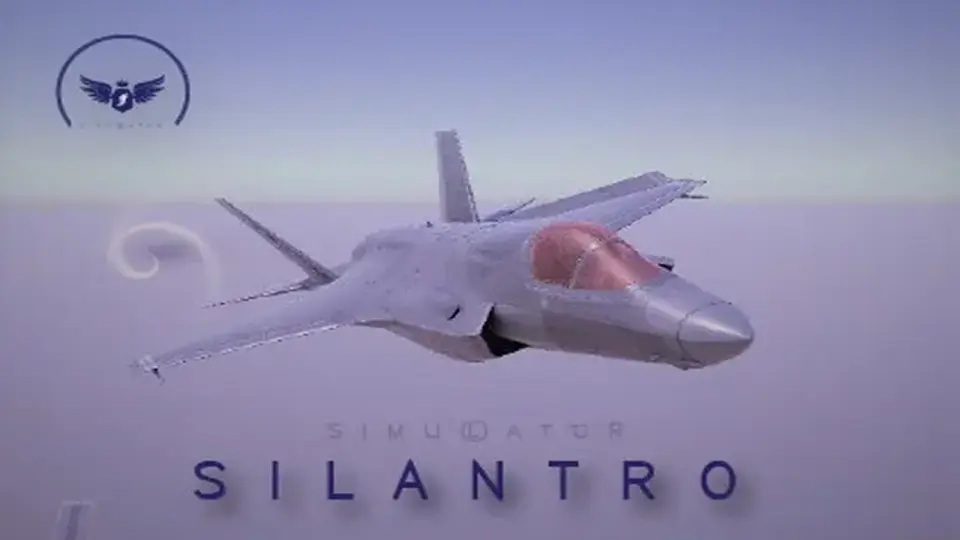
Jet runways, propeller aircraft, gliders, and cockpit-driven flight scenes all need more than a mesh and a movement script. Silantro Flight Simulator Toolkit is a Unity toolkit for setting up, modelling, and simulating fixed-wing aircraft with the systems needed to make those scenes behave like aircraft instead of props.
It can be used for subsonic or supersonic jets, propeller-powered aeroplanes, and unpowered or powered gliders. The package also supports Android and iOS devices, which makes it relevant for projects that need the same flight logic across desktop and mobile targets.
Aerodynamics built around aircraft forces and airfoils
The core of the toolkit is its detailed aerodynamic system. All forces on the aircraft are calculated based on standard aerodynamic principles and formulas, so the aircraft behavior is not limited to a simple scripted approximation. Airfoil data can be imported directly from javafoil in either txt or afl file format, which gives the aerofoil setup a practical connection to existing airfoil data.
Control surface handling is broad enough to cover common aircraft behaviors. The aerofoil system includes implementations for ailerons, rudders, elevators, spoilers, flaps, slats, and elevons. That matters when a project needs different lift, drag, and control responses across separate aircraft parts instead of a single generic wing setup.
An update also added advanced modelling with full subdivision configuration for each aerofoil, including a Spitfire wing example. That makes the wing setup more granular where the aircraft shape or control behavior needs finer adjustment.
Engines, cockpit systems, and input paths
Silantro Flight Simulator Toolkit does not stop at aerodynamics. It includes realistic engines with full thermodynamic analysis, covering turboprop, piston, turboshaft, electric, turbojet, liftfan, and turbofan engine types. Thrust vectoring and a variable exhaust nozzle are also available for the engines, which gives the propulsion side more room for aircraft-specific behavior.
Input is handled through a central system with support for standard Unity input, Unity's new Input System, custom VR controls, and mobile controls. Full VR support is included as well, along with control testing. For hardware input, the toolkit supports Logitech, Thrustmaster, and other joysticks compatible with Unity.
Cockpit setup is covered through a full array of instruments, including joysticks, yokes, analogue dials, and digital displays. Custom editors for all scripts and components are included to make the setup process easier to manage inside Unity.
Systems that let the aircraft feel complete
Realistic engine models with thermodynamic analysis
Aircraft control surfaces for a wide range of wing and tail behaviors
VR, mobile, standard Unity input, and new Input System support
Joystick support for common flight hardware
Cockpit instruments for piloted aircraft scenes
Weapon options including miniguns, unguided drop bombs, unguided rockets, and active or semi-active homing missiles with proportional navigation
Sample scenes that show different ways the toolkit can be staged
The included scenes show how the system can be configured for different flight setups and control styles. There are seven scenes demonstrating different configurations and behavior:
Augmented (Stability Augmentation) Controls
Manual Controls
Mobile Controls
Enter-Exit Mode
Performance Flighter with CAS Controls
Hot Start
Weapons Loadout
That range makes the package useful when a project needs more than one kind of aircraft interaction. A flight game, simulator prototype, or training-style scene can use different control and loadout states without changing the underlying aircraft framework each time.
Where it fits in a Unity workflow
In production, this toolkit fits best where the aircraft itself is a major part of the scene. It gives a project a ready place to start when the work involves fixed-wing flight, cockpit control, input mapping, engine response, and weapon integration. The full C# source code also means the systems can be inspected and adapted inside the project rather than treated as a black box.
The package comes as a unitypackage, with an original Unity version of 2019.3.0, a latest version of 3.5.15, and a latest release date of Dec 04, 2022. It was first published on Sep 11, 2018. The file size is 117.0 MB and the asset count is 514.
For projects that need fixed-wing aircraft with detailed flight behavior, cockpit instruments, and multiple control paths, Silantro Flight Simulator Toolkit is positioned as a practical starting point rather than a thin placeholder. It is most useful when the aircraft needs to be simulated, not merely animated.
 Physics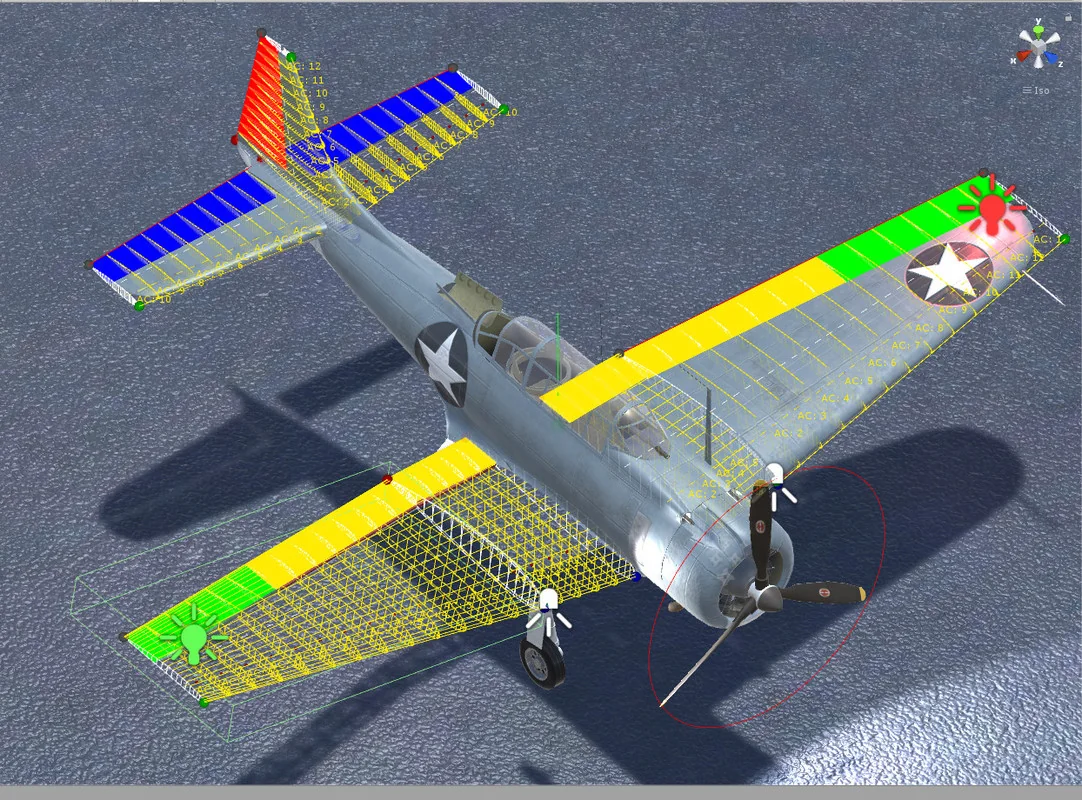
 Physics
 Physics
 Physics