"7b46a695175d8694"{"id":"23484","slug":"realistic-mesh-deformation","title":"Realistic Mesh Deformation","category":"Physics","engine":"Original Unity version: 2021.3.2","assetVersion":"Original Unity version: 2021.3.2","engineVersion":"Asset Version:1.1","tag":"Physics","accent":"cyan","visual":"luts","summary":"Realistic Mesh Deformation handles collision-driven changes on meshes that need to react in real time. It can target selected meshes or all meshes on a game object, with settings that stay adjustable through script and API support.","platform":"Unity","publishedAt":"2026-04-09T17:42:25.000Z","updatedAt":"2026-04-19T15:35:23.000Z","sourceNotes":[],"fileContents":[],"compatibility":["Unity","Original Unity version: 2021.3.2","Asset Version: 1.1"],"featuredImage":{"alt":"Realistic Mesh Deformation","src":"https://3dcghub.com/wp-content/uploads/2026/04/8ba226af8f84_b3ae51dc-ab3c-4e4a-bafe-43ec698dc2d6_1280x720_stretch.webp"},"hasDownloadLink":true,"downloads":0,"terms":[{"taxonomy":"category","slug":"physics-tools-unity-2","name":"Physics"},{"taxonomy":"post_tag","slug":"tools","name":"Tools"},{"taxonomy":"post_tag","slug":"unity","name":"Unity"},{"taxonomy":"post_tag","slug":"vehicles","name":"Vehicles"}],"galleryImages":[{"src":"https://3dcghub.com/wp-content/uploads/2026/04/b310b25fd273_5fe768f9-f3db-4f5b-93e1-c63c12fa97fd_scaled.webp","alt":"Realistic Mesh Deformation"},{"src":"https://3dcghub.com/wp-content/uploads/2026/04/bb18bcd3c420_4bebc862-60cc-46a8-8e88-bf0d0cf62fba_scaled.webp","alt":"Realistic Mesh Deformation"},{"src":"https://3dcghub.com/wp-content/uploads/2026/04/ae7f874c4bfc_9f712310-660c-4beb-9ccd-53efd1f46fee_scaled.webp","alt":"Realistic Mesh Deformation"}],"accessPanel":{"kind":"resource","title":"Access this resource","eyebrow":"Free Download","message":"Log in or create a free account to start your download.","fileName":"Realistic Mesh Deformation v1.1.7z","safetyNote":"All resources are 100% manually reviewed to eliminate all risks.","actionLabel":"Download Free","resourceType":"Resource archive"},"contentHtml":"\u003ch2\u003eCollision-driven mesh changes that stay close to the object\u003c/h2\u003e\n\u003cp\u003eRealistic Mesh Deformation fits scenes where meshes need to react the moment a collision happens. The setup stays direct: attach it to the game objects you want to deform, and the script handles the deformation at runtime. It works on any object, but the wireframe topology needs to be in good condition for the deformation method to hold up properly.\u003c/p\u003e\n\u003cp\u003eThe implementation uses the same deformation methods found in Realistic Car Controller, but in a version that is described as more customizable and more stable. That makes the workflow easy to place into a project without turning it into a separate system that needs a lot of extra handling. The focus stays on letting the object respond in real time while keeping the deformation logic manageable.\u003c/p\u003e \u003ch2\u003eChoosing which meshes react\u003c/h2\u003e\n\u003cp\u003eNot every mesh on a model has to move. Meshes can be selected individually, or the script can take all of them at once. That gives the setup a practical range: one object can react as a whole, or only the parts that matter can be included in the deformation pass.\u003c/p\u003e\n\u003cp\u003eCustomizable deform settings sit at the center of that workflow. Instead of forcing every mesh into the same behavior, the asset leaves room to adjust how the deformation is handled. The combination of per-mesh selection and adjustable settings makes it easier to line up the effect with the structure of the model being used.\u003c/p\u003e\n\u003cp\u003eThis is also where the assetâs tags and feature set line up with the work it supports: realtime deformation, meshes, damage, wireframe, and lowpoly use cases are all part of the picture. The goal is not a broad effects suite, but a focused tool for mesh reaction when a collision needs to leave a visible result.\u003c/p\u003e \u003ch2\u003eWorking through scripts, code, and editor support\u003c/h2\u003e\n\u003cp\u003eSeveral parts of the workflow can be handled through code. The feature set includes deforming and repairing with code, so the mesh state does not have to be locked to one direction of change. If a project needs deformation to be restored or adjusted through script, that path is already part of the tool.\u003c/p\u003e\n\u003cp\u003eThe supporting pieces are practical rather than decorative. Commented scripts and editor extensions are included, and an API is available as part of the package. Those details make the setup easier to read and extend without having to treat the deformer as a black box.\u003c/p\u003e\n\u003cul\u003e \u003cli\u003eDeforming and repairing with code\u003c/li\u003e \u003cli\u003eCommented scripts\u003c/li\u003e \u003cli\u003eEditor extensions\u003c/li\u003e \u003cli\u003eAPI access\u003c/li\u003e\n\u003c/ul\u003e\n\u003cp\u003eThat combination makes the asset feel geared toward projects where the deformation needs to be controlled, inspected, and adjusted instead of only turned on once and left untouched.\u003c/p\u003e \u003ch2\u003ePerformance, package details, and project fit\u003c/h2\u003e\n\u003cp\u003eThe package is presented as lightweight and performance friendly, which matters for a runtime deformation system that needs to stay attached to game objects in motion. The file size is 3.4 MB, and the asset count is 27. Its latest version is 1.2, with the latest release dated Jun 03, 2025. The package type is unitypackage.\u003c/p\u003e\n\u003cp\u003eUnity compatibility is centered on the original Unity version 2021.3.2. Render pipeline compatibility is listed for Built-in, HDRP, and URP under 2021.3.2f1. The release notes point to updated documentation, updated scripts and prefabs, improved performance, and fixes for minor bugs.\u003c/p\u003e\n\u003cp\u003eFor projects that need meshes to react to collisions without a heavy setup, the strongest fit is a model with clean wireframe topology and a clear idea of which objects should deform. When the geometry is ready and the targets are known, the script can be attached directly and the deformation work stays close to the scene itself.\u003c/p\u003e\n\n\u003ch2\u003eMore From The Same Workflow\u003c/h2\u003e\n\u003cul\u003e\n\u003cli\u003e\u003ca href=\"https://3dcghub.com/opencv-for-unity/\" title=\"OpenCV for Unity\"\u003eOpenCV for Unity\u003c/a\u003e\u003c/li\u003e\n\u003cli\u003e\u003ca href=\"https://3dcghub.com/exporter-for-unreal-to-for-unity-2026/\" title=\"Exporter for Unreal to/for Unity 2026\"\u003eExporter for Unreal to/for Unity 2026\u003c/a\u003e\u003c/li\u003e\n\u003cli\u003e\u003ca href=\"https://3dcghub.com/dialogue-system-for-unity/\" title=\"Dialogue System for Unity\"\u003eDialogue System for Unity\u003c/a\u003e\u003c/li\u003e\n\u003cli\u003e\u003ca href=\"https://3dcghub.com/ambient-sounds-interactive-soundscapes-for-unity-6/\" title=\"Ambient Sounds – Interactive Soundscapes for Unity 6\"\u003eAmbient Sounds – Interactive Soundscapes for Unity 6\u003c/a\u003e\u003c/li\u003e\n\u003cli\u003e\u003ca href=\"https://3dcghub.com/pegasus-flythroughs-for-unity-6/\" title=\"Pegasus – Flythroughs for Unity 6\"\u003ePegasus – Flythroughs for Unity 6\u003c/a\u003e\u003c/li\u003e\n\u003c/ul\u003e","contentTextLength":3855,"navigation":{"current":3404,"total":3481,"previous":{"id":"23495","slug":"silantro-flight-simulator-toolkit","title":"Silantro Flight Simulator Toolkit","category":"Physics","platform":"Unity","updatedAt":"2026-04-19T15:35:23.000Z"},"next":{"id":"23575","slug":"flora-renderer-6","title":"Flora Renderer 6","category":"Terrain","platform":"Unity","updatedAt":"2026-04-19T15:35:22.000Z"}},"relatedResources":[{"id":"23389","slug":"arcade-vehicle-physics","title":"Arcade Vehicle Physics","category":"Physics","engine":"Original Unity version: 2020.3.12","assetVersion":"Original Unity version: 2020.3.12","engineVersion":"Asset Version:1.4","tag":"Physics","accent":"cyan","visual":"character","summary":"Arcade Vehicle Physics focuses on quick, drivable vehicle setup for arcade racing, car combat, and arena-style games. It uses a body-and-wheels workflow, includes camera behavior through Cinemachine, and keeps movement logic open for project-specific changes.","platform":"Unity","publishedAt":"2026-04-09T16:57:37.000Z","updatedAt":"2026-04-19T15:35:28.000Z","sourceNotes":[],"fileContents":[],"compatibility":["Unity","Original Unity version: 2020.3.12","Asset Version: 1.4"],"featuredImage":{"alt":"Arcade Vehicle Physics","src":"https://3dcghub.com/wp-content/uploads/2026/04/e3bbf714c3a4_5ce8864d-d46d-4138-a915-13dff6f18543_1280x720_stretch.webp"},"hasDownloadLink":true,"downloads":2},{"id":"23454","slug":"nwh-vehicle-physics-2","title":"NWH Vehicle Physics 2","category":"Physics","engine":"Original Unity version: 2022.3.20","assetVersion":"Original Unity version: 2022.3.20","engineVersion":"Asset Version:13.5","tag":"Physics","accent":"cyan","visual":"animation","summary":"NWH Vehicle Physics 2 focuses on getting drivable vehicles into Unity quickly, then keeps them editable through modular parts and runtime control. It adds surface detection, vehicle switching, multiplayer support, and the full C# source code.","platform":"Unity","publishedAt":"2026-04-09T17:29:13.000Z","updatedAt":"2026-04-19T15:35:25.000Z","sourceNotes":[],"fileContents":[],"compatibility":["Unity","Original Unity version: 2022.3.20","Asset Version: 13.5"],"featuredImage":{"alt":"NWH Vehicle Physics 2","src":"https://3dcghub.com/wp-content/uploads/2026/04/aca45ab345c2_70f6980b-2041-4da8-91b4-d1e95b31d6c1_1280x720_stretch.webp"},"hasDownloadLink":true,"downloads":2},{"id":"23495","slug":"silantro-flight-simulator-toolkit","title":"Silantro Flight Simulator Toolkit","category":"Physics","engine":"Original Unity version: 2019.3.0","assetVersion":"Original Unity version: 2019.3.0","engineVersion":"Asset Version:3.5.15","tag":"Physics","accent":"cyan","visual":"city","summary":"Silantro Flight Simulator Toolkit is a Unity package for setting up and simulating fixed-wing aircraft with detailed aerodynamics, engine models, cockpit instruments, and input support. It also includes sample scenes that show manual, mobile, stabilized, an...","platform":"Unity","publishedAt":"2026-04-09T17:42:33.000Z","updatedAt":"2026-04-19T15:35:23.000Z","sourceNotes":[],"fileContents":[],"compatibility":["Unity","Original Unity version: 2019.3.0","Asset Version: 3.5.15"],"featuredImage":{"alt":"Silantro Flight Simulator Toolkit","src":"https://3dcghub.com/wp-content/uploads/2026/04/40950f9dc369_c00f37d3-2929-4ee4-a088-72108b308b42_1280x720_stretch.webp"},"hasDownloadLink":true,"downloads":1}]}
Physics
Realistic Mesh Deformation
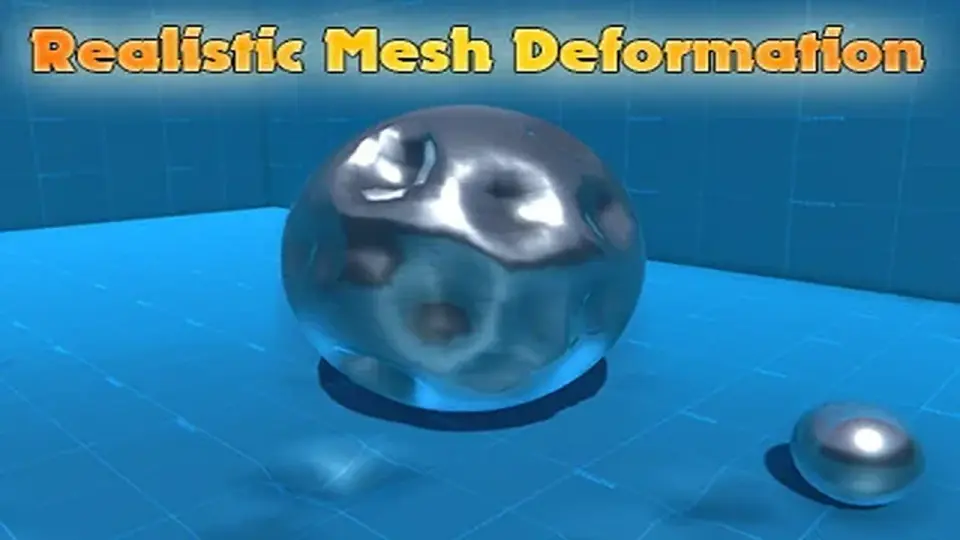
Realistic Mesh Deformation handles collision-driven changes on meshes that need to react in real time. It can target selected meshes or all meshes on a game object, with settings that stay adjustable through script and API support.
Collision-driven mesh changes that stay close to the object
Realistic Mesh Deformation fits scenes where meshes need to react the moment a collision happens. The setup stays direct: attach it to the game objects you want to deform, and the script handles the deformation at runtime. It works on any object, but the wireframe topology needs to be in good condition for the deformation method to hold up properly.
The implementation uses the same deformation methods found in Realistic Car Controller, but in a version that is described as more customizable and more stable. That makes the workflow easy to place into a project without turning it into a separate system that needs a lot of extra handling. The focus stays on letting the object respond in real time while keeping the deformation logic manageable.
Choosing which meshes react
Not every mesh on a model has to move. Meshes can be selected individually, or the script can take all of them at once. That gives the setup a practical range: one object can react as a whole, or only the parts that matter can be included in the deformation pass.
Customizable deform settings sit at the center of that workflow. Instead of forcing every mesh into the same behavior, the asset leaves room to adjust how the deformation is handled. The combination of per-mesh selection and adjustable settings makes it easier to line up the effect with the structure of the model being used.
This is also where the assetâs tags and feature set line up with the work it supports: realtime deformation, meshes, damage, wireframe, and lowpoly use cases are all part of the picture. The goal is not a broad effects suite, but a focused tool for mesh reaction when a collision needs to leave a visible result.
Working through scripts, code, and editor support
Several parts of the workflow can be handled through code. The feature set includes deforming and repairing with code, so the mesh state does not have to be locked to one direction of change. If a project needs deformation to be restored or adjusted through script, that path is already part of the tool.
The supporting pieces are practical rather than decorative. Commented scripts and editor extensions are included, and an API is available as part of the package. Those details make the setup easier to read and extend without having to treat the deformer as a black box.
Deforming and repairing with code
Commented scripts
Editor extensions
API access
That combination makes the asset feel geared toward projects where the deformation needs to be controlled, inspected, and adjusted instead of only turned on once and left untouched.
Performance, package details, and project fit
The package is presented as lightweight and performance friendly, which matters for a runtime deformation system that needs to stay attached to game objects in motion. The file size is 3.4 MB, and the asset count is 27. Its latest version is 1.2, with the latest release dated Jun 03, 2025. The package type is unitypackage.
Unity compatibility is centered on the original Unity version 2021.3.2. Render pipeline compatibility is listed for Built-in, HDRP, and URP under 2021.3.2f1. The release notes point to updated documentation, updated scripts and prefabs, improved performance, and fixes for minor bugs.
For projects that need meshes to react to collisions without a heavy setup, the strongest fit is a model with clean wireframe topology and a clear idea of which objects should deform. When the geometry is ready and the targets are known, the script can be attached directly and the deformation work stays close to the scene itself.
 Physics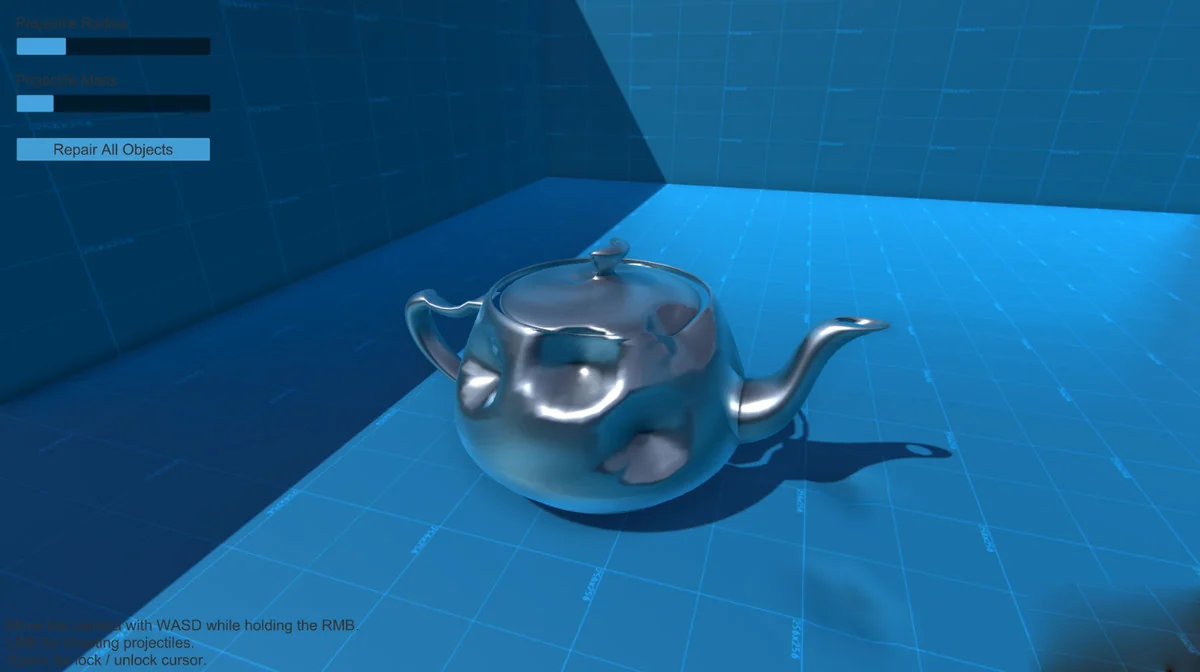
 Physics
 Physics
 Physics