"7b46a695175d8694"{"id":"23426","slug":"easy-collider-editor","title":"Easy Collider Editor","category":"Physics","engine":"Original Unity version: 2019.4.25","assetVersion":"Original Unity version: 2019.4.25","engineVersion":"Asset Version:6.18.3","tag":"Physics","accent":"cyan","visual":"luts","summary":"Easy Collider Editor speeds up collider placement in Unity by letting you select mesh vertices, preview the result, and create common collider shapes with a shortcut. It also reaches into VHACD-based convex hull generation and skinned mesh bone colliders wh...","platform":"Unity","publishedAt":"2026-04-09T17:12:53.000Z","updatedAt":"2026-04-19T15:35:27.000Z","sourceNotes":[],"fileContents":[],"compatibility":["Unity","Original Unity version: 2019.4.25","Asset Version: 6.18.3"],"featuredImage":{"alt":"Easy Collider Editor","src":"https://3dcghub.com/wp-content/uploads/2026/04/52fa4ef76589_5a4460df-f082-4c4a-bb6d-c35794fee210_1280x720_stretch.webp"},"hasDownloadLink":true,"downloads":1,"terms":[{"taxonomy":"category","slug":"physics-tools-unity-2","name":"Physics"},{"taxonomy":"post_tag","slug":"characters","name":"Characters"},{"taxonomy":"post_tag","slug":"tools","name":"Tools"},{"taxonomy":"post_tag","slug":"unity","name":"Unity"}],"galleryImages":[{"src":"https://3dcghub.com/wp-content/uploads/2026/04/f7841b6ecb03_b6b00d7b-f426-4a3f-81c0-a78c3109324d_scaled.webp","alt":"Easy Collider Editor"},{"src":"https://3dcghub.com/wp-content/uploads/2026/04/41067ea8f86c_d8774222-55d5-418e-a564-4cc2e7f6be3c_scaled.webp","alt":"Easy Collider Editor"},{"src":"https://3dcghub.com/wp-content/uploads/2026/04/1e83b2589e00_423ac656-dcfc-488b-bfc6-ee7a0dc53f5b_scaled.webp","alt":"Easy Collider Editor"},{"src":"https://3dcghub.com/wp-content/uploads/2026/04/497834db0a0e_fd9b793b-fce5-4121-8f91-ea6645ad2fc5_scaled.webp","alt":"Easy Collider Editor"},{"src":"https://3dcghub.com/wp-content/uploads/2026/04/5fa4f028ab56_fad5c93e-9569-41bc-b63d-f238e253fca9_scaled.webp","alt":"Easy Collider Editor"},{"src":"https://3dcghub.com/wp-content/uploads/2026/04/96130271d526_fd1a977c-fe08-4b91-b22f-717ee9a1fe57_scaled.webp","alt":"Easy Collider Editor"},{"src":"https://3dcghub.com/wp-content/uploads/2026/04/a95835638a68_3a82839d-4357-470a-9731-3fef2abe07f6_scaled.webp","alt":"Easy Collider Editor"},{"src":"https://3dcghub.com/wp-content/uploads/2026/04/ea8857b9925f_ee006aaf-a000-493b-865c-0d92ca55e211_scaled.webp","alt":"Easy Collider Editor"}],"accessPanel":{"kind":"resource","title":"Access this resource","eyebrow":"Free Download","message":"Log in or create a free account to start your download.","fileName":"Easy Collider Editor v6.18.3 (15 May 2025).7z","safetyNote":"All resources are 100% manually reviewed to eliminate all risks.","actionLabel":"Download Free","resourceType":"Resource archive"},"contentHtml":"\u003cp\u003eWhen a mesh needs a collider that follows its shape closely, Easy Collider Editor keeps the work inside the scene instead of turning it into a long round of manual resizing. The tool uses vertex selection so colliders can be created from points on a mesh, then applied with a button click or a shortcut key. That makes it useful when accurate physics matter but the usual drag-and-resize workflow is too slow.\u003c/p\u003e\n\u003cp\u003eThe editor supports boxes, spheres, capsules, cylinders, rotated boxes, rotated capsules, and convex mesh colliders. A preview is drawn while points are selected, so the collider shape is visible before it is created. Shortcut keys can switch between previews, and a collider can be created from the current preview with a double tap or a single key press.\u003c/p\u003e\n\u003ch2\u003eCreating the shape you actually need\u003c/h2\u003e\n\u003cp\u003ePrimitive colliders are the main day-to-day use case here. Instead of adding a box or capsule and manually fitting it, the editor lets the collider be formed from selected vertices and adjusted with options that control how it attaches, whether the result should shrink or grow, and whether multiple colliders should be created around a pivot point.\u003c/p\u003e\n\u003cp\u003eThat combination is practical when one mesh needs several colliders or when a single primitive is not enough. Rotated boxes and rotated capsules are included, which helps when the collider needs to follow an angled piece of geometry without forcing the mesh or the collider into a rigid axis-aligned fit.\u003c/p\u003e\n\u003cp\u003eThere is also a clear emphasis on speed. The workflow avoids repeatedly adding, moving, and resizing colliders by hand. With the preview drawn during selection, the shape is easier to judge before it becomes part of the object. That matters when the collider must line up with a visible edge, a curved body, or a section of geometry that would be awkward to approximate with a standard primitive.\u003c/p\u003e\n\u003ch2\u003eVHACD for convex hull generation\u003c/h2\u003e\n\u003cp\u003eFor cases where convex mesh colliders are the better fit, the editor includes VHACD-based convex hull generation on Windows. A click can generate multiple convex mesh colliders on any mesh, and the result is previewed as it is calculated. All VHACD parameters are exposed and adjustable, so the generated shape can be tuned instead of treated as a fixed output.\u003c/p\u003e\n\u003cp\u003eThe workflow does not stop at convex hulls. The output of VHACD can be converted automatically to boxes, spheres, and capsules, or converted one collider at a time with the collider merge tools. That gives a path from automatic mesh decomposition to simpler physics volumes when a project needs that kind of cleanup.\u003c/p\u003e\n\u003cp\u003eThis is the part of the tool that fits especially well when a single convex hull is not enough to represent a mesh well. Multiple convex mesh colliders can better match the form of the object while still allowing physics and rigidbodies to work correctly. The preview being calculated and displayed during the process also keeps the result visible while the settings are being adjusted.\u003c/p\u003e\n\u003ch2\u003eSkinned meshes and bone-based collider creation\u003c/h2\u003e\n\u003cp\u003eCharacters are covered as well. With a single click, colliders can be created automatically on a skinned mesh's bones, using boxes, capsules, spheres, or convex meshes. That avoids the extra step of building every collider by hand when the target is a rigged character rather than a static object.\u003c/p\u003e\n\u003cp\u003eBecause the tool is built around quick selection and preview-driven placement, it fits best in the part of production where colliders still need to track geometry closely but the team does not want to spend time constantly nudging, resizing, and checking shapes. The option to create multiple colliders, adjust attachment behavior, and use preview switching keeps the work tied to the mesh instead of to guesswork.\u003c/p\u003e\n\u003cp\u003eEasy Collider Editor also reflects a feature set that has grown through user suggestions, with additions such as the cylinder collider, extra VHACD settings, and previews. That makes it feel like a practical utility rather than a narrow one-purpose tool. For teams setting up physics on props, modular assets, or skinned characters, the strongest point is simple: colliders can be shaped from the mesh, previewed immediately, and turned into working physics volumes without breaking the editing flow.\u003c/p\u003e\n\n\u003ch2\u003eContinue Browsing Similar Packs\u003c/h2\u003e\n\u003cul\u003e\n\u003cli\u003e\u003ca href=\"https://3dcghub.com/opencv-for-unity/\" title=\"OpenCV for Unity\"\u003eOpenCV for Unity\u003c/a\u003e\u003c/li\u003e\n\u003cli\u003e\u003ca href=\"https://3dcghub.com/exporter-for-unreal-to-for-unity-2026/\" title=\"Exporter for Unreal to/for Unity 2026\"\u003eExporter for Unreal to/for Unity 2026\u003c/a\u003e\u003c/li\u003e\n\u003cli\u003e\u003ca href=\"https://3dcghub.com/dialogue-system-for-unity/\" title=\"Dialogue System for Unity\"\u003eDialogue System for Unity\u003c/a\u003e\u003c/li\u003e\n\u003cli\u003e\u003ca href=\"https://3dcghub.com/ambient-sounds-interactive-soundscapes-for-unity-6/\" title=\"Ambient Sounds – Interactive Soundscapes for Unity 6\"\u003eAmbient Sounds – Interactive Soundscapes for Unity 6\u003c/a\u003e\u003c/li\u003e\n\u003cli\u003e\u003ca href=\"https://3dcghub.com/pegasus-flythroughs-for-unity-6/\" title=\"Pegasus – Flythroughs for Unity 6\"\u003ePegasus – Flythroughs for Unity 6\u003c/a\u003e\u003c/li\u003e\n\u003c/ul\u003e","contentTextLength":4455,"navigation":{"current":3392,"total":3481,"previous":{"id":"23365","slug":"see-through-shader","title":"See-through Shader","category":"Particles \u0026 Effects","platform":"Unity","updatedAt":"2026-04-19T15:35:28.000Z"},"next":{"id":"23402","slug":"dynamic-water-physics-2","title":"Dynamic Water Physics 2","category":"Physics","platform":"Unity","updatedAt":"2026-04-19T15:35:27.000Z"}},"relatedResources":[{"id":"23415","slug":"easy-character-movement-2","title":"Easy Character Movement 2","category":"Physics","engine":"Original Unity version: 2021.3.45","assetVersion":"Original Unity version: 2021.3.45","engineVersion":"Asset Version:1.4.2","tag":"Physics","accent":"cyan","visual":"character","summary":"Easy Character Movement 2 centers on a CharacterMovement component that replaces Unityâs built-in Character Controller with a more flexible kinematic workflow. It also adds movement modes, grounding tools, platform handling, and options for custom gravity...","platform":"Unity","publishedAt":"2026-04-09T17:13:01.000Z","updatedAt":"2026-04-19T15:35:26.000Z","sourceNotes":[],"fileContents":[],"compatibility":["Unity","Original Unity version: 2021.3.45","Asset Version: 1.4.2"],"featuredImage":{"alt":"Easy Character Movement 2","src":"https://3dcghub.com/wp-content/uploads/2026/04/0ea8c048c175_40bb8f05-455a-46df-b201-ce0a6950be63_1280x720_stretch.webp"},"hasDownloadLink":true,"downloads":0},{"id":"23478","slug":"ragdoll-animator-2","title":"Ragdoll Animator 2","category":"Physics","engine":"Original Unity version: 2021.3.34","assetVersion":"Original Unity version: 2021.3.34","engineVersion":"Asset Version:1.0.4.0.4","tag":"Physics","accent":"cyan","visual":"character","summary":"Ragdoll Animator 2 sets up humanoid ragdolls in a few clicks and extends to animals and other creature models with automatic assistance and scene gizmos. It works through rigidbody and joint physics, adds Extra Features and Equipables APIs, and includes uti...","platform":"Unity","publishedAt":"2026-04-09T17:42:09.000Z","updatedAt":"2026-04-19T15:35:24.000Z","sourceNotes":[],"fileContents":[],"compatibility":["Unity","Original Unity version: 2021.3.34","Asset Version: 1.0.4.0.4"],"featuredImage":{"alt":"Ragdoll Animator 2","src":"https://3dcghub.com/wp-content/uploads/2026/04/a5a86fd752a0_ef4b5cb3-9bd7-4015-b065-5dc6f8c79f77_1280x720_stretch.webp"},"hasDownloadLink":true,"downloads":7},{"id":"23437","slug":"magica-cloth-2","title":"Magica Cloth 2","category":"Physics","engine":"Original Unity version: 2021.3.20","assetVersion":"Original Unity version: 2021.3.20","engineVersion":"Asset Version:2.16.0","tag":"Physics","accent":"cyan","visual":"character","summary":"Magica Cloth 2 brings cloth simulation to Unity DOTS and works with both Transform and Mesh setups. It avoids special shaders, supports runtime builds, and adds collision tools such as edge collision, backstop, and self-collision.","platform":"Unity","publishedAt":"2026-04-09T17:22:18.000Z","updatedAt":"2026-04-19T15:35:26.000Z","sourceNotes":[],"fileContents":[],"compatibility":["Unity","Original Unity version: 2021.3.20","Asset Version: 2.16.0"],"featuredImage":{"alt":"Magica Cloth 2","src":"https://3dcghub.com/wp-content/uploads/2026/04/53741a7ca553_377342f0-a154-407a-913a-48e0c9777e08_1280x720_stretch.webp"},"hasDownloadLink":true,"downloads":6}]}
Physics
Easy Collider Editor
Easy Collider Editor speeds up collider placement in Unity by letting you select mesh vertices, preview the result, and create common collider shapes with a shortcut. It also reaches into VHACD-based convex hull generation and skinned mesh bone colliders wh...
When a mesh needs a collider that follows its shape closely, Easy Collider Editor keeps the work inside the scene instead of turning it into a long round of manual resizing. The tool uses vertex selection so colliders can be created from points on a mesh, then applied with a button click or a shortcut key. That makes it useful when accurate physics matter but the usual drag-and-resize workflow is too slow.
The editor supports boxes, spheres, capsules, cylinders, rotated boxes, rotated capsules, and convex mesh colliders. A preview is drawn while points are selected, so the collider shape is visible before it is created. Shortcut keys can switch between previews, and a collider can be created from the current preview with a double tap or a single key press.
Creating the shape you actually need
Primitive colliders are the main day-to-day use case here. Instead of adding a box or capsule and manually fitting it, the editor lets the collider be formed from selected vertices and adjusted with options that control how it attaches, whether the result should shrink or grow, and whether multiple colliders should be created around a pivot point.
That combination is practical when one mesh needs several colliders or when a single primitive is not enough. Rotated boxes and rotated capsules are included, which helps when the collider needs to follow an angled piece of geometry without forcing the mesh or the collider into a rigid axis-aligned fit.
There is also a clear emphasis on speed. The workflow avoids repeatedly adding, moving, and resizing colliders by hand. With the preview drawn during selection, the shape is easier to judge before it becomes part of the object. That matters when the collider must line up with a visible edge, a curved body, or a section of geometry that would be awkward to approximate with a standard primitive.
VHACD for convex hull generation
For cases where convex mesh colliders are the better fit, the editor includes VHACD-based convex hull generation on Windows. A click can generate multiple convex mesh colliders on any mesh, and the result is previewed as it is calculated. All VHACD parameters are exposed and adjustable, so the generated shape can be tuned instead of treated as a fixed output.
The workflow does not stop at convex hulls. The output of VHACD can be converted automatically to boxes, spheres, and capsules, or converted one collider at a time with the collider merge tools. That gives a path from automatic mesh decomposition to simpler physics volumes when a project needs that kind of cleanup.
This is the part of the tool that fits especially well when a single convex hull is not enough to represent a mesh well. Multiple convex mesh colliders can better match the form of the object while still allowing physics and rigidbodies to work correctly. The preview being calculated and displayed during the process also keeps the result visible while the settings are being adjusted.
Skinned meshes and bone-based collider creation
Characters are covered as well. With a single click, colliders can be created automatically on a skinned mesh's bones, using boxes, capsules, spheres, or convex meshes. That avoids the extra step of building every collider by hand when the target is a rigged character rather than a static object.
Because the tool is built around quick selection and preview-driven placement, it fits best in the part of production where colliders still need to track geometry closely but the team does not want to spend time constantly nudging, resizing, and checking shapes. The option to create multiple colliders, adjust attachment behavior, and use preview switching keeps the work tied to the mesh instead of to guesswork.
Easy Collider Editor also reflects a feature set that has grown through user suggestions, with additions such as the cylinder collider, extra VHACD settings, and previews. That makes it feel like a practical utility rather than a narrow one-purpose tool. For teams setting up physics on props, modular assets, or skinned characters, the strongest point is simple: colliders can be shaped from the mesh, previewed immediately, and turned into working physics volumes without breaking the editing flow.
 Physics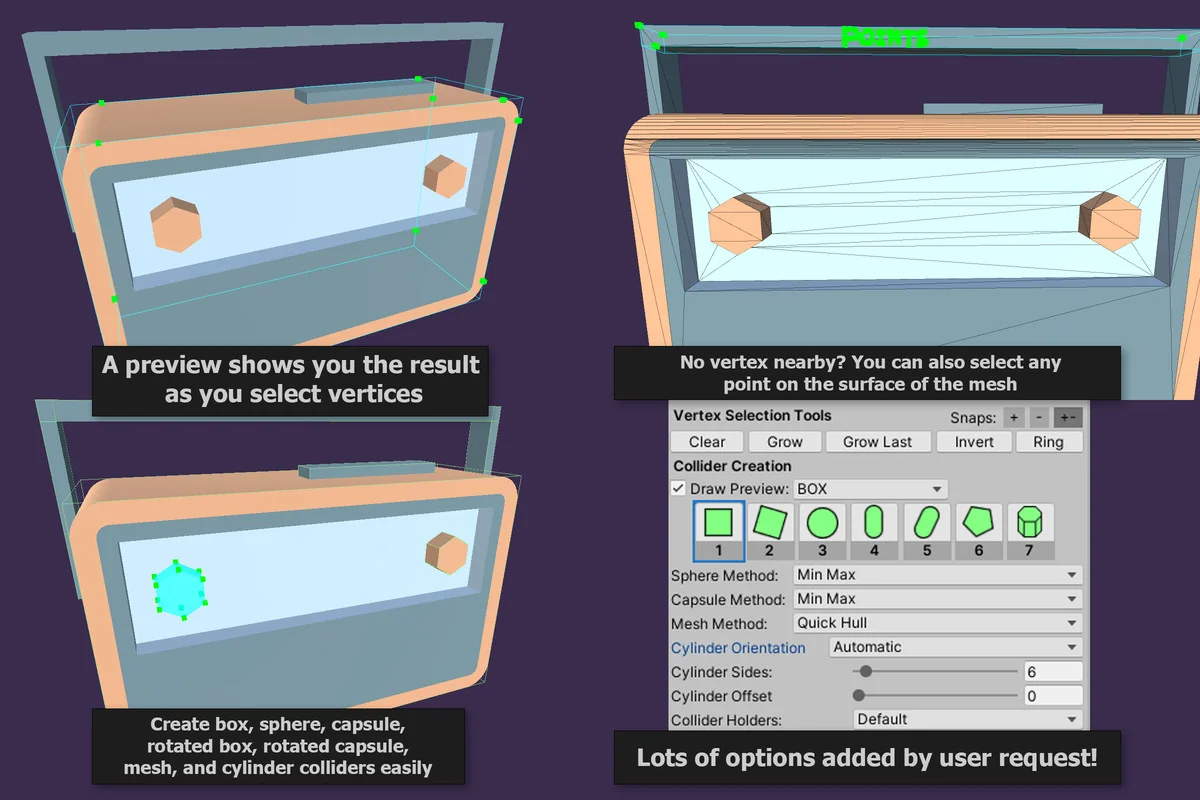
 Physics
 Physics
 Physics