"7b46a695175d8694"{"id":"23415","slug":"easy-character-movement-2","title":"Easy Character Movement 2","category":"Physics","engine":"Original Unity version: 2021.3.45","assetVersion":"Original Unity version: 2021.3.45","engineVersion":"Asset Version:1.4.2","tag":"Physics","accent":"cyan","visual":"character","summary":"Easy Character Movement 2 centers on a CharacterMovement component that replaces Unityâs built-in Character Controller with a more flexible kinematic workflow. It also adds movement modes, grounding tools, platform handling, and options for custom gravity...","platform":"Unity","publishedAt":"2026-04-09T17:13:01.000Z","updatedAt":"2026-04-19T15:35:26.000Z","sourceNotes":[],"fileContents":[],"compatibility":["Unity","Original Unity version: 2021.3.45","Asset Version: 1.4.2"],"featuredImage":{"alt":"Easy Character Movement 2","src":"https://3dcghub.com/wp-content/uploads/2026/04/0ea8c048c175_40bb8f05-455a-46df-b201-ce0a6950be63_1280x720_stretch.webp"},"hasDownloadLink":true,"downloads":0,"terms":[{"taxonomy":"category","slug":"physics-tools-unity-2","name":"Physics"},{"taxonomy":"post_tag","slug":"characters","name":"Characters"},{"taxonomy":"post_tag","slug":"tools","name":"Tools"},{"taxonomy":"post_tag","slug":"unity","name":"Unity"}],"galleryImages":[{"src":"https://3dcghub.com/wp-content/uploads/2026/04/43ae643eb49c_5ab44773-b911-479a-a8b3-3fbb660779dc_scaled.webp","alt":"Easy Character Movement 2"},{"src":"https://3dcghub.com/wp-content/uploads/2026/04/d9cdc83380c4_4e28f2bc-878c-4923-8b7d-f47e740c7280_scaled.webp","alt":"Easy Character Movement 2"},{"src":"https://3dcghub.com/wp-content/uploads/2026/04/c214062fb424_c20ac73c-5e21-41a6-8a9c-af286407f7a9_scaled.webp","alt":"Easy Character Movement 2"},{"src":"https://3dcghub.com/wp-content/uploads/2026/04/fb6df46e8084_72bb3f67-2e8e-4601-b3c8-4d863c603bd2_scaled.webp","alt":"Easy Character Movement 2"},{"src":"https://3dcghub.com/wp-content/uploads/2026/04/97ed9c3c5d9e_d0719db2-42f6-4418-9f63-c94733bbbd0d_scaled.webp","alt":"Easy Character Movement 2"},{"src":"https://3dcghub.com/wp-content/uploads/2026/04/05a51fc4c033_2fa8c8f1-82da-4ea1-87fb-f9af35d29245_scaled.webp","alt":"Easy Character Movement 2"},{"src":"https://3dcghub.com/wp-content/uploads/2026/04/313a962486d2_bdfc30f0-39f9-4ac8-b1ae-907305e9a5e2_scaled.webp","alt":"Easy Character Movement 2"},{"src":"https://3dcghub.com/wp-content/uploads/2026/04/fbadf9b72b37_07f69d47-9608-4175-b0bc-1b06b8f885f1_scaled.webp","alt":"Easy Character Movement 2"},{"src":"https://3dcghub.com/wp-content/uploads/2026/04/b5117353a38e_211f8625-45e8-4f47-8e99-5a63a4868516_scaled.webp","alt":"Easy Character Movement 2"},{"src":"https://3dcghub.com/wp-content/uploads/2026/04/1c9798072ce9_e7f97dba-42ec-49fb-9594-9fa17a244621_scaled.webp","alt":"Easy Character Movement 2"}],"accessPanel":{"kind":"resource","title":"Access this resource","eyebrow":"Free Download","message":"Log in or create a free account to start your download.","fileName":"Easy Character Movement 2 v1.4.2 (14 Nov 2024).7z","safetyNote":"All resources are 100% manually reviewed to eliminate all risks.","actionLabel":"Download Free","resourceType":"Resource archive"},"contentHtml":"\u003ch2\u003eSetting up character movement around a kinematic motor\u003c/h2\u003e\n\u003cp\u003eEasy Character Movement 2 starts with a practical replacement for Unityâs built-in Character Controller. The main component, CharacterMovement, works as a kinematic character controller and follows the same general Move-method style, which keeps the implementation familiar while expanding the available behavior. That makes it a direct fit for projects that already think in terms of controller-driven movement instead of physics-driven rigidbody motion.\u003c/p\u003e\n\u003cp\u003eThe package is a comprehensive set of components for character movement in both 3D and 2.5D environments. Its purpose is to give developers a foundation for character mechanics without tying the workflow to a specific game genre. The same structure can support player-controlled avatars or AI-controlled characters, since the Character class uses the CharacterMovement component as its motor.\u003c/p\u003e\n\u003cp\u003eThere is also a version split to keep in mind. As of v1.4.2, ECM2 is available in two versions: one for Unity 2021+ and a native version for Unity 6. The Unity 6 version includes examples that use the Input System and URP.\u003c/p\u003e\n\u003ch2\u003eCharacter class and movement modes\u003c/h2\u003e\n\u003cp\u003eThe Character class sits on top of the motor and provides a highly customizable base for avatars. It does not lock movement into one fixed behavior. Instead, it includes common movement modes such as walking, falling, flying, and swimming, while also allowing custom modes to be created. That gives the implementation a flexible structure for characters that need to switch between grounded movement and more specialized traversal states.\u003c/p\u003e\n\u003cp\u003eBecause the CharacterMovement component is used as the controller/motor, the character logic stays organized around a single movement foundation. The package is aimed at making it easier to build game mechanics on top of that foundation rather than forcing each system to be assembled from scratch.\u003c/p\u003e\n\u003cp\u003eThe available behavior is meant to stay configurable. The system is having flexible and customizable behavior through callbacks, which gives developers a place to extend how characters respond during movement without replacing the entire setup.\u003c/p\u003e\n\u003ch2\u003eGrounding, slopes, and stepping behavior\u003c/h2\u003e\n\u003cp\u003eA large part of the package focuses on how characters behave on surfaces. Ground detection is based on the real surface normal, which is important for handling uneven terrain more reliably. The Slope Limit Override adds another layer of control by letting walkable areas be defined per-face or even per-object. That makes surface rules more specific than a single global slope setting.\u003c/p\u003e\n\u003cp\u003eThe perchOffset setting defines the characterâs feet radius and gives a configurable walkable area. The controller is capsule-based, and it includes a Flat Base for Ground Checks option. That option exists to avoid the situation where characters slowly lower off the side of a ledge, which is a small but important detail in everyday traversal.\u003c/p\u003e\n\u003cp\u003eMovement also includes a ground constraint to prevent the character from being launched off ramps. Auto-stepping is handled while preserving momentum, including stride, so characters can move over obstacles in a more continuous way. A configurable Plane Constraint is available as well, making movement along a locked axis impossible when that restriction is needed.\u003c/p\u003e\n\u003ch2\u003eInteractions, custom gravity, and platform support\u003c/h2\u003e\n\u003cp\u003eBeyond basic locomotion, the controller includes physics interactions and character-vs-character interactions. Those systems matter when movement has to coexist with other moving entities or with direct character contact in gameplay. Collision and grounding events are also included, which gives the movement layer a way to communicate important state changes without extra setup.\u003c/p\u003e\n\u003cp\u003ePlatform support is treated as a first-class feature. Animated, scripted, and physics-based platforms are all supported transparently, without additional steps needed from the developer. That helps the character motor stay usable in scenes where the ground itself is moving or changing in time.\u003c/p\u003e\n\u003cp\u003eThe package also supports user-defined gravity and a user-defined up vector. That opens the door to effects such as Mario Galaxy-like movement, where the character does not have to remain bound to a single fixed gravity direction. Combined with the movement callbacks and the custom movement modes, this gives the controller room for unusual traversal rules while still keeping the core system consistent.\u003c/p\u003e\n\u003cp\u003eNetwork friendliness is called out as well. Full control over the update and simulation timestep makes the controller easier to align with different runtime needs, including setups where timing control matters. For teams building production characters, that sort of timestep control can be as important as the visible movement features themselves.\u003c/p\u003e\n\u003ch2\u003eDocumentation and implementation readiness\u003c/h2\u003e\n\u003cp\u003eEasy Character Movement 2 includes extensive documentation and fully commented, readable source code. That combination matters for setup and maintenance because the movement logic is meant to be understood, adjusted, and extended rather than treated as a black box. The emphasis is on a controller that can serve as a long-term foundation for character systems instead of a one-off movement script.\u003c/p\u003e\n\u003cp\u003eWhat stands out most in practice is the balance between directness and control. The implementation path stays close to Unityâs own controller style through the Move method, but the surrounding systems add more specific handling for grounding, slopes, stepping, moving platforms, custom gravity, and interaction events. For projects that need a character motor with a broad feature set and room for customization, the package is organized to support that workflow from the start.\u003c/p\u003e\n\u003cp\u003eThe final takeaway is simple: this is a kinematic character controller built to cover the ordinary parts of movement and the awkward edge cases around terrain, platforms, and custom movement rules without forcing the character into a rigid template.\u003c/p\u003e\n\u003cp\u003e\u003c/p\u003e\n\n\u003ch2\u003eRelated Resources Worth Checking\u003c/h2\u003e\n\u003cul\u003e\n\u003cli\u003e\u003ca href=\"https://3dcghub.com/opencv-for-unity/\" title=\"OpenCV for Unity\"\u003eOpenCV for Unity\u003c/a\u003e\u003c/li\u003e\n\u003cli\u003e\u003ca href=\"https://3dcghub.com/exporter-for-unreal-to-for-unity-2026/\" title=\"Exporter for Unreal to/for Unity 2026\"\u003eExporter for Unreal to/for Unity 2026\u003c/a\u003e\u003c/li\u003e\n\u003cli\u003e\u003ca href=\"https://3dcghub.com/dialogue-system-for-unity/\" title=\"Dialogue System for Unity\"\u003eDialogue System for Unity\u003c/a\u003e\u003c/li\u003e\n\u003cli\u003e\u003ca href=\"https://3dcghub.com/ambient-sounds-interactive-soundscapes-for-unity-6/\" title=\"Ambient Sounds – Interactive Soundscapes for Unity 6\"\u003eAmbient Sounds – Interactive Soundscapes for Unity 6\u003c/a\u003e\u003c/li\u003e\n\u003cli\u003e\u003ca href=\"https://3dcghub.com/pegasus-flythroughs-for-unity-6/\" title=\"Pegasus – Flythroughs for Unity 6\"\u003ePegasus – Flythroughs for Unity 6\u003c/a\u003e\u003c/li\u003e\n\u003c/ul\u003e","contentTextLength":6176,"navigation":{"current":3396,"total":3481,"previous":{"id":"23430","slug":"hurricane-vr-physics-interaction-toolkit","title":"Hurricane VR - Physics Interaction Toolkit","category":"Physics","platform":"Unity","updatedAt":"2026-04-19T15:35:26.000Z"},"next":{"id":"23475","slug":"projectile-toolkit-3","title":"Projectile Toolkit 3","category":"Physics","platform":"Unity","updatedAt":"2026-04-19T15:35:25.000Z"}},"relatedResources":[{"id":"23389","slug":"arcade-vehicle-physics","title":"Arcade Vehicle Physics","category":"Physics","engine":"Original Unity version: 2020.3.12","assetVersion":"Original Unity version: 2020.3.12","engineVersion":"Asset Version:1.4","tag":"Physics","accent":"cyan","visual":"character","summary":"Arcade Vehicle Physics focuses on quick, drivable vehicle setup for arcade racing, car combat, and arena-style games. It uses a body-and-wheels workflow, includes camera behavior through Cinemachine, and keeps movement logic open for project-specific changes.","platform":"Unity","publishedAt":"2026-04-09T16:57:37.000Z","updatedAt":"2026-04-19T15:35:28.000Z","sourceNotes":[],"fileContents":[],"compatibility":["Unity","Original Unity version: 2020.3.12","Asset Version: 1.4"],"featuredImage":{"alt":"Arcade Vehicle Physics","src":"https://3dcghub.com/wp-content/uploads/2026/04/e3bbf714c3a4_5ce8864d-d46d-4138-a915-13dff6f18543_1280x720_stretch.webp"},"hasDownloadLink":true,"downloads":2},{"id":"23426","slug":"easy-collider-editor","title":"Easy Collider Editor","category":"Physics","engine":"Original Unity version: 2019.4.25","assetVersion":"Original Unity version: 2019.4.25","engineVersion":"Asset Version:6.18.3","tag":"Physics","accent":"cyan","visual":"luts","summary":"Easy Collider Editor speeds up collider placement in Unity by letting you select mesh vertices, preview the result, and create common collider shapes with a shortcut. It also reaches into VHACD-based convex hull generation and skinned mesh bone colliders wh...","platform":"Unity","publishedAt":"2026-04-09T17:12:53.000Z","updatedAt":"2026-04-19T15:35:27.000Z","sourceNotes":[],"fileContents":[],"compatibility":["Unity","Original Unity version: 2019.4.25","Asset Version: 6.18.3"],"featuredImage":{"alt":"Easy Collider Editor","src":"https://3dcghub.com/wp-content/uploads/2026/04/52fa4ef76589_5a4460df-f082-4c4a-bb6d-c35794fee210_1280x720_stretch.webp"},"hasDownloadLink":true,"downloads":1},{"id":"23437","slug":"magica-cloth-2","title":"Magica Cloth 2","category":"Physics","engine":"Original Unity version: 2021.3.20","assetVersion":"Original Unity version: 2021.3.20","engineVersion":"Asset Version:2.16.0","tag":"Physics","accent":"cyan","visual":"character","summary":"Magica Cloth 2 brings cloth simulation to Unity DOTS and works with both Transform and Mesh setups. It avoids special shaders, supports runtime builds, and adds collision tools such as edge collision, backstop, and self-collision.","platform":"Unity","publishedAt":"2026-04-09T17:22:18.000Z","updatedAt":"2026-04-19T15:35:26.000Z","sourceNotes":[],"fileContents":[],"compatibility":["Unity","Original Unity version: 2021.3.20","Asset Version: 2.16.0"],"featuredImage":{"alt":"Magica Cloth 2","src":"https://3dcghub.com/wp-content/uploads/2026/04/53741a7ca553_377342f0-a154-407a-913a-48e0c9777e08_1280x720_stretch.webp"},"hasDownloadLink":true,"downloads":6}]}
Physics
Easy Character Movement 2
Easy Character Movement 2 centers on a CharacterMovement component that replaces Unityâs built-in Character Controller with a more flexible kinematic workflow. It also adds movement modes, grounding tools, platform handling, and options for custom gravity...
Setting up character movement around a kinematic motor
Easy Character Movement 2 starts with a practical replacement for Unityâs built-in Character Controller. The main component, CharacterMovement, works as a kinematic character controller and follows the same general Move-method style, which keeps the implementation familiar while expanding the available behavior. That makes it a direct fit for projects that already think in terms of controller-driven movement instead of physics-driven rigidbody motion.
The package is a comprehensive set of components for character movement in both 3D and 2.5D environments. Its purpose is to give developers a foundation for character mechanics without tying the workflow to a specific game genre. The same structure can support player-controlled avatars or AI-controlled characters, since the Character class uses the CharacterMovement component as its motor.
There is also a version split to keep in mind. As of v1.4.2, ECM2 is available in two versions: one for Unity 2021+ and a native version for Unity 6. The Unity 6 version includes examples that use the Input System and URP.
Character class and movement modes
The Character class sits on top of the motor and provides a highly customizable base for avatars. It does not lock movement into one fixed behavior. Instead, it includes common movement modes such as walking, falling, flying, and swimming, while also allowing custom modes to be created. That gives the implementation a flexible structure for characters that need to switch between grounded movement and more specialized traversal states.
Because the CharacterMovement component is used as the controller/motor, the character logic stays organized around a single movement foundation. The package is aimed at making it easier to build game mechanics on top of that foundation rather than forcing each system to be assembled from scratch.
The available behavior is meant to stay configurable. The system is having flexible and customizable behavior through callbacks, which gives developers a place to extend how characters respond during movement without replacing the entire setup.
Grounding, slopes, and stepping behavior
A large part of the package focuses on how characters behave on surfaces. Ground detection is based on the real surface normal, which is important for handling uneven terrain more reliably. The Slope Limit Override adds another layer of control by letting walkable areas be defined per-face or even per-object. That makes surface rules more specific than a single global slope setting.
The perchOffset setting defines the characterâs feet radius and gives a configurable walkable area. The controller is capsule-based, and it includes a Flat Base for Ground Checks option. That option exists to avoid the situation where characters slowly lower off the side of a ledge, which is a small but important detail in everyday traversal.
Movement also includes a ground constraint to prevent the character from being launched off ramps. Auto-stepping is handled while preserving momentum, including stride, so characters can move over obstacles in a more continuous way. A configurable Plane Constraint is available as well, making movement along a locked axis impossible when that restriction is needed.
Interactions, custom gravity, and platform support
Beyond basic locomotion, the controller includes physics interactions and character-vs-character interactions. Those systems matter when movement has to coexist with other moving entities or with direct character contact in gameplay. Collision and grounding events are also included, which gives the movement layer a way to communicate important state changes without extra setup.
Platform support is treated as a first-class feature. Animated, scripted, and physics-based platforms are all supported transparently, without additional steps needed from the developer. That helps the character motor stay usable in scenes where the ground itself is moving or changing in time.
The package also supports user-defined gravity and a user-defined up vector. That opens the door to effects such as Mario Galaxy-like movement, where the character does not have to remain bound to a single fixed gravity direction. Combined with the movement callbacks and the custom movement modes, this gives the controller room for unusual traversal rules while still keeping the core system consistent.
Network friendliness is called out as well. Full control over the update and simulation timestep makes the controller easier to align with different runtime needs, including setups where timing control matters. For teams building production characters, that sort of timestep control can be as important as the visible movement features themselves.
Documentation and implementation readiness
Easy Character Movement 2 includes extensive documentation and fully commented, readable source code. That combination matters for setup and maintenance because the movement logic is meant to be understood, adjusted, and extended rather than treated as a black box. The emphasis is on a controller that can serve as a long-term foundation for character systems instead of a one-off movement script.
What stands out most in practice is the balance between directness and control. The implementation path stays close to Unityâs own controller style through the Move method, but the surrounding systems add more specific handling for grounding, slopes, stepping, moving platforms, custom gravity, and interaction events. For projects that need a character motor with a broad feature set and room for customization, the package is organized to support that workflow from the start.
The final takeaway is simple: this is a kinematic character controller built to cover the ordinary parts of movement and the awkward edge cases around terrain, platforms, and custom movement rules without forcing the character into a rigid template.
 Physics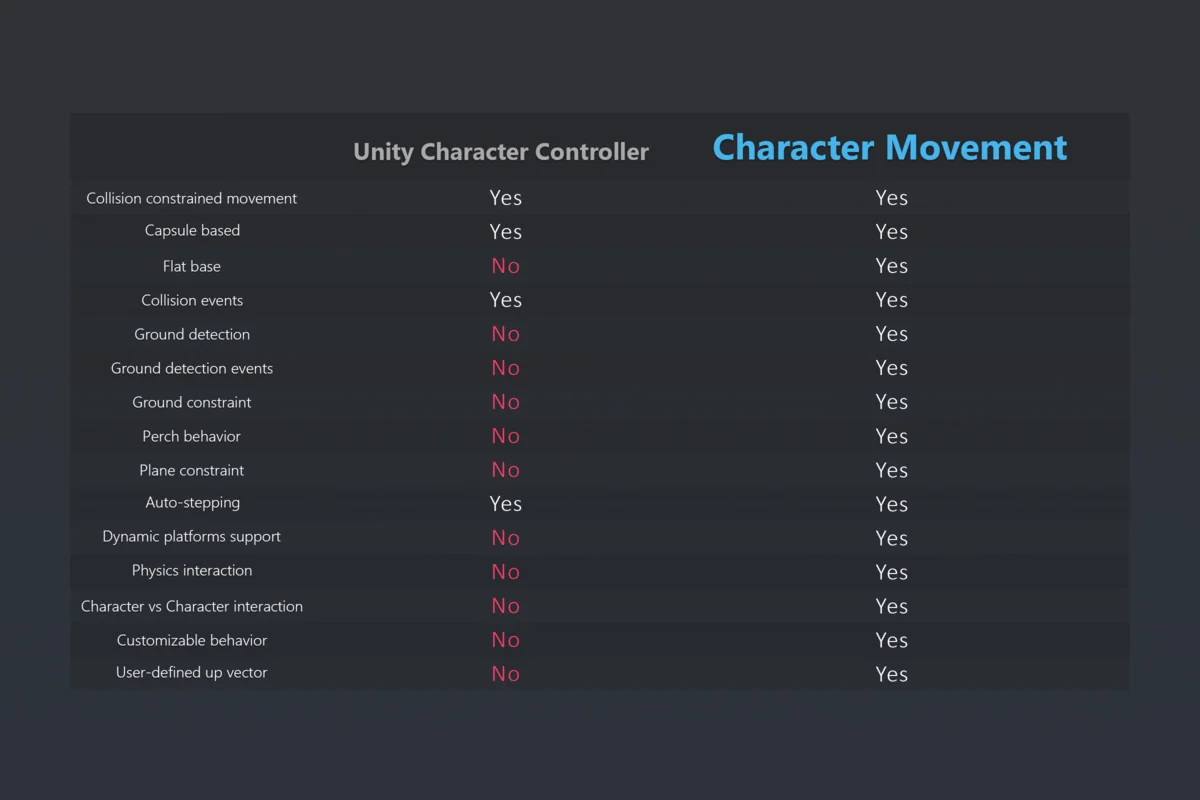
 Physics
 Physics
 Physics