"7b46a695175d8694"{"id":"23430","slug":"hurricane-vr-physics-interaction-toolkit","title":"Hurricane VR - Physics Interaction Toolkit","category":"Physics","engine":"Original Unity version: 2019.4.1","assetVersion":"Original Unity version: 2019.4.1","engineVersion":"Asset Version:2.9.1","tag":"Physics","accent":"cyan","visual":"audio","summary":"HurricaneVR is a Unity VR interaction framework centered on physics hands, responsive grabbing, and object collisions. It also covers player movement, sockets, weapons, and sample interactables for projects that need a physical VR loop.","platform":"Unity","publishedAt":"2026-04-09T17:22:04.000Z","updatedAt":"2026-04-19T15:35:26.000Z","sourceNotes":[],"fileContents":[],"compatibility":["Unity","Original Unity version: 2019.4.1","Asset Version: 2.9.1"],"featuredImage":{"alt":"Hurricane VR - Physics Interaction Toolkit","src":"https://3dcghub.com/wp-content/uploads/2026/04/de5223ff03b1_b9dd83aa-837c-4855-a440-d6a6902ebe16_1280x720_stretch.webp"},"hasDownloadLink":true,"downloads":0,"terms":[{"taxonomy":"category","slug":"physics-tools-unity-2","name":"Physics"},{"taxonomy":"post_tag","slug":"game-systems","name":"Game Systems"},{"taxonomy":"post_tag","slug":"plugins","name":"Plugins"},{"taxonomy":"post_tag","slug":"unity","name":"Unity"}],"galleryImages":[{"src":"https://3dcghub.com/wp-content/uploads/2026/04/ba6854cfa92e_5f1c0e53-c783-4ea7-a30d-5b032b116fb2_scaled.webp","alt":"Hurricane VR - Physics Interaction Toolkit"}],"accessPanel":{"kind":"resource","title":"Access this resource","eyebrow":"Free Download","message":"Log in or create a free account to start your download.","fileName":"Hurricane VR - Physics Interaction Toolkit v2.9.1.7z","safetyNote":"All resources are 100% manually reviewed to eliminate all risks.","actionLabel":"Download Free","resourceType":"Resource archive"},"contentHtml":"\u003ch2\u003ePhysics hands as the starting point\u003c/h2\u003e\n\u003cp\u003eHurricaneVR is a complete VR interaction framework for Unity with a heavy emphasis on quality physics interactions. The hand system is driven by tuned PD Controllers, which gives the physics hands a smooth and responsive feel instead of a stiff or disconnected motion style. That matters when the same setup has to handle collision, two-handed holding, throwing, and regular interaction with physics objects in the same scene.\u003c/p\u003e\n\u003cp\u003eSupported Unity versions run from 2019.4 through 6.3, and Unity 2019 and up is supported across major headsets and XR plugins. In practice, that makes the framework relevant when a project needs to reach multiple devices and platforms without changing the core interaction logic each time.\u003c/p\u003e\n\u003cp\u003eThe package also pairs well with the BW Style Hexabody Player Controller for a more complete physics experience. That places it in a useful spot for projects that want the hands, player body, and held objects to behave as part of one system rather than as separate pieces.\u003c/p\u003e\n\u003ch2\u003eGrabbing, pose control, and socket behavior\u003c/h2\u003e\n\u003cp\u003eThe grabbing side focuses on more than simply attaching an object to the hand. Smooth and responsive one- and two-handed physics grabbing is supported, along with custom rigged hand models. An advanced pose editor provides per-finger animations and bone mirroring, while dynamic auto pose solving uses physics to shape the hand around held objects.\u003c/p\u003e\n\u003cp\u003eThere is also a dynamic auto poser with live updates in the editor view, which is useful when creating or adjusting poses quickly. Gravity Gloves or Force Grab style remote grabbing is part of the framework, along with Line Grab, which lets an object be grabbed anywhere along the line with optional grip adjustment. Configurable one- and two-hand strength per grabbable gives more control over how each object responds.\u003c/p\u003e\n\u003cul\u003e\n\u003cli\u003ePose Zones\u003c/li\u003e\n\u003cli\u003eSocketable Orientation UI Helper for multiple socket types\u003c/li\u003e\n\u003cli\u003eHaptic enhancements for guns, hand and force grabber, and hand-held object collisions\u003c/li\u003e\n\u003cli\u003eForce Grabber and Hand Grabber hover and grab poses\u003c/li\u003e\n\u003cli\u003ePose swapping on held objects, including flipping knives in hand\u003c/li\u003e\n\u003cli\u003eAdvanced stabbing system with customizable stab difficulty and friction\u003c/li\u003e\n\u003c/ul\u003e\n\u003cp\u003eThe socket system is described as powerful, with easy filtering and auto scaling by mesh size. SteamVR Finger Tracking Integration is included for Knuckles and similar hardware, and Valve Knuckles XRHand OpenXR support extends to the middle, ring, and pinky fingers.\u003c/p\u003e\n\u003ch2\u003ePlayer control for seated or standing setups\u003c/h2\u003e\n\u003cp\u003eHurricaneVR does not stop at hand interactions. The player controller includes sit and standing modes with height calibration, smooth locomotion with smooth and snap turning, crouching, sprinting, and jumping. Teleporting is also covered, with a dash-to-destination option for faster movement across a scene.\u003c/p\u003e\n\u003cp\u003eA post-teleport collision safety check for hands and held objects is included as well. That detail fits the frameworkâs physics-first approach, since the player can move between spaces without leaving the hands or carried objects in an awkward state right after travel.\u003c/p\u003e\n\u003cp\u003eThis makes the toolkit useful for scenes where movement and interaction have to stay in sync. The same package handles the hand response, the playerâs body mode, and the movement options that connect one interaction area to the next.\u003c/p\u003e\n\u003ch2\u003eInteractables, weapons, and sample scenes\u003c/h2\u003e\n\u003cp\u003eThe included samples cover a wide range of physical interactions. Doors, drawers, dials, buttons, levers, and a combination safe are all represented. The package also includes an over-the-shoulder backpack inventory with auto collect, an auto-collecting chest inventory, waist holsters with configurable orientation, and keypad door unlock.\u003c/p\u003e\n\u003cp\u003eWeapon examples are part of the setup as well. There is a gun system and gun creation editor, customizable physics-based gun recoil, physics-based bow and arrows, and the advanced stabbing system with customizable stab difficulty and friction. The sample list also includes SMG and pump shotgun content, which shows how the framework handles weapon-specific interaction patterns alongside the general physics tools.\u003c/p\u003e\n\u003cp\u003eA brand new Examples scene is loaded with demonstrations of asset features, so the interactions can be inspected in context instead of pieced together from isolated parts. That is useful when a team wants to see how the grab system, sockets, weapons, and environmental interactables sit inside the same project structure.\u003c/p\u003e\n\u003ch2\u003eWhere it fits in production\u003c/h2\u003e\n\u003cp\u003eHurricaneVR fits projects that need a single VR interaction foundation for physical hands, grabbing, sockets, movement, and weapon handling. It reaches across Unity 2019 and up, supports major headsets, and works with XR plugins, which keeps it relevant when the target setup is still changing during development.\u003c/p\u003e\n\u003cp\u003eFor production work, the value is in how many core VR tasks are already covered in one framework. Hand physics, remote grabbing, pose work, player movement, interactable props, holsters, inventory, and weapon examples all sit in the same package. That makes it easier to keep the physical feel consistent when the scene moves from simple object handling to doors, inventory, and combat-style interactions.\u003c/p\u003e\n\u003cp\u003eThe practical takeaway is straightforward: if a VR project depends on physical hand response and believable object interaction, HurricaneVR gives you the systems to start building around that loop without having to separate the hands, player control, and interactable examples into different workflows.\u003c/p\u003e\n\n\u003ch2\u003eMore From The Same Workflow\u003c/h2\u003e\n\u003cul\u003e\n\u003cli\u003e\u003ca href=\"https://3dcghub.com/opencv-for-unity/\" title=\"OpenCV for Unity\"\u003eOpenCV for Unity\u003c/a\u003e\u003c/li\u003e\n\u003cli\u003e\u003ca href=\"https://3dcghub.com/exporter-for-unreal-to-for-unity-2026/\" title=\"Exporter for Unreal to/for Unity 2026\"\u003eExporter for Unreal to/for Unity 2026\u003c/a\u003e\u003c/li\u003e\n\u003cli\u003e\u003ca href=\"https://3dcghub.com/dialogue-system-for-unity/\" title=\"Dialogue System for Unity\"\u003eDialogue System for Unity\u003c/a\u003e\u003c/li\u003e\n\u003cli\u003e\u003ca href=\"https://3dcghub.com/ambient-sounds-interactive-soundscapes-for-unity-6/\" title=\"Ambient Sounds – Interactive Soundscapes for Unity 6\"\u003eAmbient Sounds – Interactive Soundscapes for Unity 6\u003c/a\u003e\u003c/li\u003e\n\u003cli\u003e\u003ca href=\"https://3dcghub.com/pegasus-flythroughs-for-unity-6/\" title=\"Pegasus – Flythroughs for Unity 6\"\u003ePegasus – Flythroughs for Unity 6\u003c/a\u003e\u003c/li\u003e\n\u003c/ul\u003e","contentTextLength":5717,"navigation":{"current":3395,"total":3481,"previous":{"id":"23437","slug":"magica-cloth-2","title":"Magica Cloth 2","category":"Physics","platform":"Unity","updatedAt":"2026-04-19T15:35:26.000Z"},"next":{"id":"23415","slug":"easy-character-movement-2","title":"Easy Character Movement 2","category":"Physics","platform":"Unity","updatedAt":"2026-04-19T15:35:26.000Z"}},"relatedResources":[{"id":"23495","slug":"silantro-flight-simulator-toolkit","title":"Silantro Flight Simulator Toolkit","category":"Physics","engine":"Original Unity version: 2019.3.0","assetVersion":"Original Unity version: 2019.3.0","engineVersion":"Asset Version:3.5.15","tag":"Physics","accent":"cyan","visual":"city","summary":"Silantro Flight Simulator Toolkit is a Unity package for setting up and simulating fixed-wing aircraft with detailed aerodynamics, engine models, cockpit instruments, and input support. It also includes sample scenes that show manual, mobile, stabilized, an...","platform":"Unity","publishedAt":"2026-04-09T17:42:33.000Z","updatedAt":"2026-04-19T15:35:23.000Z","sourceNotes":[],"fileContents":[],"compatibility":["Unity","Original Unity version: 2019.3.0","Asset Version: 3.5.15"],"featuredImage":{"alt":"Silantro Flight Simulator Toolkit","src":"https://3dcghub.com/wp-content/uploads/2026/04/40950f9dc369_c00f37d3-2929-4ee4-a088-72108b308b42_1280x720_stretch.webp"},"hasDownloadLink":true,"downloads":1},{"id":"23475","slug":"projectile-toolkit-3","title":"Projectile Toolkit 3","category":"Physics","engine":"Original Unity version: 6000.0.34","assetVersion":"Original Unity version: 6000.0.34","engineVersion":"Asset Version:3.0","tag":"Physics","accent":"cyan","visual":"city","summary":"Projectile Toolkit 3 brings projectile launch, trajectory prediction, and projectile aerodynamics into one Unity physics package. Version 3.1 adds an Aero Projectile Launcher template, frame-rate-independent predictor animation, and updated docs.","platform":"Unity","publishedAt":"2026-04-09T17:33:49.000Z","updatedAt":"2026-04-19T15:35:25.000Z","sourceNotes":[],"fileContents":[],"compatibility":["Unity","Original Unity version: 6000.0.34","Asset Version: 3.0"],"featuredImage":{"alt":"Projectile Toolkit 3","src":"https://3dcghub.com/wp-content/uploads/2026/04/88bf7dfb5ab0_c3c433be-3749-4a04-8dc9-4b94e8fa7d29_1280x720_stretch.webp"},"hasDownloadLink":true,"downloads":0},{"id":"23511","slug":"wavemaker-2","title":"WaveMaker 2","category":"Physics","engine":"Original Unity version: 2019.4.34","assetVersion":"Original Unity version: 2019.4.34","engineVersion":"Asset Version:2.3","tag":"Physics","accent":"cyan","visual":"audio","summary":"WaveMaker 2 turns a procedurally created rectangular mesh into a real-time wave surface that runs on the CPU. It reacts to rigidbodies, supports two-way interaction, and works with any material that already functions on a normal mesh.","platform":"Unity","publishedAt":"2026-04-09T17:50:06.000Z","updatedAt":"2026-04-19T15:35:23.000Z","sourceNotes":[],"fileContents":[],"compatibility":["Unity","Original Unity version: 2019.4.34","Asset Version: 2.3"],"featuredImage":{"alt":"WaveMaker 2","src":"https://3dcghub.com/wp-content/uploads/2026/04/284db9716601_9b261ccc-ecb4-44d7-8146-12763700ea0e_1280x720_stretch.webp"},"hasDownloadLink":true,"downloads":0}]}
Physics
Hurricane VR - Physics Interaction Toolkit
HurricaneVR is a Unity VR interaction framework centered on physics hands, responsive grabbing, and object collisions. It also covers player movement, sockets, weapons, and sample interactables for projects that need a physical VR loop.
HurricaneVR is a complete VR interaction framework for Unity with a heavy emphasis on quality physics interactions. The hand system is driven by tuned PD Controllers, which gives the physics hands a smooth and responsive feel instead of a stiff or disconnected motion style. That matters when the same setup has to handle collision, two-handed holding, throwing, and regular interaction with physics objects in the same scene.
Supported Unity versions run from 2019.4 through 6.3, and Unity 2019 and up is supported across major headsets and XR plugins. In practice, that makes the framework relevant when a project needs to reach multiple devices and platforms without changing the core interaction logic each time.
The package also pairs well with the BW Style Hexabody Player Controller for a more complete physics experience. That places it in a useful spot for projects that want the hands, player body, and held objects to behave as part of one system rather than as separate pieces.
Grabbing, pose control, and socket behavior
The grabbing side focuses on more than simply attaching an object to the hand. Smooth and responsive one- and two-handed physics grabbing is supported, along with custom rigged hand models. An advanced pose editor provides per-finger animations and bone mirroring, while dynamic auto pose solving uses physics to shape the hand around held objects.
There is also a dynamic auto poser with live updates in the editor view, which is useful when creating or adjusting poses quickly. Gravity Gloves or Force Grab style remote grabbing is part of the framework, along with Line Grab, which lets an object be grabbed anywhere along the line with optional grip adjustment. Configurable one- and two-hand strength per grabbable gives more control over how each object responds.
Pose Zones
Socketable Orientation UI Helper for multiple socket types
Haptic enhancements for guns, hand and force grabber, and hand-held object collisions
Force Grabber and Hand Grabber hover and grab poses
Pose swapping on held objects, including flipping knives in hand
Advanced stabbing system with customizable stab difficulty and friction
The socket system is described as powerful, with easy filtering and auto scaling by mesh size. SteamVR Finger Tracking Integration is included for Knuckles and similar hardware, and Valve Knuckles XRHand OpenXR support extends to the middle, ring, and pinky fingers.
Player control for seated or standing setups
HurricaneVR does not stop at hand interactions. The player controller includes sit and standing modes with height calibration, smooth locomotion with smooth and snap turning, crouching, sprinting, and jumping. Teleporting is also covered, with a dash-to-destination option for faster movement across a scene.
A post-teleport collision safety check for hands and held objects is included as well. That detail fits the frameworkâs physics-first approach, since the player can move between spaces without leaving the hands or carried objects in an awkward state right after travel.
This makes the toolkit useful for scenes where movement and interaction have to stay in sync. The same package handles the hand response, the playerâs body mode, and the movement options that connect one interaction area to the next.
Interactables, weapons, and sample scenes
The included samples cover a wide range of physical interactions. Doors, drawers, dials, buttons, levers, and a combination safe are all represented. The package also includes an over-the-shoulder backpack inventory with auto collect, an auto-collecting chest inventory, waist holsters with configurable orientation, and keypad door unlock.
Weapon examples are part of the setup as well. There is a gun system and gun creation editor, customizable physics-based gun recoil, physics-based bow and arrows, and the advanced stabbing system with customizable stab difficulty and friction. The sample list also includes SMG and pump shotgun content, which shows how the framework handles weapon-specific interaction patterns alongside the general physics tools.
A brand new Examples scene is loaded with demonstrations of asset features, so the interactions can be inspected in context instead of pieced together from isolated parts. That is useful when a team wants to see how the grab system, sockets, weapons, and environmental interactables sit inside the same project structure.
Where it fits in production
HurricaneVR fits projects that need a single VR interaction foundation for physical hands, grabbing, sockets, movement, and weapon handling. It reaches across Unity 2019 and up, supports major headsets, and works with XR plugins, which keeps it relevant when the target setup is still changing during development.
For production work, the value is in how many core VR tasks are already covered in one framework. Hand physics, remote grabbing, pose work, player movement, interactable props, holsters, inventory, and weapon examples all sit in the same package. That makes it easier to keep the physical feel consistent when the scene moves from simple object handling to doors, inventory, and combat-style interactions.
The practical takeaway is straightforward: if a VR project depends on physical hand response and believable object interaction, HurricaneVR gives you the systems to start building around that loop without having to separate the hands, player control, and interactable examples into different workflows.
 Physics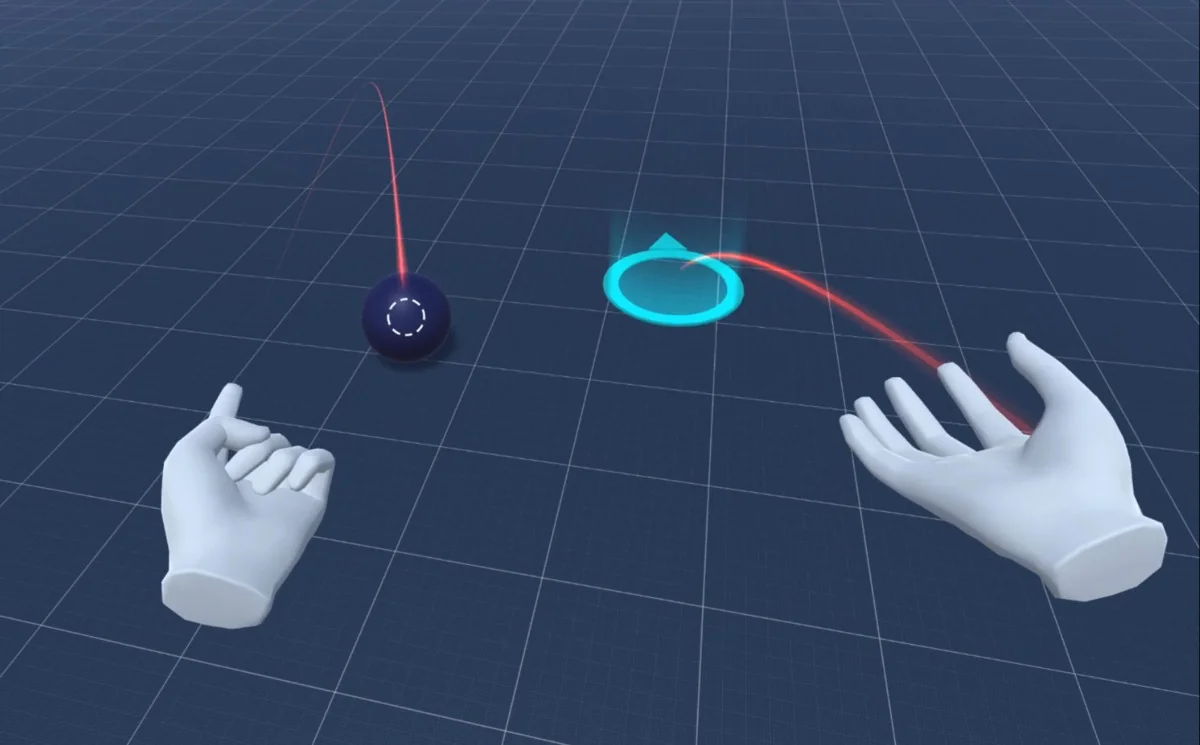
 Physics
 Physics
 Physics