"7b46a695175d8694"{"id":"23511","slug":"wavemaker-2","title":"WaveMaker 2","category":"Physics","engine":"Original Unity version: 2019.4.34","assetVersion":"Original Unity version: 2019.4.34","engineVersion":"Asset Version:2.3","tag":"Physics","accent":"cyan","visual":"audio","summary":"WaveMaker 2 turns a procedurally created rectangular mesh into a real-time wave surface that runs on the CPU. It reacts to rigidbodies, supports two-way interaction, and works with any material that already functions on a normal mesh.","platform":"Unity","publishedAt":"2026-04-09T17:50:06.000Z","updatedAt":"2026-04-19T15:35:23.000Z","sourceNotes":[],"fileContents":[],"compatibility":["Unity","Original Unity version: 2019.4.34","Asset Version: 2.3"],"featuredImage":{"alt":"WaveMaker 2","src":"https://3dcghub.com/wp-content/uploads/2026/04/284db9716601_9b261ccc-ecb4-44d7-8146-12763700ea0e_1280x720_stretch.webp"},"hasDownloadLink":true,"downloads":0,"terms":[{"taxonomy":"category","slug":"physics-tools-unity-2","name":"Physics"},{"taxonomy":"post_tag","slug":"environment","name":"Environment"},{"taxonomy":"post_tag","slug":"materials","name":"Materials"},{"taxonomy":"post_tag","slug":"unity","name":"Unity"}],"galleryImages":[{"src":"https://3dcghub.com/wp-content/uploads/2026/04/39977aac2b9e_768b7aad-23f5-4b95-bb95-bf062ef8b66a_scaled.webp","alt":"WaveMaker 2"},{"src":"https://3dcghub.com/wp-content/uploads/2026/04/f6126465e1c8_79ca63cf-53cf-4925-b89e-57765d3c9b4b_scaled.webp","alt":"WaveMaker 2"},{"src":"https://3dcghub.com/wp-content/uploads/2026/04/c50c193f1f64_52a64fee-f4d1-480d-97b3-0955d9b79182_scaled.webp","alt":"WaveMaker 2"}],"accessPanel":{"kind":"resource","title":"Access this resource","eyebrow":"Free Download","message":"Log in or create a free account to start your download.","fileName":"WaveMaker 2 v2.3.7z","safetyNote":"All resources are 100% manually reviewed to eliminate all risks.","actionLabel":"Download Free","resourceType":"Resource archive"},"contentHtml":"\u003ch2\u003eA wave surface that behaves like part of the scene\u003c/h2\u003e\n\u003cp\u003eWaveMaker 2 turns a procedurally created rectangular mesh into a live surface that simulates waves in real time. It is not a visual effect layered on top with shaders. The motion is calculated in 3D on the CPU, which makes the surface behave like a real mesh inside the scene rather than a separate trick hidden in the rendering pass.\u003c/p\u003e\n\u003cp\u003eThat matters in production because the surface is meant to fit into an ordinary Unity workflow. If a material already works on a normal mesh, it can be used here as well. The mesh can be shaded, hidden in parts with transparency, or altered with existing shader setups without needing a special material made only for this system.\u003c/p\u003e \u003ch2\u003eInteraction runs in both directions\u003c/h2\u003e\n\u003cp\u003eThe strongest part of WaveMaker 2 is the two-way coupling between the water surface and scene objects. Rigidbodies can affect the fluid, and the fluid can affect rigidbodies at the same time. Volume occupancy is calculated, which means objects do more than simply trigger ripples; they also generate waves while moving through the surface.\u003c/p\u003e\n\u003cp\u003eThat opens a different kind of interaction from buoyancy systems that only push objects around. Here, the simulation tracks how much of the liquid volume is occupied, then uses that information to create waves and floating forces together. The system also supports complex rigidbodies with overlapped setups, so it is not limited to simple shapes moving through a flat surface.\u003c/p\u003e\n\u003cp\u003eThere are two interaction modes. A simple mode uses relative velocity and works for any shape or orientation of the surface. An advanced mode uses liquid volume occupancy for more advanced behavior on horizontal surfaces, including buoyancy and drifting. The surface can also generate waves in response to selected colliders.\u003c/p\u003e \u003ch2\u003eShapes, surface control, and how the liquid is presented\u003c/h2\u003e\n\u003cp\u003eThe surface is not locked to a single layout. It can be used to create small, medium, or long areas such as pools, portals, ponds, and simple river shapes. The mesh can be placed at an arbitrary position and rotation, with adjustable length and width, so it can fit into a scene without forcing the environment to change around it.\u003c/p\u003e\n\u003cp\u003eWave behavior can be controlled through wave speed, damping, and smoothing parameters. Substepping is included to help avoid instabilities. Areas can also be fixed manually or automatically so the waves ignore them and hit those zones instead. Static objects or borders can be handled by painting the parts of the surface that should stay fixed.\u003c/p\u003e\n\u003cp\u003eThe fluid is not limited to looking like water. It can also be shaped to resemble mud, cream, and denser liquids at the resolution you want. Because it works like a normal mesh, the surface can be adapted with materials and shaders already in a project rather than being trapped in one preset look.\u003c/p\u003e \u003ch2\u003eWhat the simulation exposes to the rest of the project\u003c/h2\u003e\n\u003cp\u003eWaveMaker 2 includes an API for interactors and the surface, which can be used to gather simulation data for custom purposes. That makes the system useful not only for the visible wave motion itself, but also for gameplay logic that needs access to the state of the surface.\u003c/p\u003e\n\u003cp\u003eThe mesh properties are updated in real time so the surface can work with lighting. The scene hierarchy is agnostic as well, so the asset is not tied to a specific placement structure in the editor. These details make it easier to drop the system into a project where the scene already has its own organization.\u003c/p\u003e\n\u003cp\u003eBecause the simulation is CPU-based, it is positioned differently from shader-only solutions. Devices with GPU support limitations are still covered, while the surface remains compatible with the same rendering pipelines used by the material. That keeps the asset closer to a standard mesh workflow than a specialized visual effect setup.\u003c/p\u003e \u003ch3\u003eSupported range and production fit\u003c/h3\u003e\n\u003cp\u003eThe package supports Unity 2020.3.48 through 2023.2.16 and works with all rendering pipelines. That range gives it a defined place in projects that need a wave surface integrated into an existing Unity setup rather than a standalone demo scene.\u003c/p\u003e\n\u003cp\u003eIn practice, the asset fits projects that need interactive water-like behavior on a rectangular mesh with direct control over shape, motion, and response. It is suited to scenes where rigidbodies must float, drift, or disturb the surface while the surface itself continues to drive visible motion and simulation data.\u003c/p\u003e\n\u003cp\u003eFor teams evaluating where it belongs in a workflow, the practical answer is simple: WaveMaker 2 is a mesh-based real-time wave system for Unity projects that want scene interaction, CPU simulation, and normal-material compatibility in one surface.\u003c/p\u003e\n\n\u003ch2\u003eRelated Resources Worth Checking\u003c/h2\u003e\n\u003cul\u003e\n\u003cli\u003e\u003ca href=\"https://3dcghub.com/opencv-for-unity/\" title=\"OpenCV for Unity\"\u003eOpenCV for Unity\u003c/a\u003e\u003c/li\u003e\n\u003cli\u003e\u003ca href=\"https://3dcghub.com/exporter-for-unreal-to-for-unity-2026/\" title=\"Exporter for Unreal to/for Unity 2026\"\u003eExporter for Unreal to/for Unity 2026\u003c/a\u003e\u003c/li\u003e\n\u003cli\u003e\u003ca href=\"https://3dcghub.com/dialogue-system-for-unity/\" title=\"Dialogue System for Unity\"\u003eDialogue System for Unity\u003c/a\u003e\u003c/li\u003e\n\u003cli\u003e\u003ca href=\"https://3dcghub.com/ambient-sounds-interactive-soundscapes-for-unity-6/\" title=\"Ambient Sounds – Interactive Soundscapes for Unity 6\"\u003eAmbient Sounds – Interactive Soundscapes for Unity 6\u003c/a\u003e\u003c/li\u003e\n\u003cli\u003e\u003ca href=\"https://3dcghub.com/pegasus-flythroughs-for-unity-6/\" title=\"Pegasus – Flythroughs for Unity 6\"\u003ePegasus – Flythroughs for Unity 6\u003c/a\u003e\u003c/li\u003e\n\u003c/ul\u003e","contentTextLength":4898,"navigation":{"current":3401,"total":3481,"previous":{"id":"23478","slug":"ragdoll-animator-2","title":"Ragdoll Animator 2","category":"Physics","platform":"Unity","updatedAt":"2026-04-19T15:35:24.000Z"},"next":{"id":"23504","slug":"toolkit-for-unity-physics-2026","title":"Toolkit for Unity Physics 2026","category":"Physics","platform":"Unity","updatedAt":"2026-04-19T15:35:23.000Z"}},"relatedResources":[{"id":"23402","slug":"dynamic-water-physics-2","title":"Dynamic Water Physics 2","category":"Physics","engine":"Original Unity version: 6000.0.40","assetVersion":"Original Unity version: 6000.0.40","engineVersion":"Asset Version:2.19","tag":"Physics","accent":"cyan","visual":"animation","summary":"Dynamic Water Physics 2 simulates buoyancy and hydrodynamics from mesh data, so objects of any shape or size can react to water above or below the surface. It also includes ship and submarine controls, multiplayer support, and integration with several water...","platform":"Unity","publishedAt":"2026-04-09T17:12:42.000Z","updatedAt":"2026-04-19T15:35:27.000Z","sourceNotes":[],"fileContents":[],"compatibility":["Unity","Original Unity version: 6000.0.40","Asset Version: 2.19"],"featuredImage":{"alt":"Dynamic Water Physics 2","src":"https://3dcghub.com/wp-content/uploads/2026/04/2ac563dda735_8b3979b6-a239-417a-987b-9d7669fa86f6_1280x720_stretch.webp"},"hasDownloadLink":true,"downloads":1},{"id":"23437","slug":"magica-cloth-2","title":"Magica Cloth 2","category":"Physics","engine":"Original Unity version: 2021.3.20","assetVersion":"Original Unity version: 2021.3.20","engineVersion":"Asset Version:2.16.0","tag":"Physics","accent":"cyan","visual":"character","summary":"Magica Cloth 2 brings cloth simulation to Unity DOTS and works with both Transform and Mesh setups. It avoids special shaders, supports runtime builds, and adds collision tools such as edge collision, backstop, and self-collision.","platform":"Unity","publishedAt":"2026-04-09T17:22:18.000Z","updatedAt":"2026-04-19T15:35:26.000Z","sourceNotes":[],"fileContents":[],"compatibility":["Unity","Original Unity version: 2021.3.20","Asset Version: 2.16.0"],"featuredImage":{"alt":"Magica Cloth 2","src":"https://3dcghub.com/wp-content/uploads/2026/04/53741a7ca553_377342f0-a154-407a-913a-48e0c9777e08_1280x720_stretch.webp"},"hasDownloadLink":true,"downloads":6},{"id":"23504","slug":"toolkit-for-unity-physics-2026","title":"Toolkit for Unity Physics 2026","category":"Physics","engine":"Original Unity version: 6000.0.59","assetVersion":"Original Unity version: 6000.0.59","engineVersion":"Asset Version:4.0.0","tag":"Physics","accent":"cyan","visual":"mech","summary":"Toolkit for Unity Physics 2026 brings together physics-based systems that plug into Unityâs built-in Physics behaviours. It focuses on projectile control, buoyancy, ropes, force effects, and softbody-like behaviour, with APIs, structs, and scripts meant t...","platform":"Unity","publishedAt":"2026-04-09T17:49:35.000Z","updatedAt":"2026-04-19T15:35:23.000Z","sourceNotes":[],"fileContents":[],"compatibility":["Unity","Original Unity version: 6000.0.59","Asset Version: 4.0.0"],"featuredImage":{"alt":"Toolkit for Unity Physics 2026","src":"https://3dcghub.com/wp-content/uploads/2026/04/df343032ce3d_79616528-337f-4786-b053-f513e366a42e_1280x720_stretch.webp"},"hasDownloadLink":true,"downloads":0}]}
Physics
WaveMaker 2
WaveMaker 2 turns a procedurally created rectangular mesh into a real-time wave surface that runs on the CPU. It reacts to rigidbodies, supports two-way interaction, and works with any material that already functions on a normal mesh.
A wave surface that behaves like part of the scene
WaveMaker 2 turns a procedurally created rectangular mesh into a live surface that simulates waves in real time. It is not a visual effect layered on top with shaders. The motion is calculated in 3D on the CPU, which makes the surface behave like a real mesh inside the scene rather than a separate trick hidden in the rendering pass.
That matters in production because the surface is meant to fit into an ordinary Unity workflow. If a material already works on a normal mesh, it can be used here as well. The mesh can be shaded, hidden in parts with transparency, or altered with existing shader setups without needing a special material made only for this system.
Interaction runs in both directions
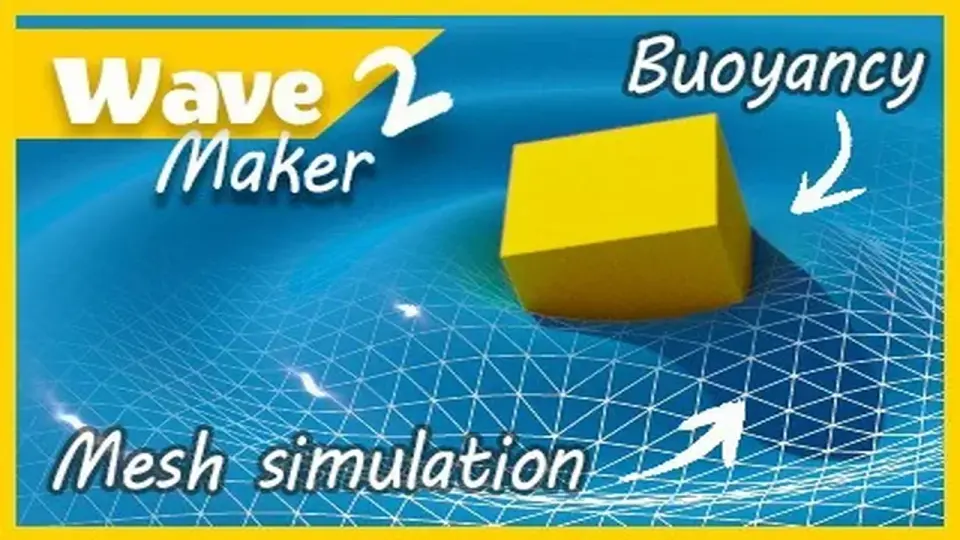
The strongest part of WaveMaker 2 is the two-way coupling between the water surface and scene objects. Rigidbodies can affect the fluid, and the fluid can affect rigidbodies at the same time. Volume occupancy is calculated, which means objects do more than simply trigger ripples; they also generate waves while moving through the surface.
That opens a different kind of interaction from buoyancy systems that only push objects around. Here, the simulation tracks how much of the liquid volume is occupied, then uses that information to create waves and floating forces together. The system also supports complex rigidbodies with overlapped setups, so it is not limited to simple shapes moving through a flat surface.
There are two interaction modes. A simple mode uses relative velocity and works for any shape or orientation of the surface. An advanced mode uses liquid volume occupancy for more advanced behavior on horizontal surfaces, including buoyancy and drifting. The surface can also generate waves in response to selected colliders.
Shapes, surface control, and how the liquid is presented
The surface is not locked to a single layout. It can be used to create small, medium, or long areas such as pools, portals, ponds, and simple river shapes. The mesh can be placed at an arbitrary position and rotation, with adjustable length and width, so it can fit into a scene without forcing the environment to change around it.
Wave behavior can be controlled through wave speed, damping, and smoothing parameters. Substepping is included to help avoid instabilities. Areas can also be fixed manually or automatically so the waves ignore them and hit those zones instead. Static objects or borders can be handled by painting the parts of the surface that should stay fixed.
The fluid is not limited to looking like water. It can also be shaped to resemble mud, cream, and denser liquids at the resolution you want. Because it works like a normal mesh, the surface can be adapted with materials and shaders already in a project rather than being trapped in one preset look.
What the simulation exposes to the rest of the project
WaveMaker 2 includes an API for interactors and the surface, which can be used to gather simulation data for custom purposes. That makes the system useful not only for the visible wave motion itself, but also for gameplay logic that needs access to the state of the surface.
The mesh properties are updated in real time so the surface can work with lighting. The scene hierarchy is agnostic as well, so the asset is not tied to a specific placement structure in the editor. These details make it easier to drop the system into a project where the scene already has its own organization.
Because the simulation is CPU-based, it is positioned differently from shader-only solutions. Devices with GPU support limitations are still covered, while the surface remains compatible with the same rendering pipelines used by the material. That keeps the asset closer to a standard mesh workflow than a specialized visual effect setup.
Supported range and production fit
The package supports Unity 2020.3.48 through 2023.2.16 and works with all rendering pipelines. That range gives it a defined place in projects that need a wave surface integrated into an existing Unity setup rather than a standalone demo scene.
In practice, the asset fits projects that need interactive water-like behavior on a rectangular mesh with direct control over shape, motion, and response. It is suited to scenes where rigidbodies must float, drift, or disturb the surface while the surface itself continues to drive visible motion and simulation data.
For teams evaluating where it belongs in a workflow, the practical answer is simple: WaveMaker 2 is a mesh-based real-time wave system for Unity projects that want scene interaction, CPU simulation, and normal-material compatibility in one surface.
 Physics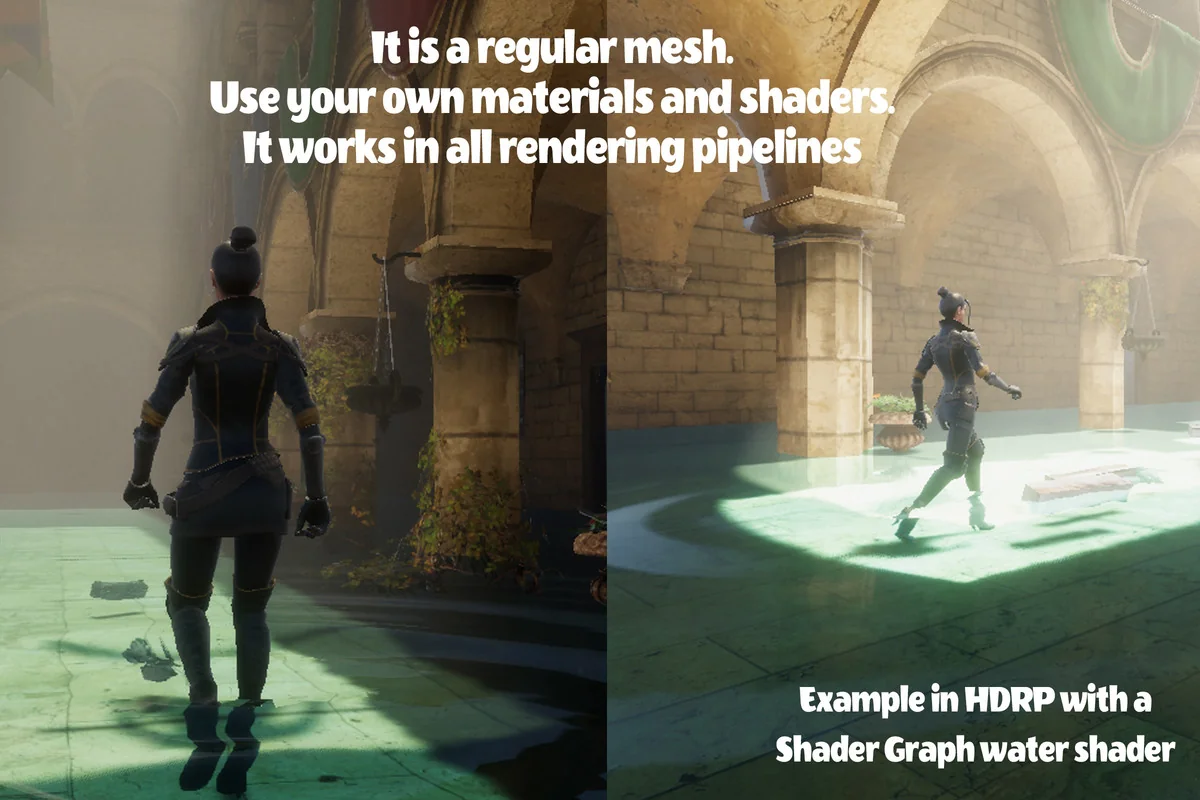
 Physics
 Physics
 Physics