"1f00f67f9253451b"{"id":"23402","slug":"dynamic-water-physics-2","title":"Dynamic Water Physics 2","category":"Physics","engine":"Original Unity version: 6000.0.40","assetVersion":"Original Unity version: 6000.0.40","engineVersion":"Asset Version:2.19","tag":"Physics","accent":"cyan","visual":"animation","summary":"Dynamic Water Physics 2 simulates buoyancy and hydrodynamics from mesh data, so objects of any shape or size can react to water above or below the surface. It also includes ship and submarine controls, multiplayer support, and integration with several water...","platform":"Unity","publishedAt":"2026-04-09T17:12:42.000Z","updatedAt":"2026-04-19T15:35:27.000Z","sourceNotes":[],"fileContents":[],"compatibility":["Unity","Original Unity version: 6000.0.40","Asset Version: 2.19"],"featuredImage":{"alt":"Dynamic Water Physics 2","src":"https://3dcghub.com/wp-content/uploads/2026/04/2ac563dda735_8b3979b6-a239-417a-987b-9d7669fa86f6_1280x720_stretch.webp"},"hasDownloadLink":true,"downloads":1,"terms":[{"taxonomy":"category","slug":"physics-tools-unity-2","name":"Physics"},{"taxonomy":"post_tag","slug":"environment","name":"Environment"},{"taxonomy":"post_tag","slug":"materials","name":"Materials"},{"taxonomy":"post_tag","slug":"unity","name":"Unity"}],"galleryImages":[{"src":"https://3dcghub.com/wp-content/uploads/2026/04/d98991823700_d883984b-3bb9-4540-8afc-3617cfd28866_scaled.webp","alt":"Dynamic Water Physics 2"},{"src":"https://3dcghub.com/wp-content/uploads/2026/04/e8f2fce1dc2b_a331afed-f46f-46fe-be3a-da36b6148eaf_scaled.webp","alt":"Dynamic Water Physics 2"},{"src":"https://3dcghub.com/wp-content/uploads/2026/04/a6d1d2724bb6_4e3f0e0a-ba8e-40c9-97e9-4fdd3513e636_scaled.webp","alt":"Dynamic Water Physics 2"},{"src":"https://3dcghub.com/wp-content/uploads/2026/04/de7a62da73be_66fb7d91-362c-4da2-b8a7-eb8384ae875f_scaled.webp","alt":"Dynamic Water Physics 2"},{"src":"https://3dcghub.com/wp-content/uploads/2026/04/989c0dfb133e_2afbe530-ff38-4505-8809-9801f3bd96f8_scaled.webp","alt":"Dynamic Water Physics 2"},{"src":"https://3dcghub.com/wp-content/uploads/2026/04/1e39f6b820fc_006e68a2-56bc-4fec-b6d5-9718708f2c1a_scaled.webp","alt":"Dynamic Water Physics 2"},{"src":"https://3dcghub.com/wp-content/uploads/2026/04/f3e3e52e619f_7ea082a2-f081-4e59-ae82-b5341e1a5940_scaled.webp","alt":"Dynamic Water Physics 2"},{"src":"https://3dcghub.com/wp-content/uploads/2026/04/31566b7f0c9a_d8830a54-242c-4ed6-b4d9-ef70571a7a35_scaled.webp","alt":"Dynamic Water Physics 2"},{"src":"https://3dcghub.com/wp-content/uploads/2026/04/2013435a795a_0c414a33-16ad-4d8c-88e2-e6f23c33eb97_scaled.webp","alt":"Dynamic Water Physics 2"},{"src":"https://3dcghub.com/wp-content/uploads/2026/04/cecf81c66848_4994cc71-00e3-492d-b901-3902b63f2f13_scaled.webp","alt":"Dynamic Water Physics 2"}],"accessPanel":{"kind":"resource","title":"Access this resource","eyebrow":"Free Download","message":"Log in or create a free account to start your download.","fileName":"Dynamic Water Physics 2 v2.19.7z","safetyNote":"All resources are 100% manually reviewed to eliminate all risks.","actionLabel":"Download Free","resourceType":"Resource archive"},"contentHtml":"\u003ch2\u003eWater interaction for boats, submarines, and any mesh that needs to feel the water\u003c/h2\u003e\n\u003cp\u003eDynamic Water Physics 2 focuses on scenes where water has to affect the object, not just sit beneath it. It simulates buoyancy and hydrodynamics from mesh data, which makes it suitable for objects of any shape or size, whether they are moving or stationary, above the water or underwater. That makes it a practical fit for boats, ships, submarines, floating props, and other mesh-based objects that need to respond to water in a believable way.\u003c/p\u003e\n\u003cp\u003eThe package is built for Unity 6 and works with URP out of the box. It is also part of NWH Physics World, a collection of compatible vehicle simulation assets, so it sits naturally inside workflows that already involve drivable craft and physics-driven movement.\u003c/p\u003e\n\u003cp\u003eOne important detail is that this is not a water renderer or shader. It is the interaction layer that uses simulation data to drive water effects and object behavior. In a production setup, that keeps the focus on how objects move through or sit on water rather than on drawing the water itself.\u003c/p\u003e\n\u003ch2\u003eMesh data, forces, and a setup path that stays practical\u003c/h2\u003e\n\u003cp\u003eThe core simulation works with mesh data, and the asset is meant to handle any object as long as it has a mesh. A simplified simulation mesh is generated internally with an in-built algorithm, which allows high-poly models to be used without affecting performance. The setup is described as fast and easy, with either manual configuration or a one-click wizard.\u003c/p\u003e\n\u003cp\u003eWaterObjects are Rigidbodies and interact with water only through forces. No translation or rotation is applied directly. That approach keeps the interaction tied to physics behavior, which is useful when the object needs to respond naturally rather than being moved by custom positional overrides.\u003c/p\u003e\n\u003cp\u003eThe simulation also supports any positive object scale and works underwater. Water effects are generated automatically from the simulation data and can work with any flat water asset. That makes the system useful in scenes where the water surface is provided by another solution and the gameplay logic still needs accurate buoyancy and hydrodynamic response.\u003c/p\u003e\n\u003cp\u003ePerformance is another clear part of the package identity. In the demo scene, the reported CPU time is around 0.02ms on average per object and about 1.2ms total for 70 objects. Wavy water performance depends on the third-party asset being used. The asset is positioned for both desktop and mobile, so the same interaction layer can be carried into different project targets without changing the core approach.\u003c/p\u003e\n\u003ch2\u003eShip control, submarine support, and vehicle-style movement\u003c/h2\u003e\n\u003cp\u003eBeyond floating objects, the package includes a ship controller that can be used with WaterObjects to make drivable boats and ships. There is also an additional script for submarines, which extends the workflow into underwater craft rather than stopping at surface-level floating behavior.\u003c/p\u003e\n\u003cp\u003eThe ship controller supports multiple engines with sound, both inboard and outboard, along with bow and stern thrusters and multiple rudders. Those details matter in a vehicle-driven project because they give the craft a more structured control setup without requiring a separate movement system for every type of vessel.\u003c/p\u003e\n\u003cp\u003eIn a real scene-building workflow, that means the asset can serve as the physics layer for water-bound vehicles while other parts of the project handle visuals, level design, and any water surface solution already in use. The simulation is centered on interaction, and the included vehicle tools make that interaction usable in gameplay rather than only in test scenes.\u003c/p\u003e\n\u003ch2\u003eWhere it fits with other water systems and project setups\u003c/h2\u003e\n\u003cp\u003eDynamic Water Physics 2 is compatible with several water assets, including Crest, Unity HDRP Water, Stylized Water 2 \u0026amp; 3, KWS Water System, R.A.M, Lux Water, and all flat water assets such as AQUAS and Stylized Water Shader. That wide compatibility is useful when the water surface already comes from another pipeline or style and the project only needs consistent object interaction on top of it.\u003c/p\u003e\n\u003cp\u003eSupport for multiplayer is included as well, with Mirror and PUN2 named directly. The package also includes C# source code, a manual, and everything seen in the demo. Demos are available for Windows, MacOS, and Android, which gives a clear sense of how the system has been exercised across platforms.\u003c/p\u003e\n\u003cp\u003eTechnical compatibility is listed for Unity 6000.0.40, with render pipeline support shown for HDRP, URP, and Built-in on 6000.0.40f1. The package size is 310.3 MB and the asset count is 604, which reflects a fairly substantial setup rather than a minimal add-on.\u003c/p\u003e\n\u003cp\u003eFor a project that needs objects to float, submerge, or push through water with physics-driven behavior, Dynamic Water Physics 2 fits as the interaction layer between your water surface and your gameplay objects. It is a better match when the production need is movement, buoyancy, and hydrodynamics rather than a new shader or water mesh.\u003c/p\u003e\n\u003ch3\u003eA practical fit for production\u003c/h3\u003e\n\u003cp\u003eIf the scene already has water and the next step is making meshes react to it, this asset gives you the simulation side of that job. If the project also needs boats, ships, or submarines to become drivable inside the same system, the included controller tools make that path more direct.\u003c/p\u003e\n\n\u003ch2\u003eMore From The Same Workflow\u003c/h2\u003e\n\u003cul\u003e\n\u003cli\u003e\u003ca href=\"https://3dcghub.com/opencv-for-unity/\" title=\"OpenCV for Unity\"\u003eOpenCV for Unity\u003c/a\u003e\u003c/li\u003e\n\u003cli\u003e\u003ca href=\"https://3dcghub.com/exporter-for-unreal-to-for-unity-2026/\" title=\"Exporter for Unreal to/for Unity 2026\"\u003eExporter for Unreal to/for Unity 2026\u003c/a\u003e\u003c/li\u003e\n\u003cli\u003e\u003ca href=\"https://3dcghub.com/dialogue-system-for-unity/\" title=\"Dialogue System for Unity\"\u003eDialogue System for Unity\u003c/a\u003e\u003c/li\u003e\n\u003cli\u003e\u003ca href=\"https://3dcghub.com/ambient-sounds-interactive-soundscapes-for-unity-6/\" title=\"Ambient Sounds – Interactive Soundscapes for Unity 6\"\u003eAmbient Sounds – Interactive Soundscapes for Unity 6\u003c/a\u003e\u003c/li\u003e\n\u003cli\u003e\u003ca href=\"https://3dcghub.com/pegasus-flythroughs-for-unity-6/\" title=\"Pegasus – Flythroughs for Unity 6\"\u003ePegasus – Flythroughs for Unity 6\u003c/a\u003e\u003c/li\u003e\n\u003c/ul\u003e","contentTextLength":5530,"navigation":{"current":3134,"total":3222,"previous":{"id":"23426","slug":"easy-collider-editor","title":"Easy Collider Editor","category":"Physics","platform":"Unity","updatedAt":"2026-04-19T15:35:27.000Z"},"next":{"id":"23437","slug":"magica-cloth-2","title":"Magica Cloth 2","category":"Physics","platform":"Unity","updatedAt":"2026-04-19T15:35:26.000Z"}},"relatedResources":[{"id":"23511","slug":"wavemaker-2","title":"WaveMaker 2","category":"Physics","engine":"Original Unity version: 2019.4.34","assetVersion":"Original Unity version: 2019.4.34","engineVersion":"Asset Version:2.3","tag":"Physics","accent":"cyan","visual":"audio","summary":"WaveMaker 2 turns a procedurally created rectangular mesh into a real-time wave surface that runs on the CPU. It reacts to rigidbodies, supports two-way interaction, and works with any material that already functions on a normal mesh.","platform":"Unity","publishedAt":"2026-04-09T17:50:06.000Z","updatedAt":"2026-04-19T15:35:23.000Z","sourceNotes":[],"fileContents":[],"compatibility":["Unity","Original Unity version: 2019.4.34","Asset Version: 2.3"],"featuredImage":{"alt":"WaveMaker 2","src":"https://3dcghub.com/wp-content/uploads/2026/04/284db9716601_9b261ccc-ecb4-44d7-8146-12763700ea0e_1280x720_stretch.webp"},"hasDownloadLink":true,"downloads":0},{"id":"24403","slug":"stylized-water-3","title":"Stylized Water 3","category":"Shaders","engine":"Original Unity version: 6000.0.68","assetVersion":"Original Unity version: 6000.0.68","engineVersion":"Asset Version:3.0.1","tag":"Shaders","accent":"cyan","visual":"audio","summary":"Stylized Water 3 focuses on artistic water rendering for Unity scenes that need clear control over color, reflections, foam, and wave motion. It covers ocean meshes, river behavior, waterfalls, puddles, and water decals without leaning on a realism-first si...","platform":"Unity","publishedAt":"2026-04-14T11:48:46.000Z","updatedAt":"2026-04-20T06:12:49.000Z","sourceNotes":[],"fileContents":[],"compatibility":["Unity","Original Unity version: 6000.0.68","Asset Version: 3.0.1"],"featuredImage":{"alt":"Stylized Water 3","src":"https://3dcghub.com/wp-content/uploads/2026/04/1e931df26ffe_2a7b5ca4-dbfb-416e-b26c-2a1dc7b15ca8_1280x720_stretch.webp"},"hasDownloadLink":true,"downloads":12},{"id":"13883","slug":"dynamic-real-water","title":"Dynamic Real Water","category":"Engine Tools","engine":"5.7","assetVersion":"Engine version: 5.7","engineVersion":"Asset Version:1.1","tag":"Engine Tools","accent":"blue","visual":"mech","summary":"Enhance your Unreal Engine 5 environments with Dynamic Real Water, a high-performance FFT simulation plugin. It offers realistic wave dynamics, advanced buoyancy physics, and seamless replication for multiplayer projects.","platform":"Unreal Engine","publishedAt":"2026-03-11T10:30:53.000Z","updatedAt":"2026-04-19T15:46:20.000Z","sourceNotes":[],"fileContents":[],"compatibility":["Unreal Engine","Engine version: 5.7","Asset Version: 1.1"],"featuredImage":{"alt":"Dynamic Real Water","src":"https://3dcghub.com/wp-content/uploads/2026/03/8532c421-bf8f-4903-bbfc-9e94a063892e.webp"},"hasDownloadLink":true,"downloads":2}]}
Physics
Dynamic Water Physics 2
Dynamic Water Physics 2 simulates buoyancy and hydrodynamics from mesh data, so objects of any shape or size can react to water above or below the surface. It also includes ship and submarine controls, multiplayer support, and integration with several water...
Water interaction for boats, submarines, and any mesh that needs to feel the water
Dynamic Water Physics 2 focuses on scenes where water has to affect the object, not just sit beneath it. It simulates buoyancy and hydrodynamics from mesh data, which makes it suitable for objects of any shape or size, whether they are moving or stationary, above the water or underwater. That makes it a practical fit for boats, ships, submarines, floating props, and other mesh-based objects that need to respond to water in a believable way.
The package is built for Unity 6 and works with URP out of the box. It is also part of NWH Physics World, a collection of compatible vehicle simulation assets, so it sits naturally inside workflows that already involve drivable craft and physics-driven movement.
One important detail is that this is not a water renderer or shader. It is the interaction layer that uses simulation data to drive water effects and object behavior. In a production setup, that keeps the focus on how objects move through or sit on water rather than on drawing the water itself.
Mesh data, forces, and a setup path that stays practical
The core simulation works with mesh data, and the asset is meant to handle any object as long as it has a mesh. A simplified simulation mesh is generated internally with an in-built algorithm, which allows high-poly models to be used without affecting performance. The setup is described as fast and easy, with either manual configuration or a one-click wizard.
WaterObjects are Rigidbodies and interact with water only through forces. No translation or rotation is applied directly. That approach keeps the interaction tied to physics behavior, which is useful when the object needs to respond naturally rather than being moved by custom positional overrides.
The simulation also supports any positive object scale and works underwater. Water effects are generated automatically from the simulation data and can work with any flat water asset. That makes the system useful in scenes where the water surface is provided by another solution and the gameplay logic still needs accurate buoyancy and hydrodynamic response.
Performance is another clear part of the package identity. In the demo scene, the reported CPU time is around 0.02ms on average per object and about 1.2ms total for 70 objects. Wavy water performance depends on the third-party asset being used. The asset is positioned for both desktop and mobile, so the same interaction layer can be carried into different project targets without changing the core approach.
Ship control, submarine support, and vehicle-style movement
Beyond floating objects, the package includes a ship controller that can be used with WaterObjects to make drivable boats and ships. There is also an additional script for submarines, which extends the workflow into underwater craft rather than stopping at surface-level floating behavior.
The ship controller supports multiple engines with sound, both inboard and outboard, along with bow and stern thrusters and multiple rudders. Those details matter in a vehicle-driven project because they give the craft a more structured control setup without requiring a separate movement system for every type of vessel.
In a real scene-building workflow, that means the asset can serve as the physics layer for water-bound vehicles while other parts of the project handle visuals, level design, and any water surface solution already in use. The simulation is centered on interaction, and the included vehicle tools make that interaction usable in gameplay rather than only in test scenes.
Where it fits with other water systems and project setups
Dynamic Water Physics 2 is compatible with several water assets, including Crest, Unity HDRP Water, Stylized Water 2 & 3, KWS Water System, R.A.M, Lux Water, and all flat water assets such as AQUAS and Stylized Water Shader. That wide compatibility is useful when the water surface already comes from another pipeline or style and the project only needs consistent object interaction on top of it.
Support for multiplayer is included as well, with Mirror and PUN2 named directly. The package also includes C# source code, a manual, and everything seen in the demo. Demos are available for Windows, MacOS, and Android, which gives a clear sense of how the system has been exercised across platforms.
Technical compatibility is listed for Unity 6000.0.40, with render pipeline support shown for HDRP, URP, and Built-in on 6000.0.40f1. The package size is 310.3 MB and the asset count is 604, which reflects a fairly substantial setup rather than a minimal add-on.
For a project that needs objects to float, submerge, or push through water with physics-driven behavior, Dynamic Water Physics 2 fits as the interaction layer between your water surface and your gameplay objects. It is a better match when the production need is movement, buoyancy, and hydrodynamics rather than a new shader or water mesh.
A practical fit for production
If the scene already has water and the next step is making meshes react to it, this asset gives you the simulation side of that job. If the project also needs boats, ships, or submarines to become drivable inside the same system, the included controller tools make that path more direct.
 Physics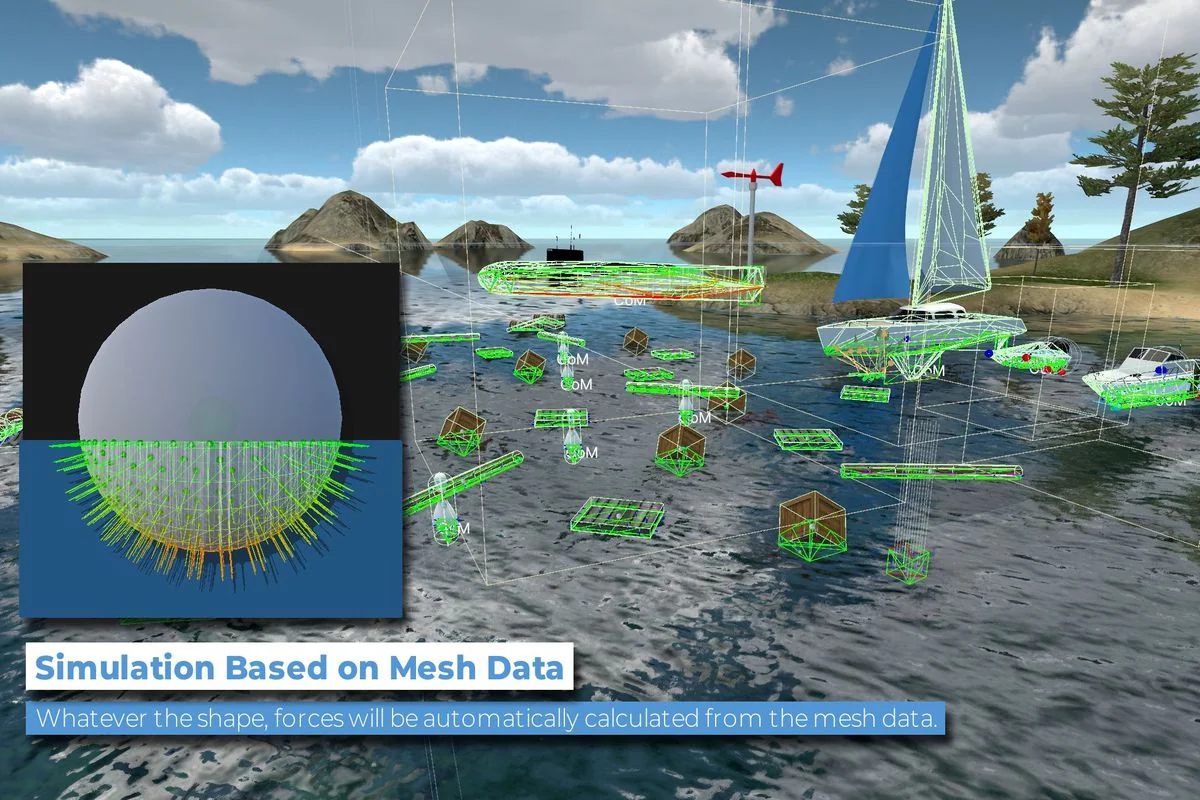
 Physics
 Shaders
 Engine Tools