"7b46a695175d8694"{"id":"23475","slug":"projectile-toolkit-3","title":"Projectile Toolkit 3","category":"Physics","engine":"Original Unity version: 6000.0.34","assetVersion":"Original Unity version: 6000.0.34","engineVersion":"Asset Version:3.0","tag":"Physics","accent":"cyan","visual":"city","summary":"Projectile Toolkit 3 brings projectile launch, trajectory prediction, and projectile aerodynamics into one Unity physics package. Version 3.1 adds an Aero Projectile Launcher template, frame-rate-independent predictor animation, and updated docs.","platform":"Unity","publishedAt":"2026-04-09T17:33:49.000Z","updatedAt":"2026-04-19T15:35:25.000Z","sourceNotes":[],"fileContents":[],"compatibility":["Unity","Original Unity version: 6000.0.34","Asset Version: 3.0"],"featuredImage":{"alt":"Projectile Toolkit 3","src":"https://3dcghub.com/wp-content/uploads/2026/04/88bf7dfb5ab0_c3c433be-3749-4a04-8dc9-4b94e8fa7d29_1280x720_stretch.webp"},"hasDownloadLink":true,"downloads":0,"terms":[{"taxonomy":"category","slug":"physics-tools-unity-2","name":"Physics"},{"taxonomy":"post_tag","slug":"environment","name":"Environment"},{"taxonomy":"post_tag","slug":"game-systems","name":"Game Systems"},{"taxonomy":"post_tag","slug":"unity","name":"Unity"}],"galleryImages":[{"src":"https://3dcghub.com/wp-content/uploads/2026/04/8a750b0ad5f8_e555a719-29e6-4f0b-89ee-7c272084342b_scaled.webp","alt":"Projectile Toolkit 3"},{"src":"https://3dcghub.com/wp-content/uploads/2026/04/22cead87e024_6dd5e978-4e21-48a7-8b7c-7d77dfc63dd0_scaled.webp","alt":"Projectile Toolkit 3"},{"src":"https://3dcghub.com/wp-content/uploads/2026/04/93ef4dbca471_8da9ac38-d8b3-4019-9c9c-699e694bdf0c_scaled.webp","alt":"Projectile Toolkit 3"},{"src":"https://3dcghub.com/wp-content/uploads/2026/04/23afc52d6c71_c65802d7-c464-4bd6-8dbf-cbca977cdb38_scaled.webp","alt":"Projectile Toolkit 3"},{"src":"https://3dcghub.com/wp-content/uploads/2026/04/b3e08bd23a08_6a6736ae-7c13-44f1-ad90-27a3ed6b9a7b_scaled.webp","alt":"Projectile Toolkit 3"},{"src":"https://3dcghub.com/wp-content/uploads/2026/04/6dbdc0735879_2c3e7ebf-0dfe-4c11-81cc-955d29f95c23_scaled.webp","alt":"Projectile Toolkit 3"},{"src":"https://3dcghub.com/wp-content/uploads/2026/04/a8f02154d3d5_fee72fb6-f88c-4252-a375-90b62b4cb73b_scaled.webp","alt":"Projectile Toolkit 3"},{"src":"https://3dcghub.com/wp-content/uploads/2026/04/8a70edb0f349_98121b82-10c9-4a19-adf5-a48916a54e1d_scaled.webp","alt":"Projectile Toolkit 3"},{"src":"https://3dcghub.com/wp-content/uploads/2026/04/6e1235ac065e_ede5d174-13ff-4c43-b428-390c19831688_scaled.webp","alt":"Projectile Toolkit 3"}],"accessPanel":{"kind":"resource","title":"Access this resource","eyebrow":"Free Download","message":"Log in or create a free account to start your download.","fileName":"Projectile Toolkit 3 v3.0 (22 Oct 2024).7z","safetyNote":"All resources are 100% manually reviewed to eliminate all risks.","actionLabel":"Download Free","resourceType":"Resource archive"},"contentHtml":"\u003ch2\u003eProjectile setup for physics-driven shots\u003c/h2\u003e\n\u003cp\u003eProjectile Toolkit 3 is a Unity physics package from Blobcreate for projects that need projectile behavior, trajectory prediction, and launch-based movement without assembling every part from scratch.\u003c/p\u003e\n\u003cp\u003eIt ships as a unitypackage in the tools/physics category, with 97 assets in the package and a file size of 1.3 MB. The current version is 3.1, released on Sep 26, 2025, and the package was first published on Jul 03, 2022. The original Unity version is 6000.0.34, and the minimum supported Unity version has been changed to 6.\u003c/p\u003e \u003ch2\u003eA template for common launcher scenes\u003c/h2\u003e\n\u003cp\u003eThe newest addition is the Aero Projectile Launcher template.\u003c/p\u003e\n\u003cp\u003eThis template is described as a high-level prefab with all essential components required for common use cases, and it supports no-code or low-code development. That makes it a direct starting point for scenes built around launchers, cannons, arrows, missiles, grenades, balls, and archer-style shooting. The same tag set also points toward top-down and TPS setups, so the toolkit sits comfortably in projects where the projectile itself carries the action rather than acting as a background effect.\u003c/p\u003e \u003ch2\u003eTrajectory prediction and projectile motion\u003c/h2\u003e\n\u003cp\u003eTrajectory work is a central part of the toolkit, and version 3.1 includes a fix for PEBTrajectoryPredictor.\u003c/p\u003e\n\u003cp\u003eThe line lerp animation in PEBTrajectoryPredictor is now frame-rate independent, which keeps the prediction animation tied to the update behavior rather than to changing frame speed. The update also renames Aerodynamic Movement to Projectile Aerodynamics, and the documentation for Projectile Aerodynamics has been rewritten. Those details place the toolkit in the space where projectile arcs, motion behavior, and ballistics-style setup need to be handled together.\u003c/p\u003e \u003ch2\u003eDocumentation and pipeline fit\u003c/h2\u003e\n\u003cp\u003eThe documentation workflow has been adjusted as part of the update.\u003c/p\u003e\n\u003cp\u003eOnline docs now include theme selection and a back button to the docs root. On the rendering side, the asset's default render pipeline has been changed to URP, while compatibility is listed for Built-in, HDRP, Custom SRP, and URP. The original Unity version is 6000.0.34, so the package is anchored to the current Unity 6 era while still identifying the supported pipeline paths explicitly.\u003c/p\u003e \u003ch2\u003eWhere it fits in production\u003c/h2\u003e\n\u003cp\u003eProjectile Toolkit 3 fits into the physics layer of a Unity project when the work centers on how a projectile launches, travels, predicts its path, and behaves as it moves.\u003c/p\u003e\n\u003cp\u003eIts tags map directly to practical scene types: ballistics, parabola, cannon, motion, arrow, launcher, missile, ball, grenade, TPS, top down, shoot, archer, trajectory prediction, and physics. That makes the toolkit relevant for gameplay systems where the projectile is part of the player-facing mechanics and needs a clear setup path, a predictive workflow, and a template that covers common launch cases without forcing a custom start each time.\u003c/p\u003e\n\u003cp\u003eFor projects that need those pieces grouped in one Unity package, it belongs in the same part of production where launch logic, projectile motion, and prediction tools are handled together.\u003c/p\u003e\n\n\u003ch2\u003eMore From The Same Workflow\u003c/h2\u003e\n\u003cul\u003e\n\u003cli\u003e\u003ca href=\"https://3dcghub.com/opencv-for-unity/\" title=\"OpenCV for Unity\"\u003eOpenCV for Unity\u003c/a\u003e\u003c/li\u003e\n\u003cli\u003e\u003ca href=\"https://3dcghub.com/exporter-for-unreal-to-for-unity-2026/\" title=\"Exporter for Unreal to/for Unity 2026\"\u003eExporter for Unreal to/for Unity 2026\u003c/a\u003e\u003c/li\u003e\n\u003cli\u003e\u003ca href=\"https://3dcghub.com/dialogue-system-for-unity/\" title=\"Dialogue System for Unity\"\u003eDialogue System for Unity\u003c/a\u003e\u003c/li\u003e\n\u003cli\u003e\u003ca href=\"https://3dcghub.com/ambient-sounds-interactive-soundscapes-for-unity-6/\" title=\"Ambient Sounds – Interactive Soundscapes for Unity 6\"\u003eAmbient Sounds – Interactive Soundscapes for Unity 6\u003c/a\u003e\u003c/li\u003e\n\u003cli\u003e\u003ca href=\"https://3dcghub.com/pegasus-flythroughs-for-unity-6/\" title=\"Pegasus – Flythroughs for Unity 6\"\u003ePegasus – Flythroughs for Unity 6\u003c/a\u003e\u003c/li\u003e\n\u003c/ul\u003e","contentTextLength":3351,"navigation":{"current":3397,"total":3481,"previous":{"id":"23415","slug":"easy-character-movement-2","title":"Easy Character Movement 2","category":"Physics","platform":"Unity","updatedAt":"2026-04-19T15:35:26.000Z"},"next":{"id":"23463","slug":"obi-rope","title":"Obi Rope","category":"Physics","platform":"Unity","updatedAt":"2026-04-19T15:35:25.000Z"}},"relatedResources":[{"id":"23504","slug":"toolkit-for-unity-physics-2026","title":"Toolkit for Unity Physics 2026","category":"Physics","engine":"Original Unity version: 6000.0.59","assetVersion":"Original Unity version: 6000.0.59","engineVersion":"Asset Version:4.0.0","tag":"Physics","accent":"cyan","visual":"mech","summary":"Toolkit for Unity Physics 2026 brings together physics-based systems that plug into Unityâs built-in Physics behaviours. It focuses on projectile control, buoyancy, ropes, force effects, and softbody-like behaviour, with APIs, structs, and scripts meant t...","platform":"Unity","publishedAt":"2026-04-09T17:49:35.000Z","updatedAt":"2026-04-19T15:35:23.000Z","sourceNotes":[],"fileContents":[],"compatibility":["Unity","Original Unity version: 6000.0.59","Asset Version: 4.0.0"],"featuredImage":{"alt":"Toolkit for Unity Physics 2026","src":"https://3dcghub.com/wp-content/uploads/2026/04/df343032ce3d_79616528-337f-4786-b053-f513e366a42e_1280x720_stretch.webp"},"hasDownloadLink":true,"downloads":0},{"id":"23495","slug":"silantro-flight-simulator-toolkit","title":"Silantro Flight Simulator Toolkit","category":"Physics","engine":"Original Unity version: 2019.3.0","assetVersion":"Original Unity version: 2019.3.0","engineVersion":"Asset Version:3.5.15","tag":"Physics","accent":"cyan","visual":"city","summary":"Silantro Flight Simulator Toolkit is a Unity package for setting up and simulating fixed-wing aircraft with detailed aerodynamics, engine models, cockpit instruments, and input support. It also includes sample scenes that show manual, mobile, stabilized, an...","platform":"Unity","publishedAt":"2026-04-09T17:42:33.000Z","updatedAt":"2026-04-19T15:35:23.000Z","sourceNotes":[],"fileContents":[],"compatibility":["Unity","Original Unity version: 2019.3.0","Asset Version: 3.5.15"],"featuredImage":{"alt":"Silantro Flight Simulator Toolkit","src":"https://3dcghub.com/wp-content/uploads/2026/04/40950f9dc369_c00f37d3-2929-4ee4-a088-72108b308b42_1280x720_stretch.webp"},"hasDownloadLink":true,"downloads":1},{"id":"22705","slug":"abilities-game-creator-2","title":"Abilities | Game Creator 2","category":"Game Toolkits","engine":"Original Unity version: 6000.2.2","assetVersion":"Original Unity version: 6000.2.2","engineVersion":"Asset Version:1.9.0","tag":"Game Toolkits","accent":"cyan","visual":"luts","summary":"The Abilities module provides a flexible, five-system framework for designing RPG skills without coding. From targeting and cooldown requirements to projectile-based impact logic, it streamlines the translation of design concepts into gameplay mechanics.","platform":"Unity","publishedAt":"2026-04-06T13:49:43.000Z","updatedAt":"2026-04-19T15:37:04.000Z","sourceNotes":[],"fileContents":[],"compatibility":["Unity","Original Unity version: 6000.2.2","Asset Version: 1.9.0"],"featuredImage":{"alt":"Abilities | Game Creator 2","src":"https://3dcghub.com/wp-content/uploads/2026/04/40349f0a430b_752239b3-993a-4c99-836d-ca515bfc3ba5_1280x720_stretch.webp"},"hasDownloadLink":true,"downloads":1}]}
Physics
Projectile Toolkit 3
Projectile Toolkit 3 brings projectile launch, trajectory prediction, and projectile aerodynamics into one Unity physics package. Version 3.1 adds an Aero Projectile Launcher template, frame-rate-independent predictor animation, and updated docs.
Projectile Toolkit 3 is a Unity physics package from Blobcreate for projects that need projectile behavior, trajectory prediction, and launch-based movement without assembling every part from scratch.
It ships as a unitypackage in the tools/physics category, with 97 assets in the package and a file size of 1.3 MB. The current version is 3.1, released on Sep 26, 2025, and the package was first published on Jul 03, 2022. The original Unity version is 6000.0.34, and the minimum supported Unity version has been changed to 6.
A template for common launcher scenes
The newest addition is the Aero Projectile Launcher template.
This template is described as a high-level prefab with all essential components required for common use cases, and it supports no-code or low-code development. That makes it a direct starting point for scenes built around launchers, cannons, arrows, missiles, grenades, balls, and archer-style shooting. The same tag set also points toward top-down and TPS setups, so the toolkit sits comfortably in projects where the projectile itself carries the action rather than acting as a background effect.
Trajectory prediction and projectile motion
Trajectory work is a central part of the toolkit, and version 3.1 includes a fix for PEBTrajectoryPredictor.
The line lerp animation in PEBTrajectoryPredictor is now frame-rate independent, which keeps the prediction animation tied to the update behavior rather than to changing frame speed. The update also renames Aerodynamic Movement to Projectile Aerodynamics, and the documentation for Projectile Aerodynamics has been rewritten. Those details place the toolkit in the space where projectile arcs, motion behavior, and ballistics-style setup need to be handled together.
Documentation and pipeline fit
The documentation workflow has been adjusted as part of the update.
Online docs now include theme selection and a back button to the docs root. On the rendering side, the asset's default render pipeline has been changed to URP, while compatibility is listed for Built-in, HDRP, Custom SRP, and URP. The original Unity version is 6000.0.34, so the package is anchored to the current Unity 6 era while still identifying the supported pipeline paths explicitly.
Where it fits in production
Projectile Toolkit 3 fits into the physics layer of a Unity project when the work centers on how a projectile launches, travels, predicts its path, and behaves as it moves.
Its tags map directly to practical scene types: ballistics, parabola, cannon, motion, arrow, launcher, missile, ball, grenade, TPS, top down, shoot, archer, trajectory prediction, and physics. That makes the toolkit relevant for gameplay systems where the projectile is part of the player-facing mechanics and needs a clear setup path, a predictive workflow, and a template that covers common launch cases without forcing a custom start each time.
For projects that need those pieces grouped in one Unity package, it belongs in the same part of production where launch logic, projectile motion, and prediction tools are handled together.
 Physics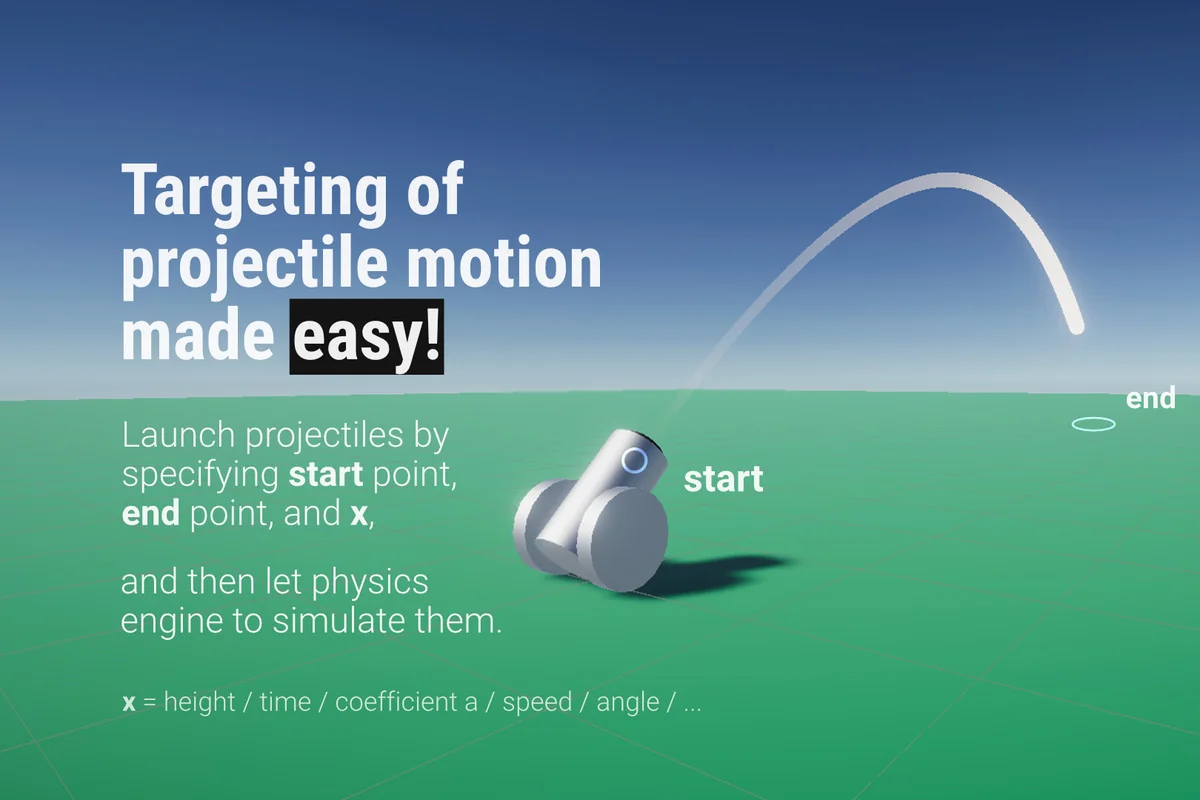
 Physics
 Physics
 Game Toolkits