"7b46a695175d8694"{"id":"23463","slug":"obi-rope","title":"Obi Rope","category":"Physics","engine":"Original Unity version: 2021.3.4","assetVersion":"Original Unity version: 2021.3.4","engineVersion":"Asset Version:7.0.4","tag":"Physics","accent":"cyan","visual":"luts","summary":"Obi Rope brings rope, rod, and bone-driven motion into a single Unity workflow. It combines particle-based simulation with spline editing, runtime changes, and collision handling across the scene.","platform":"Unity","publishedAt":"2026-04-09T17:29:24.000Z","updatedAt":"2026-04-19T15:35:25.000Z","sourceNotes":[],"fileContents":[],"compatibility":["Unity","Original Unity version: 2021.3.4","Asset Version: 7.0.4"],"featuredImage":{"alt":"Obi Rope","src":"https://3dcghub.com/wp-content/uploads/2026/04/f05dc02eb4ed_86bbe084-97b0-41ec-a77f-fafe275ca866_1280x720_stretch.webp"},"hasDownloadLink":true,"downloads":2,"terms":[{"taxonomy":"category","slug":"physics-tools-unity-2","name":"Physics"},{"taxonomy":"post_tag","slug":"tools","name":"Tools"},{"taxonomy":"post_tag","slug":"unity","name":"Unity"},{"taxonomy":"post_tag","slug":"vfx","name":"VFX"}],"galleryImages":[{"src":"https://3dcghub.com/wp-content/uploads/2026/04/a3373c0406ca_51be8fe7-dfc6-4c04-b626-09f211779dac_scaled.webp","alt":"Obi Rope"},{"src":"https://3dcghub.com/wp-content/uploads/2026/04/038ab0d5775f_a85e55e2-ffb7-414f-96b1-f10e51f3712a_scaled.webp","alt":"Obi Rope"},{"src":"https://3dcghub.com/wp-content/uploads/2026/04/838eac63b043_720e7549-dc90-4d4a-bb9f-96019a21061b_scaled.webp","alt":"Obi Rope"},{"src":"https://3dcghub.com/wp-content/uploads/2026/04/12d6c7754011_94fcb7ec-a9c3-4433-a8a0-63a8cdbbcd79_scaled.webp","alt":"Obi Rope"},{"src":"https://3dcghub.com/wp-content/uploads/2026/04/2ab9eae39a5d_756f0075-9dab-49a7-a8c3-467cf155654c_scaled.webp","alt":"Obi Rope"},{"src":"https://3dcghub.com/wp-content/uploads/2026/04/d55d5781cb4b_dbc6dddb-863c-42b9-9664-db697f1d3846_scaled.webp","alt":"Obi Rope"}],"accessPanel":{"kind":"resource","title":"Access this resource","eyebrow":"Free Download","message":"Log in or create a free account to start your download.","fileName":"Obi Rope v7.0.4.7z","safetyNote":"All resources are 100% manually reviewed to eliminate all risks.","actionLabel":"Download Free","resourceType":"Resource archive"},"contentHtml":"\u003ch2\u003eRopes, rods, and secondary motion in one setup\u003c/h2\u003e\n\u003cp\u003eRopes and rods are often the parts of a scene that need to stay responsive while everything around them holds its shape. Obi Rope fits that kind of work by pairing rope simulation with rod behavior and bone-driven secondary motion inside Unity. The system is built on Obi, an advanced particle-based physics engine that handles a wide range of deformable material behaviors and can run on either the CPU or the GPU.\u003c/p\u003e\n\u003cp\u003eThat setup gives the package a broad role in a project. Ropes can be made quickly, rods can carry twisting motion, and bones can add extra movement to character bone hierarchies. The same system also supports collision with the environment and with other simulated objects, so the rope or rod is not isolated from the rest of the scene.\u003c/p\u003e \u003ch2\u003eParticles instead of rigid-body chains\u003c/h2\u003e\n\u003cp\u003eObi Rope does not rely on rigid bodies and joints the way some rope solutions do. Its simulation is based on XPBD particles, which is presented as a lighter, more detailed, and unconditionally stable approach. That makes the structure of the system easy to read: the rope behaves as a particle simulation first, not as a chain of linked rigid bodies.\u003c/p\u003e\n\u003cp\u003eCPU mode depends on the Burst, Jobs, Collections, and Mathematics packages. GPU mode requires compute shader support. Those requirements matter because they shape how the simulation is executed, whether the project is leaning on the CPU path or taking advantage of GPU compute support.\u003c/p\u003e\n\u003cp\u003eRods use oriented particle technology, which allows torsion and twisting effects. Ropes are described as more lightweight and can be cut or resized. Both rope and rod setups can be attached to rigid bodies, and the interaction goes both ways so the simulated object and the rigid body influence each other.\u003c/p\u003e \u003ch2\u003eSpline editing that stays live while you work\u003c/h2\u003e\n\u003cp\u003eBuilding a rope does not depend on manual geometry work. Non-linear, non-destructive editing uses splines, and the editor gives immediate visual feedback while the rope is being shaped. That makes the setup process practical for scenes that need quick iteration on length, curve, or layout.\u003c/p\u003e\n\u003cp\u003eMesh generation is handled procedurally with splines as well. The generated mesh includes tangent space updating and normal map support, so the rope can carry a cleaner surface without requiring separate geometry creation. Adaptive curvature-based realtime mesh decimation goes a step further by simplifying straight sections more than curved sections, which keeps the geometry aligned with the ropeâs shape.\u003c/p\u003e \u003ch3\u003eControls exposed in the editor and at runtime\u003c/h3\u003e\n\u003cul\u003e \u003cli\u003eChange rope length at runtime\u003c/li\u003e \u003cli\u003eCreate tearable or cuttable rope\u003c/li\u003e \u003cli\u003eBuild closed loops\u003c/li\u003e \u003cli\u003eUse modular solver settings so only the needed constraints are evaluated\u003c/li\u003e \u003cli\u003eAdjust solver iteration counts per module\u003c/li\u003e \u003cli\u003eSet independent stretch and bending stiffness\u003c/li\u003e \u003cli\u003eWork with editor particle tools such as selection, brush selection, paintbrush, and property smoothing\u003c/li\u003e\n\u003c/ul\u003e\n\u003cp\u003eThose controls keep the workflow flexible. A rope can be edited in the scene, then adjusted again during play without forcing the setup into a fixed shape. Per-module solver iteration counts and independent stiffness settings also make the simulation more specific, since one part of the rope does not need to behave exactly like another.\u003c/p\u003e \u003ch2\u003eCollision, culling, and project fit\u003c/h2\u003e\n\u003cp\u003eObi Rope supports all standard Unity colliders, which places it in the same collision space as the rest of a typical Unity project. Automatic camera culling is also included, so ropes that are not visible do not keep updating their simulation.\u003c/p\u003e\n\u003cp\u003eThe current technical details list version 7.1, with a latest release date of Jun 12, 2025 and an original publication date of Jun 10, 2016. The original Unity version is 2021.3.4, and render pipeline compatibility is listed for Built-in, HDRP, URP, and Custom SRP on 2021.3.4f1. The package size is 12.0 MB, the asset count is 908, and the package type is unitypackage.\u003c/p\u003e\n\u003cp\u003eFor a project that needs ropes, rods, or bone-linked motion to behave as active scene elements rather than static meshes, Obi Rope gives a single particle-based system for shaping, simulating, colliding, and refining that motion inside Unity.\u003c/p\u003e\n\n\u003ch2\u003eRelated Resources Worth Checking\u003c/h2\u003e\n\u003cul\u003e\n\u003cli\u003e\u003ca href=\"https://3dcghub.com/opencv-for-unity/\" title=\"OpenCV for Unity\"\u003eOpenCV for Unity\u003c/a\u003e\u003c/li\u003e\n\u003cli\u003e\u003ca href=\"https://3dcghub.com/exporter-for-unreal-to-for-unity-2026/\" title=\"Exporter for Unreal to/for Unity 2026\"\u003eExporter for Unreal to/for Unity 2026\u003c/a\u003e\u003c/li\u003e\n\u003cli\u003e\u003ca href=\"https://3dcghub.com/dialogue-system-for-unity/\" title=\"Dialogue System for Unity\"\u003eDialogue System for Unity\u003c/a\u003e\u003c/li\u003e\n\u003cli\u003e\u003ca href=\"https://3dcghub.com/ambient-sounds-interactive-soundscapes-for-unity-6/\" title=\"Ambient Sounds – Interactive Soundscapes for Unity 6\"\u003eAmbient Sounds – Interactive Soundscapes for Unity 6\u003c/a\u003e\u003c/li\u003e\n\u003cli\u003e\u003ca href=\"https://3dcghub.com/pegasus-flythroughs-for-unity-6/\" title=\"Pegasus – Flythroughs for Unity 6\"\u003ePegasus – Flythroughs for Unity 6\u003c/a\u003e\u003c/li\u003e\n\u003c/ul\u003e","contentTextLength":4395,"navigation":{"current":3398,"total":3481,"previous":{"id":"23475","slug":"projectile-toolkit-3","title":"Projectile Toolkit 3","category":"Physics","platform":"Unity","updatedAt":"2026-04-19T15:35:25.000Z"},"next":{"id":"23454","slug":"nwh-vehicle-physics-2","title":"NWH Vehicle Physics 2","category":"Physics","platform":"Unity","updatedAt":"2026-04-19T15:35:25.000Z"}},"relatedResources":[{"id":"23504","slug":"toolkit-for-unity-physics-2026","title":"Toolkit for Unity Physics 2026","category":"Physics","engine":"Original Unity version: 6000.0.59","assetVersion":"Original Unity version: 6000.0.59","engineVersion":"Asset Version:4.0.0","tag":"Physics","accent":"cyan","visual":"mech","summary":"Toolkit for Unity Physics 2026 brings together physics-based systems that plug into Unityâs built-in Physics behaviours. It focuses on projectile control, buoyancy, ropes, force effects, and softbody-like behaviour, with APIs, structs, and scripts meant t...","platform":"Unity","publishedAt":"2026-04-09T17:49:35.000Z","updatedAt":"2026-04-19T15:35:23.000Z","sourceNotes":[],"fileContents":[],"compatibility":["Unity","Original Unity version: 6000.0.59","Asset Version: 4.0.0"],"featuredImage":{"alt":"Toolkit for Unity Physics 2026","src":"https://3dcghub.com/wp-content/uploads/2026/04/df343032ce3d_79616528-337f-4786-b053-f513e366a42e_1280x720_stretch.webp"},"hasDownloadLink":true,"downloads":0},{"id":"23437","slug":"magica-cloth-2","title":"Magica Cloth 2","category":"Physics","engine":"Original Unity version: 2021.3.20","assetVersion":"Original Unity version: 2021.3.20","engineVersion":"Asset Version:2.16.0","tag":"Physics","accent":"cyan","visual":"character","summary":"Magica Cloth 2 brings cloth simulation to Unity DOTS and works with both Transform and Mesh setups. It avoids special shaders, supports runtime builds, and adds collision tools such as edge collision, backstop, and self-collision.","platform":"Unity","publishedAt":"2026-04-09T17:22:18.000Z","updatedAt":"2026-04-19T15:35:26.000Z","sourceNotes":[],"fileContents":[],"compatibility":["Unity","Original Unity version: 2021.3.20","Asset Version: 2.16.0"],"featuredImage":{"alt":"Magica Cloth 2","src":"https://3dcghub.com/wp-content/uploads/2026/04/53741a7ca553_377342f0-a154-407a-913a-48e0c9777e08_1280x720_stretch.webp"},"hasDownloadLink":true,"downloads":6},{"id":"23484","slug":"realistic-mesh-deformation","title":"Realistic Mesh Deformation","category":"Physics","engine":"Original Unity version: 2021.3.2","assetVersion":"Original Unity version: 2021.3.2","engineVersion":"Asset Version:1.1","tag":"Physics","accent":"cyan","visual":"luts","summary":"Realistic Mesh Deformation handles collision-driven changes on meshes that need to react in real time. It can target selected meshes or all meshes on a game object, with settings that stay adjustable through script and API support.","platform":"Unity","publishedAt":"2026-04-09T17:42:25.000Z","updatedAt":"2026-04-19T15:35:23.000Z","sourceNotes":[],"fileContents":[],"compatibility":["Unity","Original Unity version: 2021.3.2","Asset Version: 1.1"],"featuredImage":{"alt":"Realistic Mesh Deformation","src":"https://3dcghub.com/wp-content/uploads/2026/04/8ba226af8f84_b3ae51dc-ab3c-4e4a-bafe-43ec698dc2d6_1280x720_stretch.webp"},"hasDownloadLink":true,"downloads":0}]}
Physics
Obi Rope
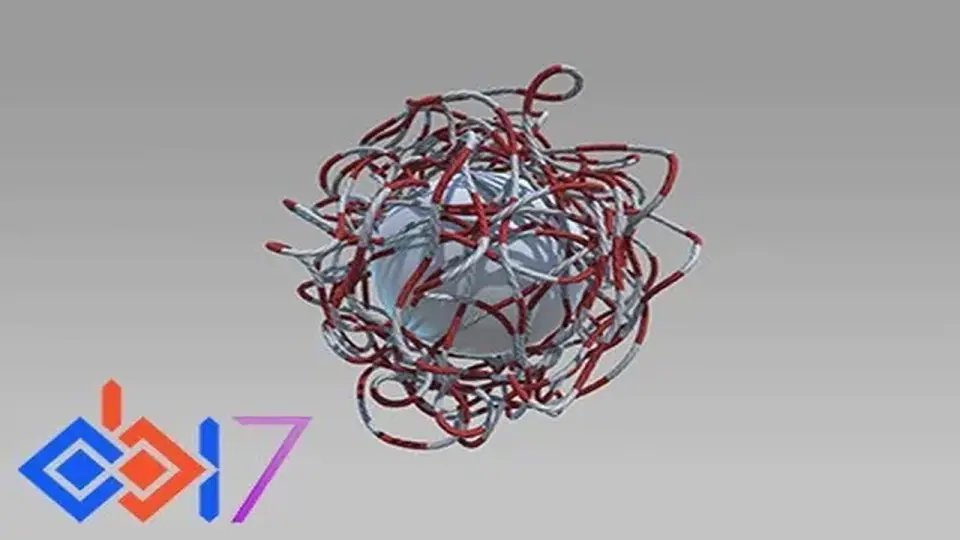
Obi Rope brings rope, rod, and bone-driven motion into a single Unity workflow. It combines particle-based simulation with spline editing, runtime changes, and collision handling across the scene.
Ropes and rods are often the parts of a scene that need to stay responsive while everything around them holds its shape. Obi Rope fits that kind of work by pairing rope simulation with rod behavior and bone-driven secondary motion inside Unity. The system is built on Obi, an advanced particle-based physics engine that handles a wide range of deformable material behaviors and can run on either the CPU or the GPU.
That setup gives the package a broad role in a project. Ropes can be made quickly, rods can carry twisting motion, and bones can add extra movement to character bone hierarchies. The same system also supports collision with the environment and with other simulated objects, so the rope or rod is not isolated from the rest of the scene.
Particles instead of rigid-body chains
Obi Rope does not rely on rigid bodies and joints the way some rope solutions do. Its simulation is based on XPBD particles, which is presented as a lighter, more detailed, and unconditionally stable approach. That makes the structure of the system easy to read: the rope behaves as a particle simulation first, not as a chain of linked rigid bodies.
CPU mode depends on the Burst, Jobs, Collections, and Mathematics packages. GPU mode requires compute shader support. Those requirements matter because they shape how the simulation is executed, whether the project is leaning on the CPU path or taking advantage of GPU compute support.
Rods use oriented particle technology, which allows torsion and twisting effects. Ropes are described as more lightweight and can be cut or resized. Both rope and rod setups can be attached to rigid bodies, and the interaction goes both ways so the simulated object and the rigid body influence each other.
Spline editing that stays live while you work
Building a rope does not depend on manual geometry work. Non-linear, non-destructive editing uses splines, and the editor gives immediate visual feedback while the rope is being shaped. That makes the setup process practical for scenes that need quick iteration on length, curve, or layout.
Mesh generation is handled procedurally with splines as well. The generated mesh includes tangent space updating and normal map support, so the rope can carry a cleaner surface without requiring separate geometry creation. Adaptive curvature-based realtime mesh decimation goes a step further by simplifying straight sections more than curved sections, which keeps the geometry aligned with the ropeâs shape.
Controls exposed in the editor and at runtime
Change rope length at runtime
Create tearable or cuttable rope
Build closed loops
Use modular solver settings so only the needed constraints are evaluated
Adjust solver iteration counts per module
Set independent stretch and bending stiffness
Work with editor particle tools such as selection, brush selection, paintbrush, and property smoothing
Those controls keep the workflow flexible. A rope can be edited in the scene, then adjusted again during play without forcing the setup into a fixed shape. Per-module solver iteration counts and independent stiffness settings also make the simulation more specific, since one part of the rope does not need to behave exactly like another.
Collision, culling, and project fit
Obi Rope supports all standard Unity colliders, which places it in the same collision space as the rest of a typical Unity project. Automatic camera culling is also included, so ropes that are not visible do not keep updating their simulation.
The current technical details list version 7.1, with a latest release date of Jun 12, 2025 and an original publication date of Jun 10, 2016. The original Unity version is 2021.3.4, and render pipeline compatibility is listed for Built-in, HDRP, URP, and Custom SRP on 2021.3.4f1. The package size is 12.0 MB, the asset count is 908, and the package type is unitypackage.
For a project that needs ropes, rods, or bone-linked motion to behave as active scene elements rather than static meshes, Obi Rope gives a single particle-based system for shaping, simulating, colliding, and refining that motion inside Unity.
 Physics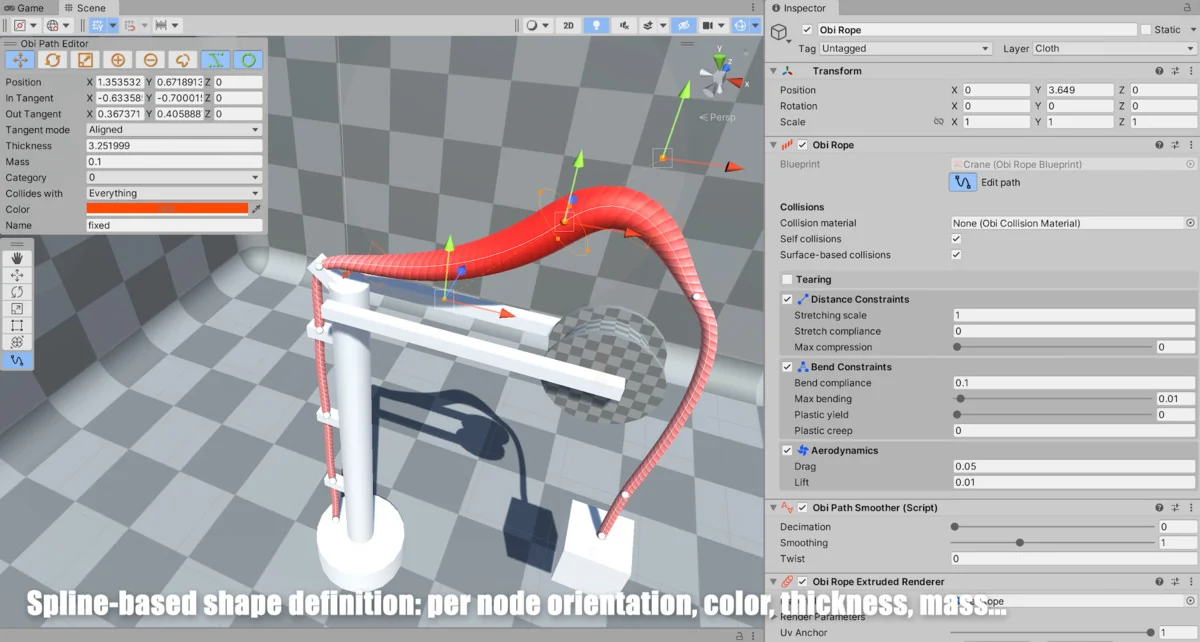
 Physics
 Physics
 Physics