"c68a05d5e51405b3"{"id":"1000664","slug":"replicated-interaction-kit-vol-1-switch-valve-chain-etc","title":"Replicated Interaction Kit Vol 1 (Switch, Valve, Chain etc.)","category":"Gameplay Features","engine":"5.1+","assetVersion":"","engineVersion":"Engine Version: 5.1+","tag":"Gameplay Features","accent":"blue","visual":"mech","summary":"A network-replicated interaction blueprint kit for Unreal Engine featuring switches, valves, and chains with multiplayer support, TPP/FPP integration, and custo","platform":"Unreal Engine","publishedAt":"2026-07-22T06:49:04.419Z","updatedAt":"2026-07-22T06:49:04.419Z","sourceNotes":[],"fileContents":[],"compatibility":["Unreal Engine","Engine Version: 5.1+"],"featuredImage":{"alt":"Replicated Interaction Kit Vol 1 (Switch, Valve, Chain etc.)","src":"/wp-content/uploads/published/2026/07/4a0398ea3371-dad15c4a-ea6d-4b44-9559-c441b78887dd-085fe54a93.webp"},"hasDownloadLink":true,"downloads":1,"terms":[{"taxonomy":"category","slug":"gameplay-features","name":"Gameplay Features"}],"galleryImages":[{"src":"/wp-content/uploads/published/2026/07/af2932ba740d-40d9b533-2195-4b7d-acf0-e586d0030813-3c006601d3.webp","alt":"Replicated Interaction Kit Vol 1 (Switch, Valve, Chain etc.)"},{"src":"/wp-content/uploads/published/2026/07/3991899de2d5-cc186d38-cdea-4d49-b4b6-7a94963b23cc-eda783ae1e.webp","alt":"Replicated Interaction Kit Vol 1 (Switch, Valve, Chain etc.)"},{"src":"/wp-content/uploads/published/2026/07/76609b0660ca-74507c1e-fcef-4ff1-9bc9-b7b2ecaed8d1-8103fdf227.webp","alt":"Replicated Interaction Kit Vol 1 (Switch, Valve, Chain etc.)"},{"src":"/wp-content/uploads/published/2026/07/20915f9d4e53-44e9fa80-d4c6-4330-9738-1b85f58d725d-f38a0222e9.webp","alt":"Replicated Interaction Kit Vol 1 (Switch, Valve, Chain etc.)"},{"src":"/wp-content/uploads/published/2026/07/4e855050b692-db201ef0-3613-4371-a802-46ef0f51915c-6567ae8922.webp","alt":"Replicated Interaction Kit Vol 1 (Switch, Valve, Chain etc.)"},{"src":"/wp-content/uploads/published/2026/07/b8765e3efb91-666e5f59-72e4-4bff-81fe-71cfd29ae767-8db152c696.webp","alt":"Replicated Interaction Kit Vol 1 (Switch, Valve, Chain etc.)"},{"src":"/wp-content/uploads/published/2026/07/4b5b7107689d-097eded3-7de2-4fd9-ba01-ef83f6b4826a-f52f3fd82b.webp","alt":"Replicated Interaction Kit Vol 1 (Switch, Valve, Chain etc.)"},{"src":"/wp-content/uploads/published/2026/07/8de596f0e744-ca15ae36-018c-4b59-91e1-cf69fd898bdc-bc07937a2f.webp","alt":"Replicated Interaction Kit Vol 1 (Switch, Valve, Chain etc.)"},{"src":"/wp-content/uploads/published/2026/07/ff596c184355-66080bcb-0418-49a8-978b-f5e809190e52-d8f63a1f8d.webp","alt":"Replicated Interaction Kit Vol 1 (Switch, Valve, Chain etc.)"},{"src":"/wp-content/uploads/published/2026/07/e64cb4215a01-91fff14f-02df-45c2-8625-73df5b83a5d4-c1fd81aaf6.webp","alt":"Replicated Interaction Kit Vol 1 (Switch, Valve, Chain etc.)"}],"accessPanel":{"kind":"resource","title":"Download this resource","eyebrow":"Free Download","message":"Log in or create a free account to start your download.","fileName":"InteractionKitVol1.7z","safetyNote":"Resources are manually reviewed before listing to improve quality and reduce obvious risks.","actionLabel":"Download Free","resourceType":"Resource archive"},"contentHtml":"\u003ch2\u003eSetting Up Replicated Character Interactions\u003c/h2\u003e\n\u003cp\u003eImplementing synchronized object manipulation in a multiplayer environment requires a robust networking foundation. The Replicated Interaction Kit Vol 1 (Switch, Valve, Chain etc.) addresses this by providing an advanced framework that allows characters to engage with various physical elements in the game world. The core of the system is based on a robust replication architecture, ensuring that when a player triggers a switch, turns a valve, or pulls a chain, the action is broadcast and experienced by all connected players in real-time.\u003c/p\u003e\n\u003cp\u003eThe package includes thirteen distinct blueprints that form the backbone of the interaction systems. Developers can drop these interaction system actors directly into their levels. To accommodate different visual styles and project requirements, the meshes within these interaction actors can be swapped out and replaced. This allows the underlying logic to remain intact while the visual representation is entirely customized to match the specific aesthetic of the game.\u003c/p\u003e \u003ch2\u003eConfiguring Character Movement to the Interaction Point\u003c/h2\u003e\n\u003cp\u003eWhen a player initiates an interaction, the character must navigate to the correct position before the animation begins. The kit provides two different modes for the character to approach the interaction location. This gives developers flexibility in how characters align with objects, accommodating varying spatial constraints and level design layouts.\u003c/p\u003e\n\u003cp\u003eTo ensure the character approaches smoothly without abrupt stops or sliding, the system includes customizable movement parameters. Developers can define a custom MaxWalkSpeed specifically for the approach phase, ensuring the character slows down or speeds up appropriately. The system also features a custom BreakingDecelerationWalking value, which controls how quickly the character decelerates before reaching the interaction point. This precise control over the approach mechanics prevents visual jitter and ensures the character comes to a natural stop exactly where the interaction requires.\u003c/p\u003e \u003ch3\u003eAligning the Character Using Dot Product\u003c/h3\u003e\n\u003cp\u003eAccurate positioning is critical for believable interactions. The system utilizes a Dot Product calculation to force the character to face the interaction actor directly. When the approach sequence concludes, the character is automatically oriented to look squarely at the object they are manipulating. This mathematical alignment guarantees that the subsequent character animations hook up correctly to the interaction points, maintaining visual fidelity and preventing graphical misalignment between the character and the prop.\u003c/p\u003e \u003ch2\u003eIntegrating Animations and Input Controls\u003c/h2\u003e\n\u003cp\u003eThe interaction sequences rely heavily on character animations to convey the physical action. The kit integrates Inverse Kinematics (IK) support, allowing the character's hands and limbs to connect accurately with the interaction props. This IK support ensures that regardless of the specific proportions of the character model, the visual contact points remain believable.\u003c/p\u003e\n\u003cp\u003eInput handling is designed to be versatile across different play configurations. The system fully supports both Third-Person Perspective (TPP) and First-Person Perspective (FPP) gameplay. Additionally, gamepad support is built directly into the framework, ensuring that console-style controls work seamlessly alongside traditional keyboard and mouse setups. This broad input compatibility means the interaction system can be deployed across a wide variety of game genres without requiring fundamental control scheme rewrites.\u003c/p\u003e \u003ch3\u003eDispatching Interaction Completion Events\u003c/h3\u003e\n\u003cp\u003eManaging the flow of gameplay logic after an interaction concludes is handled through an Event Dispatcher named WhenTheInteractionIsOver. This dispatcher fires once the character has completed the interaction sequence, allowing designers to trigger downstream events. Whether it is opening a door after a valve is turned or spawning an item after a switch is flipped, the Event Dispatcher provides a reliable hook for scripting complex sequences. The system also includes custom breaking mechanics, allowing interactions to be interrupted under specific conditions defined by the developer.\u003c/p\u003e \u003ch2\u003eUI Integration and Platform Support\u003c/h2\u003e\n\u003cp\u003eProviding players with clear context during gameplay is handled by an included Interaction Widget. This user interface element displays relevant interaction information to the player, ensuring they know when and what they can interact with. The widget is integrated directly into the blueprint system, ready to be customized and styled to match the game's overall user interface design.\u003c/p\u003e\n\u003cp\u003eThe technical foundation of the kit is built to function in both Multiplayer and Singleplayer environments. The networking logic is fully replicated, marked as network-enabled to handle the synchronization of state changes across server and client instances. The supported development platforms for the kit are Windows and Mac, covering the primary desktop operating systems used for game development. The resource is specifically noted for its compatibility with a Replicated Grab System, indicating that it functions alongside other replicated manipulation frameworks.\u003c/p\u003e \u003ch3\u003eProduction Maintenance and Iteration\u003c/h3\u003e\n\u003cp\u003eKeeping the asset current, the developer has released Update V2, which delivers general improvements across the board. For ongoing production needs, tutorials and documentation are available to assist with implementation and iteration. Creators can also submit suggestions and seek support through the developer's Discord channel. This support structure ensures that teams integrating the system into their projects have resources available for troubleshooting complex replication scenarios or customizing the interaction blueprints to fit unique gameplay requirements.\u003c/p\u003e\n\n\u003ch2\u003eMore From The Same Workflow\u003c/h2\u003e\n\u003cul\u003e\n\u003cli\u003e\u003ca href=\"https://3dcghub.com/dismemberment-kit-v2/\" title=\"Dismemberment Kit V2\"\u003eDismemberment Kit V2\u003c/a\u003e\u003c/li\u003e\n\u003cli\u003e\u003ca href=\"https://3dcghub.com/teleportation-and-portal/\" title=\"Teleportation and Portal\"\u003eTeleportation and Portal\u003c/a\u003e\u003c/li\u003e\n\u003cli\u003e\u003ca href=\"https://3dcghub.com/advanced-fuel-system-multiplayer-vehicle-addon/\" title=\"Advanced Fuel System: Multiplayer Vehicle Addon\"\u003eAdvanced Fuel System: Multiplayer Vehicle Addon\u003c/a\u003e\u003c/li\u003e\n\u003cli\u003e\u003ca href=\"https://3dcghub.com/advanced-framework-vr-mobile-desktop/\" title=\"Advanced Framework - VR, Mobile \u0026amp; Desktop\"\u003eAdvanced Framework - VR, Mobile \u0026amp; Desktop\u003c/a\u003e\u003c/li\u003e\n\u003cli\u003e\u003ca href=\"https://3dcghub.com/replicated-building-system/\" title=\"Replicated Building System\"\u003eReplicated Building System\u003c/a\u003e\u003c/li\u003e\n\u003c/ul\u003e","contentTextLength":6008,"navigation":{"current":1341,"total":3860,"previous":{"id":"1000665","slug":"restaurant-vol-3-dining-decor-nanite-and-low-poly","title":"Restaurant VOL.3 - Dining Decor (Nanite and Low Poly)","category":"Food \u0026 Drink","platform":"Unreal Engine","updatedAt":"2026-07-22T06:58:56.056Z"},"next":{"id":"1000663","slug":"red-pine-biome","title":"Red Pine Biome","category":"Forest \u0026 Jungle","platform":"Unreal Engine","updatedAt":"2026-07-22T06:41:11.442Z"}},"relatedResources":[{"id":"10714","slug":"dismemberment-kit-v2","title":"Dismemberment Kit V2","category":"Gameplay Features","engine":"5.3+","assetVersion":"Engine version: 5.3+","engineVersion":"4.27","tag":"Gameplay Features","accent":"blue","visual":"character","summary":"Dismemberment Kit V2 provides a streamlined, plug-and-play solution for adding realistic gore to your characters. This fully replicated component allows for quick mesh swapping and animation integration.","platform":"Unreal Engine","publishedAt":"2026-03-03T16:02:30.000Z","updatedAt":"2026-04-19T15:49:56.000Z","sourceNotes":[],"fileContents":[],"compatibility":["Unreal Engine","Engine version: 5.3+"],"featuredImage":{"alt":"Dismemberment Kit V2","src":"https://3dcghub.com/wp-content/uploads/2026/03/b9cd95a1-bf2a-4ab7-8393-7b2f8b103bd9.webp"},"hasDownloadLink":true,"downloads":6},{"id":"1001711","slug":"ultimate-horse-system-horse-horse-riding-horse-system-mount-rideable-horse","title":"Ultimate Horse System (Horse, Horse Riding, Horse System, Mount, Rideable Horse)","category":"Gameplay Features","engine":"5.1+","assetVersion":"","engineVersion":"Engine Version: 5.1+","tag":"Gameplay Features","accent":"blue","visual":"mech","summary":"Explore the Ultimate Horse System for Unreal Engine, featuring full network replication, modular saddles, Foot IK, water interaction, and custom rider support.","platform":"Unreal Engine","publishedAt":"2026-10-14T17:15:39.983Z","updatedAt":"2026-10-14T17:15:39.983Z","sourceNotes":[],"fileContents":[],"compatibility":["Unreal Engine","Engine Version: 5.1+"],"featuredImage":{"alt":"Ultimate Horse System (Horse, Horse Riding, Horse System, Mount, Rideable Horse)","src":"/wp-content/uploads/published/2026/10/6dc76c7660f2-d252bb16-9c4e-4df7-8a68-0bb86ab4c882-eca349b4ab.webp"},"hasDownloadLink":true,"downloads":2},{"id":"1001074","slug":"advanced-ladder-climbing-system","title":"Advanced Ladder Climbing System","category":"Gameplay Features","engine":"5.0+","assetVersion":"","engineVersion":"Engine Version: 5.0+","tag":"Gameplay Features","accent":"blue","visual":"mech","summary":"Advanced multiplayer ladder climbing system for UE5 with replicated Blueprint logic, slow/fast climbing, ladder sliding, and five modular ladders.","platform":"Unreal Engine","publishedAt":"2026-09-04T14:25:31.912Z","updatedAt":"2026-09-04T14:25:31.912Z","sourceNotes":[],"fileContents":[],"compatibility":["Unreal Engine","Engine Version: 5.0+"],"featuredImage":{"alt":"Advanced Ladder Climbing System","src":"/wp-content/uploads/published/2026/09/59ffeb900e40-b4243caa-17bb-4ac3-b6ec-e0814dffd788-1a4d44bd68.webp"},"hasDownloadLink":true,"downloads":4}]}
A network-replicated interaction blueprint kit for Unreal Engine featuring switches, valves, and chains with multiplayer support, TPP/FPP integration, and custo
Implementing synchronized object manipulation in a multiplayer environment requires a robust networking foundation. The Replicated Interaction Kit Vol 1 (Switch, Valve, Chain etc.) addresses this by providing an advanced framework that allows characters to engage with various physical elements in the game world. The core of the system is based on a robust replication architecture, ensuring that when a player triggers a switch, turns a valve, or pulls a chain, the action is broadcast and experienced by all connected players in real-time.
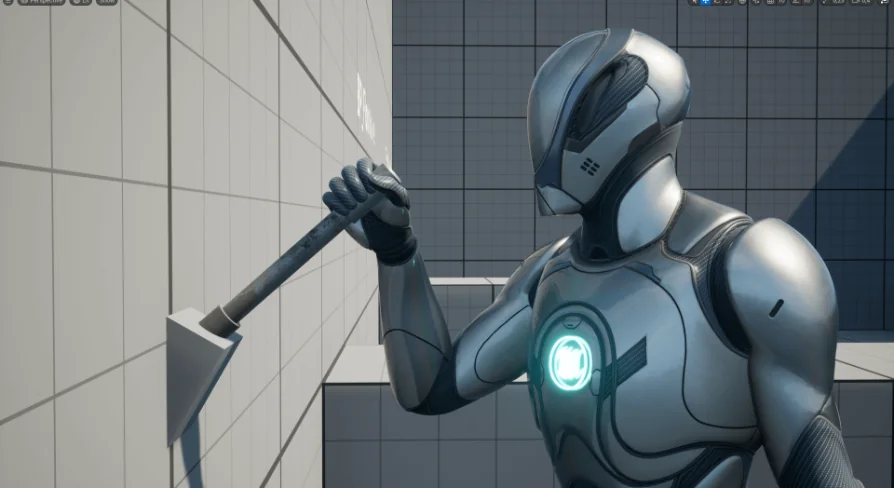
The package includes thirteen distinct blueprints that form the backbone of the interaction systems. Developers can drop these interaction system actors directly into their levels. To accommodate different visual styles and project requirements, the meshes within these interaction actors can be swapped out and replaced. This allows the underlying logic to remain intact while the visual representation is entirely customized to match the specific aesthetic of the game.
Configuring Character Movement to the Interaction Point
When a player initiates an interaction, the character must navigate to the correct position before the animation begins. The kit provides two different modes for the character to approach the interaction location. This gives developers flexibility in how characters align with objects, accommodating varying spatial constraints and level design layouts.
To ensure the character approaches smoothly without abrupt stops or sliding, the system includes customizable movement parameters. Developers can define a custom MaxWalkSpeed specifically for the approach phase, ensuring the character slows down or speeds up appropriately. The system also features a custom BreakingDecelerationWalking value, which controls how quickly the character decelerates before reaching the interaction point. This precise control over the approach mechanics prevents visual jitter and ensures the character comes to a natural stop exactly where the interaction requires.
Aligning the Character Using Dot Product
Accurate positioning is critical for believable interactions. The system utilizes a Dot Product calculation to force the character to face the interaction actor directly. When the approach sequence concludes, the character is automatically oriented to look squarely at the object they are manipulating. This mathematical alignment guarantees that the subsequent character animations hook up correctly to the interaction points, maintaining visual fidelity and preventing graphical misalignment between the character and the prop.
Integrating Animations and Input Controls
The interaction sequences rely heavily on character animations to convey the physical action. The kit integrates Inverse Kinematics (IK) support, allowing the character's hands and limbs to connect accurately with the interaction props. This IK support ensures that regardless of the specific proportions of the character model, the visual contact points remain believable.
Input handling is designed to be versatile across different play configurations. The system fully supports both Third-Person Perspective (TPP) and First-Person Perspective (FPP) gameplay. Additionally, gamepad support is built directly into the framework, ensuring that console-style controls work seamlessly alongside traditional keyboard and mouse setups. This broad input compatibility means the interaction system can be deployed across a wide variety of game genres without requiring fundamental control scheme rewrites.
Dispatching Interaction Completion Events
Managing the flow of gameplay logic after an interaction concludes is handled through an Event Dispatcher named WhenTheInteractionIsOver. This dispatcher fires once the character has completed the interaction sequence, allowing designers to trigger downstream events. Whether it is opening a door after a valve is turned or spawning an item after a switch is flipped, the Event Dispatcher provides a reliable hook for scripting complex sequences. The system also includes custom breaking mechanics, allowing interactions to be interrupted under specific conditions defined by the developer.
UI Integration and Platform Support
Providing players with clear context during gameplay is handled by an included Interaction Widget. This user interface element displays relevant interaction information to the player, ensuring they know when and what they can interact with. The widget is integrated directly into the blueprint system, ready to be customized and styled to match the game's overall user interface design.
The technical foundation of the kit is built to function in both Multiplayer and Singleplayer environments. The networking logic is fully replicated, marked as network-enabled to handle the synchronization of state changes across server and client instances. The supported development platforms for the kit are Windows and Mac, covering the primary desktop operating systems used for game development. The resource is specifically noted for its compatibility with a Replicated Grab System, indicating that it functions alongside other replicated manipulation frameworks.
Production Maintenance and Iteration
Keeping the asset current, the developer has released Update V2, which delivers general improvements across the board. For ongoing production needs, tutorials and documentation are available to assist with implementation and iteration. Creators can also submit suggestions and seek support through the developer's Discord channel. This support structure ensures that teams integrating the system into their projects have resources available for troubleshooting complex replication scenarios or customizing the interaction blueprints to fit unique gameplay requirements.
 Gameplay Features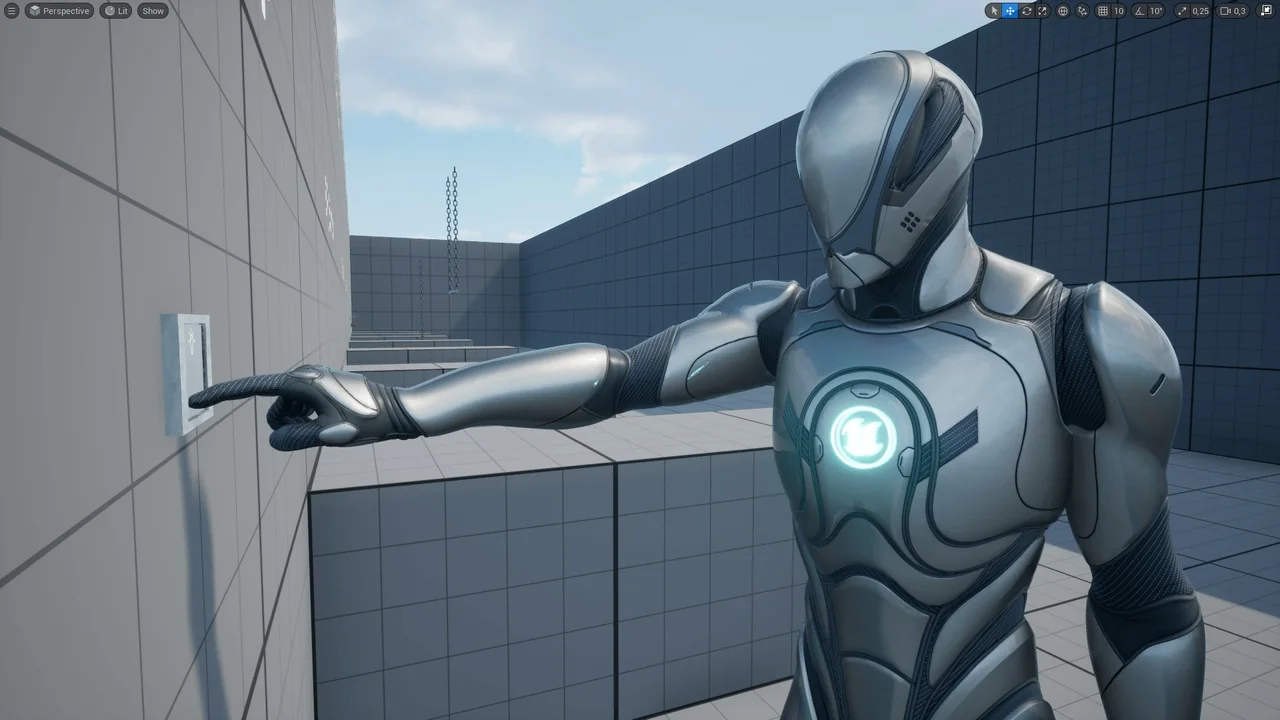
 Gameplay Features
 Gameplay Features
 Gameplay Features