"7066dd76da796369"{"id":"11071","slug":"replicated-building-system","title":"Replicated Building System","category":"Gameplay Features","engine":"4.27,5.0+","assetVersion":"Engine version: 4.27,5.0+","engineVersion":"4.27","tag":"Gameplay Features","accent":"blue","visual":"audio","summary":"The Replicated Building System offers a comprehensive suite of features for item placement in both singleplayer and multiplayer environments. It includes advanced rotation, zooming, and auto-snapping capabilities.","platform":"Unreal Engine","publishedAt":"2026-03-03T16:52:44.000Z","updatedAt":"2026-04-19T15:49:50.000Z","sourceNotes":[],"fileContents":[],"compatibility":["Unreal Engine","Engine version: 4.27,5.0+"],"featuredImage":{"alt":"Replicated Building System","src":"https://3dcghub.com/wp-content/uploads/2026/03/b76dfc40-036d-4165-885a-4a6810ad6234.webp"},"hasDownloadLink":true,"downloads":0,"terms":[{"taxonomy":"category","slug":"gameplay-features","name":"Gameplay Features"},{"taxonomy":"post_tag","slug":"multiplayer-building","name":"Multiplayer Building"},{"taxonomy":"post_tag","slug":"network-replicated-building","name":"Network Replicated Building"},{"taxonomy":"post_tag","slug":"replicated-building-system","name":"Replicated Building System"}],"galleryImages":[{"src":"https://3dcghub.com/wp-content/uploads/2026/03/c6b32a1f0763_78f725d0-83f8-441f-96be-f52b8bb948e6.webp","alt":"Replicated Building System"},{"src":"https://3dcghub.com/wp-content/uploads/2026/03/3356a2fd84dc_16746456-dcc7-476f-a3c9-66ad0269d4c0.webp","alt":"Replicated Building System"},{"src":"https://3dcghub.com/wp-content/uploads/2026/03/19a8cf8b20b0_7495b6c0-5a8c-4f6c-8269-05f8de89ccd2.webp","alt":"Replicated Building System"},{"src":"https://3dcghub.com/wp-content/uploads/2026/03/f66388960045_d25b447d-807d-47e0-acad-6f5299ce4e6a.webp","alt":"Replicated Building System"},{"src":"https://3dcghub.com/wp-content/uploads/2026/03/4c7756e453a6_ff0a1c63-d6e9-4d3f-95dd-dfd41187acd2.webp","alt":"Replicated Building System"},{"src":"https://3dcghub.com/wp-content/uploads/2026/03/1ce4b4ccd989_6ccc7c87-511d-42ec-9421-b3334dae318c.webp","alt":"Replicated Building System"},{"src":"https://3dcghub.com/wp-content/uploads/2026/03/8602f00a80ab_5a13a24c-e9ae-4368-8434-8b8728c5dcc9.webp","alt":"Replicated Building System"}],"accessPanel":{"kind":"resource","title":"Access this resource","eyebrow":"Free Download","message":"Log in or create a free account to start your download.","fileName":"Replicated Building System.7z","safetyNote":"All resources are 100% manually reviewed to eliminate all risks.","actionLabel":"Download Free","resourceType":"Resource archive"},"contentHtml":"\u003ch2\u003eEfficient Item Placement with the Replicated Building System\u003c/h2\u003e\n\u003cp\u003eThe Replicated Building System is a robust solution designed to streamline the creation of building mechanics in game development. This system is fully optimized for both singleplayer and multiplayer environments. Consequently, it provides developers with the flexibility needed to create engaging placement systems. It offers a variety of modes to ensure convenience during the building process.\u003c/p\u003e\n\n\u003cp\u003eOne of the primary advantages of this tool is its comprehensive item manipulation features. Users can rotate items freely or reset their rotation to a default state. Additionally, the system allows players to move items back and forth or zoom them toward the character. To maintain a high-quality user experience, the creator included adjustable limits for these zoom functions.\u003c/p\u003e\n\n\u003ch2\u003eAdvanced Snapping and Customization\u003c/h2\u003e\n\u003cp\u003eThe Replicated Building System includes an intelligent auto-snap feature to assist with precise object placement. Developers can apply filters to determine which items should utilize auto-snapping. Furthermore, the system provides clear visual feedback for players. You can easily customize the materials and colors used to indicate valid or invalid placement locations.\u003c/p\u003e\n\n\u003cp\u003eRecent updates have introduced even more control over the building experience. For instance, a variable named \"Snap Trace Length\" allows you to adjust the trace length from control arrows. Moreover, the \"Debug for Disable Materials\" option ensures that items can retain their original materials during placement if desired. These features collectively enhance the visual and functional quality of the building process.\u003c/p\u003e\n\n\u003ch2\u003eTechnical Specifications and Updates\u003c/h2\u003e\n\u003cp\u003eThis system is built using 9 Blueprints and is fully network-replicated. Therefore, it is ready for use in online projects across various platforms. However, please note that the models shown in the product showcase are for demonstration purposes and are not included in the package.\u003c/p\u003e\n\n\u003ch3\u003eKey Features and Improvements:\u003c/h3\u003e\n\u003cul\u003e\n \u003cli\u003e\u003cstrong\u003eSkeletal Mesh Support:\u003c/strong\u003e Added in Version 3 to expand item compatibility.\u003c/li\u003e\n \u003cli\u003e\u003cstrong\u003eCrosshair Interactivity:\u003c/strong\u003e Version 2 introduced interactivity for crosshairs and a new debug style.\u003c/li\u003e\n \u003cli\u003e\u003cstrong\u003eActor Management:\u003c/strong\u003e A function is available to return a taken actor to its original location.\u003c/li\u003e\n \u003cli\u003e\u003cstrong\u003ePlatform Support:\u003c/strong\u003e Compatible with Windows, Mac, Linux, Android, and iOS.\u003c/li\u003e\n \u003cli\u003e\u003cstrong\u003eReplication Enhancements:\u003c/strong\u003e Version 4 brought significant replication improvements and bug fixes.\u003c/li\u003e\n\u003c/ul\u003e\n\n\u003ch2\u003eBest Fit\u003c/h2\u003e\n\u003cp\u003eThe Replicated Building System provides a solid foundation for any project requiring item placement mechanics. With its extensive customization options and multiplayer support, it simplifies complex building tasks. Whether you are developing for desktop or mobile, this system offers the tools necessary for a professional building experience.\u003c/p\u003e\n\n\u003ch2\u003eMore From The Same Workflow\u003c/h2\u003e\n\u003cul\u003e\n\u003cli\u003e\u003ca href=\"https://3dcghub.com/advanced-jigsaw-inventory-system/\" title=\"Advanced Jigsaw Inventory system\"\u003eAdvanced Jigsaw Inventory system\u003c/a\u003e\u003c/li\u003e\n\u003cli\u003e\u003ca href=\"https://3dcghub.com/dismemberment-kit-v2/\" title=\"Dismemberment Kit V2\"\u003eDismemberment Kit V2\u003c/a\u003e\u003c/li\u003e\n\u003cli\u003e\u003ca href=\"https://3dcghub.com/multiplayer-xp-system/\" title=\"Multiplayer XP System\"\u003eMultiplayer XP System\u003c/a\u003e\u003c/li\u003e\n\u003cli\u003e\u003ca href=\"https://3dcghub.com/multiplayer-world-origin-rebase-tool/\" title=\"Multiplayer World Origin Rebase Tool\"\u003eMultiplayer World Origin Rebase Tool\u003c/a\u003e\u003c/li\u003e\n\u003cli\u003e\u003ca href=\"https://3dcghub.com/battle-royale-island-pack-battle-royale-battle-royale-buildings-island/\" title=\"Battle Royale Island Pack (Battle Royale, Battle Royale Buildings, Island )\"\u003eBattle Royale Island Pack (Battle Royale, Battle Royale Buildings, Island )\u003c/a\u003e\u003c/li\u003e\n\u003c/ul\u003e","contentTextLength":3051,"navigation":{"current":3191,"total":4016,"previous":{"id":"11082","slug":"riding-system-in-blueprints-multiplayer","title":"Riding System in Blueprints (Multiplayer)","category":"Gameplay Features","platform":"Unreal Engine","updatedAt":"2026-04-19T15:49:50.000Z"},"next":{"id":"11117","slug":"smart-cable-connector","title":"Smart Cable Connector","category":"Gameplay Features","platform":"Unreal Engine","updatedAt":"2026-04-19T15:49:49.000Z"}},"relatedResources":[{"id":"1001938","slug":"advanced-multiplayer-lobby-system-v2","title":"Advanced Multiplayer Lobby System V2","category":"Gameplay Features","engine":"4.26+,5.0+","assetVersion":"","engineVersion":"Engine Version: 4.26+,5.0+","tag":"Gameplay Features","accent":"blue","visual":"mech","summary":"Explore Advanced Multiplayer Lobby System V2, featuring customizable player pods, Steam Subsystem integration, replicated chat, and modular Actor Components.","platform":"Unreal Engine","publishedAt":"2026-10-24T11:14:17.405Z","updatedAt":"2026-10-24T11:14:17.405Z","sourceNotes":[],"fileContents":[],"compatibility":["Unreal Engine","Engine Version: 4.26+,5.0+"],"featuredImage":{"alt":"Advanced Multiplayer Lobby System V2","src":"/wp-content/uploads/published/2026/10/bb90ebda1d38-fcf74666-81cc-481a-8f29-e136d71e0b58-08afe87973.webp"},"hasDownloadLink":true,"downloads":0},{"id":"1001074","slug":"advanced-ladder-climbing-system","title":"Advanced Ladder Climbing System","category":"Gameplay Features","engine":"5.0+","assetVersion":"","engineVersion":"Engine Version: 5.0+","tag":"Gameplay Features","accent":"blue","visual":"mech","summary":"Advanced multiplayer ladder climbing system for UE5 with replicated Blueprint logic, slow/fast climbing, ladder sliding, and five modular ladders.","platform":"Unreal Engine","publishedAt":"2026-09-04T14:25:31.912Z","updatedAt":"2026-09-04T14:25:31.912Z","sourceNotes":[],"fileContents":[],"compatibility":["Unreal Engine","Engine Version: 5.0+"],"featuredImage":{"alt":"Advanced Ladder Climbing System","src":"/wp-content/uploads/published/2026/09/59ffeb900e40-b4243caa-17bb-4ac3-b6ec-e0814dffd788-1a4d44bd68.webp"},"hasDownloadLink":true,"downloads":4},{"id":"1001747","slug":"multiverse","title":"Multiverse","category":"Gameplay Features","engine":"5.2+","assetVersion":"","engineVersion":"Engine Version: 5.2+","tag":"Gameplay Features","accent":"blue","visual":"mech","summary":"Create seamless multiplayer parallel universes with no loading screens or plugins using this replicated Blueprint system and internal space manager.","platform":"Unreal Engine","publishedAt":"2026-10-20T02:52:36.558Z","updatedAt":"2026-10-20T02:52:36.558Z","sourceNotes":[],"fileContents":[],"compatibility":["Unreal Engine","Engine Version: 5.2+"],"featuredImage":{"alt":"Multiverse","src":"/wp-content/uploads/published/2026/10/7f60f7c5b780-c6c39f3d-8522-4880-90d0-f3e14e975bc5-2e804d5047.webp"},"hasDownloadLink":true,"downloads":0}]}
Gameplay Features
Replicated Building System
The Replicated Building System offers a comprehensive suite of features for item placement in both singleplayer and multiplayer environments. It includes advanced rotation, zooming, and auto-snapping capabilities.
Efficient Item Placement with the Replicated Building System
The Replicated Building System is a robust solution designed to streamline the creation of building mechanics in game development. This system is fully optimized for both singleplayer and multiplayer environments. Consequently, it provides developers with the flexibility needed to create engaging placement systems. It offers a variety of modes to ensure convenience during the building process.
One of the primary advantages of this tool is its comprehensive item manipulation features. Users can rotate items freely or reset their rotation to a default state. Additionally, the system allows players to move items back and forth or zoom them toward the character. To maintain a high-quality user experience, the creator included adjustable limits for these zoom functions.
Advanced Snapping and Customization
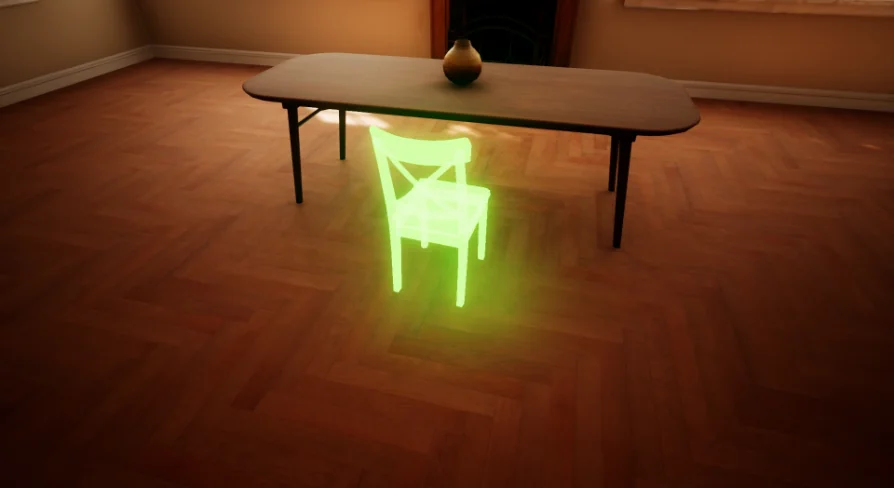
The Replicated Building System includes an intelligent auto-snap feature to assist with precise object placement. Developers can apply filters to determine which items should utilize auto-snapping. Furthermore, the system provides clear visual feedback for players. You can easily customize the materials and colors used to indicate valid or invalid placement locations.
Recent updates have introduced even more control over the building experience. For instance, a variable named "Snap Trace Length" allows you to adjust the trace length from control arrows. Moreover, the "Debug for Disable Materials" option ensures that items can retain their original materials during placement if desired. These features collectively enhance the visual and functional quality of the building process.
Technical Specifications and Updates
This system is built using 9 Blueprints and is fully network-replicated. Therefore, it is ready for use in online projects across various platforms. However, please note that the models shown in the product showcase are for demonstration purposes and are not included in the package.
Key Features and Improvements:
Skeletal Mesh Support: Added in Version 3 to expand item compatibility.
Crosshair Interactivity: Version 2 introduced interactivity for crosshairs and a new debug style.
Actor Management: A function is available to return a taken actor to its original location.
Platform Support: Compatible with Windows, Mac, Linux, Android, and iOS.
Replication Enhancements: Version 4 brought significant replication improvements and bug fixes.
Best Fit
The Replicated Building System provides a solid foundation for any project requiring item placement mechanics. With its extensive customization options and multiplayer support, it simplifies complex building tasks. Whether you are developing for desktop or mobile, this system offers the tools necessary for a professional building experience.
 Gameplay Features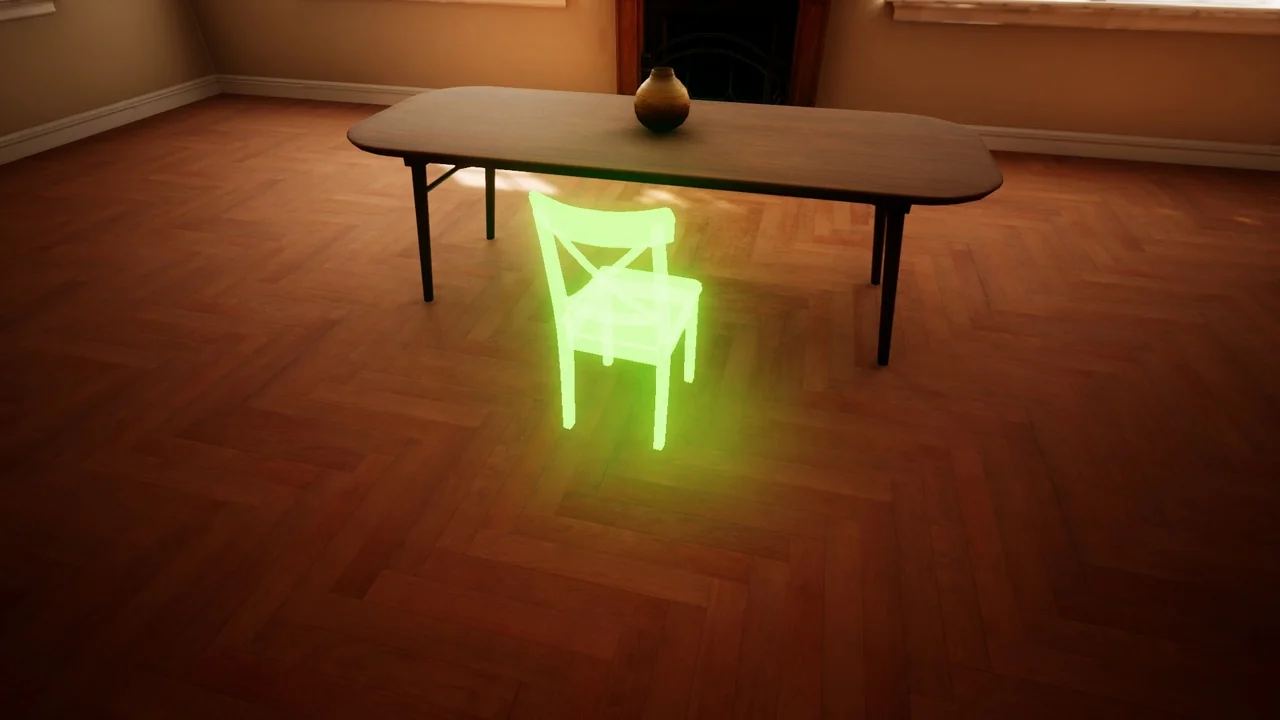
 Gameplay Features
 Gameplay Features
 Gameplay Features